Page 77 of 593

76
uuIndicators u
Instrument Panel
*1:Models with the smart entry system have an ENGINE START/STOP button instead of an ignition switch.Indicator
Name
On/Blinking
Explanation
Message
*
System
Message
Indicator
*
●Comes on for a few seconds when you
turn the ignition switch to ON
(w
*1, then
goes off.
●Comes on along with a beep when a
problem is detected. A system message on
the multi-information display appears at
the same time.
●While the indicator is on, press the
(information) button to see the
message again.●Refer to the Indicators information in
this chapter when a system message
appears on the multi-information
display. Take the appropriate action for
the message.●The multi-information display does not return
to the normal screen unless the warning is
canceled, or the button is pressed.
—
Turn Signal
and Hazard
Warning
Indicators
●Blinks when you operate the turn signal
lever.●Blink along with all turn signals when you
press the hazard warning button.
●Does not blink or blinks rapidly - A
turn signal light bulb has blown.
Change the bulb immediately.
2 Replacing Light Bulbs P. 516, 518
—
High Beam
Indicator
●Comes on when the high beam headlights
are on.
—
—
Lights On
Indicator
●Comes on whenever the light switch is on,
or in AUTO when the exterior lights are
on.
●If you remove the key from the ignition
switch
*1 while the exterior lights are on,
a chime sounds when the driver's door
is opened.
—
* Not available on all models
Page 78 of 593
77
uuIndicators u
Continued
Instrument Panel
*1:Models with the smart entry system have an ENGINE START/STOP button instead of an ignition switch.Indicator
Name
On/Blinking
Explanation
Message
*
Fog Light
Indicator
*
●Comes on when the fog lights are
on.
—
—
Immobilizer
System Indicator
●Comes on briefly when you turn the
ignition switch to ON
(w
*1, then
goes off.
●Comes on if the immobilizer system
cannot recognize the key
information.
●Blinks - You cannot start the engine.
Turn the ignition switch to LOCK
(0
*1,
pull the key out, and then insert the key
and turn it to ON
(w
*1 again.
●Repeatedly blinks - The system may
be malfunctioning. Have your vehicle
checked by a dealer.●Do not attempt to alter this system or
add other devices to it. Electrical
problems can occur.
—
Security System
Alarm Indicator
●Blinks when the security system
alarm has been set.
2 Security System Alarm P. 124
—
Indicator* Not available on all models
Page 82 of 593

81
uuIndicators u
Instrument Panel
*1:Models with the smart entry system have an ENGINE START/STOP button instead of an ignition switch.Indicator
Name
On/Blinking
Explanation
Message
*
Smart Entry
System
Indicator
*
●Comes on for a few seconds when
you change the power mode to ON.●Comes on as soon as a problem is
detected in the smart entry system
or push button starting system.
●Stays on constantly or does not come
on at all - Have your vehicle checked by a
dealer.
Starter System
Indicator
*
●Comes on for a few seconds when
you turn the ignition switch to ON (w
*1, then goes off.
●Comes on if the starter system has a
problem.
●As a temporary measure, press and hold
the ENGINE START/STOP button for up to
15 seconds while pressing the brake pedal
and manually start the engine. Have your
vehicle checked by a dealer.
—
Light Control
Indicator
*
●Comes on if there is a problem with
the automatic lighting control
system or low beam headlights
*.
●Comes on while driving - Turn the lights
on manually and have your vehicle checked
by a dealer.
—
U.S.
Canada
* Not available on all models
Page 85 of 593

84
uuIndicators uMulti-Information Display Warn ing and Information Messages
*
Instrument Panel
Multi-Information Display Warning and Information Messages
*
The following messages appear only on the multi-information display. Pres s the (information) button to see the message again
with the system message indicator on.
Message
Condition
Explanation
●Appears when the fuel fill cap is loose or is not
installed.
2 Check/Tighten Fuel Cap Message P. 559
●Appears when the scheduled maintenance is due
soon.
u Consequently, Maintenance Due Now and
Maintenance Past Due follow.
2Maintenance Minder Messages on the Multi-
Information Display P. 492
●Appears when the engine coolant temperature gets
abnormally high.
2Overheating P. 556
●Appears if there is a problem with the automatic
lighting control system.
●Appears while driving - Manually turn the lights on,
and have your vehicle checked by a dealer.
●Appears if there is a problem with the low beam
headlights.
●Appears while driving - The low beam headlights
may not be on. When conditions allow you to drive
safely, have your vehicle checked by a dealer as soon as
possible.
* Not available on all models
Page 102 of 593

101
uuGauges and Displays uMulti-Information Display
*
Continued
Instrument Panel
*1: Default SettingSetup Group Customizable Features Description Selectable Settings
Driving
Position
Setup Memory Position Link
Changes the driver's seat position to a stored
setting.
On
*1/
Off
Keyless
Access
Setup
Door Unlock Mode
Changes which doors unlock when you grab the
driver’s door handle.
Driver Door Only
*1/All Doors
Keyless Access Light
Flash
Causes some exterior lights to blink when you
unlock/lock the doors.
On
*1/ Off
Keyless Access Beep
Sets the beeper sound or not when you grab either
front door handle.
On
*1/Off
Lighting
Setup Interior Light Dimming
Time
Changes the length of time the interior lights stay on
after you close the doors.
60sec
/30sec
*1/15sec
Headlight Auto Off
Timer Changes the length of time the exterior lights stay
on after you close the driver's door.
60sec
/30sec /15sec
*1/ 0sec
Auto Light Sensitivity Changes the timing for the headlights to come on. Max/High /Mid
*1/Low /Min
Page 103 of 593
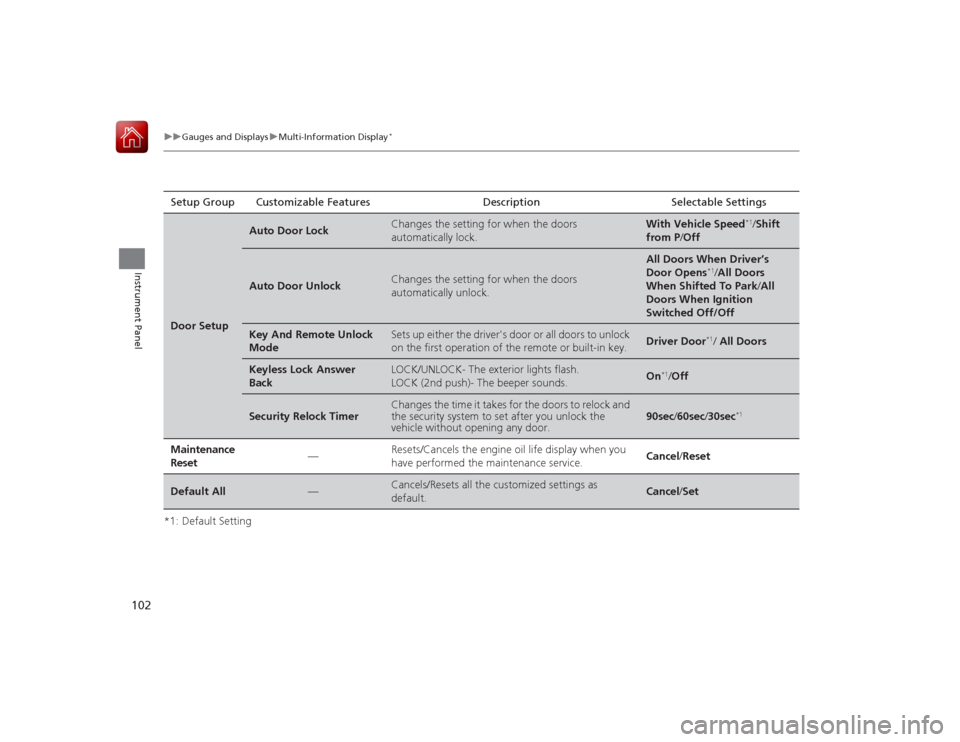
102
uuGauges and Displays uMulti-Information Display
*
Instrument Panel
*1: Default SettingSetup Group Customizable Features Description Selectable SettingsDoor Setup
Auto Door Lock
Changes the setting for when the doors
automatically lock.
With Vehicle Speed
*1/
Shift
from P /Off
Auto Door Unlock
Changes the setting for when the doors
automatically unlock.
All Doors When Driver’s
Door Opens
*1/All Doors
When Shifted To Park /All
Doors When Ignition
Switched Off/Off
Key And Remote Unlock
Mode
Sets up either the driver's door or all doors to unlock
on the first operation of the remote or built-in key.
Driver Door
*1/ All Doors
Keyless Lock Answer
Back
LOCK/UNLOCK- The exterior lights flash.
LOCK (2nd push)- The beeper sounds.
On
*1/ Off
Security Relock Timer
Changes the time it takes for the doors to relock and
the security system to set after you unlock the
vehicle without opening any door.
90sec /60sec /30sec
*1
Maintenance
Reset
—
Resets/Cancels the engine oil life display when you
have performed the maintenance service.
Cancel /Reset
Default All
—
Cancels/Resets all the customized settings as
default.
Cancel /Set
Page 106 of 593

105
Controls
This chapter explains how to operate the various controls necessary for driving.
Clock.................................................. 106
Locking and Unlocking the Doors
Key Types and Functions .................. 108Low Smart Entry Remote Signal Strength
*.................................... 110
Locking/Unlocking the Doors from the
Inside ............................................. 116
Childproof Door Locks ..................... 118
Auto Door Locking/Unlocking .......... 119
Opening and Closing the Trunk ....... 120
Security System Immobilizer System .......................... 124
Security System Alarm ...................... 124Opening and Closing the Windows ..... 127
Opening and Closing the Moonroof
*.. 130
Operating the Switches Around the Steering Wheel
Ignition Switch
*............................... 131
ENGINE START/STOP Button
*........... 132
Ignition Switch and Power Mode
Comparison ................................... 135
Turn Signals ..................................... 136
Light Switches.................................. 136
Fog Lights
*...................................... 138
Daytime Running Lights ................... 139
Wipers and Washers ........................ 140
Brightness Control ........................... 141
Rear Defogger/Heated Door Mirror
*
Button ........................................... 142 Driving Position Memory System
*.... 143
Adjusting the Steering Wheel .......... 145
Adjusting the Mirrors Interior Rearview Mirror ................... 146
Power Door Mirrors ......................... 147
Adjusting the Seats .......................... 148
Interior Lights/Interior Convenience Items ................................................ 156
Heating and Cooling
*
Using Vents, Heating and A/C.......... 166
Climate Control System
*
Using Automatic Climate Control .... 169
Synchronized Mode ......................... 171
Automatic Climate Control Sensors ... 172
* Not available on all models
Page 112 of 593

111
uuLocking and Unlocking the Doors uLocking/Unlocking the Doors from the Outside
Continued
Controls
Locking/Unlocking the Doors from the Outside
■Locking the doors
Press the lock button.
Once: u Some exterior lights flash, all the doors
lock, and the security system sets.
Twice (within five seconds after the first
push): u The beeper sounds and verifies the
security system is set.
■
Using the Remote Transmitter
1Using the Remote Transmitter
If you do not open a door within 30 seconds of
unlocking the vehicle with the remote transmitter,
the doors will automatically relock.
You can change the relock timer setting.
2 Customized Features P. 97, 298
If the interior light switch is in the door activated
position, the interior lights come on when you press
the unlock button.
No doors opened: The lights fade out after 30
seconds.
Doors relocked with the remote: The lights go off
immediately. 2 Interior Lights P. 156
The remote transmitter uses low-power signals, so
the operating range may vary depending on the
surroundings.
The remote transmitter will not work when the key is
in the ignition switch.
You can lock or unlock doors using the remote
transmitter or smart entry system only when the
power mode in VEHICLE OFF.
The remote will not lock the vehicle when a door is
open.Models without smart entry systemModels with smart entry systemAll models
LED
Unlock Button
Lock Button
