Page 257 of 557

256
uuAudio System Basic Operation uPlaying Internet Radio
Features
Playing Internet RadioConnect a compatible phone through Bluetooth®.
You can also connect the phone using your dock connector to the USB port.
Select Source to select Pandora or Aha mode.Compatible phones only
1Playing Internet Radio
Pandora ®, the Pandora logo, and the Pandora trade
dress are trademarks or regi stered trademarks of
Pandora Media, Inc., used with permission. Pandora
is currently available exclusively in the United States.
To find out if your phone is compatible with this
feature, visit www.handsfreelink.honda.com , or call
1-888-528-7876.
To use this service in your vehicle, the Pandora ® app
must first be installed on your phone. Visit
www.pandora.com . for more information.
iPhoneAudio/Information ScreenAlbum Art
USB Indicator
Appears when a phone is connected.Rating Icon
Audio with Touch Screen
BACK Button
Press to go back to the previous display.
Skip Icon
Select to skip a song.
More
Select to display the menu items. Station Up/Down Icons
Select to change a station.
Source
Select Pandora
® or Aha
TM.
Play/Pause Icon
Select to resume or play a song.
Like/Dislike Icons
Select to evaluate a song.
(Power) Button
Press to turn the audio system on and off.
VOL (Volume) Knob
Turn to adjust the volume.Interface Dial/ENTER Button
Press and turn to select an item, then press to set
your selection. Move up, down, right and left to
select secondary menu.
Title
Select to display the information of the
current song.
Page 259 of 557
uuAudio System Basic Operation uPlaying Internet Radio
258Features
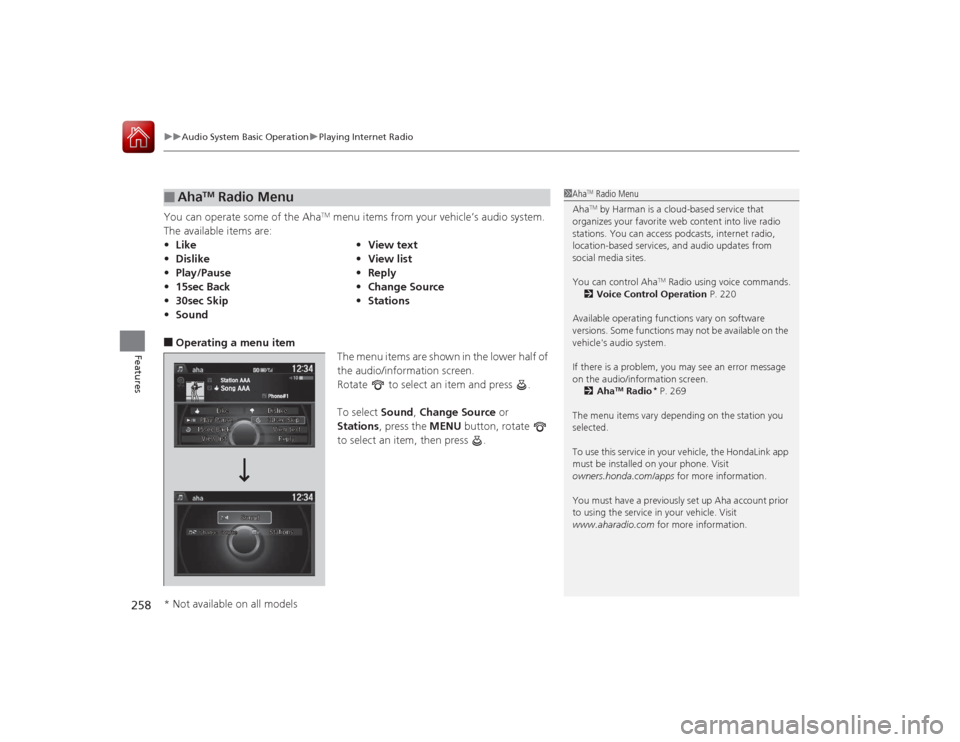
You can operate some of the Aha
TM menu items from your vehicle’s audio system.
The available items are:
■Operating a menu item The menu items are shown in the lower half of
the audio/information screen.
Rotate to select an item and press .
To select Sound, Change Source or
Stations , press the MENU button, rotate
to select an item, then press .■
Aha
TM Radio Menu
• Like •View text
• Dislike •View list
• Play/Pause •Reply
• 15sec Back •Change Source
• 30sec Skip •Stations
• Sound
1Aha
TM Radio Menu
AhaTM by Harman is a cloud-based service that
organizes your favorite web content into live radio
stations. You can access podcasts, internet radio,
location-based services, and audio updates from
social media sites.
You can control Aha
TM Radio using voice commands.
2 Voice Control Operation P. 220
Available operating functions vary on software
versions. Some functions may not be available on the
vehicle's audio system.
If there is a problem, you may see an error message
on the audio/information screen. 2 Aha
TM Radio
* P. 269
The menu items vary depending on the station you
selected.
To use this service in your vehicle, the HondaLink app
must be installed on your phone. Visit
owners.honda.com/apps for more information.
You must have a previously set up Aha account prior
to using the service in your vehicle. Visit
www.aharadio.com for more information.
* Not available on all models
Page 263 of 557
262
uuAudio System Basic Operation uPlaying Bluetooth ® Audio
Features
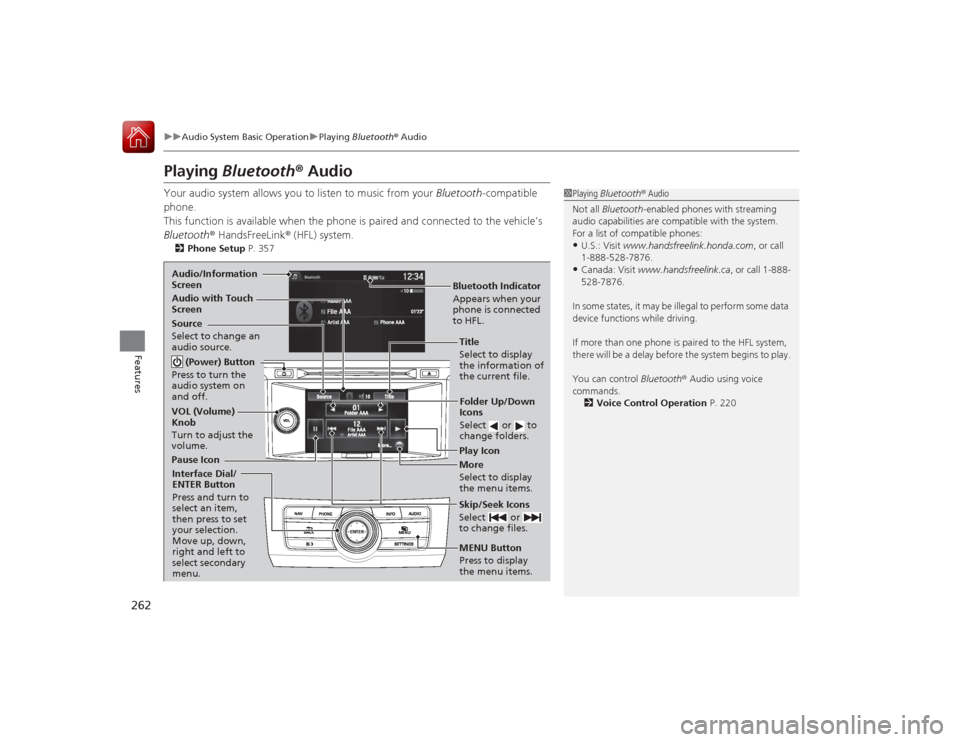
Playing Bluetooth® AudioYour audio system allows you to listen to music from your Bluetooth-compatible
phone.
This function is available when the phone is paired and connected to the vehicle's
Bluetooth ® HandsFreeLink ® (HFL) system.2 Phone Setup P. 357
1Playing Bluetooth ® Audio
Not all Bluetooth-enabled phones with streaming
audio capabilities are compatible with the system.
For a list of compatible phones:•U.S.: Visit www.handsfreelink.honda.com , or call
1-888-528-7876.•Canada: Visit www.handsfreelink.ca , or call 1-888-
528-7876.
In some states, it may be illegal to perform some data
device functions while driving.
If more than one phone is paired to the HFL system,
there will be a delay before the system begins to play.
You can control Bluetooth® Audio using voice
commands.
2 Voice Control Operation P. 220
Bluetooth Indicator
Appears when your
phone is connected
to HFL.
Audio/Information
Screen
Audio with Touch
Screen
Play Icon
Pause Icon More
Select to display
the menu items.
Source
Select to change an
audio source. (Power) Button
Press to turn the
audio system on
and off.VOL (Volume)
Knob
Turn to adjust the
volume.
Interface Dial/
ENTER Button
Press and turn to
select an item,
then press to set
your selection.
Move up, down,
right and left to
select secondary
menu.
Skip/Seek Icons
Select or
to change files.MENU Button
Press to display
the menu items.Folder Up/Down
Icons
Select or to
change folders.Title
Select to display
the information of
the current file.
Page 264 of 557
263
uuAudio System Basic Operation uPlaying Bluetooth ® Audio
Features
1. Make sure that your phone is paired and
connected to HFL.
2. Select the Bluetooth® Audio mode.
If the phone is not recognized, another HFL-
compatible phone, which is not compatible
for Bluetooth ® Audio, may already be
connected.
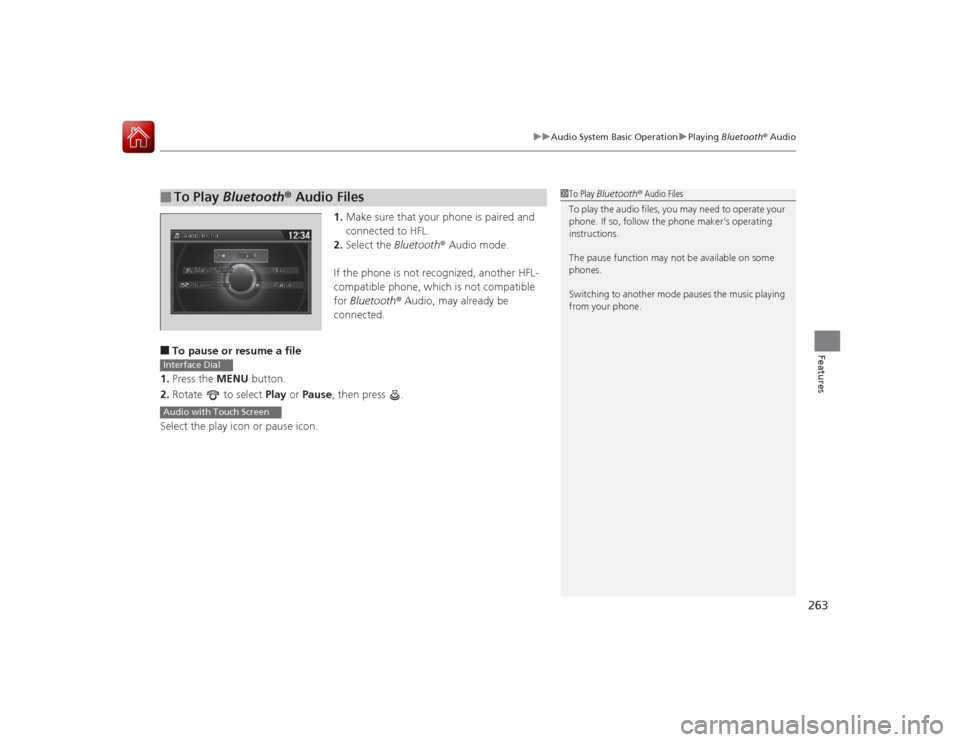
■To pause or resume a file
1. Press the MENU button.
2. Rotate to select Play or Pause , then press .
Select the play icon or pause icon.■
To Play Bluetooth ® Audio Files
1 To Play Bluetooth ® Audio Files
To play the audio files, you may need to operate your
phone. If so, follow the phone maker's operating
instructions.
The pause function may not be available on some
phones.
Switching to another mode pauses the music playing
from your phone.
Interface DialAudio with Touch Screen
Page 269 of 557
268
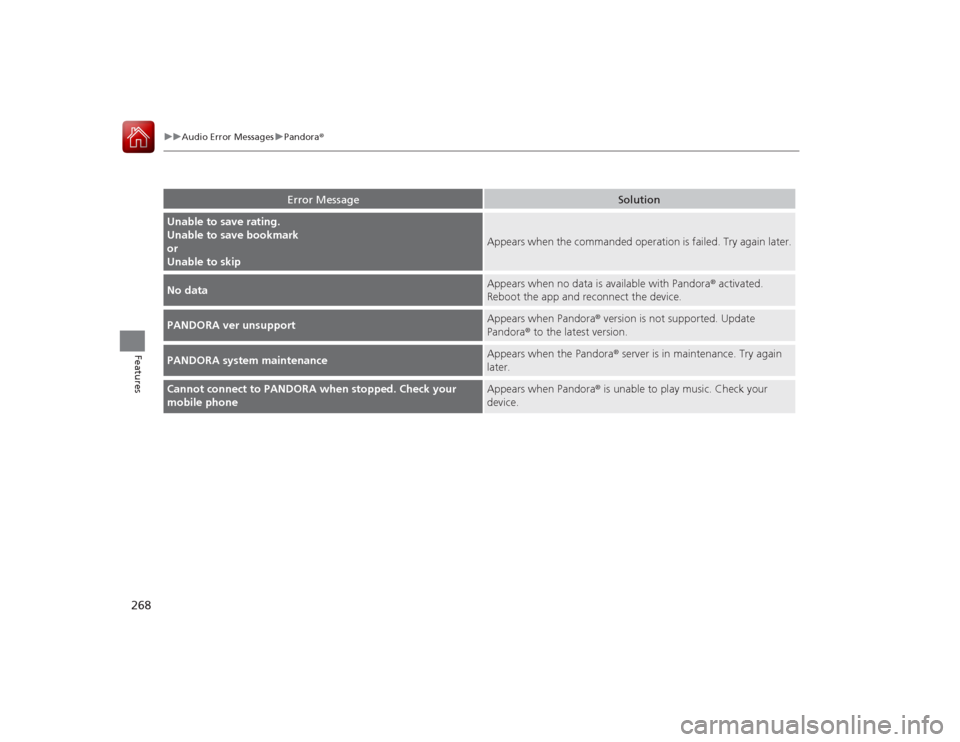
uuAudio Error Messages uPandora®
Features
Error Message
Solution
Unable to save rating.
Unable to save bookmark
or
Unable to skip
Appears when the commanded operation is failed. Try again later.
No data
Appears when no data is available with Pandora ® activated.
Reboot the app and reconnect the device.
PANDORA ver unsupport
Appears when Pandora ® version is not supported. Update
Pandora® to the latest version.
PANDORA system maintenance
Appears when the Pandora ® server is in maintenance. Try again
later.
Cannot connect to PANDORA when stopped. Check your
mobile phone
Appears when Pandora ® is unable to play music. Check your
device.
Page 274 of 557

273
uuGeneral Information on the Audio System uCompatible iPod, iPhone, and USB Flash Drives
Features
Compatible iPod, iPhone, and USB Flash Drives*1:Models with one display
*2:Models with two displays or the navigation system
• Use a recommended USB flash drive of 256 MB or higher.
• Some digital audio players may not be compatible.
• Some USB flash drives (e.g., a device with security lockout) may not work.
• Some software files may not allow for audio play or text data display.
• Some versions of MP3, WMA, or AAC formats may be unsupported.■
iPod and iPhone Model Compatibility
Model
iPod (5th generation)
iPod classic 80GB/160GB (launch in 2007)
iPod classic 120GB (launch in 2008)iPod classic 160GB (launch in 2009)
iPod nano (1st to 7th generation) launch in 2012
*1
iPod nano (1st to 6th generation) launch in 2010
*2
iPod touch (1st to 5th generation) launch in 2012
*1
iPod touch (1st to 4th generation) launch in 2010
*2
iPhone 3G/iPhone 3GS/iPhone 4/iPhone 4S/iPhone 5
*1
iPhone 3G/iPhone 3GS/iPhone 4/iPhone 4S
*2
■
USB Flash Drives
1iPod and iPhone Model Compatibility
This system may not work with all software versions
of these devices.1USB Flash Drives
Files on the USB flash drive are played in their stored
order. This order may be different from the order
displayed on your PC or device.
Page 280 of 557
279
uuCustomized Features u
Continued
Features
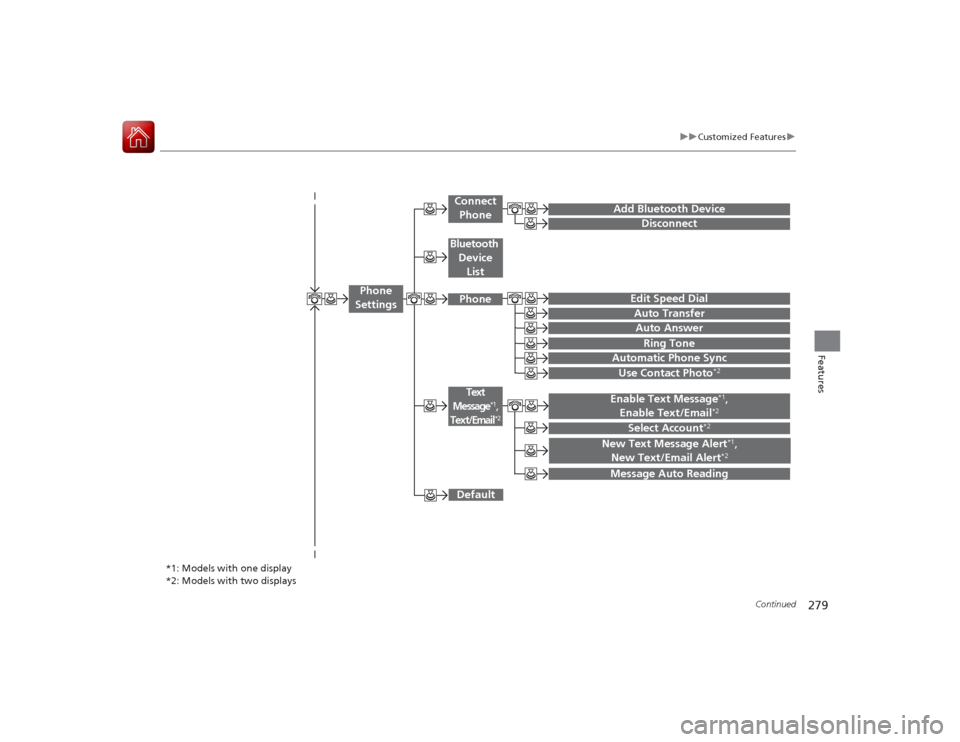
Add Bluetooth Device
DisconnectEdit Speed DialAuto Transfer
Auto AnswerRing Tone
Automatic Phone Sync
Default
Use Contact Photo
*2
Enable Text Message
*1,
Enable Text/Email
*2
Select Account
*2
Message Auto ReadingNew Text Message Alert
*1,
New Text/Email Alert
*2
*1: Models with one display
*2: Models with two displays
Phone
Settings
Connect PhoneText
Message
*1,
Text/Email
*2
Bluetooth
Device ListPhone
Page 282 of 557
281
uuCustomized Features u
Continued
Features
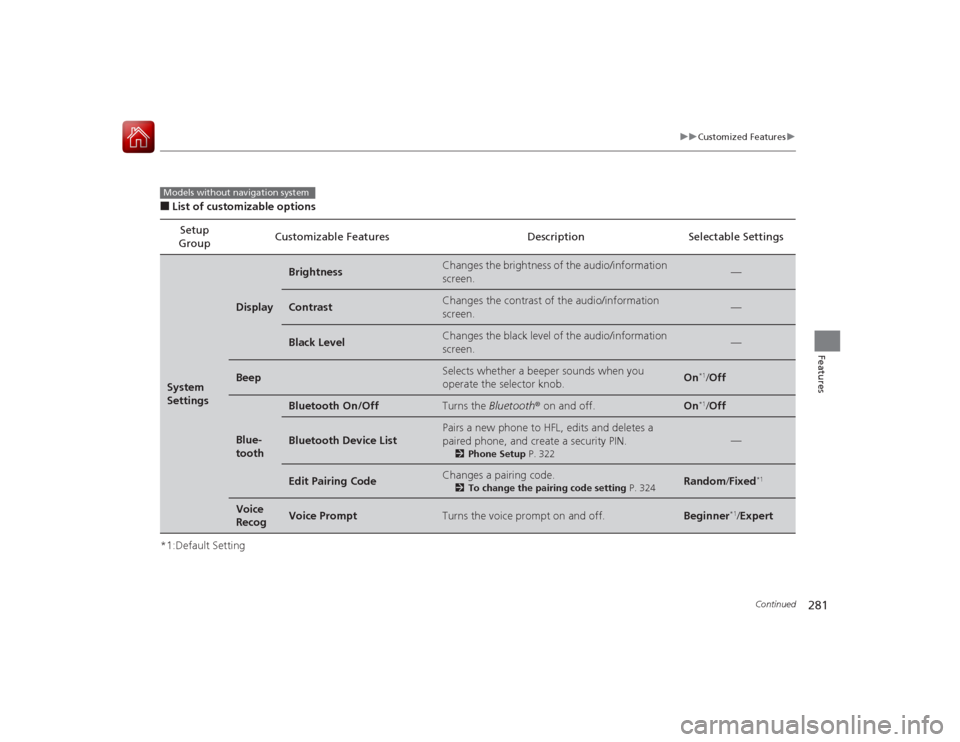
■List of customizable options
*1:Default Setting Setup
Group Customizable Features Description Selectable SettingsSystem
Settings
Display
Brightness
Changes the brightness of the audio/information
screen.
—
Contrast
Changes the contrast of the audio/information
screen.
—
Black Level
Changes the black level of the audio/information
screen.
—
Beep
Selects whether a beeper sounds when you
operate the selector knob.
On
*1/
Off
Blue-
tooth
Bluetooth On/Off
Turns the Bluetooth® on and off.
On
*1/Off
Bluetooth Device List
Pairs a new phone to HFL, edits and deletes a
paired phone, and create a security PIN.
2 Phone Setup P. 322
—
Edit Pairing Code
Changes a pairing code.
2To change the pairing code setting P. 324
Random/Fixed
*1
Voice
Recog
Voice Prompt
Turns the voice prompt on and off.
Beginner
*1/ Expert
Models without navigation system