2015 GMC YUKON XL key
[x] Cancel search: keyPage 67 of 459

Black plate (34,1)GMC 2015i Yukon/Yukon XL Owner Manual (GMNA-Localizing-U.S./Canada/
Mexico-8431503) - 2015 - crc - 8/11/14
2-34 Keys, Doors, and Windows
window will need to be
reprogrammed for the express-up
feature to work.
To reprogram the power windows:
1. Close all doors.
2. Place the ignition in ACC/ACCESSORY or ON/RUN/
START.
3. From any open position, pull the power window switch up until the
window is fully closed.
4. Hold the switch up for approximately two seconds after
the window is fully closed.
The window is now reprogrammed.
Express Window Anti-Pinch
Feature
If any object is in the path of the
window when express-up is active,
the window stops at the obstacle
and auto-reverses to a preset
factory position. Weather conditions
such as severe icing also cause the
window to auto-reverse. The window returns to normal operation
once the obstacle or condition is
removed.
Express Window Anti-Pinch
Override
{Warning
If express override is activated,
the window will not reverse
automatically. You or others could
be injured and the window could
be damaged. Before you use
express override, make sure that
all people and obstructions are
clear of the window path.
The anti-pinch feature can be
overridden in a supervised mode.
Hold the window switch in the
partially or fully pulled up position.
The window rises for as long as the
switch is held. Once the switch is
released, the express mode is
reactivated. In this mode, the window can still
close on an object in its path. Use
care when using the override mode.
Window Lockout
This feature prevents the rear
passenger windows from operating,
except from the driver position.
.PressZto activate the rear
window locks. An indicator light
will illuminate when the feature
is on.
.PressZagain to deactivate the
rear window locks.
Page 68 of 459
Black plate (35,1)GMC 2015i Yukon/Yukon XL Owner Manual (GMNA-Localizing-U.S./Canada/
Mexico-8431503) - 2015 - crc - 8/11/14
Keys, Doors, and Windows 2-35
Sun Visors
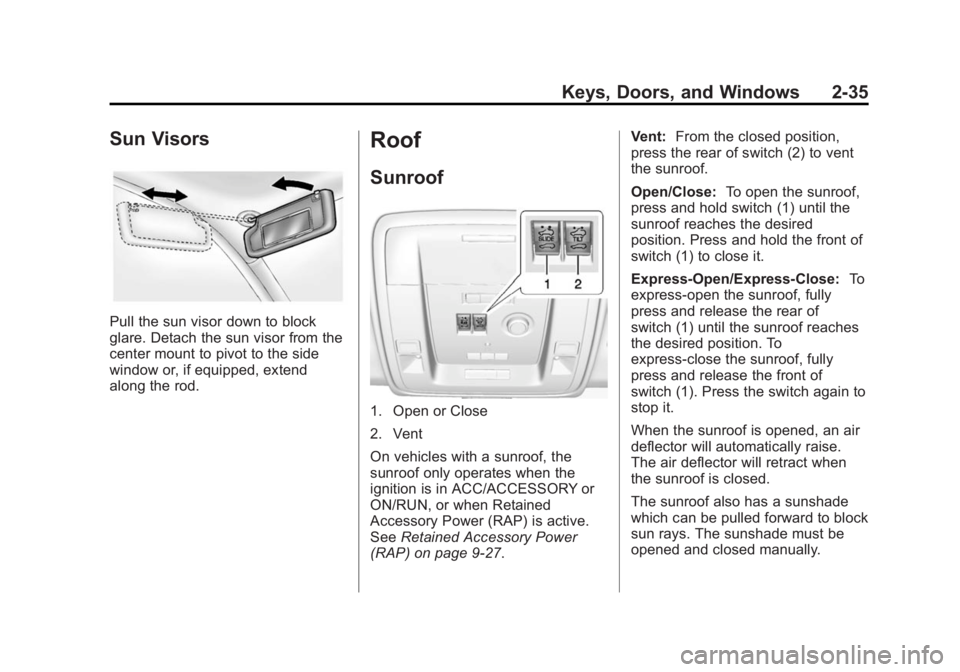
Pull the sun visor down to block
glare. Detach the sun visor from the
center mount to pivot to the side
window or, if equipped, extend
along the rod.
Roof
Sunroof
1. Open or Close
2. Vent
On vehicles with a sunroof, the
sunroof only operates when the
ignition is in ACC/ACCESSORY or
ON/RUN, or when Retained
Accessory Power (RAP) is active.
SeeRetained Accessory Power
(RAP) on page 9-27. Vent:
From the closed position,
press the rear of switch (2) to vent
the sunroof.
Open/Close: To open the sunroof,
press and hold switch (1) until the
sunroof reaches the desired
position. Press and hold the front of
switch (1) to close it.
Express-Open/Express-Close: To
express-open the sunroof, fully
press and release the rear of
switch (1) until the sunroof reaches
the desired position. To
express-close the sunroof, fully
press and release the front of
switch (1). Press the switch again to
stop it.
When the sunroof is opened, an air
deflector will automatically raise.
The air deflector will retract when
the sunroof is closed.
The sunroof also has a sunshade
which can be pulled forward to block
sun rays. The sunshade must be
opened and closed manually.
Page 69 of 459
Black plate (36,1)GMC 2015i Yukon/Yukon XL Owner Manual (GMNA-Localizing-U.S./Canada/
Mexico-8431503) - 2015 - crc - 8/11/14
2-36 Keys, Doors, and Windows
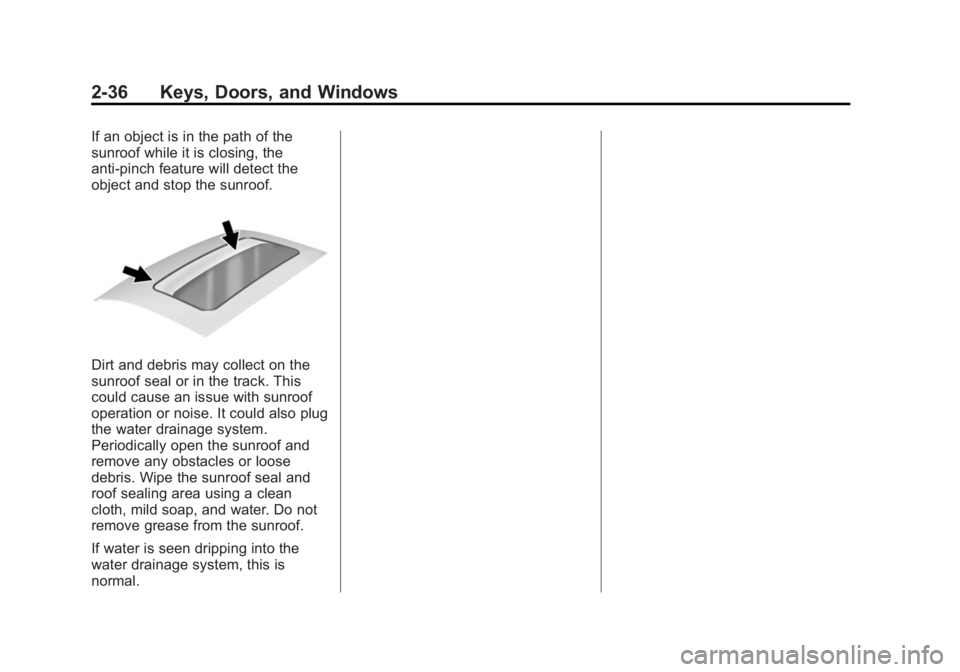
If an object is in the path of the
sunroof while it is closing, the
anti-pinch feature will detect the
object and stop the sunroof.
Dirt and debris may collect on the
sunroof seal or in the track. This
could cause an issue with sunroof
operation or noise. It could also plug
the water drainage system.
Periodically open the sunroof and
remove any obstacles or loose
debris. Wipe the sunroof seal and
roof sealing area using a clean
cloth, mild soap, and water. Do not
remove grease from the sunroof.
If water is seen dripping into the
water drainage system, this is
normal.
Page 75 of 459
Black plate (6,1)GMC 2015i Yukon/Yukon XL Owner Manual (GMNA-Localizing-U.S./Canada/
Mexico-8431503) - 2015 - crc - 8/11/14
3-6 Seats and Restraints
Storing Memory Positions
To store positions to the“1”and “2”
buttons:
1. Adjust the driver seat, outside mirrors, power tilt and
telescoping steering column (if
equipped), and adjustable
pedals (if equipped) to the
desired driving positions.
2. Press and release SET. A beep will sound.
3. Immediately press and hold “1”
until two beeps sound.
4. Repeat Steps 1–3 for a second driver using “2.”
To store positions to the
B(Exit)
button and easy exit features:
1. Adjust the driver seat, power tilt and telescoping steering column
(if equipped), adjustable pedals,
and the outside mirrors on some
vehicles to the desired positions
for getting out of the vehicle.
2. Press and release SET. A beep will sound. 3. Immediately press and hold
B
until two beeps sound.
Manually Recalling Memory
Positions
If the vehicle is off or not in P (Park),
press and hold "1," "2," or
B(Exit)
to manually recall the previously
stored memory positions. Releasing
"1,” "2," or
Bbefore the stored
positions are reached stops the
recall.
If the vehicle is on and in P (Park),
press and release “1,” “2,”or
Bto
manually recall the previously
stored memory positions. Placing
the ignition in OFF/LOCK before the
stored positions are reached stops
the recall.
Automatically Recalling Memory
Positions (Auto Memory Recall)
The Auto (Automatic) Memory
Recall feature automatically recalls
the current driver ’s previously stored
“1” or“2” position when entering the
vehicle. If the Auto Memory Recall feature is
enabled in the vehicle
personalization menu, memory
“1”
or “2” positions are recalled in the
following ways:
.PressKon the RKE transmitter
and open the driver door.
.PressKon the RKE transmitter
when the driver door is open.
.If equipped with Keyless Access,
press the lock/unlock button on
the outside driver door handle
and open the driver door. The
RKE transmitter must be present
for the recall to activate.
See Vehicle Personalization on
page 5-44.
To stop recall movement, press one
of the memory, power mirror,
or power seat controls; press the
power tilt and telescoping steering
column control (if equipped); or
press the adjustable pedal control (if
equipped).
Page 84 of 459
Black plate (15,1)GMC 2015i Yukon/Yukon XL Owner Manual (GMNA-Localizing-U.S./Canada/
Mexico-8431503) - 2015 - crc - 8/11/14
Seats and Restraints 3-15
Caution (Continued)
belts and return them to their
normal stowed position before
folding a rear seat.
On third row seats (if equipped), the
seatbacks can be folded to increase
cargo space.
Manual Operation
To fold the seatback (if equipped):
1. Open the liftgate.
2. Make sure that there is nothing under, in front of, or on the seat.
3. Fully lower the head restraints. See Head Restraints on
page 3-2. Put the second row
seatbacks in the upright position.
See Second Row Seats on
page 3-10.
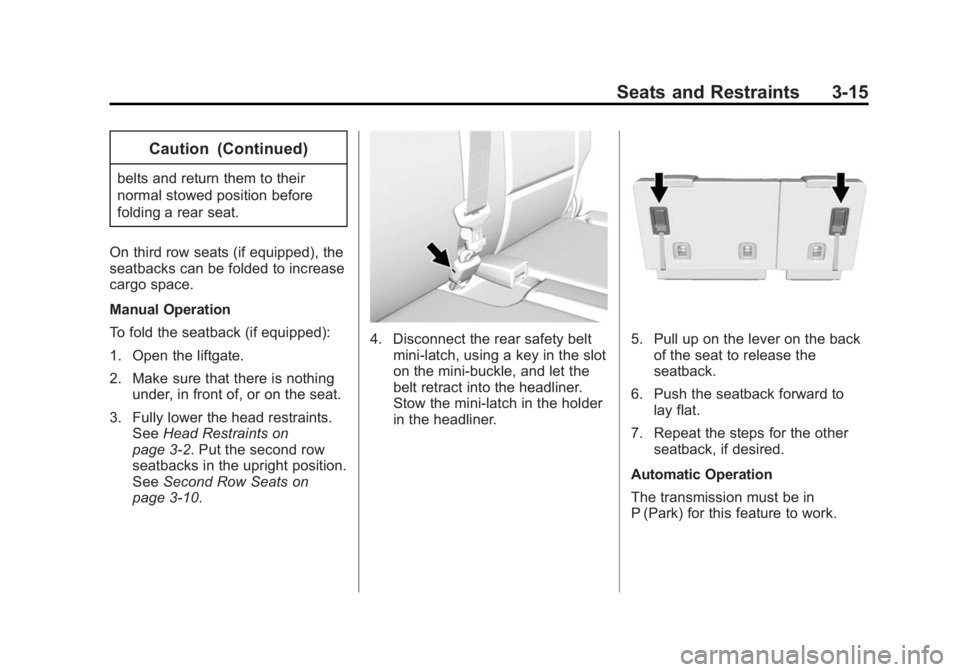
4. Disconnect the rear safety belt
mini-latch, using a key in the slot
on the mini-buckle, and let the
belt retract into the headliner.
Stow the mini-latch in the holder
in the headliner.5. Pull up on the lever on the backof the seat to release the
seatback.
6. Push the seatback forward to lay flat.
7. Repeat the steps for the other seatback, if desired.
Automatic Operation
The transmission must be in
P (Park) for this feature to work.
Page 85 of 459
Black plate (16,1)GMC 2015i Yukon/Yukon XL Owner Manual (GMNA-Localizing-U.S./Canada/
Mexico-8431503) - 2015 - crc - 8/11/14
3-16 Seats and Restraints
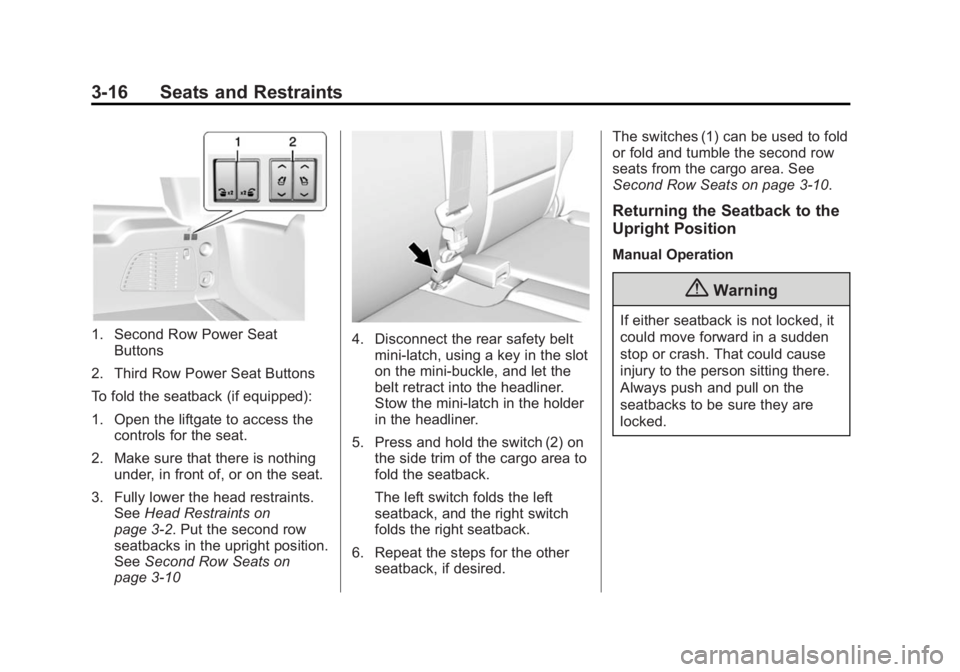
1. Second Row Power SeatButtons
2. Third Row Power Seat Buttons
To fold the seatback (if equipped):
1. Open the liftgate to access the controls for the seat.
2. Make sure that there is nothing under, in front of, or on the seat.
3. Fully lower the head restraints. See Head Restraints on
page 3-2. Put the second row
seatbacks in the upright position.
See Second Row Seats on
page 3-104. Disconnect the rear safety belt
mini-latch, using a key in the slot
on the mini-buckle, and let the
belt retract into the headliner.
Stow the mini-latch in the holder
in the headliner.
5. Press and hold the switch (2) on the side trim of the cargo area to
fold the seatback.
The left switch folds the left
seatback, and the right switch
folds the right seatback.
6. Repeat the steps for the other seatback, if desired. The switches (1) can be used to fold
or fold and tumble the second row
seats from the cargo area. See
Second Row Seats on page 3-10.
Returning the Seatback to the
Upright Position
Manual Operation
{Warning
If either seatback is not locked, it
could move forward in a sudden
stop or crash. That could cause
injury to the person sitting there.
Always push and pull on the
seatbacks to be sure they are
locked.
Page 95 of 459
Black plate (26,1)GMC 2015i Yukon/Yukon XL Owner Manual (GMNA-Localizing-U.S./Canada/
Mexico-8431503) - 2015 - crc - 8/11/14
3-26 Seats and Restraints
Safety Belt Use During
Pregnancy
Safety belts work for everyone,
including pregnant women. Like all
occupants, they are more likely to
be seriously injured if they do not
wear safety belts.
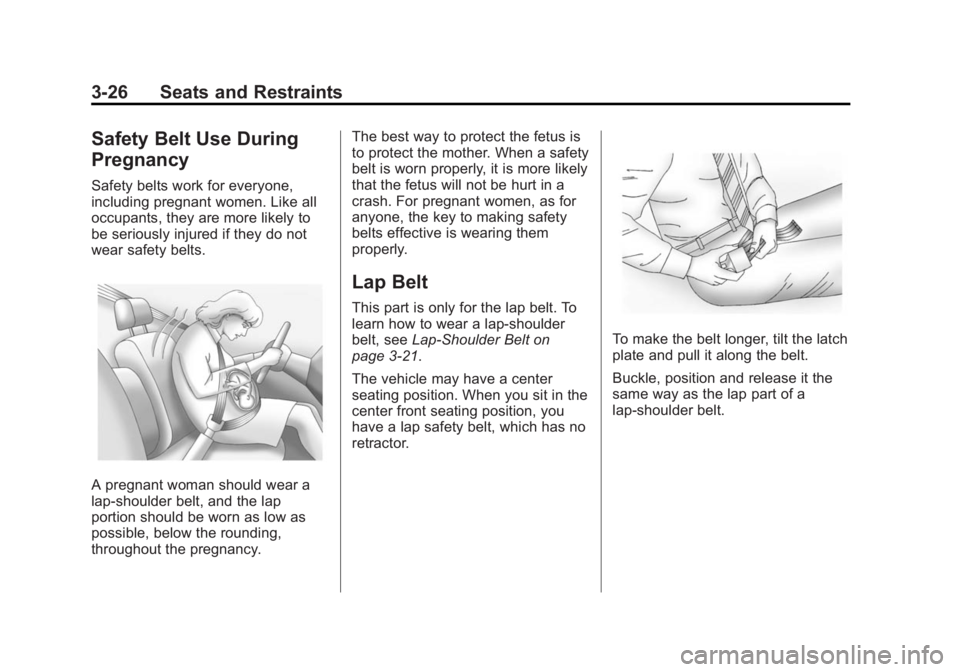
A pregnant woman should wear a
lap-shoulder belt, and the lap
portion should be worn as low as
possible, below the rounding,
throughout the pregnancy.The best way to protect the fetus is
to protect the mother. When a safety
belt is worn properly, it is more likely
that the fetus will not be hurt in a
crash. For pregnant women, as for
anyone, the key to making safety
belts effective is wearing them
properly.
Lap Belt
This part is only for the lap belt. To
learn how to wear a lap-shoulder
belt, see
Lap-Shoulder Belt on
page 3-21.
The vehicle may have a center
seating position. When you sit in the
center front seating position, you
have a lap safety belt, which has no
retractor.
To make the belt longer, tilt the latch
plate and pull it along the belt.
Buckle, position and release it the
same way as the lap part of a
lap-shoulder belt.
Page 136 of 459
Black plate (1,1)GMC 2015i Yukon/Yukon XL Owner Manual (GMNA-Localizing-U.S./Canada/
Mexico-8431503) - 2015 - crc - 8/11/14
Storage 4-1
Storage
Storage Compartments
Storage Compartments . . . . . . . 4-1
Instrument Panel Storage . . . . . 4-1
Glove Box . . . . . . . . . . . . . . . . . . . . 4-1
Cupholders . . . . . . . . . . . . . . . . . . . 4-1
Sunglasses Storage . . . . . . . . . . 4-2
Armrest Storage . . . . . . . . . . . . . . 4-2
Rear Storage . . . . . . . . . . . . . . . . . 4-2
Center Console Storage . . . . . . 4-2
Additional Storage Features
Cargo Cover . . . . . . . . . . . . . . . . . . 4-3
Roof Rack System
Roof Rack System . . . . . . . . . . . . 4-4
Storage
Compartments
{Warning
Do not store heavy or sharp
objects in storage compartments.
In a crash, these objects may
cause the cover to open and
could result in injury.
Instrument Panel Storage
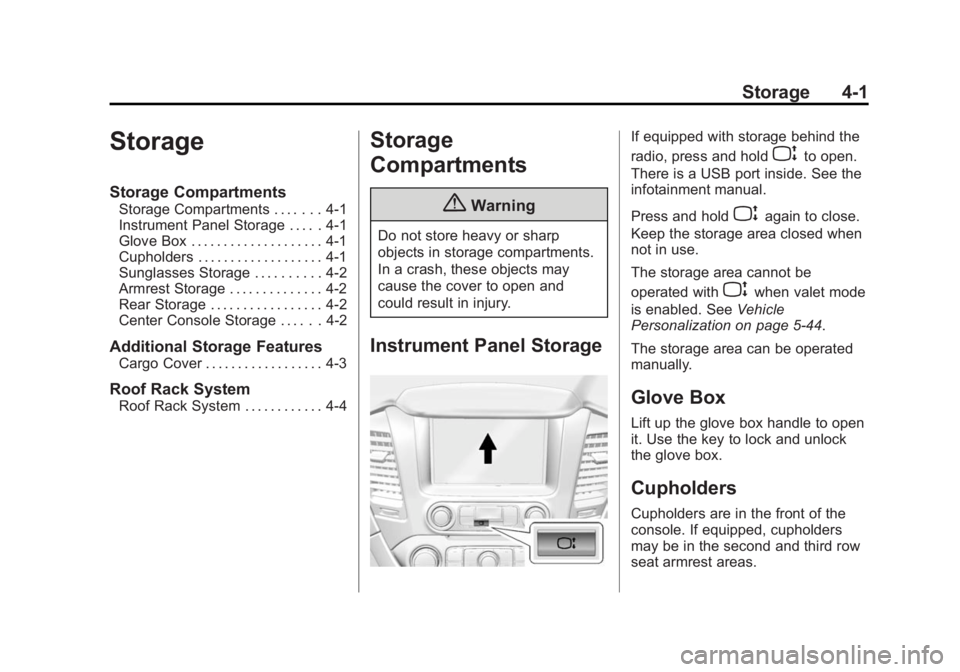
If equipped with storage behind the
radio, press and hold
Pto open.
There is a USB port inside. See the
infotainment manual.
Press and hold
Pagain to close.
Keep the storage area closed when
not in use.
The storage area cannot be
operated with
Pwhen valet mode
is enabled. See Vehicle
Personalization on page 5-44.
The storage area can be operated
manually.
Glove Box
Lift up the glove box handle to open
it. Use the key to lock and unlock
the glove box.
Cupholders
Cupholders are in the front of the
console. If equipped, cupholders
may be in the second and third row
seat armrest areas.