2015 GMC YUKON remove seats
[x] Cancel search: remove seatsPage 16 of 455

Black plate (9,1)GMC Yukon/Yukon XL Owner Manual (GMNA-Localizing-U.S./Canada/
Mexico-7063682) - 2015 - crc - 6/5/14
In Brief 1-9
If equipped, the SET, "1," "2," andB(Exit) buttons on the driver door
are used to manually save and
recall memory settings for the driver
seat, outside mirrors, power tilt and
telescoping steering column (if
equipped), and adjustable pedals (if
equipped).
See Memory Seats on page 3-5 and
Vehicle Personalization on
page 5-43.
Second Row Seats
The second row seatbacks can be
folded for additional cargo space,
or the seats can be folded and
tumbled for easy entry/exit to the
third row seats (if equipped). The
seatbacks also recline.
See Second Row Seats on
page 3-10.
Third Row Seats
If equipped, third row seatbacks can
be folded.
To fold the third row seatback:
1. Remove anything on or under the seat.
2. Disconnect the rear safety beltmini-latch using a key in the slot
on the mini-buckle, and let the
belt retract into the headliner.
3. Stow the mini-latch in the holder in the headliner.
See Third Row Seats on page 3-14.
Heated and Cooled Front
Seats
If equipped, the vehicle may have
heated or heated and cooled seats.
Heated and Cooled Seats Shown,
Heated Seats Similar
The buttons are on the center stack
below the climate control system. To
operate, the engine must be
running.
Press
Ito heat the driver or
passenger seatback only.
Page 44 of 455

Black plate (11,1)GMC Yukon/Yukon XL Owner Manual (GMNA-Localizing-U.S./Canada/
Mexico-7063682) - 2015 - crc - 6/5/14
Keys, Doors, and Windows 2-11
3. Insert the vehicle key into thekey lock cylinder on the driver
door handle. Then turn the key
counterclockwise, to the unlock
position, five times within
10 seconds.
The Driver Information Center
(DIC) displays READY FOR
REMOTE#2, 3, 4, ETC.
4. Place the new transmitter in the
transmitter pocket/insert.
Open the center console storage
area and the storage tray. The
transmitter pocket/insert is in front of the storage area next to
the center console storage area
between the driver and front
passenger seats.
5. Press the ENGINE START/ STOP button. When the
transmitter is learned, the DIC
display will show that it is ready
to program the next transmitter.
6. Remove the transmitter from the transmitter pocket and press
K
orQon the transmitter.
To program additional
transmitters, repeat Steps 4–6.
When all additional transmitters
are programmed, press and hold
the ENGINE START/STOP
button for approximately
12 seconds to exit
programming mode.
7. Return the key back into the transmitter. Programming without a
Recognized Transmitter (Keyless
Access Vehicles Only)
If there are no currently recognized
transmitters available, follow this
procedure to program up to eight
transmitters. This feature is not
available in Canada. This procedure
will take approximately 30 minutes
to complete. The vehicle must be off
and all transmitters to be
programmed must be with you.
1. Remove the vehicle key from the
transmitter.
2. Insert the vehicle key into the key lock cylinder on the driver
door handle; then turn the key
counterclockwise, to the unlock
position five times within
10 seconds.
The Driver Information Center
(DIC) displays REMOTE LEARN
PENDING, PLEASE WAIT.
Page 45 of 455
Black plate (12,1)GMC Yukon/Yukon XL Owner Manual (GMNA-Localizing-U.S./Canada/
Mexico-7063682) - 2015 - crc - 6/5/14
2-12 Keys, Doors, and Windows
3. Wait for 10 minutes until the DICdisplays PRESS ENGINE
START BUTTON TO LEARN,
then press the ENGINE START/
STOP button.
The DIC display will again show
REMOTE LEARN PENDING,
PLEASE WAIT.
4. Repeat Step 3 two additional times. After the third time all
previously known transmitters
will no longer work with the
vehicle. Remaining transmitters
can be relearned during the next
steps.
The DIC display should now
show READY FOR REMOTE
# 1.
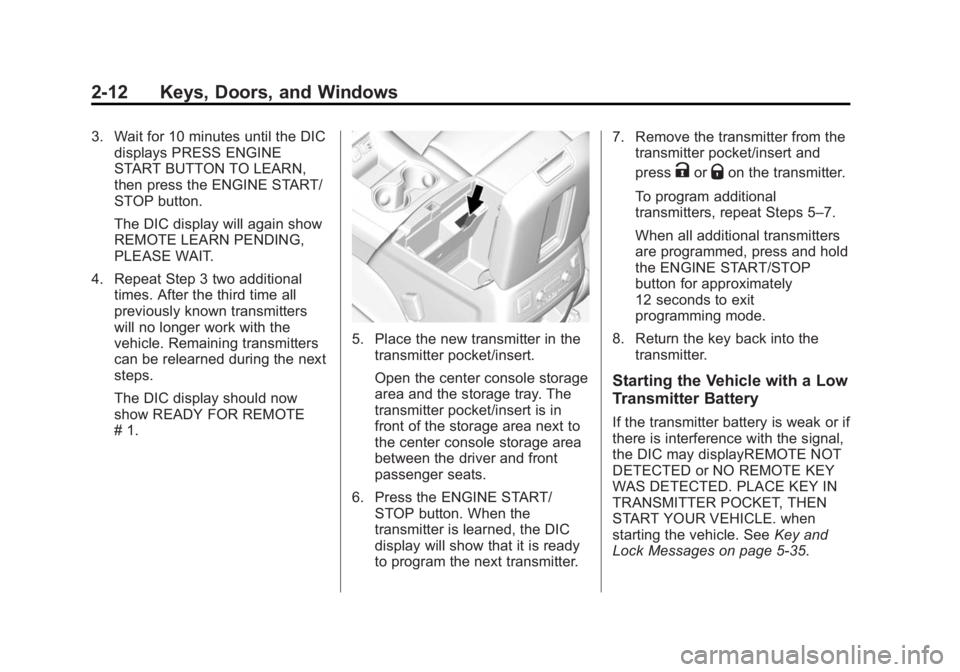
5. Place the new transmitter in thetransmitter pocket/insert.
Open the center console storage
area and the storage tray. The
transmitter pocket/insert is in
front of the storage area next to
the center console storage area
between the driver and front
passenger seats.
6. Press the ENGINE START/ STOP button. When the
transmitter is learned, the DIC
display will show that it is ready
to program the next transmitter. 7. Remove the transmitter from the
transmitter pocket/insert and
press
KorQon the transmitter.
To program additional
transmitters, repeat Steps 5–7.
When all additional transmitters
are programmed, press and hold
the ENGINE START/STOP
button for approximately
12 seconds to exit
programming mode.
8. Return the key back into the transmitter.
Starting the Vehicle with a Low
Transmitter Battery
If the transmitter battery is weak or if
there is interference with the signal,
the DIC may displayREMOTE NOT
DETECTED or NO REMOTE KEY
WAS DETECTED. PLACE KEY IN
TRANSMITTER POCKET, THEN
START YOUR VEHICLE. when
starting the vehicle. See Key and
Lock Messages on page 5-35.
Page 47 of 455

Black plate (14,1)GMC Yukon/Yukon XL Owner Manual (GMNA-Localizing-U.S./Canada/
Mexico-7063682) - 2015 - crc - 6/5/14
2-14 Keys, Doors, and Windows
2. Lift the battery with a flat object
3. Remove the battery.
4. Insert the new battery, positiveside toward the back cover.
Replace with a CR2032 or
equivalent battery.
5. Push together the transmitter.
Remote Vehicle Start
If equipped with the remote start
feature, the climate control system
will come on when the vehicle is
started remotely depending on the
outside temperature. The rear defog and heated and
cooled seats, if equipped, may also
come on. See
Heated and Cooled
Front Seats on page 3-7 and
Vehicle Personalization on
page 5-43.
Laws in some communities may
restrict the use of remote starters.
Check local regulations for any
requirements on remote starting of
vehicles.
Do not use remote start if the
vehicle is low on fuel.
The vehicle cannot be remote
started if:
.The key is in the ignition (Key
Access) or the transmitter is in
the vehicle (Keyless Access).
.The hood is not closed.
.There is an emission control
system malfunction and the
malfunction indicator lamp is on. The engine will turn off during a
remote vehicle start if:
.The coolant temperature gets
too high.
.The oil pressure gets low.
The RKE transmitter range may be
reduced while the vehicle is running.
Other conditions can affect the
performance of the transmitter. See
Remote Keyless Entry (RKE)
System on page 2-4 orVehicle
Personalization on page 5-43.
Starting the Engine Using Remote
Start
1. Press and release
Q.
Page 73 of 455

Black plate (6,1)GMC Yukon/Yukon XL Owner Manual (GMNA-Localizing-U.S./Canada/
Mexico-7063682) - 2015 - crc - 6/5/14
3-6 Seats and Restraints
Storing Memory Positions
To save positions to the“1”and “2”
buttons:
1. Adjust the driver seat, outside mirrors, power tilt and
telescoping steering column (if
equipped), and adjustable
pedals (if equipped) to the
desired driving positions.
2. Press and release SET, then immediately press and hold “1”
until a beep sounds.
3. Repeat Steps 1 and 2 for a second driver using “2.”
To save positions to the
B(Exit)
button and easy exit features:
1. Adjust the driver seat, power tilt and telescoping steering column
(if equipped), adjustable pedals,
and the outside mirrors on some
vehicles to the desired positions
for getting out of the vehicle.
2. Press and release SET, then immediately press and hold
B
until a beep sounds. Manually Recalling Memory
Positions
If the vehicle is OFF or not in
P (Park), press and hold "1," "2," or
Bto manually recall the previously
stored memory positions. Releasing
"1,” "2," or
Bbefore the stored
positions are reached stops the
recall.
If the vehicle is ON and in P (Park),
press and release “1,” “2,”or
Bto
manually recall the previously
stored memory positions. Placing
the ignition in OFF/LOCK before the
stored positions are reached stops
the recall.
If something has blocked the driver
seat, power tilt and telescoping
steering column, and/or adjustable
pedals while recalling a memory
position, the recall may stop.
Remove the obstruction; then press
and hold the appropriate manual
control for the memory item that is
not recalling for two seconds. Try
recalling the memory position again
by pressing the appropriate memory button. If the memory position is still
not recalling, see your dealer for
service.
Automatically Recalling Memory
Positions (Auto Memory Recall)
The Auto (Automatic) Memory
Recall feature automatically recalls
the current driver
’s previously stored
“1” or“2” position when entering the
vehicle.
If the Auto Memory Recall feature is
enabled in the vehicle
personalization menu, memory “1”
or “2” positions are recalled in the
following ways:
.PressKon the RKE transmitter
and open the driver door.
.PressKon the RKE transmitter
when the driver door is open.
.If equipped with Keyless Access,
press the lock/unlock button on
the outside driver door handle
and open the driver door. The
RKE transmitter must be present
for the recall to activate.
Page 74 of 455

Black plate (7,1)GMC Yukon/Yukon XL Owner Manual (GMNA-Localizing-U.S./Canada/
Mexico-7063682) - 2015 - crc - 6/5/14
Seats and Restraints 3-7
SeeVehicle Personalization on
page 5-43.
To stop recall movement, press one
of the memory, power mirror,
or power seat controls; press the
power tilt and telescoping steering
column control (if equipped); or
press the adjustable pedal control (if
equipped).
If something has blocked the driver
seat, power tilt and telescoping
steering column, and/or the
adjustable pedals while recalling a
memory position, the recall may
stop. Remove the obstruction; then
press and hold the appropriate
manual control for the memory item
that is not recalling for two seconds.
Try recalling the memory position
again by opening the driver door
and pressing
Kon the RKE
transmitter. If the memory position is
still not recalling, see your dealer for
service. Easy Exit Recall
If programmed on in the vehicle
personalization menu, the easy exit
feature automatically moves the
driver seat, power tilt and
telescoping steering column (if
equipped), adjustable pedals (if
equipped), and outside mirrors on
some vehicles to the memory
positions saved to the
B(Exit)
button. See “Storing Memory
Positions” listed previously. See
also Vehicle Personalization on
page 5-43.
Easy exit recall automatically
activates when one of the following
occurs:
.The vehicle is turned off and the
driver door is opened within a
short time.
.The vehicle is turned off with the
driver door open.
If something has blocked the driver
seat, power tilt and telescoping
steering column, and/or adjustable
pedals (if equipped) while recalling the exit position, the recall may
stop. Remove the obstruction; then
press and hold the appropriate
manual control for the exit feature
not recalling for two seconds. Try
recalling the exit position again.
If the exit position is still not
recalling, see your dealer for
service.
Heated and Cooled Front
Seats
If equipped, the vehicle may have
heated or heated and cooled seats.
{Warning
If you cannot feel temperature
change or pain to the skin, the
seat heater may cause burns. To
reduce the risk of burns, people
with such a condition should use
care when using the seat heater,
especially for long periods of
time. Do not place anything on
(Continued)
Page 91 of 455
Black plate (24,1)GMC Yukon/Yukon XL Owner Manual (GMNA-Localizing-U.S./Canada/
Mexico-7063682) - 2015 - crc - 6/5/14
3-24 Seats and Restraints
Pretensioners work only once. If the
pretensioners activate in a crash,
the pretensioners and probably
other parts of the vehicle's safety
belt system will need to be replaced.
SeeReplacing Safety Belt System
Parts after a Crash on page 3-27.
Rear Safety Belt Comfort
Guides
Rear safety belt comfort guides may
provide added safety belt comfort
for older children who have
outgrown booster seats and for
some adults. When installed on a
shoulder belt, the comfort guide
positions the shoulder belt away
from the neck and head.
This vehicle has rear shoulder belt
comfort guides. Additional guides
are available through your dealer.
There is one guide for each
outboard passenger position in the
second row seat and for each
passenger position in the third
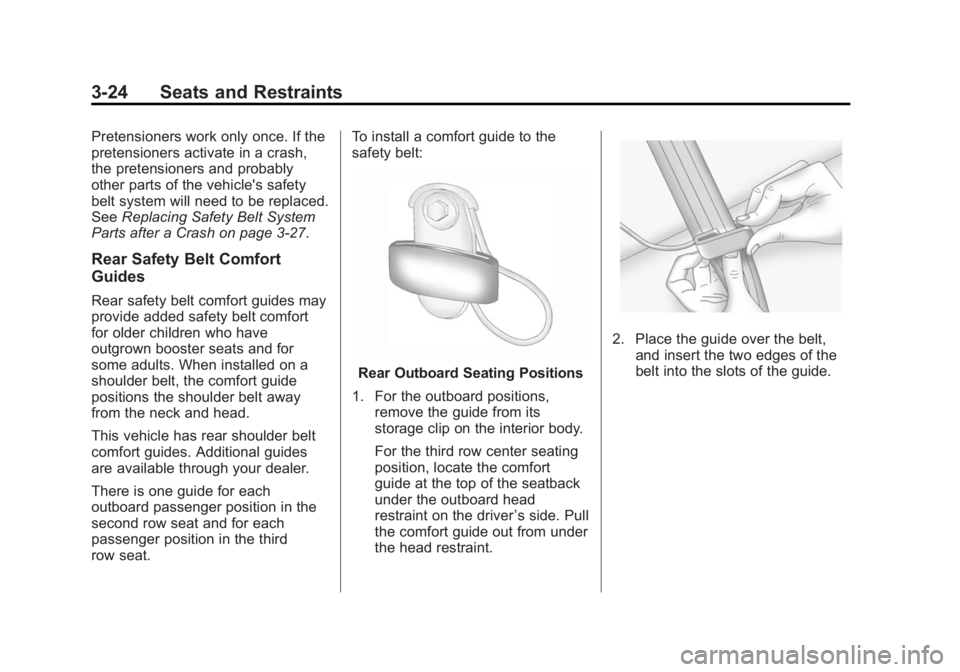
row seat. To install a comfort guide to the
safety belt:
Rear Outboard Seating Positions
1. For the outboard positions, remove the guide from its
storage clip on the interior body.
For the third row center seating
position, locate the comfort
guide at the top of the seatback
under the outboard head
restraint on the driver ’s side. Pull
the comfort guide out from under
the head restraint.
2. Place the guide over the belt, and insert the two edges of the
belt into the slots of the guide.
Page 92 of 455
Black plate (25,1)GMC Yukon/Yukon XL Owner Manual (GMNA-Localizing-U.S./Canada/
Mexico-7063682) - 2015 - crc - 6/5/14
Seats and Restraints 3-25
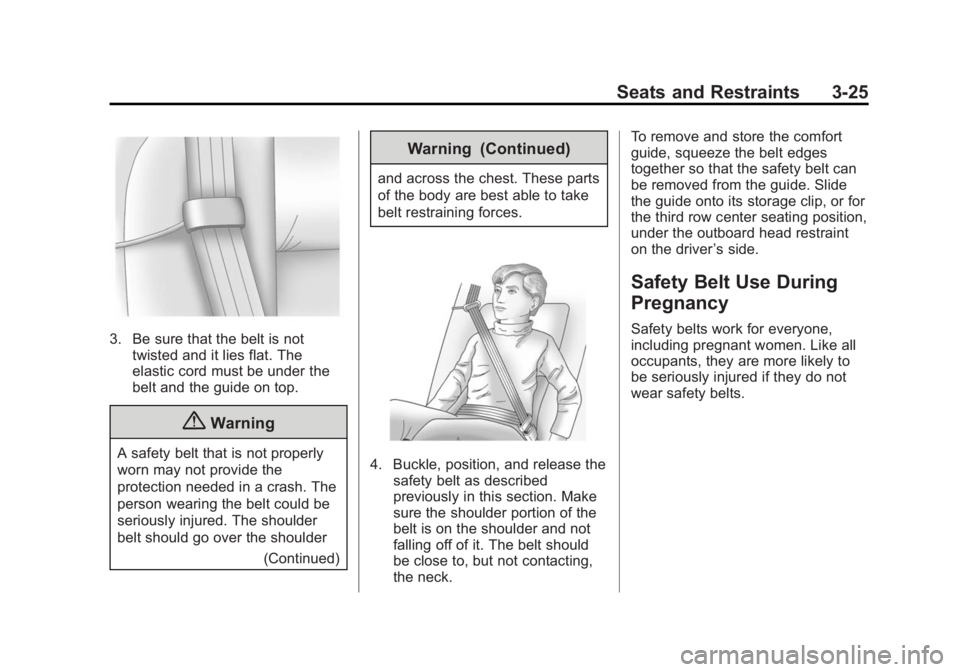
3. Be sure that the belt is nottwisted and it lies flat. The
elastic cord must be under the
belt and the guide on top.
{Warning
A safety belt that is not properly
worn may not provide the
protection needed in a crash. The
person wearing the belt could be
seriously injured. The shoulder
belt should go over the shoulder
(Continued)
Warning (Continued)
and across the chest. These parts
of the body are best able to take
belt restraining forces.
4. Buckle, position, and release thesafety belt as described
previously in this section. Make
sure the shoulder portion of the
belt is on the shoulder and not
falling off of it. The belt should
be close to, but not contacting,
the neck. To remove and store the comfort
guide, squeeze the belt edges
together so that the safety belt can
be removed from the guide. Slide
the guide onto its storage clip, or for
the third row center seating position,
under the outboard head restraint
on the driver
’s side.
Safety Belt Use During
Pregnancy
Safety belts work for everyone,
including pregnant women. Like all
occupants, they are more likely to
be seriously injured if they do not
wear safety belts.