2015 GMC SIERRA DENALI lock
[x] Cancel search: lockPage 154 of 439

Black plate (45,1)GMC 2015i Sierra Denali Owner Manual (GMNA-Localizing-U.S./Canada/
Mexico-8431500) - 2015 - crc - 6/20/14
Instruments and Controls 5-45adjusted to this level. To set the
maximum startup volume, press +
or − to increase or decrease.
Vehicle Select and the following may
display: .
Climate and Air Quality .
Collision/Detection Systems .
Comfort and Convenience .
Lighting .
Power Door Locks .
Remote Lock, Unlock, Start
Climate and Air Quality Select the Climate and Air Quality
menu and the following may display: .
Auto Fan Max Speed .
Auto Rear Defog
Auto Fan Max Speed
This feature will set the maximum
auto fan speed.
Select Low, Medium, or High. Auto Rear Defog
If equipped, this feature will
automatically turn on the rear
window defogger when it is cold
outside.
Select Off or On.
Collision/Detection Systems Select the Collision/Detection
Systems menu and the following
may display: .
Alert Type .
Auto Collision Preparation .
Park Assist
Alert Type
This feature will set crash alerts to
beeps or seat vibrations. This
setting affects all crash alerts
including Forward Collision Alert,
Lane Departure Warning, and Park
Assist alerts.
Select Beeps or Safety Alert Seat. Auto Collision Preparation
This feature will turn on or off the
Forward Collision Alert feature as
well as the automatic braking
capability of the Auto Collision
Preparation feature. With the Alert
and Brake setting, both Forward
Collision Alert as well as the
automatic braking capability of the
Auto Collision Preparation feature
are available. The Alert setting
disables most automatic braking
functions of the Auto Collision
Preparation feature. Some
last-second automatic braking
capability is still provided with the
Alert setting, but it is much less
likely to be triggered by most driving
conditions. Off disables all Forward
Collision Alert and automatic
braking capabilities of the Auto
Collision Preparation feature.
Select Off, Alert and Brake, or Alert.
See Object Detection System
Messages on page 5-35 .
Page 156 of 439

Black plate (47,1)GMC 2015i Sierra Denali Owner Manual (GMNA-Localizing-U.S./Canada/
Mexico-8431500) - 2015 - crc - 6/20/14
Instruments and Controls 5-47Power Door Locks Select Power Door Locks and the
following may display: .
Auto Door Unlock .
Delayed Door Lock
Auto Door Unlock
This allows selection of which of the
doors will automatically unlock when
the vehicle is shifted into P (Park).
Select Off, All Doors, or Driver Door.
Delayed Door Lock
When on, this feature will delay the
locking of the doors. To override the
delay, press the power door lock
switch on the door.
Select On or Off.
Remote Lock, Unlock, Start
Select Remote Lock, Unlock, Start
and the following may display: .
Remote Unlock Light Feedback .
Remote Lock Feedback .
Remote Door Unlock .
Remote Start Auto Cool Seats .
Remote Start Auto Heat Seats .
Passive Door Unlock .
Passive Door Lock .
Remote Left in Vehicle Alert
Remote Unlock Light Feedback
When on, the exterior lamps will
flash when unlocking the vehicle
with the RKE transmitter.
Select Off or Flash Lights.
Remote Lock Feedback
This allows selection of what type of
feedback is given when locking the
vehicle with the RKE transmitter.
Select Off, Lights and Horn, Lights
Only, or Horn Only.
Remote Door Unlock
This allows selection of which doors
will unlock when pressing
K on the
RKE transmitter.
Select All Doors or Driver Door. Remote Start Auto Cool Seats
If equipped and turned on, this
feature will turn the cooled seats on
when using remote start on
warm days.
Select Off or On.
Remote Start Auto Heat Seats
If equipped and turned on, this
feature will turn the heated seats on
when using remote start on
cold days.
Select Off or On.
Passive Door Unlock
This allows the selection of what
doors will unlock when using the
button on the driver door to unlock
the vehicle.
Select All Doors or Driver
Door Only.
Page 157 of 439

Black plate (48,1)GMC 2015i Sierra Denali Owner Manual (GMNA-Localizing-U.S./Canada/
Mexico-8431500) - 2015 - crc - 6/20/14
5-48 Instruments and Controls Passive Door Lock
This allows passive locking to be
turned on or off and selects
feedback. See Remote Keyless
Entry (RKE) System Operation on
page 2-4 .
Select Off, On with Horn
Chirp, or On.
Remote Left in Vehicle Alert
This feature sounds an alert when
the RKE transmitter is left in the
vehicle.
Select Off or On.
Bluetooth Select and the following may
display: .
Pair New Device .
Device Management .
Ringtones .
Voice Mail Numbers Pair New Device
Select to pair a new device. See
“ Pairing ” in “ Infotainment Controls ”
under “ Bluetooth ” in the infotainment
manual.
Device Management
Select to connect to a different
phone source, disconnect a phone,
or delete a phone.
Ringtones
Press to change the ring tone for
the specific phone. The phone does
not need to be connected to change
the ring tone.
Voice Mail Numbers
This feature displays the voice mail
number for all connected phones.
To change the voice mail number,
select EDIT or press the EDIT
button. Type a new number, then
select SAVE or press the SAVE
button. Voice Select and the following may
display: .
Prompt Length .
Audio Feedback Speed
Prompt Length
This feature adjusts the voice
prompt length.
Select Short or Long.
Audio Feedback Speed
This feature adjusts the audio
feedback speed.
Select Slow, Medium, or Fast.
Display Select and the following may
display: .
Calibrate Touchscreen .
Turn Display Off
Calibrate Touchscreen
Select to calibrate the touchscreen,
then follow the prompts.
Page 175 of 439

Black plate (2,1)GMC 2015i Sierra Denali Owner Manual (GMNA-Localizing-U.S./Canada/
Mexico-8431500) - 2015 - crc - 6/20/14
8-2 Climate Controls Automatic Operation
The system automatically controls
the fan speed, air delivery, air
conditioning, and recirculation in
order to heat or cool the vehicle to
the desired temperature.
When the indicator light is on, the
system is in full automatic operation.
If the air delivery mode or fan
setting is manually adjusted, the
auto indicator turns off and displays
will show the selected settings.
To place the system in
automatic mode:
1. Press AUTO.
2. Set the driver and passenger
temperature.
To find your comfort setting, start
with 22°C (72°F) and allow the
system time to stabilize. Then
adjust the temperature as
needed for best comfort.
To improve fuel efficiency and to
cool the vehicle faster, recirculation
may be automatically selected in
warm weather. The recirculation light will not come
on when automatically controlled.
Press
@ to manually select
recirculation; press it again to select
outside air.
Do not cover the solar sensor on the
top of the instrument panel near the
windshield. This sensor regulates
air temperature based on sun load.
See “ Sensors ” later in this section.
Manual Operation
O (On/Off): Press to turn the
climate control system on or off.
Outside air still enters the vehicle,
and is directed to the floor. This
direction can be changed by
pressing the air delivery mode.
9 (Fan Control): Turn clockwise
or counterclockwise to increase or
decrease the fan speed. Press the
knob to turn the fan off.
Press AUTO to return to automatic
operation. Driver and Passenger
Temperature Control: The
temperature can be adjusted
separately for the driver and
passenger.
Turn the knob clockwise or
counterclockwise to increase or
decrease the driver or passenger
temperature setting.
SYNC (Synchronized
Temperature): Press to link the
passenger temperature setting to
the driver setting. The SYNC
indicator light will turn on. When the
passenger setting is adjusted, the
SYNC indicator light is off.
The driver side or passenger side
temperature display shows the
temperature setting increasing or
decreasing.
Air Delivery Mode Control:
Press
Y ,
\ ,
[ , or
- to change
the direction of the airflow. An
indicator light comes on in the
selected mode button.
Page 176 of 439

Black plate (3,1)GMC 2015i Sierra Denali Owner Manual (GMNA-Localizing-U.S./Canada/
Mexico-8431500) - 2015 - crc - 6/20/14
Climate Controls 8-3Changing the mode cancels the
automatic operation and the system
goes into manual mode. Press
AUTO to return to automatic
operation.
Y (Vent): Air is directed to the
instrument panel outlets.
\ (Bi-Level): Air is divided
between the instrument panel and
floor outlets. Some air is directed
toward the windshield and side
window outlets.
[ (Floor): Air is directed to the
floor outlets, with some to the
windshield, side window outlets, and
second row floor outlets.
- (Defog): This mode clears the
windows of fog or moisture. Air is
directed to the windshield, floor
outlets, and side window vents. The
system automatically forces outside
air into the vehicle and the air
conditioning compressor will run,
unless the outside temperature is
close to freezing. 0 (Defrost): Press to clear the
windshield of fog or frost more
quickly. Air is directed to the
windshield and the side window
vents. The air conditioning
compressor also comes on, unless
the outside temperature is below
freezing.
Do not drive the vehicle until all
windows are clear.
See Air Vents on page 8-4 .
A/C (Air Conditioning): Press to
turn the air conditioning system on
or off. An indicator light comes on to
show that the air conditioning is
enabled. If the fan is turned off, the
air conditioner will not run. The A/C
light will stay on even if the outside
temperatures are below freezing.
@ (Recirculation): Press to turn
on recirculation. An indicator light
comes on. Air is recirculated to
quickly cool the inside of the
vehicle. It can also be used to help
reduce outside air and odors that enter the vehicle. The air
conditioning compressor also comes
on when this mode is activated.
Rear Window Defogger The rear window defogger uses a
warming grid to remove fog from the
rear window.
K (Rear Window Defogger):
Press to turn the rear window
defogger on or off. An indicator light
on the button comes on to show that
the rear window defogger is on.
The rear window defogger only
works when the ignition is in ON/
RUN. The defogger turns off if the
ignition is turned to ACC/
ACCESSORY or LOCK/OFF.
{ Caution
Using a razor blade or sharp
object to clear the inside rear
window can damage the rear
window defogger. Repairs would
(Continued)
Page 177 of 439

Black plate (4,1)GMC 2015i Sierra Denali Owner Manual (GMNA-Localizing-U.S./Canada/
Mexico-8431500) - 2015 - crc - 6/20/14
8-4 Climate Controls Caution (Continued)not be covered by the vehicle
warranty. Do not clear the inside
rear window with sharp objects.
Heated Mirror: If equipped with
heated outside rearview mirrors, the
mirrors heat to help clear fog or frost
from the surface of the mirror when
the rear window defog button is
pressed. See Heated Mirrors on
page 2-17 .
Sensors The solar sensor, located in the
defrost grille in the middle of the
instrument panel, monitors the solar
heat. Do not cover the solar sensor
or the system will not work properly.
There is also an exterior
temperature sensor behind the front
grille. This sensor reads the outside
air temperature and helps maintain
the temperature inside the vehicle.
Any cover on the front of the vehicle
including a snow plow, could cause
a false reading in the displayed
temperature.
The climate control system uses the
information from these sensors to
maintain comfort settings by
adjusting the outlet temperature, fan
speed, and the air delivery mode.
The system may also supply cooler
air to the side of the vehicle facing
the sun. The recirculation mode will
also be used as needed to maintain
cool outlet temperatures. Air Vents Use the air vents in the center and
on the side of the instrument panel
to direct airflow. Use the
thumbwheels near the air vents to
open or close off the airflow.
Air vents blow warm air on the side
windows in cold weather. If Floor,
Defog, or Defrost modes are
selected, a small amount of air will
come from the vents close to the
window. If the airflow is shut off
using the thumbwheels, warm air
will be directed to the other
instrument panel vents. This is
normal operation.
Use the thumbwheels to turn vent
airflow on or off based on the mode
selected.
Operation Tips .
Clear away any ice, snow,
or leaves from air inlets at the
base of the windshield that could
block the flow of air into the
vehicle.
Page 180 of 439
Black plate (1,1)GMC 2015i Sierra Denali Owner Manual (GMNA-Localizing-U.S./Canada/
Mexico-8431500) - 2015 - crc - 6/20/14
Driving and Operating 9-1
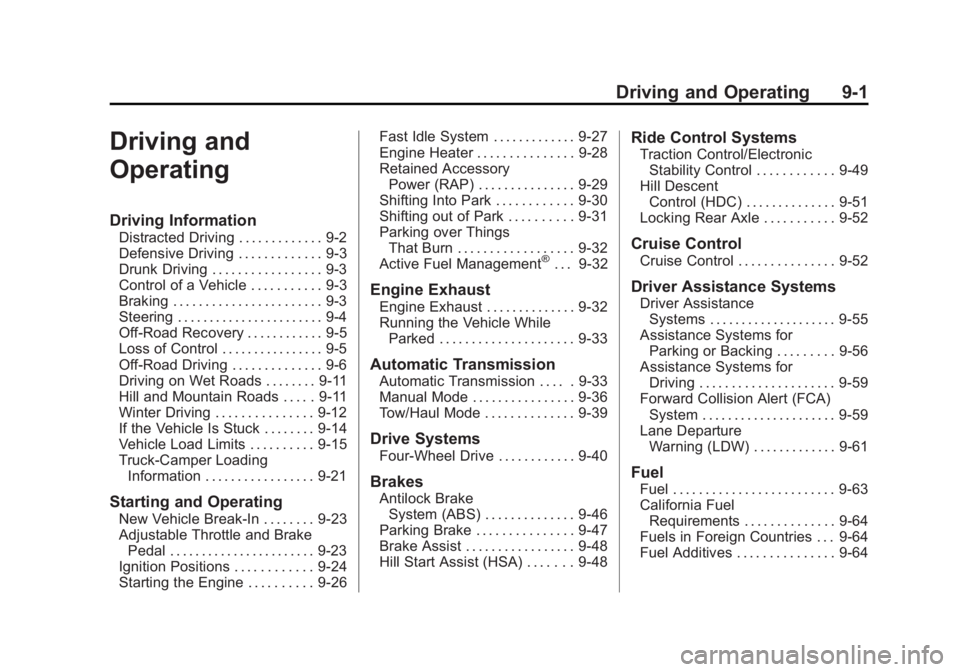
Driving and
Operating Driving Information Distracted Driving . . . . . . . . . . . . . 9-2
Defensive Driving . . . . . . . . . . . . . 9-3
Drunk Driving . . . . . . . . . . . . . . . . . 9-3
Control of a Vehicle . . . . . . . . . . . 9-3
Braking . . . . . . . . . . . . . . . . . . . . . . . 9-3
Steering . . . . . . . . . . . . . . . . . . . . . . . 9-4
Off-Road Recovery . . . . . . . . . . . . 9-5
Loss of Control . . . . . . . . . . . . . . . . 9-5
Off-Road Driving . . . . . . . . . . . . . . 9-6
Driving on Wet Roads . . . . . . . . 9-11
Hill and Mountain Roads . . . . . 9-11
Winter Driving . . . . . . . . . . . . . . . 9-12
If the Vehicle Is Stuck . . . . . . . . 9-14
Vehicle Load Limits . . . . . . . . . . 9-15
Truck-Camper Loading
Information . . . . . . . . . . . . . . . . . 9-21
Starting and Operating New Vehicle Break-In . . . . . . . . 9-23
Adjustable Throttle and Brake
Pedal . . . . . . . . . . . . . . . . . . . . . . . 9-23
Ignition Positions . . . . . . . . . . . . 9-24
Starting the Engine . . . . . . . . . . 9-26 Fast Idle System . . . . . . . . . . . . . 9-27
Engine Heater . . . . . . . . . . . . . . . 9-28
Retained Accessory
Power (RAP) . . . . . . . . . . . . . . . 9-29
Shifting Into Park . . . . . . . . . . . . 9-30
Shifting out of Park . . . . . . . . . . 9-31
Parking over Things
That Burn . . . . . . . . . . . . . . . . . . 9-32
Active Fuel Management ®
. . . 9-32
Engine Exhaust Engine Exhaust . . . . . . . . . . . . . . 9-32
Running the Vehicle While
Parked . . . . . . . . . . . . . . . . . . . . . 9-33
Automatic Transmission Automatic Transmission . . . . . 9-33
Manual Mode . . . . . . . . . . . . . . . . 9-36
Tow/Haul Mode . . . . . . . . . . . . . . 9-39
Drive Systems Four-Wheel Drive . . . . . . . . . . . . 9-40
Brakes Antilock Brake
System (ABS) . . . . . . . . . . . . . . 9-46
Parking Brake . . . . . . . . . . . . . . . 9-47
Brake Assist . . . . . . . . . . . . . . . . . 9-48
Hill Start Assist (HSA) . . . . . . . 9-48 Ride Control Systems Traction Control/Electronic
Stability Control . . . . . . . . . . . . 9-49
Hill Descent
Control (HDC) . . . . . . . . . . . . . . 9-51
Locking Rear Axle . . . . . . . . . . . 9-52
Cruise Control Cruise Control . . . . . . . . . . . . . . . 9-52
Driver Assistance Systems Driver Assistance
Systems . . . . . . . . . . . . . . . . . . . . 9-55
Assistance Systems for
Parking or Backing . . . . . . . . . 9-56
Assistance Systems for
Driving . . . . . . . . . . . . . . . . . . . . . 9-59
Forward Collision Alert (FCA)
System . . . . . . . . . . . . . . . . . . . . . 9-59
Lane Departure
Warning (LDW) . . . . . . . . . . . . . 9-61
Fuel Fuel . . . . . . . . . . . . . . . . . . . . . . . . . 9-63
California Fuel
Requirements . . . . . . . . . . . . . . 9-64
Fuels in Foreign Countries . . . 9-64
Fuel Additives . . . . . . . . . . . . . . . 9-64
Page 184 of 439

Black plate (5,1)GMC 2015i Sierra Denali Owner Manual (GMNA-Localizing-U.S./Canada/
Mexico-8431500) - 2015 - crc - 6/20/14
Driving and Operating 9-5.
Wait until the vehicle is out of
the curve before accelerating
gently into the straightaway.
Steering in Emergencies .
There are some situations when
steering around a problem may
be more effective than braking. .
Holding both sides of the
steering wheel allows you to turn
180 degrees without removing
a hand. .
Antilock Brake System (ABS)
allows steering while braking. Off-Road Recovery
The vehicle's right wheels can drop
off the edge of a road onto the
shoulder while driving. Follow
these tips:
1. Ease off the accelerator and
then, if there is nothing in the
way, steer the vehicle so that it
straddles the edge of the
pavement.
2. Turn the steering wheel about
one-eighth of a turn, until the
right front tire contacts the
pavement edge. 3. Turn the steering wheel to go
straight down the roadway.
Loss of Control Skidding There are three types of skids that
correspond to the vehicle's three
control systems: .
Braking Skid — wheels are not
rolling. .
Steering or Cornering Skid —
too much speed or steering in a
curve causes tires to slip and
lose cornering force. .
Acceleration Skid — too much
throttle causes the driving
wheels to spin.
Defensive drivers avoid most skids
by taking reasonable care suited to
existing conditions, and by not
overdriving those conditions. But
skids are always possible.