2015 GMC SIERRA DENALI sensor
[x] Cancel search: sensorPage 240 of 439

Black plate (61,1)GMC 2015i Sierra Denali Owner Manual (GMNA-Localizing-U.S./Canada/
Mexico-8431500) - 2015 - crc - 6/20/14
Driving and Operating 9-61Selecting the Alert Timing
The FCA control is on the steering
wheel. Press
[ to set the FCA
timing to Far, Medium, Near, or Off.
The first button press shows the
current setting on the DIC.
Additional button presses will
change this setting. The chosen
setting will remain until it is changed
and will affect the timing of both the
Collision Alert and the Tailgating
Alert features. The timing of both
alerts will vary based on vehicle
speed. The faster the vehicle speed,
the farther away the alert will occur. Consider traffic and weather
conditions when selecting the alert
timing. The range of selectable alert
timing may not be appropriate for all
drivers and driving conditions.
Unnecessary Alerts FCA may provide unnecessary
alerts for turning vehicles, vehicles
in other lanes, objects that are not
vehicles, or shadows. These alerts
are normal operation and the
vehicle does not need service.
Cleaning the System If the FCA system does not seem to
operate properly, cleaning the
outside of the windshield in front of
the rearview mirror, and cleaning the
front of the vehicle where radar
sensors are located, may correct
the issue. Lane Departure
Warning (LDW) If equipped, LDW may help avoid
crashes due to unintentional lane
departures. It may provide an alert if
the vehicle is crossing a lane
marking without using a turn signal
in that direction. LDW uses a
camera sensor to detect the lane
markings at speeds of 56 km/h
(35 mph) or greater.
{ WarningThe LDW system does not steer
the vehicle. The LDW system
may not: .
Provide enough time to avoid
a crash. .
Detect lane markings under
poor weather or visibility
conditions. This can occur if
the windshield or headlamps
are blocked by dirt, snow,
or ice; if they are not in
(Continued)
Page 241 of 439

Black plate (62,1)GMC 2015i Sierra Denali Owner Manual (GMNA-Localizing-U.S./Canada/
Mexico-8431500) - 2015 - crc - 6/20/14
9-62 Driving and Operating Warning (Continued) proper condition; or if the sun
shines directly into the
camera. .
Detect road edges. .
Detect lanes on winding or
hilly roads.
If LDW only detects lane
markings on one side of the road,
it will only warn you when
departing the lane on the side
where it has detected a lane
marking. Always keep your
attention on the road and
maintain proper vehicle position
within the lane, or vehicle
damage, injury, or death could
occur. Always keep the
windshield, headlamps, and
camera sensors clean and in
good repair. Do not use LDW in
bad weather conditions. How the System Works The LDW camera sensor is on the
windshield ahead of the rearview
mirror.
To turn LDW on and off, press
@ on
the center stack. The control
indicator will light when LDW is on.
When LDW is on,
@ is green if
LDW is available to warn of a lane
departure. If the vehicle crosses a
detected lane marking without using
the turn signal in that direction,
@changes to amber and flashes.
Additionally, there will be three
beeps, or the driver seat will pulse
three times on the right or left,
depending on the lane departure
direction. When the System Does Not
Seem to Work Properly The system may not detect lanes as
well when there are: .
Close vehicles ahead. .
Sudden lighting changes, such
as when driving through tunnels. .
Banked roads.
If the LDW system is not functioning
properly when lane markings are
clearly visible, cleaning the
windshield may help.
LDW alerts may occur due to tar
marks, shadows, cracks in the road,
temporary or construction lane
markings, or other road
imperfections. This is normal system
operation; the vehicle does not need
service. Turn LDW off if these
conditions continue.
Page 315 of 439

Black plate (44,1)GMC 2015i Sierra Denali Owner Manual (GMNA-Localizing-U.S./Canada/
Mexico-8431500) - 2015 - crc - 6/20/14
10-44 Vehicle Care Micro Fuses
(2 Pin) Usage
33 Back-up Lamps
34 Engine Control
Module Ignition
35 Air Conditioning
Compressor Clutch
36 Heated Mirrors
37 Upfitter 1
38 Center
High-Mounted
Stoplamp
39 Miscellaneous
Ignition
40 Transmission
Ignition
41 Fuel Pump 2
42 Cooling Fan Clutch
43 Engine Micro Fuses
(2 Pin) Usage
44 Fuel Injectors
A, Odd
45 Fuel Injectors
B, Even
46 Oxygen Sensor B
47 Throttle Control
48 Horn
49 Fog Lamp
50 Oxygen Sensor A
51 Engine Control
Module
52 Interior Heater
53 Spare
54 Aeroshutter
55 Front Washer Micro Fuses
(3 Pin) Usage
56 Air Conditioning
Compressor/
Battery Regulated
Voltage Control
57 Air Conditioning
Compressor
Module/
Battery Pack
58 Transmission
Control Module/
Engine Control
Module
59 Headlamps
Micro
Relays Usage
60 Fuel Pump
61 Upfitter 2
62 Upfitter 3
63 Upfitter 4
Page 332 of 439
Black plate (61,1)GMC 2015i Sierra Denali Owner Manual (GMNA-Localizing-U.S./Canada/
Mexico-8431500) - 2015 - crc - 6/20/14
Vehicle Care 10-61Return the tires to the
recommended cold tire inflation
pressure when high-speed driving
has ended. See Vehicle Load Limits
on page 9-15 and Tire Pressure on
page 10-59 .
Tire Pressure Monitor
System The Tire Pressure Monitor System
(TPMS) uses radio and sensor
technology to check tire pressure
levels. The TPMS sensors monitor
the air pressure in your tires and
transmit tire pressure readings to a
receiver located in the vehicle.
Each tire, including the spare (if
provided), should be checked
monthly when cold and inflated to
the inflation pressure recommended
by the vehicle manufacturer on the
vehicle placard or tire inflation
pressure label. (If your vehicle has
tires of a different size than the size
indicated on the vehicle placard or tire inflation pressure label, you
should determine the proper tire
inflation pressure for those tires.)
As an added safety feature, your
vehicle has been equipped with a
tire pressure monitoring system
(TPMS) that illuminates a low tire
pressure telltale when one or more
of your tires is significantly
under-inflated.
Accordingly, when the low tire
pressure telltale illuminates, you
should stop and check your tires as
soon as possible, and inflate them
to the proper pressure. Driving on a
significantly under-inflated tire
causes the tire to overheat and can
lead to tire failure. Under-inflation
also reduces fuel efficiency and tire
tread life, and may affect the
vehicle's handling and stopping
ability.
Please note that the TPMS is not a
substitute for proper tire
maintenance, and it is the driver's
responsibility to maintain correct tire
pressure, even if under-inflation has not reached the level to trigger
illumination of the TPMS low tire
pressure telltale.
Your vehicle has also been
equipped with a TPMS malfunction
indicator to indicate when the
system is not operating properly.
The TPMS malfunction indicator is
combined with the low tire pressure
telltale. When the system detects a
malfunction, the telltale will flash for
approximately one minute and then
remain continuously illuminated.
This sequence will continue upon
subsequent vehicle start-ups as
long as the malfunction exists.
When the malfunction indicator is
illuminated, the system may not be
able to detect or signal low tire
pressure as intended. TPMS
malfunctions may occur for a variety
of reasons, including the installation
of replacement or alternate tires or
wheels on the vehicle that prevent
the TPMS from functioning properly.
Always check the TPMS malfunction
telltale after replacing one or more
tires or wheels on your vehicle to
Page 333 of 439
Black plate (62,1)GMC 2015i Sierra Denali Owner Manual (GMNA-Localizing-U.S./Canada/
Mexico-8431500) - 2015 - crc - 6/20/14
10-62 Vehicle Care ensure that the replacement or
alternate tires and wheels allow the
TPMS to continue to function
properly.
See Tire Pressure Monitor
Operation on page 10-62 .
See Radio Frequency Statement on
page 13-12 .
Tire Pressure Monitor
Operation This vehicle may have a Tire
Pressure Monitor System (TPMS).
The TPMS is designed to warn the
driver when a low tire pressure
condition exists. TPMS sensors are
mounted onto each tire and wheel
assembly, excluding the spare tire
and wheel assembly. The TPMS
sensors monitor the air pressure in
the tires and transmit the tire
pressure readings to a receiver
located in the vehicle. When a low tire pressure condition
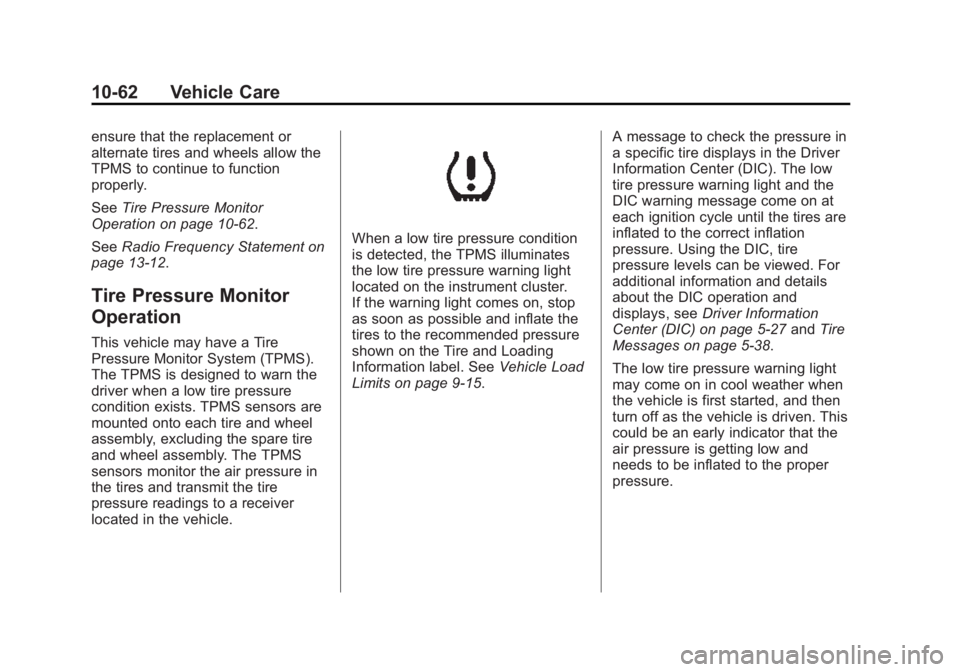
is detected, the TPMS illuminates
the low tire pressure warning light
located on the instrument cluster.
If the warning light comes on, stop
as soon as possible and inflate the
tires to the recommended pressure
shown on the Tire and Loading
Information label. See Vehicle Load
Limits on page 9-15 . A message to check the pressure in
a specific tire displays in the Driver
Information Center (DIC). The low
tire pressure warning light and the
DIC warning message come on at
each ignition cycle until the tires are
inflated to the correct inflation
pressure. Using the DIC, tire
pressure levels can be viewed. For
additional information and details
about the DIC operation and
displays, see Driver Information
Center (DIC) on page 5-27 and Tire
Messages on page 5-38 .
The low tire pressure warning light
may come on in cool weather when
the vehicle is first started, and then
turn off as the vehicle is driven. This
could be an early indicator that the
air pressure is getting low and
needs to be inflated to the proper
pressure.
Page 334 of 439
Black plate (63,1)GMC 2015i Sierra Denali Owner Manual (GMNA-Localizing-U.S./Canada/
Mexico-8431500) - 2015 - crc - 6/20/14
Vehicle Care 10-63A Tire and Loading Information label
shows the size of the original
equipment tires and the correct
inflation pressure for the tires when
they are cold. See Vehicle Load
Limits on page 9-15 , for an example
of the Tire and Loading Information
label and its location. Also see Tire
Pressure on page 10-59 .
The TPMS can warn about a low
tire pressure condition but it does
not replace normal tire
maintenance. See Tire Inspection
on page 10-65 , Tire Rotation on
page 10-65 , and Tires on
page 10-50 .
{ Caution
Tire sealant materials are not all
the same. A non-approved tire
sealant could damage the TPMS
sensors. TPMS sensor damage
caused by using an incorrect tire
sealant is not covered by the
vehicle warranty. Always use only
(Continued) Caution (Continued) the GM approved tire sealant
available through your dealer or
included in the vehicle.
TPMS Malfunction Light and
Message The TPMS will not function properly
if one or more of the TPMS sensors
are missing or inoperable. When the
system detects a malfunction, the
low tire pressure warning light
flashes for about one minute and
then stays on for the remainder of
the ignition cycle. A DIC warning
message also displays. The
malfunction light and DIC warning
message come on at each ignition
cycle until the problem is corrected.
Some of the conditions that can
cause these to come on are: .
One of the road tires has been
replaced with the spare tire. The
spare tire does not have a
TPMS sensor. The malfunction light and the DIC message
should go off after the road tire
is replaced and the sensor
matching process is performed
successfully. See “ TPMS Sensor
Matching Process ” later in this
section. .
The TPMS sensor matching
process was not done or not
completed successfully after
rotating the tires. The
malfunction light and the DIC
message should go off after
successfully completing the
sensor matching process. See
“ TPMS Sensor Matching
Process ” later in this section. .
One or more TPMS sensors are
missing or damaged. The
malfunction light and the DIC
message should go off when the
TPMS sensors are installed and
the sensor matching process is
performed successfully. See
your dealer for service.
Page 335 of 439

Black plate (64,1)GMC 2015i Sierra Denali Owner Manual (GMNA-Localizing-U.S./Canada/
Mexico-8431500) - 2015 - crc - 6/20/14
10-64 Vehicle Care .
Replacement tires or wheels do
not match the original equipment
tires or wheels. Tires and wheels
other than those recommended
could prevent the TPMS from
functioning properly. See Buying
New Tires on page 10-69 ..
Operating electronic devices or
being near facilities using radio
wave frequencies similar to the
TPMS could cause the TPMS
sensors to malfunction.
If the TPMS is not functioning
properly, it cannot detect or signal a
low tire condition. See your dealer
for service if the TPMS malfunction
light and DIC message come on
and stay on.
TPMS Sensor Matching
Process
Each TPMS sensor has a unique
identification code. The identification
code needs to be matched to a new
tire/wheel position after rotating the
vehicle ’ s tires or replacing one or
more of the TPMS sensors. Also,
the TPMS sensor matching process should be performed after replacing
a spare tire with a road tire
containing the TPMS sensor. The
malfunction light and the DIC
message should go off at the next
ignition cycle. The sensors are
matched to the tire/wheel positions,
using a TPMS relearn tool, in the
following order: driver side front tire,
passenger side front tire, passenger
side rear tire, and driver side rear.
See your dealer for service or to
purchase a relearn tool. A TPMS
relearn tool can also be purchased.
See Tire Pressure Monitor
Sensor Activation Tool at
www.gmtoolsandequipment.com or
call 1-800-GM TOOLS
(1-800-468-6657).
There are two minutes to match the
first tire/wheel position, and
five minutes overall to match all four
tire/wheel positions. If it takes
longer, the matching process stops
and must be restarted. The TPMS sensor matching
process is:
1. Set the parking brake.
2. Turn the ignition to ON/RUN with
the engine off.
3. Make sure the Tire Pressure info
page option is turned on. The
info pages on the DIC can be
turned on and off through the
Settings menu. See Driver
Information Center (DIC) on
page 5-27 .
4. Use the DIC controls on the right
side of the steering wheel to
scroll to the Tire Pressure
screen under the DIC info page.
5. Press and hold the
V (Set/
Reset) button located in the
center of the DIC controls.
The horn sounds twice to signal
the receiver is in relearn mode
and the TIRE LEARNING
ACTIVE message displays on
the DIC screen.
Page 336 of 439

Black plate (65,1)GMC 2015i Sierra Denali Owner Manual (GMNA-Localizing-U.S./Canada/
Mexico-8431500) - 2015 - crc - 6/20/14
Vehicle Care 10-656. Start with the driver side
front tire.
7. Place the relearn tool against
the tire sidewall, near the valve
stem. Then press the button to
activate the TPMS sensor.
A horn chirp confirms that the
sensor identification code has
been matched to this tire and
wheel position.
8. Proceed to the passenger side
front tire, and repeat the
procedure in Step 7.
9. Proceed to the passenger side
rear tire, and repeat the
procedure in Step 7.
10. Proceed to the driver side rear
tire, and repeat the procedure
in Step 7. The horn sounds two
times to indicate the sensor
identification code has been
matched to the driver side rear
tire, and the TPMS sensor
matching process is no longer
active. The TIRE LEARNING
ACTIVE message on the DIC
display screen goes off. 11. Turn the ignition switch to
LOCK/OFF.
12. Set all four tires to the
recommended air pressure
level as indicated on the Tire
and Loading Information label.
Tire Inspection We recommend that the tires,
including the spare tire, if the
vehicle has one, be inspected
for signs of wear or damage at
least once a month.
Replace the tire if: .
The indicators at three or
more places around the tire
can be seen. .
There is cord or fabric
showing through the tire's
rubber. .
The tread or sidewall is
cracked, cut, or snagged
deep enough to show cord or
fabric. .
The tire has a bump, bulge,
or split. .
The tire has a puncture, cut,
or other damage that cannot
be repaired well because of
the size or location of the
damage.
Tire Rotation Tires should be rotated every
12 000 km (7,500 mi). See
Maintenance Schedule on
page 11-3 .
Tires are rotated to achieve a
uniform wear for all tires. The
first rotation is the most
important.
Anytime unusual wear is
noticed, rotate the tires as soon
as possible, check for proper tire
inflation pressure, and check for
damaged tires or wheels. If the
unusual wear continues after the
rotation, check the wheel
alignment.