2015 GMC CANYON ECU
[x] Cancel search: ECUPage 343 of 433
Black plate (62,1)GMC Canyon Owner Manual (GMNA-Localizing-U.S./Canada-7587000) -
2015 - CRC - 3/17/15
10-62 Vehicle Care
Used Replacement Wheels
{Warning
Replacing a wheel with a used
one is dangerous. How it has
been used or how far it has been
driven may be unknown. It could
fail suddenly and cause a crash.
When replacing wheels, use a
new GM original equipment
wheel.
Tire Chains
{Warning
If the vehicle has 255/65R17 AT,
265/60R18 or 265/70R16 size
tires, do not use tire chains. They
can damage the vehicle because
there is not enough clearance.
Tire chains used on a vehicle
without the proper amount of
clearance can cause damage to(Continued)
Warning (Continued)
the brakes, suspension, or other
vehicle parts. The area damaged
by the tire chains could cause you
to lose control of the vehicle and
you or others may be injured in a
crash.
Use another type of traction
device only if its manufacturer
recommends it for use on the
vehicle and tire size combination
and road conditions. Follow that
manufacturer's instructions. To
help avoid damage to the vehicle,
drive slowly, readjust, or remove
the device if it is contacting the
vehicle, and do not spin the
vehicle's wheels.
If you do find traction devices that
will fit, install them on the rear
tires.
{Caution
If the vehicle has a tire size other
than 255/65R17 AT, 265/60R18 or
265/70R16, use tire chains only
where legal and only when you
must. Use chains that are the
proper size for the tires. Install
them on the tires of the rear axle.
Do not use chains on the tires of
the front axle. Tighten them as
tightly as possible with the ends
securely fastened. Drive slowly
and follow the chain
manufacturer's instructions. If you
can hear the chains contacting
the vehicle, stop and retighten
them. If the contact continues,
slow down until it stops. Driving
too fast or spinning the wheels
with chains on will damage the
vehicle.
Page 349 of 433
Black plate (68,1)GMC Canyon Owner Manual (GMNA-Localizing-U.S./Canada-7587000) -
2015 - CRC - 3/17/15
10-68 Vehicle Care
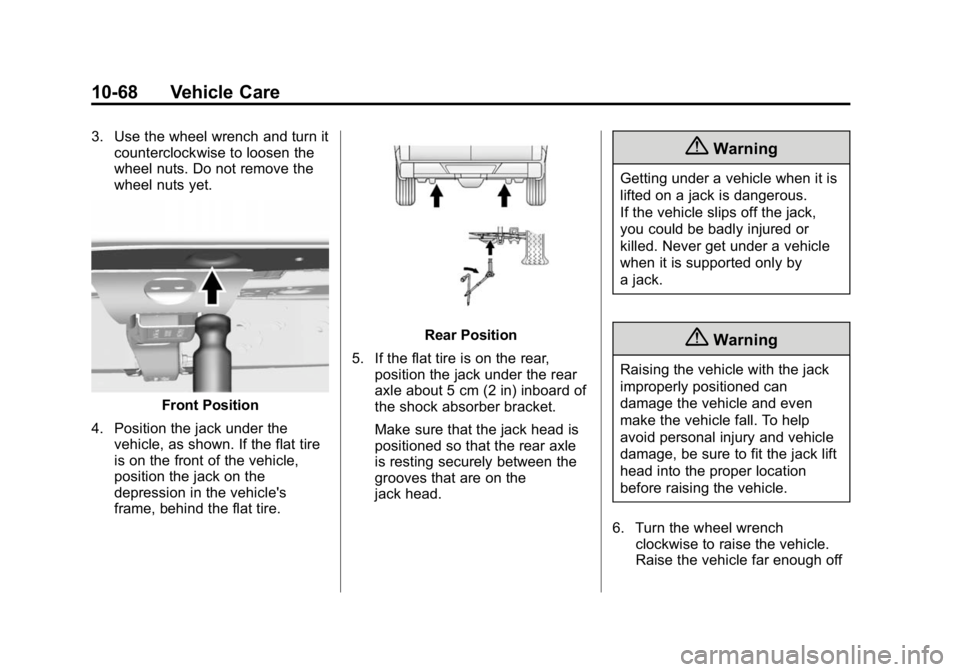
3. Use the wheel wrench and turn itcounterclockwise to loosen the
wheel nuts. Do not remove the
wheel nuts yet.
Front Position
4. Position the jack under the vehicle, as shown. If the flat tire
is on the front of the vehicle,
position the jack on the
depression in the vehicle's
frame, behind the flat tire.
Rear Position
5. If the flat tire is on the rear, position the jack under the rear
axle about 5 cm (2 in) inboard of
the shock absorber bracket.
Make sure that the jack head is
positioned so that the rear axle
is resting securely between the
grooves that are on the
jack head.
{Warning
Getting under a vehicle when it is
lifted on a jack is dangerous.
If the vehicle slips off the jack,
you could be badly injured or
killed. Never get under a vehicle
when it is supported only by
a jack.
{Warning
Raising the vehicle with the jack
improperly positioned can
damage the vehicle and even
make the vehicle fall. To help
avoid personal injury and vehicle
damage, be sure to fit the jack lift
head into the proper location
before raising the vehicle.
6. Turn the wheel wrench clockwise to raise the vehicle.
Raise the vehicle far enough off
Page 353 of 433
Black plate (72,1)GMC Canyon Owner Manual (GMNA-Localizing-U.S./Canada-7587000) -
2015 - CRC - 3/17/15
10-72 Vehicle Care
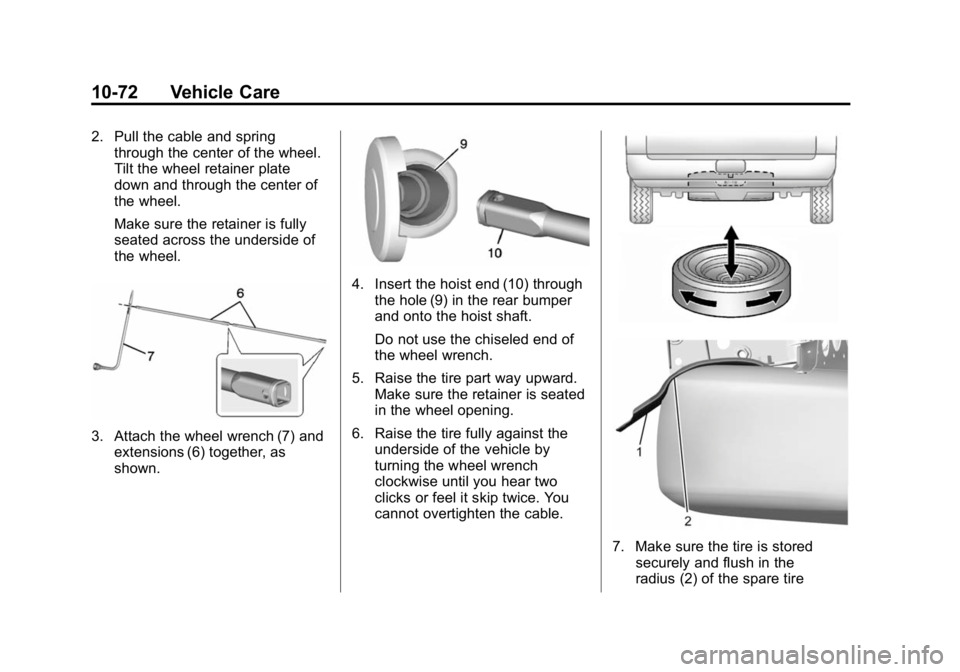
2. Pull the cable and springthrough the center of the wheel.
Tilt the wheel retainer plate
down and through the center of
the wheel.
Make sure the retainer is fully
seated across the underside of
the wheel.
3. Attach the wheel wrench (7) and
extensions (6) together, as
shown.
4. Insert the hoist end (10) throughthe hole (9) in the rear bumper
and onto the hoist shaft.
Do not use the chiseled end of
the wheel wrench.
5. Raise the tire part way upward. Make sure the retainer is seated
in the wheel opening.
6. Raise the tire fully against the underside of the vehicle by
turning the wheel wrench
clockwise until you hear two
clicks or feel it skip twice. You
cannot overtighten the cable.
7. Make sure the tire is stored
securely and flush in the
radius (2) of the spare tire
Page 354 of 433
Black plate (73,1)GMC Canyon Owner Manual (GMNA-Localizing-U.S./Canada-7587000) -
2015 - CRC - 3/17/15
Vehicle Care 10-73
support bracket (1). Push, pull,
and then try to turn the tire. If the
tire moves, use the wheel
wrench to tighten the cable.
8. Reinstall the spare tire lock, if the vehicle has one.
To store the jack and tools, reverse
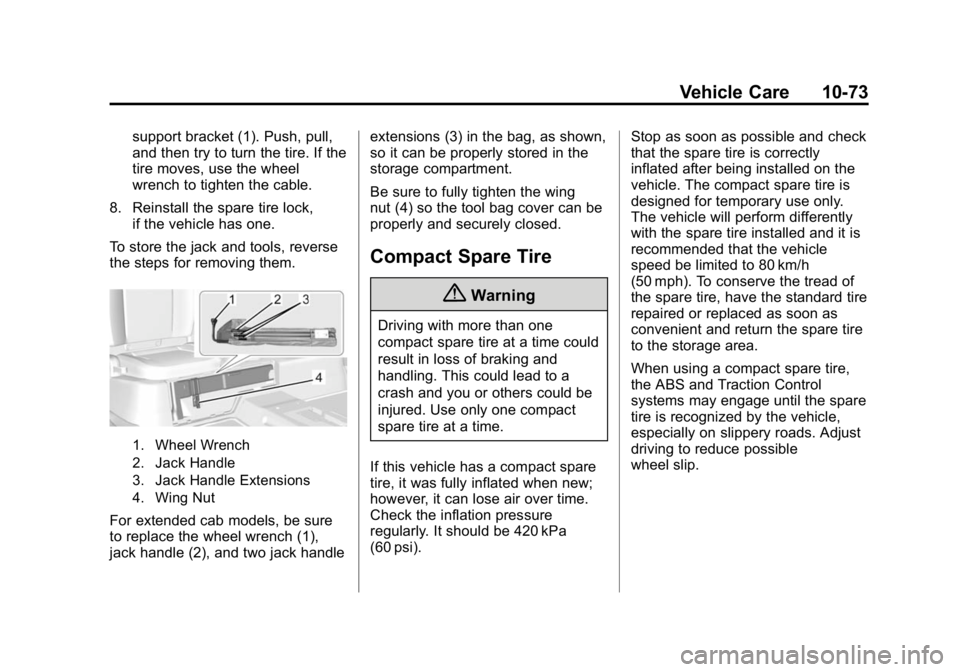
the steps for removing them.
1. Wheel Wrench
2. Jack Handle
3. Jack Handle Extensions
4. Wing Nut
For extended cab models, be sure
to replace the wheel wrench (1),
jack handle (2), and two jack handle extensions (3) in the bag, as shown,
so it can be properly stored in the
storage compartment.
Be sure to fully tighten the wing
nut (4) so the tool bag cover can be
properly and securely closed.
Compact Spare Tire
{Warning
Driving with more than one
compact spare tire at a time could
result in loss of braking and
handling. This could lead to a
crash and you or others could be
injured. Use only one compact
spare tire at a time.
If this vehicle has a compact spare
tire, it was fully inflated when new;
however, it can lose air over time.
Check the inflation pressure
regularly. It should be 420 kPa
(60 psi). Stop as soon as possible and check
that the spare tire is correctly
inflated after being installed on the
vehicle. The compact spare tire is
designed for temporary use only.
The vehicle will perform differently
with the spare tire installed and it is
recommended that the vehicle
speed be limited to 80 km/h
(50 mph). To conserve the tread of
the spare tire, have the standard tire
repaired or replaced as soon as
convenient and return the spare tire
to the storage area.
When using a compact spare tire,
the ABS and Traction Control
systems may engage until the spare
tire is recognized by the vehicle,
especially on slippery roads. Adjust
driving to reduce possible
wheel slip.
Page 360 of 433
Black plate (79,1)GMC Canyon Owner Manual (GMNA-Localizing-U.S./Canada-7587000) -
2015 - CRC - 3/17/15
Vehicle Care 10-79
Dinghy Towing
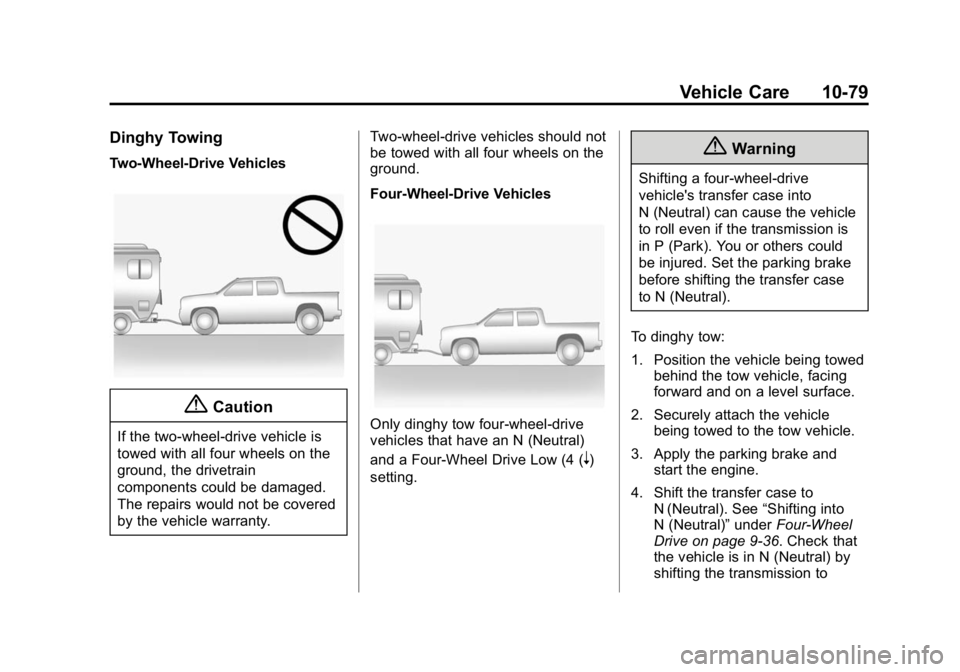
Two-Wheel-Drive Vehicles
{Caution
If the two-wheel-drive vehicle is
towed with all four wheels on the
ground, the drivetrain
components could be damaged.
The repairs would not be covered
by the vehicle warranty.Two-wheel-drive vehicles should not
be towed with all four wheels on the
ground.
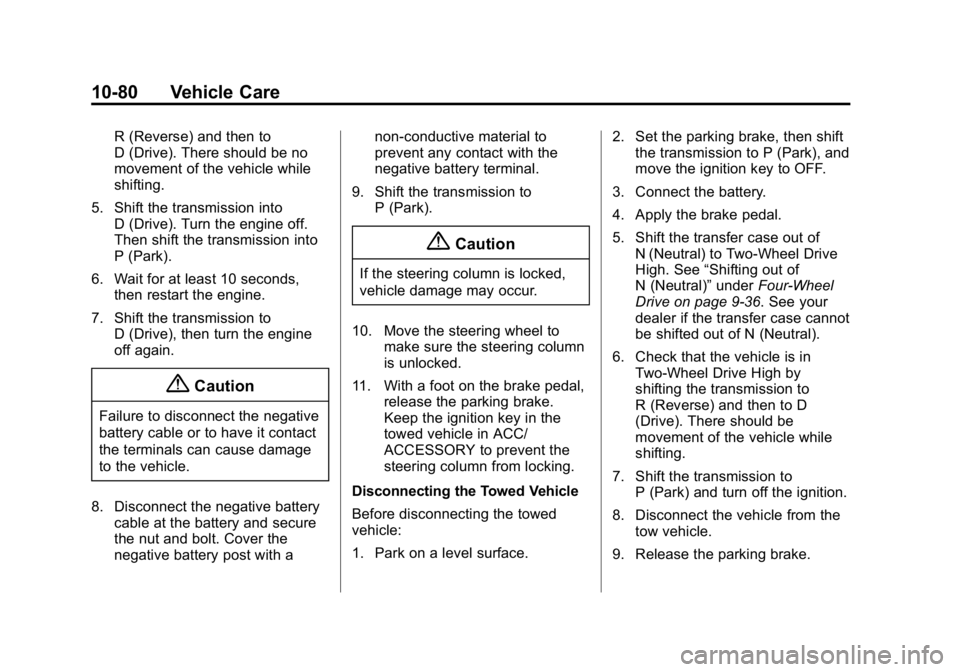
Four-Wheel-Drive VehiclesOnly dinghy tow four-wheel-drive
vehicles that have an N (Neutral)
and a Four-Wheel Drive Low (4 (
n)
setting.
{Warning
Shifting a four-wheel-drive
vehicle's transfer case into
N (Neutral) can cause the vehicle
to roll even if the transmission is
in P (Park). You or others could
be injured. Set the parking brake
before shifting the transfer case
to N (Neutral).
To dinghy tow:
1. Position the vehicle being towed behind the tow vehicle, facing
forward and on a level surface.
2. Securely attach the vehicle being towed to the tow vehicle.
3. Apply the parking brake and start the engine.
4. Shift the transfer case to N (Neutral). See “Shifting into
N (Neutral)” underFour-Wheel
Drive on page 9-36. Check that
the vehicle is in N (Neutral) by
shifting the transmission to
Page 361 of 433
Black plate (80,1)GMC Canyon Owner Manual (GMNA-Localizing-U.S./Canada-7587000) -
2015 - CRC - 3/17/15
10-80 Vehicle Care
R (Reverse) and then to
D (Drive). There should be no
movement of the vehicle while
shifting.
5. Shift the transmission into D (Drive). Turn the engine off.
Then shift the transmission into
P (Park).
6. Wait for at least 10 seconds, then restart the engine.
7. Shift the transmission to D (Drive), then turn the engine
off again.
{Caution
Failure to disconnect the negative
battery cable or to have it contact
the terminals can cause damage
to the vehicle.
8. Disconnect the negative battery cable at the battery and secure
the nut and bolt. Cover the
negative battery post with a non-conductive material to
prevent any contact with the
negative battery terminal.
9. Shift the transmission to P (Park).
{Caution
If the steering column is locked,
vehicle damage may occur.
10. Move the steering wheel to make sure the steering column
is unlocked.
11. With a foot on the brake pedal, release the parking brake.
Keep the ignition key in the
towed vehicle in ACC/
ACCESSORY to prevent the
steering column from locking.
Disconnecting the Towed Vehicle
Before disconnecting the towed
vehicle:
1. Park on a level surface. 2. Set the parking brake, then shift
the transmission to P (Park), and
move the ignition key to OFF.
3. Connect the battery.
4. Apply the brake pedal.
5. Shift the transfer case out of N (Neutral) to Two-Wheel Drive
High. See “Shifting out of
N (Neutral)” underFour-Wheel
Drive on page 9-36. See your
dealer if the transfer case cannot
be shifted out of N (Neutral).
6. Check that the vehicle is in Two-Wheel Drive High by
shifting the transmission to
R (Reverse) and then to D
(Drive). There should be
movement of the vehicle while
shifting.
7. Shift the transmission to P (Park) and turn off the ignition.
8. Disconnect the vehicle from the tow vehicle.
9. Release the parking brake.
Page 363 of 433
Black plate (82,1)GMC Canyon Owner Manual (GMNA-Localizing-U.S./Canada-7587000) -
2015 - CRC - 3/17/15
10-82 Vehicle Care
{Warning
Shifting a four-wheel-drive
vehicle's transfer case into
N (Neutral) can cause the vehicle
to roll even if the transmission is
in P (Park). You or others could
be injured. Set the parking brake
before shifting the transfer case
to N (Neutral).
5. Use a clamping device designed for towing to ensure that the
front wheels are locked into the
straight position.
6. Secure the vehicle to the dolly following the manufacturer's
instructions.
7. Shift the transfer case to N (Neutral). See “Shifting into
N (Neutral)” underFour-Wheel
Drive on page 9-36 for the
proper procedure. 8. Release the parking brake only
after the vehicle being towed is
firmly attached to the tow
vehicle.
9. Turn the ignition to LOCK/OFF.
Rear Towing (Rear Wheels Off
the Ground)
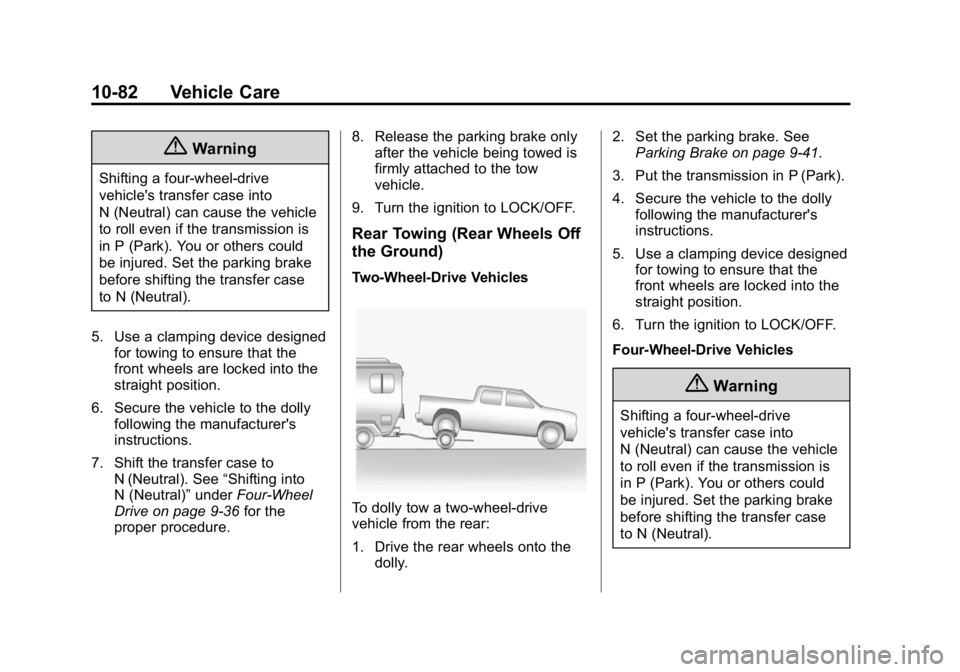
Two-Wheel-Drive Vehicles
To dolly tow a two-wheel-drive
vehicle from the rear:
1. Drive the rear wheels onto the dolly. 2. Set the parking brake. See
Parking Brake on page 9-41.
3. Put the transmission in P (Park).
4. Secure the vehicle to the dolly following the manufacturer's
instructions.
5. Use a clamping device designed for towing to ensure that the
front wheels are locked into the
straight position.
6. Turn the ignition to LOCK/OFF.
Four-Wheel-Drive Vehicles
{Warning
Shifting a four-wheel-drive
vehicle's transfer case into
N (Neutral) can cause the vehicle
to roll even if the transmission is
in P (Park). You or others could
be injured. Set the parking brake
before shifting the transfer case
to N (Neutral).
Page 364 of 433
Black plate (83,1)GMC Canyon Owner Manual (GMNA-Localizing-U.S./Canada-7587000) -
2015 - CRC - 3/17/15
Vehicle Care 10-83
To dolly tow a four-wheel-drive
vehicle from the rear:
1. Drive the rear wheels onto thedolly.
2. Set the parking brake. See Parking Brake on page 9-41.
3. Put the transmission in P (Park).
4. Secure the vehicle to the dolly following the manufacturer's
instructions.
5. Use a clamping device designed for towing to ensure that the
front wheels are locked into the
straight position.
6. Shift the transfer case to N (Neutral). See “Shifting into
N (Neutral)” underFour-Wheel
Drive on page 9-36 for the
proper procedure.
7. Turn the ignition to LOCK/OFF.Appearance Care
Exterior Care
Locks
Locks are lubricated at the factory.
Use a de-icing agent only when
absolutely necessary, and have the
locks greased after using. See
Recommended Fluids and
Lubricants on page 11-13.
Washing the Vehicle
To preserve the vehicle's finish,
wash it often and out of direct
sunlight.
{Caution
Do not use petroleum-based,
acidic, or abrasive cleaning
agents as they can damage the
vehicle's paint, metal, or plastic
parts. If damage occurs, it would
not be covered by the vehicle
warranty. Approved cleaning (Continued)
Caution (Continued)
products can be obtained from
your dealer. Follow all
manufacturer directions regarding
correct product usage, necessary
safety precautions, and
appropriate disposal of any
vehicle care product.
{Caution
Avoid using high-pressure
washes closer than 30 cm (12 in)
to the surface of the vehicle. Use
of power washers exceeding
8,274 kPa (1,200 psi) can result
in damage or removal of paint
and decals.
This symbol
eis on any
underhood compartment electrical
center that should not be power