2015 GMC CANYON horn
[x] Cancel search: hornPage 317 of 433
Black plate (36,1)GMC Canyon Owner Manual (GMNA-Localizing-U.S./Canada-7587000) -
2015 - CRC - 3/17/15
10-36 Vehicle Care
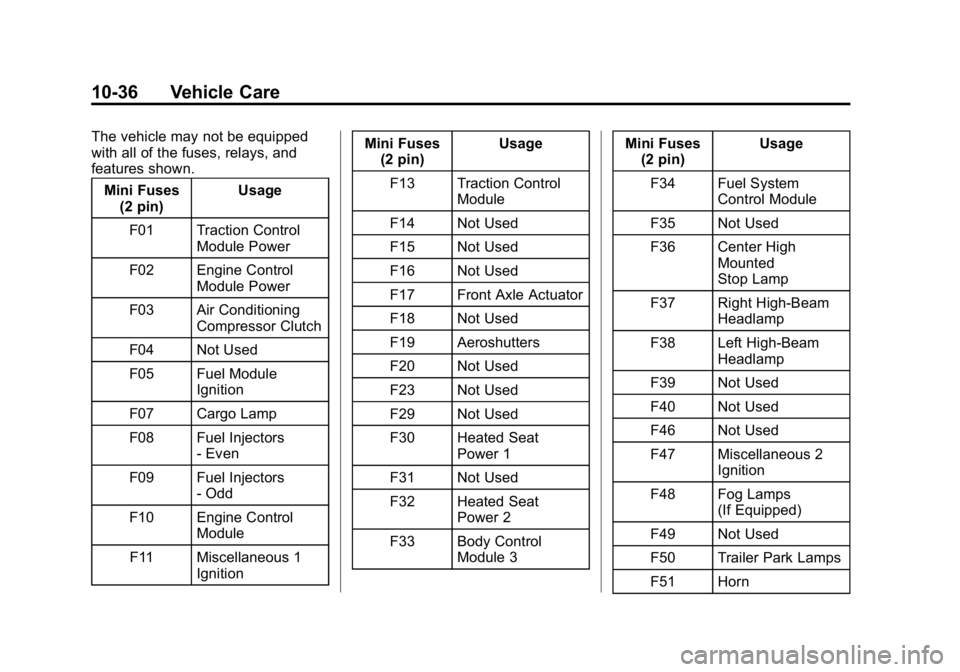
The vehicle may not be equipped
with all of the fuses, relays, and
features shown.Mini Fuses (2 pin) Usage
F01 Traction Control Module Power
F02 Engine Control Module Power
F03 Air Conditioning Compressor Clutch
F04 Not Used
F05 Fuel Module Ignition
F07 Cargo Lamp
F08 Fuel Injectors - Even
F09 Fuel Injectors - Odd
F10 Engine Control Module
F11 Miscellaneous 1 Ignition Mini Fuses
(2 pin) Usage
F13 Traction Control Module
F14 Not Used
F15 Not Used
F16 Not Used
F17 Front Axle Actuator
F18 Not Used
F19 Aeroshutters
F20 Not Used
F23 Not Used
F29 Not Used
F30 Heated Seat Power 1
F31 Not Used
F32 Heated Seat Power 2
F33 Body Control Module 3 Mini Fuses
(2 pin) Usage
F34 Fuel System Control Module
F35 Not Used
F36 Center High Mounted
Stop Lamp
F37 Right High-Beam Headlamp
F38 Left High-Beam Headlamp
F39 Not Used
F40 Not Used
F46 Not Used
F47 Miscellaneous 2 Ignition
F48 Fog Lamps (If Equipped)
F49 Not Used
F50 Trailer Park Lamps
F51 Horn
Page 335 of 433

Black plate (54,1)GMC Canyon Owner Manual (GMNA-Localizing-U.S./Canada-7587000) -
2015 - CRC - 3/17/15
10-54 Vehicle Care
3. If the vehicle has an uplevelDIC, make sure the Tire
Pressure info page option is
turned on. The info pages on the
DIC can be turned on and off
through the Settings menu. See
Driver Information Center (DIC)
(Base Level) on page 5-27 or
Driver Information Center (DIC)
(Uplevel) on page 5-29.
4. If the vehicle has an uplevel DIC, use the DIC controls on the
right side of the steering wheel
to scroll to the Tire Pressure
screen under the DIC info page.
If the vehicle has a base level
DIC, use the MENU button to
select the Vehicle Information
menu in the DIC. Use the
thumbwheel to scroll to the Tire
Pressure Menu item screen. 5. If the vehicle has an uplevel
DIC, press and hold the
V(Set/
Reset) button located in the
center of the DIC controls.
If the vehicle has a base level
DIC, press the SET/CLR button
to begin the sensor matching
process.
A message asking if the process
should begin should appear.
Press the SET/CLR button again
to confirm the selection.
The horn sounds twice to signal
the receiver is in relearn mode
and the TIRE LEARNING
ACTIVE message displays on
the DIC screen.
6. Start with the driver side front tire.
7. Place the relearn tool against the tire sidewall, near the valve
stem. Then press the button to
activate the TPMS sensor.
A horn chirp confirms that the sensor identification code has
been matched to this tire and
wheel position.
8. Proceed to the passenger side front tire, and repeat the
procedure in Step 7.
9. Proceed to the passenger side rear tire, and repeat the
procedure in Step 7.
10. Proceed to the driver side rear tire, and repeat the procedure
in Step 7. The horn sounds two
times to indicate the sensor
identification code has been
matched to the driver side rear
tire, and the TPMS sensor
matching process is no longer
active. The TIRE LEARNING
ACTIVE message on the DIC
display screen goes off.
11. Turn the ignition switch to LOCK/OFF.
12. Set all four tires to the recommended air pressure
level as indicated on the Tire
and Loading Information label.
Page 413 of 433
Black plate (4,1)GMC Canyon Owner Manual (GMNA-Localizing-U.S./Canada-7587000) -
2015 - CRC - 3/17/15
14-4 OnStar
navigation system in the vehicle (if
equipped). After the call ends, press
the“Go” button on the navigation
screen to begin driving directions.
If directions are downloaded to the
navigation system, the route can
only be canceled through the
navigation system.
Destinations can also be
downloaded on the go. For
information about eNav or
Destination Download, see
www.onstar.com (U.S.) or
www.onstar.ca (Canada).
Connections
The required specific Onstar
subscription plan includes the
services that follow to help
customers stay connected.
For coverage maps, see
www.onstar.com (U.S.) or
www.onstar.ca (Canada). WiFi Connectivity (If Equipped)
The vehicle has a WiFi hotspot that
provides a high-speed, wireless
Internet connection to connect
multiple mobile devices (data plan
required).
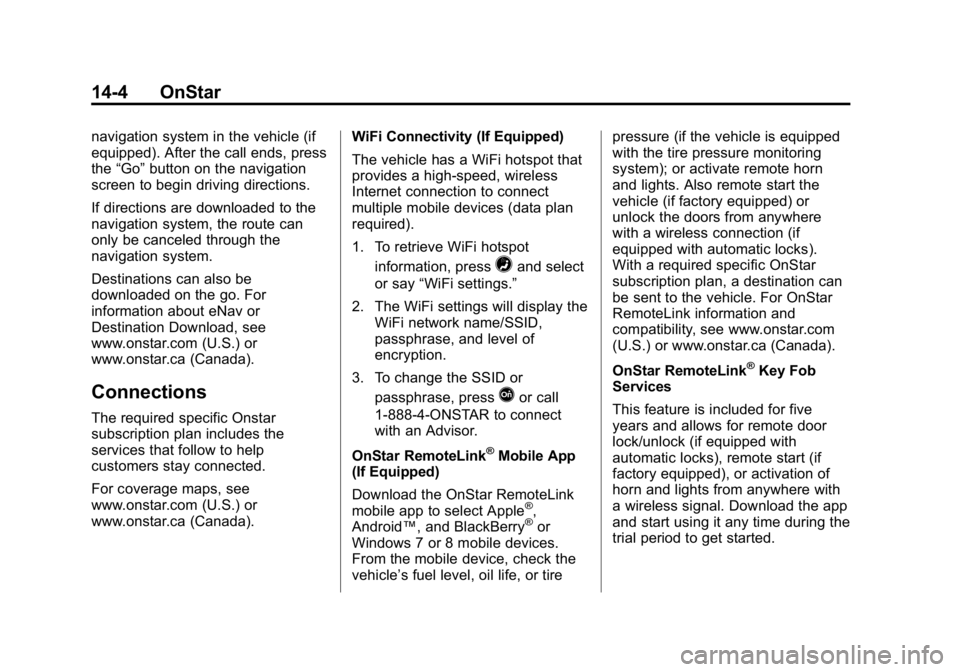
1. To retrieve WiFi hotspot
information, press
=and select
or say “WiFi settings.”
2. The WiFi settings will display the WiFi network name/SSID,
passphrase, and level of
encryption.
3. To change the SSID or passphrase, press
Qor call
1-888-4-ONSTAR to connect
with an Advisor.
OnStar RemoteLink
®Mobile App
(If Equipped)
Download the OnStar RemoteLink
mobile app to select Apple
®,
Android™, and BlackBerry®or
Windows 7 or 8 mobile devices.
From the mobile device, check the
vehicle’s fuel level, oil life, or tire pressure (if the vehicle is equipped
with the tire pressure monitoring
system); or activate remote horn
and lights. Also remote start the
vehicle (if factory equipped) or
unlock the doors from anywhere
with a wireless connection (if
equipped with automatic locks).
With a required specific OnStar
subscription plan, a destination can
be sent to the vehicle. For OnStar
RemoteLink information and
compatibility, see www.onstar.com
(U.S.) or www.onstar.ca (Canada).
OnStar RemoteLink
®Key Fob
Services
This feature is included for five
years and allows for remote door
lock/unlock (if equipped with
automatic locks), remote start (if
factory equipped), or activation of
horn and lights from anywhere with
a wireless signal. Download the app
and start using it any time during the
trial period to get started.
Page 425 of 433

Black plate (6,1)GMC Canyon Owner Manual (GMNA-Localizing-U.S./Canada-7587000) -
2015 - CRC - 3/17/15
i-6 INDEX
Heated Mirrors . . . . . . . . . . . . . . . . . 2-15
HeaterEngine Coolant . . . . . . . . . . . . . . . 9-25
Heating and Air Conditioning . . . . . . . . . . . . . . . 8-1, 8-3
High-Beam On Light . . . . . . . . . . . 5-25
Hill and Mountain Roads . . . . . . . 9-11
Hill Descent Control (HDC) . . . . 9-45
Hill Descent Control Light . . . . . . 5-22
Hill Start Assist (HSA) . . . . . . . . . 9-42
Home Page . . . . . . . . . . . . . . . . . . . . . 7-4
Hood . . . . . . . . . . . . . . . . . . . . . . . . . . 10-5
Horn . . . . . . . . . . . . . . . . . . . . . . . . . . . . 5-3
How to Wear Safety Belts Properly . . . . . . . . . . . . . . . . . . . . . . 3-10
Hydraulic Clutch . . . . . . . . . . . . . . 10-13
I
Ignition Positions . . . . . . . . . . . . . . 9-22
Ignition Transmission Lock
Check . . . . . . . . . . . . . . . . . . . . . . . 10-28
Immobilizer . . . . . . . . . . . . . . . . . . . . 2-13
Indicator Vehicle Ahead . . . . . . . . . . . . . . . . 5-22
Infants and Young Children, Restraints . . . . . . . . . . . . . . . . . . . . 3-32 Infotainment . . . . . . . . . . . . . . . . . . . . 7-1
Infotainment System . . . . . . . . . . 13-15
Instrument Cluster . . . . . . . . 5-8, 5-10
Interior Rearview Mirrors . . . . . . . 2-17
Internet Radio
Pandora . . . . . . . . . . . . . . . . . . . . . . . 7-9
Introduction . . . . . . . . . . . . . . . . . . . . . . . iii
J
Jack
Auxiliary . . . . . . . . . . . . . . . . . . . . . . 7-15
Jump Starting - North America . . . . . . . . . . . . . . . . . . . . . 10-75
K
Key and Lock Messages . . . . . . . 5-36
Keyless Entry
Remote (RKE) System . . . . . . . . 2-4
Keys . . . . . . . . . . . . . . . . . . . . . . . . . . . . 2-1
L
Labeling, Tire Sidewall . . . . . . . . 10-43 Lamps
Cargo . . . . . . . . . . . . . . . . . . . . . . . . . . 6-6
Daytime Running (DRL) . . . . . . . 6-3
Dome . . . . . . . . . . . . . . . . . . . . . . . . . . 6-6
Exterior Controls . . . . . . . . . . . . . . . 6-1
Exterior Lamps OffReminder . . . . . . . . . . . . . . . . . . . . 6-2
Fog . . . . . . . . . . . . . . . . . . . . . . . . . . . . 6-5
Malfunction Indicator . . . . . . . . . 5-18
Messages . . . . . . . . . . . . . . . . . . . . 5-36
On Reminder . . . . . . . . . . . . . . . . . 5-26
Reading . . . . . . . . . . . . . . . . . . . . . . . 6-7
Lane Departure Warning (LDW) . . . . . . . . . . . . . . . 9-52
Lane Departure Warning Light . . . . . . . . . . . . . . . . . . . . . . . . . 5-22
Lap-Shoulder Belt . . . . . . . . . . . . . 3-11
LATCH System Replacing Parts after aCrash . . . . . . . . . . . . . . . . . . . . . . . 3-53
LATCH, Lower Anchors and
Tethers for Children . . . . . . . . . . 3-38
Light Hill Decent Control . . . . . . . . . . . 5-22