2015 FORD TRANSIT CONNECT ignition
[x] Cancel search: ignitionPage 81 of 428

Note:
You must start the relearning process
within 30 seconds of switching the ignition
on.
In case the sun shade no longer opens or
closes properly, follow this relearning
procedure:
1. Press the front of the control to the first
action point twice and release it within
two seconds.
2. Press the rear of the control to the first
action point twice and release it within
two seconds.
3. Press and hold the front of the control
to the first action point, until the sun
shade fully opens.
4. Press and hold the rear of the control to the first action point, until the sun
shade fully closes.
If you do not complete Step 2 within 15
seconds of Step 1, the relearning function
end. Switch the ignition off, wait for
another 30 seconds and then switch the
ignition back on again. Start the procedure
again from the beginning.
Confirm that relearning was successful by
opening and closing the sun shade.
78
Transit Connect (CHC) Canada/United States of America, enUSA, First Printing Windows and Mirrors
Page 83 of 428

If the needle enters the red section, the
engine is overheating. Stop the engine,
switch the ignition off and determine the
cause once the engine has cooled down.
See Engine Coolant Check (page 190).
Note: Do not restart the engine until the
cause of overheating has been resolved.
Fuel Gauge
Switch the ignition on. The fuel gauge will
indicate approximately how much remains
in the fuel tank. The fuel gauge may vary
slightly when your vehicle is moving or on
a gradient. The arrow adjacent to the fuel
pump symbol indicates on which side of
the vehicle the fuel filler door is located.
WARNING LAMPS AND
INDICATORS
The following warning lamps and
indicators will alert you to a vehicle
condition that may become serious. Some
lamps will illuminate when you start your
vehicle to make sure they work. If any
lamps remain on after starting your vehicle,
refer to the respective system warning
lamp for further information.
Note: Some warning indicators appear in
the information display and function the
same as a warning lamp but do not display
when you start your vehicle.
Airbag - Front If it fails to illuminate when you
start your vehicle, continues to
flash or remains on, it indicates
a malfunction. Have the system checked
by your authorized dealer. Anti-Lock Braking System If it illuminates when you are
driving, this indicates a
malfunction. You will continue
to have the normal braking system
(without ABS) unless the brake system
warning lamp is also illuminated. Have the
system checked by your authorized dealer.
Battery If it illuminates while driving, it
indicates a malfunction. Switch
off all unnecessary electrical
equipment and have the system checked
by your authorized dealer immediately.
Brake System It will illuminate when you
engage the parking brake with
the ignition on.
If it illuminates when you are driving, check
that the parking brake is not engaged. If
the parking brake is not engaged, this
indicates low brake fluid level or a brake
system malfunction. Have the system
checked immediately by your authorized
dealer. WARNING
Driving your vehicle with the warning
lamp on is dangerous. A significant
decrease in braking performance
may occur. It will take you longer to stop
your vehicle. Have your vehicle checked by
your authorized dealer immediately. Driving
extended distances with the parking brake
engaged can cause brake failure and the
risk of personal injury. Cruise Control
(If Equipped)
It will illuminate when you switch
this feature on. See
Using
Cruise Control (page 139).
80
Transit Connect (CHC) Canada/United States of America, enUSA, First Printing Instrument Cluster E138644 E71340
Page 84 of 428
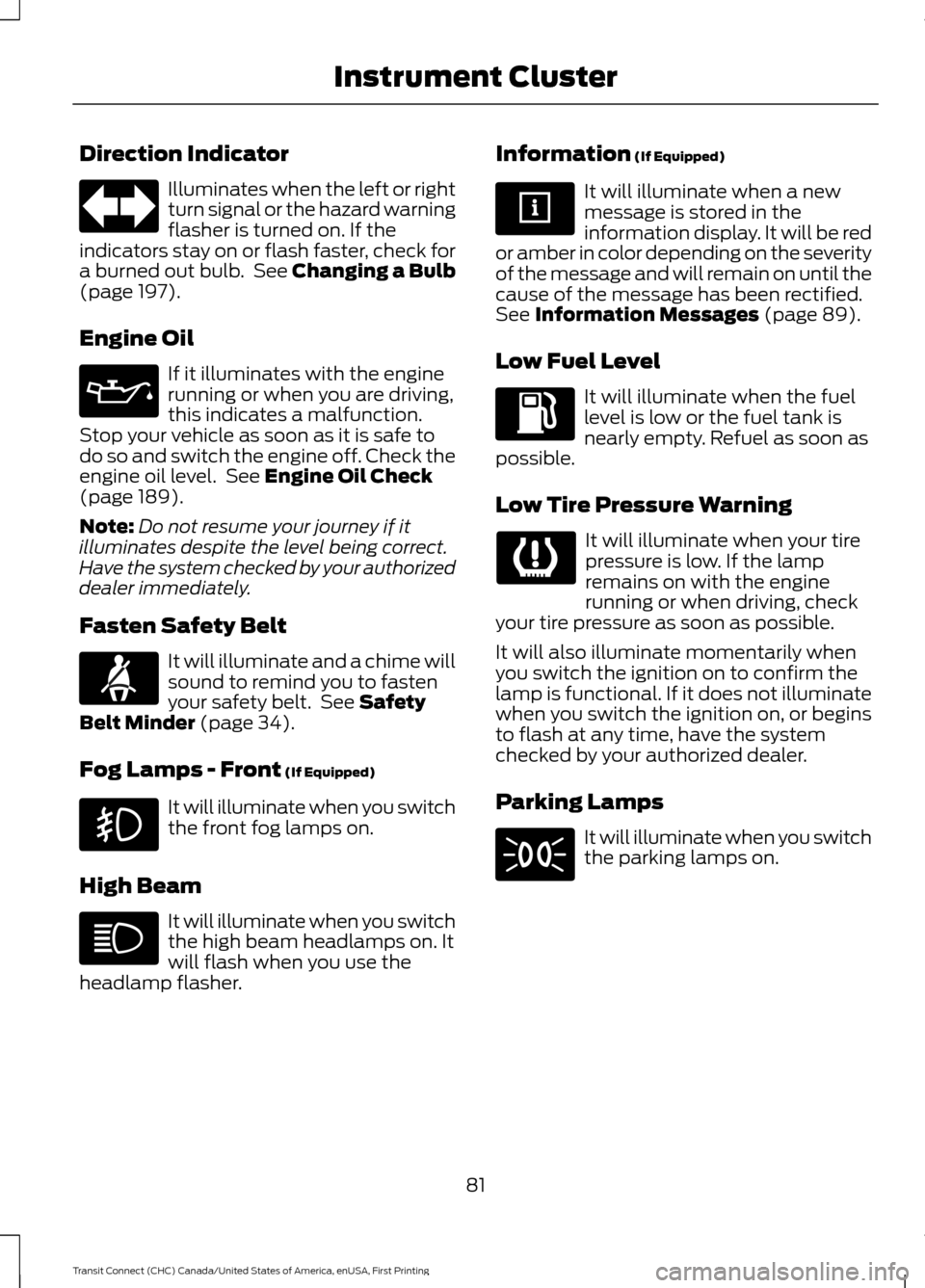
Direction Indicator
Illuminates when the left or right
turn signal or the hazard warning
flasher is turned on. If the
indicators stay on or flash faster, check for
a burned out bulb. See Changing a Bulb
(page 197).
Engine Oil If it illuminates with the engine
running or when you are driving,
this indicates a malfunction.
Stop your vehicle as soon as it is safe to
do so and switch the engine off. Check the
engine oil level. See
Engine Oil Check
(page 189).
Note: Do not resume your journey if it
illuminates despite the level being correct.
Have the system checked by your authorized
dealer immediately.
Fasten Safety Belt It will illuminate and a chime will
sound to remind you to fasten
your safety belt. See
Safety
Belt Minder (page 34).
Fog Lamps - Front
(If Equipped) It will illuminate when you switch
the front fog lamps on.
High Beam It will illuminate when you switch
the high beam headlamps on. It
will flash when you use the
headlamp flasher. Information
(If Equipped) It will illuminate when a new
message is stored in the
information display. It will be red
or amber in color depending on the severity
of the message and will remain on until the
cause of the message has been rectified.
See
Information Messages (page 89).
Low Fuel Level It will illuminate when the fuel
level is low or the fuel tank is
nearly empty. Refuel as soon as
possible.
Low Tire Pressure Warning It will illuminate when your tire
pressure is low. If the lamp
remains on with the engine
running or when driving, check
your tire pressure as soon as possible.
It will also illuminate momentarily when
you switch the ignition on to confirm the
lamp is functional. If it does not illuminate
when you switch the ignition on, or begins
to flash at any time, have the system
checked by your authorized dealer.
Parking Lamps It will illuminate when you switch
the parking lamps on.
81
Transit Connect (CHC) Canada/United States of America, enUSA, First Printing Instrument Cluster
Page 85 of 428

Service Engine Soon
If the service engine soon
indicator light stays illuminated
after the engine is started, it
indicates that the On-Board Diagnostics
(OBD-II) system has detected a
malfunction of the vehicle emissions
control system. Refer to On-Board
Diagnostics (OBD-II) in the Fuel and
Refueling chapter for more information
about having your vehicle serviced. See
Emission Control System (page 123).
If the light is blinking, engine misfire is
occurring which could damage your
catalytic converter. Drive in a moderate
fashion (avoid heavy acceleration and
deceleration) and have your vehicle
serviced immediately.
Note: Under engine misfire conditions,
excessive exhaust temperatures could
damage the catalytic converter or other
vehicle components.
The service engine soon indicator light
illuminates when the ignition is first turned
on prior to engine start to check the bulb
and to indicate whether the vehicle is ready
for Inspection/Maintenance (I/M) testing.
Normally, the service engine soon light will
stay on until the engine is cranked, then
turn itself off if no malfunctions are
present. However, if after 15 seconds the
service engine soon light blinks eight times,
it means that the vehicle is not ready for
I/M testing. See
Emission Control
System (page 123). Traction and Stability Control It will flash when the system is
active. If it remains illuminated
or does not illuminate when you
switch the ignition on, this indicates a
malfunction. During a malfunction the
system will switch off. Have the system
checked by your authorized dealer
immediately.
Traction and Stability Control Off It will illuminate when you switch
the system off. It will go out
when you switch the system
back on or when you switch the ignition
off.
AUDIBLE WARNINGS AND
INDICATORS
Key in Ignition Warning Chime
Sounds when you open the driver door and
you have left the key in the ignition with it
in the off or accessory position.
Headlamps On Warning Chime
Sounds when you remove the key from the
ignition and open the driver door and you
have left the headlamps or parking lamps
on.
Parking Brake On Warning Chime
Sounds when you have left the parking
brake on and drive your vehicle. If the
warning chime remains on after you have
released the parking brake, have your
vehicle checked by an authorized dealer
immediately.
82
Transit Connect (CHC) Canada/United States of America, enUSA, First Printing Instrument Cluster E138639
Page 91 of 428

Menu
Set date
Set time zone
Summer time
24-hour mode
CLOCK
Type 1
To adjust the clock, switch the ignition on
and press buttons H or M on the
information and entertainment display as
necessary.
Type 2
Note: Use the information display to adjust
the clock. See (page 84).
TRIP COMPUTER
Resetting the Trip Computer
Press and hold
OK on the current screen
to reset the respective trip, distance, time
and average fuel information.
Trip Odometer
Registers the distance traveled of
individual journeys.
Distance to Empty
Indicates the approximate distance your
vehicle will travel on the fuel remaining in
the tank. Changes in driving pattern may
cause the value to vary.
Average Fuel
Indicates the average fuel consumption
since the function was last reset. Digital Speedometer
The speed your vehicle is traveling at will
display as a digital number.
PERSONALIZED SETTINGS
Measure Units
To swap between imperial and metric
units, scroll to this display and press the
OK
button.
Swapping between imperial and metric
units will affect the following displays:
• Distance to empty.
• Average fuel consumption.
• Instantaneous fuel consumption.
• Average speed.
Switching Chimes Off
The following chimes can be switched off:
• Warning messages.
• Information messages.
88
Transit Connect (CHC) Canada/United States of America, enUSA, First Printing Information Displays
Page 93 of 428

Battery and Charging System
Action
Message Indic-
ator
Message
Stop your vehicle as soon as it is safe to doso and switch the ignition off. Have your
vehicle checked by an authorized dealer as soon as possible.
Red
Electrical system over-
voltage
Stop safely
Displays to warn of a low battery condition.Turn off all unnecessary electrical
accessories. Have your vehicle checked by an authorized dealer as soon as possible.
Amber
Battery low
See manual
Doors Open Action
Message Indic-
ator
Message
Vehicle is moving. Stop your vehicle as soonas safely possible and close.
Red
Driver door ajar
Vehicle is moving. Stop your vehicle as soonas safely possible and close.
Red
Driver side rear door ajar
Vehicle is moving. Stop your vehicle as soonas safely possible and close.
Red
Passenger door ajar
Vehicle is moving. Stop your vehicle as soonas safely possible and close.
Red
Passenger side rear door
ajar
Vehicle is moving. Stop your vehicle as soonas safely possible and close.
Red
Hood open
Vehicle is moving. Stop your vehicle as soonas safely possible and close.
Red
Rear load compartment
door ajar
Vehicle is moving. Stop your vehicle as soonas safely possible and close.
Red
Emergency rear door ajar
Vehicle not moving. Close.
-
Driver door ajar
Vehicle not moving. Close.
-
Driver side rear door ajar
Vehicle not moving. Close.
-
Passenger door ajar
Vehicle not moving. Close.
-
Passenger side rear door
ajar
90
Transit Connect (CHC) Canada/United States of America, enUSA, First Printing Information Displays
Page 94 of 428

Action
Message Indic-
ator
Message
Vehicle not moving. Close.
-
Hood open
Vehicle not moving. Close.
-
Rear load compartment
door ajar
Vehicle not moving. Close.
-
Emergency rear door ajar
Engine Action
Message Indic-
ator
Message
Have your vehicle checked by an authorizeddealer as soon as possible.
Amber
Engine fault
Service now
Displays when the engine temperature is
too high. Stop your vehicle as soon as it is safe to do so, switch the ignition off andallow the engine to cool. If the problem
persists, have your vehicle checked by an
authorized dealer as soon as possible. See
Engine Coolant Check (page 190).
Red
High engine temperature
Stop safely
Hill Start Assist Action
Message Indic-
ator
Message
Displays when hill start assist is not avail-able. Have your vehicle checked by an
authorized dealer as soon as possible.
See
Hill Start Assist (page 130).
Amber
Hill start assist not avail-
able
91
Transit Connect (CHC) Canada/United States of America, enUSA, First Printing Information Displays
Page 116 of 428

12 Volt DC Power Point
WARNINGS
Do not use the power point for
operating a cigar lighter element, this
can result in fire or serious injury.
Do not insert objects other than an
accessory plug into the power point,
this can result in fire or serious injury.
Run the engine for full capacity use of the
power point.
Auxiliary power points may be found at
the:
•
Front of the floor console.
• Rear of the floor console.
• Right hand side of the luggage
compartment.
To prevent the battery from running out of
charge:
• Do not use the power point longer than
necessary when the engine is not
running.
• Do not leave devices plugged in
overnight or when your vehicle is
parked for extended periods.
Note: When you switch the ignition on you
can use the power point to power 12 volt
appliances with a maximum current rating
of 20 amps.
Note: Do not hang any type of accessory or
accessory bracket from an accessory plug.
Note: Do not use the power point over the
vehicle capacity of 12 volt DC 180 watt or a
fuse may blow.
Note: Incorrect use of the power point can
cause damage not covered by the vehicle
warranty.
Note: Always keep the power point caps
closed when not in use. CIGAR LIGHTER
Press the element in to use the cigar
lighter. It will pop out automatically.
Note:
Do not hold the cigar lighter element
pressed in.
113
Transit Connect (CHC) Canada/United States of America, enUSA, First Printing Auxiliary Power PointsE103382