Page 211 of 428
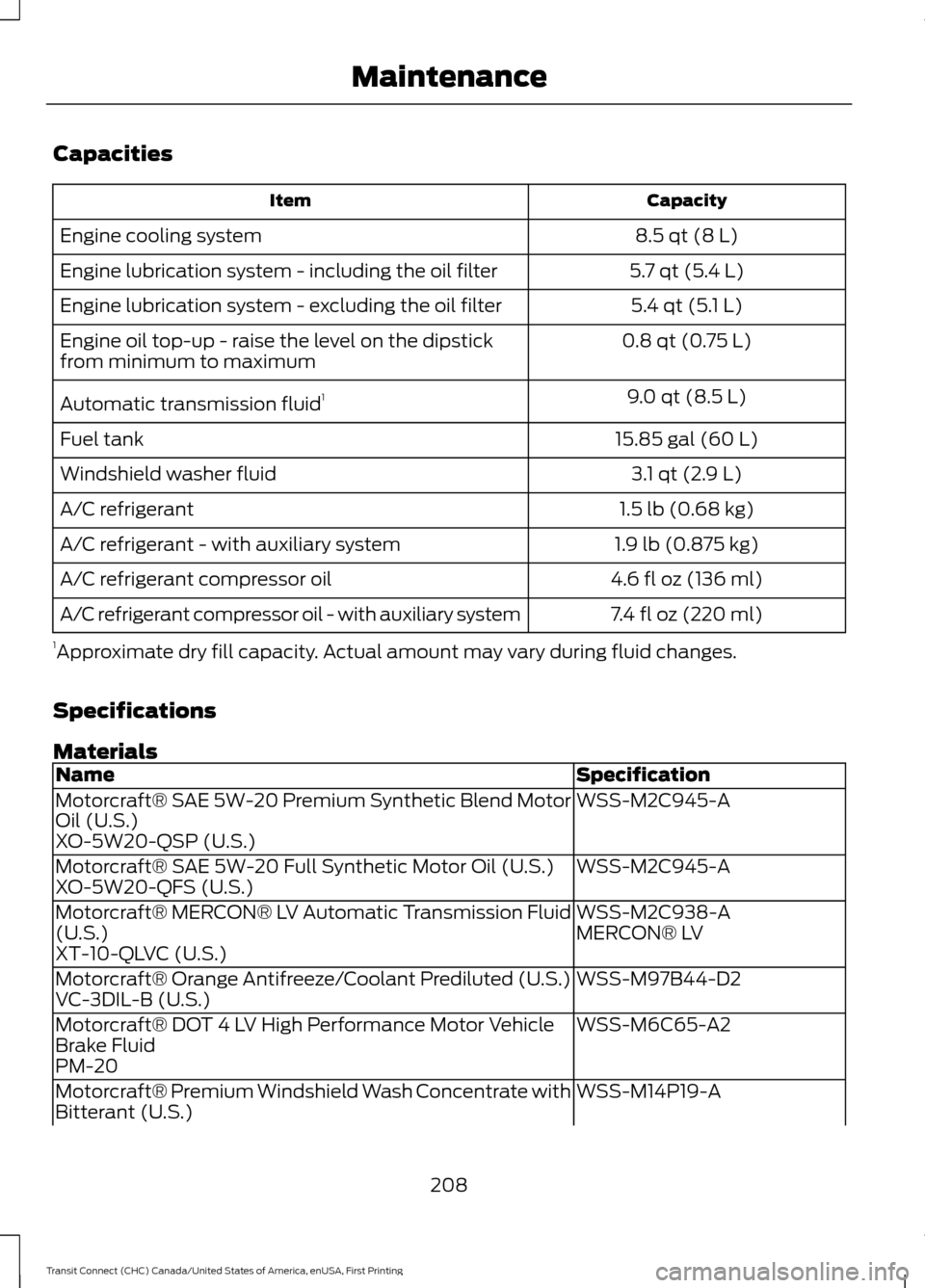
Capacities
Capacity
Item
8.5 qt (8 L)
Engine cooling system
5.7 qt (5.4 L)
Engine lubrication system - including the oil filter
5.4 qt (5.1 L)
Engine lubrication system - excluding the oil filter
0.8 qt (0.75 L)
Engine oil top-up - raise the level on the dipstick
from minimum to maximum
9.0 qt (8.5 L)
Automatic transmission fluid 1
15.85 gal (60 L)
Fuel tank
3.1 qt (2.9 L)
Windshield washer fluid
1.5 lb (0.68 kg)
A/C refrigerant
1.9 lb (0.875 kg)
A/C refrigerant - with auxiliary system
4.6 fl oz (136 ml)
A/C refrigerant compressor oil
7.4 fl oz (220 ml)
A/C refrigerant compressor oil - with auxiliary system
1 Approximate dry fill capacity. Actual amount may vary during fluid changes.
Specifications
Materials Specification
Name
WSS-M2C945-A
Motorcraft® SAE 5W-20 Premium Synthetic Blend Motor
Oil (U.S.)
XO-5W20-QSP (U.S.)
WSS-M2C945-A
Motorcraft® SAE 5W-20 Full Synthetic Motor Oil (U.S.)
XO-5W20-QFS (U.S.)
WSS-M2C938-A
Motorcraft® MERCON® LV Automatic Transmission Fluid
(U.S.) MERCON® LV
XT-10-QLVC (U.S.)
WSS-M97B44-D2
Motorcraft® Orange Antifreeze/Coolant Prediluted (U.S.)
VC-3DIL-B (U.S.)
WSS-M6C65-A2
Motorcraft® DOT 4 LV High Performance Motor Vehicle
Brake Fluid
PM-20
WSS-M14P19-A
Motorcraft® Premium Windshield Wash Concentrate with
Bitterant (U.S.)
208
Transit Connect (CHC) Canada/United States of America, enUSA, First Printing Maintenance
Page 213 of 428
Note:
Automatic transmissions that require
MERCON LV transmission fluid should only
use MERCON LV transmission fluid. The
use of any other fluid may cause
transmission damage.
210
Transit Connect (CHC) Canada/United States of America, enUSA, First Printing Maintenance
Page 253 of 428
TRANSMISSION CODE
DESIGNATION
The transmission code is on the Safety
Compliance Certification Label. The
following table shows the transmission
code along with the transmission
description.
Description
Code
Six-speed automatic trans-mission 6F35
6
250
Transit Connect (CHC) Canada/United States of America, enUSA, First Printing Capacities and SpecificationsE142806
Page 275 of 428

Pairing a Cell Phone for the First
Time
Note:
SYNC can support downloading up
to approximately 1000 entries per
Bluetooth-enabled cell phone.
Note: Make sure to switch on the ignition
and the radio. Put the transmission in
position park (P) (automatic transmission)
or neutral with the parking brake applied
(manual transmission). Note:
To scroll through the menus, press
the up and down arrows on your audio
system.
Wirelessly pairing your cell phone with
SYNC allows you to make and receive
hands-free calls.
Press the phone button. When the display indicates there is no cell phone paired,
do the following: Action and Description
Message
Press the
OK button. When the following message appears
in the display.
No Phone Paired
Find SYNC
1. Press the
OK button.
2. Put your cell phone into Bluetooth discovery mode. See your device's manual if necessary.
3. When prompted on your cell phone's display, enter the six-digit PIN provided by SYNC in the radio display. The
display indicates when the pairing is successful.
Depending on your cell phone's capability
and your market, the system may prompt
you with questions, such as setting the
current cell phone as the primary cell
phone (the cell phone SYNC automatically
tries to connect with first upon vehicle
start-up) and downloading your
phonebook.
272
Transit Connect (CHC) Canada/United States of America, enUSA, First Printing SYNC™
Page 276 of 428

Pairing Subsequent Cell Phones
Press the phone button, then scroll to:
Action
Message
Press the OK button.
Phone settings
Press the
OK button.
Bluetooth Devices
Press the
OK button. When the following message appears
in the display.
Add Device
Find SYNC
1. Press the
OK button.
2. Put your cell phone into Bluetooth discovery mode. See your device's manual if necessary.
3. When prompted on your cell phone's display, enter the six-digit PIN provided by SYNC in the radio display. The
display indicates when the pairing is successful.
The system then prompts with questions, such as if you would like to set the current cell
phone as the primary cell phone (the cell phone SYNC automatically tries to connect
with first upon vehicle start-up) or download your phonebook.
Note: Make sure to switch on the ignition and the radio. Put the transmission in position
park (
P) (automatic transmission) or neutral with the parking brake applied (manual
transmission).
Note: To scroll through the menus, press the up and down arrows on your audio system.
Phone Voice Commands Action
Voice Command
You do not need to preceed this command by saying; phone.
call (someone |
[[a] name]) This command is not available until your cell phone information is
completely downloaded using Bluetooth.
You do not need to preceed this command by saying; phone.
Call ___ at Home
This command is not available until your cell phone information is
completely downloaded using Bluetooth.
You do not need to preceed this command by saying; phone.
Call ___ at Work
This command is not available until your cell phone information is
completely downloaded using Bluetooth.
You do not need to preceed this command by saying; phone.
Call ___ in Office
This command is not available until your cell phone information is
completely downloaded using Bluetooth.
273
Transit Connect (CHC) Canada/United States of America, enUSA, First Printing SYNC™
Page 405 of 428

Multi-Point inspection
Hazard warning system operation
Accessory drive belt(s)
Horn operation
Battery performance
Radiator, cooler, heater and air conditioninghoses
Engine air filter
Suspension components for leaks ordamage
Exhaust system
Steering and linkage
Exterior lamps operation
Tires (including spare) for wear and properpressure**
Fluid levels *
; fill if necessary
Windshield for cracks, chips or pits
For oil and fluid leaks
Washer spray and wiper operation
Half-shaft dust boots
* Brake, coolant recovery reservoir, automatic transmission and window washer
** If your vehicle is equipped with a temporary mobility kit, check the tire sealant expiration
Use By date on the canister. Replace as needed.
Be sure to ask your dealership service
advisor or technician about the multi-point
vehicle inspection. It is a comprehensive
way to perform a thorough inspection of
your vehicle. Your checklist gives you
immediate feedback on the overall
condition of your vehicle.
NORMAL SCHEDULED
MAINTENANCE - VEHICLES
BUILT FROM: 01-09-2014
Intelligent Oil-Life Monitor®
Your vehicle is equipped with an Intelligent
Oil-Life Monitor that determines when you
should change the engine oil based on how
your vehicle is used. By using several
important factors in its calculations, the
monitor helps reduce the cost of owning
your vehicle and reduces environmental
waste at the same time. This means you do not have to remember
to change the oil on a mileage-based
schedule. Your vehicle lets you know when
an oil change is due by displaying ENGINE
OIL CHANGE DUE or OIL CHANGE
REQUIRED in the information display.
The following table provides examples of
vehicle use and its impact on oil change
intervals. It is a guideline only. Actual oil
change intervals depend on several factors
and generally decrease with severity of
use.
402
Transit Connect (CHC) Canada/United States of America, enUSA, First Printing Scheduled Maintenance
Page 406 of 428

When to expect the OIL CHANGE REQUIRED message
Vehicle use and example
Interval
Normal
7500-10000 miles
(12000-16000 km) Normal commuting with highway driving
No, or moderate, load or towing
Flat to moderately hilly roads
No extended idling
Severe
5000-7499 miles
(8000-11999 km) Moderate to heavy load or towing
Mountainous or off-road conditions
Extended idling
Extended hot or cold operation
Extreme
3000-4999 miles
(5000-7999 km) Maximum load or towing
Extreme hot or cold operation
Maintenance Intervals At every oil change interval as indicated by the information display
*
Change engine oil and filter. **
Rotate the tires.
Perform a multi-point inspection (recommended).
Inspect the automatic transmission fluid level. Consult your dealer for requirements.
Inspect the brake pads, rotors, hoses and parking brake.
Inspect the engine cooling system strength and hoses.
Inspect the exhaust system and heat shields.
Inspect the half-shaft boots.
Inspect the steering linkage, suspension, tie-rod ends.
403
Transit Connect (CHC) Canada/United States of America, enUSA, First Printing Scheduled Maintenance
Page 407 of 428

At every oil change interval as indicated by the information display
*
Inspect the tires, tire wear and measure the tread depth.
Inspect the wheels and related components for abnormal noise, wear, looseness or
drag.
* Do not exceed one year or 10000 miles (16000 kilometers) between service intervals.
** Reset the Intelligent Oil-Life Monitor after engine oil and filter changes. See Engine
Oil Check (page 189). Other maintenance items
1
Replace cabin air filter.
Every 20000 miles (32000
km)
Replace engine air filter.
Every 30000 miles (48000
km)
Change engine coolant.2
At 100000 miles (160000
km)
Replace spark plugs.
Every 100000 miles
(160000 km) Inspect accessory drive belt(s). 3
Change automatic transmission fluid.
Every 150000 miles
(240000 km)
Replace accessory drive belt(s). 4
1 Perform these maintenance items within 3000 miles (4800 kilometers) of the last
engine oil and filter change. Do not exceed the designated distance for the interval.
2 Initial replacement at six years or 100000 miles (160000 kilometers), then every three
years or 50000 miles (80000 kilometers).
3 After initial inspection, inspect every other oil change until replaced.
4 If not replaced within the last 100000 miles (160000 kilometers).
404
Transit Connect (CHC) Canada/United States of America, enUSA, First Printing Scheduled Maintenance

