2015 FORD TAURUS steering wheel
[x] Cancel search: steering wheelPage 489 of 558

You can also turn the outside air temperature display on and off. It
appears at the top center of the touchscreen, next to the time and date.
The system automatically saves any updates you make to the settings.
Display
You can adjust the touchscreen display through the touchscreen or by
pressing the voice button on your steering wheel controls and when
prompted, say, “Display settings”.Press the Settings icon > Display,to access and make
adjustments using the touchscreen.
• Brightness allows you to make the screen display brighter or
dimmer.
• Auto DIM, when set to On,lets you use the Auto Dim Manual Offset
feature. When set to Off,screen brightness does not change.
• Mode allows you to set the screen to a certain brightness or have the
system automatically change based on the outside light level, or turn
the display off.
• If you select AUTOorNIGHT, you have the options of turning
the display’s Auto Dim feature on or off and changing the Auto
Dim Manual Offset feature.
• Auto Dim Manual Offset allows you to adjust screen dimming as
the outside lighting conditions change from day to night. This feature
also allows you to adjust screen brightness using the instrument panel
dimming control.
Edit Wallpaper
• You can have your touchscreen display the default photo or upload
your own.
Uploading Photos for Your Home Screen Wallpaper
Note: You cannot load photos directly from your camera. You must
access the photos either from your USB mass storage device or from an
SD card.
Note: Photographs with extremely large dimensions (such as 2048 x
1536) may not be compatible and appear as a blank (black) image on the
display.
Your system allows you to upload and view up to 32 photos.
To access, press the Settings icon > Display>Edit Wallpaper, and
then follow the system prompts to upload your photographs.
488 MyFord Touch® (If Equipped)
2015 Taurus
Owners Guide gf, 1st Printing, April 2014
USA(fus)
Page 502 of 558

K.Driver settings: Depending on your vehicle and option package, you
may have the following features:
• Touch the +or –to increase or decrease the air temperature on the
passenger side of the vehicle.
• Touch the heated seat icon to switch the heated seat off and on (if
equipped).
• Touch the climate-controlled seat icon to switch the
climate-controlled seat off and on (if equipped).
• Touch MyTemp to select your preset temperature setpoint. Touch
and hold MyTemp to save a new preset temperature setpoint.
• Touch the heated steering wheel icon to switch the heated steering
wheel on and off (if equipped).
Note: If your vehicle is equipped with a wood-trimmed steering wheel, it
does not heat between the 10 o’clock and 2 o’clock positions.
Climate Control Voice Commands
The following voice commands are available at the main menu
level of a voice session. For example, press the voice button
and after the prompt, “Say a command”; say any of the
following commands:
Climate control voice commands
“Climate automatic”
“Climate my temperature” “Climate off”“Climate on”
“Climate temperature <15.5–29.5> degrees” “Climate temperature <60–85> degrees” “Help”
There are additional climate control commands but in order to access
them, you have to say “Climate” first, then when the system is ready to
listen, you may say any of the following commands:
Additional climate control voice commands
“Automatic” “Panel on” “A/C off” “Rear defrost off”“A/C on” “Rear defrost on”
“Defrost off” “Recirc off” “Defrost on” “Recirc on”
MyFord Touch® (If Equipped) 501
2015 Taurus
Owners Guide gf, 1st Printing, April 2014
USA(fus)
Page 513 of 558
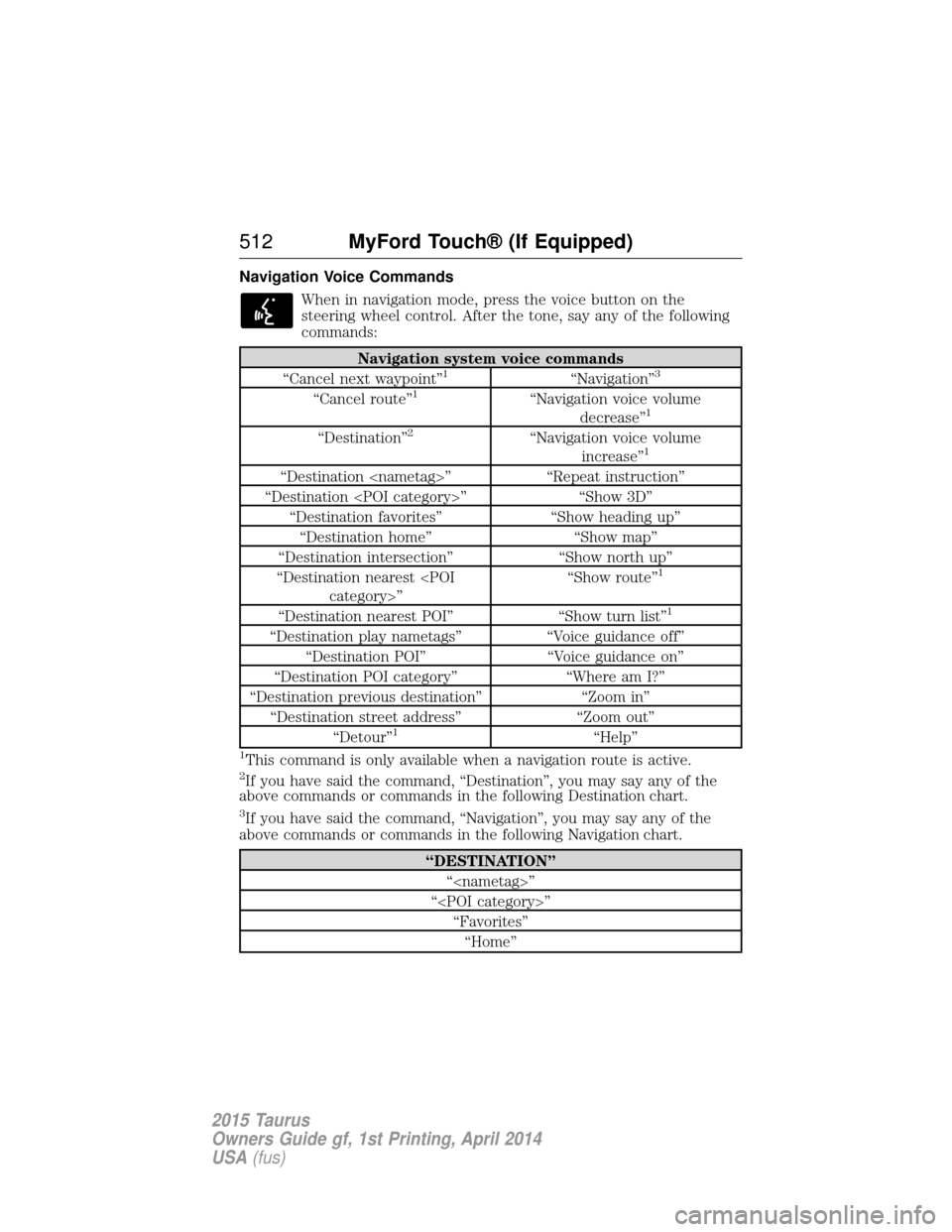
Navigation Voice CommandsWhen in navigation mode, press the voice button on the
steering wheel control. After the tone, say any of the following
commands:
Navigation system voice commands
“Cancel next waypoint”1“Navigation”3
“Cancel route”1“Navigation voice volume decrease”1
“Destination”2“Navigation voice volume increase”1
“Destination
“Destination
“Destination favorites” “Show heading up”
“Destination home” “Show map”
“Destination intersection” “Show north up”
“Destination nearest
1
“Destination nearest POI”
“Show turn list”1
“Destination play nametags”“Voice guidance off”
“Destination POI” “Voice guidance on”
“Destination POI category” “Where am I?”
“Destination previous destination” “Zoom in”
“Destination street address” “Zoom out”
“Detour”
1“Help”
1This command is only available when a navigation route is active.2If you have said the command, “Destination”, you may say any of the
above commands or commands in the following Destination chart.
3If you have said the command, “Navigation”, you may say any of the
above commands or commands in the following Navigation chart.
“DESTINATION”
“
“
512 MyFord Touch® (If Equipped)
2015 Taurus
Owners Guide gf, 1st Printing, April 2014
USA(fus)
Page 540 of 558

Normal scheduled maintenance*
At every oil change
interval as indicated by
the information displayChange engine oil and filter.**
Rotate tires, inspect tire wear and measure
tread depth.
Perform multi-point inspection
(recommended).
Inspect automatic transmission fluid level (if
equipped with dipstick). Consult dealer for
requirements.
Inspect brake pads, shoes, rotors, drums,
brake linings, hoses and parking brake.
Inspect engine cooling system strength and
hoses.
Inspect exhaust system and heat shields.
Inspect rear axle and U-joints. Lubricate if
equipped with grease fittings (All-wheel drive
vehicles).
Inspect half-shaft boots (if equipped).
Inspect steering linkage, ball joints,
suspension, tie-rod ends, driveshaft and
U-joints. Lubricate if equipped with grease
fittings.
Inspect wheels and related components for
abnormal noise, wear, looseness or drag.
*Do not exceed one year or 10000 miles (16000 kilometers) between
service intervals.
**Reset your Intelligent Oil-Life Monitor after each engine oil and filter
change. See the Instrument Cluster chapter.
Scheduled Maintenance 539
2015 Taurus
Owners Guide gf, 1st Printing, April 2014
USA(fus)
Page 554 of 558

H
Hazard flashers .........................258
HD Radio™ ...............................449
Headlampsaiming ......................................303
bulb specifications ..................308
flash to pass ..............................89
high beam ...........................89, 92
replacing bulbs .......................305
Head restraints .........................143
Heated steering wheel ..............499
Heating ..............130–131, 133, 135
Help ............................................498
Homelink wireless control
system ........................................156
Hood ..........................................281
How to use voice commands ...442
I
Ignition ...............................165, 356
Illuminated visor mirror ...100–101
Information displays .................110
Inspection/maintenance (I/M)
testing ........................................182
Instrument panel cleaning ...................................313
cluster ......................................105
Intelligent Access Key ................57
J
Jack ............................................339 positioning ...............................339 storage .....................................339
Joining two calls
(multiparty/conference call) ....398
Jump-starting your vehicle ......260
K
Keyless entry system autolock .....................................71
keypad .......................................73
locking and unlockingd oors ....74
programming entry code .........73
Keys .......................................57, 77 positions of the ignition .........165
L
Lamps bulb replacement
specifications chart ................308
headlamps, flash to pass ..........89
interior lamps ...........................95
replacing bulbs .......................305
Lane keeping system ................224
LATCH anchors ...........................28
Lights, warning and
indicator ....................................105
Listening to music ....................446
Load limits .................................239
Locks autolock .....................................71
childproof ..................................32
doors ..........................................68
Lubricant specifications ...........358
Lug nuts ....................................355
Index 553
2015 Taurus
Owners Guide gf, 1st Printing, April 2014
USA(fus)
Page 557 of 558

Setting a destination by
voice ...........................................503
Settings ......................................487
Setting the clock ...............373, 487
Side air curtain ...........................52
Side-curtain airbags system .......52
SIRIUS® satellite radio ....373, 454
SIRIUS satellite radio voice
commands .................................456
SIRIUS Travel Link ...................479
SIRIUS Travel Link voice
commands .................................481
SOS Post Crash Alert .................44
Spark plugs,
specifications .....................356, 363
Specification chart,
lubricants ...................................358
Stability system .........................199
Starting your vehicle ................166jump starting ..........................260
push button start system .......165
Steering wheel ............................81 controls ......................................83
tilting .........................................81
Sunshade ...................................101
Sun visor ....................................100
Supplemental Restraint System
(SRS) (see airbags) ....................45
Supported media file types ......464
Supported player, media
formats and metadata
information ................................464
SYNC® customer
support ..............................390, 438
SYNC® Services ................413, 475 System settings .........................490
T
Temperature control
(see Climate control) ......130–131,
133, 135, 499
Temporary mobility kit .............345
Text messaging .................401, 471
Text messaging (sending,
downloading, deleting) .....401, 403
Tilt steering wheel ......................81
Tires ...........................318–319, 339 alignment ................................332
care ..........................................318
changing ..........................339, 341
checking the pressure ............328
inflating ...................................326
label .........................................325
replacing ..................................330
rotating ....................................333
safety practices .......................332
sidewall information ...............321
snow tires and chains ............334
spare tire .................................339
Temporary mobility kit ..........345
terminology .............................319
tire grades ...............................319
treadwear ........................318, 328
Touchscreen features
(climate) ....................................499
Towing .......................247, 251–252 recreational towing .................252
trailer towing ..........................247
wrecker ....................................251
Traction control ........................197
Traffic, Directions and
Information ................................413
Traffic preferences ...................506
556 Index
2015 Taurus
Owners Guide gf, 1st Printing, April 2014
USA(fus)