2015 FORD TAURUS navigation system
[x] Cancel search: navigation systemPage 494 of 558
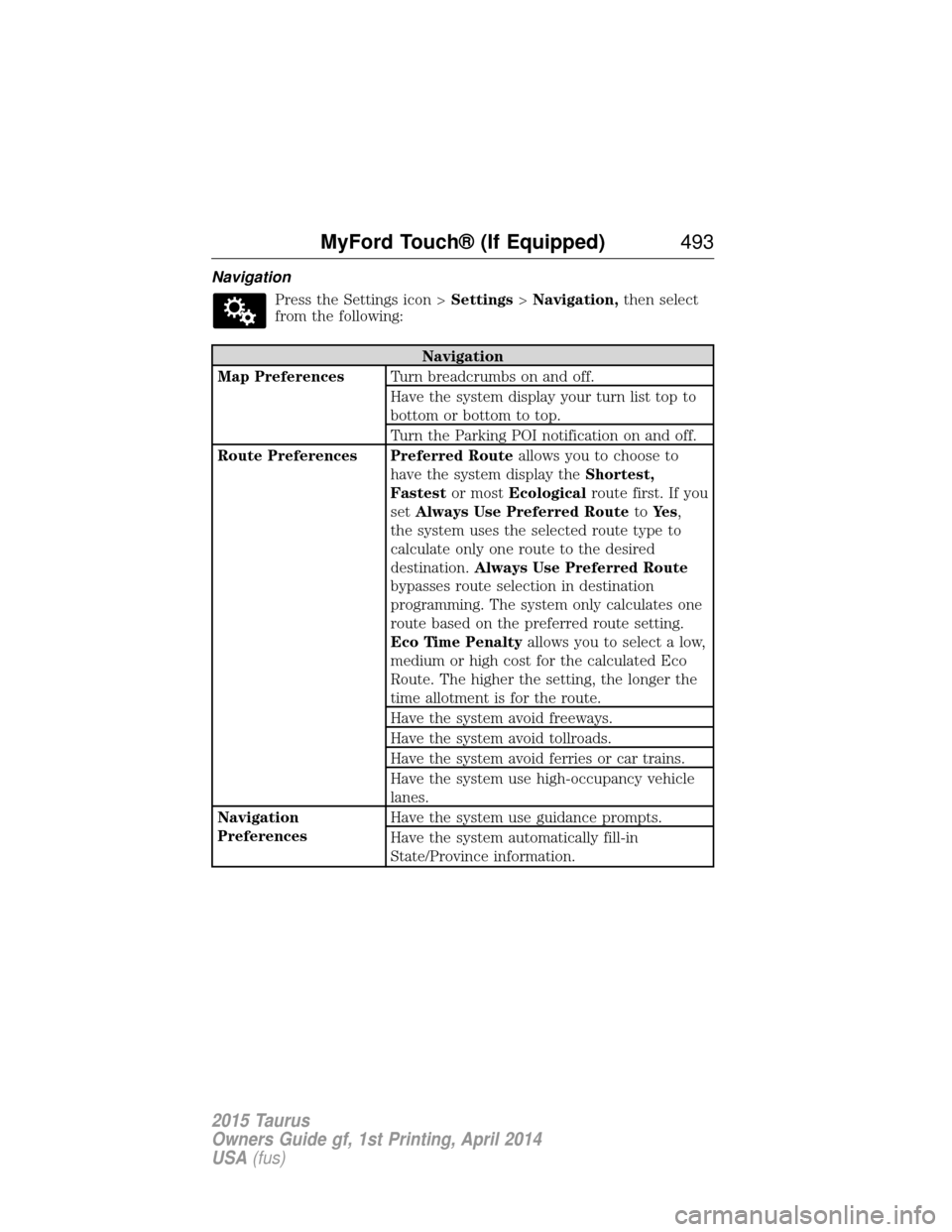
NavigationPress the Settings icon > Settings>Navigation, then select
from the following:
Navigation
Map Preferences Turn breadcrumbs on and off.
Have the system display your turn list top to
bottom or bottom to top.
Turn the Parking POI notification on and off.
Route Preferences Preferred Route allows you to choose to
have the system display the Shortest,
Fastest or mostEcological route first. If you
set Always Use Preferred Route toYe s ,
the system uses the selected route type to
calculate only one route to the desired
destination. Always Use Preferred Route
bypasses route selection in destination
programming. The system only calculates one
route based on the preferred route setting.
Eco Time Penalty allows you to select a low,
medium or high cost for the calculated Eco
Route. The higher the setting, the longer the
time allotment is for the route.
Have the system avoid freeways.
Have the system avoid tollroads.
Have the system avoid ferries or car trains.
Have the system use high-occupancy vehicle
lanes.
Navigation
Preferences Have the system use guidance prompts.
Have the system automatically fill-in
State/Province information.
MyFord Touch® (If Equipped)
493
2015 Taurus
Owners Guide gf, 1st Printing, April 2014
USA(fus)
Page 495 of 558
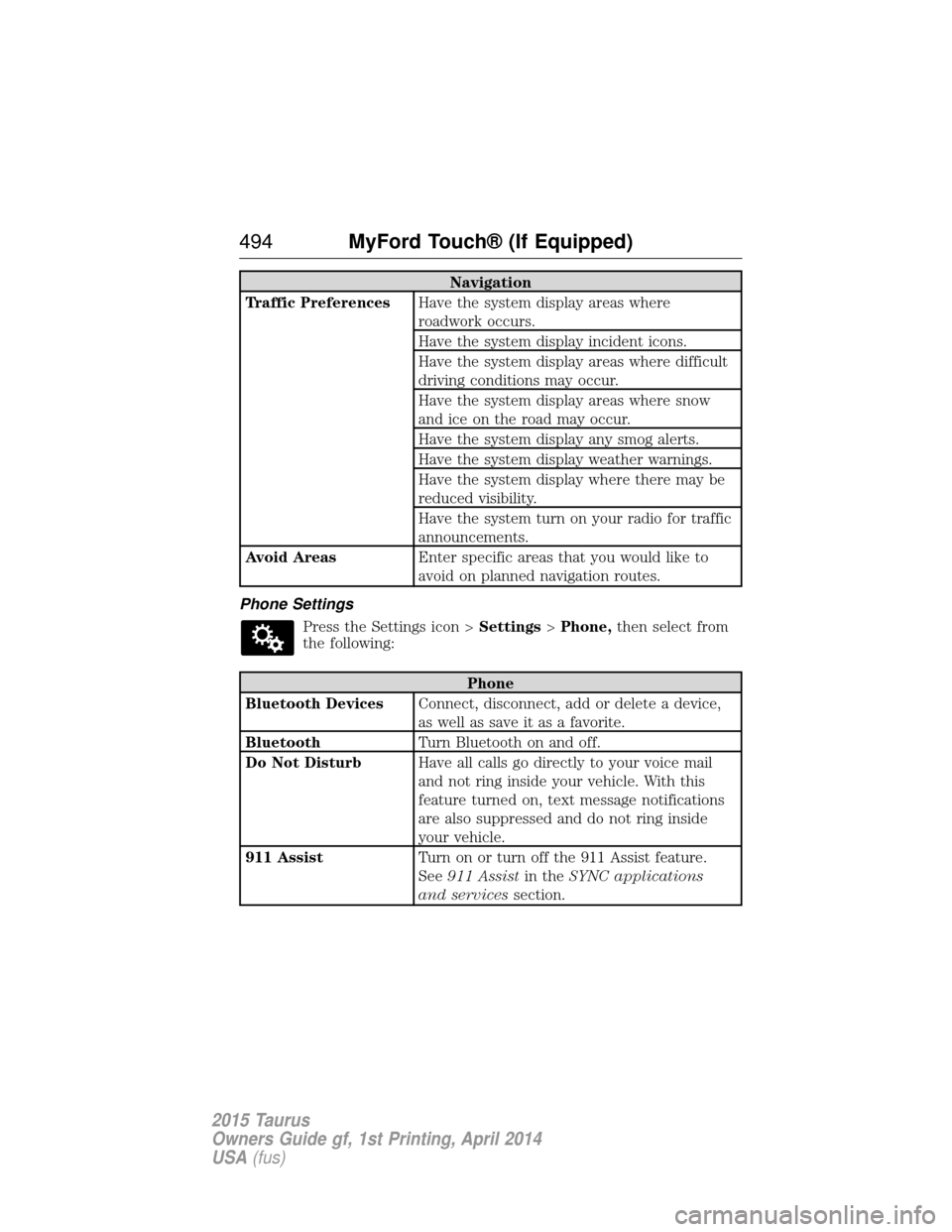
Navigation
Traffic Preferences Have the system display areas where
roadwork occurs.
Have the system display incident icons.
Have the system display areas where difficult
driving conditions may occur.
Have the system display areas where snow
and ice on the road may occur.
Have the system display any smog alerts.
Have the system display weather warnings.
Have the system display where there may be
reduced visibility.
Have the system turn on your radio for traffic
announcements.
Avoid Areas Enter specific areas that you would like to
avoid on planned navigation routes.
Phone Settings Press the Settings icon > Settings>Phone, then select from
the following:
Phone
Bluetooth Devices Connect, disconnect, add or delete a device,
as well as save it as a favorite.
Bluetooth Turn Bluetooth on and off.
Do Not Disturb Have all calls go directly to your voice mail
and not ring inside your vehicle. With this
feature turned on, text message notifications
are also suppressed and do not ring inside
your vehicle.
911 Assist Turn on or turn off the 911 Assist feature.
See911 Assist in theSYNC applications
and services section.
494MyFord Touch® (If Equipped)
2015 Taurus
Owners Guide gf, 1st Printing, April 2014
USA(fus)
Page 499 of 558
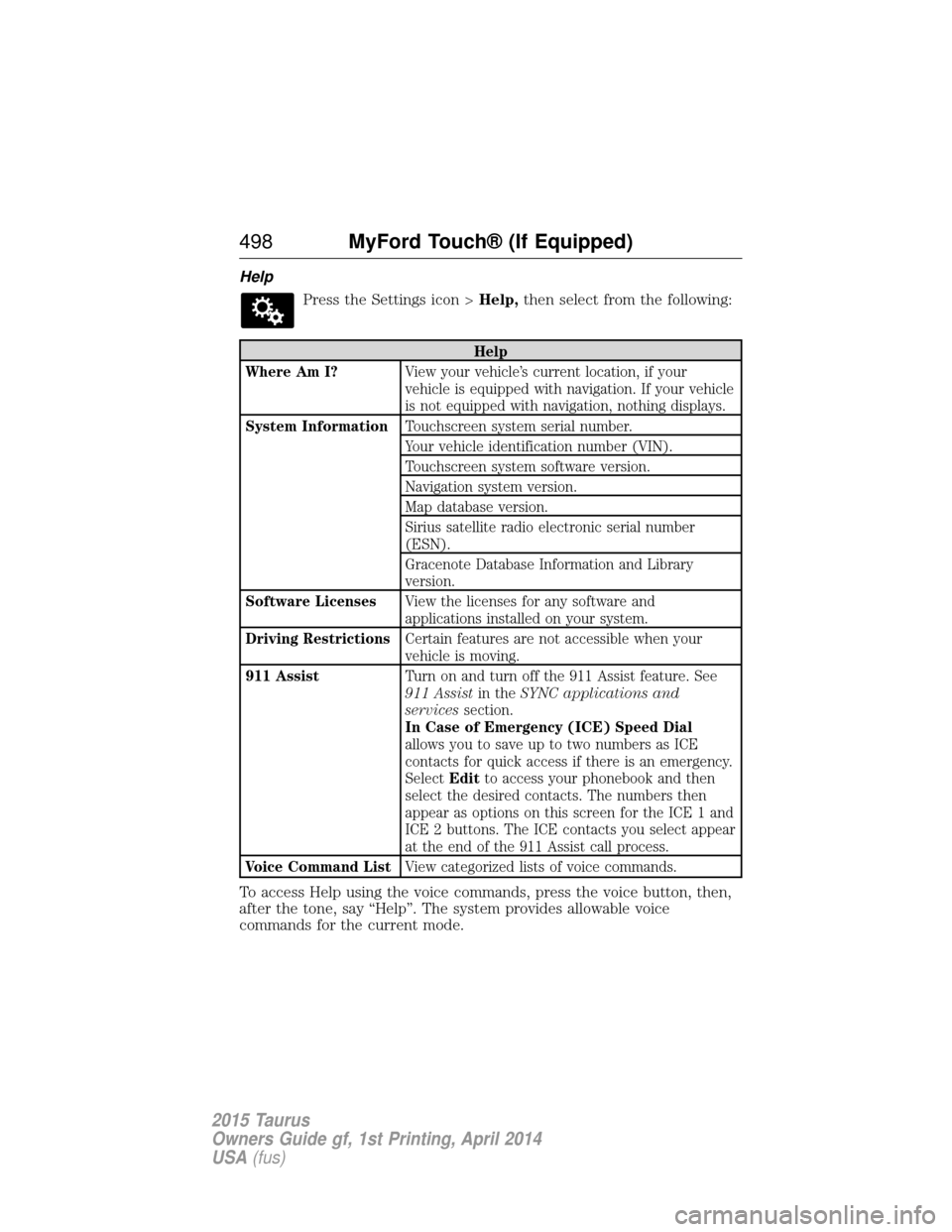
HelpPress the Settings icon > Help,then select from the following:
Help
Where Am I? View your vehicle’s current location, if your
vehicle is equipped with navigation. If your vehicle
is not equipped with navigation, nothing displays.
System Information Touchscreen system serial number.
Your vehicle identification number (VIN).
Touchscreen system software version.
Navigation system version.
Map database version.
Sirius satellite radio electronic serial number
(ESN).
Gracenote Database Information and Library
version.
Software Licenses View the licenses for any software and
applications installed on your system.
Driving Restrictions Certain features are not accessible when your
vehicle is moving.
911 Assist Turn on and turn off the 911 Assist feature. See
911 Assistin theSYNC applications and
services section.
In Case of Emergency (ICE) Speed Dial
allows you to save up to two numbers as ICE
contacts for quick access if there is an emergency.
Select Editto access your phonebook and then
select the desired contacts. The numbers then
appear as options on this screen for the ICE 1 and
ICE 2 buttons. The ICE contacts you select appear
at the end of the 911 Assist call process.
Voice Command List View categorized lists of voice commands.
To access Help using the voice commands, press the voice button, then,
after the tone, say “Help”. The system provides allowable voice
commands for the current mode.
498MyFord Touch® (If Equipped)
2015 Taurus
Owners Guide gf, 1st Printing, April 2014
USA(fus)
Page 503 of 558
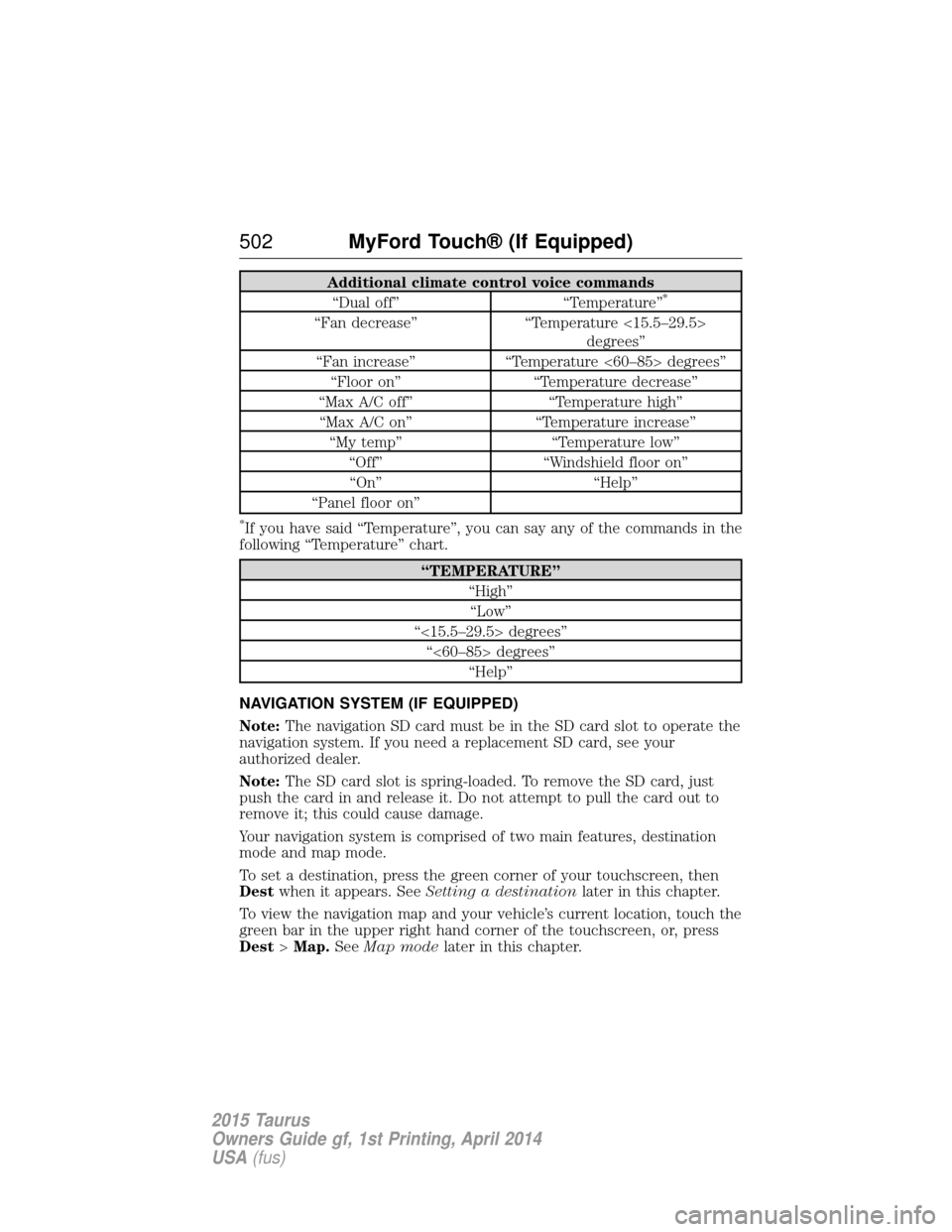
Additional climate control voice commands“Dual off” “Temperature”*
“Fan decrease” “Temperature <15.5–29.5>
degrees”
“Fan increase” “Temperature <60–85> degrees”
“Floor on” “Temperature decrease”
“Max A/C off” “Temperature high”
“Max A/C on” “Temperature increase”
“My temp” “Temperature low”
“Off” “Windshield floor on”
“On” “Help”
“Panel floor on”
*If you have said “Temperature”, you can say any of the commands in the
following “Temperature” chart.
“TEMPERATURE”
“High”“Low”
“<15.5–29.5> degrees” “<60–85> degrees” “Help”
NAVIGATION SYSTEM (IF EQUIPPED)
Note: The navigation SD card must be in the SD card slot to operate the
navigation system. If you need a replacement SD card, see your
authorized dealer.
Note: The SD card slot is spring-loaded. To remove the SD card, just
push the card in and release it. Do not attempt to pull the card out to
remove it; this could cause damage.
Your navigation system is comprised of two main features, destination
mode and map mode.
To set a destination, press the green corner of your touchscreen, then
Dest when it appears. See Setting a destination later in this chapter.
To view the navigation map and your vehicle’s current location, touch the
green bar in the upper right hand corner of the touchscreen, or, press
Dest >Map. SeeMap mode later in this chapter.
502 MyFord Touch® (If Equipped)
2015 Taurus
Owners Guide gf, 1st Printing, April 2014
USA(fus)
Page 504 of 558

Setting a Destination
Press the green corner of your touchscreen, thenDestwhen it appears.
Choose any of the following:
Destination selections
My Home Street Address
Favorites Intersection
Previous Destinations City Center
Point of Interest Map
Emergency Edit Route Cancel Route
1. Enter the necessary information into the highlighted text fields (in any order). For address destination entry, Go!appears once you
enter all the necessary information. Pressing Go!makes the address
location appear on the map. If you choose Previous Destination,
the last 20 destinations you have selected appear.
2. Select Set as Dest to make this your destination. You can also
choose to set this as a waypoint (have the system route to this point
on the way to your current destination) or save it as a favorite. The
system considers any Avoid Areasselections in its route calculation.
3. Choose from up to three different types of routes, and then select Start Route.
•Fastest Route: Uses the fastest moving roads possible.
• Shortest Route: Uses the shortest distance possible.
• Eco Route: Uses the most fuel-efficient route.
You can cancel the route or have the system demo the route for you.
Select Route Prefs to set route preferences like avoiding freeways,
tollroads, ferries and car trains as well as to use or not use
high-occupancy vehicle lanes. (High-occupancy vehicle lanes are also
known as carpool or diamond lanes. People who ride in buses, vanpools
or carpools use these lanes.)
Note: If your vehicle is on a recognized road and you do not press the
Start Route button, the system defaults to the Fastest Routeoption
and begins guidance.
During route guidance, you can press the talking bubble icon that
appears in the upper right navigation corner (green bar) if you want the
system to repeat route guidance information. When the system repeats
the last guidance instruction, it updates the distance to the next
guidance instruction, since it detects when the vehicle is moving.
MyFord Touch® (If Equipped) 503
2015 Taurus
Owners Guide gf, 1st Printing, April 2014
USA(fus)
Page 507 of 558
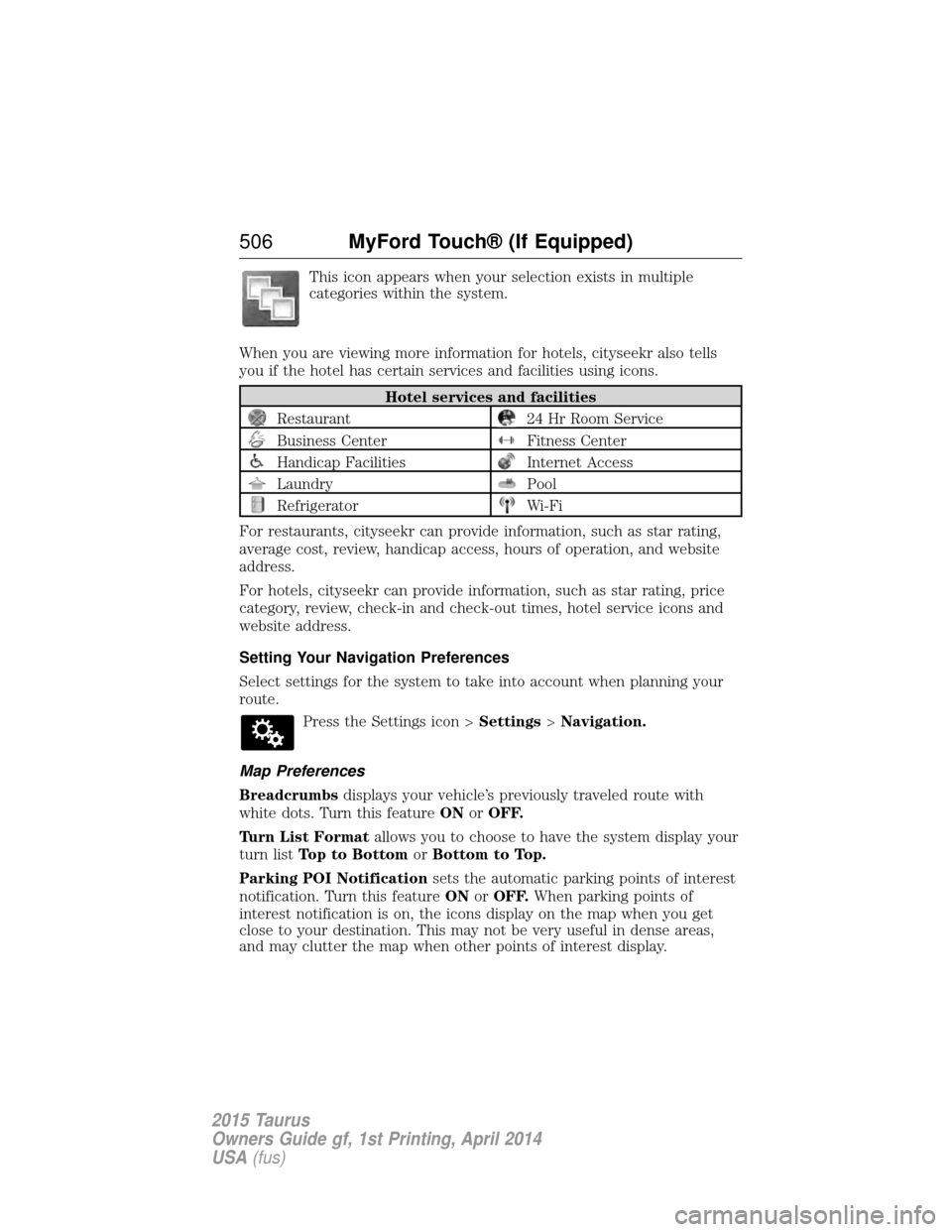
This icon appears when your selection exists in multiple
categories within the system.
When you are viewing more information for hotels, cityseekr also tells
you if the hotel has certain services and facilities using icons.
Hotel services and facilities
Restaurant24 Hr Room Service
Business CenterFitness Center
Handicap FacilitiesInternet Access
LaundryPool
RefrigeratorWi-Fi
For restaurants, cityseekr can provide information, such as star rating,
average cost, review, handicap access, hours of operation, and website
address.
For hotels, cityseekr can provide information, such as star rating, price
category, review, check-in and check-out times, hotel service icons and
website address.
Setting Your Navigation Preferences
Select settings for the system to take into account when planning your
route. Press the Settings icon > Settings>Navigation.
Map Preferences
Breadcrumbs displays your vehicle’s previously traveled route with
white dots. Turn this feature ONorOFF.
Turn List Format allows you to choose to have the system display your
turn list Top to Bottom orBottom to Top.
Parking POI Notification sets the automatic parking points of interest
notification. Turn this feature ONorOFF. When parking points of
interest notification is on, the icons display on the map when you get
close to your destination. This may not be very useful in dense areas,
and may clutter the map when other points of interest display.
506 MyFord Touch® (If Equipped)
2015 Taurus
Owners Guide gf, 1st Printing, April 2014
USA(fus)
Page 508 of 558
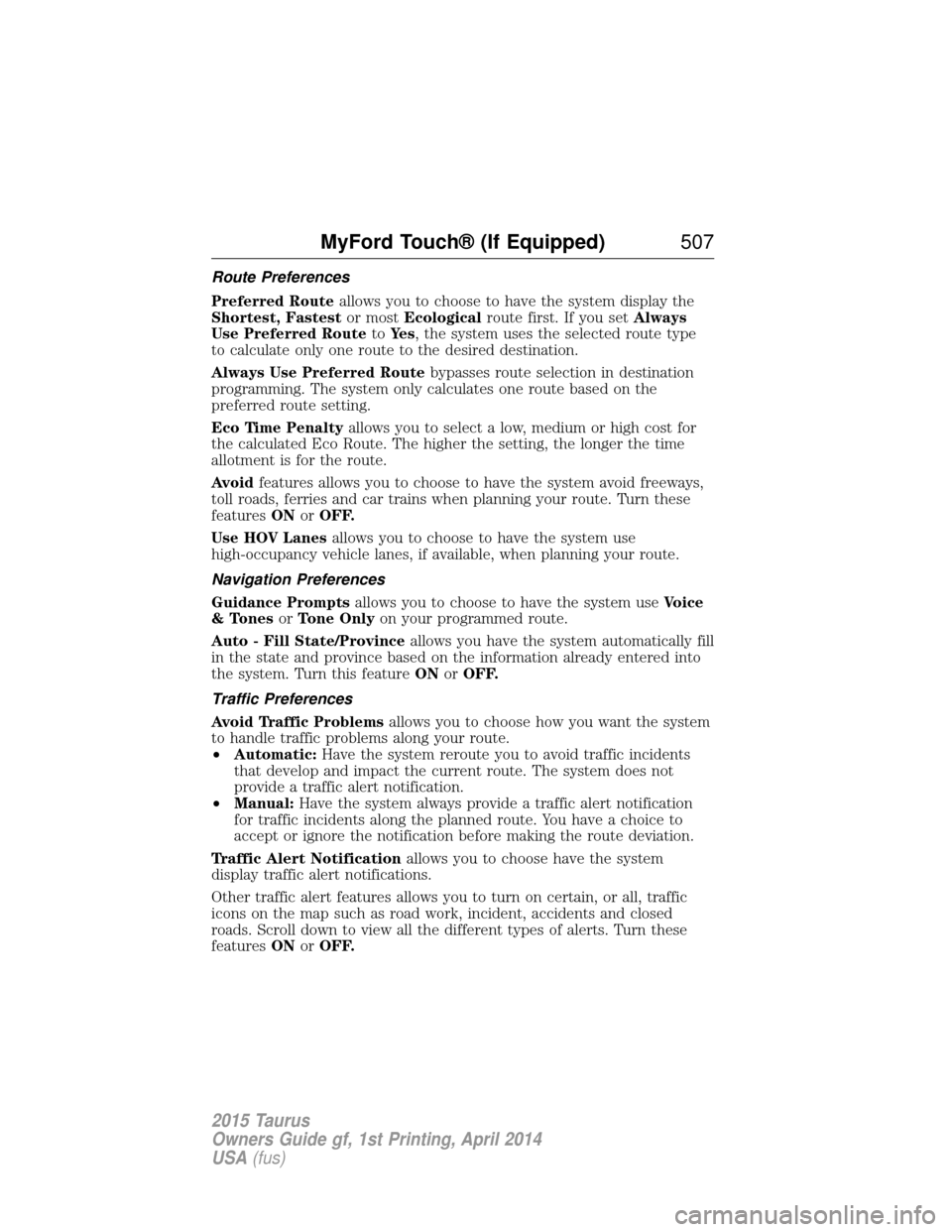
Route Preferences
Preferred Routeallows you to choose to have the system display the
Shortest, Fastest or mostEcological route first. If you set Always
Use Preferred Route toYe s , the system uses the selected route type
to calculate only one route to the desired destination.
Always Use Preferred Route bypasses route selection in destination
programming. The system only calculates one route based on the
preferred route setting.
Eco Time Penalty allows you to select a low, medium or high cost for
the calculated Eco Route. The higher the setting, the longer the time
allotment is for the route.
Avoid features allows you to choose to have the system avoid freeways,
toll roads, ferries and car trains when planning your route. Turn these
features ONorOFF.
Use HOV Lanes allows you to choose to have the system use
high-occupancy vehicle lanes, if available, when planning your route.
Navigation Preferences
Guidance Prompts allows you to choose to have the system use Voice
& Tones orTone Only on your programmed route.
Auto - Fill State/Province allows you have the system automatically fill
in the state and province based on the information already entered into
the system. Turn this feature ONorOFF.
Traffic Preferences
Avoid Traffic Problems allows you to choose how you want the system
to handle traffic problems along your route.
• Automatic: Have the system reroute you to avoid traffic incidents
that develop and impact the current route. The system does not
provide a traffic alert notification.
• Manual: Have the system always provide a traffic alert notification
for traffic incidents along the planned route. You have a choice to
accept or ignore the notification before making the route deviation.
Traffic Alert Notification allows you to choose have the system
display traffic alert notifications.
Other traffic alert features allows you to turn on certain, or all, traffic
icons on the map such as road work, incident, accidents and closed
roads. Scroll down to view all the different types of alerts. Turn these
features ONorOFF.
MyFord Touch® (If Equipped) 507
2015 Taurus
Owners Guide gf, 1st Printing, April 2014
USA(fus)
Page 513 of 558
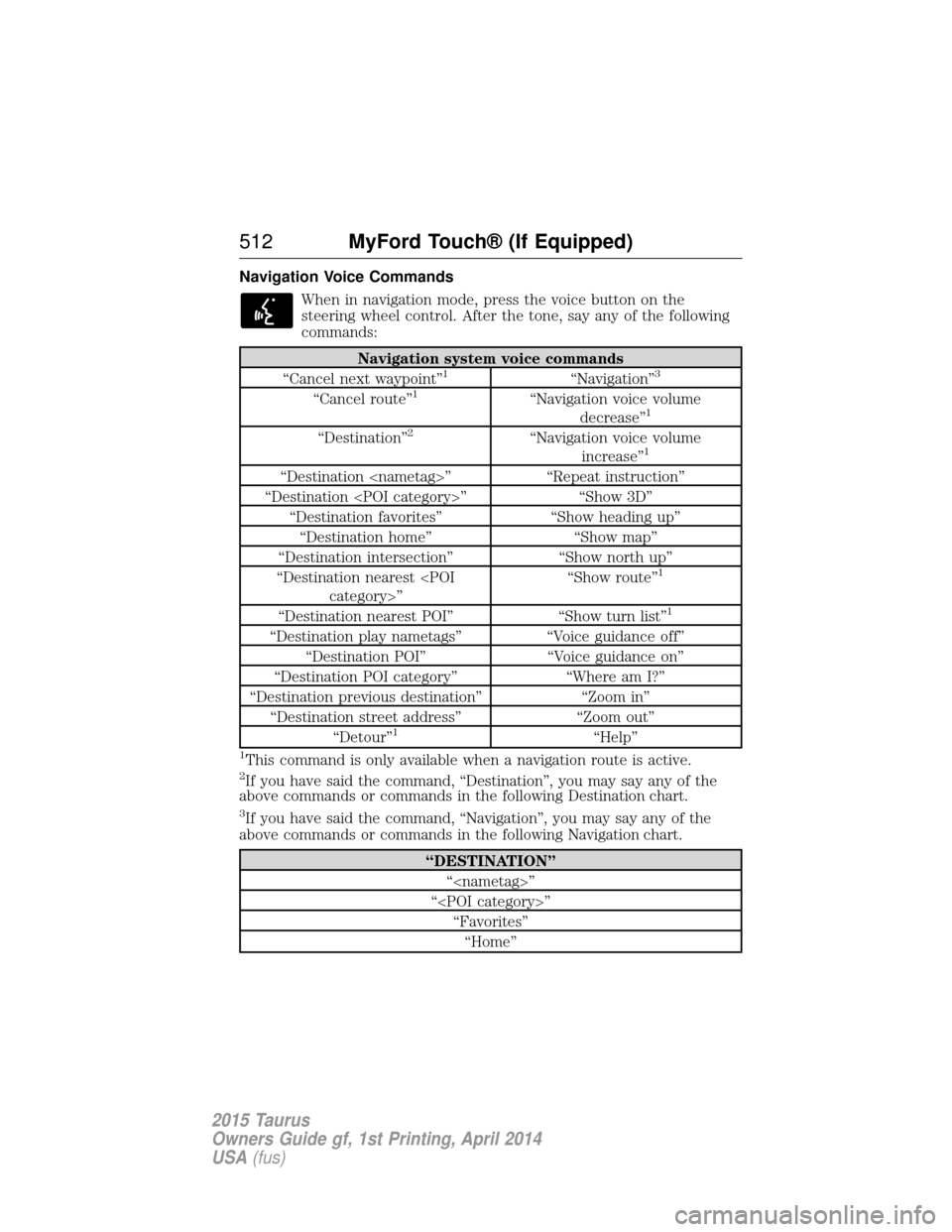
Navigation Voice CommandsWhen in navigation mode, press the voice button on the
steering wheel control. After the tone, say any of the following
commands:
Navigation system voice commands
“Cancel next waypoint”1“Navigation”3
“Cancel route”1“Navigation voice volume decrease”1
“Destination”2“Navigation voice volume increase”1
“Destination
“Destination
“Destination favorites” “Show heading up”
“Destination home” “Show map”
“Destination intersection” “Show north up”
“Destination nearest
1
“Destination nearest POI”
“Show turn list”1
“Destination play nametags”“Voice guidance off”
“Destination POI” “Voice guidance on”
“Destination POI category” “Where am I?”
“Destination previous destination” “Zoom in”
“Destination street address” “Zoom out”
“Detour”
1“Help”
1This command is only available when a navigation route is active.2If you have said the command, “Destination”, you may say any of the
above commands or commands in the following Destination chart.
3If you have said the command, “Navigation”, you may say any of the
above commands or commands in the following Navigation chart.
“DESTINATION”
“
“
512 MyFord Touch® (If Equipped)
2015 Taurus
Owners Guide gf, 1st Printing, April 2014
USA(fus)