Page 98 of 558
Bounce-Back (One-Touch Up or Down Windows Only)
The window stops automatically while closing and reverse some distance
if there is an obstacle in the way.
Overriding the Bounce-Back Feature
WARNING:When you override the bounce-back feature the
window will not reverse if it detects an obstacle. Take care when
closing the windows to avoid personal injury or damage to your vehicle.
Pull up the window switch and hold within two seconds of the window
reaching the bounce-back position. The window travels up with no
bounce-back protection. The window stops if you release the switch
before the window is fully closed.
Window Lock Press the control to lock or unlock
the rear window controls.
Accessory Delay
You can use the window switches for several minutes after you switch
the ignition off, or until you open either front door.
Windows and Mirrors 97
2015 Taurus
Owners Guide gf, 1st Printing, April 2014
USA(fus)
Page 100 of 558
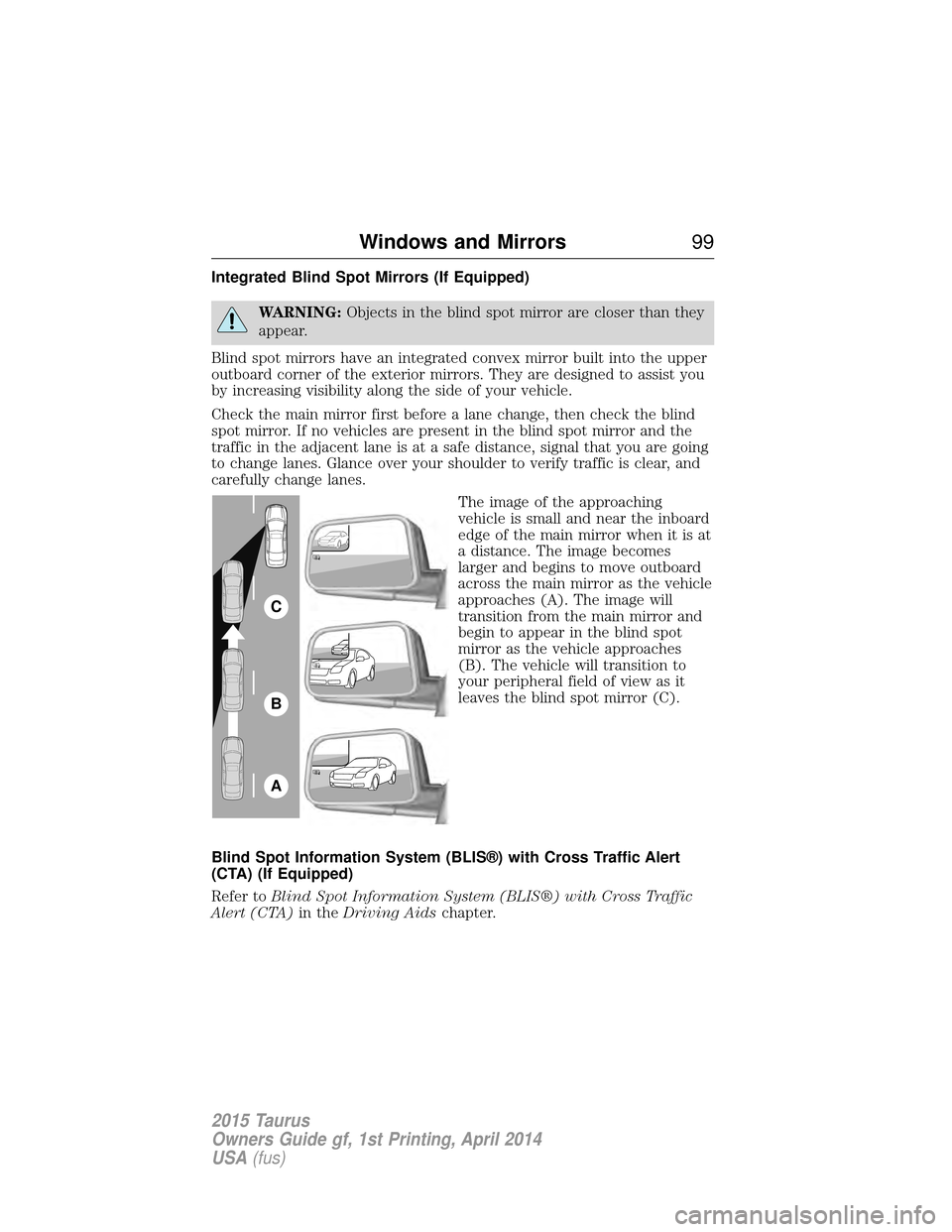
Integrated Blind Spot Mirrors (If Equipped)
WARNING:Objects in the blind spot mirror are closer than they
appear.
Blind spot mirrors have an integrated convex mirror built into the upper
outboard corner of the exterior mirrors. They are designed to assist you
by increasing visibility along the side of your vehicle.
Check the main mirror first before a lane change, then check the blind
spot mirror. If no vehicles are present in the blind spot mirror and the
traffic in the adjacent lane is at a safe distance, signal that you are going
to change lanes. Glance over your shoulder to verify traffic is clear, and
carefully change lanes. The image of the approaching
vehicle is small and near the inboard
edge of the main mirror when it is at
a distance. The image becomes
larger and begins to move outboard
across the main mirror as the vehicle
approaches (A). The image will
transition from the main mirror and
begin to appear in the blind spot
mirror as the vehicle approaches
(B). The vehicle will transition to
your peripheral field of view as it
leaves the blind spot mirror (C).
Blind Spot Information System (BLIS®) with Cross Traffic Alert
(CTA) (If Equipped)
Refer to Blind Spot Information System (BLIS®) with Cross Traffic
Alert (CTA) in theDriving Aids chapter.
A
B
C
Windows and Mirrors 99
2015 Taurus
Owners Guide gf, 1st Printing, April 2014
USA(fus)
Page 103 of 558

MOONROOF (IF EQUIPPED)
WARNING:Do not let children play with the moonroof or leave
children unattended in the vehicle. They may seriously hurt
themselves.
WARNING: When closing the moonroof, you should verify that it
is free of obstructions and ensure that children and/or pets are
not in the proximity of the moonroof opening.
You can manually open or close the sliding shade when the moonroof is
closed. Pull the shade toward the front of the vehicle to close it.
The moonroof controls are located on the overhead console.
The moonroof has a one-touch open and close feature. To stop its motion
during one-touch operation, press the control a second time.
Opening and Closing the Moonroof Press and release theSLIDE
control to open the moonroof.
Pull and release the SLIDEcontrol to close the moonroof.
Bounce-Back
The moonroof automatically stops closing and reverses if it detects an
obstacle while closing.
Pull and hold the SLIDEcontrol within two seconds of a bounce-back
event to override the function. The closing force begins to increase each
of the next three times the moonroof close s, with bounce-back active.
Venting the Moonroof
Press and release the TILTcontrol to vent the moonroof. Pull and hold
the TILT control to close the moonroof.
SLIDE
TILT
102 Windows and Mirrors
2015 Taurus
Owners Guide gf, 1st Printing, April 2014
USA(fus)
Page 107 of 558

Brake system warning lightTo confirm the brake system warning light is functional, it will
momentarily illuminate when the ignition is turned to the on
position when the engine is not running, or in a position
between on and start, or by applying the parking brake when the ignition
is turned to the on position.
If it illuminates when you are driving, check that the parking brake is not
engaged. If the parking brake is not engaged, this indicates low brake
fluid level or a brake system malfunction. Have the system checked
immediately by your authorized dealer.
WARNING: Driving a vehicle with the brake system warning
light on is dangerous. A significant decrease in braking
performance may occur. It will take you longer to stop the vehicle.
Have the vehicle checked by your authorized dealer as soon as possible.
Driving extended distances with the parking brake engaged can cause
brake failure and the risk of personal injury.
Charging system (RTT) Illuminates when the battery is not charging properly. If it stays
on while the engine is running, there may be a malfunction with
the charging system. Contact your authorized dealer as soon as
possible. This indicates a problem with the electrical system or a related
component.
Door ajar (RTT)
Displays when the ignition is on and any door is not completely
closed.
Engine oil pressure (RTT) Illuminates when the oil pressure falls below the normal range.
Engine coolant temperature (RTT) Illuminates when the engine coolant temperature is high. Stop
the vehicle as soon as possible, switch off the engine and let
cool.
106 Instrument Cluster
2015 Taurus
Owners Guide gf, 1st Printing, April 2014
USA(fus)
Page 110 of 558

Stability Control SystemDisplays when the AdvanceTrac®/Traction control is active. If
the light remains on, have the system serviced immediately.
Stability Control System Off Illuminates when AdvanceTrac®/Traction control has been
disabled by the driver.
Turn signal Illuminates when the left or right turn signal or the hazard
warning flasher is turned on. If the indicators stay on or flash
faster, check for a burned out bulb.
AUDIBLE WARNINGS AND INDICATORS
Key In Ignition Warning Chime
Sounds when the key is left in the ignition in the off or accessory
position and the driver’s door is opened.
Keyless Warning Alert (If Equipped)
Sounds the horn twice when you exit your vehicle with the intelligent
access key, after the last door is closed and your keyless vehicle is in
RUN, indicating your vehicle is still on.
Headlamps On Warning Chime
Sounds when the headlamps or parking lamps are on, the ignition is off
(the key is not in the ignition) and the driver’s door is opened.
Parking Brake On Warning Chime
Sounds when you have left the parking brake on and drive your vehicle.
If the warning chime remains on after you have released the parking
brake, have the system checked by your authorized dealer immediately.
Instrument Cluster 109
2015 Taurus
Owners Guide gf, 1st Printing, April 2014
USA(fus)
Page 114 of 558
Settings
Convenience Auto Engine Off — check enabled (default) / uncheck disabled
Auto Highbeam — check enabled (default) / uncheck
disabled
Autolamp Delay Off or number of seconds
Compass Display — check enabled (default) / uncheck disabled
DTE Calculation Normal or Towing
Easy Entry/Exit — check enabled (default) /
uncheck disabled
Locks Autolock — check enabled (default) / uncheck disabled
Autounlock — check enabled
(default) / uncheck disabled
Remote Unlock All Doors orDriver First
Oil life Reset Set XXX% — Hold OK to Reset
Remote Start Climate Control Auto or Last Setting
Seats and Wheel
or Front Seats Automatic or
Off
Duration (5, 10 or 15 minutes)
System — check enabled
(default) / uncheck disabled
Windows Remote Open or Close
Wipers Courtesy Wipe — check enabled (default) / uncheck disabled
Rain Sensing — check enabled
(default) / uncheck disabled
Information Displays 11 3
2015 Taurus
Owners Guide gf, 1st Printing, April 2014
USA(fus)
Page 120 of 558

Settings
Vehicle Auto Engine Off — check enabled / uncheck disabled DTE Calculation Normal / Towing
Easy Entry/Exit — check enabled / uncheck disabled
Lighting Auto highbeam — check enabled(default) / uncheck disabled
Autolamp Delay Off or number ofseconds
Locks Autolock — check enabled (default) / uncheck disabled
Autounlock — check enabled
(default) / uncheck disabled
Remote
UnlockingAll doors /
Driver’s door
Oil Life Reset Set to XXX % — Hold OK to Reset
Remote Start Climate Control
(using this
feature allows
you to select
different climate
control modes
when the vehicle
is started using
the remote start
feature)
Auto / Last
Setting
Seats & Wheel or
Front Seats Auto / Off
Duration 5/10
/15 minutes
System — check enabled (default)
/ uncheck disabled
Windows Remote Open or Close
Wipers Courtesy Wipe — check enabled
(default) / uncheck disabled
Rain Sensing — check enabled
(default) / uncheck disabled
Information Displays
11 9
2015 Taurus
Owners Guide gf, 1st Printing, April 2014
USA(fus)
Page 126 of 558

Collision WarningSystem Messages Action / Description
Collision Warning Not
Available Displayed when there is a system malfunction
with the collision warning system. The system
will be disabled. Contact your authorized
dealer as soon as possible.
Collision Warning Not
Available Sensor
Blocked See Manual Displayed when the collision warning system
radar is blocked because of poor radar
visibility due to bad weather or ice/mud/water
in front of the radar. Driver can typically clean
the sensor to resolve. Contact your authorized
dealer as soon as possible.
Collision Warning
Malfunction Displayed when there is a system malfunction
with the collision warning system. The system
will be disabled. Contact your authorized
dealer as soon as possible.
Door Messages
Action / Description
X Door Ajar Displayed when a door is not completely
closed.
Trunk Ajar Displayed when the trunk is not completely
closed.
Fuel Messages Action / Description
Check Fuel Fill Inlet Displayed when the fuel fill inlet may not be properly closed.
Fuel Level LOW Displayed as an early reminder of a low fuel condition.
Information Displays 125
2015 Taurus
Owners Guide gf, 1st Printing, April 2014
USA(fus)

