2015 FORD TAURUS engine
[x] Cancel search: enginePage 362 of 558

ItemsCapacityFord part name or
equivalent Ford part number / Ford
specification
A/C refrigerant
9
2.0LEcoBoost engine
1.62 lb (0.74kg) 3.5L V6 engine
1.43 lb (0.65kg) Motorcraft R–134a
Refrigerant YN-19 (U.S.);
CYN–16–R (Canada) / WSH-M17B19–A
A/C refrigerant
compressor oil
9
2.0L GTDI & 3.5LTiVCT 5.2 fl oz
(0.153 L) Motorcraft PAG Refrigerant
Compressor Oil YN-12–D /
WSH-M1C231–B
1Ford recommends using Motorcraft (Ford) DOT 4 Low Viscosity High Performance Brake Fluid or
equivalent meeting WSS-M6C65-A2. Use of any fluid other than the recommended fluid may cause
degraded brake performance and not meet the Ford performance standards. Keep brake fluid clean
and dry. Contamination with dirt, water, petroleum products or other materials may result in brake
system damage and possible failure.2Approximate dry fill capacity. Actual amount may vary during fluid changes.3Automatic transmissions that require MERCON LV should only use MERCON LV fluid. Refer to
scheduled maintenance information to determine the correct service interval. Use of any fluid other
than the recommended fluid may cause transmission damage.4See your authorized dealer for fluid level checking or filling.5Use of synthetic or synthetic blend motor oil is not mandatory. Only use fluid that meets Ford
specifications. Motor oils of the recommended viscosity grade that meet API SN requirements and
display the API Certification Mark for gasoline engines are also acceptable. Do not use oil labeled with
API SN service category unless the label also displays the API certification mark.
Capacities and Specifications 361
2015 Taurus
Owners Guide gf, 1st Printing, April 2014
USA(fus)
Page 363 of 558

ItemsCapacityFord part name or
equivalent Ford part number / Ford
specification
6An oil that displays the API Certification Mark symbol conforms to current engine, emission system
and fuel economy performance standards of the International Lubricant Standardization and Approval
Committee (ILSAC).7Do not use supplemental engine oil additives. They are unnecessary and could lead to engine damage
that is not covered by Ford’s warranty.8Add the coolant type originally equipped in your vehicle.9See warning below:
WARNING: The air conditioning refrigerant system contains refrigerant R134a under high
pressure. Opening the air conditioning refrigerant system can cause personal injury. Only
qualified personnel should service the air conditioning refrigerant system.
362 Capacities and Specifications
2015 Taurus
Owners Guide gf, 1st Printing, April 2014
USA(fus)
Page 364 of 558

MOTORCRAFT® PART NUMBERS
Component3.5L V6
engine 3.5L V6 SHO
engine 2.0L EcoBoost
engine
Air filter
element FA-1884 FA-1884 FA-1884
Oil filter FL-500-S FL-500-S FL-910-S
Battery BXT-59 BXT-65-650 BXT-59 BXT-65–650
1BXT-65-6501
Spark plugs SP-5342SP-5342SP-5372
Cabin air filter FP68 FP68FP68
Seat air filter FS-104
Windshield
wiper blade WW–2601–PF (driver side)
WW–2001–PF (passenger side)
1This part is designed for vehicles with Intelligent Access.
2Refer to scheduled maintenance information for the appropriate
intervals for changing the spark plugs.
Note: Replace the spark plugs with ones that meet Ford material and
design specifications for your vehicle, such as Motorcraft® or equivalent
replacement parts. The customer warranty may be void for any damage
to the engine if such spark plugs are not used.
Capacities and Specifications 363
2015 Taurus
Owners Guide gf, 1st Printing, April 2014
USA(fus)
Page 365 of 558

VEHICLE IDENTIFICATION NUMBERThe vehicle identification number is
located on the driver’s side
instrument panel.
Please note that in the graphic,
XXXX is representative of your
vehicle identification number.
The Vehicle Identification Number (VIN) contains the following
information: A. World manufacturer identifier
B. Brake system / Gross Vehicle
Weight Rating (GVWR) / Restraint
Devices and their location
C. Make, vehicle line, series, body
type
D. Engine type
E. Check digit
F. Model year
G. Assembly plant
H. Production sequence number.
XXXXXXXXXXXXXXXXX
364 Capacities and Specifications
2015 Taurus
Owners Guide gf, 1st Printing, April 2014
USA(fus)
Page 368 of 558

Peace of mind
•Remote start
• Wheel locks
• Locking fuel plug for capless fuel system
• Bumper mounted parking sensors*
• Vehicle security system
*The accessory manufacturer designs, develops and therefore warrants
Ford Licensed Accessories, and does not design or test these accessories
to Ford Motor Company engineering requirements. Contact an
authorized Ford dealer for the manufacturer’s limited warranty details,
and request a copy of the Ford Licensed Accessories product limited
warranty from the accessory manufacturer.
For maximum vehicle performance, keep the following information in
mind when adding accessories or equipment to your vehicle:
• When adding accessories, equipment, passengers and luggage to your
vehicle, do not exceed the total weight capacity of the vehicle or of
the front or rear axle (GVWR or GAWR as indicated on the Safety
Compliance Certification label). Ask an authorized dealer for specific
weight information.
• The Federal Communications Commission (FCC) and Canadian Radio
Telecommunications Commission (CRTC) regulate the use of mobile
communications systems that are equipped with radio transmitters, for
example, two-way radios, telephones and theft alarms. Any such
equipment installed in your vehicle should comply with Federal
Communications Commission (FCC) and Canadian Radio
Telecommunications Commission (CRTC) regulations and should be
installed only by an authorized dealer.
• An authorized dealer needs to install mobile communications systems.
Improper installation may harm the operation of your vehicle,
particularly if the manufacturer did not design the mobile
communication system specifically for automotive use.
• If you or an authorized Ford dealer add any non-Ford electrical or
electronic accessories or components to your vehicle, you may
adversely affect battery performance and durability. In addition, you
may also adversely affect the performance of other electrical systems
in the vehicle.
Accessories 367
2015 Taurus
Owners Guide gf, 1st Printing, April 2014
USA(fus)
Page 388 of 558

The auxiliary input jack allows you
to connect and play music from
your portable music player through
your vehicle speakers. You can use
any portable music player designed
for use with headphones. Your audio
extension cable must have male
18-inch (3.5 millimeter) connectors
at each end.
1. Switch off the engine, radio and portable music player. Set the parking brake and put the transmission in position P.
2. Plug the extension cable from the portable music player into the auxiliary input jack.
3. Switch the radio on. Select either a tuned FM station or a CD.
4. Adjust the volume as desired.
5. Switch your portable music player on and adjust its volume to half its maximum level.
6. Press AUXuntilLINE orLINE IN appears in the display. You
should hear music from your device even if it is low.
7. Adjust the volume on your portable music player until it reaches the volume level of the FM station or CD. Do this by switching back and
forth between the AUX and FM or CD controls.
USB PORT (IF EQUIPPED)
WARNING: Driving while distracted can result in loss of vehicle
control, crash and injury. We strongly recommend that you use
extreme caution when using any device that may take your focus off
the road. Your primary responsibility is the safe operation of your
vehicle. We recommend against the use of any hand-held device while
driving and encourage the use of voice-operated systems when possible.
Make sure you are aware of all applicable local laws that may affect the
use of electronic devices while driving.
The USB port is located in the center console. It allows you to plug in
media playing devices, memory sticks and charge devices (if supported).
See the SYNCchapter for more information.
LINE IN
Audio System 387
2015 Taurus
Owners Guide gf, 1st Printing, April 2014
USA(fus)
Page 467 of 558
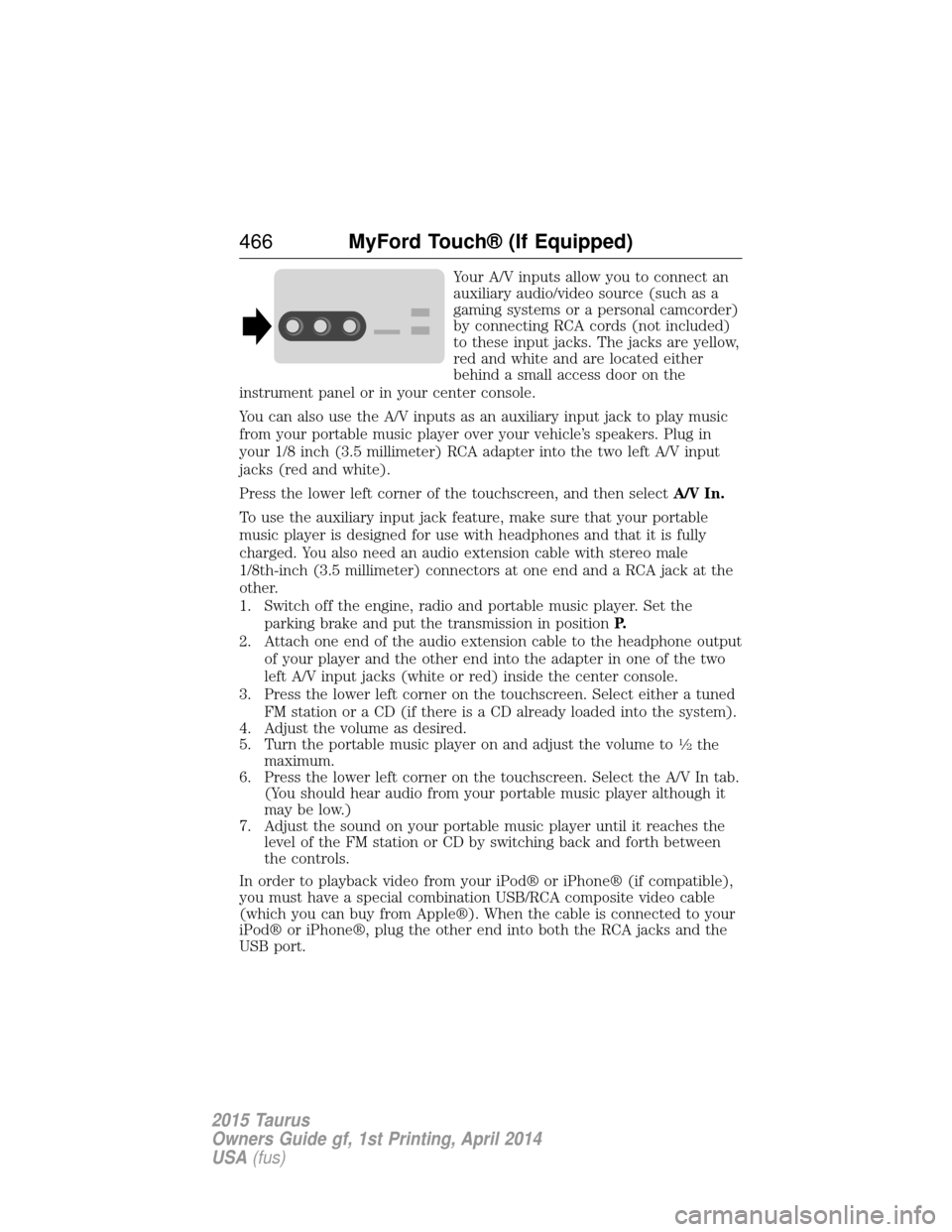
Your A/V inputs allow you to connect an
auxiliary audio/video source (such as a
gaming systems or a personal camcorder)
by connecting RCA cords (not included)
to these input jacks. The jacks are yellow,
red and white and are located either
behind a small access door on the
instrument panel or in your center console.
You can also use the A/V inputs as an auxiliary input jack to play music
from your portable music player over your vehicle’s speakers. Plug in
your 1/8 inch (3.5 millimeter) RCA adapter into the two left A/V input
jacks (red and white).
Press the lower left corner of the touchscreen, and then select A/V In.
To use the auxiliary input jack feature, make sure that your portable
music player is designed for use with headphones and that it is fully
charged. You also need an audio extension cable with stereo male
1/8th-inch (3.5 millimeter) connectors at one end and a RCA jack at the
other.
1. Switch off the engine, radio and portable music player. Set the parking brake and put the transmission in position P.
2. Attach one end of the audio extension cable to the headphone output of your player and the other end into the adapter in one of the two
left A/V input jacks (white or red) inside the center console.
3. Press the lower left corner on the touchscreen. Select either a tuned FM station or a CD (if there is a CD already loaded into the system).
4. Adjust the volume as desired.
5. Turn the portable music player on and adjust the volume to
12the
maximum.
6. Press the lower left corner on the touchscreen. Select the A/V In tab. (You should hear audio from your portable music player although it
may be low.)
7. Adjust the sound on your portable music player until it reaches the level of the FM station or CD by switching back and forth between
the controls.
In order to playback video from your iPod® or iPhone® (if compatible),
you must have a special combination USB/RCA composite video cable
(which you can buy from Apple®). When the cable is connected to your
iPod® or iPhone®, plug the other end into both the RCA jacks and the
USB port.
466 MyFord Touch® (If Equipped)
2015 Taurus
Owners Guide gf, 1st Printing, April 2014
USA(fus)
Page 516 of 558
DESCRIPTION OF OTHER RIGHTS AND LIMITATIONS:
•Speech Recognition: If the SOFTWARE includes speech recognition
component(s), you should understand that speech recognition is an
inherently statistical process and that recognition errors are inherent
in the process. Neither FORD MOTOR COMPANY nor its suppliers
shall be liable for any damages arising out of errors in the speech
recognition process.
• Limitations on Reverse Engineering, Decompilation and
Disassembly: You may not reverse engineer, decompile, or
disassemble nor permit others to reverse engineer, decompile or
disassemble the SOFTWARE, except and only to the extent that such
activity is expressly permitted by applicable law notwithstanding this
limitation.
• Limitations on Distributing, Copying, Modifying and Creating
Derivative Works: You may not distribute, copy, make modifications
to or create derivative works based on the SOFTWARE, except and
only to the extent that such activity is expressly permitted by
applicable law notwithstanding this limitation.
• Single EULA: The end user documentation for the DEVICE and
related systems and services may contain multiple EULAs, such as
multiple translations and/or multiple media versions (e.g., in the user
documentation and in the software). Even if you receive multiple
EULAs, you are licensed to use only one (1) copy of the SOFTWARE.
• SOFTWARE Transfer: You may permanently transfer your rights
under this EULA only as part of a sale or transfer of the DEVICE,
provided you retain no copies, you transfer all of the SOFTWARE
(including all component parts, the media and printed materials, any
upgrades, and, if applicable, the Certificate(s) of Authenticity), and
the recipient agrees to the terms of this EULA. If the SOFTWARE is
an upgrade, any transfer must include all prior versions of the
SOFTWARE.
• Termination: Without prejudice to any other rights, FORD MOTOR
COMPANY or MS may terminate this EULA if you fail to comply with
the terms and conditions of this EULA.
• Security Updates/Digital Rights Management: Content owners use
the WMDRM technology included in your DEVICE to protect their
intellectual property, included copyrighted content. Portions of the
SOFTWARE on your DEVICE use WMDRM software to access
WMDRM-protected content. If the WMDRM software fails to protect
the content, content owners may ask Microsoft to revoke the
Appendices 515
2015 Taurus
Owners Guide gf, 1st Printing, April 2014
USA(fus)