2015 FORD SUPER DUTY remote start
[x] Cancel search: remote startPage 62 of 470
1.Insert the first previously programmedcoded key into the ignition.
2.Switch the ignition from off to on. Keepthe ignition on for at least threeseconds, but no more than 10 seconds.
3.Switch the ignition off and remove thefirst coded key from the ignition.
4.After three seconds but within 10seconds of switching the ignition off,insert the second previously coded keyinto the ignition.
5.Switch the ignition from off to on. Keepthe ignition on for at least threeseconds, but no more than 10 seconds.
6.Switch the ignition off and remove thesecond previously programmed codedkey from the ignition.
7.After three seconds but within 10seconds of switching the ignition offand removing the previouslyprogrammed coded key, insert the newunprogrammed key into the ignition.
8.Switch the ignition from off to on. Keepthe ignition on for at least six secondsuntil you hear the door locks cycle.
9.Remove the newly programmed codedkey from the ignition.
The key will start the engine ifprogramming is successful. You canoperate the remote entry system if the newkey is an integrated keyhead transmitter.
If programming was not successful, wait20 seconds and repeat Steps 1 through 8.If you are still unsuccessful, take yourvehicle to an authorized dealer.
ANTI-THEFT ALARM (IF EQUIPPED)
The system warns you of an unauthorizedentry to your vehicle. It triggers if any dooror the hood opens without using the key,remote control or keyless entry keypad.
The direction indicators flash and the hornsounds if the system triggers while thealarm is armed.
Take all remote controls to an authorizeddealer if there is any potential alarmproblem with your vehicle.
Arming the Alarm
The alarm is ready to arm when there isnot a key in the ignition. Electronically lockthe vehicle to arm the alarm.
The direction indicators flash once afteryou lock the vehicle. This indicates thealarm is in the pre-armed mode. It will fullyarm in 20 seconds.
Disarming the Alarm
Disarm the alarm by any of the followingactions:
•Press the power door unlock buttonwithin the 20-second pre-armed mode.
•Unlock the doors with the remotecontrol or keyless entry keypad.
•Switch the ignition on or start thevehicle.
•Use a key in the driver door to unlockthe vehicle, then switch the ignition onwithin 12 seconds.
Note:Pressing the panic button on theremote control will stop the horn and signalindicators, but will not disarm the system.
59Super Duty (), enUSASecurity
Page 73 of 470
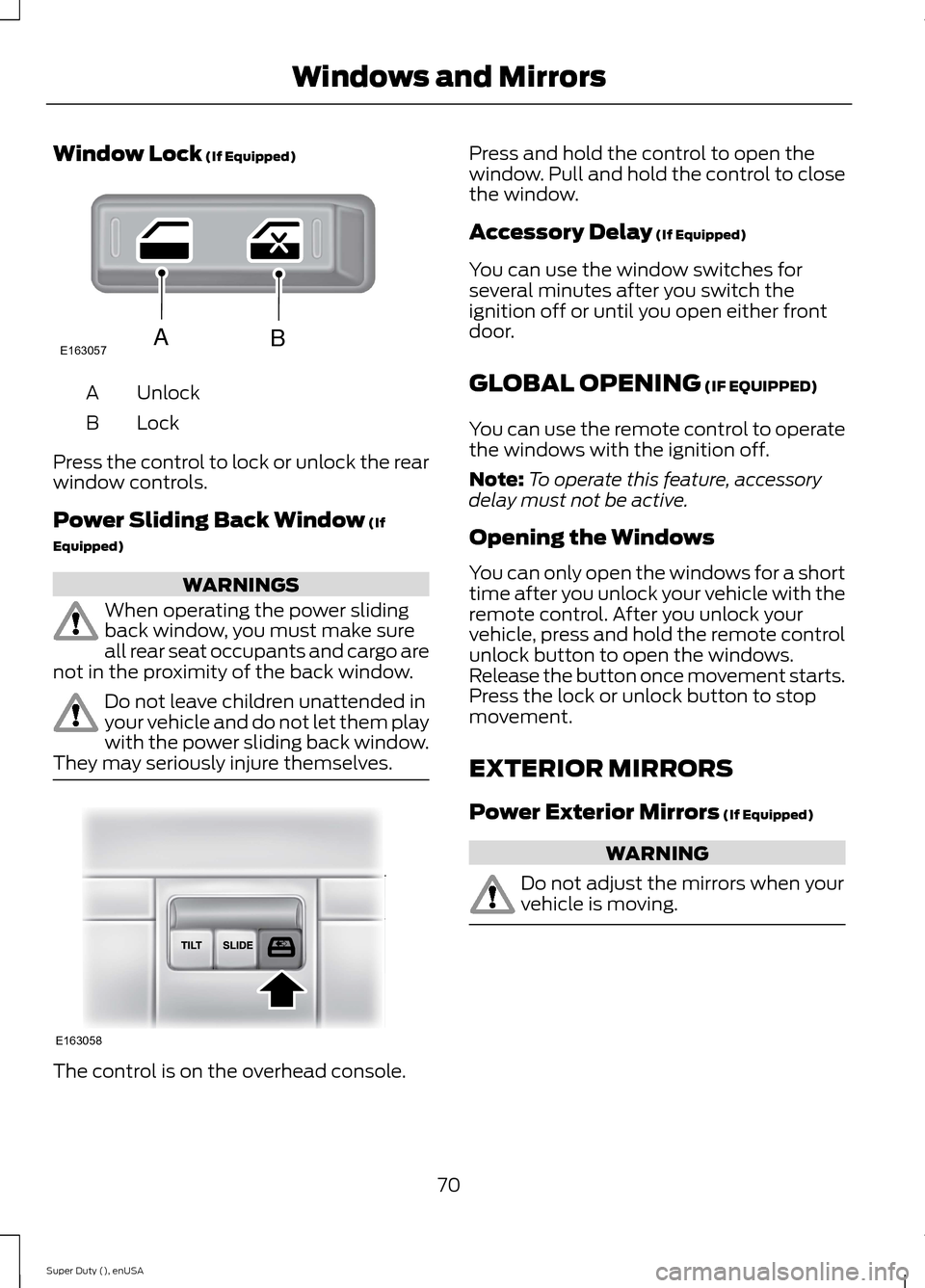
Window Lock (If Equipped)
UnlockA
LockB
Press the control to lock or unlock the rearwindow controls.
Power Sliding Back Window (If
Equipped)
WARNINGS
When operating the power slidingback window, you must make sureall rear seat occupants and cargo arenot in the proximity of the back window.
Do not leave children unattended inyour vehicle and do not let them playwith the power sliding back window.They may seriously injure themselves.
The control is on the overhead console.
Press and hold the control to open thewindow. Pull and hold the control to closethe window.
Accessory Delay (If Equipped)
You can use the window switches forseveral minutes after you switch theignition off or until you open either frontdoor.
GLOBAL OPENING (IF EQUIPPED)
You can use the remote control to operatethe windows with the ignition off.
Note:To operate this feature, accessorydelay must not be active.
Opening the Windows
You can only open the windows for a shorttime after you unlock your vehicle with theremote control. After you unlock yourvehicle, press and hold the remote controlunlock button to open the windows.Release the button once movement starts.Press the lock or unlock button to stopmovement.
EXTERIOR MIRRORS
Power Exterior Mirrors (If Equipped)
WARNING
Do not adjust the mirrors when yourvehicle is moving.
70Super Duty (), enUSAWindows and MirrorsE163057AB E163058
Page 87 of 470
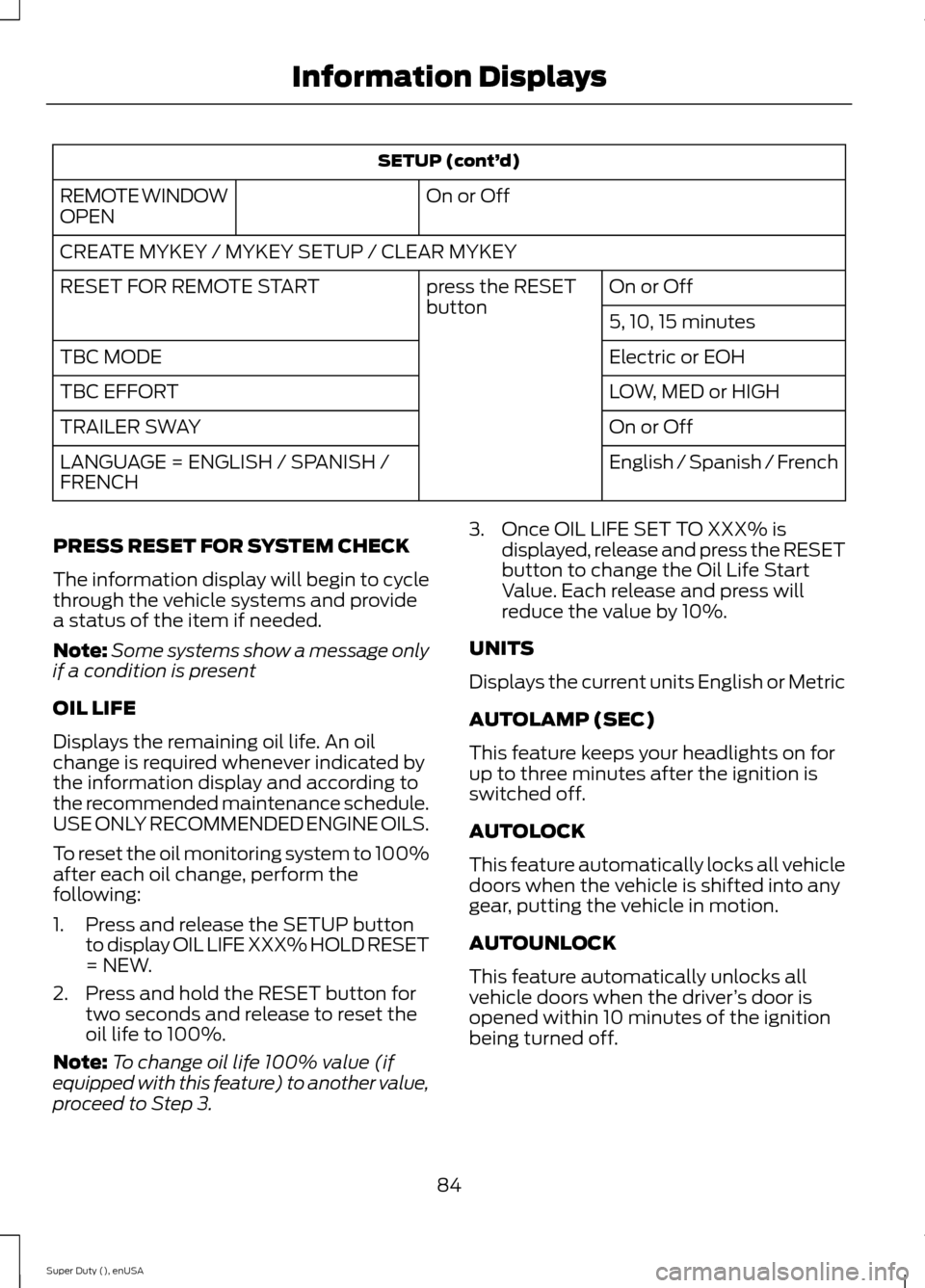
SETUP (cont’d)
On or OffREMOTE WINDOWOPEN
CREATE MYKEY / MYKEY SETUP / CLEAR MYKEY
On or Offpress the RESETbuttonRESET FOR REMOTE START
5, 10, 15 minutes
Electric or EOHTBC MODE
LOW, MED or HIGHTBC EFFORT
On or OffTRAILER SWAY
English / Spanish / FrenchLANGUAGE = ENGLISH / SPANISH /FRENCH
PRESS RESET FOR SYSTEM CHECK
The information display will begin to cyclethrough the vehicle systems and providea status of the item if needed.
Note:Some systems show a message onlyif a condition is present
OIL LIFE
Displays the remaining oil life. An oilchange is required whenever indicated bythe information display and according tothe recommended maintenance schedule.USE ONLY RECOMMENDED ENGINE OILS.
To reset the oil monitoring system to 100%after each oil change, perform thefollowing:
1.Press and release the SETUP buttonto display OIL LIFE XXX% HOLD RESET= NEW.
2.Press and hold the RESET button fortwo seconds and release to reset theoil life to 100%.
Note:To change oil life 100% value (ifequipped with this feature) to another value,proceed to Step 3.
3.Once OIL LIFE SET TO XXX% isdisplayed, release and press the RESETbutton to change the Oil Life StartValue. Each release and press willreduce the value by 10%.
UNITS
Displays the current units English or Metric
AUTOLAMP (SEC)
This feature keeps your headlights on forup to three minutes after the ignition isswitched off.
AUTOLOCK
This feature automatically locks all vehicledoors when the vehicle is shifted into anygear, putting the vehicle in motion.
AUTOUNLOCK
This feature automatically unlocks allvehicle doors when the driver’s door isopened within 10 minutes of the ignitionbeing turned off.
84Super Duty (), enUSAInformation Displays
Page 88 of 470
COURTESY WIPE
This feature allows for an extra swipe ofthe wipers after a wipe/wash cycle.
CREATE MYKEY / MYKEY SETUP /CLEAR MYKEY
For more information, See Creating aMyKey (page 50).
RESET FOR REMOTE START (ifequipped)
REAR PARK AID
This feature sounds a warning tone to warnthe driver of obstacles near the rearbumper, and functions only when R(Reverse) gear is selected.
TBC MODE (if equipped)
Allows you to choose the trailer brakemode.
TBC EFFORT (if equipped)
Allows you to choose the level of initialbraking.
TRAILER SWAY (if equipped)
This feature uses the electronic stabilitycontrol to mitigate trailer sway.
LANGUAGE = ENGLISH / SPANISH /FRENCH
Allows you to choose which language themessage center will display in.
Waiting four seconds or pressing theRESET button cycles the message centerthrough each of the language choices.
Press the RESET button to set thelanguage choice.
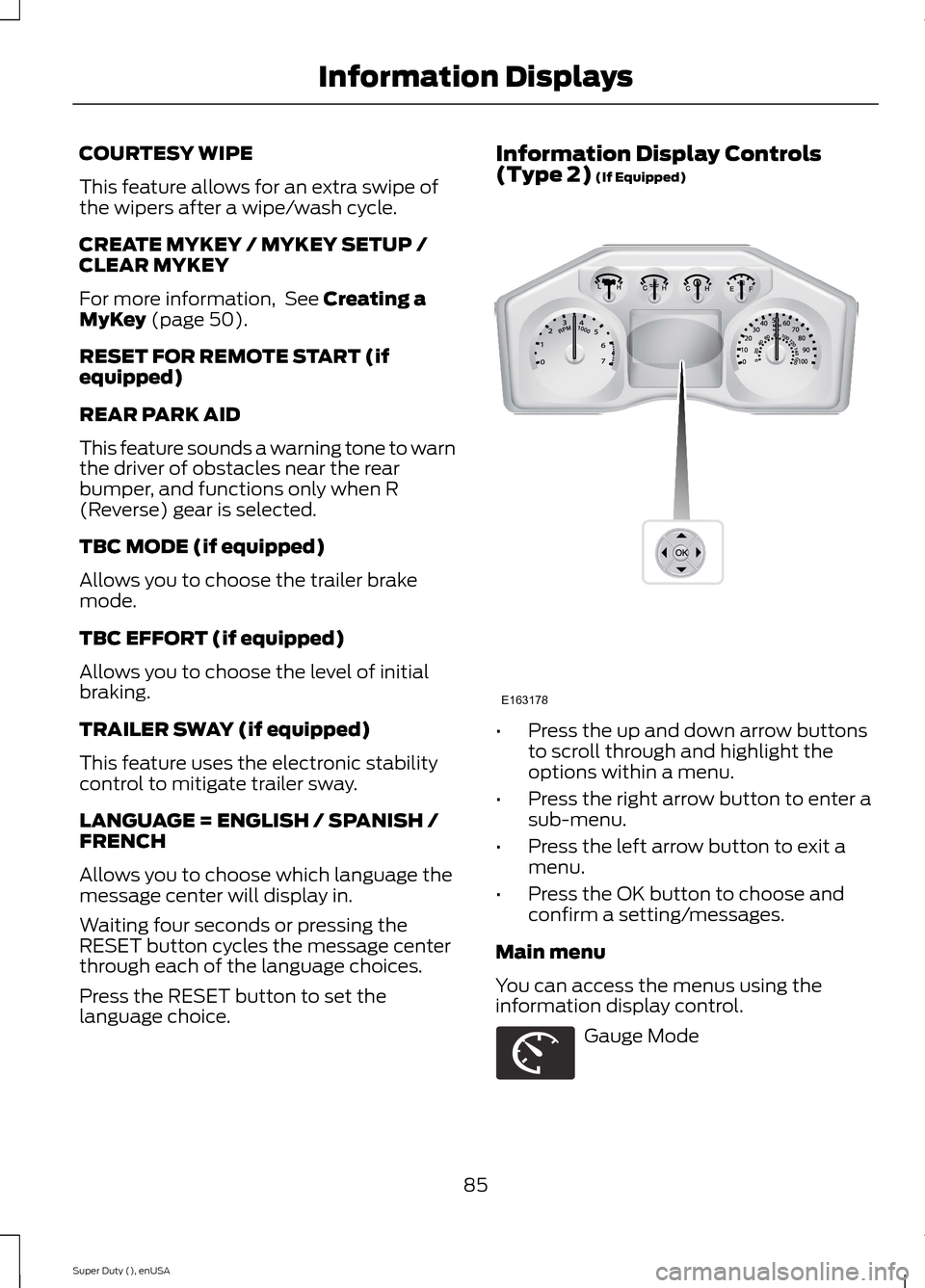
Information Display Controls(Type 2) (If Equipped)
•Press the up and down arrow buttonsto scroll through and highlight theoptions within a menu.
•Press the right arrow button to enter asub-menu.
•Press the left arrow button to exit amenu.
•Press the OK button to choose andconfirm a setting/messages.
Main menu
You can access the menus using theinformation display control.
Gauge Mode
85Super Duty (), enUSAInformation DisplaysE163178 E163179
Page 93 of 470
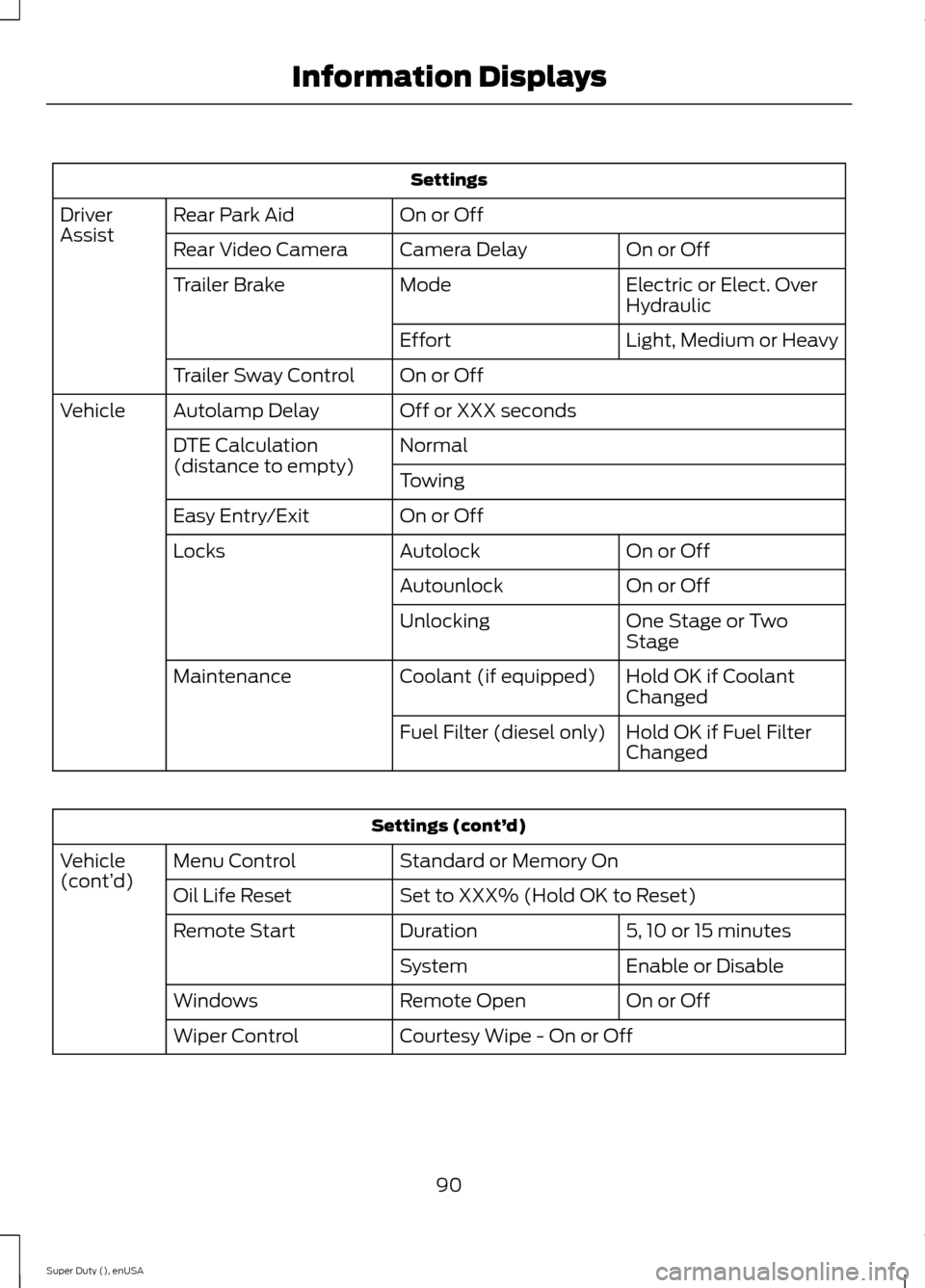
Settings
On or OffRear Park AidDriverAssistOn or OffCamera DelayRear Video Camera
Electric or Elect. OverHydraulicModeTrailer Brake
Light, Medium or HeavyEffort
On or OffTrailer Sway Control
Off or XXX secondsAutolamp DelayVehicle
NormalDTE Calculation(distance to empty)Towing
On or OffEasy Entry/Exit
On or OffAutolockLocks
On or OffAutounlock
One Stage or TwoStageUnlocking
Hold OK if CoolantChangedCoolant (if equipped)Maintenance
Hold OK if Fuel FilterChangedFuel Filter (diesel only)
Settings (cont’d)
Standard or Memory OnMenu ControlVehicle(cont’d)Set to XXX% (Hold OK to Reset)Oil Life Reset
5, 10 or 15 minutesDurationRemote Start
Enable or DisableSystem
On or OffRemote OpenWindows
Courtesy Wipe - On or OffWiper Control
90Super Duty (), enUSAInformation Displays
Page 101 of 470
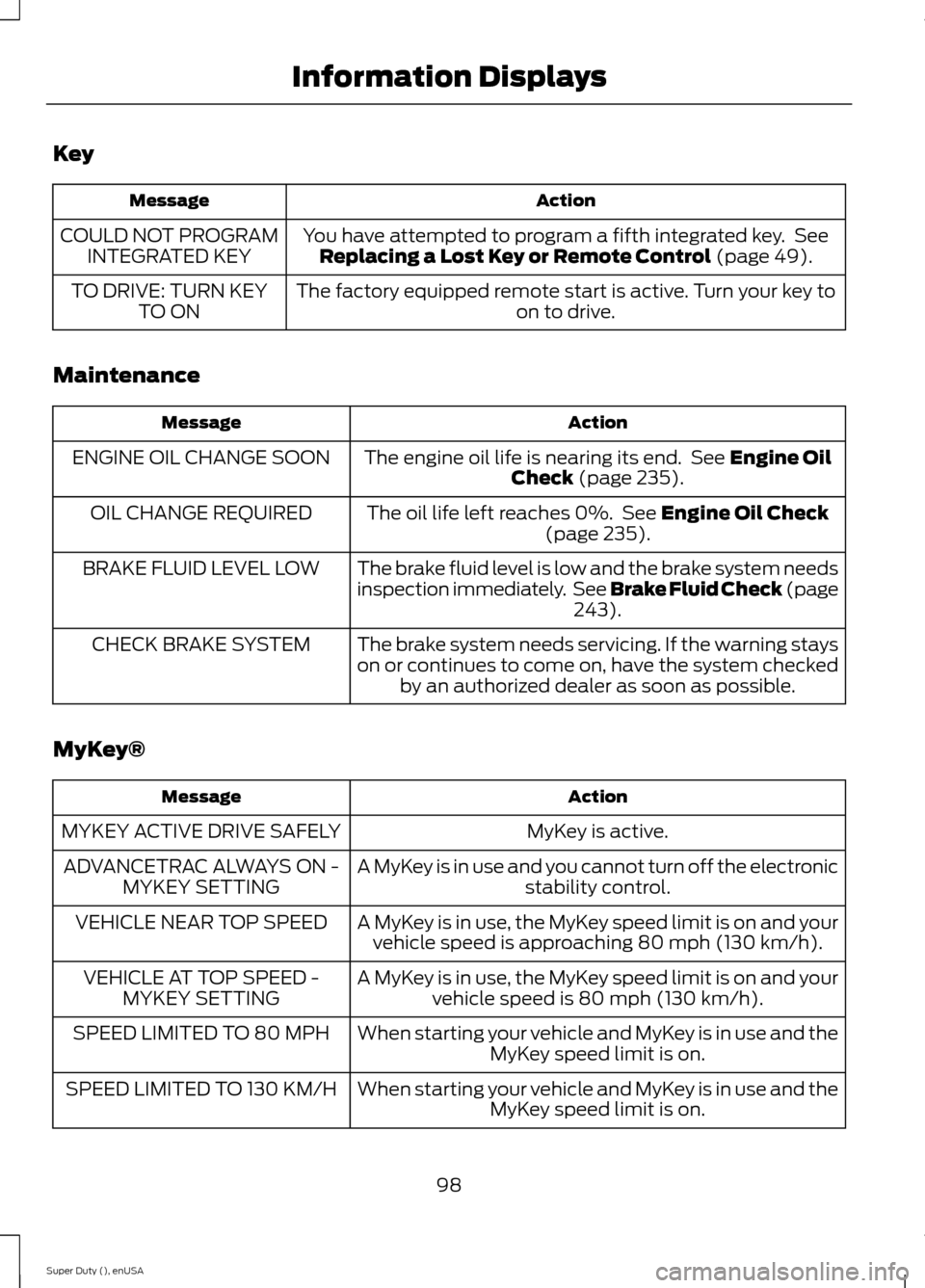
Key
ActionMessage
You have attempted to program a fifth integrated key. SeeReplacing a Lost Key or Remote Control (page 49).COULD NOT PROGRAMINTEGRATED KEY
The factory equipped remote start is active. Turn your key toon to drive.TO DRIVE: TURN KEYTO ON
Maintenance
ActionMessage
The engine oil life is nearing its end. See Engine OilCheck (page 235).ENGINE OIL CHANGE SOON
The oil life left reaches 0%. See Engine Oil Check(page 235).OIL CHANGE REQUIRED
The brake fluid level is low and the brake system needsinspection immediately. See Brake Fluid Check (page243).
BRAKE FLUID LEVEL LOW
The brake system needs servicing. If the warning stayson or continues to come on, have the system checkedby an authorized dealer as soon as possible.
CHECK BRAKE SYSTEM
MyKey®
ActionMessage
MyKey is active.MYKEY ACTIVE DRIVE SAFELY
A MyKey is in use and you cannot turn off the electronicstability control.ADVANCETRAC ALWAYS ON -MYKEY SETTING
A MyKey is in use, the MyKey speed limit is on and yourvehicle speed is approaching 80 mph (130 km/h).VEHICLE NEAR TOP SPEED
A MyKey is in use, the MyKey speed limit is on and yourvehicle speed is 80 mph (130 km/h).VEHICLE AT TOP SPEED -MYKEY SETTING
When starting your vehicle and MyKey is in use and theMyKey speed limit is on.SPEED LIMITED TO 80 MPH
When starting your vehicle and MyKey is in use and theMyKey speed limit is on.SPEED LIMITED TO 130 KM/H
98Super Duty (), enUSAInformation Displays
Page 112 of 470
REMOTE START (IF EQUIPPED)
The remote start feature allows you topre-condition the interior of your vehicle.The climate control system works toachieve comfort according to your previoussettings.
Note:You cannot adjust the system duringremote start operation.
Turn the ignition on to return the systemto its previous settings. You can now makeadjustments normally, but you need to turncertain vehicle-dependent features backon, such as:
•Heated seats.
•Cooled seats.
•Heated steering wheel.
•Heated mirrors.
•Heated rear window.
You can adjust the default remote startsettings using the information displaycontrols. See Information Displays(page 81).
Automatic Settings
In hot weather, the system is set to 72°F(22°C). The cooled seats are set to high(if available, and selected to AUTO in theinformation display).
In moderate weather, the system eitherheats or cools (based on previoussettings). The rear defroster, heatedmirrors and heated seats do notautomatically turn on.
In cold weather, the system is set to 72°F(22°C). The heated seats are set to high(if available, and selected to AUTO in theinformation display). The rear defrosterand heated mirrors automatically turn on.
109Super Duty (), enUSAClimate Control
Page 423 of 470
For a complete listing of the accessoriesthat are available for your vehicle, pleasecontact an authorized dealer or visit ouronline store atwww.Accessories.Ford.com (UnitedStates only).
Ford Motor Company will repair or replaceany properly authorized dealer-installedFord Genuine Accessories found to bedefective in factory-supplied materials orworkmanship during the warranty period,as well as any component damaged by thedefective accessories.
Ford Motor Company will warrant yourvehicle through the warranty that providesthe greatest benefit:
•24 months, unlimited mileage.
•The remainder of your new vehiclelimited warranty.
Contact an authorized dealer for detailsand a copy of the warranty.
Exterior style
•Bug shields.
•Exhaust tip.
•Deflectors.
•Running boards.
•Splash guards.
•Step bars.
•Fog lamps.
•Custom graphics*.
•Stainless-steel wheel covers*.
•Wheel well liners.
Interior style
•Floor mats.
•Cargo organizers.
•Custom seat covers*.
Lifestyle
•Ash cup / smoker's package.
•Bedliners and bedmats.
•Rear-seat entertainment*.
•Tonneau covers*.
•Trailer hitches, wiring harnesses andaccessories.
•Racks and carriers*.
•Truck bed camping tent*.
•Sportliner cargo liner*.
•Bed extender.
Peace of mind
•Keyless entry keypad.
•Back-up alarm*.
•Remote start and alarms.
•Wheel locks.
•Protective seat covers*.
•Bumper and hitch-mounted parkingsensors*.
•Cable lock*.
•Bed hooks*.
•Tool/Cargo boxes*.
•Speed/Cruise control.
*The accessory manufacturer designs,develops and therefore warrants FordLicensed Accessories, and does not designor test these accessories to Ford MotorCompany engineering requirements.Contact an authorized Ford dealer for themanufacturer’s limited warranty details,and request a copy of the Ford LicensedAccessories product limited warranty fromthe accessory manufacturer.
420Super Duty (), enUSAAccessories