Page 355 of 470
You can:When you select:
Press OK to select.
Exit the current menu.Return
*This is a speed-dependent feature.**Setting Bluetooth to off disconnects all Bluetooth devices and turns off all Bluetoothfeatures.
Advanced
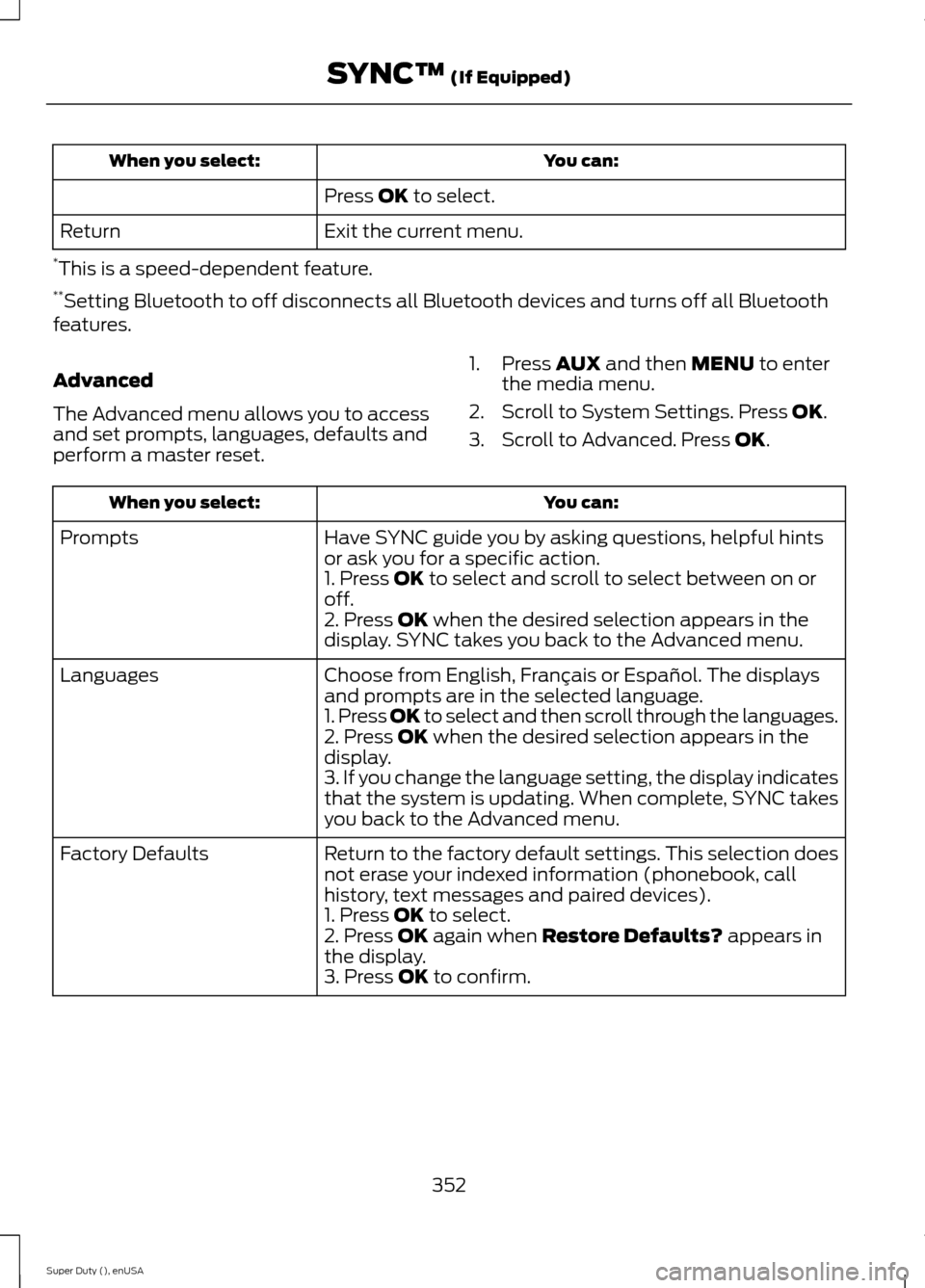
The Advanced menu allows you to accessand set prompts, languages, defaults andperform a master reset.
1.Press AUX and then MENU to enterthe media menu.
2.Scroll to System Settings. Press OK.
3.Scroll to Advanced. Press OK.
You can:When you select:
Have SYNC guide you by asking questions, helpful hintsor ask you for a specific action.Prompts
1. Press OK to select and scroll to select between on oroff.2. Press OK when the desired selection appears in thedisplay. SYNC takes you back to the Advanced menu.
Choose from English, Français or Español. The displaysand prompts are in the selected language.Languages
1. Press OK to select and then scroll through the languages.2. Press OK when the desired selection appears in thedisplay.3. If you change the language setting, the display indicatesthat the system is updating. When complete, SYNC takesyou back to the Advanced menu.
Return to the factory default settings. This selection doesnot erase your indexed information (phonebook, callhistory, text messages and paired devices).
Factory Defaults
1. Press OK to select.2. Press OK again when Restore Defaults? appears inthe display.3. Press OK to confirm.
352Super Duty (), enUSASYNC™ (If Equipped)
Page 372 of 470
Settings
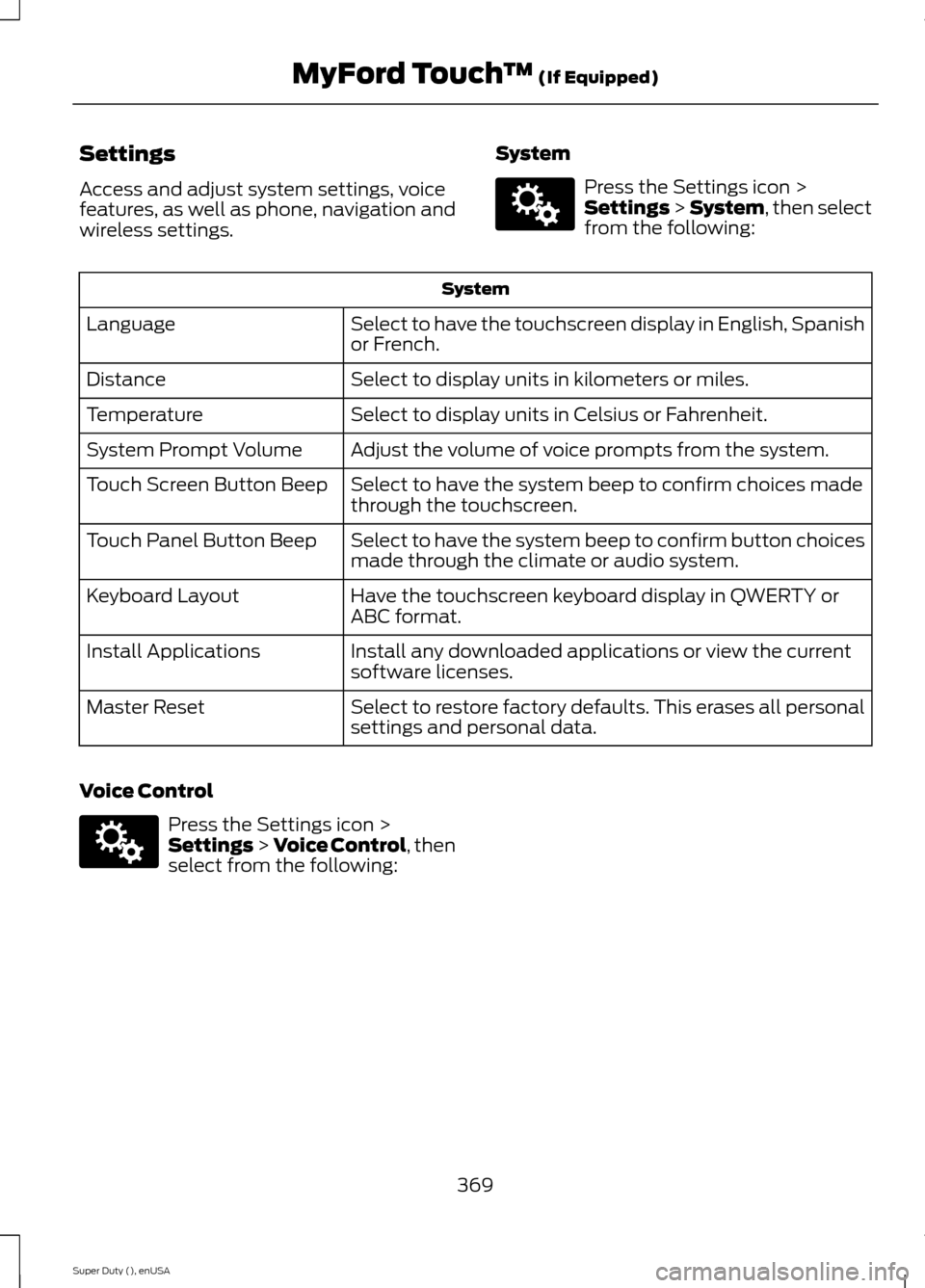
Access and adjust system settings, voicefeatures, as well as phone, navigation andwireless settings.
System
Press the Settings icon >Settings > System, then selectfrom the following:
System
Select to have the touchscreen display in English, Spanishor French.Language
Select to display units in kilometers or miles.Distance
Select to display units in Celsius or Fahrenheit.Temperature
Adjust the volume of voice prompts from the system.System Prompt Volume
Select to have the system beep to confirm choices madethrough the touchscreen.Touch Screen Button Beep
Select to have the system beep to confirm button choicesmade through the climate or audio system.Touch Panel Button Beep
Have the touchscreen keyboard display in QWERTY orABC format.Keyboard Layout
Install any downloaded applications or view the currentsoftware licenses.Install Applications
Select to restore factory defaults. This erases all personalsettings and personal data.Master Reset
Voice Control
Press the Settings icon >Settings > Voice Control, thenselect from the following:
369Super Duty (), enUSAMyFord Touch™ (If Equipped)E142607 E142607
Page 380 of 470
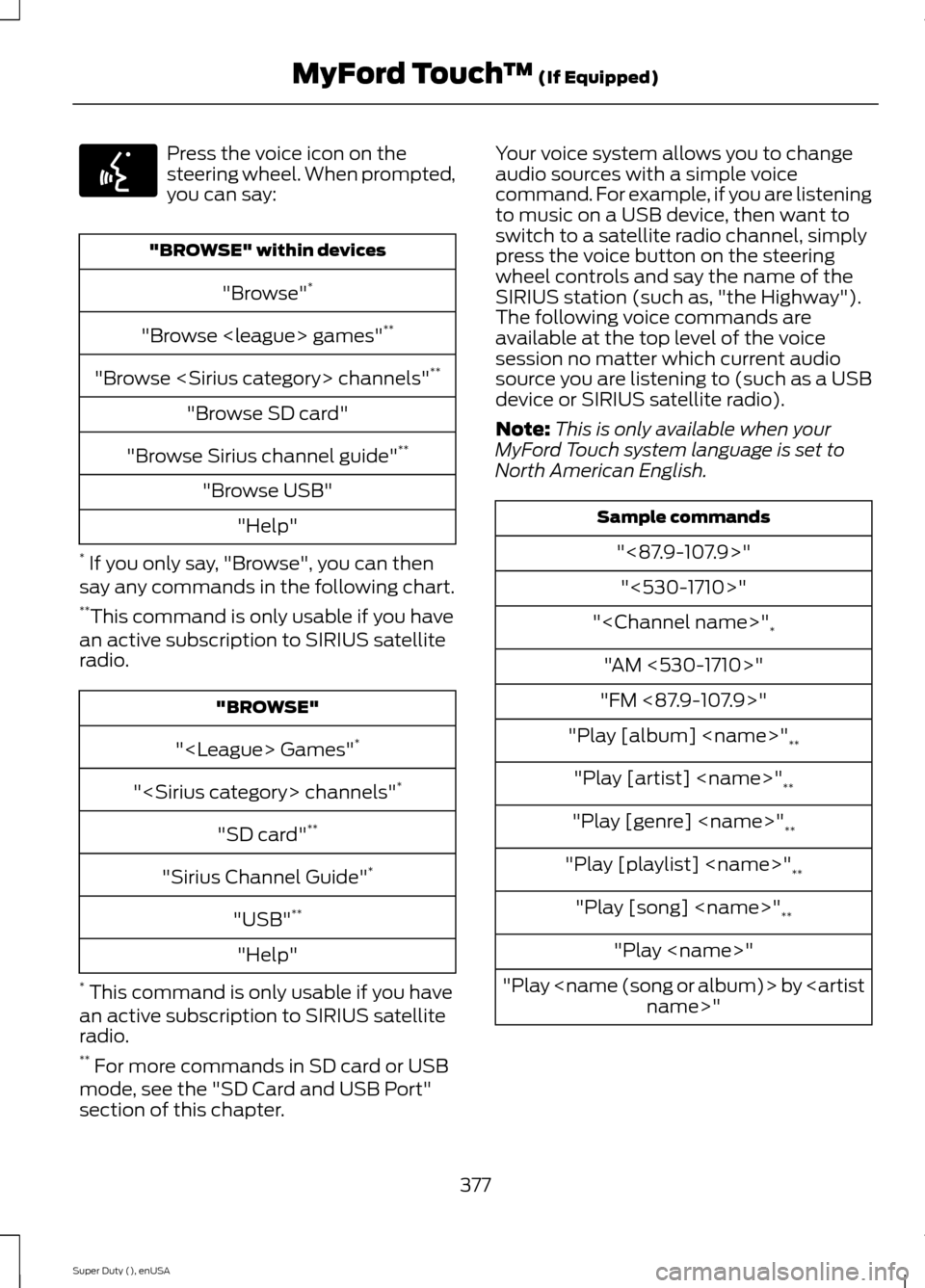
Press the voice icon on thesteering wheel. When prompted,you can say:
"BROWSE" within devices
"Browse"*
"Browse games"**
"Browse channels"**
"Browse SD card"
"Browse Sirius channel guide"**
"Browse USB"
"Help"
* If you only say, "Browse", you can thensay any commands in the following chart.**This command is only usable if you havean active subscription to SIRIUS satelliteradio.
"BROWSE"
" Games"*
" channels"*
"SD card"**
"Sirius Channel Guide"*
"USB"**
"Help"
* This command is only usable if you havean active subscription to SIRIUS satelliteradio.** For more commands in SD card or USBmode, see the "SD Card and USB Port"section of this chapter.
Your voice system allows you to changeaudio sources with a simple voicecommand. For example, if you are listeningto music on a USB device, then want toswitch to a satellite radio channel, simplypress the voice button on the steeringwheel controls and say the name of theSIRIUS station (such as, "the Highway").The following voice commands areavailable at the top level of the voicesession no matter which current audiosource you are listening to (such as a USBdevice or SIRIUS satellite radio).
Note:This is only available when yourMyFord Touch system language is set toNorth American English.
Sample commands
"<87.9-107.9>"
"<530-1710>"
""*
"AM <530-1710>"
"FM <87.9-107.9>"
"Play [album] "**
"Play [artist] "**
"Play [genre] "**
"Play [playlist] "**
"Play [song] "**
"Play "
"Play by "
377Super Duty (), enUSAMyFord Touch™ (If Equipped)E142599