2015 FORD POLICE INTERCEPTOR UTILITY phone
[x] Cancel search: phonePage 359 of 398

USB and media issues
Issue Possible
cause(s)Possible solution(s)
I am having
trouble
connecting my
device.Possible device
malfunction.•Try turning off the device,
resetting the device or removing
the device’s battery, then trying
again.
•Make sure you are using the
manufacturer’s cable.
•Make sure the USB cable is
properly inserted into the device
and the vehicle’s USB port.
•Make sure that the device
does not have an auto-install
program or active security
settings.
SYNC does not
recognize my
device when I
turn on the car.This is a device
limitation.Make sure you are not leaving
the device in your vehicle
during very hot or cold
temperatures.
Bluetooth audio
does not stream.•Thisisa
phone-dependent
feature, OR
•The device is
not connected.Make sure the device is
connected to SYNC and that you
have pressed play on your
device.
SYNC does not
recognize music
that is on my
device.•Your music files
may not contain
the proper artist,
song title, album
or genre
information, OR
•The file may be
corrupted, OR
•The song may
have copyright
protection which
does not allow it
to play.•Make sure that all song details
are populated.
•Some devices require you to
change the USB settings from
mass storage to MTP class.
358SYNC®
2015 Police(pol)
Owners Guide gf, 1st Printing, April 2014
USA(fus)
Page 360 of 398

Vehicle Health Report and SYNC Services (Traffic, Directions
and Information) issues
Issue Possible
cause(s)Possible solution(s)
I received a text
that the Vehicle
Health Report is
not activated.•Your account
may not be
activated on the
website, OR
•You may have
the wrong VIN
(vehicle
identification
number) listed.•This is a free feature, but you
must first register online to use
it.
•Make sure that your VIN is
correctly listed in your account.
I am unable to
retrieve the
report on the
website, or I
receive a system
error.The preferred
dealer
information did
not load correctly.When you register your account,
you must list a preferred dealer.
If one is already listed, try
selecting another dealer and
logging out. Log back in and
change it back to your preferred
dealer and retrieve the report.
I am unable to
submit a report.•This could be
due to your
phone’s
compatibility, OR
•Bad signal
strength, OR
•Your phone
may not be
activated on the
website.•Update your mobile number
in your account on the website.
•Make sure you have full signal
strength and that your
Bluetoothvolume level has been
turned up.
•Try deleting your phone and
performing a clean pairing.
I heard a
commercial when
I tried to use
Traffic, Directions
and Information.•The phone in
use is not
activated, OR
•Your phone has
ID blocker active.•This is a free feature, but you
must first register online to use
it.
•Turn off ID blocker on your
phone as the system recognizes
you by your phone number.
•Make sure the currently
connected phone is the same
one that is registered on your
SyncMyRide account.
SYNC®359
2015 Police(pol)
Owners Guide gf, 1st Printing, April 2014
USA(fus)
Page 361 of 398
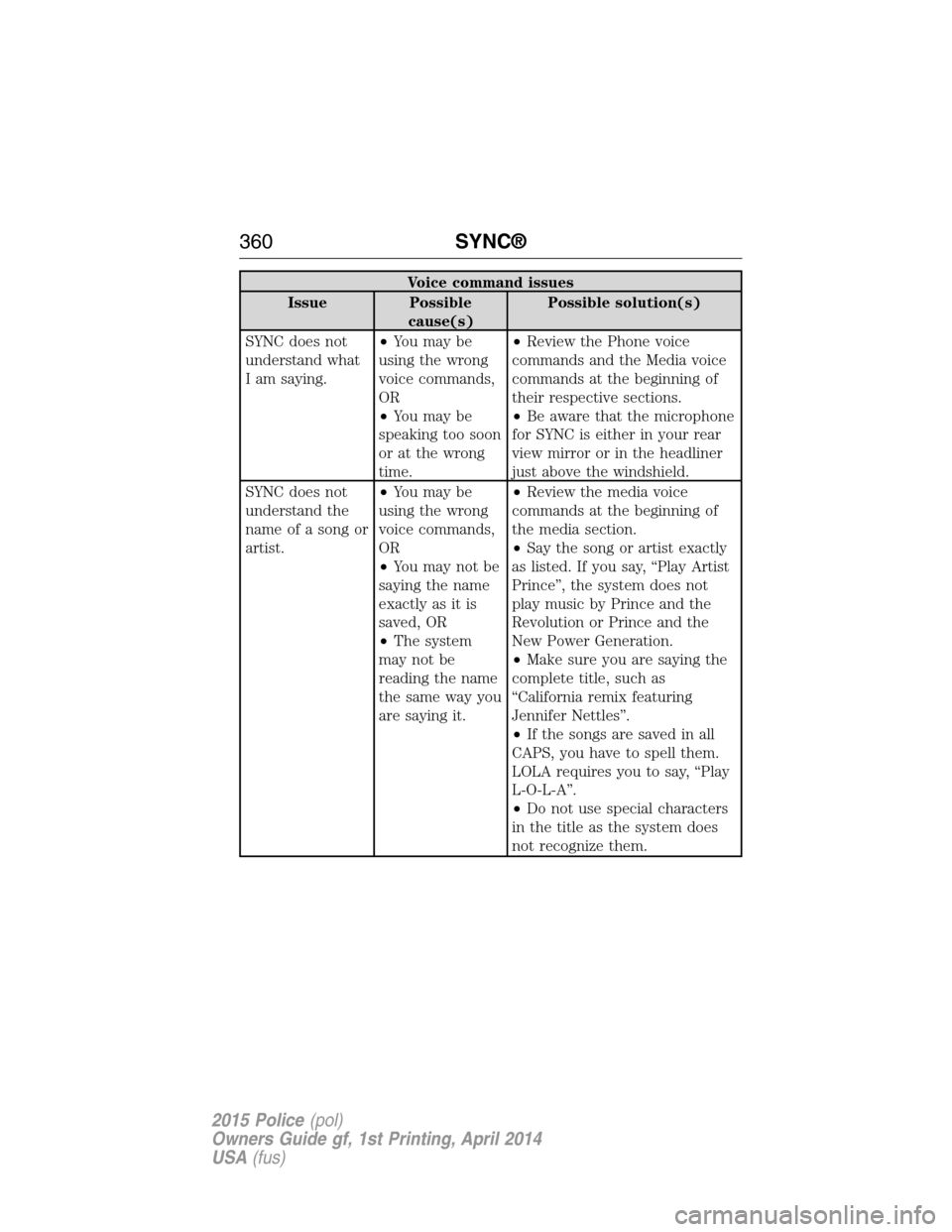
Voice command issues
Issue Possible
cause(s)Possible solution(s)
SYNC does not
understand what
I am saying.•You may be
using the wrong
voice commands,
OR
•You may be
speaking too soon
or at the wrong
time.•Review the Phone voice
commands and the Media voice
commands at the beginning of
their respective sections.
•Be aware that the microphone
for SYNC is either in your rear
view mirror or in the headliner
just above the windshield.
SYNC does not
understand the
name of a song or
artist.•You may be
using the wrong
voice commands,
OR
•You may not be
saying the name
exactly as it is
saved, OR
•The system
may not be
reading the name
the same way you
are saying it.•Review the media voice
commands at the beginning of
the media section.
•Say the song or artist exactly
as listed. If you say, “Play Artist
Prince”, the system does not
play music by Prince and the
Revolution or Prince and the
New Power Generation.
•Make sure you are saying the
complete title, such as
“California remix featuring
Jennifer Nettles”.
•If the songs are saved in all
CAPS, you have to spell them.
LOLA requires you to say, “Play
L-O-L-A”.
•Do not use special characters
in the title as the system does
not recognize them.
360SYNC®
2015 Police(pol)
Owners Guide gf, 1st Printing, April 2014
USA(fus)
Page 362 of 398
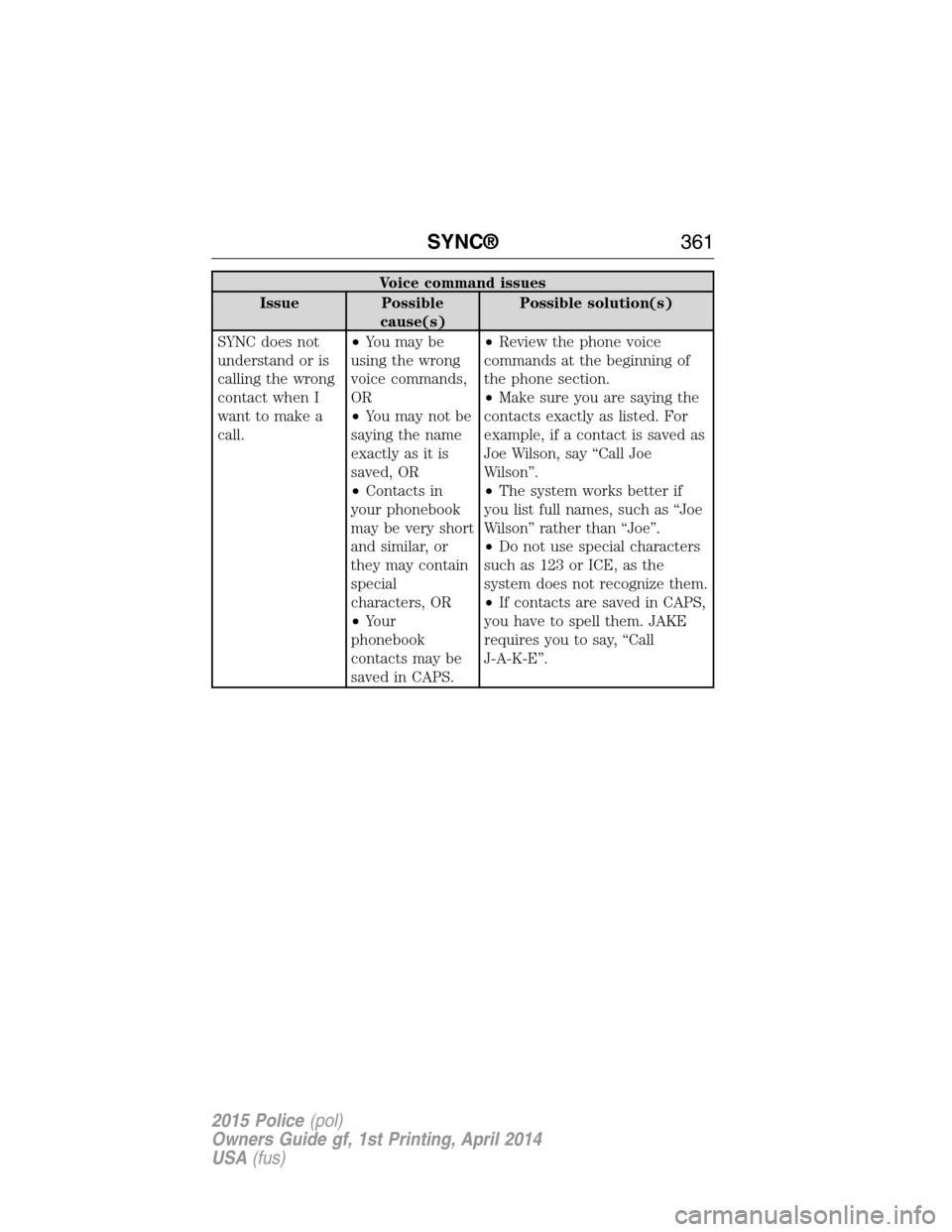
Voice command issues
Issue Possible
cause(s)Possible solution(s)
SYNC does not
understand or is
calling the wrong
contact when I
want to make a
call.•You may be
using the wrong
voice commands,
OR
•You may not be
saying the name
exactly as it is
saved, OR
•Contacts in
your phonebook
may be very short
and similar, or
they may contain
special
characters, OR
•Your
phonebook
contacts may be
saved in CAPS.•Review the phone voice
commands at the beginning of
the phone section.
•Make sure you are saying the
contacts exactly as listed. For
example, if a contact is saved as
Joe Wilson, say “Call Joe
Wilson”.
•The system works better if
you list full names, such as “Joe
Wilson” rather than “Joe”.
•Do not use special characters
such as 123 or ICE, as the
system does not recognize them.
•If contacts are saved in CAPS,
you have to spell them. JAKE
requires you to say, “Call
J-A-K-E”.
SYNC®361
2015 Police(pol)
Owners Guide gf, 1st Printing, April 2014
USA(fus)
Page 363 of 398

AppLink issues
Issue Possible
cause(s)Possible solution(s)
SYNC does not
find any mobile
apps that are on
my phone.•Your device
may not support
the AppLink
feature, OR
•The application
does not support
AppLink., OR
•If you have an
iPhone, it may
not be plugged in,
OR
•Your phone
may not be
paired or
connected.•Check the website for
compatible devices and
applications.
•Make sure your device is
paired and connected. If you
have an iPhone, make sure it is
plugged in using the USB and
that the application is running
in the foreground.
362SYNC®
2015 Police(pol)
Owners Guide gf, 1st Printing, April 2014
USA(fus)
Page 392 of 398

911 Assist™ ..............................336
A
ABS (see Brakes) .....................149
Accessing call history/phone
book during active call .............325
Accessing your media menu
features ......................................347
Accessing your phone menu
features ......................................327
Accessory delay ..........................88
Active call menu options .........325
Advanced menu options ...334, 354
Advanced menu options
(prompts, languages, defaults,
master reset, installing
applications) ..............................334
Airbag supplemental restraint
system ..........................................47
and child safety seats ..............48
description ................................47
disposal ......................................62
driver airbag ..............................47
passenger airbag .......................47
side airbag ...........................47, 51
Air cleaner filter .......231, 233, 299
Air conditioning ........................107
manual heating and air
conditioning system ...............107
Air filter, cabin ..........................109
All Wheel Drive (AWD),
driving off road .........................139
Ambulance packages ..................15
Antifreeze
(see Engine coolant) ................218Anti-lock brake system
(see Brakes) ..............................149
Anti-theft system
arming the system ....................73
disarming a triggered system ..73
Audio system
Single CD ................................307
Audio system (see Radio) .......307
Automatic transmission ............137
fluid, adding ....................223, 227
fluid, checking ................223, 227
fluid, refill capacities ..............293
fluid, specification ..................293
Auxiliary input jack (Line in) ..314
Auxiliary powerpoint ................117
B
Battery .......................................228
acid, treating emergencies .....228
jumping a disabled battery ....189
maintenance-free ....................228
replacement, specifications ...299
servicing ..................................228
Blind Spot Information
System .......................................159
Booster seats ...............................22
Brakes ........................................148
anti-lock ...................................149
anti-lock brake system (ABS)
warning light ...........................149
brake warning light ................149
fluid, checking and adding ....227
fluid, refill capacities ..............293
fluid, specifications .................293
lubricant specifications ..........293
parking ....................................149
trailer .......................................178
Index391
2015 Police(pol)
Owners Guide gf, 1st Printing, April 2014
USA(fus)
Page 393 of 398

C
Capacities for refilling fluids ....293
Cargo management system ......166
CD ..............................................307
CD player ..................................305
Cell phone use ............................16
Changing a tire .........................282
Child safety restraints ..........28, 31
Child safety seats
attaching with tether straps ....31
automatic locking mode
(retractor) .................................38
LATCH .......................................28
Child safety seats - booster
seats .............................................22
Cleaning your vehicle ...............247
engine compartment ..............249
instrument panel ....................251
interior .....................................251
plastic parts ............................249
washing ....................................247
waxing .....................................249
wheels ......................................253
wiper blades ............................250
Climate control (see Air
conditioning or Heating) ..........107
Clock ..........................................307
Console ......................................118
overhead ..................................119
Coolant ......................................218
checking and adding ..............218
refill capacities ........................293
specifications ..........................293
Cross Traffic Alert ....................159
Cruise control ...........................157
Customer Assistance ................187Ford Extended Service
Plan ..........................................302
Getting roadside assistance ...187
Getting the service you
need .........................................192
Ordering additional owner’s
literature .................................198
Utilizing the
Mediation/Arbitration
Program ...................................196
D
Defrost .......................................107
rear window ............................108
Dipstick
automatic transmission
fluid ..................................223, 227
engine oil .................................217
Driving under special
conditions ..................138, 142, 145
sand .........................................143
snow and ice ...........................146
through water .................144, 185
E
Electronic message center .........98
Electronic stability control ......152
Emergencies, roadside
jump-starting ..........................189
running out of fuel .................128
Emergency brake
(see Parking brake) ..................149
Emission control system ..........133
End user license agreement ....363
Engine ........................................292
cleaning ...................................249
coolant .....................................218
fail-safe cooling .......................222
392Index
2015 Police(pol)
Owners Guide gf, 1st Printing, April 2014
USA(fus)
Page 395 of 398

Joining two calls
(multiparty/conference call) ....325
Jump-starting your vehicle ......189
K
Keys .............................................66
positions of the ignition .........121
L
Lamps
bulb replacement
specifications chart ................244
headlamps, flash to pass ..........82
interior lamps ...........................85
replacing bulbs .......................236
LATCH anchors ...........................28
Liftgate ........................................70
Lights, warning and indicator ....93
Loading instructions .................175
Load limits .................................168
Locks
childproof ..................................34
doors ..........................................67
Lubricant specifications ...........293
Lug nuts ....................................291
M
Media Bluetooth menu options
(adding, connecting, deleting,
turning on/off) ..........................353
Message center ...........................98
warning messages ...................100
Mirrors ...................................89, 91
fold away ...................................89
side view mirrors (power) .......89Motorcraft® parts .............247, 299
O
Octane rating ............................128
P
Pairing other phones ................322
Pairing your phone for the first
time ............................................321
Parking brake ............................149
Parts
(see Motorcraft® parts) ..........299
Passenger Occupant
Classification Sensor ...................49
Phone Bluetooth menu options
(adding, connecting, deleting,
turning on/off) ..........................333
Phone redial ..............................327
Playing music (by artist,
album, genre, playlist, tracks,
similar) ......................................350
Power distribution box
(see Fuses) ...............................200
Power door locks ........................67
Power mirrors .............................89
Powerpoint ................................117
Power steering ..........................164
fluid, checking and adding ....227
fluid, refill capacity ................293
fluid, specifications .................293
Power Windows ...........................87
Privacy information ..................318
Putting a call on/off hold .........325
R
Radio ..........................................307
394Index
2015 Police(pol)
Owners Guide gf, 1st Printing, April 2014
USA(fus)