2015 FORD POLICE INTERCEPTOR UTILITY wheel
[x] Cancel search: wheelPage 99 of 398

GENERAL INFORMATION
WARNING:Driving while distracted can result in loss of vehicle
control, crash and injury. We strongly recommend that you use
extreme caution when using any device that may take your focus off
the road. Your primary responsibility is the safe operation of your
vehicle. We recommend against the use of any handheld device while
driving and encourage the use of voice-operated systems when possible.
Make sure you are aware of all applicable local laws that may affect the
use of electronic devices while driving..
Various systems on your vehicle can be controlled using the information
display controls on the steering wheel. Corresponding information is
displayed in the information display.
Information Display Controls
•Press the up and down arrow
buttons to scroll through and
highlight the options within a
menu.
•Press the right arrow button to
enter a sub-menu.
•Press the left arrow button to exit
a menu.
•Press theOKbutton to choose and
confirm a setting or messages.
Menu
You can access the menus using the information display control.
Note:Some options may appear slightly different or not at all if the
items are optional for sedan and utility.
†Trip1/2
Digital Speedometer
Trip Odometer
Trip Timer
Average Fuel
Total Odometer (located in lower right of display).Note:this will also
display in other menus.
†SeeTrip computerlater in this section for more information.
98Information Displays
2015 Police(pol)
Owners Guide gf, 1st Printing, April 2014
USA(fus)
Page 107 of 398

Passenger Sensing
System MessagesAction / Description
Remove Objects Near
Passenger SeatDisplayed when objects are by the passenger
seat. After the objects are moved away from
the seat, if the warning stays on or continues
to come on contact your authorized dealer as
soon as possible.
Reminder Messages Action / Description
Steering Lock Turn
Wheel to UnlockDisplays when you need to turn the steering
wheel in order to disengage the steering lock.
Shift to Park Displays as a reminder to shift into park.
Engine On Displayed when the engine is on, the vehicle is
in park and the driver’s door is opened.
Speed Limited to xx
MPH/km/hDisplayed at key on when the vehicle’s top
speed is limited.
Tire Messages Action / Description
Low Tire Pressure Displays when one or more tires on your
vehicle have low tire pressure.
Tire Pressure Monitor
FaultDisplays when the tire pressure monitoring
system is malfunctioning. If the warning stays
on or continues to come on, contact your
authorized dealer.
Tire Pressure Sensor
FaultDisplayed when a tire pressure sensor is
malfunctioning, or your spare tire is in use.
For more information on how the system
operates under these conditions, refer toTi r e
Pressure Monitoring System (TPMS)in the
Wheels and tireschapter. If the warning stays
on or continues to come on, contact your
authorized dealer as soon as possible.
106Information Displays
2015 Police(pol)
Owners Guide gf, 1st Printing, April 2014
USA(fus)
Page 111 of 398
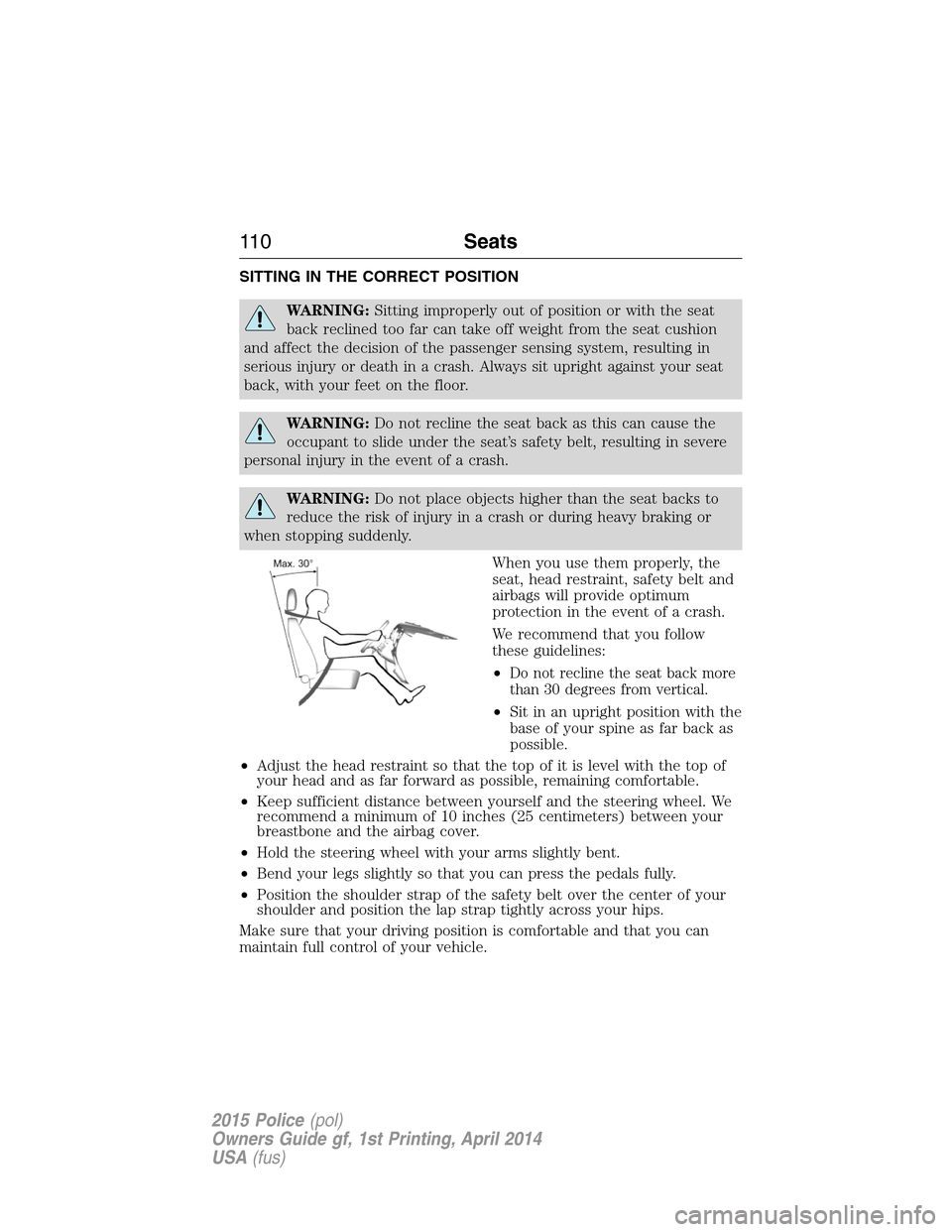
SITTING IN THE CORRECT POSITION
WARNING:Sitting improperly out of position or with the seat
back reclined too far can take off weight from the seat cushion
and affect the decision of the passenger sensing system, resulting in
serious injury or death in a crash. Always sit upright against your seat
back, with your feet on the floor.
WARNING:Do not recline the seat back as this can cause the
occupant to slide under the seat’s safety belt, resulting in severe
personal injury in the event of a crash.
WARNING:Do not place objects higher than the seat backs to
reduce the risk of injury in a crash or during heavy braking or
when stopping suddenly.
When you use them properly, the
seat, head restraint, safety belt and
airbags will provide optimum
protection in the event of a crash.
We recommend that you follow
these guidelines:
•
Do not recline the seat back more
than 30 degrees from vertical.
•Sit in an upright position with the
base of your spine as far back as
possible.
•Adjust the head restraint so that the top of it is level with the top of
your head and as far forward as possible, remaining comfortable.
•Keep sufficient distance between yourself and the steering wheel. We
recommend a minimum of 10 inches (25 centimeters) between your
breastbone and the airbag cover.
•Hold the steering wheel with your arms slightly bent.
•Bend your legs slightly so that you can press the pedals fully.
•Position the shoulder strap of the safety belt over the center of your
shoulder and position the lap strap tightly across your hips.
Make sure that your driving position is comfortable and that you can
maintain full control of your vehicle.
11 0Seats
2015 Police(pol)
Owners Guide gf, 1st Printing, April 2014
USA(fus)
Page 138 of 398

AUTOMATIC TRANSMISSION
WARNING:Always set the parking brake fully and make sure
the gearshift is latched in P (Park). Turn the ignition to the off
position and remove the key whenever you leave your vehicle.
Your vehicle has been designed to improve fuel economy by reducing
fuel usage while coasting or decelerating. When you take your foot off
the accelerator pedal and the vehicle begins to slow down, the torque
converter clutch locks up and aggressively shuts off fuel flow to the
engine while decelerating. This fuel economy benefit may be perceived
as a light to medium braking sensation when removing your foot from
the accelerator pedal.
P (Park)
This position locks the transmission and prevents the front wheels from
turning.
To put your vehicle in gear:
•Press the brake pedal
•Move the gearshift lever into the desired gear
To put your vehicle in P (Park):
•Come to a complete stop
•Move the gearshift lever and securely latch it in P (Park)
R (Reverse)
With the gearshift lever in R (Reverse), the vehicle will move backward.
Always come to a complete stop before shifting into and out of R
(Reverse).
N (Neutral)
With the gearshift lever in N (Neutral), the vehicle can be started and is
free to roll. Hold the brake pedal down while in this position.
D (Drive)
The normal driving position for the best fuel economy. Transmission
operates in gears one through six.
Transmission137
2015 Police(pol)
Owners Guide gf, 1st Printing, April 2014
USA(fus)
Page 140 of 398

USING YOUR ALL-WHEEL-DRIVE (AWD) SYSTEM
AWD uses all four wheels to power the vehicle. This increases traction,
enabling you to drive over terrain and road conditions that a
conventional two-wheel drive vehicles cannot. The AWD system is active
all the time and requires no input from the operator.
Note:Your AWD vehicle is not intended for off-road use. The AWD
feature gives your vehicle some limited off-road capabilities in which
driving surfaces are relatively level, obstruction-free and otherwise
similar to normal on-road driving conditions. Operating your vehicle
under other than those conditions could subject the vehicle to excessive
stress which might result in damage which is not covered under your
warranty.
Note:When an AWD system fault is present, the warning Check AWD
will display in the message center. The AWD system is not functioning
correctly and defaulted to front-wheel drive. When this warning is
displayed, have your vehicle serviced at an authorized dealer.
Note:The AWD Off message may also be displayed in the message
center if the AWD system has overheated and defaulted to front-wheel
drive. This condition may occur if the vehicle was operated in extreme
conditions with excessive wheel slip, such as deep sand. To resume
normal AWD function as soon as possible, stop the vehicle in a safe
location and stop the engine for at least 10 minutes. After the engine has
been restarted and the AWD system has adequately cooled, the AWD Off
message will turn off and normal AWD function will return. In the event
the engine is not stopped, the AWD Off message will turn off when the
system cools and normal AWD function returns.
The Power Transfer Unit (PTU) in police vehicles does not require any
normal scheduled maintenance. The system is electronically monitored
and notifies the driver of required service by displaying the message
Change AWD Power Transfer Unit Lube in the information display. The
PTU lube will be more likely to require a fluid change if the vehicle has
experienced extended periods of extreme/severe duty cycle driving. Do
not check or change the PTU lubricant unless the unit has been
submerged in water, shows signs of leakage or a message indicating
required service is displayed. Contact your authorized dealer for service
and to reset the PTU lube life monitor.
All-Wheel Drive (If Equipped)139
2015 Police(pol)
Owners Guide gf, 1st Printing, April 2014
USA(fus)
Page 141 of 398

Operating AWD Vehicles With Spare Tires
A spare tire of a different size other than the tire provided should never
be used. The AWD system may disable automatically and enter
front-wheel drive only mode to protect driveline components if a non-full
sized tire is installed. This condition may be indicated by an AWD Off
message in the information display. If there is an AWD Off message in
the message center from using a non-full sized spare tire, this indicator
should turn off after reinstalling the repaired or replaced normal road
tire and cycling the ignition off and on. It is recommended to reinstall
the repaired or replaced road tire as soon as possible. Major dissimilar
tire sizes between the front and rear axles could cause the AWD system
to stop functioning and default to front-wheel drive or damage the AWD
system.
Major dissimilar tire sizes between the front and rear axles (for example,
17 inch low profile tires on the front axle and 22 inch high profile tires
on the rear axle) could cause the AWD system to stop functioning and
default to front-wheel drive or damage the AWD system. However, the
AWD system is capable of tolerating any combination of new and worn
tires of the same original tire size. For example, using 3 worn tread tires
and 1 new tread tire all of the same original tire size, can be tolerated by
the AWD system.
Operating AWD Vehicles With Mismatched Tires
WARNING:Only use replacement tires and wheels that are the
same size, load index, speed rating and type (such as P-metric
versus LT-metric or all-season versus all-terrain) as those originally
provided by Ford. The recommended tire and wheel size may be found on
either the Safety Compliance Certification Label (affixed to either the door
hinge pillar, door-latch post, or the door edge that meets the door-latch
post, next to the driver’s seating position), or the Tire Label which is
located on the B-Pillar or edge of the driver’s door. If this information is not
found on these labels, then you should contact your authorized dealer as
soon as possible. Use of any tire or wheel not recommended by Ford can
affect the safety and performance of your vehicle, which could result in an
increased risk of loss of vehicle control, vehicle rollover, personal injury and
death. Additionally the use of non-recommended tires and wheels could
cause steering, suspension, axle, transfer case or power transfer unit
failure. If you have questions regarding tire replacement, contact your
authorized dealer as soon as possible.
140All-Wheel Drive (If Equipped)
2015 Police(pol)
Owners Guide gf, 1st Printing, April 2014
USA(fus)
Page 142 of 398

Major dissimilar tire sizes between the front and rear axles (for example,
17 inch low profile tires on the front axle and 22 inch high profile tires
on the rear axle) could cause the AWD system to stop functioning and
default to front-wheel drive or damage the AWD system. However, the
AWD system is capable of tolerating any combination of new and worn
tires of the same original tire size. For example, using 3 worn tread tires
and 1 new tread tire all of the same original tire size, can be tolerated by
the AWD system.
How Utility Vehicles Differ from Other Vehicles (If Equipped)
Truck and utility vehicles can differ from some other vehicles. Your
vehicle may be higher to allow it to travel over rough terrain without
getting hung up or damaging underbody components.
The differences that make your vehicle so versatile also make it handle
differently than an ordinary passenger car.
Maintain steering wheel control at all times, especially in rough terrain.
Since sudden changes in terrain can result in abrupt steering wheel
motion, make sure you grip the steering wheel from the outside. Do not
grip the spokes.
Drive cautiously to avoid vehicle damage from concealed objects such as
rocks and stumps.
You should either know the terrain or examine maps of the area before
driving. Map out your route before driving in the area. To maintain
steering and braking control of your vehicle, you must have all four
wheels on the ground and they must be rolling, not sliding or spinning.
Driving In Special Conditions With All-Wheel Drive
All-Wheel Drive (AWD) vehicles are equipped for driving on sand, snow,
mud and rough roads and have operating characteristics that are somewhat
different from conventional vehicles, both on and off the highway.
When driving at slow speeds in deep sand under high outside
temperatures, use a low gear when possible. Lower gear operation will
maximize the engine and transmission cooling capability.
Under severe operating conditions, the A/C may cycle on and off to
protect overheating of the engine.
Basic operating principles in special conditions
•Drive slower in strong crosswinds which can affect the normal steering
characteristics of your vehicle.
•Be extremely careful when driving on pavement made slippery by
loose sand, water, gravel, snow or ice.
All-Wheel Drive (If Equipped)141
2015 Police(pol)
Owners Guide gf, 1st Printing, April 2014
USA(fus)
Page 143 of 398

If your vehicle goes off the edge of the pavement
•If your vehicle goes off the edge of the pavement, slow down, but
avoid severe brake application, ease the vehicle back onto the
pavement only after reducing your speed. Do not turn the steering
wheel too sharply while returning to the road surface.
•It may be safer to stay on the apron or shoulder of the road and slow
down gradually before returning to the pavement. You may lose
control if you do not slow down or if you turn the steering wheel too
sharply or abruptly.
•It often may be less risky to strike small objects, such as highway
reflectors, with minor damage to your vehicle rather than attempt a
sudden return to the pavement which could cause the vehicle to slide
sideways out of control or rollover. Remember, your safety and the
safety of others should be your primary concern.
If your vehicle gets stuck
WARNING:Always set the parking brake fully and make sure
the gearshift is latched in P (Park). Turn the ignition to the lock
position and remove the key whenever you leave your vehicle.
WARNING:If the parking brake is fully released, but the brake
warning lamp remains illuminated, the brakes may not be
working properly. See your authorized dealer.
WARNING:Do not spin the wheels at over 35 mph (56 km/h).
The tires may fail and injure a passenger or bystander.
Note:Do not rock the vehicle if the engine is not at normal operating
temperature or damage to the transmission may occur.
Note:Do not rock the vehicle for more than a few minutes or damage to
the transmission and tires may occur or the engine may overheat.
If your vehicle gets stuck in mud or snow it may be rocked out by
shifting between forward and reverse gears, stopping between shifts, in a
steady pattern. Press lightly on the accelerator in each gear.
If your vehicle is equipped with AdvanceTrac® with Roll Stability
Control™, it may be beneficial to disengage the AdvanceTrac® with Roll
Stability Control™ system while attempting to rock the vehicle.
142All-Wheel Drive (If Equipped)
2015 Police(pol)
Owners Guide gf, 1st Printing, April 2014
USA(fus)