2015 FORD MUSTANG lock
[x] Cancel search: lockPage 143 of 441
GENERAL INFORMATION
Note:
Occasional brake noise is normal. If
a metal-to-metal, continuous grinding or
continuous squeal sound is present, the
brake linings may be worn-out. Have the
system checked by an authorized dealer. If
your vehicle has continuous vibration or
shudder in the steering wheel while braking,
have it checked by an authorized dealer.
Note: Brake dust may accumulate on the
wheels, even under normal driving
conditions. Some dust is inevitable as the
brakes wear and does not contribute to
brake noise. See Cleaning the Alloy
Wheels (page 232). See
Warning Lamps and
Indicators (page 79).
Wet brakes result in reduced braking
efficiency. Gently press the brake pedal a
few times when driving from a car wash or
standing water to dry the brakes.
Brake Over Accelerator
In the event the accelerator pedal
becomes stuck or entrapped, apply steady
and firm pressure to the brake pedal to
slow the vehicle and reduce engine power.
If you experience this condition, apply the
brakes and bring your vehicle to a safe
stop. Move the transmission to park (P),
switch the engine off and apply the parking
brake. Inspect the accelerator pedal for
any interference. If none are found and the
condition persists, have your vehicle towed
to the nearest authorized dealer.
Brake Assist
Brake assist detects when you brake
rapidly by measuring the rate at which you
press the brake pedal. It provides
maximum braking efficiency as long as you
press the pedal, and can reduce stopping
distances in critical situations. Anti-lock Brake System
This system helps you maintain steering
control during emergency stops by keeping
the brakes from locking. This lamp momentarily
illuminates when you turn the
ignition on. If the light does not
illuminate during start up, remains on or
flashes, the system may be disabled. Have
the system checked by an authorized
dealer. If the anti-lock brake system is
disabled, normal braking is still effective. If the brake warning lamp
illuminates when you release the
parking brake, have the system
checked by an authorized dealer.
HINTS ON DRIVING WITH
ANTI-LOCK BRAKES
Note: When the system is operating, the
brake pedal will pulse and may travel
further. Maintain pressure on the brake
pedal. You may also hear a noise from the
system. This is normal.
The anti-lock braking system will not
eliminate the risks when:
• You drive too closely to the vehicle in
front of you.
• Your vehicle is hydroplaning.
• You take corners too fast.
• The road surface is poor.
PARKING BRAKE WARNINGS
If the parking brake is fully released,
but the brake warning lamp remains
illuminated, the brakes may not be
working properly. See your authorized
dealer as soon as possible.
140
Mustang (), enUSA, First Printing BrakesE144522 E144522
Page 148 of 441
Some models may also come equipped
with a sport mode which allows the driver
to reduce normal AdvanceTrac system
intervention and provide a more spirited
driving experience. To enter sport mode,
toggle the stability control button twice
rapidly. The message appears in the
information display that the system is now
in sport mode.
For vehicles equipped with the selectable
drive mode feature, AdvanceTrac sport
mode is not available. You can utilize the
performance oriented AdvanceTrac mode
by selecting track drive mode. In this mode,
AdvanceTrac intervention is reduced and
tuned specifically for track use only and is
not for use on public roads. In all of the
selectable drive modes, you can disable
traction control and AdvanceTrac with the
AdvanceTrac switch.
Line Lock (If Equipped)
Line Lock is a feature intended for use at
tracks only and should not be used on
public roadways. Use of this feature will
result in significantly increased rear tire
wear. It is intended to condition the rear
tires to maximum traction prior to track
use. Line Lock maintains brake force at the
front wheels, allowing the rear wheels to
spin with minimal vehicle movement.
This feature is located in the Track Apps
menu. Make selections through the 5-way
information display control and OK button
located on the steering wheel.
Using Line Lock
There are three Line Lock stages:
• Initiated.
• Engaged.
• Off. Initiating Line Lock
The initiation stage verifies that the vehicle
is ready for Line Lock function, and
confirms driver intent. Follow the prompts
in the information display in to initiate Line
Lock.
The following conditions must be met to
initialize Line Lock:
•
The vehicle is on a level surface.
• The engine is running.
• The vehicle is traveling less than 25
mph (40 km/h).
• Selectable Drive Mode is not in wet
mode (if equipped).
• There are no AdvanceTrac faults.
If you want to cancel Line Lock once it is
initialized, press the left information
display control. Once initiated, Line Lock
is prepared for activation and will remain
initiated up to 25 mph (40 km/h). If vehicle
speed exceeds 25 mph (40 km/h), Line
Lock will be automatically canceled.
Engaging Line Lock
Follow the prompts in the information
display to engage Line Lock after it is
initialized. To engage, firmly apply the
brakes. Then press the OK button. Once
engaged, release the brake pedal. The
front brakes will remain applied and the
rear brakes will release. At this point, the
engagement timer is initiated and shown
on the driver information display.
The following conditions must be met to
engage Line Lock:
• The vehicle is on a level surface.
• The engine is running.
• The vehicle is stopped.
• The parking brake is not applied.
• The driver door is closed.
• The transmission is in a forward gear.
145
Mustang (), enUSA, First Printing Stability Control
Page 149 of 441
•
Selectable Drive Mode is not in wet
mode (if equipped).
• There are no AdvanceTrac faults.
• The steering wheel must be in the
straight ahead position.
Releasing Line Lock
While Line Lock is engaged, you can exit
(release) the feature using the OK button.
When you press the OK button, Line Lock
releases immediately and normal vehicle
function will resume. When Line Lock is
engaged, a countdown timer shows the
remaining time before Line Lock is released
automatically. If you exceed the time limit,
or another vehicle condition requires Line
Lock to release, the system will safely
disengage and normal vehicle function will
resume.
Note: If the brake pedal is applied while
Line Lock is engaged, Line Lock
automatically cancels and normal brake
function resumes.
146
Mustang (), enUSA, First Printing Stability Control
Page 150 of 441

PARKING AID (If Equipped)
WARNINGS
To help avoid personal injury, please
read and understand the limitations
of the system as contained in this
section. Sensing is only an aid for some
(generally large and fixed) objects when
moving on a flat surface at parking speeds.
Certain objects with surfaces that absorb
ultrasonic waves, traffic control systems,
fluorescent lamps, inclement weather, air
brakes, and external motors and fans may
also affect the function of the sensing
system; this may include reduced
performance or a false activation. To help avoid personal injury, always
use caution when in reverse (R) and
when using the sensing system.
This system is not designed to
prevent contact with small or moving
objects. The system is designed to
provide a warning to assist the driver in
detecting large stationary objects to avoid
damaging the vehicle. The system may not
detect smaller objects, particularly those
close to the ground. Certain add-on devices such as large
trailer hitches, bike or surfboard racks
and any device that may block the
normal detection zone of the system, may
create false beeps. Note:
Keep the sensors, located on the
bumper or fascia, free from snow, ice and
large accumulations of dirt. If the sensors
are covered, the system ’s accuracy can be
affected. Do not clean the sensors with
sharp objects.
Note: If your vehicle sustains damage to
the bumper or fascia, leaving it misaligned
or bent, the sensing zone may be altered
causing inaccurate measurement of
obstacles or false alarms. Note:
If your vehicle is equipped with
MyKey, it is possible to prevent turning the
sensing system off. See
Principle of
Operation (page 50).
The sensing system warns the driver of
obstacles within a certain range of the
bumper area. The system turns on
automatically whenever the ignition is
switched on.
When receiving a detection warning, the
radio volume is reduced to a
predetermined level. After the warning
goes away, the radio volume returns to the
previous level.
Rear Sensing System
The rear sensors are only active when the
transmission is in reverse (R). As your
vehicle moves closer to the obstacle, the
rate of the audible warning increases.
When the obstacle is fewer than
12 in
(30 cm) away, the warning sounds
continuously. If a stationary or receding
object is detected farther than
12 in
(30 cm) from the side of your vehicle, the
tone sounds for only three seconds. Once
the system detects an object approaching,
the warning sounds again.
147
Mustang (), enUSA, First Printing Parking Aids
Page 151 of 441
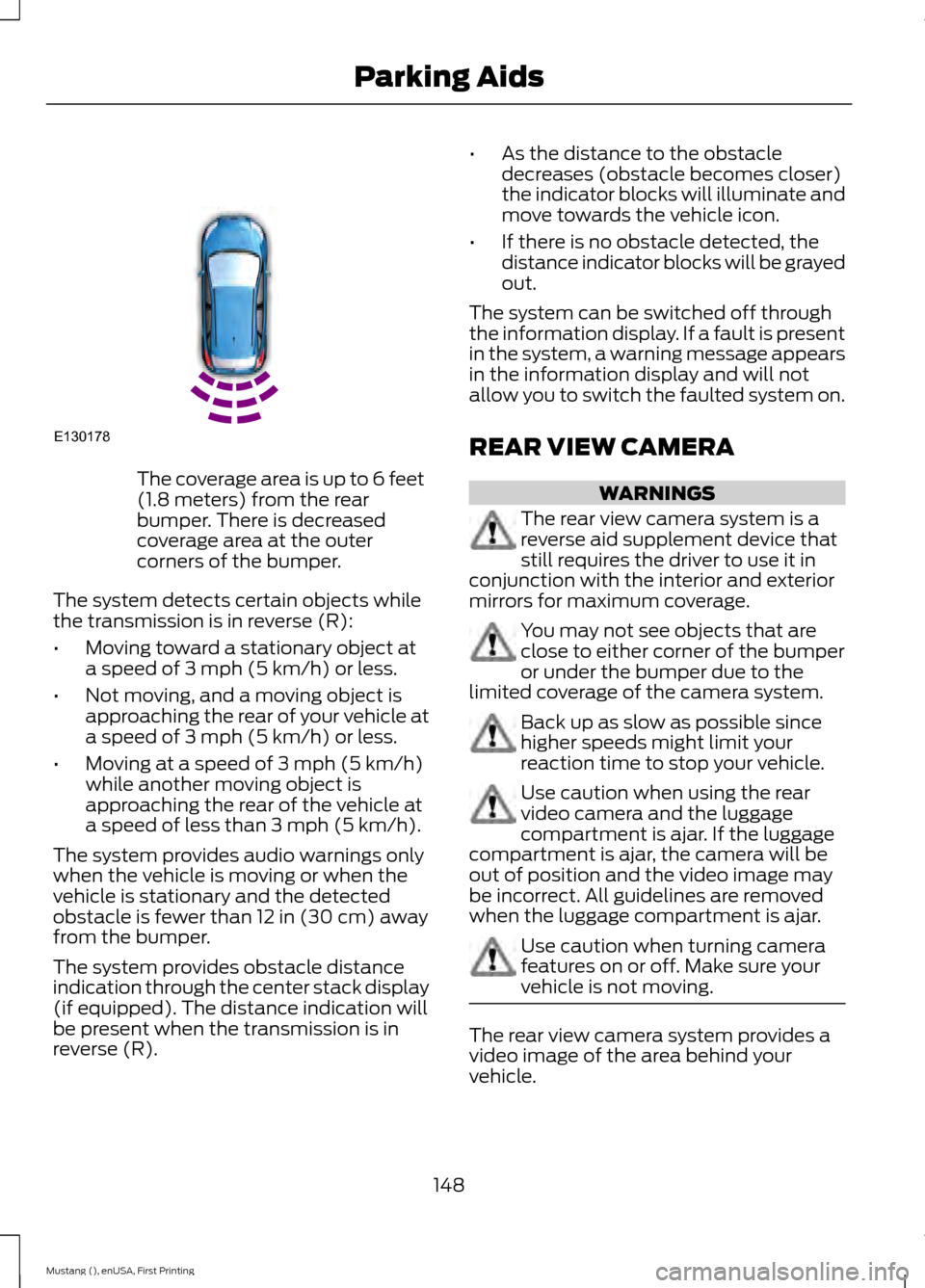
The coverage area is up to 6 feet
(1.8 meters) from the rear
bumper. There is decreased
coverage area at the outer
corners of the bumper.
The system detects certain objects while
the transmission is in reverse (R):
• Moving toward a stationary object at
a speed of 3 mph (5 km/h) or less.
• Not moving, and a moving object is
approaching the rear of your vehicle at
a speed of
3 mph (5 km/h) or less.
• Moving at a speed of
3 mph (5 km/h)
while another moving object is
approaching the rear of the vehicle at
a speed of less than
3 mph (5 km/h).
The system provides audio warnings only
when the vehicle is moving or when the
vehicle is stationary and the detected
obstacle is fewer than
12 in (30 cm) away
from the bumper.
The system provides obstacle distance
indication through the center stack display
(if equipped). The distance indication will
be present when the transmission is in
reverse (R). •
As the distance to the obstacle
decreases (obstacle becomes closer)
the indicator blocks will illuminate and
move towards the vehicle icon.
• If there is no obstacle detected, the
distance indicator blocks will be grayed
out.
The system can be switched off through
the information display. If a fault is present
in the system, a warning message appears
in the information display and will not
allow you to switch the faulted system on.
REAR VIEW CAMERA WARNINGS
The rear view camera system is a
reverse aid supplement device that
still requires the driver to use it in
conjunction with the interior and exterior
mirrors for maximum coverage. You may not see objects that are
close to either corner of the bumper
or under the bumper due to the
limited coverage of the camera system. Back up as slow as possible since
higher speeds might limit your
reaction time to stop your vehicle.
Use caution when using the rear
video camera and the luggage
compartment is ajar. If the luggage
compartment is ajar, the camera will be
out of position and the video image may
be incorrect. All guidelines are removed
when the luggage compartment is ajar. Use caution when turning camera
features on or off. Make sure your
vehicle is not moving.
The rear view camera system provides a
video image of the area behind your
vehicle.
148
Mustang (), enUSA, First Printing Parking AidsE130178
Page 160 of 441

Detection Issues
The radar sensor has a limited field of
vision. It may not detect vehicles at all or
detect a vehicle later than expected in
some situations. The lead vehicle graphic
will not illuminate if the system does not
detect a vehicle in front of you.
Detection issues can occur:
When driving on a different line
than the vehicle in front.
A
With vehicles that edge into your
lane. The system can only detect
these vehicles once they move
fully into your lane.
B
There may be issues with the
detection of vehicles in front
when driving into and coming out
of a bend or curve in the road.
C In these cases the system may brake late
or unexpectedly. The driver should stay
alert and intervene when necessary.
If something hits the front end of your
vehicle or damage occurs, the
radar-sensing zone may change. This could
cause missed or false vehicle detections.
See an authorized dealer to have the radar
checked for proper coverage and
operation.
System Not Available
Conditions that can cause the system to
deactivate or prevent the system from
activating when requested include:
•
A blocked sensor.
• High brake temperature.
• A failure in the system or a related
system.
Blocked Sensor WARNINGS
Do not use the system when towing
a trailer with brake controls.
Aftermarket trailer brakes will not
function properly when you switch the
system on because the brakes are
electronically controlled. Failing to do so
may result in loss of vehicle control, which
could result in serious injury. Do not use tire sizes other than those
recommended because this can
affect the normal operation of the
system. Failing to do so may result in a loss
of vehicle control, which could result in
serious injury. 157
Mustang (), enUSA, First Printing Cruise ControlE71621
Page 161 of 441

A message displays if something obstructs
the radar signals from the sensor. The
sensor is located behind a fascia cover
near the driver side of the lower grille. The
system cannot detect a vehicle ahead and
will not function when something obstructs
the radar signals. The following table lists
possible causes and actions for this
message displaying.
Action
Cause
Clean the grille surface in front of the radaror remove the object causing the obstruc- tion.
The surface of the radar in the grille is dirty
or obstructed in some way.
Wait a short time. It may take several
minutes for the radar to detect that it is free from obstruction.
The surface of the radar in the grille is clean
but the message remains in the display.
Do not use the system in these conditionsbecause it may not detect any vehicles ahead.
Heavy rain or snow is interfering with the
radar signals.
Do not use the system in these conditionsbecause it may not detect any vehicles ahead.
Swirling water, or snow or ice on the surface
of the road may interfere with the radar signals.
Wait a short time or switch to normal cruisecontrol.
You are in a desert or remote area with no
other vehicles and no roadside objects.
Due to the nature of radar technology, it is
possible to get a blockage warning and not
be blocked. This can happen, for example,
when driving in sparse rural or desert
environments. A false blocked condition
will either self clear or clear after a key
cycle.
Switching to Normal Cruise
Control WARNING
Normal cruise control will not brake
due to slower vehicles. Always be
aware of which mode you have
selected and apply the brakes when
necessary. You can manually change from adaptive
cruise control to normal cruise control
through the information display driver
assist.
The cruise control indicator light
replaces the adaptive cruise
control indicator light if you
select normal cruise control. The gap
setting will not display, the system will not
automatically respond to lead vehicles and
automatic braking will not activate. The
system will remember this setting the next
time you switch on your vehicle.
158
Mustang (), enUSA, First Printing Cruise ControlE145632 E71340
Page 162 of 441

BLIND SPOT INFORMATION
SYSTEM
Blind Spot Information System
(BLIS
™) with Cross Traffic Alert
(If Equipped) WARNING
To help avoid injuries, NEVER use the
Blind Spot Information System as a
replacement for using the interior
and exterior mirrors and looking over your
shoulder before changing lanes. The Blind
Spot Information System is not a
replacement for careful driving. The Blind Spot Information System aids
you in detecting vehicles that may have
entered the blind spot zone (A). The
detection area is on both sides of your
vehicle, extending rearward from the
exterior mirrors to approximately 10 ft
(3 m) beyond the bumper. The system
alerts you if certain vehicles enter the blind
spot zone while driving. WARNING
To help avoid personal injury, NEVER
use the cross traffic alert system as
a replacement for using the interior
and exterior mirrors and looking over your
shoulder before backing out of a parking
space. Cross traffic alert is not a
replacement for careful driving. Cross traffic alert warns you of vehicles
approaching from the sides when the
transmission is in reverse (R).
Note:
The Blind Spot Information System
does not prevent contact with other vehicles
or objects; nor does it detect parked
vehicles, people, animals or infrastructure
(fences, guardrails or trees). It only alerts
you to vehicles in the blind zones.
Note: When a vehicle passes quickly
through the blind zone, typically fewer than
two seconds, the system does not trigger.
Using the Systems
The Blind Spot Information System turns
on when you start the engine and you drive
your vehicle forward above
5 mph
(8 km/h), it remains on while the
transmission is in drive (D) or neutral (N).
If shifted out of drive (D) or neutral (N),
the system enters cross traffic alert mode.
Once shifted back into drive (D), the Blind
Spot Information System turns back on
when you drive your vehicle above
5 mph
(8 km/h).
Note: The Blind Spot Information System
does not function in reverse (R) or park (P).
Note: Cross traffic alert detects
approaching vehicles and bicycles from up
to
46 ft (14 m) away though coverage
decreases when the sensors are blocked.
Reversing slowly helps increase the
coverage area and effectiveness.
159
Mustang (), enUSA, First Printing Driving AidsA
A
E124788