2015 FORD MUSTANG key
[x] Cancel search: keyPage 325 of 441

Description and action
Display
2. Scroll to browse indexed media files on the device, and
then press the OK button.
Resets the USB index. After the new indexing is complete,
you can choose what to play from the USB song library.
Reset USB
* You can use the buttons at the bottom of the audio display to jump to a certain
alphabetical category quickly. You can also use the letters on the audio system's numeric
keypad to jump in the list.
USB 2
(If Equipped)
Your vehicle may come equipped with an
additional USB port. If so, USB 1 will be
located at the front of the vehicle at the
bottom of the instrument panel. USB 2 will
be located inside the storage compartment
of the vehicle's center console.
You can plug in an additional USB device
into the second USB port. To switch
between the two connected USB devices
using voice commands, say, "USB1" or
"USB2". Saying "USB" defaults to the most
recently played USB device.
Note: SYNC only supports one connected
iOS (Apple) devices at a time (whichever
one you plug in first). When you connect a
second iOS device, the systems charges it,
but does not support playback from it.
Line In Audio
To access the Line In audio source, start a
voice session and say, "Line in" or "Aux".
Bluetooth Devices and System
Settings
You can access these menus using the
audio display. See
Using SYNC™ With
Your Phone (page 299). Voice Commands for Audio
Sources
Your voice system allows you to change
audio sources with a simple voice
command. Press the voice button and say,
"Audio" when prompted, and
then any of the following
commands: "AUDIO"
"AM"
"AM1"
"AM autoset" or "AM2"
"Bluetooth
Page 340 of 441
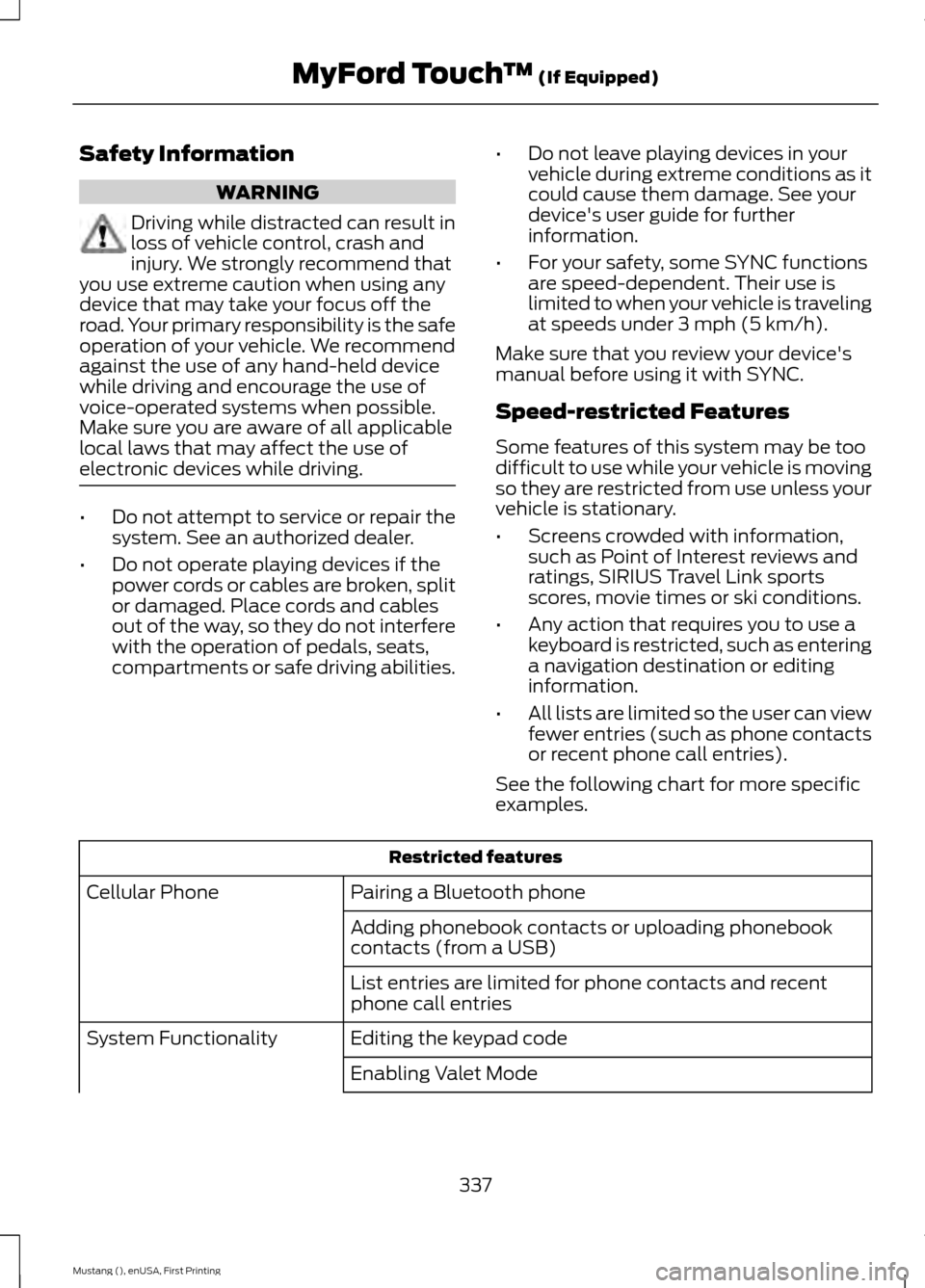
Safety Information
WARNING
Driving while distracted can result in
loss of vehicle control, crash and
injury. We strongly recommend that
you use extreme caution when using any
device that may take your focus off the
road. Your primary responsibility is the safe
operation of your vehicle. We recommend
against the use of any hand-held device
while driving and encourage the use of
voice-operated systems when possible.
Make sure you are aware of all applicable
local laws that may affect the use of
electronic devices while driving. •
Do not attempt to service or repair the
system. See an authorized dealer.
• Do not operate playing devices if the
power cords or cables are broken, split
or damaged. Place cords and cables
out of the way, so they do not interfere
with the operation of pedals, seats,
compartments or safe driving abilities. •
Do not leave playing devices in your
vehicle during extreme conditions as it
could cause them damage. See your
device's user guide for further
information.
• For your safety, some SYNC functions
are speed-dependent. Their use is
limited to when your vehicle is traveling
at speeds under 3 mph (5 km/h).
Make sure that you review your device's
manual before using it with SYNC.
Speed-restricted Features
Some features of this system may be too
difficult to use while your vehicle is moving
so they are restricted from use unless your
vehicle is stationary.
• Screens crowded with information,
such as Point of Interest reviews and
ratings, SIRIUS Travel Link sports
scores, movie times or ski conditions.
• Any action that requires you to use a
keyboard is restricted, such as entering
a navigation destination or editing
information.
• All lists are limited so the user can view
fewer entries (such as phone contacts
or recent phone call entries).
See the following chart for more specific
examples. Restricted features
Pairing a Bluetooth phone
Cellular Phone
Adding phonebook contacts or uploading phonebook
contacts (from a USB)
List entries are limited for phone contacts and recent
phone call entries
Editing the keypad code
System Functionality
Enabling Valet Mode
337
Mustang (), enUSA, First Printing MyFord Touch
™ (If Equipped)
Page 341 of 441
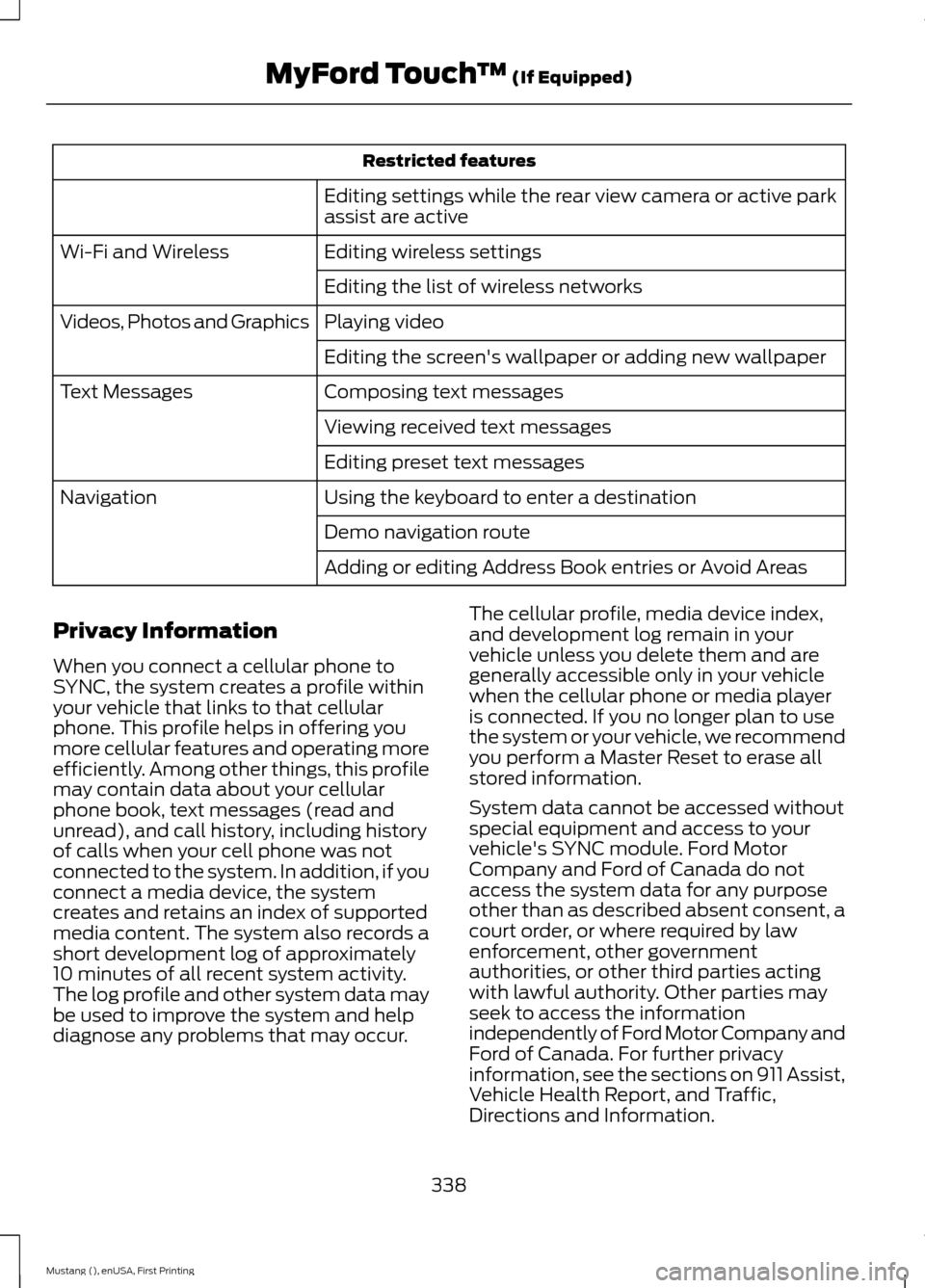
Restricted features
Editing settings while the rear view camera or active park
assist are active
Editing wireless settings
Wi-Fi and Wireless
Editing the list of wireless networks
Playing video
Videos, Photos and Graphics
Editing the screen's wallpaper or adding new wallpaper
Composing text messages
Text Messages
Viewing received text messages
Editing preset text messages
Using the keyboard to enter a destination
Navigation
Demo navigation route
Adding or editing Address Book entries or Avoid Areas
Privacy Information
When you connect a cellular phone to
SYNC, the system creates a profile within
your vehicle that links to that cellular
phone. This profile helps in offering you
more cellular features and operating more
efficiently. Among other things, this profile
may contain data about your cellular
phone book, text messages (read and
unread), and call history, including history
of calls when your cell phone was not
connected to the system. In addition, if you
connect a media device, the system
creates and retains an index of supported
media content. The system also records a
short development log of approximately
10 minutes of all recent system activity.
The log profile and other system data may
be used to improve the system and help
diagnose any problems that may occur. The cellular profile, media device index,
and development log remain in your
vehicle unless you delete them and are
generally accessible only in your vehicle
when the cellular phone or media player
is connected. If you no longer plan to use
the system or your vehicle, we recommend
you perform a Master Reset to erase all
stored information.
System data cannot be accessed without
special equipment and access to your
vehicle's SYNC module. Ford Motor
Company and Ford of Canada do not
access the system data for any purpose
other than as described absent consent, a
court order, or where required by law
enforcement, other government
authorities, or other third parties acting
with lawful authority. Other parties may
seek to access the information
independently of Ford Motor Company and
Ford of Canada. For further privacy
information, see the sections on 911 Assist,
Vehicle Health Report, and Traffic,
Directions and Information.
338
Mustang (), enUSA, First Printing MyFord Touch
™ (If Equipped)
Page 347 of 441
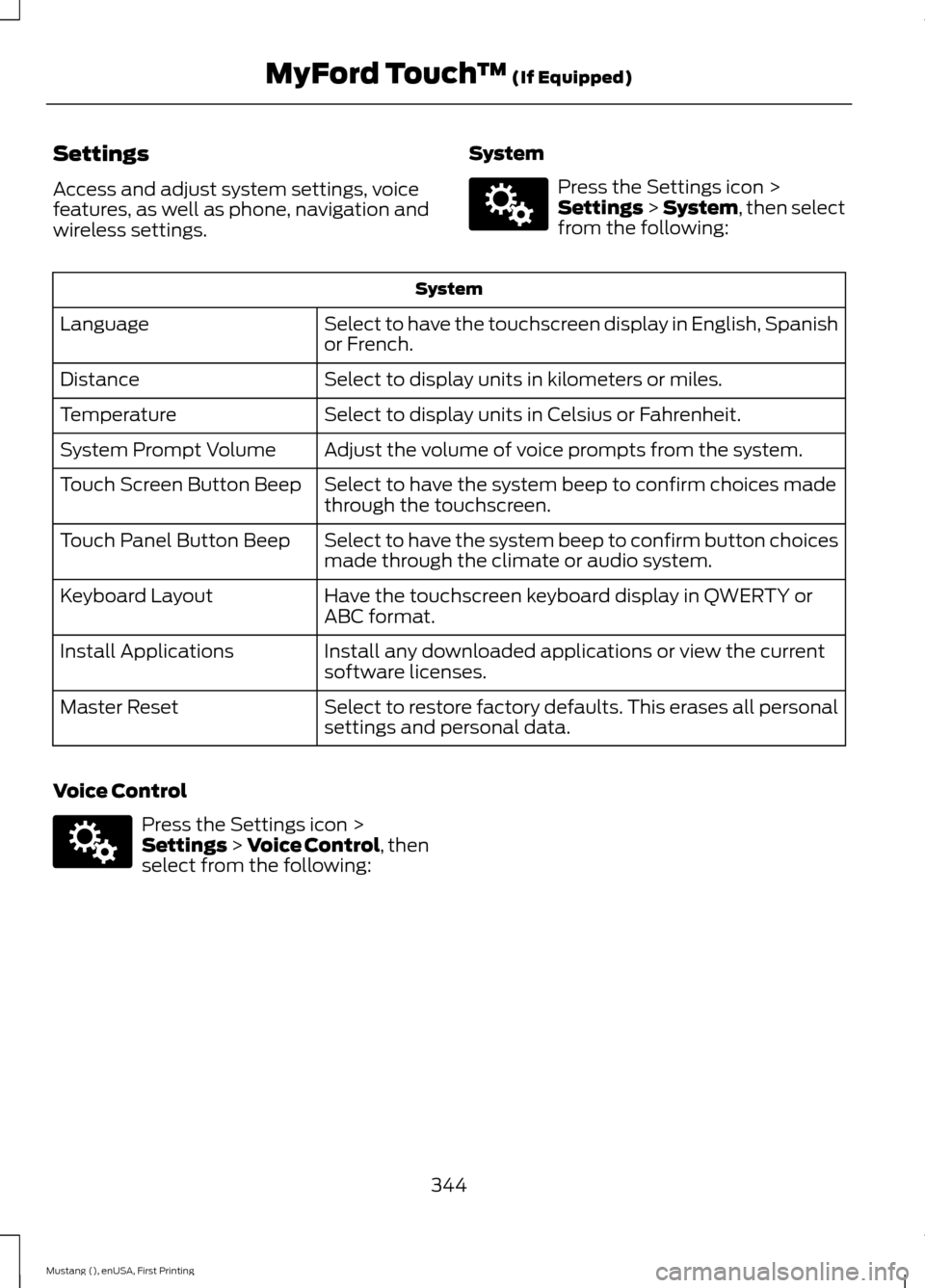
Settings
Access and adjust system settings, voice
features, as well as phone, navigation and
wireless settings.
System Press the Settings icon >
Settings > System, then select
from the following: System
Select to have the touchscreen display in English, Spanish
or French.
Language
Select to display units in kilometers or miles.
Distance
Select to display units in Celsius or Fahrenheit.
Temperature
Adjust the volume of voice prompts from the system.
System Prompt Volume
Select to have the system beep to confirm choices made
through the touchscreen.
Touch Screen Button Beep
Select to have the system beep to confirm button choices
made through the climate or audio system.
Touch Panel Button Beep
Have the touchscreen keyboard display in QWERTY or
ABC format.
Keyboard Layout
Install any downloaded applications or view the current
software licenses.
Install Applications
Select to restore factory defaults. This erases all personal
settings and personal data.
Master Reset
Voice Control Press the Settings icon >
Settings
> Voice Control, then
select from the following:
344
Mustang (), enUSA, First Printing MyFord Touch
™
(If Equipped)E142607 E142607
Page 363 of 441
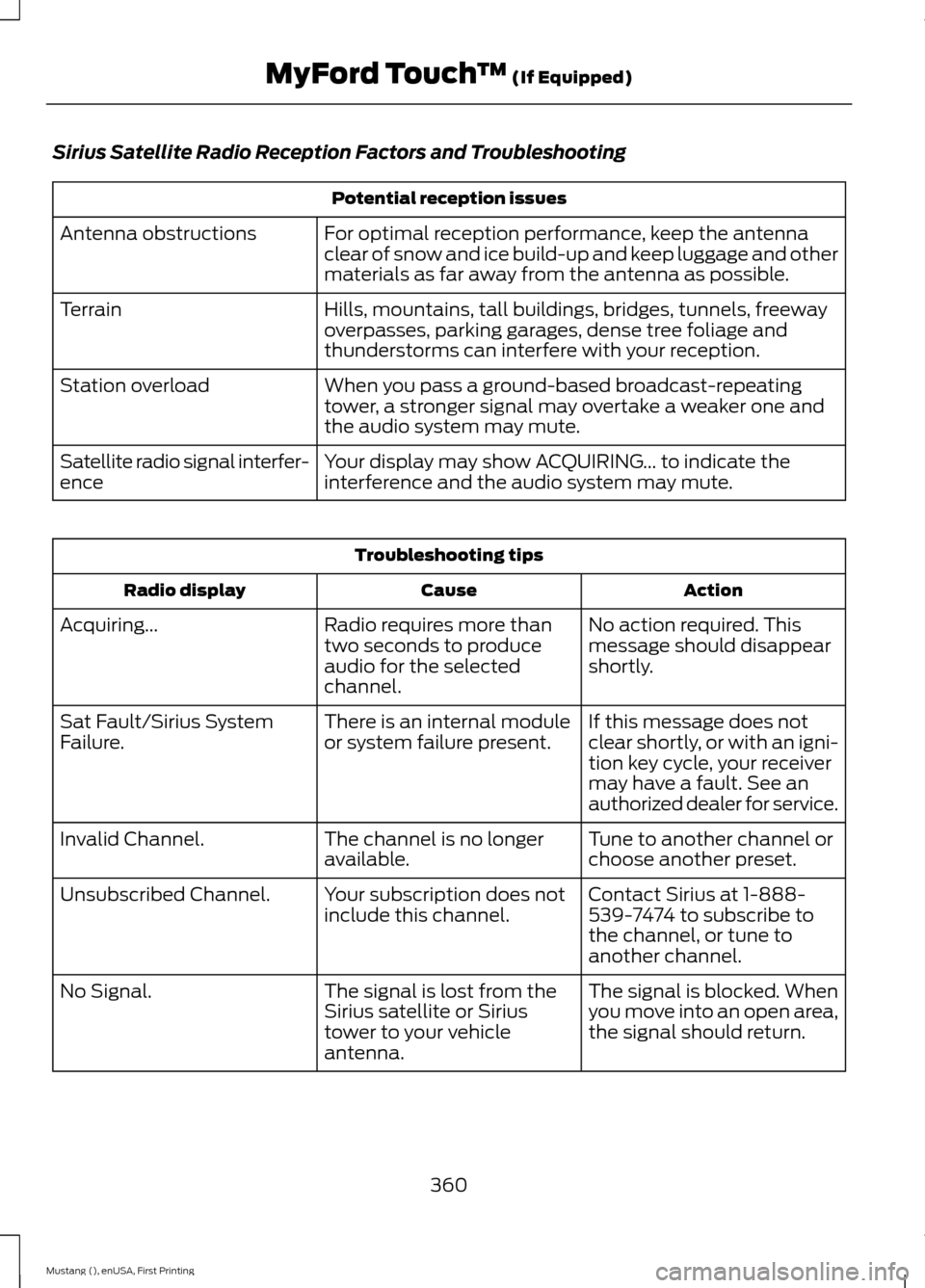
Sirius Satellite Radio Reception Factors and Troubleshooting
Potential reception issues
For optimal reception performance, keep the antenna
clear of snow and ice build-up and keep luggage and other
materials as far away from the antenna as possible.
Antenna obstructions
Hills, mountains, tall buildings, bridges, tunnels, freeway
overpasses, parking garages, dense tree foliage and
thunderstorms can interfere with your reception.
Terrain
When you pass a ground-based broadcast-repeating
tower, a stronger signal may overtake a weaker one and
the audio system may mute.
Station overload
Your display may show ACQUIRING... to indicate the
interference and the audio system may mute.
Satellite radio signal interfer-
ence Troubleshooting tips
Action
Cause
Radio display
No action required. This
message should disappear
shortly.
Radio requires more than
two seconds to produce
audio for the selected
channel.
Acquiring...
If this message does not
clear shortly, or with an igni-
tion key cycle, your receiver
may have a fault. See an
authorized dealer for service.
There is an internal module
or system failure present.
Sat Fault/Sirius System
Failure.
Tune to another channel or
choose another preset.
The channel is no longer
available.
Invalid Channel.
Contact Sirius at 1-888-
539-7474 to subscribe to
the channel, or tune to
another channel.
Your subscription does not
include this channel.
Unsubscribed Channel.
The signal is blocked. When
you move into an open area,
the signal should return.
The signal is lost from the
Sirius satellite or Sirius
tower to your vehicle
antenna.
No Signal.
360
Mustang (), enUSA, First Printing MyFord Touch
™ (If Equipped)
Page 432 of 441
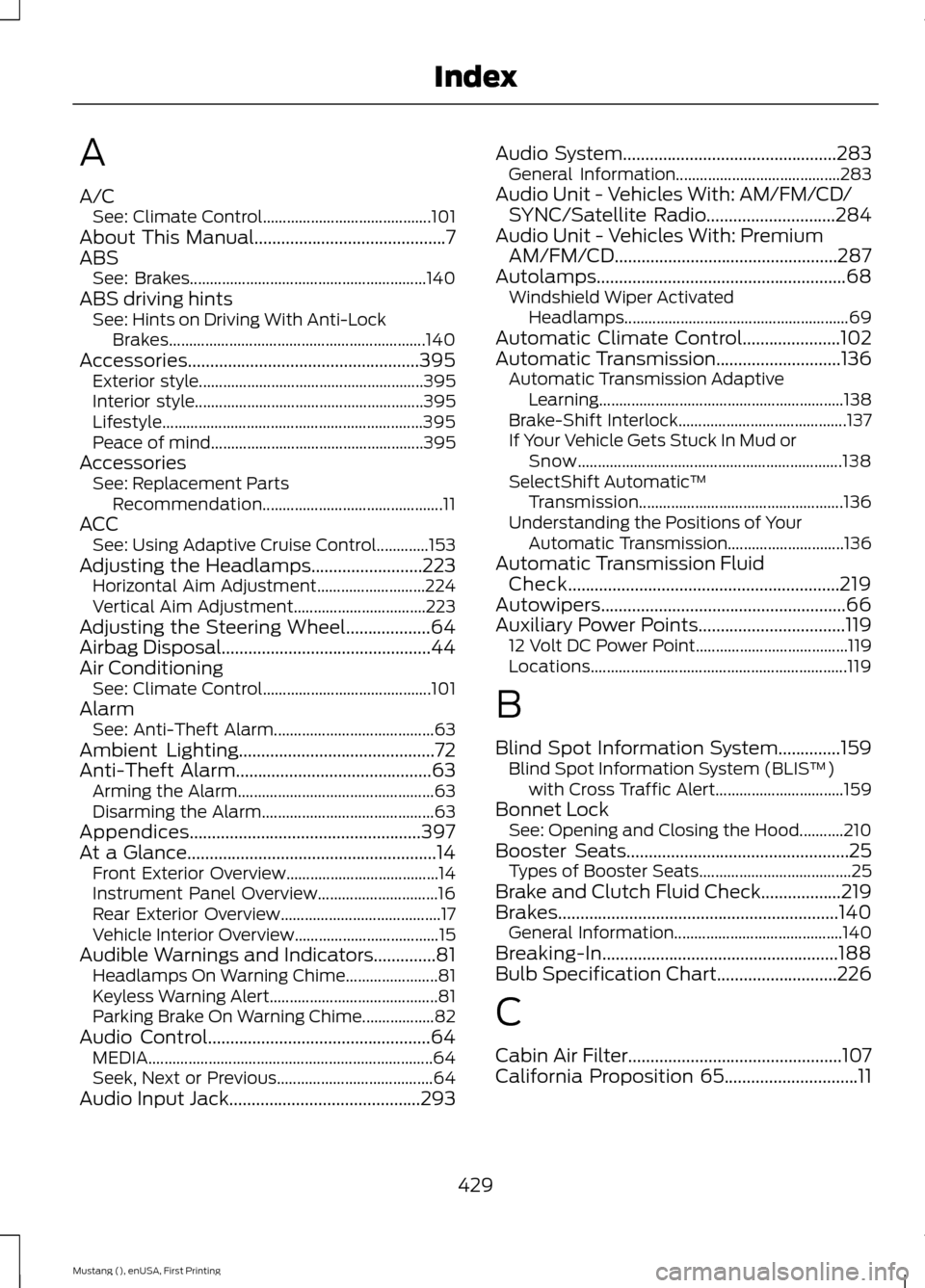
A
A/C
See: Climate Control.......................................... 101
About This Manual...........................................7
ABS See: Brakes........................................................... 140
ABS driving hints See: Hints on Driving With Anti-Lock
Brakes................................................................ 140
Accessories....................................................395 Exterior style........................................................ 395
Interior style......................................................... 395
Lifestyle................................................................. 395
Peace of mind..................................................... 395
Accessories See: Replacement Parts
Recommendation............................................. 11
ACC See: Using Adaptive Cruise Control.............153
Adjusting the Headlamps
.........................223
Horizontal Aim Adjustment........................... 224
Vertical Aim Adjustment................................. 223
Adjusting the Steering Wheel...................64
Airbag Disposal...............................................44
Air Conditioning See: Climate Control.......................................... 101
Alarm See: Anti-Theft Alarm........................................ 63
Ambient Lighting............................................72
Anti-Theft Alarm
............................................63
Arming the Alarm................................................. 63
Disarming the Alarm........................................... 63
Appendices....................................................397
At a Glance........................................................14 Front Exterior Overview...................................... 14
Instrument Panel Overview.............................. 16
Rear Exterior Overview........................................ 17
Vehicle Interior Overview.................................... 15
Audible Warnings and Indicators
..............81
Headlamps On Warning Chime....................... 81
Keyless Warning Alert.......................................... 81
Parking Brake On Warning Chime.................. 82
Audio Control..................................................64 MEDIA....................................................................... 64
Seek, Next or Previous....................................... 64
Audio Input Jack...........................................293 Audio System
................................................283
General Information......................................... 283
Audio Unit - Vehicles With: AM/FM/CD/ SYNC/Satellite Radio
.............................284
Audio Unit - Vehicles With: Premium AM/FM/CD..................................................287
Autolamps
........................................................68
Windshield Wiper Activated
Headlamps........................................................ 69
Automatic Climate Control......................102
Automatic Transmission............................136 Automatic Transmission Adaptive
Learning............................................................. 138
Brake-Shift Interlock.......................................... 137
If Your Vehicle Gets Stuck In Mud or Snow.................................................................. 138
SelectShift Automatic ™
Transmission................................................... 136
Understanding the Positions of Your Automatic Transmission............................. 136
Automatic Transmission Fluid Check.............................................................219
Autowipers.......................................................66
Auxiliary Power Points.................................119 12 Volt DC Power Point...................................... 119
Locations................................................................ 119
B
Blind Spot Information System..............159 Blind Spot Information System (BLIS ™)
with Cross Traffic Alert................................ 159
Bonnet Lock See: Opening and Closing the Hood...........210
Booster Seats..................................................25 Types of Booster Seats...................................... 25
Brake and Clutch Fluid Check..................219
Brakes...............................................................140 General Information.......................................... 140
Breaking-In.....................................................188
Bulb Specification Chart...........................226
C
Cabin Air Filter................................................107
California Proposition 65..............................11
429
Mustang (), enUSA, First Printing Index
Page 433 of 441

Capacities and Specifications - 2.3L
EcoBoost™ ...................................................271
Specifications...................................................... 272
Capacities and Specifications - 3.7L..................................................................275
Specifications...................................................... 276
Capacities and Specifications - 5.0L 32V Ti-VCT...........................................................279
Specifications..................................................... 280
Capacities and Specifications
................267
Car Wash See: Cleaning the Exterior.............................. 228
Center Console..............................................120
Changing a Bulb...........................................224 Accessing the Direction Indicator and Fog
Lamp Bulbs..................................................... 224
Lamp Assembly Condensation.................... 224
Replacing Fog Lamp Bulbs (If Equipped)........................................................ 225
Replacing HID Headlamp Bulbs................... 224
Replacing LED Fog Lamp Bulbs (If Equipped)........................................................ 225
Replacing rear, Brake, High-Mount Brake, Rear Direction Indicator and License
Plate Lamp Bulbs......................................... 225
Replacing Reverse Lamp Bulbs.................... 225
Replacing the Direction Indicator Bulbs.................................................................. 225
Changing a Fuse..........................................209 Fuses...................................................................... 209
Changing a Road Wheel
...........................260
Dissimilar Spare Wheel and Tire Assembly
Information..................................................... 260
Tire Change Procedure..................................... 261
Changing the 12V Battery.........................220 Battery Management System (If
Equipped)......................................................... 221
Changing the Engine Air Filter.................227
Changing the Wiper Blades.....................222
Checking MyKey System Status...............53
Checking the Wiper Blades......................222
Child Restraint and Safety Belt Maintenance.................................................34
Child Safety
.......................................................18
General Information............................................. 18
Child Seat Positioning...................................27
Cleaning Leather Seats..............................231
Cleaning Products.......................................228 Cleaning the Alloy Wheels.......................232
Cleaning the Engine....................................229
Cleaning the Exterior..................................228
Cleaning Plastic Exterior Parts..................... 229
Exterior Chrome................................................. 228
Stripes or Graphics (if equipped)................228
Underbody........................................................... 229
Cleaning the Instrument Panel and Instrument Cluster Lens........................230
Cleaning the Interior...................................230
Cleaning the Windows and Wiper Blades...........................................................230
Clearing All MyKeys
........................................51
Climate............................................................383 Climate Control Voice Commands.............385
Climate Control..............................................101
Climate Controlled Seats...........................113 Cooled Seats......................................................... 113
Closing the Convertible Top.....................186
Collision Warning System
.........................164
PRINCIPLE OF OPERATION........................... 164
Convertible Top.............................................185
Coolant Check See: Engine Coolant Check............................. 215
Crash Sensors and Airbag Indicator........43
Creating a MyKey.............................................51 Programming/Changing Configurable
Settings................................................................ 51
Cruise Control..................................................65 Principle of Operation....................................... 152
Cruise control See: Using Cruise Control................................ 152
Customer Assistance.................................196
D
Data Recording
..................................................9
Event Data Recording........................................... 9
Service Data Recording........................................ 9
Daytime Running Lamps.............................70 Type 1 - Conventional
(Non-Configurable)....................................... 70
Type 2 - Configurable..........................................70
Digital Radio
..................................................288
HD Radio Reception and Station
Troubleshooting............................................ 289
Direction Indicators
.........................................71
430
Mustang (), enUSA, First Printing Index
Page 436 of 441

Information Messages..................................91
Adaptive Cruise Control...................................... 91
AdvanceTrac ™...................................................... 92
Airbag........................................................................\
92
Alarm........................................................................\
93
Battery and Charging System......................... 93
Blind Spot Information and Cross Traffic Alert System..................................................... 94
Collision Warning System................................. 94
Doors and Locks................................................... 94
Fuel........................................................................\
.... 95
Hill Start Assist..................................................... 95
Keys and Intelligent Access.............................. 95
Maintenance.......................................................... 96
MyKey....................................................................... 96
Park Aid.................................................................... 97
Park Brake............................................................... 97
Remote Start.......................................................... 97
Seats........................................................................\
. 98
Starting System ................................................... 98
Steering System................................................... 98
Tire Pressure Monitoring System................... 99
Traction Control................................................... 99
Transmission......................................................... 99
Installing Child Seats
.....................................19
Child Seats............................................................... 19
Using Lap and Shoulder Belts......................... 20
Using Lower Anchors and Tethers for CHildren (LATCH)............................................ 22
Using Tether Straps............................................. 23
Instrument Cluster
.........................................77
Instrument Lighting Dimmer.....................69
Vehicles With Front Fog Lamps..................... 69
Vehicles Without Front Fog Lamps...............70
Interior Lamps...................................................71 Map Lamps.............................................................. 71
Interior Luggage Compartment Release...........................................................60
Interior Mirror
....................................................75
Auto-Dimming Mirror.......................................... 75
Introduction.........................................................7 J
Jump Starting the Vehicle.........................193
Connecting the Jumper Cables..................... 193
Jump Starting...................................................... 194
Preparing Your Vehicle...................................... 193
Removing the Jumper Cables........................ 194
K
Keyless Starting..............................................121 Ignition Modes....................................................... 121
Keys and Remote Controls.........................45
L
Lighting Control..............................................68 Headlamp Flasher............................................... 68
High Beams............................................................ 68
Lighting..............................................................68
Limited Slip Differential
.............................139
Traction-Lok ™ and TORSEN™ Axles (if
equipped)......................................................... 139
Load Carrying.................................................168
Load Limit.......................................................168 Special Loading Instructions for Owners of
Pick-up Trucks and Utility-type
Vehicles.............................................................. 172
Vehicle Loading - with and without a Trailer................................................................. 168
Locking and Unlocking
.................................56
Activating Intelligent Access ........................... 57
Autolock Feature.................................................. 58
Auto Relock............................................................ 58
Battery Saver......................................................... 59
Illuminated Entry.................................................. 59
Illuminated Exit..................................................... 59
Key Blade................................................................ 58
Luggage Compartment..................................... 60
Power Door Locks................................................ 56
Remote Control.................................................... 56
Smart Unlocks ...................................................... 57
Locks
...................................................................56
Lug Nuts See: Changing a Road Wheel....................... 260
433
Mustang (), enUSA, First Printing Index