2015 FORD MUSTANG See
[x] Cancel search: SeePage 56 of 441
CHECKING MYKEY SYSTEM
STATUS
You can find information on programmed
MyKey(s) using the information display
control on the steering wheel. See
Information Displays (page 83).
To find information on a programed MyKey(s), press the left arrow button to
access the main menu and scroll to: Description
Message
Press the
OK button.
Settings
Press the
OK button.
MyKey
Select one of the following:
Tracks the distance when drivers use a MyKey. The only way
to delete the accumulated distance is by using an admin key
to clear your MyKey. If the distance does not accumulate as
expected, then the intended user is not using the MyKey, or
an admin key user recently cleared and then recreated a
MyKey.
MyKey Dist.
Indicates the number of MyKeys programed to your vehicle.
Use this feature to detect how many MyKeys you have for
your vehicle and determine when a MyKey has been deleted.
{0} MyKeys
Indicates how many admin keys are programed to your
vehicle. Use this feature to determine how many unrestricted
keys you have for your vehicle, and detect if an additional
MyKey has been programed.
{0} Admin Keys
53
Mustang (), enUSA, First Printing MyKey
™
Page 57 of 441

USING MYKEY WITH REMOTE
START SYSTEMS
MyKey is not compatible with non
Ford-approved, aftermarket remote start
systems. If you choose to install a remote
start system, see an authorized dealer for
a Ford-approved remote start system.
MYKEY TROUBLESHOOTING Potential Causes
Condition
I cannot create a MyKey. •The key or transmitter used to start the
vehicle does not have admin privileges.
• The key or transmitter used to start the
vehicle is the only admin key (there always
has to be at least one admin key).
• Vehicles with keyless start: The keyless
start transmitter is not placed in the backup
slot, located in the center console. See
Locking and Unlocking (page 56).
• SecuriLock passive anti-theft system is
disabled or in unlimited mode.
• The key or transmitter used to start your
vehicle does not have admin privileges.
• No MyKeys are created. See
Creating a
MyKey (page 51).
I cannot program the configurable
settings.
•The key or transmitter used to start your
vehicle does not have admin privileges.
• No MyKeys are created. See
Creating a
MyKey (page 51).
I cannot clear the MyKeys.
Purchase a new key from an authorized dealer.
I lost the only admin key.
54
Mustang (), enUSA, First Printing MyKey
™
Page 58 of 441
Potential Causes
Condition
Program a spare key. See Passive Anti-Theft
System (page 62).
I lost a key.
MyKey distances do not accumulate.
•The MyKey user is not using the MyKey.
• An admin key holder cleared the MyKeys
and created new MyKeys.
• The key system has been reset.
• An admin transmitter is present at vehicle
start.
• No MyKeys are created. See
Creating a
MyKey (page 51).
No MyKey functions with the keyless
entry transmitter.
55
Mustang (), enUSA, First Printing MyKey
™
Page 59 of 441
LOCKING AND UNLOCKING
You can use the power door lock control
or the remote control to lock and unlock
your vehicle.
Power Door Locks
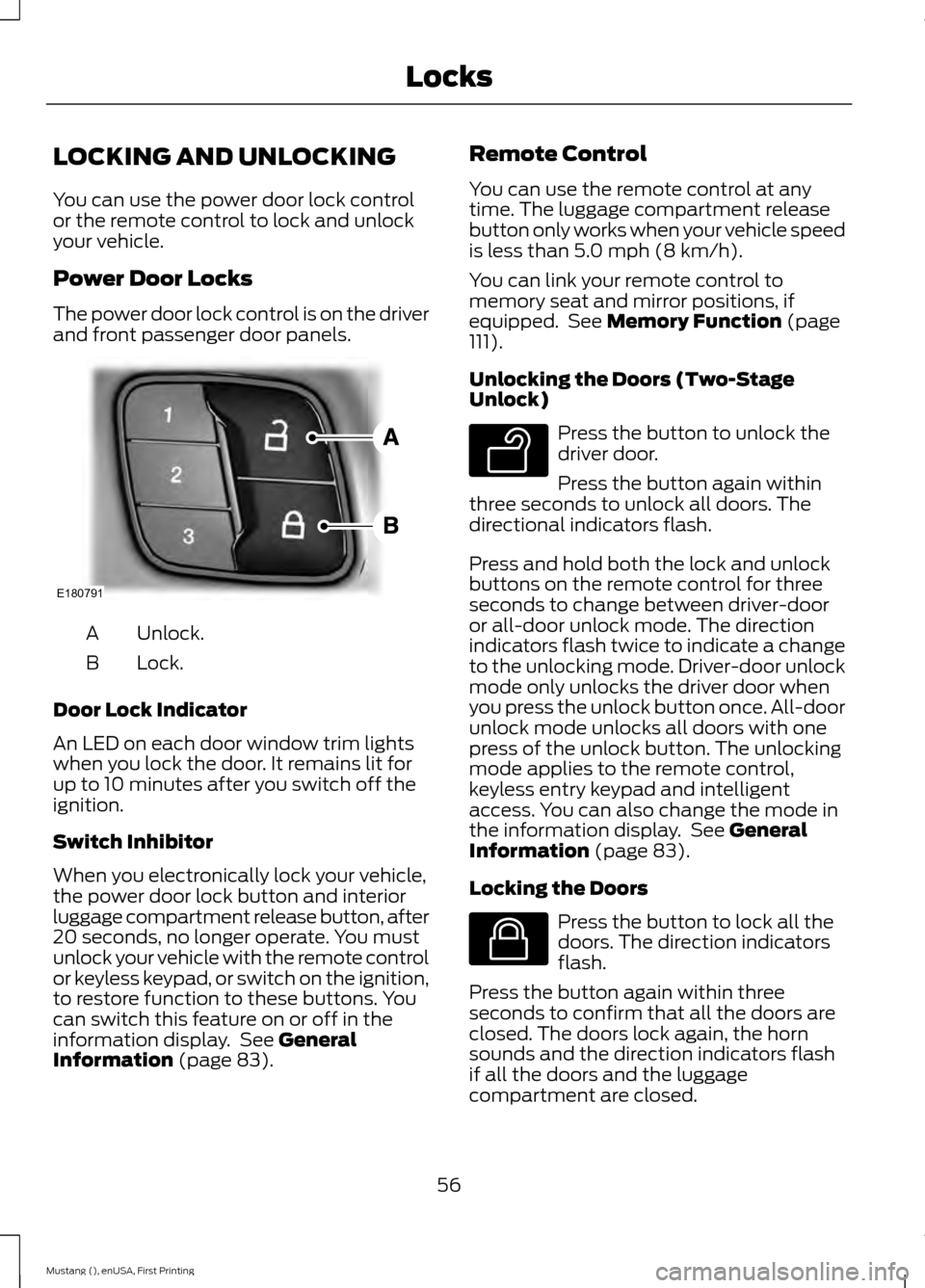
The power door lock control is on the driver
and front passenger door panels.
Unlock.
A
Lock.
B
Door Lock Indicator
An LED on each door window trim lights
when you lock the door. It remains lit for
up to 10 minutes after you switch off the
ignition.
Switch Inhibitor
When you electronically lock your vehicle,
the power door lock button and interior
luggage compartment release button, after
20 seconds, no longer operate. You must
unlock your vehicle with the remote control
or keyless keypad, or switch on the ignition,
to restore function to these buttons. You
can switch this feature on or off in the
information display. See General
Information (page 83). Remote Control
You can use the remote control at any
time. The luggage compartment release
button only works when your vehicle speed
is less than
5.0 mph (8 km/h).
You can link your remote control to
memory seat and mirror positions, if
equipped. See
Memory Function (page
111).
Unlocking the Doors (Two-Stage
Unlock) Press the button to unlock the
driver door.
Press the button again within
three seconds to unlock all doors. The
directional indicators flash.
Press and hold both the lock and unlock
buttons on the remote control for three
seconds to change between driver-door
or all-door unlock mode. The direction
indicators flash twice to indicate a change
to the unlocking mode. Driver-door unlock
mode only unlocks the driver door when
you press the unlock button once. All-door
unlock mode unlocks all doors with one
press of the unlock button. The unlocking
mode applies to the remote control,
keyless entry keypad and intelligent
access. You can also change the mode in
the information display. See
General
Information (page 83).
Locking the Doors Press the button to lock all the
doors. The direction indicators
flash.
Press the button again within three
seconds to confirm that all the doors are
closed. The doors lock again, the horn
sounds and the direction indicators flash
if all the doors and the luggage
compartment are closed.
56
Mustang (), enUSA, First Printing LocksE180791 E138629 E138623
Page 60 of 441

Mislock
If any door or the luggage compartment is
open, or if the hood is open on vehicles
with an anti-theft alarm or remote start,
the horn sounds twice and the directional
indicators do not flash. You can enable or
disable this feature in the information
display. See General Information (page
83).
Opening the Luggage Compartment Press twice within three seconds
to open the luggage
compartment.
Make sure to close and latch the luggage
compartment before driving your vehicle.
Objects may fall from an unlatched
luggage compartment. An unlatched
luggage compartment may block your rear
view.
Activating Intelligent Access
You must have the intelligent access key
within 3 feet (1 meter) of your vehicle.
At a Door
Pull an exterior door handle to unlock and
open the door. Make sure not to touch the
lock sensor on top of the handle. Touch the top of the door handle to lock
your vehicle. There is a brief delay before
you can unlock your vehicle again. Note:
Keep the door handle surface clean
to avoid issues with operation.
At the Luggage Compartment Press the exterior release button hidden
above the license plate.
Smart Unlocks
This feature helps to prevent you from
unintentionally locking your intelligent
access key inside your vehicle
’s passenger
compartment or luggage compartment.
When you electronically lock your vehicle
(with any door open, vehicle in park and
ignition off), your vehicle searches for an
intelligent access key in the passenger
compartment after you close the last door.
If your vehicle finds a key, all of the doors
immediately unlock and the horn sounds
twice, indicating that a key is inside.
You can override the smart unlock feature
and intentionally lock the intelligent access
key inside your vehicle. To do this, lock your
vehicle after you have closed all the doors
by:
• Using the keyless entry keypad.
• Pressing the lock button on another
intelligent access key.
• Touching the locking area on the
handle with another intelligent access
key in your hand.
57
Mustang (), enUSA, First Printing LocksE138630 E180792 E175208
Page 61 of 441
When you open one of the front doors and
lock your vehicle using the power door lock
control, all doors lock then unlock if:
•
The ignition is on.
• The ignition is off and your vehicle is
not in P.
Auto Relock
If you press the unlock button on the
remote control and do not open a door
within 45 seconds, your vehicle locks and
arms your alarm. You can enable or disable
this feature in the information display. See
General Information
(page 83).
Autolock Feature
The autolock feature locks all the doors
when:
• All doors are closed.
• The ignition is on.
• You shift into any gear putting your
vehicle in motion.
• And your vehicle attains a speed
greater than
12.4 mph (20 km/h).
The autolock feature repeats when:
• You open, and then close, any door
while the ignition is on and your vehicle
speed is
9.3 mph (15 km/h).
• And your vehicle then attains a speed
greater than
12.4 mph (20 km/h). Autounlock Feature
The autounlock feature unlocks all the
doors when:
•
The ignition is on, all the doors are
closed, and your vehicle has been in
motion at a speed greater than
12.4 mph (20 km/h)
.
• The vehicle comes to a stop and you
switch the ignition off or to accessory.
• And you open the driver door within 10
minutes of switching the ignition off or
to accessory.
Note: The doors do not autounlock if you
electronically lock your vehicle after you
switch the ignition off and before you open
the driver door.
Enabling or Disabling
Note: You can enable or disable the
autolock and autounlock features
independently of each other.
You can enable or disable these features
in the information display, or an authorized
dealer can do it for you. See Information
Messages
(page 91).
Key Blade
Turn the top of the key toward the front of
your vehicle once to lock all doors.
Turn the top of the key toward the rear of
your vehicle once to unlock the driver door
only.
See Remote Control (page 46).
Locking the Doors Individually
If the power locks do not operate because
of a discharged battery, lock the doors
individually using the mechanical key blade
in the position shown.
58
Mustang (), enUSA, First Printing Locks
Page 65 of 441
PASSIVE ANTI-THEFT
SYSTEM
Note:
The system is not compatible with
non-Ford aftermarket remote start systems.
Use of these systems may result in vehicle
starting problems and a loss of security
protection.
Note: Metallic objects, electronic devices
or a second coded key on the same key
chain may cause vehicle starting problems
if they are too close to the key when starting
your vehicle. Prevent these objects from
touching the coded key while starting your
vehicle. Switch the ignition off, move all
objects on the key chain away from the
coded key and restart your vehicle if a
problem occurs.
Note: Do not leave a duplicate coded key
in your vehicle. Always take your keys and
lock all doors when leaving your vehicle.
SecuriLock
The system helps prevent your vehicle
from starting unless you use a coded key
programmed to your vehicle. Using the
wrong key may prevent your vehicle from
starting. A message may appear in the
information display.
If you are unable to start your vehicle with
a correctly coded key, it is not operating
properly. A message may appear in the
information display.
Automatic Arming
Your vehicle arms immediately after
switching the ignition off.
Automatic Disarming
Switching the ignition on with a coded key
disarms your vehicle. Replacement Keys
Note:
Your vehicle comes equipped with
two intelligent access keys.
The intelligent access key functions as a
programmed key that operates the driver
door lock and activates the intelligent
access with push button start system, as
well as a remote control.
If your programmed transmitters are lost
or stolen and you do not have an extra
coded key, you need to have your vehicle
towed to an authorized dealer. You need
to erase the key codes from your vehicle
and program new coded keys.
Store an extra programmed key away from
your vehicle in a safe place to help prevent
any inconveniences. See your authorized
dealer to purchase additional spare or
replacement keys.
Programming a Spare Intelligent
Access Key
Note: You can program a maximum of four
intelligent access keys to your vehicle.
You must have two previously
programmed intelligent access keys inside
your vehicle and the new unprogrammed
intelligent access keys readily accessible.
See an authorized dealer to have the spare
key programmed if two previously
programmed keys are not available.
Make sure that your vehicle is off before
beginning this procedure. Make sure that
you close all the doors before beginning
and that they remain closed throughout
the procedure. Perform all steps within 30
seconds of starting the sequence. Stop
and wait for at least one minute before
starting again if you perform any steps out
of sequence.
Read and understand the entire procedure
before you begin.
62
Mustang (), enUSA, First Printing Security
Page 67 of 441
ADJUSTING THE STEERING
WHEEL
WARNING
Do not adjust the steering wheel
when your vehicle is moving.
Note:
Make sure that you sit in the correct
position. See Sitting in the Correct
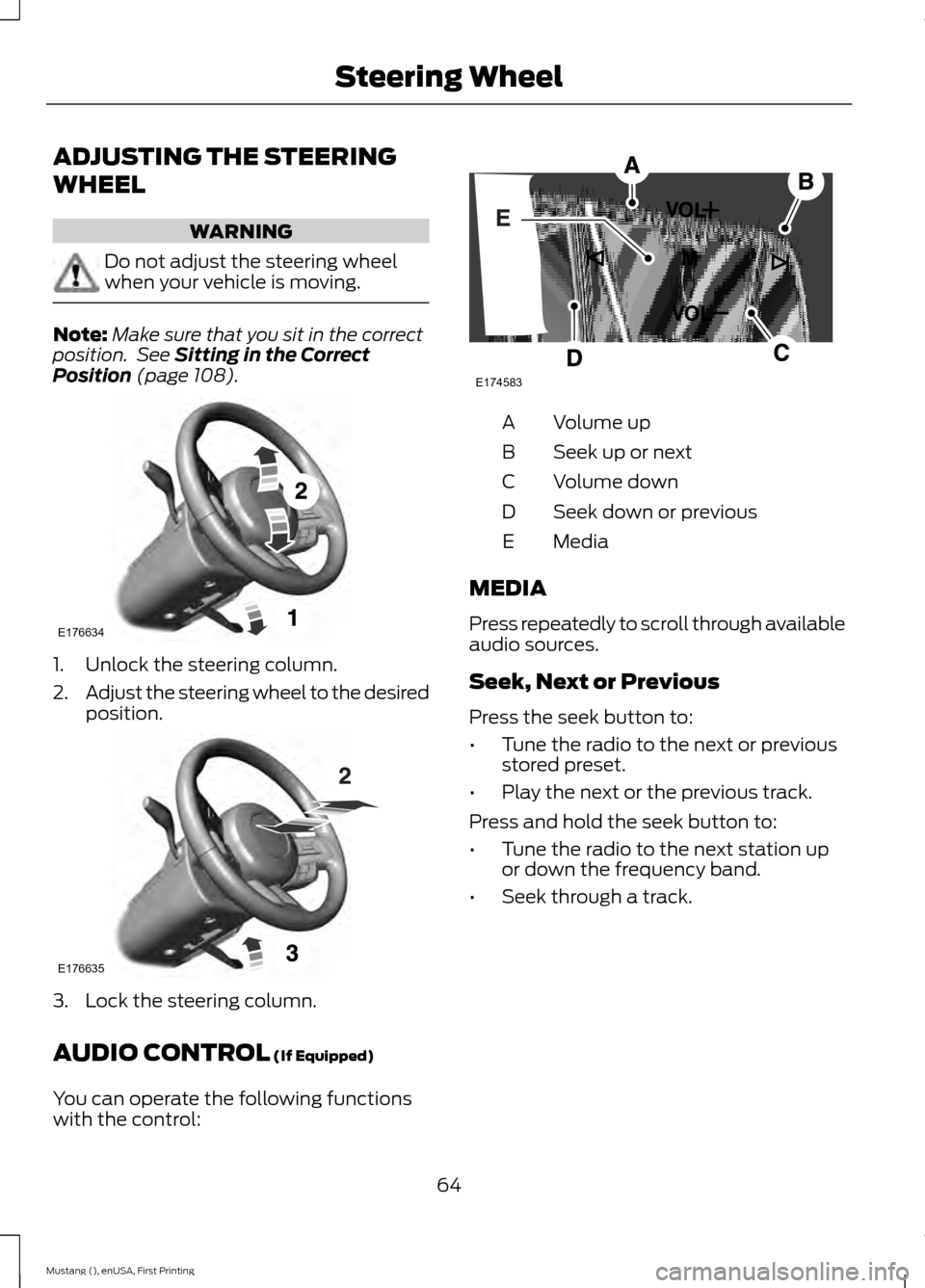
Position (page 108). 1. Unlock the steering column.
2.
Adjust the steering wheel to the desired
position. 3. Lock the steering column.
AUDIO CONTROL
(If Equipped)
You can operate the following functions
with the control: Volume up
A
Seek up or next
B
Volume down
C
Seek down or previous
D
Media
E
MEDIA
Press repeatedly to scroll through available
audio sources.
Seek, Next or Previous
Press the seek button to:
• Tune the radio to the next or previous
stored preset.
• Play the next or the previous track.
Press and hold the seek button to:
• Tune the radio to the next station up
or down the frequency band.
• Seek through a track.
64
Mustang (), enUSA, First Printing Steering WheelE176634 E176635 E174583