2015 FORD FUSION (AMERICAS) clutch
[x] Cancel search: clutchPage 7 of 488

Ordering Additional Owner's
Literature.....................................................233
Reporting Safety Defects (U.S. Only).............................................................233
Reporting Safety Defects (Canada Only).............................................................234
Fuses
Fuse Specification Chart...........................235
Changing a Fuse..........................................245
Maintenance
General Information
...................................246
Opening and Closing the Hood
..............246
Under Hood Overview - 1.5L EcoBoost™/ 1.6L EcoBoost™.......................................248
Under Hood Overview -
2.0L
EcoBoost™...............................................249
Under Hood Overview - 2.5L...................250
Engine Oil Dipstick -
1.5L
EcoBoost™...............................................250
Engine Oil Dipstick -
2.0L EcoBoost™/
2.5L.................................................................251
Engine Oil Dipstick -
1.6L
EcoBoost™.................................................251
Engine Oil Check
...........................................251
Oil Change Indicator Reset
.......................252
Engine Coolant Check................................252
Automatic Transmission Fluid Check...........................................................255
Brake and Clutch Fluid Check.................255
Power Steering Fluid Check.....................255
Washer Fluid Check
....................................255
Fuel Filter........................................................255
Changing the 12V Battery.........................255
Checking the Wiper Blades......................257
Changing the Wiper Blades.....................257
Adjusting the Headlamps........................258
Removing a Headlamp..............................259
Changing a Bulb............................................261
Bulb Specification Chart...........................263 Changing the Engine Air Filter
................265
Vehicle Care
General Information...................................266
Cleaning Products.......................................266
Cleaning the Exterior..................................266
Waxing
.............................................................267
Cleaning the Engine....................................267
Cleaning the Windows and Wiper Blades..........................................................268
Cleaning the Interior...................................268
Cleaning the Instrument Panel and Instrument Cluster Lens.......................268
Cleaning Leather Seats
.............................269
Repairing Minor Paint Damage
...............270
Cleaning the Alloy Wheels.......................270
Vehicle Storage.............................................270
Wheels and Tires
Temporary Mobility Kit...............................273
Tire Care
..........................................................285
Using Snow Chains....................................300
Tire Pressure Monitoring System
...........301
Changing a Road Wheel...........................304
Technical Specifications
............................310
Capacities and Specific- ations
Engine Specifications..................................312
Motorcraft Parts
............................................313
Vehicle Identification Number.................314
Vehicle Certification Label........................314
Transmission Code Designation.............315
Technical Specifications............................316
Audio System
General Information...................................320
Audio Unit - Vehicles With: AM/FM/CD/ SYNC/
Satellite Radio.............................321
4
Fusion/Mondeo (CC7), enUSA Table of Contents
Page 108 of 488

Airbag
Action
Message
The system detects a malfunction due to a blocked sensor. Remove blockage.
Occupant Sensor
BLOCKED Remove
Objects Near Passenger Seat
Alarm Action
Message
Alarm triggered due to unauthorized entry. See Anti-Theft
Alarm (page 67).
Vehicle Alarm to Stop
Alarm, Start Vehicle
Auto Start-Stop Action
Message
The engine needs to be restarted, press the brake pedal to start.
Auto StartStop Press
Brake to Start Engine
The engine needs to be restarted, press the brake pedal harder to start.
Auto StartStop Press
Brake Harder to Activate
The engine needs to be restarted, press the clutch pedal to start.
Auto StartStop Press
Clutch to Start Engine
The engine needs to be restarted, press any pedal to start.
Auto StartStop Press
Any Pedal
Select neutral for the system to restart the engine.
Auto StartStop Select
Neutral To Start Engine
Select park for the system to restart the engine.
Auto StartStop Shift to
P Restart Engine
The system is not functioning. A manual restart is required.
Auto StartStop Manual
Restart Required
Displays when conditions are not met for the Auto StartStop
system to function properly See Auto-Start-Stop (page 150).
Auto StartStop Not
Available
StartStop has shutoff the engine automatically.
Engine Stopped
StartStop is starting the engine automatically.
Engine Starting
105
Fusion/Mondeo (CC7), enUSA Information Displays
Page 110 of 488

Action
Message
Engine is on due to the vehicle battery needing to be charged.
Engine On due to Vehicle
Charging
Select neutral and release the clutch for the system to restart the engine.
Select Neutral and
Release Clutch to Auto- Stop
You have disabled the Start Stop feature.
Deactivated by Driver
Automatic Engine Shutdown Action
Message
The engine is getting ready to shut off.
Engine Shuts Off in XX
Seconds
The engine has shut off to help increase fuel economy.
Engine Shut Off for Fuel
Economy
The engine is getting ready to shut off. You can press OK onthe left steering wheel button to override the shut down.
Engine Shuts Off in XX
Seconds Press Ok to Override
All-Wheel Drive Action
Message
The all-wheel drive system temporarily turns off to protectitself from overheating.
AWD Temporarily
Disabled
The all-wheel drive system temporarily turns off to protect
itself from overheating or if you are using the temporary spare tire.
AWD Off
The all-wheel drive system will resume normal function and
clear this message after driving a short distance with the road tire re-installed or after the system cools.
AWD Restored
The all-wheel drive system is not operating properly. If thewarning stays on or continues to come on, contact an authorized dealer as soon as possible.
AWD Malfunction
Service Required
107
Fusion/Mondeo (CC7), enUSA Information Displays
Page 113 of 488

Keys and Intelligent Access
Action
Message
A reminder to press the brake while starting your vehicle.
Press Brake to START
The system does not detect a key in your vehicle. See KeylessStarting (page 144).
No Key Detected
You pressed the start/stop button to switch off the engine
and your vehicle does not detect your intelligent access key inside your vehicle.
Restart Now or Key is
Needed
Your vehicle is in the run ignition state.
Run Power Active
There is a problem with your vehicle ’s starting system. Contact
an authorized dealer for service.
Starting System Fault
A reminder to press the brake and clutch while starting your vehicle.
Press Brake and Clutch
to Start
A reminder to press the clutch in while starting your vehicle.
Press Clutch to Start
You have successfully programmed an intelligent access keyto the system.
Key Program Successful
You have failed to program an intelligent access key to thesystem.
Key Program Failure
You have programmed the maximum number of keys to the system.
Max Number of Keys
Learned
You have not programmed enough keys to the system.
Not Enough Keys
Learned
The key battery is low. Change the battery as soon as possible.
Key Battery Low Replace
Soon
An attempt is made to program a spare key using two existing keys.
Could Not Program
Integrated Key
A reminder that they are exiting your vehicle and the engine is on.
Engine On
110
Fusion/Mondeo (CC7), enUSA Information Displays
Page 114 of 488

Lane Keeping System
Action
Message
The system has malfunctioned. Contact your authorizeddealer as soon as possible.
Lane Keeping Sys.
Malfunction Service Required
The system has detected a condition that has caused thesystem to be temporarily unavailable.
Front Camera Tempor-
arily Not Available
The system has detected a condition that requires the wind-shield to be cleaned to operate properly.
Front Camera Low Visib-
ility Clean Screen
The system has malfunctioned. Contact your authorizeddealer as soon as possible.
Front Camera Malfunc-
tion Service Required
The system requests your to keep your hands on the steering wheel.
Keep Hands on Steering
Wheel
Maintenance Action
Message
Stop your vehicle as soon as safely possible and turn off the
engine. Check the oil level. If the warning stays on or continues to come on with your engine running, contact an authorized dealer as soon as possible.
LOW Engine Oil Pressure
The engine oil life remaining is 10% or less. See Engine Oil
Check (page 251).
Change Engine Oil Soon
The oil life left is at 0%. See
Engine Oil Check (page 251).
Oil Change Required
The brake fluid level is low, inspect the brake system immedi-ately.
See Brake and Clutch Fluid Check (page 255).
Brake Fluid Level LOW
The brake system needs servicing. Stop your vehicle in a safeplace. Contact an authorized dealer.
Check Brake System
The engine coolant temperature is excessively high. Stop yourvehicle in a safe place and allow the engine to cool. If the
problem persists, contact an authorized dealer. See
Engine
Coolant Check (page 252).
Engine Coolant Overtem-
perature
111
Fusion/Mondeo (CC7), enUSA Information Displays
Page 148 of 488

Ignition Modes
The keyless starting system has three
modes:
Off: Turns the ignition off.
• Without applying the brake pedal,
press and release the button once
when the ignition is in the on mode, or
when the engine is running but the
vehicle is not moving.
On:
All electrical circuits are operational
and the warning lamps and indicators
illuminate.
• Without applying the brake pedal,
press and release the button once.
Start:
Starts the engine.
• Press the brake pedal, and then press
the button for any length of time. An
indicator light on the button illuminates
when then ignition is on and when the
engine starts.
STARTING A GASOLINE
ENGINE
When you start the engine, the idle speed
increases, this helps to warm up the
engine. If the engine idle speed does not
slow down automatically, have your
vehicle checked by an authorized dealer. Note:
You can crank the engine for a total
of 60 seconds (without the engine starting)
before the starting system temporarily
disables. The 60 seconds does not have to
be all at once. For example, if you crank the
engine three times for 20 seconds each
time, without the engine starting, you
reached the 60-second time limit. A
message appears in the information display
alerting you that you exceeded the cranking
time. You cannot attempt to start the engine
for at least 15 minutes. After 15 minutes, you
are limited to a 15-second engine cranking
time. You need to wait 60 minutes before
you can crank the engine for 60 seconds
again.
Before starting the engine, check the
following:
• Make sure all occupants have fastened
their safety belts.
• Make sure the headlamps and
electrical accessories are off.
• Make sure the parking brake is on.
• Move the transmission selector lever
to position P (automatic transmission)
or neutral (manual transmission).
• Turn the ignition key to position
II. If
your vehicle is equipped with a keyless
ignition, see the following instructions.
Vehicles with an Ignition Key
Note: Do not touch the accelerator pedal.
1. Fully press the brake pedal. If your vehicle is equipped with a manual
transmission, fully press the clutch
pedal also.
2. Turn the key to position
III to start the
engine. Release the key when the
engine starts.
Note: The engine may continue cranking
for up to 15 seconds or until it starts.
Note: If you cannot start the engine on the
first try, wait for a short period and try again.
145
Fusion/Mondeo (CC7), enUSA Starting and Stopping the EngineE144447
Page 149 of 488

Vehicles with Keyless Start
Note:
Do not touch the accelerator pedal.
Note: You must have your intelligent access
key in the vehicle in order to shift the
transmission out of position P.
1. Fully press the brake pedal.
2. Press the button.
The system does not function if:
• The key frequencies are jammed.
• The key battery has no charge.
If you are unable to start the engine, do the
following: 1. Locate the key backup slot in center
console utility compartment.
2. With the buttons facing the rear of the
vehicle and the key ring up, place the
key into backup slot.
3. With the key in this position, press the brake pedal, and then the button to
switch on the engine.
Fast Restart
The fast restart feature allows you to
restart the engine within 20 seconds of
switching it off, even if a valid key is not
present. Within 20 seconds of switching the engine
off, press the brake pedal and press the
button. After 20 seconds have expired, you
can no longer restart the engine without
the key present inside your vehicle.
Once the engine has started, it remains
running until you press the button, even if
the system does not detect a valid key. If
you open and close a door while the engine
is running, the system searches for a valid
key. You cannot restart the engine if the
system does not detect a valid key within
20 seconds.
Failure to Start
If you cannot start the engine after three
attempts, wait 10 seconds and follow this
procedure:
1. If your vehicle is equipped with an
automatic transmission, fully press the
brake pedal. If your vehicle is equipped
with a manual transmission, fully press
the clutch pedal and apply the
handbrake.
2. Move the transmission selector lever to park (P) (automatic transmission)
or neutral (manual transmission).
3. Fully press the accelerator pedal and hold it there.
4. Start the engine.
Automatic Engine Shutdown
If your vehicle is equipped with a keyless
ignition, it has a feature that automatically
shuts down the engine if it has been idling
for an extended period. The ignition also
turns off in order to save battery power.
Before the engine shuts down, a message
appears in the information display showing
a timer counting down from 30 seconds.
146
Fusion/Mondeo (CC7), enUSA Starting and Stopping the EngineE147165
Page 164 of 488
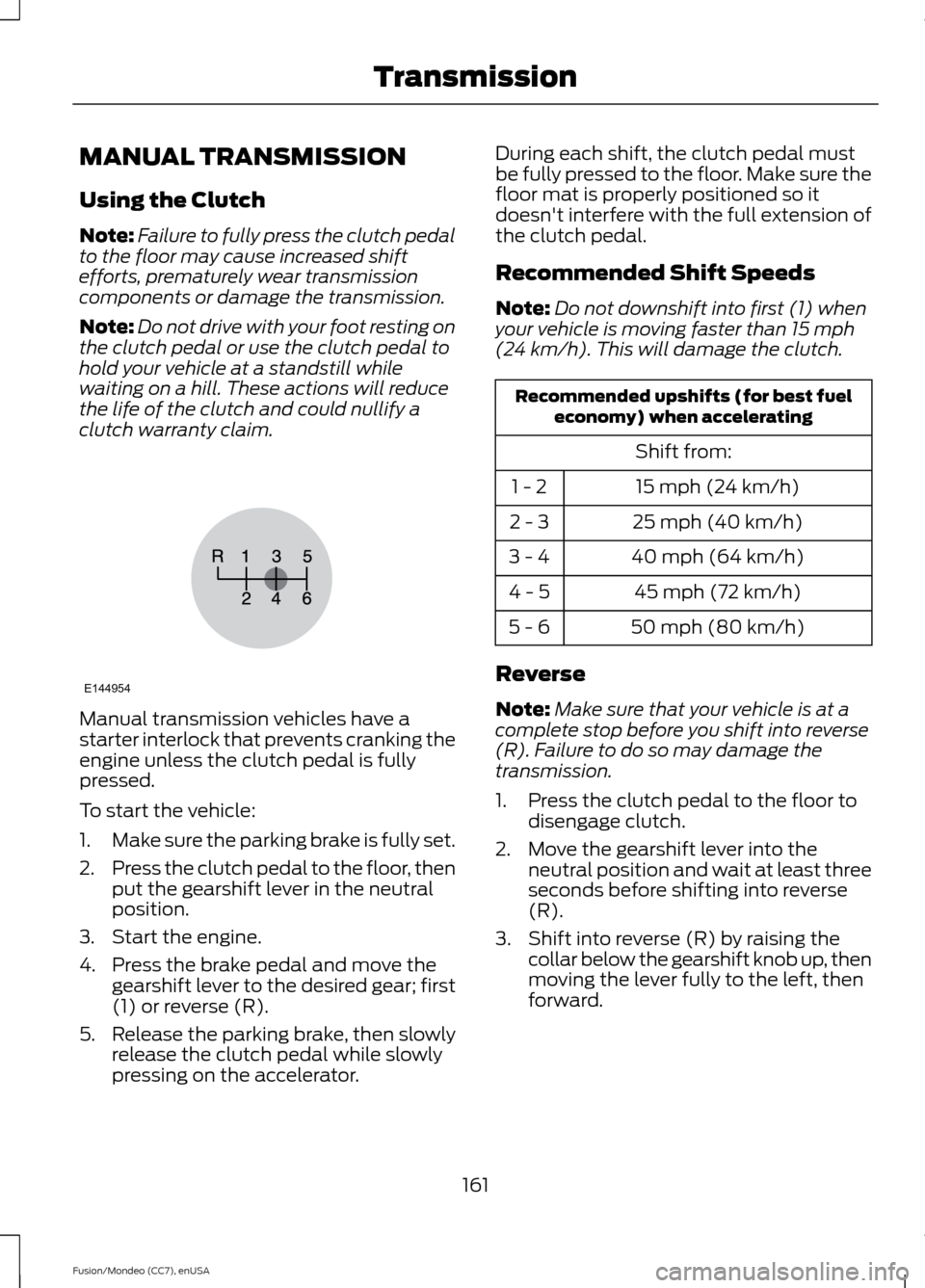
MANUAL TRANSMISSION
Using the Clutch
Note:
Failure to fully press the clutch pedal
to the floor may cause increased shift
efforts, prematurely wear transmission
components or damage the transmission.
Note: Do not drive with your foot resting on
the clutch pedal or use the clutch pedal to
hold your vehicle at a standstill while
waiting on a hill. These actions will reduce
the life of the clutch and could nullify a
clutch warranty claim. Manual transmission vehicles have a
starter interlock that prevents cranking the
engine unless the clutch pedal is fully
pressed.
To start the vehicle:
1.
Make sure the parking brake is fully set.
2. Press the clutch pedal to the floor, then
put the gearshift lever in the neutral
position.
3. Start the engine.
4. Press the brake pedal and move the gearshift lever to the desired gear; first
(1) or reverse (R).
5. Release the parking brake, then slowly
release the clutch pedal while slowly
pressing on the accelerator. During each shift, the clutch pedal must
be fully pressed to the floor. Make sure the
floor mat is properly positioned so it
doesn't interfere with the full extension of
the clutch pedal.
Recommended Shift Speeds
Note:
Do not downshift into first (1) when
your vehicle is moving faster than 15 mph
(24 km/h). This will damage the clutch. Recommended upshifts (for best fuel
economy) when accelerating
Shift from:15 mph (24 km/h)
1 - 2
25 mph (40 km/h)
2 - 3
40 mph (64 km/h)
3 - 4
45 mph (72 km/h)
4 - 5
50 mph (80 km/h)
5 - 6
Reverse
Note: Make sure that your vehicle is at a
complete stop before you shift into reverse
(R). Failure to do so may damage the
transmission.
1. Press the clutch pedal to the floor to disengage clutch.
2. Move the gearshift lever into the neutral position and wait at least three
seconds before shifting into reverse
(R).
3. Shift into reverse (R) by raising the collar below the gearshift knob up, then
moving the lever fully to the left, then
forward.
161
Fusion/Mondeo (CC7), enUSA TransmissionE144954