2015 FORD FOCUS tire
[x] Cancel search: tirePage 311 of 453
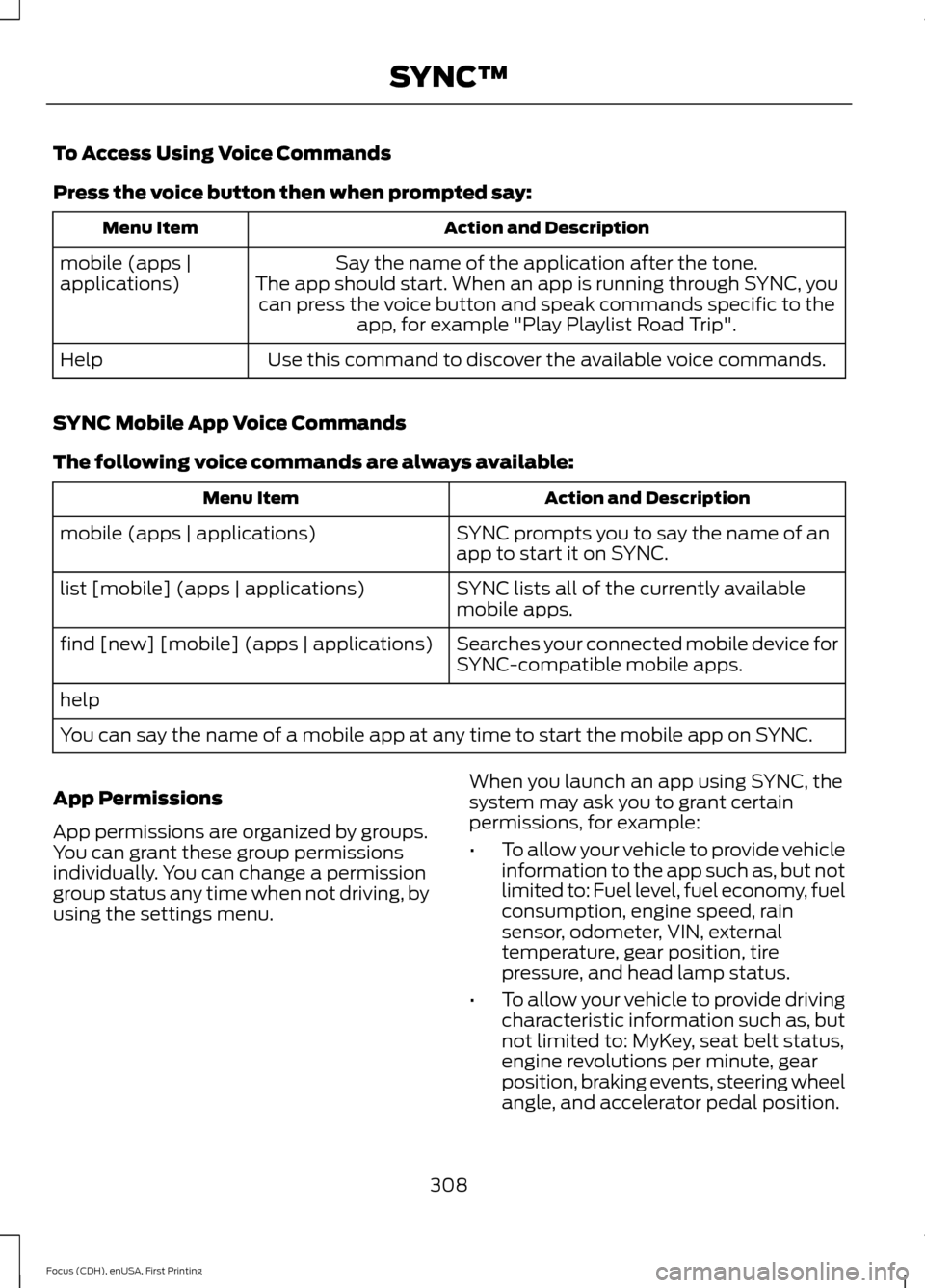
To Access Using Voice Commands
Press the voice button then when prompted say:
Action and Description
Menu Item
Say the name of the application after the tone.
The app should start. When an app is running through SYNC, you can press the voice button and speak commands specific to the app, for example "Play Playlist Road Trip".
mobile (apps |
applications)
Use this command to discover the available voice commands.
Help
SYNC Mobile App Voice Commands
The following voice commands are always available: Action and Description
Menu Item
SYNC prompts you to say the name of an
app to start it on SYNC.
mobile (apps | applications)
SYNC lists all of the currently available
mobile apps.
list [mobile] (apps | applications)
Searches your connected mobile device for
SYNC-compatible mobile apps.
find [new] [mobile] (apps | applications)
help
You can say the name of a mobile app at any time to start the mobile app on SYNC.
App Permissions
App permissions are organized by groups.
You can grant these group permissions
individually. You can change a permission
group status any time when not driving, by
using the settings menu. When you launch an app using SYNC, the
system may ask you to grant certain
permissions, for example:
•
To allow your vehicle to provide vehicle
information to the app such as, but not
limited to: Fuel level, fuel economy, fuel
consumption, engine speed, rain
sensor, odometer, VIN, external
temperature, gear position, tire
pressure, and head lamp status.
• To allow your vehicle to provide driving
characteristic information such as, but
not limited to: MyKey, seat belt status,
engine revolutions per minute, gear
position, braking events, steering wheel
angle, and accelerator pedal position.
308
Focus (CDH), enUSA, First Printing SYNC™
Page 316 of 453
![FORD FOCUS 2015 3.G Owners Manual Description and Action
Command
Creates a play list of similar genre to the one
currently playing.
[play] (similar music | more like this)
Commands inside the < > are dynamic, which
means it could be t](/manual-img/11/5150/w960_5150-315.png "FORD FOCUS 2015 3.G Owners Manual Description and Action
Command
Creates a play list of similar genre to the one
currently playing.
[play] (similar music | more like this)
Commands inside the < > are dynamic, which
means it could be t")
Description and Action
Command
Creates a play list of similar genre to the one
currently playing.
[play] (similar music | more like this)
Commands inside the < > are dynamic, which
means it could be the name of anything such
as album, artist or song. This voice command
is not available until indexing is complete on
your device.
Play song
repeat off Repeats the current track.
repeat one [on]
Plays the current play list in a random order.
(Not all devices support this command.)
shuffle [all] [on]
shuffle off At any time during playback, you can press
the voice button and ask the system what is
playing. The system reads the metadata tags
(if populated) of the current track.
((who's | who is) this | who plays this |
(what's | what is) playing [now] | (what | which) (song | track | artist) is this |
(who's | who is) playing | (what's | what is) this)
Examples of USB Commands
SYNC provides the user with many intuitive
ways to find and play a song using voice.
For example, if we have a song called
"Penny Lane" from the album "Magical
Mystery Tour" we can say the following to
play this song:
• Play song "Penny Lane".
• Play "Penny Lane".
If we wanted to play the entire album, we
can say:
• Play album "Magical Mystery Tour".
• Play "Magical Mystery Tour". Bluetooth Audio
The system is also capable of playing
music from your cellular phone through
Bluetooth.
To switch the Bluetooth audio on, use the
MEDIA button (next to the audio display)
or Source button, or press the voice button
and when prompted say: Voice Command
Bluetooth audio
Then any of the following:
313
Focus (CDH), enUSA, First Printing SYNC™
Page 361 of 453
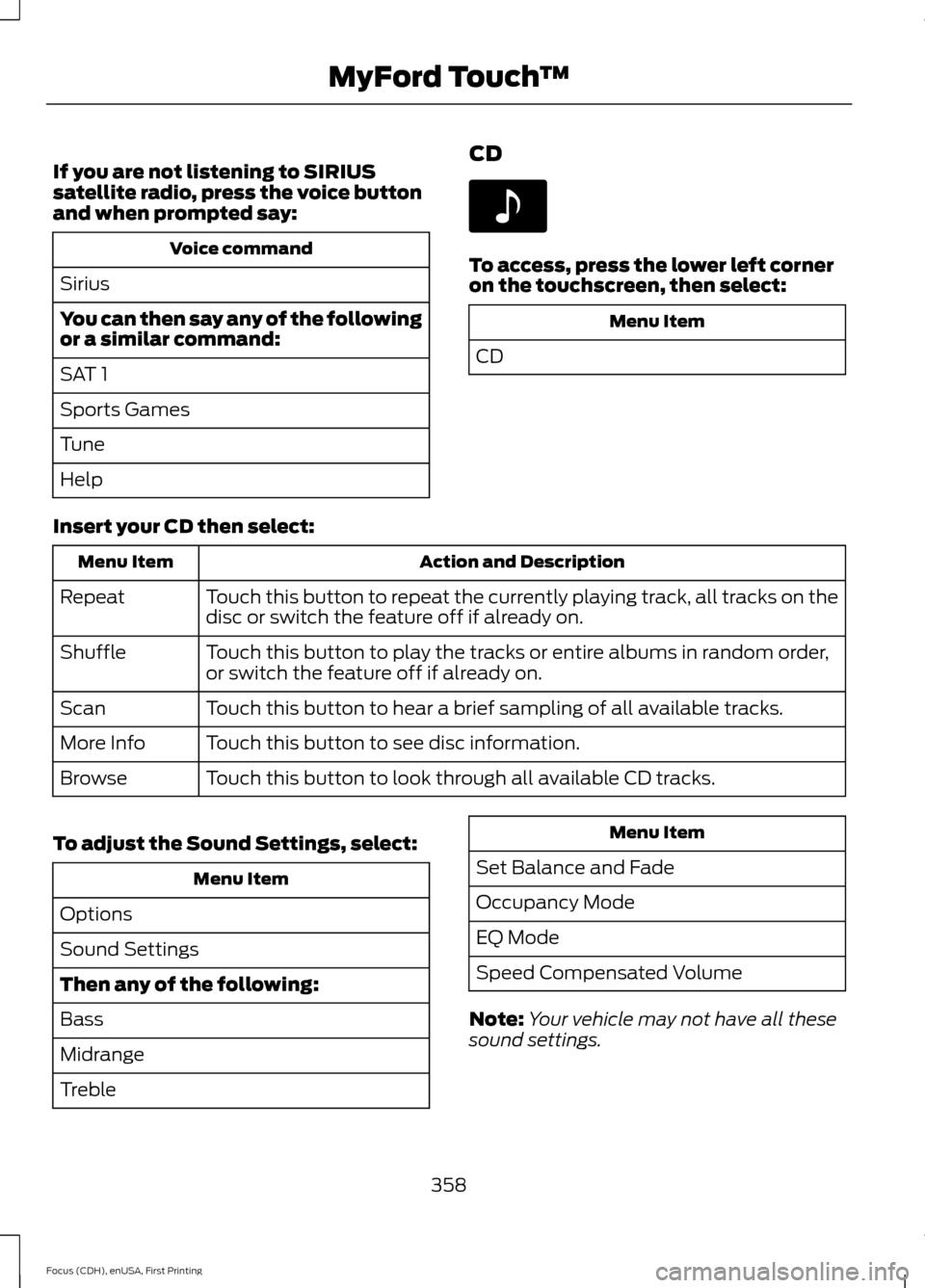
If you are not listening to SIRIUS
satellite radio, press the voice button
and when prompted say:
Voice command
Sirius
You can then say any of the following
or a similar command:
SAT 1
Sports Games
Tune
Help CD To access, press the lower left corner
on the touchscreen, then select:
Menu Item
CD
Insert your CD then select: Action and Description
Menu Item
Touch this button to repeat the currently playing track, all tracks on the
disc or switch the feature off if already on.
Repeat
Touch this button to play the tracks or entire albums in random order,
or switch the feature off if already on.
Shuffle
Touch this button to hear a brief sampling of all available tracks.
Scan
Touch this button to see disc information.
More Info
Touch this button to look through all available CD tracks.
Browse
To adjust the Sound Settings, select: Menu Item
Options
Sound Settings
Then any of the following:
Bass
Midrange
Treble Menu Item
Set Balance and Fade
Occupancy Mode
EQ Mode
Speed Compensated Volume
Note: Your vehicle may not have all these
sound settings.
358
Focus (CDH), enUSA, First Printing MyFord Touch
™E142611
Page 411 of 453
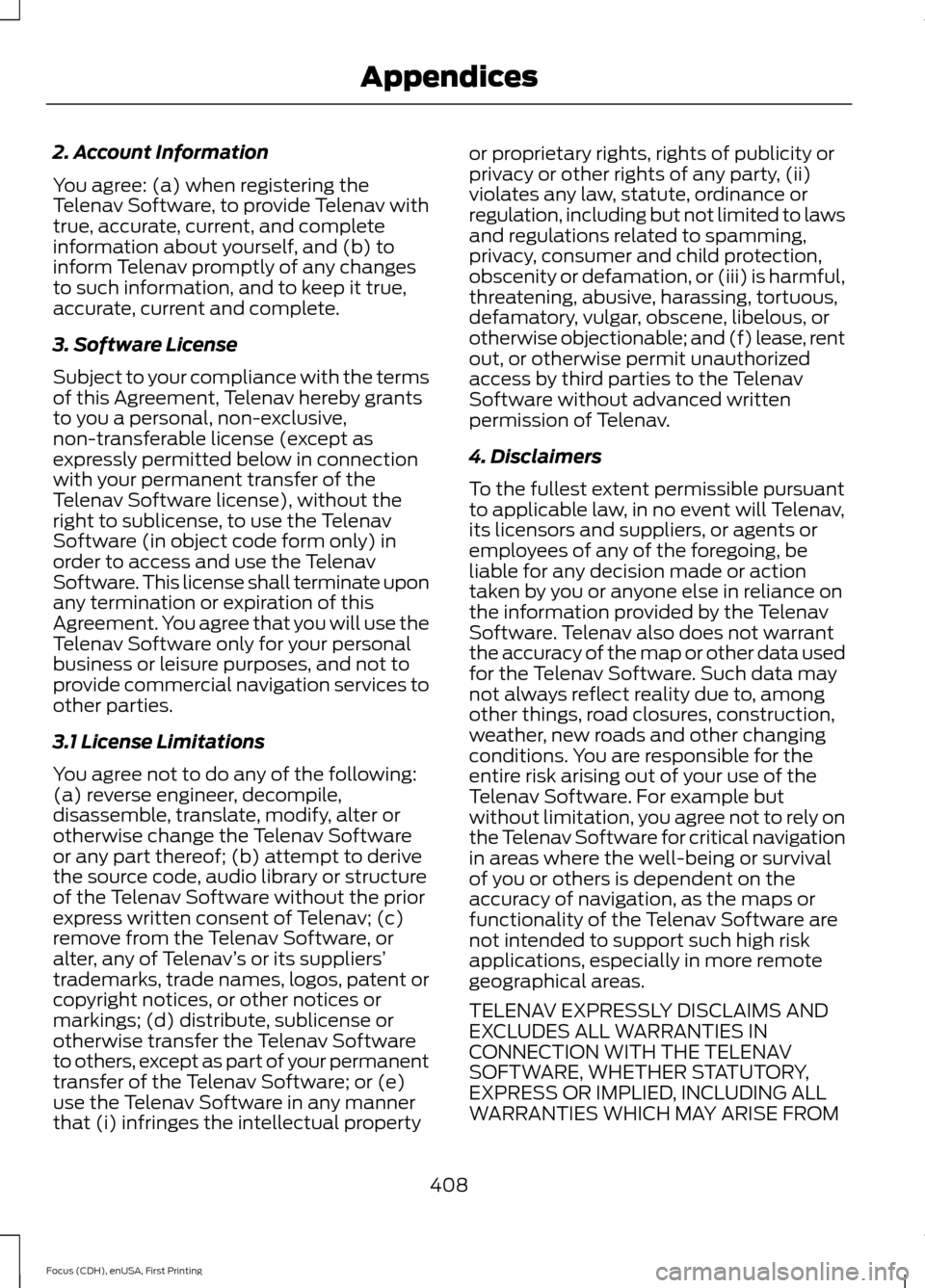
2. Account Information
You agree: (a) when registering the
Telenav Software, to provide Telenav with
true, accurate, current, and complete
information about yourself, and (b) to
inform Telenav promptly of any changes
to such information, and to keep it true,
accurate, current and complete.
3. Software License
Subject to your compliance with the terms
of this Agreement, Telenav hereby grants
to you a personal, non-exclusive,
non-transferable license (except as
expressly permitted below in connection
with your permanent transfer of the
Telenav Software license), without the
right to sublicense, to use the Telenav
Software (in object code form only) in
order to access and use the Telenav
Software. This license shall terminate upon
any termination or expiration of this
Agreement. You agree that you will use the
Telenav Software only for your personal
business or leisure purposes, and not to
provide commercial navigation services to
other parties.
3.1 License Limitations
You agree not to do any of the following:
(a) reverse engineer, decompile,
disassemble, translate, modify, alter or
otherwise change the Telenav Software
or any part thereof; (b) attempt to derive
the source code, audio library or structure
of the Telenav Software without the prior
express written consent of Telenav; (c)
remove from the Telenav Software, or
alter, any of Telenav
’s or its suppliers’
trademarks, trade names, logos, patent or
copyright notices, or other notices or
markings; (d) distribute, sublicense or
otherwise transfer the Telenav Software
to others, except as part of your permanent
transfer of the Telenav Software; or (e)
use the Telenav Software in any manner
that (i) infringes the intellectual property or proprietary rights, rights of publicity or
privacy or other rights of any party, (ii)
violates any law, statute, ordinance or
regulation, including but not limited to laws
and regulations related to spamming,
privacy, consumer and child protection,
obscenity or defamation, or (iii) is harmful,
threatening, abusive, harassing, tortuous,
defamatory, vulgar, obscene, libelous, or
otherwise objectionable; and (f) lease, rent
out, or otherwise permit unauthorized
access by third parties to the Telenav
Software without advanced written
permission of Telenav.
4. Disclaimers
To the fullest extent permissible pursuant
to applicable law, in no event will Telenav,
its licensors and suppliers, or agents or
employees of any of the foregoing, be
liable for any decision made or action
taken by you or anyone else in reliance on
the information provided by the Telenav
Software. Telenav also does not warrant
the accuracy of the map or other data used
for the Telenav Software. Such data may
not always reflect reality due to, among
other things, road closures, construction,
weather, new roads and other changing
conditions. You are responsible for the
entire risk arising out of your use of the
Telenav Software. For example but
without limitation, you agree not to rely on
the Telenav Software for critical navigation
in areas where the well-being or survival
of you or others is dependent on the
accuracy of navigation, as the maps or
functionality of the Telenav Software are
not intended to support such high risk
applications, especially in more remote
geographical areas.
TELENAV EXPRESSLY DISCLAIMS AND
EXCLUDES ALL WARRANTIES IN
CONNECTION WITH THE TELENAV
SOFTWARE, WHETHER STATUTORY,
EXPRESS OR IMPLIED, INCLUDING ALL
WARRANTIES WHICH MAY ARISE FROM
408
Focus (CDH), enUSA, First Printing Appendices
Page 412 of 453
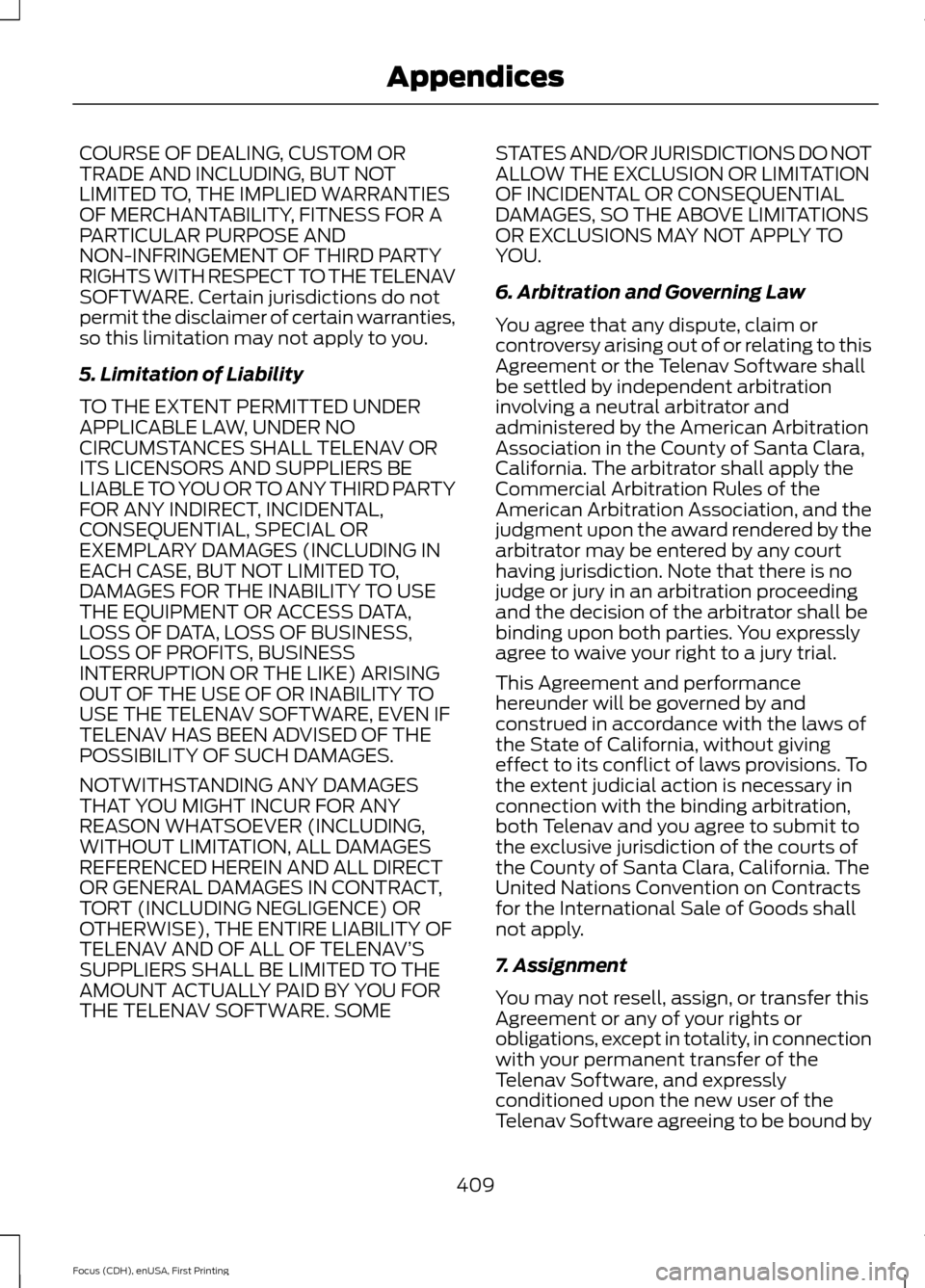
COURSE OF DEALING, CUSTOM OR
TRADE AND INCLUDING, BUT NOT
LIMITED TO, THE IMPLIED WARRANTIES
OF MERCHANTABILITY, FITNESS FOR A
PARTICULAR PURPOSE AND
NON-INFRINGEMENT OF THIRD PARTY
RIGHTS WITH RESPECT TO THE TELENAV
SOFTWARE. Certain jurisdictions do not
permit the disclaimer of certain warranties,
so this limitation may not apply to you.
5. Limitation of Liability
TO THE EXTENT PERMITTED UNDER
APPLICABLE LAW, UNDER NO
CIRCUMSTANCES SHALL TELENAV OR
ITS LICENSORS AND SUPPLIERS BE
LIABLE TO YOU OR TO ANY THIRD PARTY
FOR ANY INDIRECT, INCIDENTAL,
CONSEQUENTIAL, SPECIAL OR
EXEMPLARY DAMAGES (INCLUDING IN
EACH CASE, BUT NOT LIMITED TO,
DAMAGES FOR THE INABILITY TO USE
THE EQUIPMENT OR ACCESS DATA,
LOSS OF DATA, LOSS OF BUSINESS,
LOSS OF PROFITS, BUSINESS
INTERRUPTION OR THE LIKE) ARISING
OUT OF THE USE OF OR INABILITY TO
USE THE TELENAV SOFTWARE, EVEN IF
TELENAV HAS BEEN ADVISED OF THE
POSSIBILITY OF SUCH DAMAGES.
NOTWITHSTANDING ANY DAMAGES
THAT YOU MIGHT INCUR FOR ANY
REASON WHATSOEVER (INCLUDING,
WITHOUT LIMITATION, ALL DAMAGES
REFERENCED HEREIN AND ALL DIRECT
OR GENERAL DAMAGES IN CONTRACT,
TORT (INCLUDING NEGLIGENCE) OR
OTHERWISE), THE ENTIRE LIABILITY OF
TELENAV AND OF ALL OF TELENAV’
S
SUPPLIERS SHALL BE LIMITED TO THE
AMOUNT ACTUALLY PAID BY YOU FOR
THE TELENAV SOFTWARE. SOME STATES AND/OR JURISDICTIONS DO NOT
ALLOW THE EXCLUSION OR LIMITATION
OF INCIDENTAL OR CONSEQUENTIAL
DAMAGES, SO THE ABOVE LIMITATIONS
OR EXCLUSIONS MAY NOT APPLY TO
YOU.
6. Arbitration and Governing Law
You agree that any dispute, claim or
controversy arising out of or relating to this
Agreement or the Telenav Software shall
be settled by independent arbitration
involving a neutral arbitrator and
administered by the American Arbitration
Association in the County of Santa Clara,
California. The arbitrator shall apply the
Commercial Arbitration Rules of the
American Arbitration Association, and the
judgment upon the award rendered by the
arbitrator may be entered by any court
having jurisdiction. Note that there is no
judge or jury in an arbitration proceeding
and the decision of the arbitrator shall be
binding upon both parties. You expressly
agree to waive your right to a jury trial.
This Agreement and performance
hereunder will be governed by and
construed in accordance with the laws of
the State of California, without giving
effect to its conflict of laws provisions. To
the extent judicial action is necessary in
connection with the binding arbitration,
both Telenav and you agree to submit to
the exclusive jurisdiction of the courts of
the County of Santa Clara, California. The
United Nations Convention on Contracts
for the International Sale of Goods shall
not apply.
7. Assignment
You may not resell, assign, or transfer this
Agreement or any of your rights or
obligations, except in totality, in connection
with your permanent transfer of the
Telenav Software, and expressly
conditioned upon the new user of the
Telenav Software agreeing to be bound by
409
Focus (CDH), enUSA, First Printing Appendices
Page 413 of 453
the terms and conditions of this
Agreement. Any such sale, assignment or
transfer that is not expressly permitted
under this paragraph will result in
immediate termination of this Agreement,
without liability to Telenav, in which case
you and all other parties shall immediately
cease all use of the Telenav Software.
Notwithstanding the foregoing, Telenav
may assign this Agreement to any other
party at any time without notice, provided
the assignee remains bound by this
Agreement.
8. Miscellaneous
8.1
This Agreement constitutes the entire
agreement between Telenav and you with
respect to the subject matter hereof.
8.2
Except for the limited licenses expressly
granted in this Agreement, Telenav retains
all right, title and interest in and to the
Telenav Software, including without
limitation all related intellectual property
rights. No licenses or other rights which are
not expressly granted in this Agreement
are intended to, or shall be, granted or
conferred by implication, statute,
inducement, estoppel or otherwise, and
Telenav and its suppliers and licensors
hereby reserve all of their respective rights
other than the licenses explicitly granted
in this Agreement.
8.3
By using the Telenav Software, you
consent to receive from Telenav all
communications, including notices,
agreements, legally required disclosures
or other information in connection with the
Telenav Software (collectively,
“Notices”)
electronically. Telenav may provide such Notices by posting them on Telenav
’s
Website or by downloading such Notices
to your wireless device. If you desire to
withdraw your consent to receive Notices
electronically, you must discontinue your
use of the Telenav Software.
8.4
Telenav ’s or your failure to require
performance of any provision shall not
affect that party ’s right to require
performance at any time thereafter, nor
shall a waiver of any breach or default of
this Agreement constitute a waiver of any
subsequent breach or default or a waiver
of the provision itself.
8.5
If any provision herein is held
unenforceable, then such provision will be
modified to reflect the intention of the
parties, and the remaining provisions of
this Agreement will remain in full force and
effect.
8.6
The headings in this Agreement are for
convenience of reference only, will not be
deemed to be a part of this Agreement,
and will not be referred to in connection
with the construction or interpretation of
this Agreement. As used in this Agreement,
the words “include ” and “including, ” and
variations thereof, will not be deemed to
be terms of limitation, but rather will be
deemed to be followed by the words
“ without limitation. ”
9. Other Vendors Terms and Conditions
The Telenav Software utilizes map and
other data licensed to Telenav by third
party vendors for the benefit of you and
other end users. This Agreement includes
end-user terms applicable to these
companies (included at the end of this
410
Focus (CDH), enUSA, First Printing Appendices
Page 416 of 453
that any such export laws, rules or
regulations prohibit HERE from complying
with any of its obligations hereunder to
deliver or distribute Data, such failure shall
be excused and shall not constitute a
breach of this Agreement.
Entire Agreement.
These terms and conditions constitute the
entire agreement between Telenav (and
its licensors, including their licensors and
suppliers) and you pertaining to the subject
matter hereof, and supersedes in their
entirety any and all written or oral
agreements previously existing between
us with respect to such subject matter.
Governing Law.
The above terms and conditions shall be
governed by the laws of the State of Illinois
[insert
“Netherlands” where European
HERE Data is used], without giving effect
to (i) its conflict of laws provisions, or (ii)
the United Nations Convention for
Contracts for the International Sale of
Goods, which is explicitly excluded. You
agree to submit to the jurisdiction of the
State of Illinois [insert “The Netherlands”
where European HERE Data is used] for
any and all disputes, claims and actions
arising from or in connection with the Data
provided to you hereunder.
Government End Users.
If the Data is being acquired by or on behalf
of the United States government or any
other entity seeking or applying rights
similar to those customarily claimed by the
United States government, this Data is a
“ commercial item ” as that term is defined
at 48 C.F.R. (“FAR”) 2.101, is licensed in
accordance with these End-User Terms,
and each copy of Data delivered or
otherwise furnished shall be marked and
embedded as appropriate with the
following “Notice of Use, ” and shall be
treated in accordance with such Notice: NOTICE OF USE
CONTRACTOR (MANUFACTURER/ SUPPLIER) NAME: HERE
CONTRACTOR (MANUFACTURER/
SUPPLIER) ADDRESS: c/o Nokia, 425
West Randolph Street, Chicago, Illinois 60606
This Data is a commercial item as
defined in FAR 2.101 and is subject to
these End-User Terms under which this Data was provided.
© 1987 – 2014 HERE – All rights reserved.
If the Contracting Officer, federal
government agency, or any federal official
refuses to use the legend provided herein,
the Contracting Officer, federal
government agency, or any federal official
must notify HERE prior to seeking
additional or alternative rights in the Data. I. US/Canada Territory A. United States Data. The End-User
Terms for any Application containing
Data for the United States shall contain
the following notices: “HERE holds a non-exclusive license
from the United States Postal
Service® to publish and sell ZIP+4®
information. ”
“©United States Postal Service®
20XX. Prices are not established,
controlled or approved by the United
States Postal Service®. The following
trademarks and registrations are
owned by the USPS: United States
Postal Service, USPS, and ZIP+4. ”
413
Focus (CDH), enUSA, First Printing Appendices
Page 422 of 453
with or in communication with any
positioning devices or any mobile or
wireless-connected electronic or computer
devices, including without limitation
cellular phones, palmtop and handheld
computers, pagers, and personal digital
assistants or PDAs. You agree to cease
using this Data if you fail to comply with
these terms and conditions.
Limited Warranty
NAV2 warrants that (a) the Data will
perform substantially in accordance with
the accompanying written materials for a
period of ninety (90) days from the date
of receipt, and (b) any support services
provided by NAV2 shall be substantially as
described in applicable written materials
provided to you by NAV2, and NAV2’
s
support engineers will make commercially
reasonable efforts to solve any problem
issues.
rigCustomer Remedies
NAV2 and its suppliers’ entire liability and
your exclusive remedy shall be, at NAV2’ s
sole discretion, either (a) return of the price
paid, if any, or (b) repair or replacement of
the Data that do not meet NAV2’ s Limited
Warranty and that are returned to NAV2
with a copy of your receipt. This Limited
Warranty is void if failure of the Data has
resulted from accident, abuse, or
misapplication. Any replacement Data will
be warranted for the remainder of the
original warranty period or thirty (30) days,
whichever is longer. Neither these remedies
nor any product support services offered
by NAV2 are available without proof of
purchase from an authorized international
source. No Other Warranty:
EXCEPT FOR THE LMITED WARRANTY
SET FORTH ABOVE AND TO THE EXTENT
PERMITTED BY APPLICABLE LAW, NAV2
AND ITS LICENSORS (INCLUDING THEIR
LICENSORS AND SUPPLIERS) DISCLAIM
ANY WARRANTIES, EXPRESS OR IMPLIED,
OF QUALITY, PERFORMANCE,
MERCHANTABILITY, FITNESS FOR A
PARTICULAR PURPOSE, OWNERSHIP OR
NON-INFRINGEMENT. Certain warranty
exclusions may not be permitted under
applicable law, so to that extent the above
exclusion may not apply to you.
Limited Liability:
TO THE EXTENT PERMITTED BY
APPLICABLE LAW, NAV2 AND ITS
LICENSORS (INCLUDING THEIR
LICENSORS AND SUPPLIERS) SHALL NOT
BE LIABLE TO YOU: IN RESPECT OF ANY
CLAIM, DEMAND OR ACTION,
IRRESPECTIVE OF THE NATURE OF THE
CAUSE OF THE CLAIM, DEMAND OR
ACTION ALLEGING ANY LOSS, INJURY OR
DAMAGES, DIRECT OR INDIRECT, WHICH
MAY RESULT FROM THE USE OR
POSSESSION OF THE INFORMATION; OR
FOR ANY LOSS OF PROFIT, REVENUE,
CONTRACTS OR SAVINGS, OR ANY
OTHER DIRECT, INDIRECT, INCIDENTAL,
SPECIAL OR CONSEQUENTIAL DAMAGES
ARISING OUT OF YOUR USE OF OR
INABILITY TO USE THIS INFORMATION,
ANY DEFECT IN THE INFROMATION, OR
THE BREACH OF THESE TERMS OR
CONDITIONS, WHETHER IN AN ACTION
IN CONTRACT OR TORT OR BASED ON A
WARRANTY, EVEN IF NAV2 OR ITS
LICENSORS HAVE BEEN ADVISED OF THE
POSSIBILITY OF SUCH DAMAGES. UNDER
NO CIRCUMSTANCES SHALL NAV2’
s OR
ITS SUPPLIERS ’ LIABILITY HEREUNDER
EXCEED THE PRICE PAID. Certain liability
exclusions may not be permitted under
applicable law, so to that extent the above
exclusion may not apply to you.
419
Focus (CDH), enUSA, First Printing Appendices