2015 FORD FOCUS ECO mode
[x] Cancel search: ECO modePage 72 of 453
Programming a Personal Entry Code
1. Enter the factory-set five-digit code.
2. Press 1·2 on the keypad within five
seconds.
3. Enter your personal five-digit code. You
must enter each number within five
seconds of each other.
4. Press
1·2 on the keypad to save
personal code 1.
The doors lock then unlock to confirm that
programming was successful.
To program additional personal entry
codes, repeat Steps 1-3, then for Step 4:
• Press
3·4 to save personal code 2.
• Press
5·6 to save personal code 3.
• Press
7·8 to save personal code 4.
• Press
9·0 to save personal code 5.
Hints:
• Do not set a code that uses five of the
same number.
• Do not use five numbers in sequential
order.
• The factory-set code works even if you
have set your own personal code.
Erasing a Personal Code
1. Enter the factory-set five-digit code.
2. Press and release
1·2 on the keypad
within five seconds.
3. Press and hold
1·2 for two seconds.
You must do this within five seconds
of completing step 2.
All personal codes erase and only the
factory-set five-digit code works.
Anti-Scan Feature
The keypad goes into an anti-scan mode
if you enter the wrong code seven times.
This mode turns off the keypad for one
minute and the keypad lamp flashes. The anti-scan feature turns off after any
of the following occur:
•
One minute of keypad inactivity.
• You press the unlock button on the
remote control.
• You switch your vehicle on.
• You unlock the vehicle using intelligent
access.
Locking and Unlocking the Doors
Locking All Doors
Press and hold 7·8 and 9·0 on the keypad
simultaneously with the driver door closed.
You do not need to enter a code first.
Unlocking All Doors
Enter the factory-set code or your personal
code, then press 3·4 on the keypad within
five seconds.
Unlocking Only the Driver Door
Enter the factory-set or your personal
five-digit code. You must press each
number within five seconds of each other.
The interior lamps illuminate.
Note: All doors unlock if the two-stage
unlocking feature is turned off. See Locking
and Unlocking
(page 63).
INTERIOR LUGGAGE
COMPARTMENT RELEASE - 4-
DOOR WARNINGS
Keep vehicle doors and luggage
compartment locked and keep keys
and remote transmitters out of a
child ’s reach. Unsupervised children could
lock themselves in the trunk and risk injury.
Children should be taught not to play in
vehicles.
69
Focus (CDH), enUSA, First Printing Locks
Page 83 of 453

If equipped, the following also activate
when the lighting control is in the
autolamps position and you switch them
on in the information display:
•
Configurable daytime running lamps.
• Automatic high beam control.
• Adaptive headlamp control.
The headlamps remain on for a period of
time after you switch the ignition off. Use
the information display controls to adjust
the period of time that the headlamps
remain on. See Information Displays
(page 96).
Note: With the headlamps in the
autolamps position, you cannot switch the
high beam headlamps on until the
autolamps system turns the low beam
headlamps on.
Windshield Wiper Activated
Headlamps
The windshield wiper activated headlamps
turn on within 10 seconds when you switch
the windshield wipers on and the lighting
control is in the autolamps position. They
turn off approximately 60 seconds after
you switch the windshield wipers off.
The headlamps will not turn on by wiper
activation:
• During a mist wipe.
• When the wipers are on to clear washer
fluid during a wash condition.
• If the wipers are in intermittent mode.
Note: If you switch autolamps and
autowipers on, the headlamps will
automatically turn on when the windshield
wipers continuously operate. INSTRUMENT LIGHTING
DIMMER
Note:
You disable the manual dimmer
when you adjust the setting to Auto
Dimming in the information display. See
Information Displays
(page 96).
Note: If you disconnect the battery or it
becomes discharged, the illuminated
components will switch to the maximum
setting. Press repeatedly or press and hold until
you reach the desired level.
HEADLAMP EXIT DELAY
After you switch the ignition off, you can
switch the headlamps on by pulling the
direction indicator lever toward you. You
will hear a short tone. The headlamps will
switch off automatically after three
minutes with any door open or 30 seconds
after the last door has been closed. You
can cancel this feature by pulling the
direction indicator toward you again or
switching the ignition on.
80
Focus (CDH), enUSA, First Printing LightingE161902
Page 95 of 453

WARNING LAMPS AND
INDICATORS
The following warning lamps and
indicators alert you to a vehicle condition
that may become serious. Some lamps
light when you start your vehicle to make
sure they work. If any lamps remain on
after starting your vehicle, refer to the
respective system warning lamp for further
information.
Note:
Some warning indicators appear in
the information display and function the
same as a warning lamp but do not display
when you start your vehicle.
Adaptive Cruise Control (If Equipped) The speed control system
indicator light changes color to
indicate what mode the system
is in.
On (white light): Illuminates when you
switch on the adaptive cruise control
system. Turns off when you switch off the
speed control system.
Engaged (green light): Illuminates when
you engage the adaptive cruise control
system. Turns off when you disengage the
speed control system.
Anti-Lock Braking System If it lights when you are driving,
this indicates a malfunction. You
continue to have normal braking
(without anti-lock braking system) unless
the brake system warning lamp also lights.
Have the system checked by an authorized
dealer.
Auto Start-stop
(If Equipped) It lights to inform you when the
engine shuts down or in
conjunction with a message. Battery If it lights while driving, it
indicates a malfunction. Switch
off all unnecessary electrical
equipment and have the system checked
by an authorized dealer immediately.
Blind Spot Monitor
(If Equipped) It lights when you switch this
feature off or in conjunction with
a message. See
Blind Spot
Information System (page 167). See
Information Messages (page 99).
Brake System It lights when you engage the
parking brake with the ignition
on.
If it lights when you are driving, check that
the parking brake is not engaged. If the
parking brake is not engaged, this indicates
low brake fluid level or a brake system
malfunction. Have the system checked
immediately by an authorized dealer. WARNING
Driving your vehicle with the warning
lamp on is dangerous. A significant
decrease in braking performance
may occur. It takes you longer to stop your
vehicle. Have your vehicle checked by an
authorized dealer immediately. Driving
extended distances with the parking brake
engaged can cause brake failure and the
risk of personal injury. Cruise Control
(If Equipped)
Lights when you switch on this
feature.
See Using Cruise
Control (page 162).
92
Focus (CDH), enUSA, First Printing Instrument ClusterE144524 E124823 E144522 E71340
Page 97 of 453

It also lights momentarily when you switch
the ignition on to confirm the lamp is
functional. If it does not light when you
switch the ignition on, or begins to flash at
any time, have the system checked by an
authorized dealer.
Low Washer Fluid
Lights when the windshield
washer fluid is low.
Parking Lamps Lights when you switch the
parking lamps on.
Service Engine Soon If the service engine soon
indicator light stays illuminated
after you start the engine, it
indicates that the On Board Diagnostics
system (OBD) has detected a malfunction
of the vehicle emissions control system.
Refer to On board diagnostics (OBD) in
the Fuel and Refueling chapter for more
information about having your vehicle
serviced. See Emission Control System
(page 138).
If the light is blinking, engine misfire is
occurring which could damage your
catalytic converter. Drive in a moderate
fashion (avoid heavy acceleration and
deceleration) and have your vehicle
serviced immediately. WARNING
Under engine misfire conditions,
excessive exhaust temperatures
could damage the catalytic
converter, the fuel system, interior floor
coverings or other vehicle components,
possibly causing a fire. Have your vehicle
serviced immediately. The service engine soon indicator light
illuminates when you first switch the
ignition on before engine start to check the
bulb and to indicate whether the vehicle
is ready for Inspection/Maintenance (I/M)
testing.
Normally, the service engine soon light
stays on until you crank the engine, then
turns itself off if no malfunctions are
present. However, if after 15 seconds the
service engine soon light blinks eight times,
it means that the vehicle is not ready for
I/M testing. See
Emission Control
System (page 138).
Stability Control Lights when the system is active.
If it remains on or does not light
when you power your vehicle on,
this indicates a malfunction. During a
malfunction, the system turns off. Have
the system checked by an authorized
dealer immediately.
See (page 152).
Stability Control Off Lights when you switch the
system off. It goes out when you
switch the system back on or
when you power off your vehicle.
See
(page 152).
AUDIBLE WARNINGS AND
INDICATORS
Key in Ignition Warning Chime
Sounds when you open the driver's door
and you have left the key in the ignition.
94
Focus (CDH), enUSA, First Printing Instrument ClusterE132353 E138639
Page 99 of 453
GENERAL INFORMATION
WARNING
Driving while distracted can result in
loss of vehicle control, crash and
injury. We strongly recommend that
you use extreme caution when using any
device that may take your focus off the
road. Your primary responsibility is the safe
operation of your vehicle. We recommend
against the use of any hand-held device
while driving and encourage the use of
voice-operated systems when possible.
Make sure you are aware of all applicable
local laws that may affect the use of
electronic devices while driving. You can control various systems on your
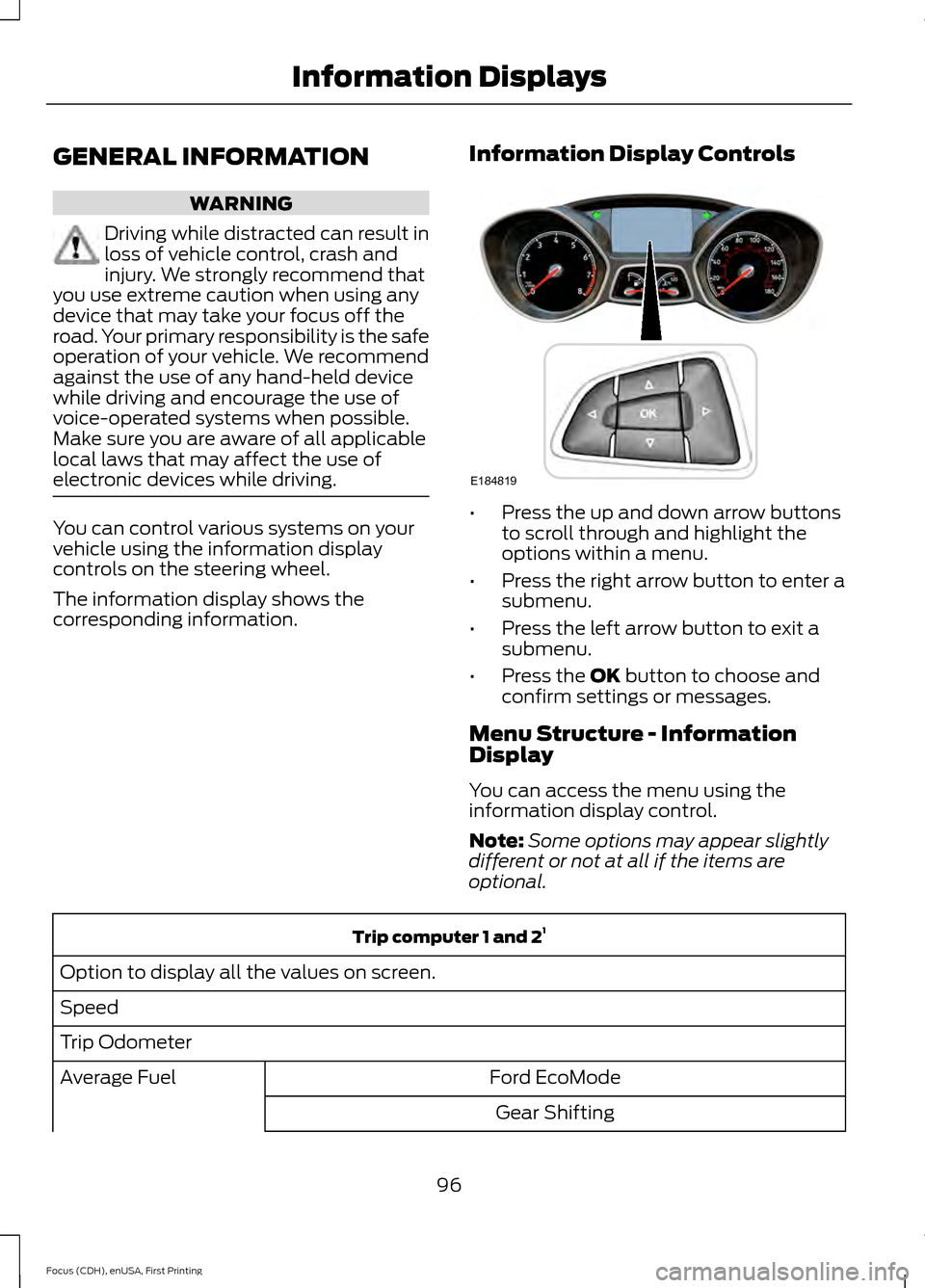
vehicle using the information display
controls on the steering wheel.
The information display shows the
corresponding information.
Information Display Controls •
Press the up and down arrow buttons
to scroll through and highlight the
options within a menu.
• Press the right arrow button to enter a
submenu.
• Press the left arrow button to exit a
submenu.
• Press the OK button to choose and
confirm settings or messages.
Menu Structure - Information
Display
You can access the menu using the
information display control.
Note: Some options may appear slightly
different or not at all if the items are
optional. Trip computer 1 and 2
1
Option to display all the values on screen.
Speed
Trip Odometer Ford EcoMode
Average Fuel
Gear Shifting
96
Focus (CDH), enUSA, First Printing Information DisplaysE184819
Page 100 of 453

Trip computer 1 and 2
1
Anticipation Speed
Ford EcoMode
Inst Fuel Econ
Distance to E
Trip Timer
Option to select for navigation display.
1 See Trip Computer (page 98). Information
Driver Alert
MyKey
MyKey Info
System Check Settings
Traction Ctrl
Driver Assist
Blindspot
Collision Warn
Cross TrafficAdaptive
Cruise Control
Normal
Driver Alert
Hill Start Assist
Tire Monitor
Traffic Signs
97
Focus (CDH), enUSA, First Printing Information Displays
Page 111 of 453
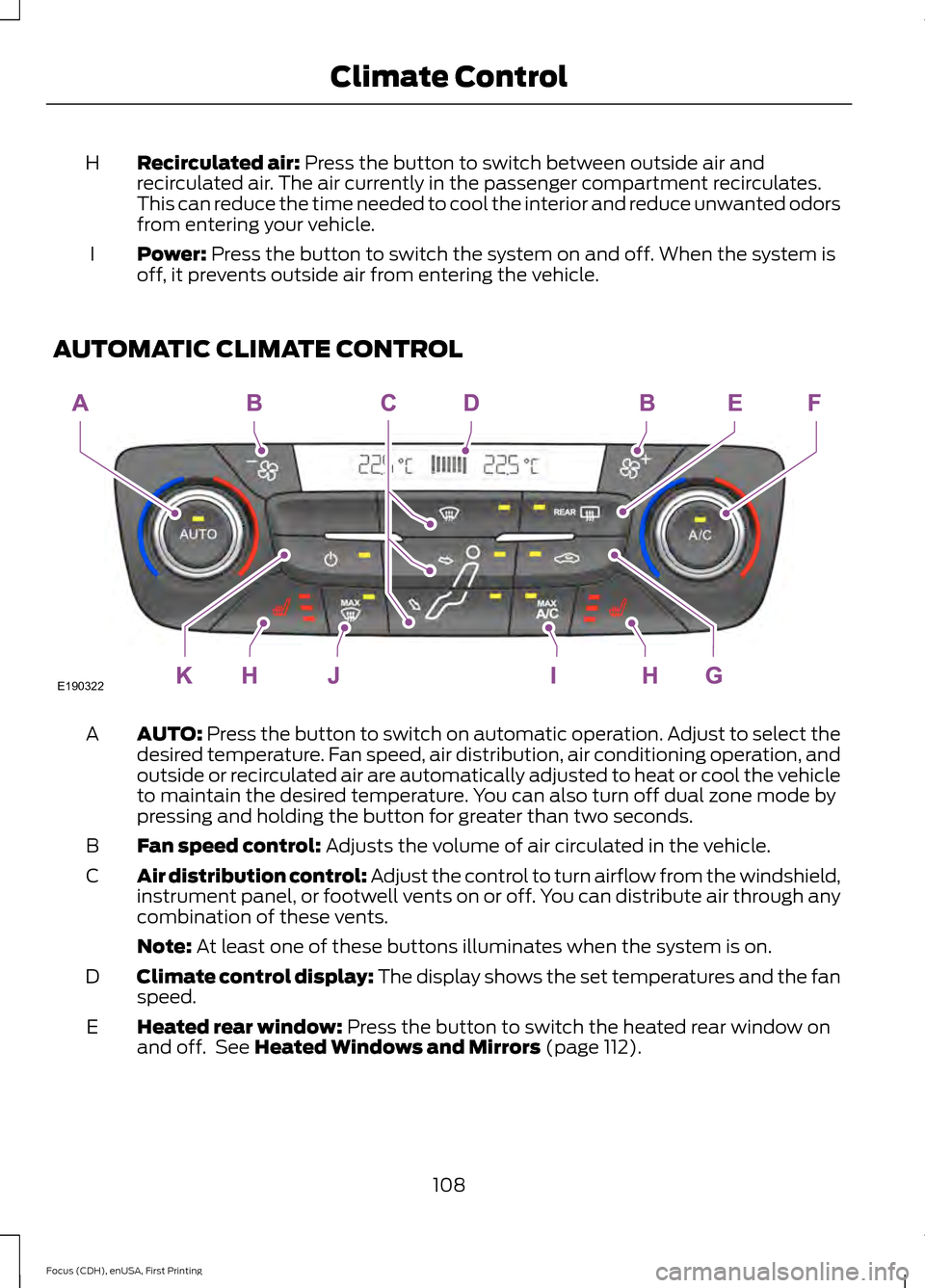
Recirculated air: Press the button to switch between outside air and
recirculated air. The air currently in the passenger compartment recirculates.
This can reduce the time needed to cool the interior and reduce unwanted odors
from entering your vehicle.
H
Power:
Press the button to switch the system on and off. When the system is
off, it prevents outside air from entering the vehicle.
I
AUTOMATIC CLIMATE CONTROL AUTO:
Press the button to switch on automatic operation. Adjust to select the
desired temperature. Fan speed, air distribution, air conditioning operation, and
outside or recirculated air are automatically adjusted to heat or cool the vehicle
to maintain the desired temperature. You can also turn off dual zone mode by
pressing and holding the button for greater than two seconds.
A
Fan speed control:
Adjusts the volume of air circulated in the vehicle.
B
Air distribution control: Adjust the control to turn airflow from the windshield,
instrument panel, or footwell vents on or off. You can distribute air through any
combination of these vents.
C
Note:
At least one of these buttons illuminates when the system is on.
Climate control display: The display shows the set temperatures and the fan
speed.
D
Heated rear window:
Press the button to switch the heated rear window on
and off. See Heated Windows and Mirrors (page 112).
E
108
Focus (CDH), enUSA, First Printing Climate ControlE190322
Page 112 of 453
A/C: Press the button to switch the air conditioning on or off. Air conditioning
cools your vehicle using outside air. To improve the time to reach a comfortable
temperature in hot weather, drive with the windows open until you feel cold air
through the air vents.
F
Recirculated air:
Press the button to switch between outside air and
recirculated air. The air currently in the passenger compartment recirculates.
This can reduce the time needed to cool the interior and reduce unwanted odors
from entering your vehicle.
G
Heated seats (if equipped):
Press the button to switch the heated seats on
and off. See Heated Seats (page 119).
H
MAX A/C: Press the button for maximum cooling. Recirculated air flows through
the instrument panel vents, air conditioning automatically turns on and the fan
automatically adjusts to the highest speed.
I
MAX Defrost: Press the button to switch on defrost. Outside air flows through
the windshield vents, air conditioning automatically turns on, and fan
automatically adjusts to the highest speed. You can also use this setting to
defrost and clear the windshield of a thin covering of ice. The heated rear window
also automatically turns on when you select maximum defrost.
J
Power:
Press the button to switch the system on and off. When the system is
off, it prevents outside air from entering the vehicle.
K
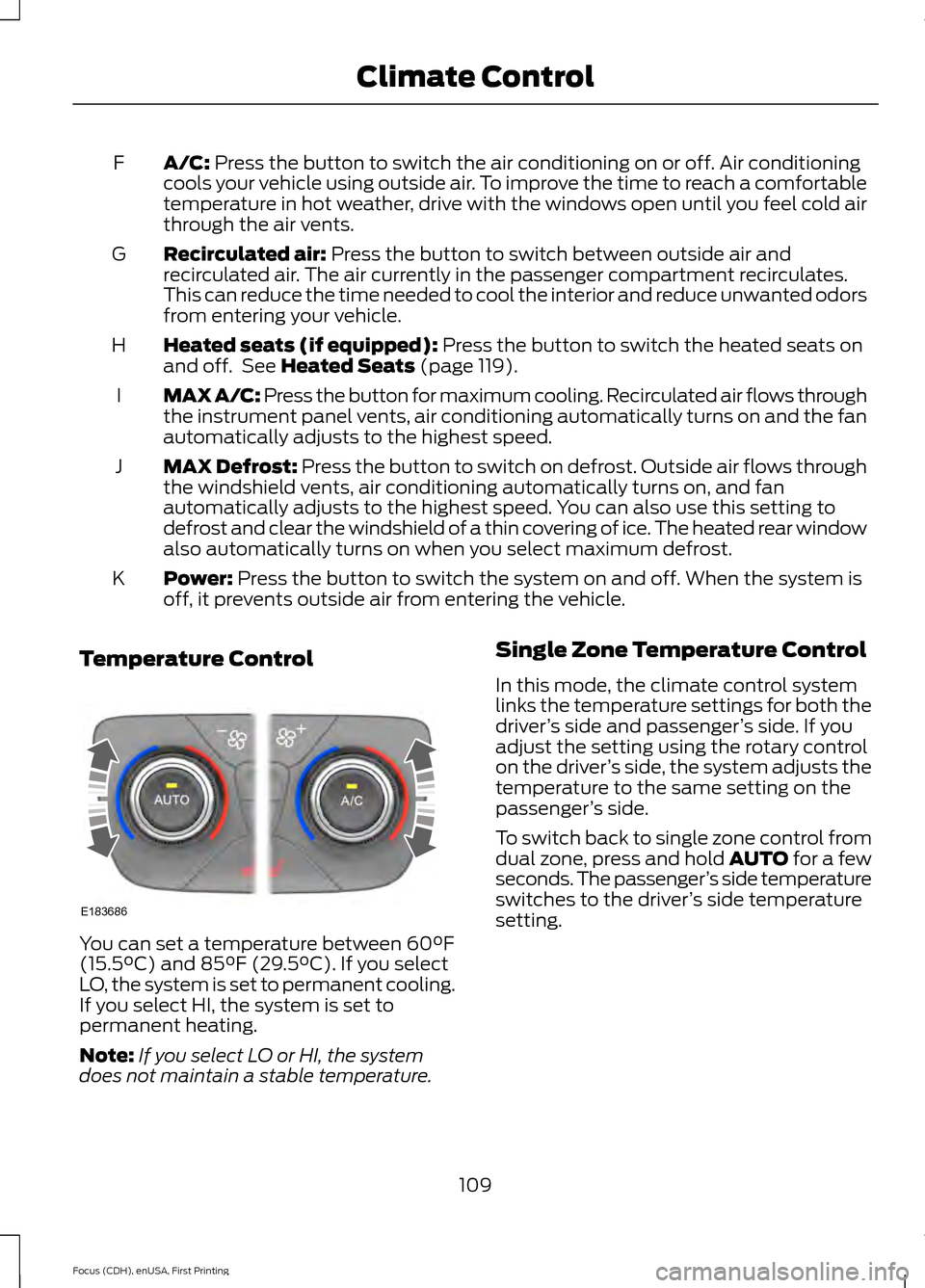
Temperature Control You can set a temperature between
60°F
(15.5°C) and 85°F (29.5°C). If you select
LO, the system is set to permanent cooling.
If you select HI, the system is set to
permanent heating.
Note: If you select LO or HI, the system
does not maintain a stable temperature. Single Zone Temperature Control
In this mode, the climate control system
links the temperature settings for both the
driver
’s side and passenger ’s side. If you
adjust the setting using the rotary control
on the driver ’s side, the system adjusts the
temperature to the same setting on the
passenger ’s side.
To switch back to single zone control from
dual zone, press and hold AUTO for a few
seconds. The passenger ’s side temperature
switches to the driver ’s side temperature
setting.
109
Focus (CDH), enUSA, First Printing Climate ControlE183686