2015 FORD FOCUS lock
[x] Cancel search: lockPage 275 of 453
Specification
Name
--
Lock cylinders (U.S.):
Penetrating and Lock Lubricant
XL-1
--
Lock cylinders (Canada):
Penetrating Fluid
CXC-51-A
--
Lock cylinders (Mexico):
Penetrating and Lock Lubricant
MXL-1
If you use oil and fluids that do not meet
the defined specification and viscosity
grade, this may lead to:
• Component damage which is not
covered by the vehicle warranty.
• Longer engine cranking periods.
• Increased emission levels.
• Reduced engine performance.
• Reduced fuel economy.
• Degraded brake performance.
We recommend Motorcraft motor oil for
your vehicle. If Motorcraft oil is not
available, use motor oils of the
recommended viscosity grade that meet
API SN requirements and display the API
Certification Mark for gasoline engines. Do
not use oil labeled with API SN service
category unless the label also displays the
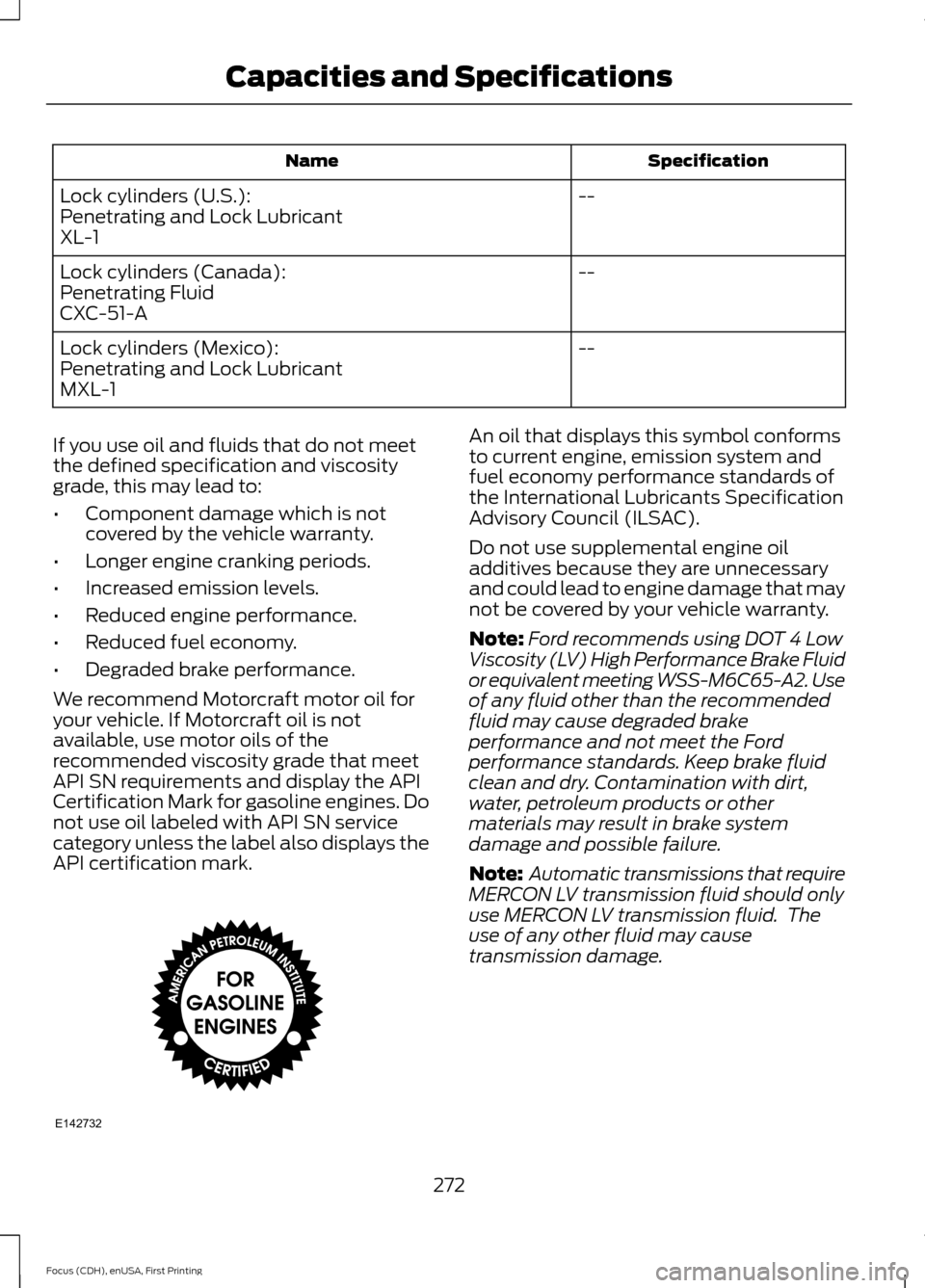
API certification mark. An oil that displays this symbol conforms
to current engine, emission system and
fuel economy performance standards of
the International Lubricants Specification
Advisory Council (ILSAC).
Do not use supplemental engine oil
additives because they are unnecessary
and could lead to engine damage that may
not be covered by your vehicle warranty.
Note:
Ford recommends using DOT 4 Low
Viscosity (LV) High Performance Brake Fluid
or equivalent meeting WSS-M6C65-A2. Use
of any fluid other than the recommended
fluid may cause degraded brake
performance and not meet the Ford
performance standards. Keep brake fluid
clean and dry. Contamination with dirt,
water, petroleum products or other
materials may result in brake system
damage and possible failure.
Note: Automatic transmissions that require
MERCON LV transmission fluid should only
use MERCON LV transmission fluid. The
use of any other fluid may cause
transmission damage.
272
Focus (CDH), enUSA, First Printing Capacities and SpecificationsE142732
Page 278 of 453
AUDIO UNIT - VEHICLES WITH: SYNC
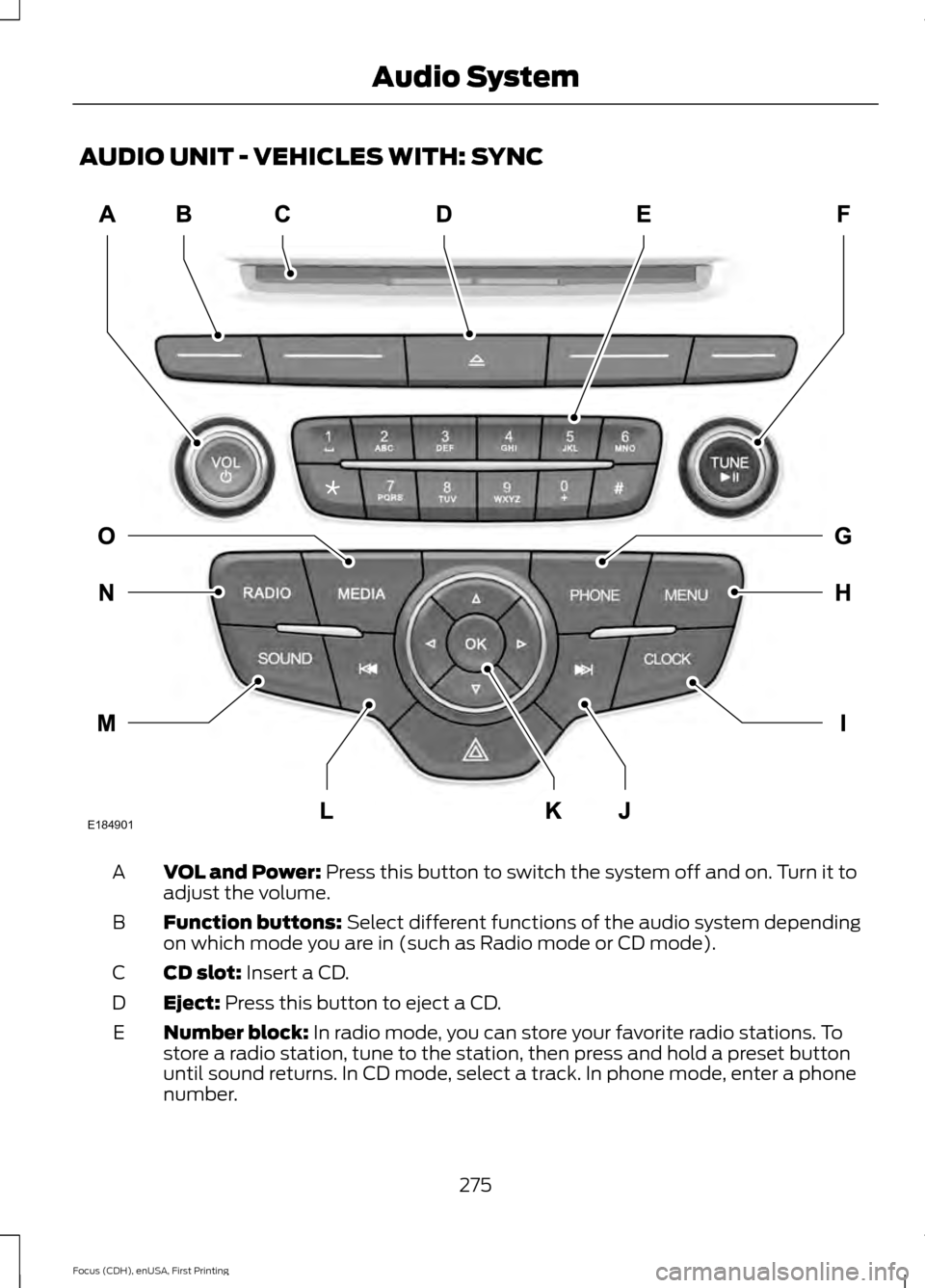
VOL and Power: Press this button to switch the system off and on. Turn it to
adjust the volume.
A
Function buttons:
Select different functions of the audio system depending
on which mode you are in (such as Radio mode or CD mode).
B
CD slot:
Insert a CD.
C
Eject:
Press this button to eject a CD.
D
Number block:
In radio mode, you can store your favorite radio stations. To
store a radio station, tune to the station, then press and hold a preset button
until sound returns. In CD mode, select a track. In phone mode, enter a phone
number.
E
275
Focus (CDH), enUSA, First Printing Audio SystemE184901
Page 279 of 453

TUNE and Play or Pause: Turn to search the frequency band in individual
increments. Press to either play or pause a track when listening to a CD.
F
PHONE:
Press this button to access the phone features of the SYNC system.
See Using SYNC™ With Your Phone (page 294).
G
MENU:
Press this button to access different audio system features. See Menu
Structure later in this chapter.
H
Clock:
Press this button to access the clock setting. Use the center arrow
controls to change the hours and minutes. You can also set the clock by pressing
the
MENU button and scrolling to Clock Settings.
I
Seek and Fast Forward:
In radio mode, select a frequency band and press
this button. The system stops at the first station up the band. Press and hold
the button to move quickly through the frequency band and advance to next
strong radio station after the button is released. In CD mode, press this button
to select the next track. Press and hold the button to move quickly forward
through the current track.
J
OK and Arrow buttons: Press the OK button to confirm menu selections. Use
the arrow buttons to navigate within menus.
K
Seek and Reverse:
In radio mode, select a frequency band and press this
button. The system stops at the first station down the band. Press and hold
the button to move quickly through the frequency band and advance to next
strong radio station after the button is released. In CD mode, press this button
to select the previous track. Press and hold the button to move quickly backward
through the current track.
L
SOUND:
Press this button to access settings for Treble, Midrange, Bass, Fade
and Balance. Use the up and down arrow buttons to select the various settings.
When you make your selection, press the left and right arrow buttons to change
the settings. Press
OK to set or press MENU to exit. Sound settings can be set
for each audio source independently.
M
RADIO:
Press this button to listen to the radio or change radio frequency bands.
N
MEDIA:
Press this button to change the active media source. To change the
SYNC-Media device (such as switching from a device plugged into the USB
port to a Bluetooth audio device), press
MENU and scroll to Select Source.
O
276
Focus (CDH), enUSA, First Printing Audio System
Page 281 of 453

VOL and Power: Press this button to switch the system off and on. Turn it to
adjust the volume.
A
Function buttons:
Select different functions of the audio system depending
on which mode you are in (such as Radio mode or CD mode).
B
CD slot:
Insert a CD.
C
Eject:
Press this button to eject a CD.
D
Number block:
In radio mode, store your favorite radio stations. To store a
radio station, tune to the station, then press and hold a preset button until sound
returns. In CD mode, select a track. In phone mode, enter a phone number. The
clock button (when not in phone mode) allows you to set the clock. Use the
center arrow controls to change the hours and minutes.
E
278
Focus (CDH), enUSA, First Printing Audio SystemE184902
Page 282 of 453

TUNE and Play or Pause: Turn to search the frequency band in individual
increments. Press to either play or pause a track when listening to a CD.
F
CLOCK:
When not in Phone mode, press this button to access the clock setting.
Use the center arrow controls to change the hours and minutes. You can also
set the clock by pressing the
MENU button and scrolling to Clock Settings.
G
PHONE:
Press this button to access the phone features of the SYNC system.
See Using SYNC™ With Your Phone (page 294).
H
MENU:
Press this button to access different audio system features. See Menu
Structure later in this section.
I
SOUND:
Press this button to access settings for Treble, Midrange, Bass, Fade
and Balance. Use the up and down arrow buttons to select the various settings.
When you make your selection, press the left and right arrow buttons to change
the settings. Press
OK to set or press MENU to exit. Sound settings can be set
for each audio source independently.
J
Seek and Fast Forward:
In radio mode, select a frequency band and press
this button. The system stops at the first station up the band. Press and hold
the button to move quickly through the frequency band and advance to next
strong radio station after the button is released. In CD mode, press this button
to select the next track. Press and hold the button to move quickly forward
through the current track.
K
OK and Arrow buttons: Press the OK button to confirm menu selections. Use
the arrow buttons to navigate within menus.
L
Seek and Reverse:
In radio mode, select a frequency band and press this
button. The system stops at the first station down the band. Press and hold
the button to move quickly through the frequency band and advance to next
strong radio station after the button is released. In CD mode, press this button
to select the previous track. Press and hold the button to move quickly backward
through the current track.
M
SIRIUS:
Press this button to listen to Sirius satellite radio.
N
RADIO:
Press this button to listen to the radio or change radio frequency bands.
O
MEDIA:
Press this button to change the active media source. To change the
SYNC-Media device (such as switching from a device plugged into the USB
port to a Bluetooth audio device), press
MENU and scroll to Select Source.
P
279
Focus (CDH), enUSA, First Printing Audio System
Page 285 of 453
SIRIUS
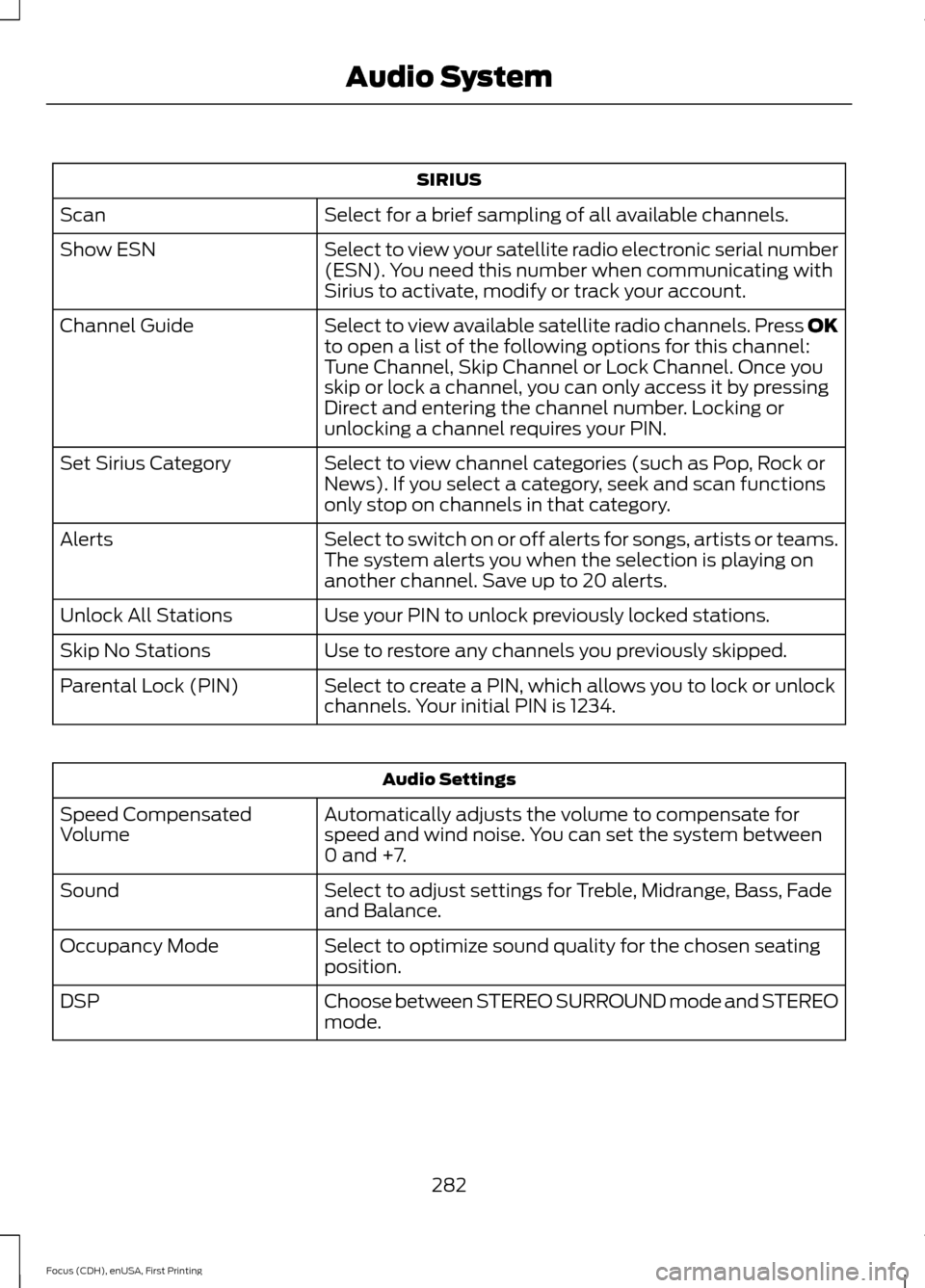
Select for a brief sampling of all available channels.
Scan
Select to view your satellite radio electronic serial number
(ESN). You need this number when communicating with
Sirius to activate, modify or track your account.
Show ESN
Select to view available satellite radio channels. Press OK
to open a list of the following options for this channel:
Tune Channel, Skip Channel or Lock Channel. Once you
skip or lock a channel, you can only access it by pressing
Direct and entering the channel number. Locking or
unlocking a channel requires your PIN.
Channel Guide
Select to view channel categories (such as Pop, Rock or
News). If you select a category, seek and scan functions
only stop on channels in that category.
Set Sirius Category
Select to switch on or off alerts for songs, artists or teams.
The system alerts you when the selection is playing on
another channel. Save up to 20 alerts.
Alerts
Use your PIN to unlock previously locked stations.
Unlock All Stations
Use to restore any channels you previously skipped.
Skip No Stations
Select to create a PIN, which allows you to lock or unlock
channels. Your initial PIN is 1234.
Parental Lock (PIN) Audio Settings
Automatically adjusts the volume to compensate for
speed and wind noise. You can set the system between
0 and +7.
Speed Compensated
Volume
Select to adjust settings for Treble, Midrange, Bass, Fade
and Balance.
Sound
Select to optimize sound quality for the chosen seating
position.
Occupancy Mode
Choose between STEREO SURROUND mode and STEREO
mode.
DSP
282
Focus (CDH), enUSA, First Printing Audio System
Page 286 of 453
CD Settings
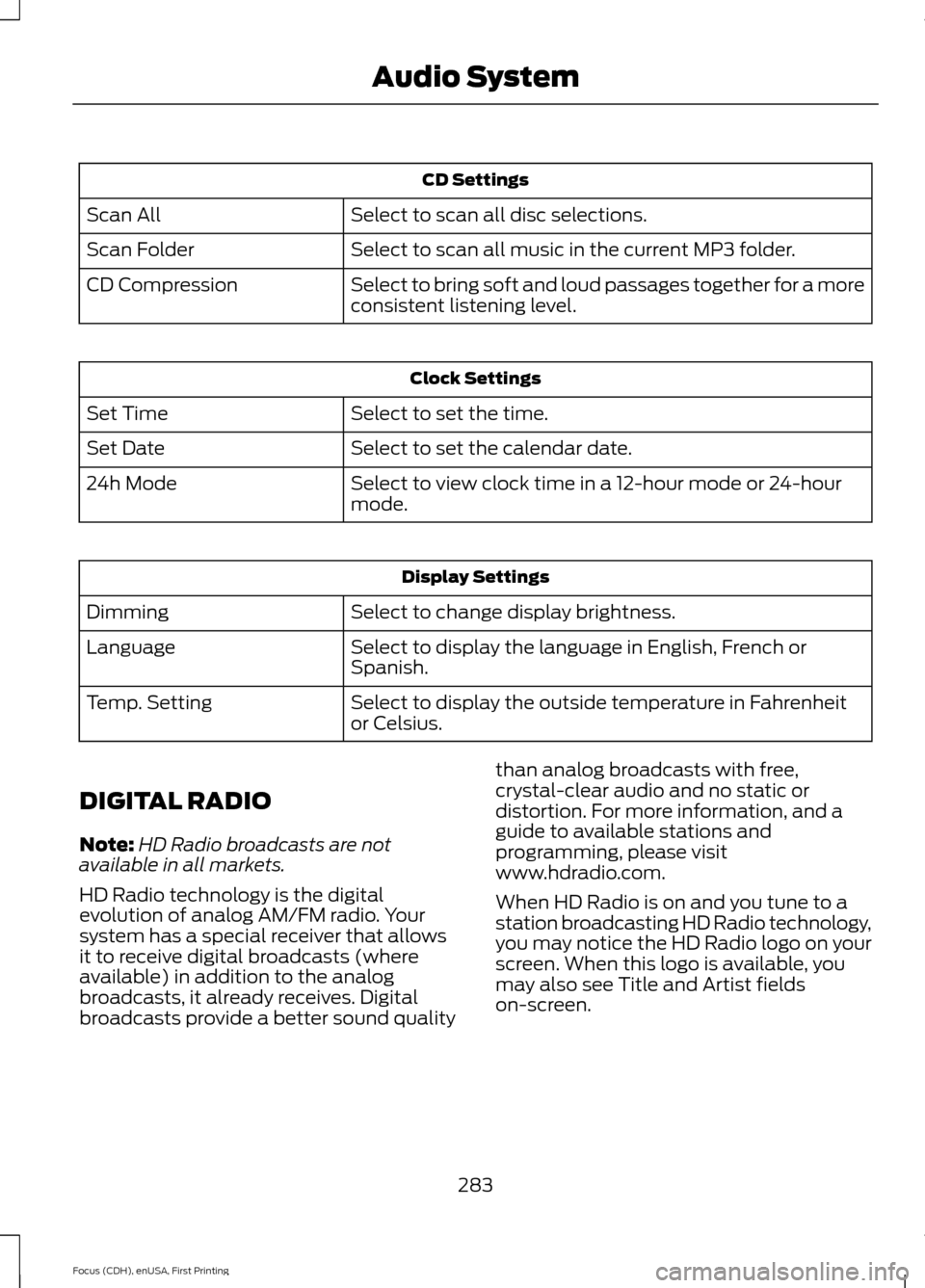
Select to scan all disc selections.
Scan All
Select to scan all music in the current MP3 folder.
Scan Folder
Select to bring soft and loud passages together for a more
consistent listening level.
CD Compression Clock Settings
Select to set the time.
Set Time
Select to set the calendar date.
Set Date
Select to view clock time in a 12-hour mode or 24-hour
mode.
24h Mode Display Settings
Select to change display brightness.
Dimming
Select to display the language in English, French or
Spanish.
Language
Select to display the outside temperature in Fahrenheit
or Celsius.
Temp. Setting
DIGITAL RADIO
Note: HD Radio broadcasts are not
available in all markets.
HD Radio technology is the digital
evolution of analog AM/FM radio. Your
system has a special receiver that allows
it to receive digital broadcasts (where
available) in addition to the analog
broadcasts, it already receives. Digital
broadcasts provide a better sound quality than analog broadcasts with free,
crystal-clear audio and no static or
distortion. For more information, and a
guide to available stations and
programming, please visit
www.hdradio.com.
When HD Radio is on and you tune to a
station broadcasting HD Radio technology,
you may notice the HD Radio logo on your
screen. When this logo is available, you
may also see Title and Artist fields
on-screen.
283
Focus (CDH), enUSA, First Printing Audio System
Page 290 of 453

SIRIUS satellite radio is a
subscription-based satellite radio service
that broadcasts a variety of music, sports,
news, weather, traffic and entertainment
programming. Your factory-installed
SIRIUS satellite radio system includes
hardware and a limited subscription term,
which begins on the date of sale or lease
of your vehicle. See an authorized dealer
for availability.
For more information on extended
subscription terms (a service fee is
required), the online media player and a
complete list of SIRIUS satellite radio
channels, and other features, please visit
www.siriusxm.com in the United States,
www.sirius.ca in Canada, or call SIRIUS at
1-888-539-7474.
Satellite Radio Electronic Serial
Number (ESN)
You need your ESN to activate, modify or
track your satellite radio account. When in
satellite radio mode, press Options.
Troubleshooting Action
Condition
Message
No action required. This
message should disappear
shortly.
Radio requires more than
two seconds to produce
audio for the selected
channel.
Acquiring…
If this message does not
clear shortly, or with an igni-
tion key cycle, your receiver
may have a fault. See an
authorized dealer for service.
There is an internal module
or system failure present.
Satellite antenna fault
SIRIUS system failure
Tune to another channel or
choose another preset.
The channel is no longer
available.
Invalid Channel
Contact SIRIUS at 1-888-
539-7474 to subscribe to
the channel, or tune to
another channel.
Your subscription does not
include this channel.
Unsubscribed Channel
The signal is blocked. When
you move into an open area,
the signal should return.
The signal is lost from the
SIRIUS satellite or SIRIUS
tower to your vehicle
antenna.
No Signal
No action required. The
process may take up to
three minutes.
Update of channel
programming in progress.
Updating…
287
Focus (CDH), enUSA, First Printing Audio System