2015 FORD FOCUS ignition
[x] Cancel search: ignitionPage 344 of 453
Action and Description
Message
Have the system ask you short questions if it has not clearly
heard or understood your request.
Confirmation Prompts
Note: Even with confirmation prompts turned off, the system
may occasionally ask you to confirm settings.
Candidate lists are possible results from your voice
commands. The system simply makes a best guess at your
request with these turned off.
Media Candidate Lists
Candidate lists are possible results from your voice
commands. The system simply makes a best guess at your
request with these turned off.
Phone Candidate Lists
This allows you to adjust the system ’s voice volume level.
Voice Control Volume
Media Player To make adjustments using the touchscreen, select:
Action and Description
Message
Press the settings icon.
Settings
Media Player
Then select from the following:
When this feature is on, the system automatically switches
to the media source upon initial connection. This allows you
to listen to music during the indexing process. When this
feature is off, the system does not automatically switch to
the inserted media source.
Autoplay
Select to connect, disconnect, add or delete a device. You
can also set a device as your favorite so that the system
automatically attempts to connect to that device at every
ignition cycle.
Bluetooth Devices
341
Focus (CDH), enUSA, First Printing MyFord Touch
™E142607
Page 360 of 453
Troubleshooting tips
Action
Cause
Message
No action required. This
message should disappear
shortly.
Radio requires more than two
seconds to produce audio for
the selected channel.
Acquiring…
If this message does not clear
shortly, or with an ignition key
cycle, your receiver may have
a fault. See an authorized
dealer for service.
There is an internal module or
system failure present.
Satellite antenna fault
SIRIUS system failure
Tune to another channel or
choose another preset.
The channel is no longer avail-
able.
Invalid Channel
Contact SIRIUS at 1-888-539-
7474 to subscribe to the
channel, or tune to another
channel.
Your subscription does not
include this channel.
Unsubscribed Channel
The signal is blocked. When
you move into an open area,
the signal should return.
The signal is lost from the
SIRIUS satellite or SIRIUS
tower to your vehicle antenna.
No Signal
No action required. The
process may take up to three
minutes.
Update of channel program-
ming in progress.
Updating…
Contact SIRIUS at 1-888-539-
7474 to resolve subscription
issues.
Your satellite service is no
longer available.
Questions? Call
1-888-539-7474
Use the channel guide to turn
off the Lock or Skip function on
that station.
All the channels in the selected
category are either skipped or
locked.
None found
Check Channel Guide
No action required.
SIRIUS has updated the chan-
nels available for your vehicle.
Subscription Updated
SIRIUS Satellite Radio Voice
Commands If you are listening to SIRIUS
satellite radio, press the voice
button on the steering wheel
controls. When prompted, say any of the
following commands.
357
Focus (CDH), enUSA, First Printing MyFord Touch
™E142599
Page 366 of 453
WARNINGS
Store the portable music player in a
secure location, such as the center
console or the glove box, when your
vehicle is moving. Hard objects may
become projectiles in a crash or sudden
stop, which may increase the risk of serious
injury. The audio extension cable must be
long enough to allow the portable music
player to be safely stored while your
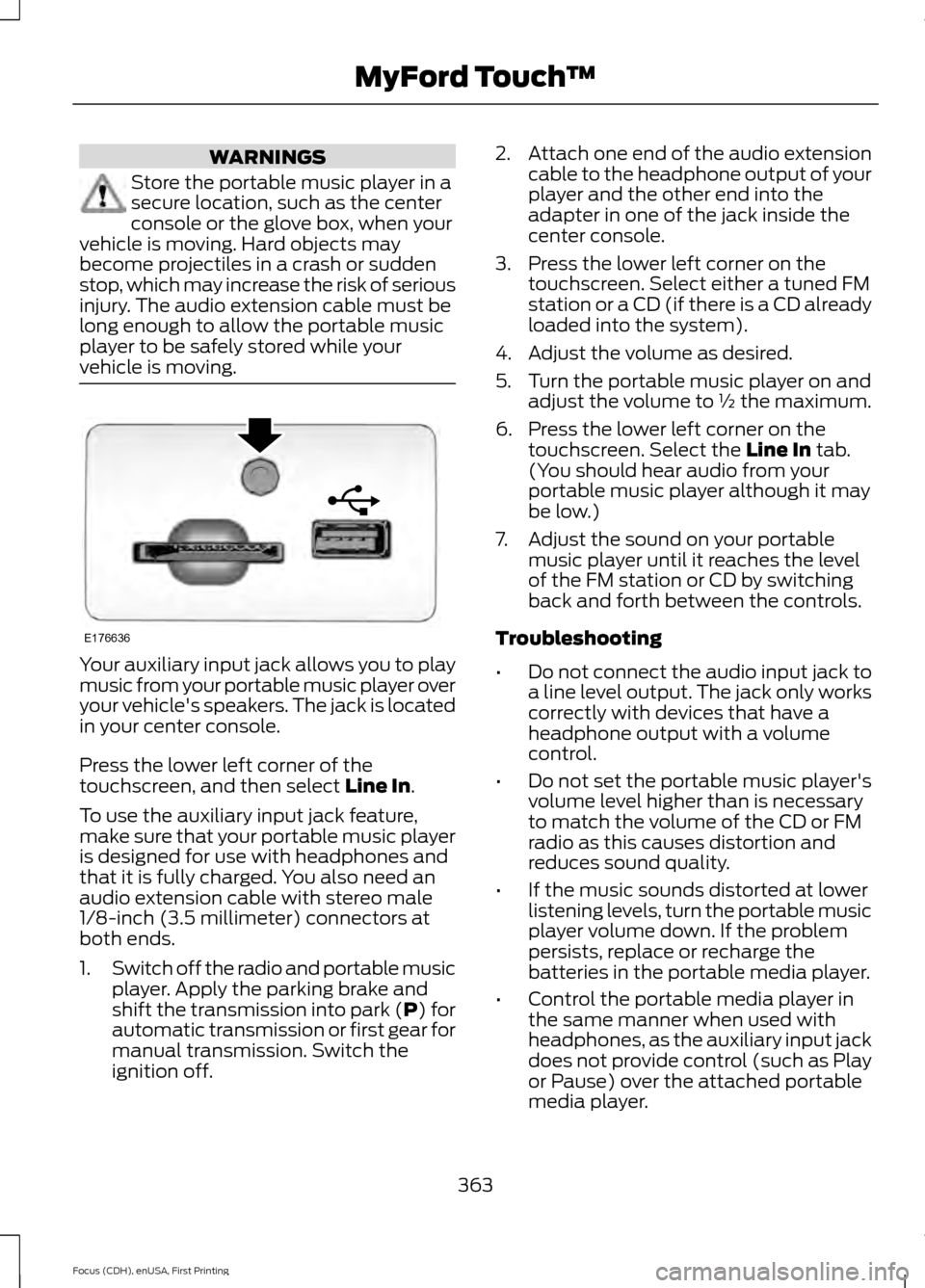
vehicle is moving. Your auxiliary input jack allows you to play
music from your portable music player over
your vehicle's speakers. The jack is located
in your center console.
Press the lower left corner of the
touchscreen, and then select Line In.
To use the auxiliary input jack feature,
make sure that your portable music player
is designed for use with headphones and
that it is fully charged. You also need an
audio extension cable with stereo male
1/8-inch (3.5 millimeter) connectors at
both ends.
1. Switch off the radio and portable music
player. Apply the parking brake and
shift the transmission into park (P) for
automatic transmission or first gear for
manual transmission. Switch the
ignition off. 2.
Attach one end of the audio extension
cable to the headphone output of your
player and the other end into the
adapter in one of the jack inside the
center console.
3. Press the lower left corner on the touchscreen. Select either a tuned FM
station or a CD (if there is a CD already
loaded into the system).
4. Adjust the volume as desired.
5. Turn the portable music player on and adjust the volume to ½ the maximum.
6. Press the lower left corner on the touchscreen. Select the
Line In tab.
(You should hear audio from your
portable music player although it may
be low.)
7. Adjust the sound on your portable music player until it reaches the level
of the FM station or CD by switching
back and forth between the controls.
Troubleshooting
• Do not connect the audio input jack to
a line level output. The jack only works
correctly with devices that have a
headphone output with a volume
control.
• Do not set the portable music player's
volume level higher than is necessary
to match the volume of the CD or FM
radio as this causes distortion and
reduces sound quality.
• If the music sounds distorted at lower
listening levels, turn the portable music
player volume down. If the problem
persists, replace or recharge the
batteries in the portable media player.
• Control the portable media player in
the same manner when used with
headphones, as the auxiliary input jack
does not provide control (such as Play
or Pause) over the attached portable
media player.
363
Focus (CDH), enUSA, First Printing MyFord Touch
™E176636
Page 368 of 453

Pairing Your Cell Phone for the
First Time
WARNING
Driving while distracted can result in
loss of vehicle control, crash and
injury. We strongly recommend that
you use extreme caution when using any
device that may take your focus off the
road. Your primary responsibility is the safe
operation of your vehicle. We recommend
against the use of any hand-held device
while driving and encourage the use of
voice-operated systems when possible.
Make sure you are aware of all applicable
local laws that may affect the use of
electronic devices while driving. The first thing you must do to use the
phone features of SYNC is to pair your
Bluetooth-enabled cell phone with SYNC.
This allows you to use your cell phone in a
hands-free manner.
Note:
Switch off the radio. Apply the
parking brake and shift the transmission into
park (P) for automatic transmission or first
gear for manual transmission. Switch the
ignition off.
Touch the upper left corner of the touchscreen: Action and Description
Message
Add phone Follow the on-screen instructions.
Find SYNC
Make sure that Bluetooth is set to On and that your cell phone
is in the correct mode. See your cell phone ’s manual if
necessary.
Select
SYNC and a six-digit PIN appears on your device.
If you are prompted to enter a PIN on your device, it does not
support Secure Simple Pairing. To pair, enter the PIN
displayed on the touchscreen. Skip the next step.
When prompted on your cell phone ’s display, confirm that
the PIN provided by SYNC matches the PIN displayed on your
cell phone.
The display indicates when the pairing is successful.
SYNC may prompt you with more cell phone options. For
more information on your cell phone's capability, see your
cell phone's manual and visit the website.
Pairing Subsequent Cell Phones
Note: Switch off the radio. Apply the
parking brake and shift the transmission into
park (P) for automatic transmission or first
gear for manual transmission. Switch the
ignition off. Make sure that Bluetooth is set to
On and
that your cell phone is in the correct mode.
See your device's manual if necessary.
365
Focus (CDH), enUSA, First Printing MyFord Touch
™
Page 444 of 453

A
A/C
See: Climate Control......................................... 107
About This Manual...........................................7
ABS See: Brakes........................................................... 148
ABS driving hints See: Hints on Driving With Anti-Lock
Brakes................................................................ 148
Accessories....................................................399 Exterior style........................................................ 399
Interior style......................................................... 399
Lifestyle................................................................. 399
Peace of mind..................................................... 399
Accessories See: Replacement Parts
Recommendation............................................. 11
Active Park Assist.........................................155 Automatic Steering into Parking
Space................................................................. 156
Deactivating the Park Assist Feature..........157
Troubleshooting the System.......................... 158
Using Active Park Assist................................... 156
Adjusting the Headlamps........................220 Horizontal Aim Adjustment............................ 221
Vertical Aim Adjustment................................ 220
Adjusting the Steering Wheel....................74
Airbag Disposal
...............................................49
Air Conditioning See: Climate Control......................................... 107
Alarm See: Anti-Theft Alarm......................................... 73
Ambient Lighting...........................................84
Anti-Theft Alarm............................................73 Arming the Alarm................................................. 73
Disarming the Alarm........................................... 73
Appendices....................................................401
At a Glance........................................................15
Audible Warnings and Indicators
.............94
Headlamps On Warning Chime...................... 95
Key in Ignition Warning Chime........................ 94
Keyless Warning Alert........................................ 95
Parking Brake On Warning Chime.................95
Audio Control
...................................................74
Type One.................................................................. 74
Type Two.................................................................. 75
Audio Input Jack..........................................288 Audio System
................................................273
General Information.......................................... 273
Audio Unit - Vehicles With: Satellite Radio..............................................................277
Audio Unit - Vehicles With: Sony Audio System.........................................................280
Menu Structure.................................................... 281
Audio Unit - Vehicles With: SYNC..........275
Autolamps........................................................79 Windshield Wiper Activated
Headlamps........................................................80
Automatic Climate Control......................108 Dual Zone Temperature Control.................... 110
Single Zone Temperature Control...............109
Temperature Control........................................ 109
Automatic High Beam Control..................81 Activating the System........................................ 82
Manually Overriding the System.................... 82
Automatic Transmission............................143 Automatic Transmission Adaptive
Learning............................................................. 147
Brake-Shift Interlock......................................... 145
If Your Vehicle Gets Stuck In Mud or Snow................................................................... 147
SelectShift Automatic ™
Transmission................................................... 144
Understanding the Positions of Your Automatic Transmission............................. 144
Automatic Transmission Fluid Check.............................................................216
Auto-Start-Stop...........................................130 Limitations of Use.............................................. 130
Switching the System On and Off.................131
Using Auto Start-Stop With a Manual Transmission................................................... 130
Using Auto Start-Stop With an Automatic Transmission................................................... 130
Auxiliary Power Points................................120 12 Volt DC Power Point..................................... 120
Location................................................................. 120
B
Blind Spot Information System...............167 Blind Spot Information System (BLIS ™)
with Cross Traffic Alert................................. 167
Bonnet Lock See: Opening and Closing the Hood...........210
441
Focus (CDH), enUSA, First Printing Index
Page 447 of 453

Front Parking Aid..........................................154
Front Sensing System....................................... 154
Obstacle Distance Indicator........................... 155
Front Passenger Sensing System............43
Fuel and Refueling........................................132
Fuel Consumption........................................137 Calculating Fuel Economy............................... 137
Filling the Tank..................................................... 137
Fuel Filler Funnel Location........................134
Fuel Filter..........................................................217
Fuel Quality - E85.........................................133 Choosing the Right Fuel................................... 133
Fuel Quality - Gasoline...............................133 Choosing the Right Fuel................................... 133
Fuel Shutoff
...................................................190
Fuses................................................................200
Fuse Specification Chart..........................200 Engine Compartment Fuse Box.................. 200
Luggage Compartment Fuse Box...............206
Passenger Compartment Fuse Box...........204
G
Gauges...............................................................90 Engine Coolant Temperature Gauge.............91
Fuel Gauge............................................................... 91
Information Display............................................ 90
General Information on Radio Frequencies...................................................50
General Maintenance Information........425 Multi-Point Inspection...................................... 427
Owner Checks and Services.......................... 426
Protecting Your Investment........................... 425
Why Maintain Your Vehicle?.......................... 425
Why Maintain Your Vehicle at Your Dealership?..................................................... 425
Getting Assistance Outside the U.S. and Canada..........................................................197
Getting the Services You Need...............194 Away From Home.............................................. 194
H
Handbrake See: Parking Brake............................................. 149
Hazard Warning Flashers..........................190
Headlamp Exit Delay
...................................80 Head Restraints
..............................................114
Adjusting the Head Restraint.......................... 115
Tilting Head Restraints ..................................... 115
Heated Seats
..................................................119
Heated Steering Wheel................................76
Heated Windows and Mirrors
....................112
Heated Exterior Mirrors...................................... 112
Heated Rear Window......................................... 112
Heating See: Climate Control......................................... 107
Hill Start Assist..............................................149 Using Hill Start Assist....................................... 150
Hints on Controlling the Interior Climate...........................................................110
Cooling the Interior Quickly............................... 111
General Hints........................................................ 110
Heating the Interior Quickly............................. 110
Recommended Settings for Cooling ............111
Recommended Settings for Heating.............111
Side Window Defogging in Cold Weather.............................................................. 112
Hints on Driving With Anti-Lock Brakes............................................................148
Hood Lock See: Opening and Closing the Hood...........210
I
Ignition Switch...............................................122
In California (U.S. Only).............................195
Information Display Control.......................76
Information Displays....................................96 General Information........................................... 96
Information......................................................371 911 Assist................................................................ 377
Alerts....................................................................... 377
Calendar................................................................. 377
Sirius Travel Link................................................. 376
SYNC Services (If Equipped, United States Only)................................................................... 372
Vehicle Health Report...................................... 379
444
Focus (CDH), enUSA, First Printing Index
Page 448 of 453

Information Messages.................................99
Airbag....................................................................... 99
Alarm...................................................................... 100
Battery and Charging System....................... 100
Blind Spot Information and Cross Traffic Alert System................................................... 100
Doors........................................................................\
101
Engine...................................................................... 101
Hill Start Assist.................................................... 102
Keyless Vehicle.................................................... 102
Lane Keeping Aid................................................ 102
Lighting................................................................... 103
Maintenance........................................................ 103
Message Indicator............................................... 99
MyKey......................................................................103
Occupant Protection........................................ 104
Park Aid.................................................................. 104
Park Brake............................................................. 104
Power Steering.................................................... 105
Starting System ................................................. 105
Start-Stop............................................................. 105
Tire Pressure Monitoring System.................106
Traction Control.................................................. 106
Transmission ........................................................ 106
Installing Child Seats
.....................................21
Child Seats............................................................... 21
Using Lap and Shoulder Belts......................... 22
Using Lower Anchors and Tethers for Children (LATCH)............................................ 24
Using Tether Straps............................................. 26
Instrument Cluster
........................................90
Instrument Lighting Dimmer.....................80
Instrument Panel Overview
........................18
Interior Lamps.................................................83
Front Interior Lamps (If Equipped)...............83
Interior Luggage Compartment Release - 4-Door
..........................................................69
Interior Mirror....................................................87
Introduction.........................................................7
J
Jump Starting the Vehicle..........................191 Connecting the Jumper Cables...................... 191
Jump Starting....................................................... 192
Preparing Your Vehicle....................................... 191
Removing the Jumper Cables........................ 192K
Keyless Entry
...................................................68
SECURICODE™ KEYLESS ENTRY
KEYPAD.............................................................. 68
Keyless Starting
.............................................122
Failure to Start..................................................... 123
Fast Restart........................................................... 124
Starting Your Vehicle......................................... 123
Stopping the Engine When Your Vehicle is Moving................................................................ 124
Stopping the Engine When Your Vehicle is Stationary......................................................... 124
Switching the Ignition On to Accessory Mode................................................................... 123
Keys and Remote Controls........................50
L
Lane Keeping System.................................163 Switching the System On and Off...............163
Lighting Control
..............................................79
Headlamp Flasher................................................ 79
High Beams............................................................ 79
Lighting
...............................................................79
Load Carrying..................................................174
Load Limit........................................................174
Vehicle Loading - with and without a
Trailer.................................................................. 174
Locking and Unlocking.................................63 Activating Intelligent Access........................... 64
Autolock Feature.................................................. 66
Autounlock Feature............................................ 66
Battery Saver.......................................................... 67
Disabled Intelligent Access Keys.................... 65
Enabling or Disabling Autolock and Autounlock........................................................ 66
Illuminated Entry.................................................. 66
Illuminated Exit..................................................... 67
Opening the Liftgate or Luggage Compartment................................................... 67
Power Door Locks................................................ 63
Remote Control.................................................... 63
Smart Unlocks for Integrated Keyhead Transmitter........................................................ 65
Smart Unlocks for Intelligent Access Keys...................................................................... 65
Locks...................................................................63
445
Focus (CDH), enUSA, First Printing Index
Page 451 of 453

Roadside Assistance..................................189
Vehicles Sold in Canada: Getting Roadside
Assistance........................................................ 189
Vehicles Sold in Canada: Using Roadside Assistance........................................................ 189
Vehicles Sold in the United States: Getting Roadside Assistance.................................... 189
Vehicles Sold in the United States: Using Roadside Assistance.................................... 189
Roadside Emergencies
..............................189
Running-In See: Breaking-In.................................................. 186
Running Out of Fuel.....................................134 Adding Fuel From a Portable Fuel
Container.......................................................... 135
Filling a Portable Fuel Container.................. 135
S
Safety Belt Height Adjustment.................36
Safety Belt Minder..........................................37 Belt-Minder™......................................................... 37
Safety Belts......................................................33 Principle of Operation......................................... 33
Safety Belt Warning Lamp and Indicator Chime...............................................................37
Conditions of operation..................................... 37
Safety Precautions.......................................132
Satellite Radio
..............................................286
Satellite Radio Electronic Serial Number
(ESN)................................................................. 287
Satellite Radio Reception Factors..............286
SIRIUS® Satellite Radio Service.................286
Troubleshooting................................................. 287
Scheduled Maintenance Record...........433
Scheduled Maintenance
...........................425
Seats...................................................................114
Security................................................................71
Settings...........................................................335 Clock....................................................................... 335
Display................................................................... 336
Settings................................................................. 339
Sound..................................................................... 337
Vehicle.................................................................... 337
Side Airbags
.....................................................45
Side Curtain Airbags......................................47
Sitting in the Correct Position...................114 Snow Chains
See: Using Snow Chains................................. 252
Special Notices................................................12 New Vehicle Limited Warranty......................... 12
On-board Diagnostics (OBD-II)....................... 12
Special Instructions.............................................. 12
Special Operating Conditions Scheduled Maintenance................................................431
Exceptions............................................................ 432
Speed Control See: Cruise Control............................................ 162
Stability Control............................................152 Principle of Operation....................................... 152
Starter Switch See: Ignition Switch............................................ 122
Starting a Gasoline Engine
........................125
Automatic Engine Shutdown......................... 126
Failure to Start..................................................... 126
Guarding Against Exhaust Fumes................128
Important Ventilating Information...............128
Stopping the Engine When Your Vehicle is Moving................................................................ 127
Stopping the Engine When Your Vehicle is Stationary.......................................................... 127
Vehicles with an Ignition Key.......................... 125
Vehicles with Keyless Start............................. 125
Starting and Stopping the Engine..........122 General Information........................................... 122
Steering.............................................................172 Electric Power Steering..................................... 172
Steering Wheel
................................................74
Storage Compartments..............................121
Sunroof See: Moonroof...................................................... 88
Sun Visors.........................................................88 Illuminated Vanity Mirror................................... 88
Supplementary Restraints System..........41 Principle of Operation......................................... 41
Symbols Glossary
.............................................7
SYNC™ Applications and Services........................................................305
911 Assist............................................................... 305
SYNC Mobile Apps............................................ 307
SYNC™...........................................................290 General Information......................................... 290
SYNC™ Troubleshooting
..........................319
448
Focus (CDH), enUSA, First Printing Index