2015 FORD FOCUS ELECTRIC ignition
[x] Cancel search: ignitionPage 169 of 369
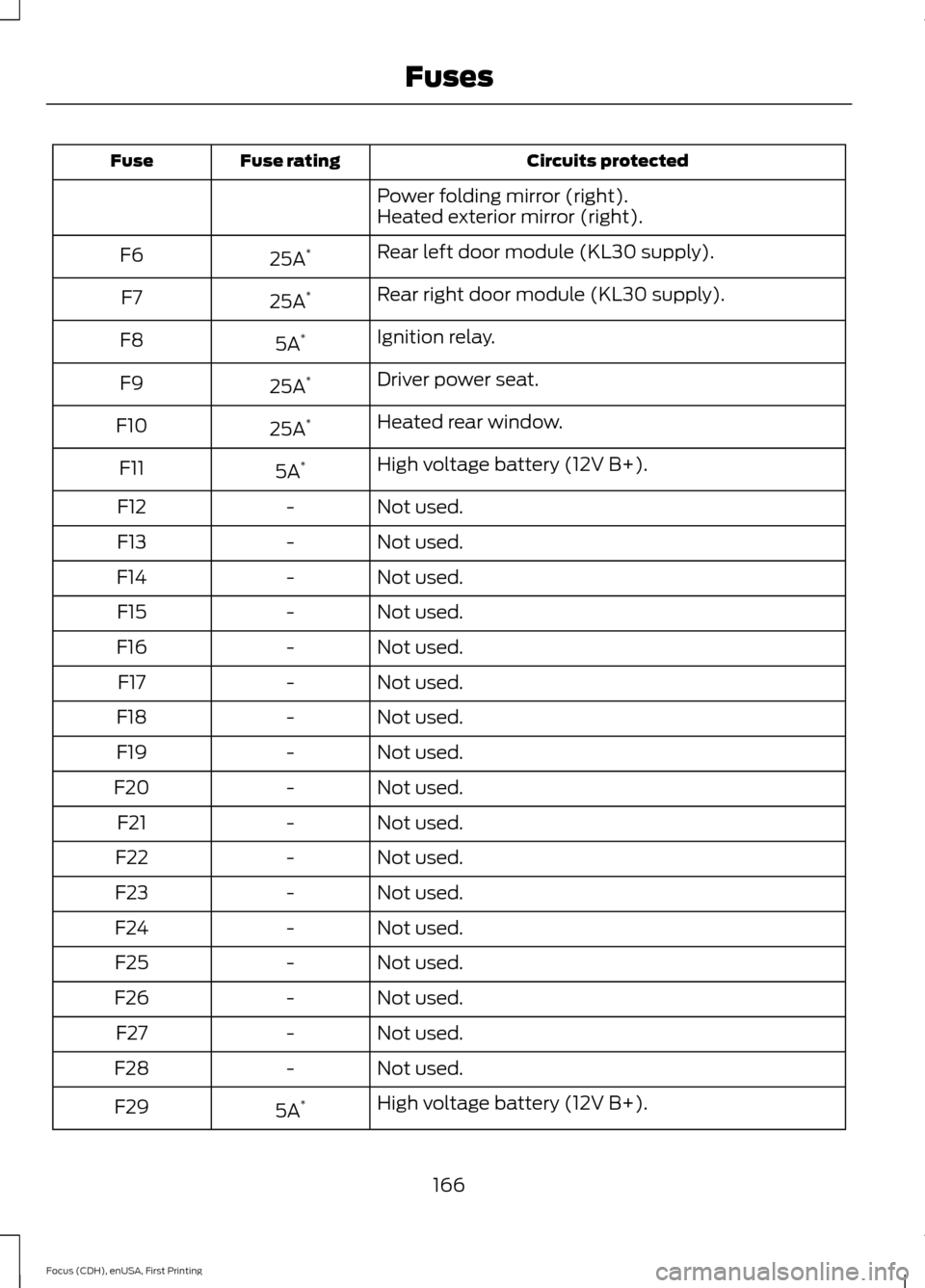
Circuits protected
Fuse rating
Fuse
Power folding mirror (right).
Heated exterior mirror (right).
Rear left door module (KL30 supply).
25A *
F6
Rear right door module (KL30 supply).
25A *
F7
Ignition relay.
5A *
F8
Driver power seat.
25A *
F9
Heated rear window.
25A *
F10
High voltage battery (12V B+).
5A *
F11
Not used.
-
F12
Not used.
-
F13
Not used.
-
F14
Not used.
-
F15
Not used.
-
F16
Not used.
-
F17
Not used.
-
F18
Not used.
-
F19
Not used.
-
F20
Not used.
-
F21
Not used.
-
F22
Not used.
-
F23
Not used.
-
F24
Not used.
-
F25
Not used.
-
F26
Not used.
-
F27
Not used.
-
F28
High voltage battery (12V B+).
5A *
F29
166
Focus (CDH), enUSA, First Printing Fuses
Page 172 of 369
GENERAL INFORMATION
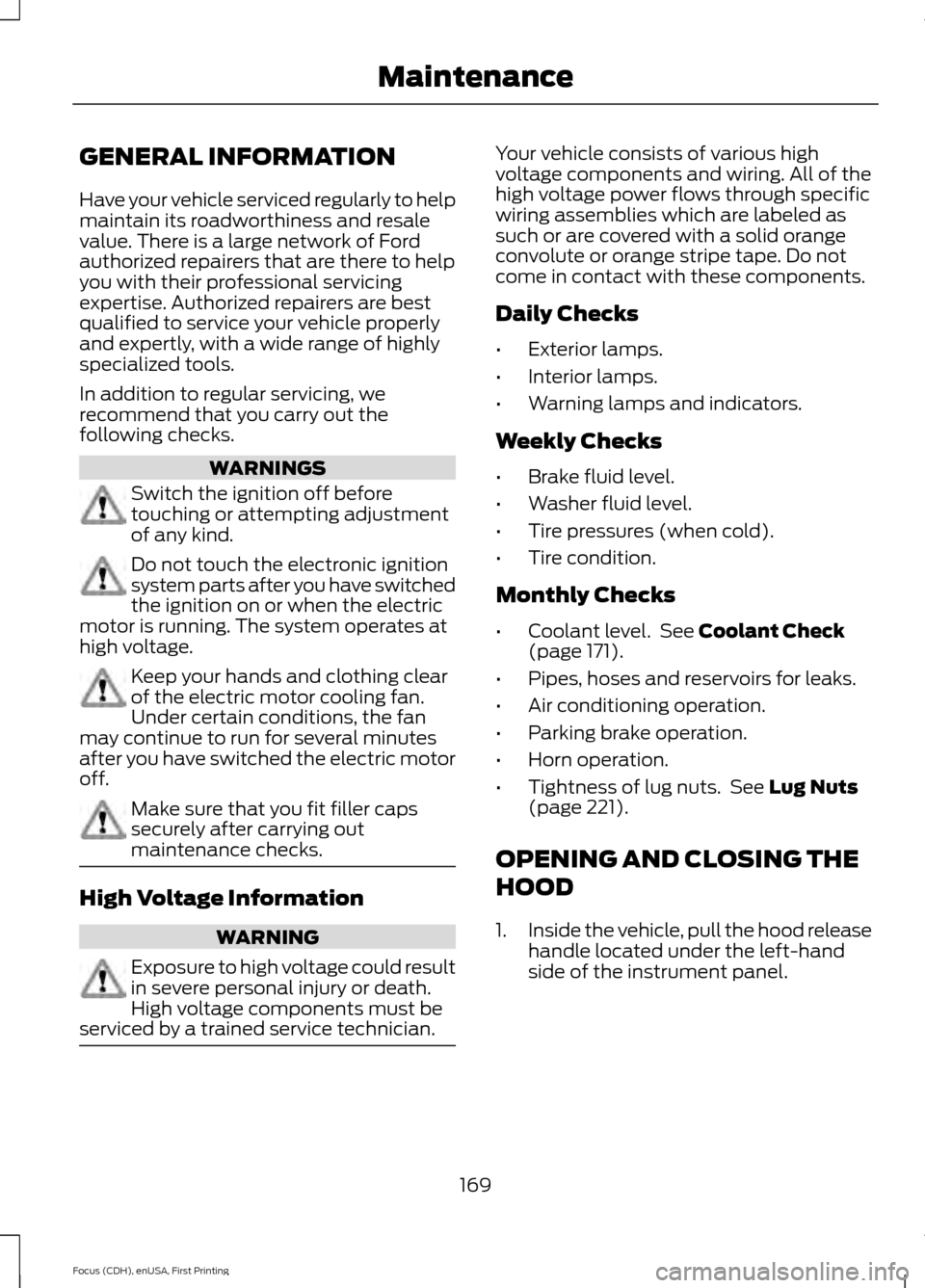
Have your vehicle serviced regularly to help
maintain its roadworthiness and resale
value. There is a large network of Ford
authorized repairers that are there to help
you with their professional servicing
expertise. Authorized repairers are best
qualified to service your vehicle properly
and expertly, with a wide range of highly
specialized tools.
In addition to regular servicing, we
recommend that you carry out the
following checks.
WARNINGS
Switch the ignition off before
touching or attempting adjustment
of any kind.
Do not touch the electronic ignition
system parts after you have switched
the ignition on or when the electric
motor is running. The system operates at
high voltage. Keep your hands and clothing clear
of the electric motor cooling fan.
Under certain conditions, the fan
may continue to run for several minutes
after you have switched the electric motor
off. Make sure that you fit filler caps
securely after carrying out
maintenance checks.
High Voltage Information
WARNING
Exposure to high voltage could result
in severe personal injury or death.
High voltage components must be
serviced by a trained service technician. Your vehicle consists of various high
voltage components and wiring. All of the
high voltage power flows through specific
wiring assemblies which are labeled as
such or are covered with a solid orange
convolute or orange stripe tape. Do not
come in contact with these components.
Daily Checks
•
Exterior lamps.
• Interior lamps.
• Warning lamps and indicators.
Weekly Checks
• Brake fluid level.
• Washer fluid level.
• Tire pressures (when cold).
• Tire condition.
Monthly Checks
• Coolant level. See Coolant Check
(page 171).
• Pipes, hoses and reservoirs for leaks.
• Air conditioning operation.
• Parking brake operation.
• Horn operation.
• Tightness of lug nuts. See
Lug Nuts
(page 221).
OPENING AND CLOSING THE
HOOD
1. Inside the vehicle, pull the hood release
handle located under the left-hand
side of the instrument panel.
169
Focus (CDH), enUSA, First Printing Maintenance
Page 178 of 369
CHECKING THE WIPER
BLADES
Run the tip of your fingers over the edge of
the blade to check for roughness.
Clean the wiper blades with washer fluid
or water applied with a soft sponge or
cloth.
CHANGING THE WIPER
BLADES
Note:
If streaks or smears appear on the
windshield, clean the windshield and the
wiper blades. See Cleaning the Windows
and Wiper Blades (page 184). If that does
not resolve the issue, install new wiper
blades.
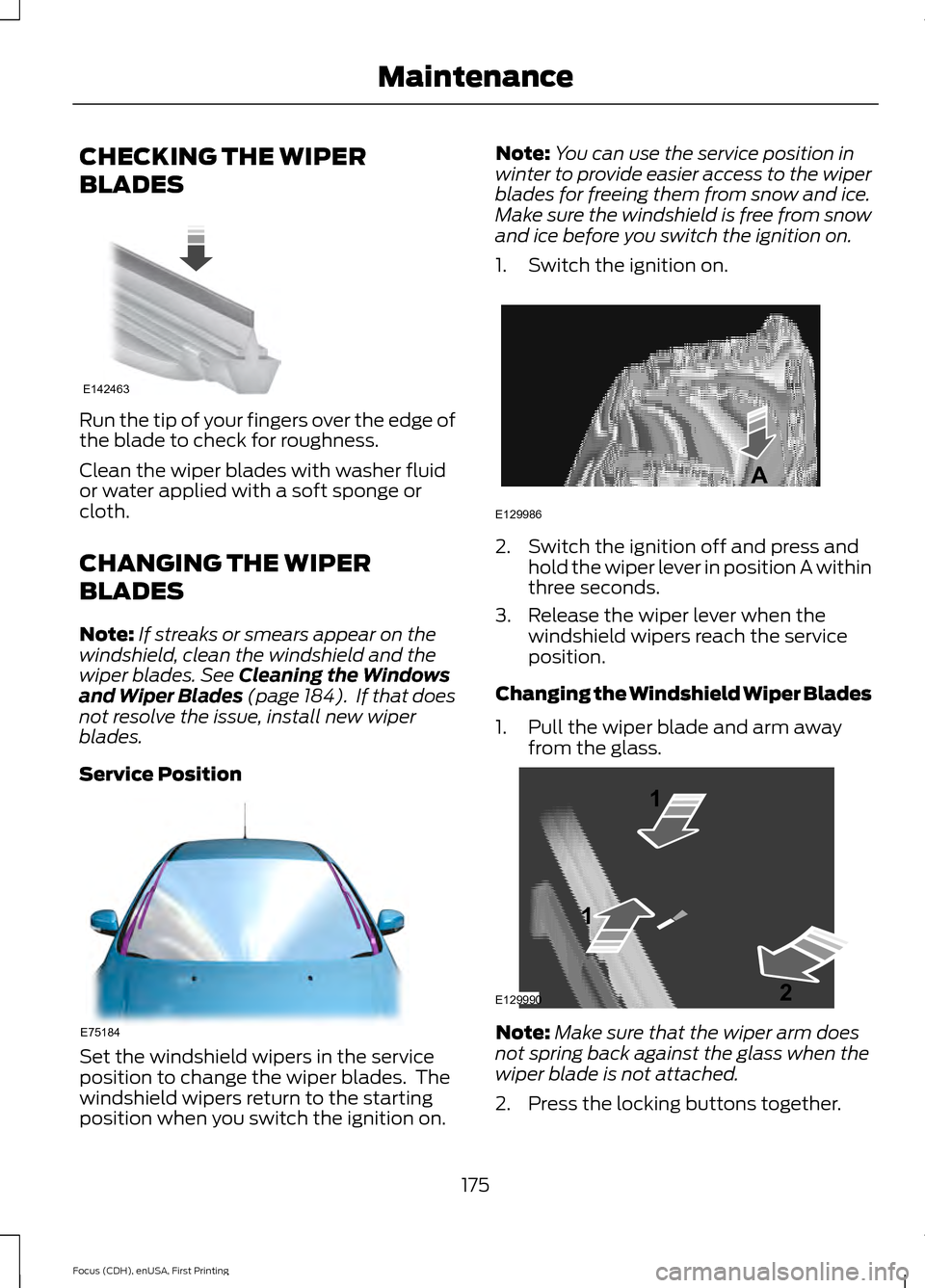
Service Position Set the windshield wipers in the service
position to change the wiper blades. The
windshield wipers return to the starting
position when you switch the ignition on. Note:
You can use the service position in
winter to provide easier access to the wiper
blades for freeing them from snow and ice.
Make sure the windshield is free from snow
and ice before you switch the ignition on.
1. Switch the ignition on. 2. Switch the ignition off and press and
hold the wiper lever in position A within
three seconds.
3. Release the wiper lever when the windshield wipers reach the service
position.
Changing the Windshield Wiper Blades
1. Pull the wiper blade and arm away from the glass. Note:
Make sure that the wiper arm does
not spring back against the glass when the
wiper blade is not attached.
2. Press the locking buttons together.
175
Focus (CDH), enUSA, First Printing MaintenanceE142463 E75184 E129986
A E129990
1
1 2
Page 187 of 369
•
Never wash or rinse any ignition coil,
spark plug wire or spark plug well, or
the area in and around these locations.
• Cover the battery, power distribution
box, and air filter assembly to prevent
water damage when cleaning the
engine.
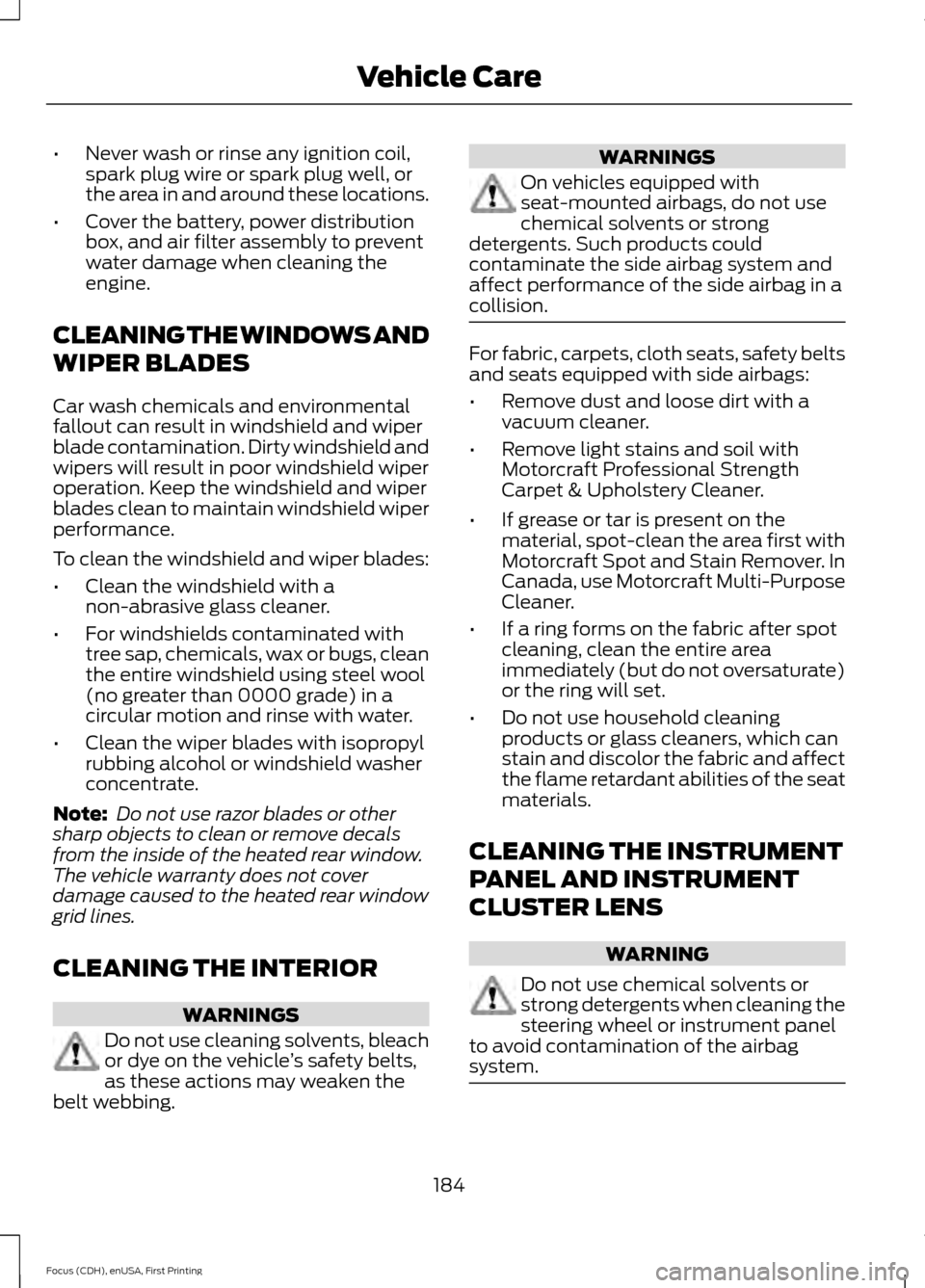
CLEANING THE WINDOWS AND
WIPER BLADES
Car wash chemicals and environmental
fallout can result in windshield and wiper
blade contamination. Dirty windshield and
wipers will result in poor windshield wiper
operation. Keep the windshield and wiper
blades clean to maintain windshield wiper
performance.
To clean the windshield and wiper blades:
• Clean the windshield with a
non-abrasive glass cleaner.
• For windshields contaminated with
tree sap, chemicals, wax or bugs, clean
the entire windshield using steel wool
(no greater than 0000 grade) in a
circular motion and rinse with water.
• Clean the wiper blades with isopropyl
rubbing alcohol or windshield washer
concentrate.
Note: Do not use razor blades or other
sharp objects to clean or remove decals
from the inside of the heated rear window.
The vehicle warranty does not cover
damage caused to the heated rear window
grid lines.
CLEANING THE INTERIOR WARNINGS
Do not use cleaning solvents, bleach
or dye on the vehicle
’s safety belts,
as these actions may weaken the
belt webbing. WARNINGS
On vehicles equipped with
seat-mounted airbags, do not use
chemical solvents or strong
detergents. Such products could
contaminate the side airbag system and
affect performance of the side airbag in a
collision. For fabric, carpets, cloth seats, safety belts
and seats equipped with side airbags:
•
Remove dust and loose dirt with a
vacuum cleaner.
• Remove light stains and soil with
Motorcraft Professional Strength
Carpet & Upholstery Cleaner.
• If grease or tar is present on the
material, spot-clean the area first with
Motorcraft Spot and Stain Remover. In
Canada, use Motorcraft Multi-Purpose
Cleaner.
• If a ring forms on the fabric after spot
cleaning, clean the entire area
immediately (but do not oversaturate)
or the ring will set.
• Do not use household cleaning
products or glass cleaners, which can
stain and discolor the fabric and affect
the flame retardant abilities of the seat
materials.
CLEANING THE INSTRUMENT
PANEL AND INSTRUMENT
CLUSTER LENS WARNING
Do not use chemical solvents or
strong detergents when cleaning the
steering wheel or instrument panel
to avoid contamination of the airbag
system. 184
Focus (CDH), enUSA, First Printing Vehicle Care
Page 235 of 369
This system uses a four-corner strategy to
provide quick access to several vehicle
features and settings. The touchscreen
provides easy interaction with your cell
phone, entertainment, information and
system settings. The corners display active
modes within the menus, for example; your
cell phone's status.
Note:
Some features are not available while
your vehicle is moving.
Note: You can access the entertainment
features for 30 minutes after you switch the
ignition off, and no doors are opened.
Phone
Press to select any of the following: Message
Phone
Quick Dial
Phonebook
History
Messaging
Settings
Navigation
Press to select any of the following: Message
My Home
Favorites
Previous Destinations
Point of Interest
Emergency
Street Address
Intersection Message
City Center
Map
Edit Route
Cancel Route
CLIMATE
Press the corresponding icons to control
the following options:
• Driver Settings
• Recirculated Air
• Auto
• Dual
• Passenger Settings
• A/C
• Defrost
Settings Press to select any of the following:
Message
Clock
Display
Sound
Vehicle
Settings
Help
232
Focus (CDH), enUSA, First Printing MyFord Touch
™E142607
Page 251 of 369
Media Player
To make adjustments using the touchscreen, select:
Action and Description
Message
Press the settings icon.
Settings
Media Player
Then select from the following:
When this feature is on, the system automatically switches
to the media source upon initial connection. This allows you
to listen to music during the indexing process. When this
feature is off, the system does not automatically switch to
the inserted media source.
Autoplay
Select to connect, disconnect, add or delete a device. You
can also set a device as your favorite so that the system
automatically attempts to connect to that device at every
ignition cycle.
Bluetooth Devices
When this feature is on, the system automatically indexes
media on your connected Bluetooth device.
Index Bluetooth Audio
Devices
This allows you to view the version level of the Gracenote
Database.
Gracenote® Database
Info
With this feature on, the Gracenote Database supplies
metadata information for your music files. This overrides
information from your device. This feature defaults to off.
Gracenote® Manage-
ment
With this feature on, the Gracenote Database supplied cover
art for your music files. This overrides any art from your device.
This feature defaults to Media Player.
Cover Art Priority
Navigation 248
Focus (CDH), enUSA, First Printing MyFord Touch
™E142607 E142607
Page 267 of 369
Troubleshooting tips
Action
Cause
Message
No action required. This
message should disappear
shortly.
Radio requires more than two
seconds to produce audio for
the selected channel.
Acquiring…
If this message does not clear
shortly, or with an ignition key
cycle, your receiver may have
a fault. See an authorized
dealer for service.
There is an internal module or
system failure present.
Satellite antenna fault
SIRIUS system failure
Tune to another channel or
choose another preset.
The channel is no longer avail-
able.
Invalid Channel
Contact SIRIUS at 1-888-539-
7474 to subscribe to the
channel, or tune to another
channel.
Your subscription does not
include this channel.
Unsubscribed Channel
The signal is blocked. When
you move into an open area,
the signal should return.
The signal is lost from the
SIRIUS satellite or SIRIUS
tower to your vehicle antenna.
No Signal
No action required. The
process may take up to three
minutes.
Update of channel program-
ming in progress.
Updating…
Contact SIRIUS at 1-888-539-
7474 to resolve subscription
issues.
Your satellite service is no
longer available.
Questions? Call
1-888-539-7474
Use the channel guide to turn
off the Lock or Skip function on
that station.
All the channels in the selected
category are either skipped or
locked.
None found
Check Channel Guide
No action required.
SIRIUS has updated the chan-
nels available for your vehicle.
Subscription Updated
SIRIUS Satellite Radio Voice
Commands If you are listening to SIRIUS
satellite radio, press the voice
button on the steering wheel
controls. When prompted, say any of the
following commands.
264
Focus (CDH), enUSA, First Printing MyFord Touch
™E142599
Page 273 of 369
WARNINGS
Store the portable music player in a
secure location, such as the center
console or the glove box, when your
vehicle is moving. Hard objects may
become projectiles in a crash or sudden
stop, which may increase the risk of serious
injury. The audio extension cable must be
long enough to allow the portable music
player to be safely stored while your
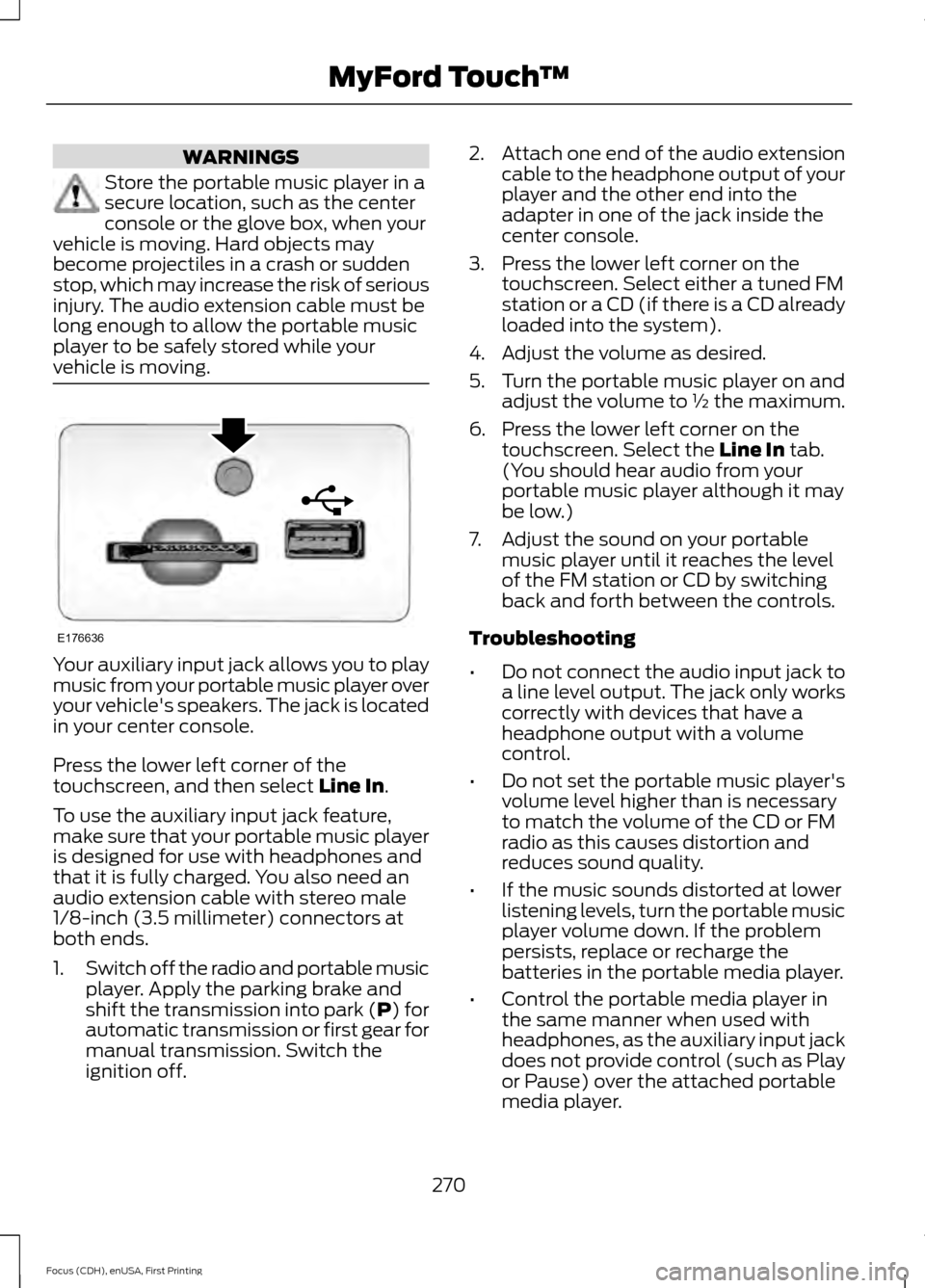
vehicle is moving. Your auxiliary input jack allows you to play
music from your portable music player over
your vehicle's speakers. The jack is located
in your center console.
Press the lower left corner of the
touchscreen, and then select Line In.
To use the auxiliary input jack feature,
make sure that your portable music player
is designed for use with headphones and
that it is fully charged. You also need an
audio extension cable with stereo male
1/8-inch (3.5 millimeter) connectors at
both ends.
1. Switch off the radio and portable music
player. Apply the parking brake and
shift the transmission into park (P) for
automatic transmission or first gear for
manual transmission. Switch the
ignition off. 2.
Attach one end of the audio extension
cable to the headphone output of your
player and the other end into the
adapter in one of the jack inside the
center console.
3. Press the lower left corner on the touchscreen. Select either a tuned FM
station or a CD (if there is a CD already
loaded into the system).
4. Adjust the volume as desired.
5. Turn the portable music player on and adjust the volume to ½ the maximum.
6. Press the lower left corner on the touchscreen. Select the
Line In tab.
(You should hear audio from your
portable music player although it may
be low.)
7. Adjust the sound on your portable music player until it reaches the level
of the FM station or CD by switching
back and forth between the controls.
Troubleshooting
• Do not connect the audio input jack to
a line level output. The jack only works
correctly with devices that have a
headphone output with a volume
control.
• Do not set the portable music player's
volume level higher than is necessary
to match the volume of the CD or FM
radio as this causes distortion and
reduces sound quality.
• If the music sounds distorted at lower
listening levels, turn the portable music
player volume down. If the problem
persists, replace or recharge the
batteries in the portable media player.
• Control the portable media player in
the same manner when used with
headphones, as the auxiliary input jack
does not provide control (such as Play
or Pause) over the attached portable
media player.
270
Focus (CDH), enUSA, First Printing MyFord Touch
™E176636