2015 FORD FOCUS ELECTRIC automatic transmission
[x] Cancel search: automatic transmissionPage 146 of 369
TOWING A TRAILER
WARNING
Never tow a trailer with your vehicle.
This powertrain is not designed to
tow.
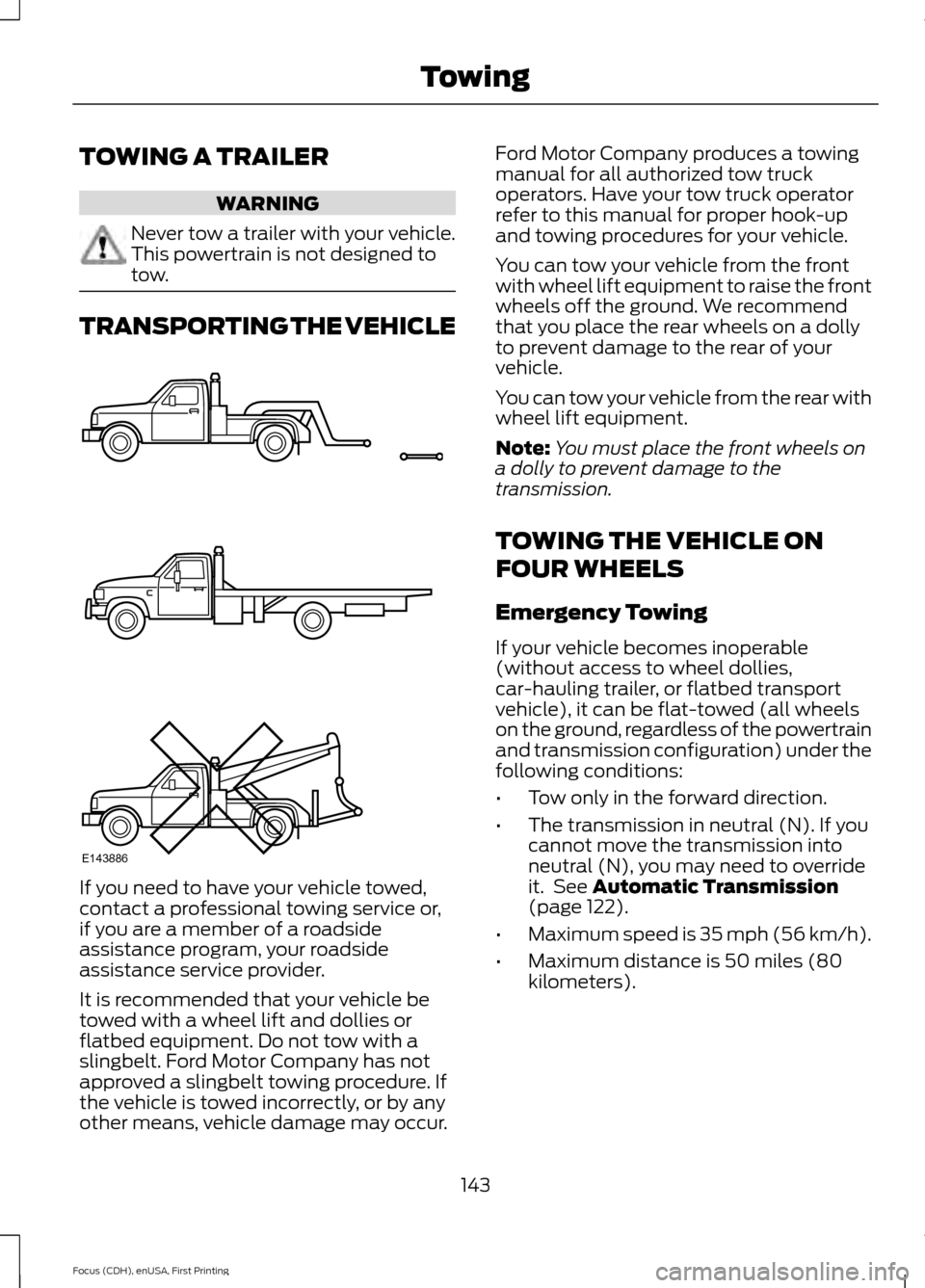
TRANSPORTING THE VEHICLE
If you need to have your vehicle towed,
contact a professional towing service or,
if you are a member of a roadside
assistance program, your roadside
assistance service provider.
It is recommended that your vehicle be
towed with a wheel lift and dollies or
flatbed equipment. Do not tow with a
slingbelt. Ford Motor Company has not
approved a slingbelt towing procedure. If
the vehicle is towed incorrectly, or by any
other means, vehicle damage may occur. Ford Motor Company produces a towing
manual for all authorized tow truck
operators. Have your tow truck operator
refer to this manual for proper hook-up
and towing procedures for your vehicle.
You can tow your vehicle from the front
with wheel lift equipment to raise the front
wheels off the ground. We recommend
that you place the rear wheels on a dolly
to prevent damage to the rear of your
vehicle.
You can tow your vehicle from the rear with
wheel lift equipment.
Note:
You must place the front wheels on
a dolly to prevent damage to the
transmission.
TOWING THE VEHICLE ON
FOUR WHEELS
Emergency Towing
If your vehicle becomes inoperable
(without access to wheel dollies,
car-hauling trailer, or flatbed transport
vehicle), it can be flat-towed (all wheels
on the ground, regardless of the powertrain
and transmission configuration) under the
following conditions:
• Tow only in the forward direction.
• The transmission in neutral (N). If you
cannot move the transmission into
neutral (N), you may need to override
it. See Automatic Transmission
(page 122).
• Maximum speed is 35 mph (56 km/h).
• Maximum distance is 50 miles (80
kilometers).
143
Focus (CDH), enUSA, First Printing TowingE143886
Page 227 of 369
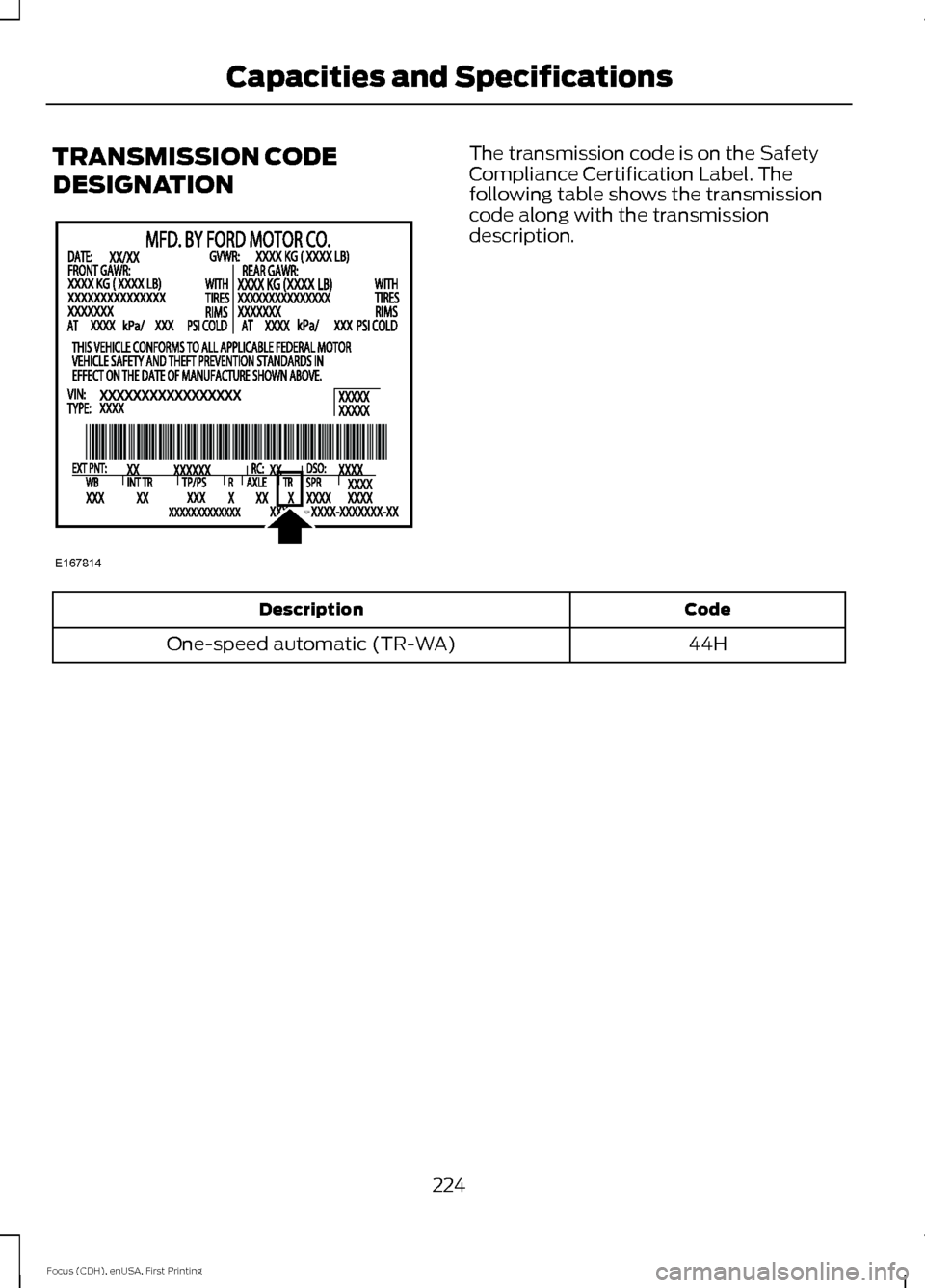
TRANSMISSION CODE
DESIGNATION The transmission code is on the Safety
Compliance Certification Label. The
following table shows the transmission
code along with the transmission
description.
Code
Description
44H
One-speed automatic (TR-WA)
224
Focus (CDH), enUSA, First Printing Capacities and SpecificationsE167814
Page 228 of 369
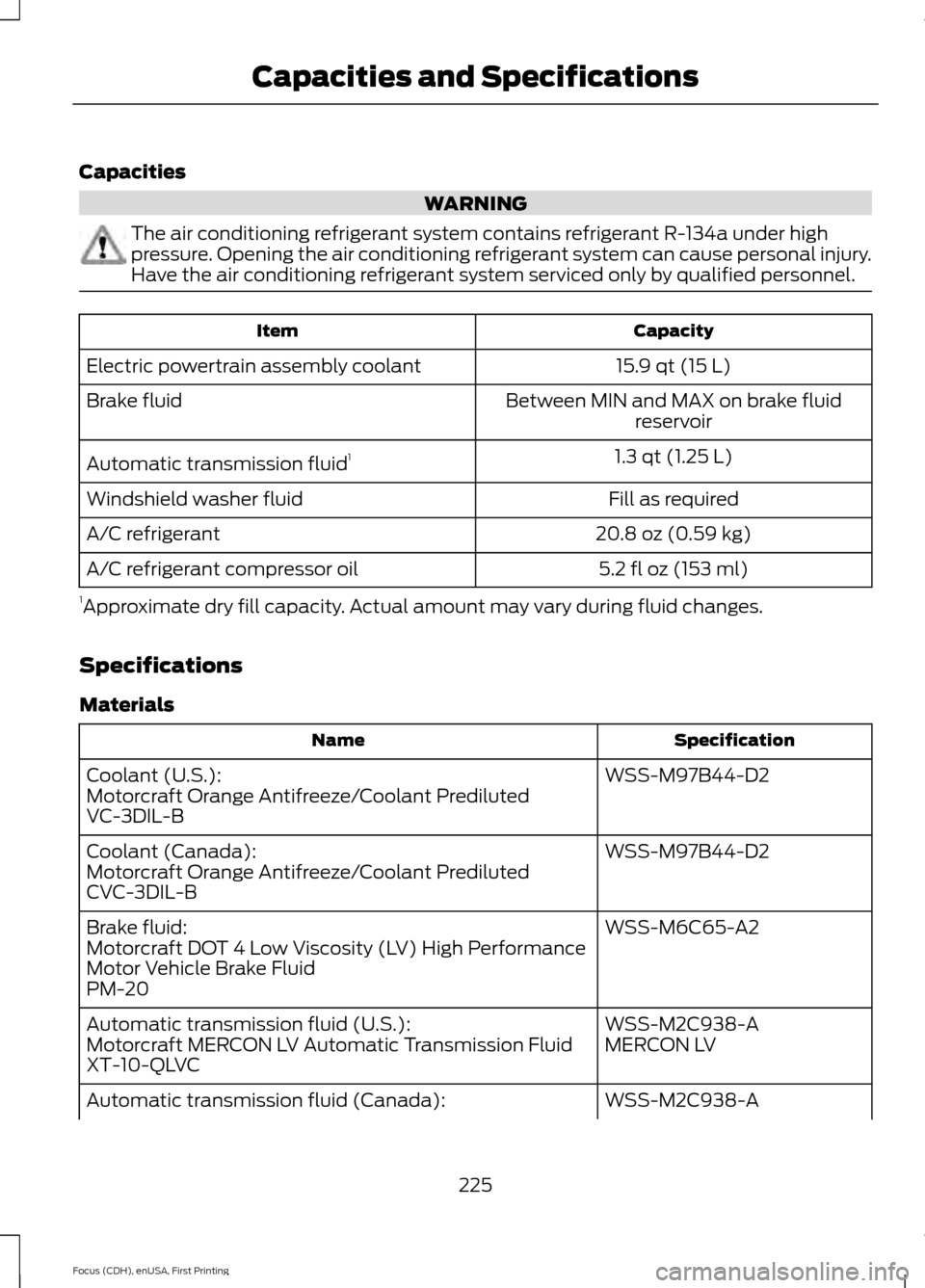
Capacities
WARNING
The air conditioning refrigerant system contains refrigerant R-134a under high
pressure. Opening the air conditioning refrigerant system can cause personal injury.
Have the air conditioning refrigerant system serviced only by qualified personnel.
Capacity
Item
15.9 qt (15 L)
Electric powertrain assembly coolant
Between MIN and MAX on brake fluidreservoir
Brake fluid
1.3 qt (1.25 L)
Automatic transmission fluid 1
Fill as required
Windshield washer fluid
20.8 oz (0.59 kg)
A/C refrigerant
5.2 fl oz (153 ml)
A/C refrigerant compressor oil
1 Approximate dry fill capacity. Actual amount may vary during fluid changes.
Specifications
Materials Specification
Name
WSS-M97B44-D2
Coolant (U.S.):
Motorcraft Orange Antifreeze/Coolant Prediluted
VC-3DIL-B
WSS-M97B44-D2
Coolant (Canada):
Motorcraft Orange Antifreeze/Coolant Prediluted
CVC-3DIL-B
WSS-M6C65-A2
Brake fluid:
Motorcraft DOT 4 Low Viscosity (LV) High Performance
Motor Vehicle Brake Fluid
PM-20
WSS-M2C938-A
Automatic transmission fluid (U.S.):
MERCON LV
Motorcraft MERCON LV Automatic Transmission Fluid
XT-10-QLVC
WSS-M2C938-A
Automatic transmission fluid (Canada):
225
Focus (CDH), enUSA, First Printing Capacities and Specifications
Page 229 of 369
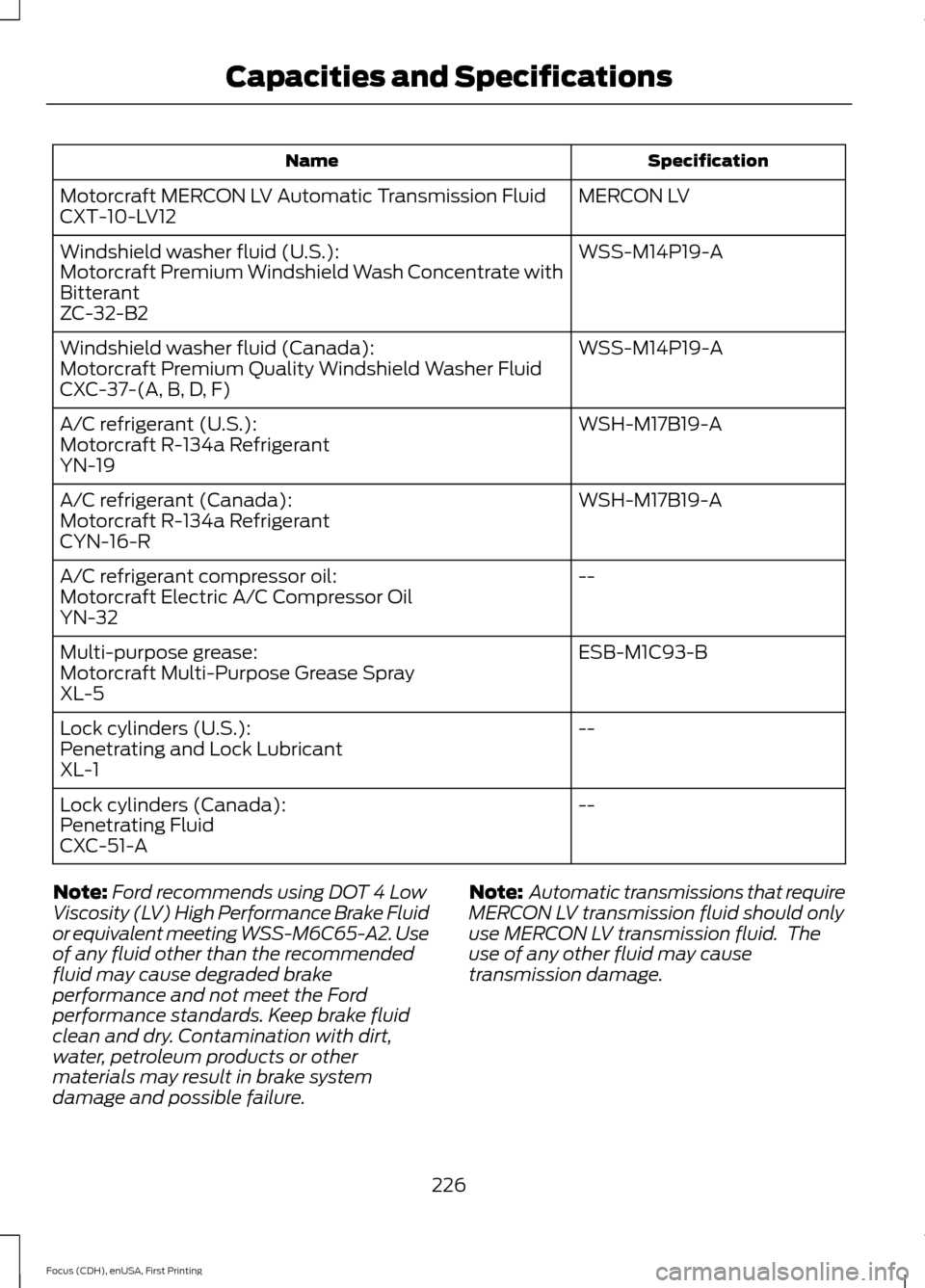
Specification
Name
MERCON LV
Motorcraft MERCON LV Automatic Transmission Fluid
CXT-10-LV12
WSS-M14P19-A
Windshield washer fluid (U.S.):
Motorcraft Premium Windshield Wash Concentrate with
Bitterant
ZC-32-B2
WSS-M14P19-A
Windshield washer fluid (Canada):
Motorcraft Premium Quality Windshield Washer Fluid
CXC-37-(A, B, D, F)
WSH-M17B19-A
A/C refrigerant (U.S.):
Motorcraft R-134a Refrigerant
YN-19
WSH-M17B19-A
A/C refrigerant (Canada):
Motorcraft R-134a Refrigerant
CYN-16-R
--
A/C refrigerant compressor oil:
Motorcraft Electric A/C Compressor Oil
YN-32
ESB-M1C93-B
Multi-purpose grease:
Motorcraft Multi-Purpose Grease Spray
XL-5
--
Lock cylinders (U.S.):
Penetrating and Lock Lubricant
XL-1
--
Lock cylinders (Canada):
Penetrating Fluid
CXC-51-A
Note: Ford recommends using DOT 4 Low
Viscosity (LV) High Performance Brake Fluid
or equivalent meeting WSS-M6C65-A2. Use
of any fluid other than the recommended
fluid may cause degraded brake
performance and not meet the Ford
performance standards. Keep brake fluid
clean and dry. Contamination with dirt,
water, petroleum products or other
materials may result in brake system
damage and possible failure. Note:
Automatic transmissions that require
MERCON LV transmission fluid should only
use MERCON LV transmission fluid. The
use of any other fluid may cause
transmission damage.
226
Focus (CDH), enUSA, First Printing Capacities and Specifications
Page 273 of 369
WARNINGS
Store the portable music player in a
secure location, such as the center
console or the glove box, when your
vehicle is moving. Hard objects may
become projectiles in a crash or sudden
stop, which may increase the risk of serious
injury. The audio extension cable must be
long enough to allow the portable music
player to be safely stored while your
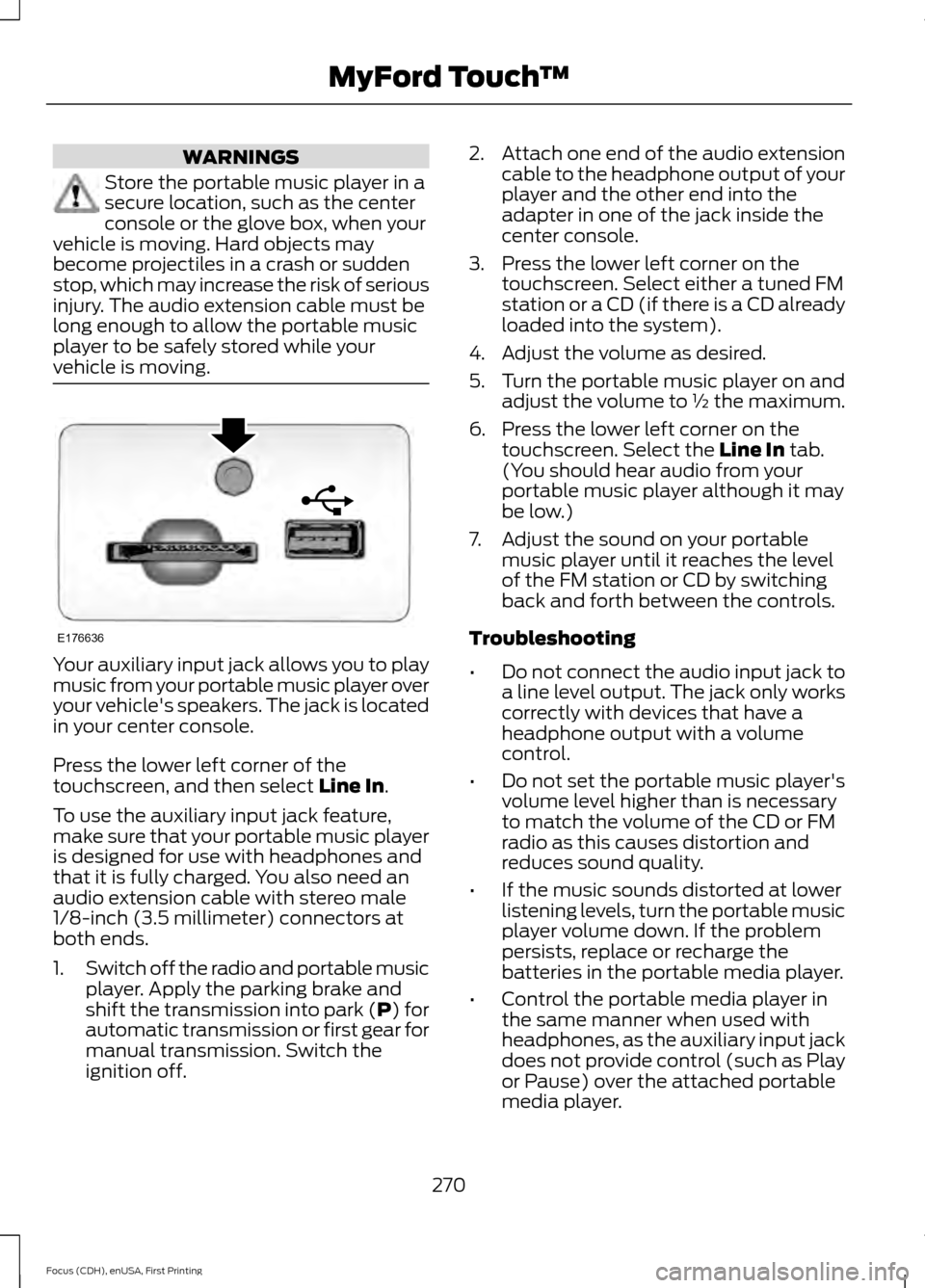
vehicle is moving. Your auxiliary input jack allows you to play
music from your portable music player over
your vehicle's speakers. The jack is located
in your center console.
Press the lower left corner of the
touchscreen, and then select Line In.
To use the auxiliary input jack feature,
make sure that your portable music player
is designed for use with headphones and
that it is fully charged. You also need an
audio extension cable with stereo male
1/8-inch (3.5 millimeter) connectors at
both ends.
1. Switch off the radio and portable music
player. Apply the parking brake and
shift the transmission into park (P) for
automatic transmission or first gear for
manual transmission. Switch the
ignition off. 2.
Attach one end of the audio extension
cable to the headphone output of your
player and the other end into the
adapter in one of the jack inside the
center console.
3. Press the lower left corner on the touchscreen. Select either a tuned FM
station or a CD (if there is a CD already
loaded into the system).
4. Adjust the volume as desired.
5. Turn the portable music player on and adjust the volume to ½ the maximum.
6. Press the lower left corner on the touchscreen. Select the
Line In tab.
(You should hear audio from your
portable music player although it may
be low.)
7. Adjust the sound on your portable music player until it reaches the level
of the FM station or CD by switching
back and forth between the controls.
Troubleshooting
• Do not connect the audio input jack to
a line level output. The jack only works
correctly with devices that have a
headphone output with a volume
control.
• Do not set the portable music player's
volume level higher than is necessary
to match the volume of the CD or FM
radio as this causes distortion and
reduces sound quality.
• If the music sounds distorted at lower
listening levels, turn the portable music
player volume down. If the problem
persists, replace or recharge the
batteries in the portable media player.
• Control the portable media player in
the same manner when used with
headphones, as the auxiliary input jack
does not provide control (such as Play
or Pause) over the attached portable
media player.
270
Focus (CDH), enUSA, First Printing MyFord Touch
™E176636
Page 275 of 369
Pairing Your Cell Phone for the
First Time
WARNING
Driving while distracted can result in
loss of vehicle control, crash and
injury. We strongly recommend that
you use extreme caution when using any
device that may take your focus off the
road. Your primary responsibility is the safe
operation of your vehicle. We recommend
against the use of any hand-held device
while driving and encourage the use of
voice-operated systems when possible.
Make sure you are aware of all applicable
local laws that may affect the use of
electronic devices while driving. The first thing you must do to use the
phone features of SYNC is to pair your
Bluetooth-enabled cell phone with SYNC.
This allows you to use your cell phone in a
hands-free manner.
Note:
Switch off the radio. Apply the
parking brake and shift the transmission into
park (P) for automatic transmission or first
gear for manual transmission. Switch the
ignition off.
Touch the upper left corner of the touchscreen: Action and Description
Message
Add phone Follow the on-screen instructions.
Find SYNC
Make sure that Bluetooth is set to On and that your cell phone
is in the correct mode. See your cell phone ’s manual if
necessary.
Select
SYNC and a six-digit PIN appears on your device.
If you are prompted to enter a PIN on your device, it does not
support Secure Simple Pairing. To pair, enter the PIN
displayed on the touchscreen. Skip the next step.
When prompted on your cell phone ’s display, confirm that
the PIN provided by SYNC matches the PIN displayed on your
cell phone.
The display indicates when the pairing is successful.
SYNC may prompt you with more cell phone options. For
more information on your cell phone's capability, see your
cell phone's manual and visit the website.
Pairing Subsequent Cell Phones
Note: Switch off the radio. Apply the
parking brake and shift the transmission into
park (P) for automatic transmission or first
gear for manual transmission. Switch the
ignition off. Make sure that Bluetooth is set to
On and
that your cell phone is in the correct mode.
See your device's manual if necessary.
272
Focus (CDH), enUSA, First Printing MyFord Touch
™
Page 362 of 369
A
A/C
See: Climate Control........................................ 100
About This Manual...........................................5
ABS See: Brakes............................................................ 124
ABS driving hints See: Hints on Driving With Anti-Lock
Brakes................................................................. 125
Accessories.....................................................321 Exterior style......................................................... 321
Interior style.......................................................... 321
Lifestyle.................................................................. 321
Peace of mind...................................................... 321
Accessories See: Replacement Parts
Recommendation.............................................. 9
Adjusting the Headlamps..........................176 Horizontal Aim Adjustment............................. 177
Vertical Aim Adjustment.................................. 176
Adjusting the Steering Wheel....................67
Airbag Disposal...............................................45
Air Conditioning See: Climate Control........................................ 100
Alarm See: Anti-Theft Alarm........................................ 65
Ambient Lighting............................................76
Anti-Theft Alarm
............................................65
Arming the Alarm................................................. 65
Disarming the Alarm........................................... 66
Appendices....................................................323
At a Glance
........................................................12
Audible Warnings and Indicators.............85 Headlamps On Warning Chime...................... 85
Keyless Warning Alert........................................ 85
Parking Brake On Warning Chime.................85
Audio Control...................................................67 Seek, Next or Previous....................................... 68
Audio System
.................................................227
General Information.......................................... 227
Audio Unit - Vehicles With: Sony Audio System..........................................................228
Autolamps.........................................................73 Windshield Wiper Activated
Headlamps......................................................... 73Automatic Climate Control......................100
Dual Zone Temperature Control.................... 101
Single Zone Temperature Control.................101
Temperature Control.......................................... 101
Automatic Transmission............................122 Brake-Shift Interlock.......................................... 122
If Your Vehicle Gets Stuck In Mud or Snow................................................................... 123
Single Speed Automatic Transmission.................................................... 122
Auxiliary Power Points.................................110 12 Volt DC Power Point...................................... 110
Location.................................................................. 110
B
Bonnet Lock See: Opening and Closing the Hood...........169
Booster Seats..................................................24 Types of Booster Seats...................................... 25
Brake Fluid Check..........................................173
Brakes................................................................124 General Information.......................................... 124
Breaking-In......................................................145
Bulb Specification Chart............................181
C
Cabin Air Filter...............................................103
California Proposition 65...............................9
Capacities and Specifications
................225
Specifications ...................................................... 225
Car Wash See: Cleaning the Exterior............................... 182
Center Console................................................111
Changing a Bulb............................................178 Replacing Headlamp Bulbs............................ 178
Replacing HID Headlamp Bulbs.................... 178
Replacing LED Rear Lamp Bulbs.................180
Replacing Licence Plate and High Mounted Brake Lamp Bulbs.......................................... 181
Replacing Rear Lamp Bulbs............................ 179
Changing a Fuse
...........................................168
Fuses....................................................................... 168
Changing a Road Wheel
...........................220
Important Information for Lifting or
Jacking.............................................................. 220
Changing the 12V Battery...........................173
359
Focus (CDH), enUSA, First Printing Index