2015 FORD FOCUS ELECTRIC wheel
[x] Cancel search: wheelPage 277 of 369
To accept the call, select:
Message
Accept
Note: You can also accept the call by
pressing the phone button on the steering
wheel. To reject the call, select:
Message
Reject
Note: You can also reject the call by
pressing the phone button on the steering
wheel.
Ignore the call by doing nothing. SYNC logs
it as a missed call.
Phone Menu Options
Press the top left corner on the
touchscreen to select from the following
options: Action and Description
Menu Item
Touch this button to access the on-screen numerical pad to
enter a number and place a call. During an active call, you can
also choose any of these options:
Phone
Mute Call
Hold Call
Privacy
Join Calls
End
Select to call stored contacts.
Quick Dial
Touch this button to access and call any contacts in your
previously downloaded phonebook. The system places the
entries in alphabetical categories summarized at the top of
the screen
Phonebook
To turn on contact picture settings, if your device supports this
feature, select:
Phone
Settings
Manage Phonebook
Display Photos from Phonebook274
Focus (CDH), enUSA, First Printing MyFord Touch
™E142632
Page 292 of 369
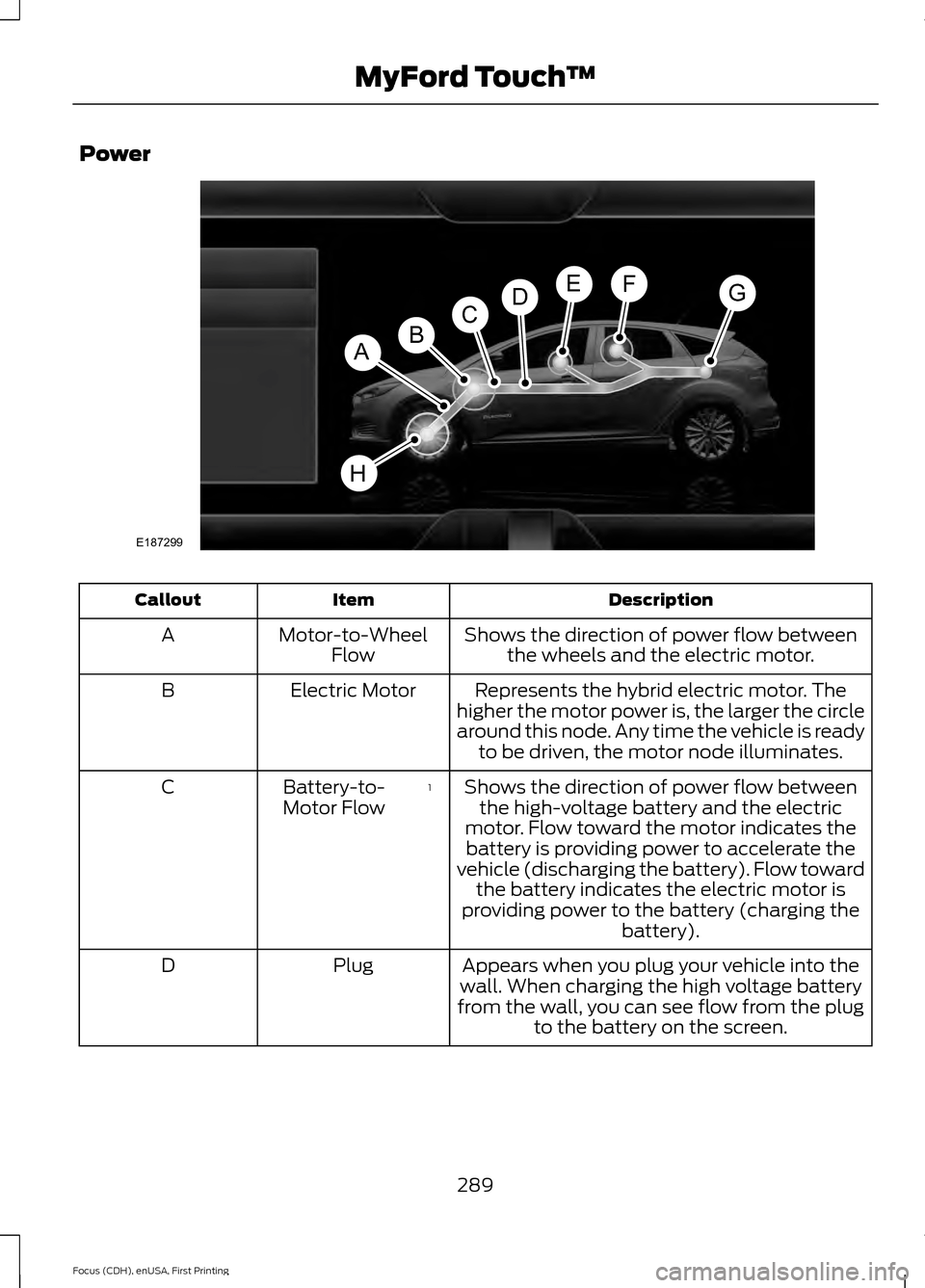
Power
Description
Item
Callout
Shows the direction of power flow betweenthe wheels and the electric motor.
Motor-to-Wheel
Flow
A
Represents the hybrid electric motor. The
higher the motor power is, the larger the circle
around this node. Any time the vehicle is ready to be driven, the motor node illuminates.
Electric Motor
B
Shows the direction of power flow betweenthe high-voltage battery and the electric
motor. Flow toward the motor indicates the battery is providing power to accelerate the
vehicle (discharging the battery). Flow toward the battery indicates the electric motor is
providing power to the battery (charging the battery).
1
Battery-to-
Motor Flow
C
Appears when you plug your vehicle into the
wall. When charging the high voltage battery
from the wall, you can see flow from the plug to the battery on the screen.
Plug
D
289
Focus (CDH), enUSA, First Printing MyFord Touch
™E187299
A
DGEF
BC
H
Page 293 of 369
Description
Item
Callout
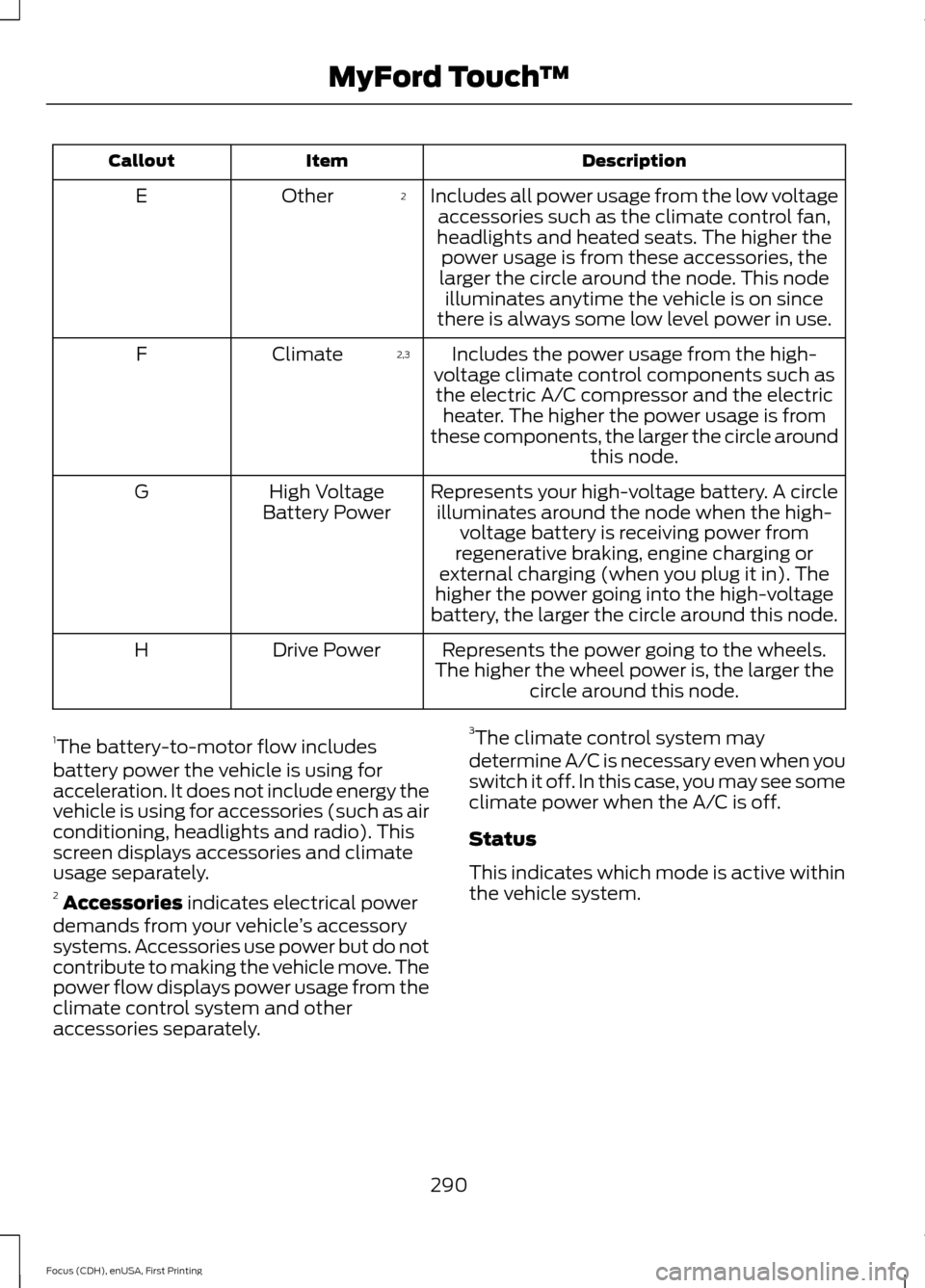
Includes all power usage from the low voltageaccessories such as the climate control fan,
headlights and heated seats. The higher the power usage is from these accessories, the
larger the circle around the node. This node illuminates anytime the vehicle is on since
there is always some low level power in use.
2
Other
E
Includes the power usage from the high-
voltage climate control components such as the electric A/C compressor and the electric heater. The higher the power usage is from
these components, the larger the circle around this node.
2,3
Climate
F
Represents your high-voltage battery. A circleilluminates around the node when the high- voltage battery is receiving power from
regenerative braking, engine charging or
external charging (when you plug it in). The
higher the power going into the high-voltage
battery, the larger the circle around this node.
High Voltage
Battery Power
G
Represents the power going to the wheels.
The higher the wheel power is, the larger the circle around this node.
Drive Power
H
1 The battery-to-motor flow includes
battery power the vehicle is using for
acceleration. It does not include energy the
vehicle is using for accessories (such as air
conditioning, headlights and radio). This
screen displays accessories and climate
usage separately.
2 Accessories indicates electrical power
demands from your vehicle ’s accessory
systems. Accessories use power but do not
contribute to making the vehicle move. The
power flow displays power usage from the
climate control system and other
accessories separately. 3
The climate control system may
determine A/C is necessary even when you
switch it off. In this case, you may see some
climate power when the A/C is off.
Status
This indicates which mode is active within
the vehicle system.
290
Focus (CDH), enUSA, First Printing MyFord Touch
™
Page 298 of 369
Action and Description
Voice Command
category, residential addresses by street
address or by name or specific street inter-
sections. Operator Assist is a feature of your
SYNC Services subscription. For more
information on Operator Assist, visit
www.SYNCMyRide.com/support.
If you miss a turn, SYNC automatically asks
if you want the route updated. Say yes
when prompted and the system sends a
new route to your vehicle.
Yes [During an active route]
Disconnecting from SYNC Services
To use the steering wheel controls, press
and hold the hang-up phone button on the
steering wheel. To use voice commands, press the
voice button and say: Voice Command
Good-bye
SYNC Services Quick Tips Tips
You can personalize your Services feature to provide quicker
access to your most used or favorite information. You can
save address points, such as work or home. You can also
save favorite information like sports teams, for example
Detroit Lions, or a news category. You can learn more about
personalization by logging onto www.SYNCMyRide.com.
Personalizing
Press the voice button at any time (while connected to SYNC
Services) to interrupt a voice prompt or an audio clip (such
as a sports report) and say your voice command.
Push to interrupt
Your subscription is associated with your Bluetooth-enabled
cellular phone number, not your VIN (Vehicle Identification
Number). You can pair and connect your phone to any vehicle
equipped with SYNC Services and continue enjoying your
personalized services.
Portable
295
Focus (CDH), enUSA, First Printing MyFord Touch
™
Page 299 of 369
SYNC Services Voice Commands
If your vehicle is equipped with
Navigation, SYNC Services
downloads your requested
destination to the navigation system. The
navigation system then calculates the
route and provides driving instructions.
See Navigation (page 304).
If your vehicle is not equipped with
Navigation, when a route has been
downloaded (non-navigation systems),
you can press the voice button on the
steering wheel controls and say any of the
following commands to receive directions:
Services Voice command
Cancel Route
Route Status
Route summary
Update Route
Help Sirius Travel Link
(If Equipped) WARNING
Driving while distracted can result in
loss of vehicle control, crash and
injury. We strongly recommend that
you use extreme caution when using any
device that may take your focus off the
road. Your primary responsibility is the safe
operation of your vehicle. We recommend
against the use of any handheld device
while driving and encourage the use of
voice-operated systems when possible.
Make sure you are aware of all applicable
local laws that may affect the use of
electronic devices while driving. Note:
In order to use Sirius Travel Link, your
vehicle must be equipped with navigation
and your navigation SD card must be in the
SD card slot.
Note: A paid subscription is required to
access and use these features. Go to
www.siriusxm.com/travellink for more
information.
Note: Visit www.siriusxm.com/traffic and
click on Coverage map and details for a
complete listing of all traffic areas covered
by Sirius Travel Link.
Note: Neither Sirius nor Ford is responsible
for any errors or inaccuracies in the Sirius
Travel Link services or its use in vehicles.
When you subscribe to Sirius Travel Link,
it can help you locate the best gas prices,
find movie listings, get current traffic alerts,
view the current weather map, get
accurate ski conditions and see scores to
current sports games.
296
Focus (CDH), enUSA, First Printing MyFord Touch
™E142599
Page 300 of 369
Action and Description
Menu Item
Touch these buttons to identify traffic incidents on your route,
nearby your vehicle ’s current location or near any of your
favorite places, if programmed.
Traffic on Route
Traffic Nearby
Touch this button to view fuel prices at stations close to your
vehicle’s location or on an active navigation route.
Fuel Prices
Touch this button to view nearby movie theaters and their
show times, if available.
Movie Listings
Touch this button to view the nearby weather, current weather,
or the five day forecast for the chosen area.
Weather
Select to see the weather map,
which can show storms, radar
information, charts and winds.
Map
Select to choose from a listing of
weather locations.
Area
Touch this button to view scores and schedules from a variety
of sports. You can also save up to 10 favorite teams for easier
access. The score automatically refreshes when a game is in
progress.
Sports Info
Touch this button to view ski conditions for a specific area.
Ski Conditions
Sirius Travel Link Voice Commands Press the voice button on the steering
wheel controls. When prompted, say
any of the following or a similar
command:
Voice command
Show Traffic
Show Weather
Help Alerts If your vehicle is equipped with
Navigation, touch the I
(Information) button to access
these features. If your vehicle is not
equipped with Navigation, touch the corner
of the touchscreen with the green tab.
Press Alerts, then choose from any of
the following services: Action and Description
Message
The complete message
View
The message
Delete
Messages
Delete All
297
Focus (CDH), enUSA, First Printing MyFord Touch
™E142599 E142608
Page 302 of 369
If your vehicle is equipped with
Navigation, touch the I (Information)
button to access these features. If your
vehicle is not equipped with
Navigation, touch the corner of the
touchscreen with the green tab. Then
select:
Message
Apps
911 Assist
On You can also access 911 Assist by
pressing:
Message
Settings
Phone
911 Assist
Or you can also select:
Help
911 Assist
To make sure that 911 Assist works
properly:
• SYNC must be powered and working
properly at the time of the incident and
throughout feature activation and use.
• The 911 Assist feature must be set on
prior to the incident.
• You must pair and connect a
Bluetooth-enabled and compatible
phone to SYNC. •
A connected Bluetooth-enabled phone
must have the ability to make and
maintain an outgoing call at the time
of the incident.
• A connected Bluetooth-enabled phone
must have adequate network coverage,
battery power and signal strength.
• The vehicle must have battery power
and be located in the United States,
Canada or in a territory in which 911 is
the emergency number.
In the Event of a Crash
Not all crashes deploy an airbag or activate
the fuel pump shut-off (which would
trigger 911 Assist); however, SYNC tries to
contact emergency services if 911 Assist
triggers. If a connected phone sustains
damage or loses connection to SYNC,
SYNC searches for, and tries to connect
to, any available previously paired phone
and tries to make the call to 911.
Before making the call:
• SYNC provides a short window of time
(approximately 10 seconds) to cancel
the call. If you fail to cancel the call,
SYNC attempts to dial 911.
• SYNC says the following, or a similar
message: "SYNC will attempt to call
911, to cancel the call, press Cancel on
your screen or press and hold the
phone button on your steering wheel."
If you do not cancel the call, and SYNC
makes a successful call, a pre-recorded
message plays for the 911 operator, and
then the occupant(s) in your vehicle is able
to talk with the operator. Be prepared to
provide your name, phone number and
location immediately, because not all 911
systems are capable of receiving this
information electronically.
299
Focus (CDH), enUSA, First Printing MyFord Touch
™E142607
Page 306 of 369
MAX Defrost: Distributes outside air through the windshield air vents and
automatically switches the air conditioning on. The fan is set to the highest
speed and the temperature to HI. When the air distribution is set in this position,
you are unable to select recirculated air or manually adjust the fan speed and
temperature control.
I
Manual airflow distribution controls:
Airflow can be directed into the
following locations:
J
Footwell and Defrost: Distributes air through the windshield defroster vents,
demister vents, floor vents and rear seat floor vents, and provides outside air
to reduce window fogging.
Panel:
Distributes air through the instrument panel vents.
Panel and Floor:
Distributes air through the instrument panel vents, demister
vents, floor vents and rear seat floor vents.
Floor:
Distributes air through the demister vents, floor vents and rear seat floor
vents.
Defrost:
Touch to clear the windshield of fog and thin ice. Touch again to return
to the previous airflow selection. When on, defrost provides outside air to reduce
window fogging and distributes air through the windshield defroster vents and
demister vents.
Driver settings:
Touch + or – adjust the temperature.
K
Climate Control Voice Commands Press the voice button on the
steering wheel controls. When
prompted, say any of the
following or a similar command: Voice commands
Climate On
Climate Off Adjust the temperature to between 59 - 86°F (15.0- 30.0°C).
Set temperature
303
Focus (CDH), enUSA, First Printing MyFord Touch
™E142599