Page 102 of 571

DAYTIME RUNNING LAMPS (IF EQUIPPED)
WARNING:Always remember to turn on your headlamps at
dusk or during inclement weather. The Daytime Running Lamp
(DRL) system does not activate the tail lamps and generally may not
provide adequate lighting during these conditions. Failure to activate
your headlamps under these conditions may result in a collision.
The system switches the headlamps on with a reduced output (vehicles
equipped with halogen headlamps) or turns the front fog lamps on
(vehicles equipped with HID headlamps).
To switch the system on:
1. Switch the ignition on.
2. Switch the lighting control to the off, autolamp or parking lamp position.
3. Make sure the transmission selector lever is not in position P.
4. Make sure the parking brake is disengaged.
AUTOMATIC HIGH BEAM CONTROL (IF EQUIPPED)
The system will automatically turn on your high beams if it is dark
enough and no other traffic is present. When it detects an approaching
vehicle’s headlights, a preceding vehicle’s tail lamps or street lighting, the
system will turn off the high beams (low beams remain on) before they
distract other drivers.
Note:If it appears that automatic control of the high beams is not
functioning properly, check the windshield in front of the camera for
blockage. A clear view of the road is required for proper system
operation. Any windshield damage in the area of the camera field-of-view
should be repaired.
Note:If a blockage is detected (e.g. bird dropping, bug splatter, snow, or
ice) and no changes are observed, the system will go into low beam
mode until the blockage is cleared. A message may also appear in the
instrument cluster display noting the front camera is blocked.
Note:Typical road dust, dirt and water spots will not affect the
automatic high beam system’s performance. However, in cold or
inclement weather conditions, the automatic high beam system’s
availability may be decreased. If the driver wants to change the beam
state independently of the system, the driver may turn the high beams
on or off using the multifunction switch stalk. Automatic control will
resume when conditions are correct.
Lighting101
2015 Flex(471)
Owners Guide gf, 1st Printing, October 2014
USA(fus)
Page 103 of 571

Note:Modification of the vehicle ride height (e.g. using much larger
tires) may degrade feature performance.
A camera sensor is centrally mounted behind the windshield of the
vehicle, and monitors the conditions to decide when to switch the high
beams off and on.
Once the system is active the high beams will switch on if:
•The ambient light level is low enough that high beams are needed.
•There is no traffic in front of the vehicle.
•Vehicle speed is greater than 32 mph (52 km/h).
•Severe weather is not detected.
The high beams will switch off if:
•An approaching vehicle’s headlights or a preceding vehicle’s tail lamps
are detected.
•The vehicle speed falls below 27 mph (44 km/h).
•The ambient light level is high enough that high beams are not
needed.
•Severe rain, snow or fog is detected.
•The camera is blocked.
Activating the system
Switch the system on within the information display. SeeInformation
displays.
Turn the lighting control to the
autolamps position.
A
102Lighting
2015 Flex(471)
Owners Guide gf, 1st Printing, October 2014
USA(fus)
Page 107 of 571
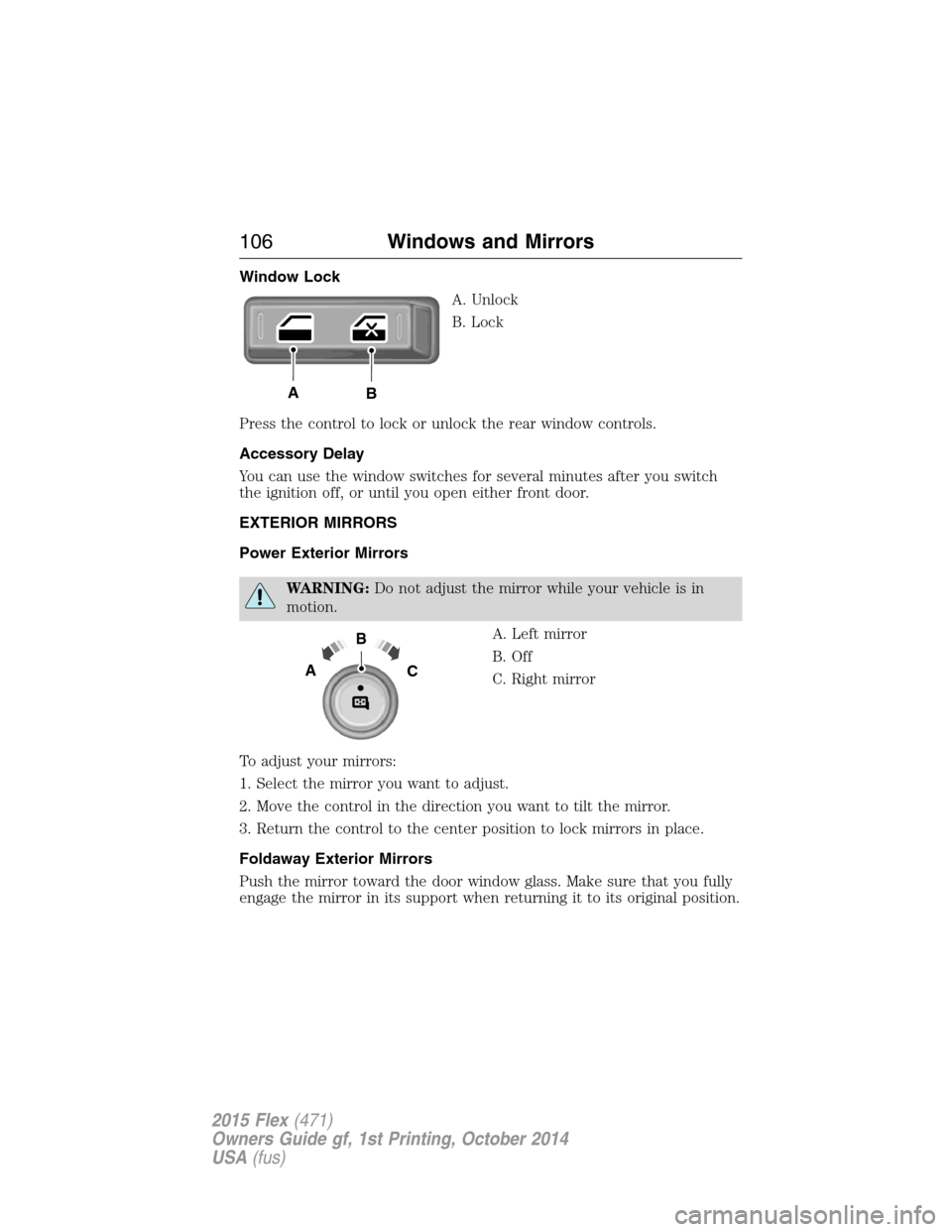
Window Lock
A. Unlock
B. Lock
Press the control to lock or unlock the rear window controls.
Accessory Delay
You can use the window switches for several minutes after you switch
the ignition off, or until you open either front door.
EXTERIOR MIRRORS
Power Exterior Mirrors
WARNING:Do not adjust the mirror while your vehicle is in
motion.
A. Left mirror
B. Off
C. Right mirror
To adjust your mirrors:
1. Select the mirror you want to adjust.
2. Move the control in the direction you want to tilt the mirror.
3. Return the control to the center position to lock mirrors in place.
Foldaway Exterior Mirrors
Push the mirror toward the door window glass. Make sure that you fully
engage the mirror in its support when returning it to its original position.
AB
B
AC
106Windows and Mirrors
2015 Flex(471)
Owners Guide gf, 1st Printing, October 2014
USA(fus)
Page 110 of 571

Blind Spot Information System (BLIS®) with Cross Traffic Alert
(CTA) (If Equipped)
Refer toBlind Spot Information System (BLIS®) with Cross Traffic
Alert (CTA)in theDriving Aidschapter.
INTERIOR MIRROR
WARNING:Do not adjust the mirror when your vehicle is
moving.
Note:Do not clean the housing or glass of any mirror with harsh
abrasives, fuel or other petroleum or ammonia based cleaning products.
You can adjust the interior mirror to your preference. Some mirrors also
have a second pivot point. This lets you move the mirror head up or
down and from side to side.
Auto-Dimming Mirror
Note:Do not block the sensors on the front and back of the mirror.
Mirror performance may be affected. A rear center passenger or raised
rear center head restraint may also block light from reaching the sensor.
The mirror will dim automatically to reduce glare when bright lights are
detected from behind your vehicle. It will automatically return to normal
reflection when you select reverse gear to make sure you have a clear
view when backing up.
Windows and Mirrors109
2015 Flex(471)
Owners Guide gf, 1st Printing, October 2014
USA(fus)
Page 116 of 571

Anti-lock brake system
If the ABS light stays illuminated or continues to flash, a
malfunction has been detected. Contact your authorized dealer
as soon as possible. Normal braking is still functional unless the
brake warning light also is illuminated.
Brake system warning light
To confirm the brake system warning light is functional, it will
momentarily illuminate when the ignition is turned to the on
position when the engine is not running, or in a position
between on and start, or by applying the parking brake when the ignition
is turned to the on position.
If it illuminates when you are driving, check that the parking brake is not
engaged. If the parking brake is not engaged, this indicates low brake
fluid level or a brake system malfunction. Have the system checked
immediately by your authorized dealer.
WARNING:Driving a vehicle with the brake system warning
light on is dangerous. A significant decrease in braking
performance may occur. It will take you longer to stop the vehicle.
Have the vehicle checked by your authorized dealer as soon as possible.
Driving extended distances with the parking brake engaged can cause
brake failure and the risk of personal injury.
Charging system (RTT)
Illuminates when the battery is not charging properly. If it stays
on while the engine is running, there may be a malfunction with
the charging system. Contact your authorized dealer as soon as
possible. This indicates a problem with the electrical system or a related
component.
Door ajar (RTT)
Displays when the ignition is on and any door is not completely
closed.
Instrument Cluster11 5
2015 Flex(471)
Owners Guide gf, 1st Printing, October 2014
USA(fus)
Page 123 of 571
Settings
Display Language Select your applicable language
Units Distance Miles and Gallons or km/L
or L/100km
Temperature Fahrenheit (°F) or Celsius
(°C)
Convenience Autolamp
DelayOff or number of seconds
Compass Display
Calibrate (if
equipped)Hold OK to Calibrate
Zone (1–15)
DTE
CalculationNormal or Towing
Easy Entry/Exit — check enabled / uncheck disabled
Locks Autolock
Autounlock
Remote
UnlockAll Doors or Driver First
Oil life Reset Set XXX%
Power
LiftgateSwitch Enabled or Disabled
Remote Start Climate
ControlAuto or Last Settings
Seats and
Wheel or
SeatsAutoorOff
Duration (5, 10 or 15 minutes)
System
Windows Remote Open
Wipers Courtesy Wipe
Rain Sensing
122Information Displays
2015 Flex(471)
Owners Guide gf, 1st Printing, October 2014
USA(fus)
Page 129 of 571
Settings
Vehicle DTE Calculation Normal / Towing
Easy Entry/Exit — check enabled / uncheck
disabled
Lighting Autolamp Delay Off or number
of seconds
Locks Autolock On / Off
Autounlock On / Off
Remote
UnlockingAll doors /
Driver’s door
Oil Life Reset Remaining Life XXX %
Power Liftgate Enable / Disable
Remote StartClimate Control
(using this
feature allows
you to select
different climate
control modes
when the
vehicle is
started using
the remote start
feature)Auto / Last
Settings
Front Seats Auto / Off
Duration 5 / 10
/15 minutes
System — check enabled
(default) / uncheck disabled
Windows Remote Open or Remote Close
WipersCourtesy Wipe — check enabled
(default) / uncheck disabled
Rain Sensing On / Off
128Information Displays
2015 Flex(471)
Owners Guide gf, 1st Printing, October 2014
USA(fus)
Page 131 of 571

INFORMATION MESSAGES
Note:Depending on the vehicle options equipped with your vehicle, not
all of the messages will display or be available. Certain messages may be
abbreviated or shortened depending upon which cluster type you have.
Press the OK button to
acknowledge and remove some
messages from the information
display. Other messages will be
removed automatically after a short
time. When a warning message
appears, you must wait two seconds
before being able to clear it. Certain
messages need to be confirmed before you can access the menus.
Message indicators:Some messages will be supplemented by a system
specific symbol.
Adaptive Cruise
Control MessagesAction / Description
Adaptive Cruise
MalfunctionDisplayed when a radar malfunction is
preventing the ACC from engaging.
Adaptive Cruise Not
AvailableDisplayed when conditions exist such that the
adaptive cruise cannot function properly.
Adaptive Cruise Not
Available Sensor
BlockedDisplayed when the radar is blocked because
of poor radar visibility due to bad weather or
ice/mud/water in front of radar. Driver can
typically clean the sensor to resolve.
AdvanceTrac® /
Traction Control
MessagesAction / Description
Service AdvanceTrac Displayed when the AdvanceTrac® system has
detected a condition that requires service.
Contact your authorized dealer as soon as
possible.
Traction control off Displayed when the traction control has been
disabled by the driver.
Trailer Sway Reduce
SpeedDisplayed when the trailer sway control has
detected trailer sway.
130Information Displays
2015 Flex(471)
Owners Guide gf, 1st Printing, October 2014
USA(fus)