Page 102 of 571

DAYTIME RUNNING LAMPS (IF EQUIPPED)
WARNING:Always remember to turn on your headlamps at
dusk or during inclement weather. The Daytime Running Lamp
(DRL) system does not activate the tail lamps and generally may not
provide adequate lighting during these conditions. Failure to activate
your headlamps under these conditions may result in a collision.
The system switches the headlamps on with a reduced output (vehicles
equipped with halogen headlamps) or turns the front fog lamps on
(vehicles equipped with HID headlamps).
To switch the system on:
1. Switch the ignition on.
2. Switch the lighting control to the off, autolamp or parking lamp position.
3. Make sure the transmission selector lever is not in position P.
4. Make sure the parking brake is disengaged.
AUTOMATIC HIGH BEAM CONTROL (IF EQUIPPED)
The system will automatically turn on your high beams if it is dark
enough and no other traffic is present. When it detects an approaching
vehicle’s headlights, a preceding vehicle’s tail lamps or street lighting, the
system will turn off the high beams (low beams remain on) before they
distract other drivers.
Note:If it appears that automatic control of the high beams is not
functioning properly, check the windshield in front of the camera for
blockage. A clear view of the road is required for proper system
operation. Any windshield damage in the area of the camera field-of-view
should be repaired.
Note:If a blockage is detected (e.g. bird dropping, bug splatter, snow, or
ice) and no changes are observed, the system will go into low beam
mode until the blockage is cleared. A message may also appear in the
instrument cluster display noting the front camera is blocked.
Note:Typical road dust, dirt and water spots will not affect the
automatic high beam system’s performance. However, in cold or
inclement weather conditions, the automatic high beam system’s
availability may be decreased. If the driver wants to change the beam
state independently of the system, the driver may turn the high beams
on or off using the multifunction switch stalk. Automatic control will
resume when conditions are correct.
Lighting101
2015 Flex(471)
Owners Guide gf, 1st Printing, October 2014
USA(fus)
Page 105 of 571
INTERIOR LAMPS
Front map lamps
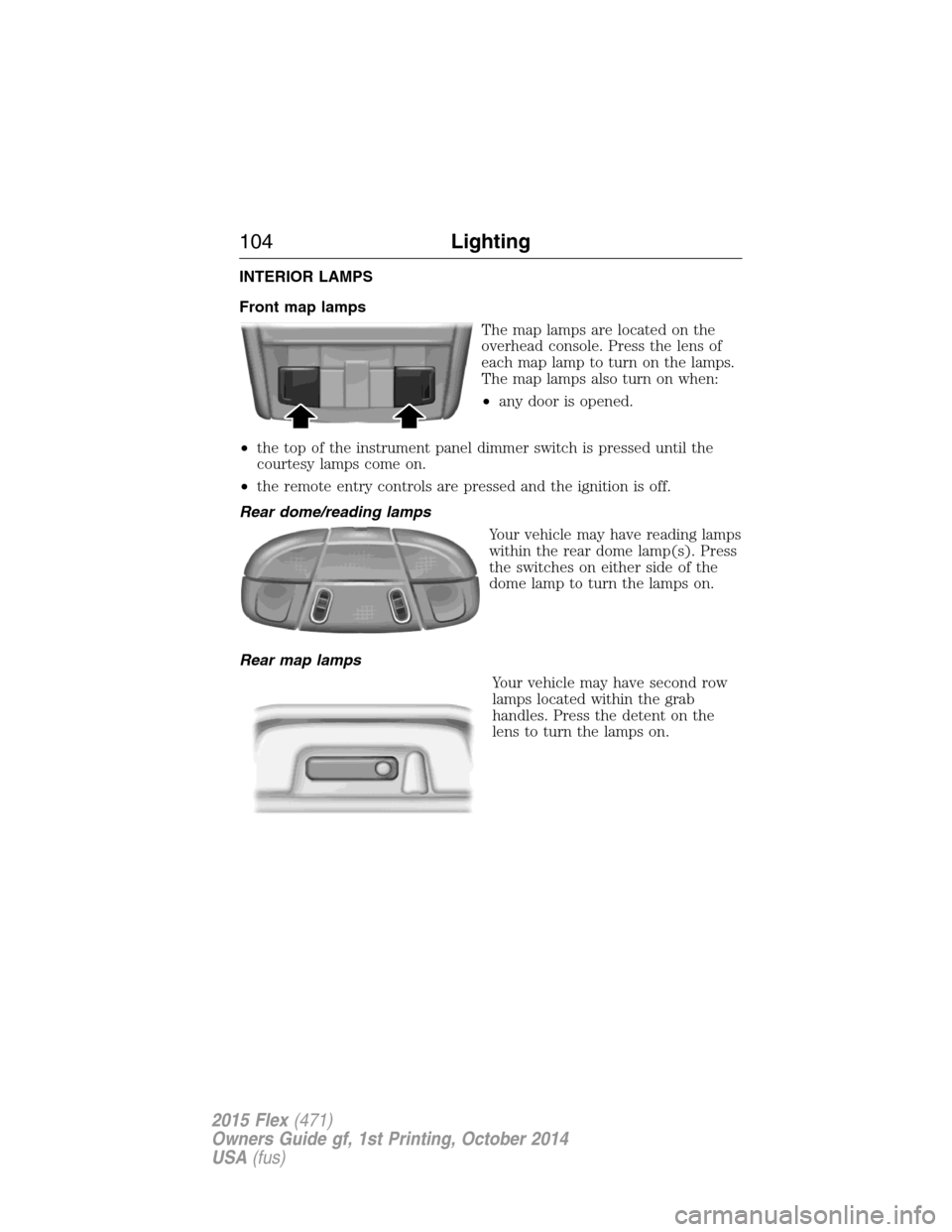
The map lamps are located on the
overhead console. Press the lens of
each map lamp to turn on the lamps.
The map lamps also turn on when:
•any door is opened.
•the top of the instrument panel dimmer switch is pressed until the
courtesy lamps come on.
•the remote entry controls are pressed and the ignition is off.
Rear dome/reading lamps
Your vehicle may have reading lamps
within the rear dome lamp(s). Press
the switches on either side of the
dome lamp to turn the lamps on.
Rear map lamps
Your vehicle may have second row
lamps located within the grab
handles. Press the detent on the
lens to turn the lamps on.
104Lighting
2015 Flex(471)
Owners Guide gf, 1st Printing, October 2014
USA(fus)
Page 107 of 571
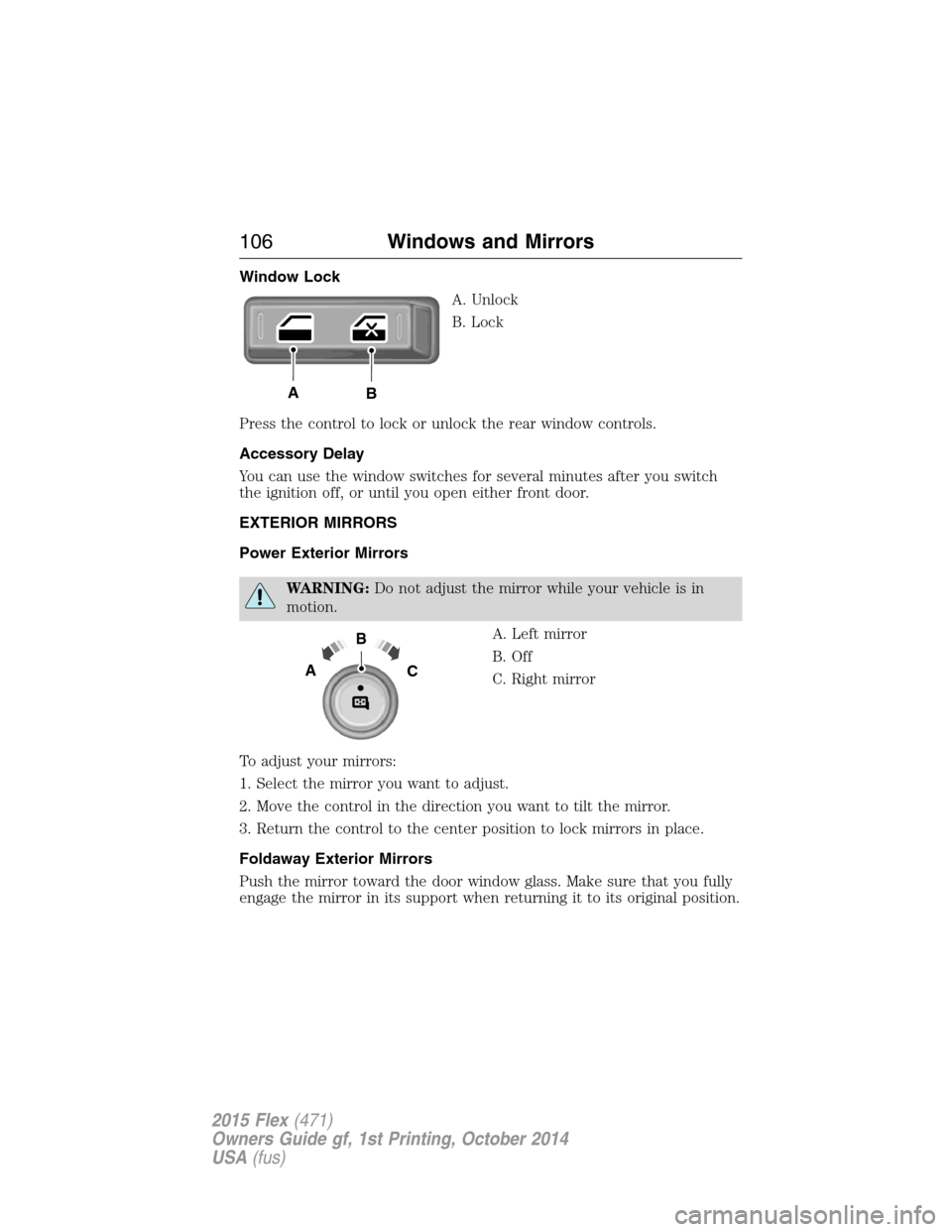
Window Lock
A. Unlock
B. Lock
Press the control to lock or unlock the rear window controls.
Accessory Delay
You can use the window switches for several minutes after you switch
the ignition off, or until you open either front door.
EXTERIOR MIRRORS
Power Exterior Mirrors
WARNING:Do not adjust the mirror while your vehicle is in
motion.
A. Left mirror
B. Off
C. Right mirror
To adjust your mirrors:
1. Select the mirror you want to adjust.
2. Move the control in the direction you want to tilt the mirror.
3. Return the control to the center position to lock mirrors in place.
Foldaway Exterior Mirrors
Push the mirror toward the door window glass. Make sure that you fully
engage the mirror in its support when returning it to its original position.
AB
B
AC
106Windows and Mirrors
2015 Flex(471)
Owners Guide gf, 1st Printing, October 2014
USA(fus)
Page 113 of 571
GAUGES
Type 1
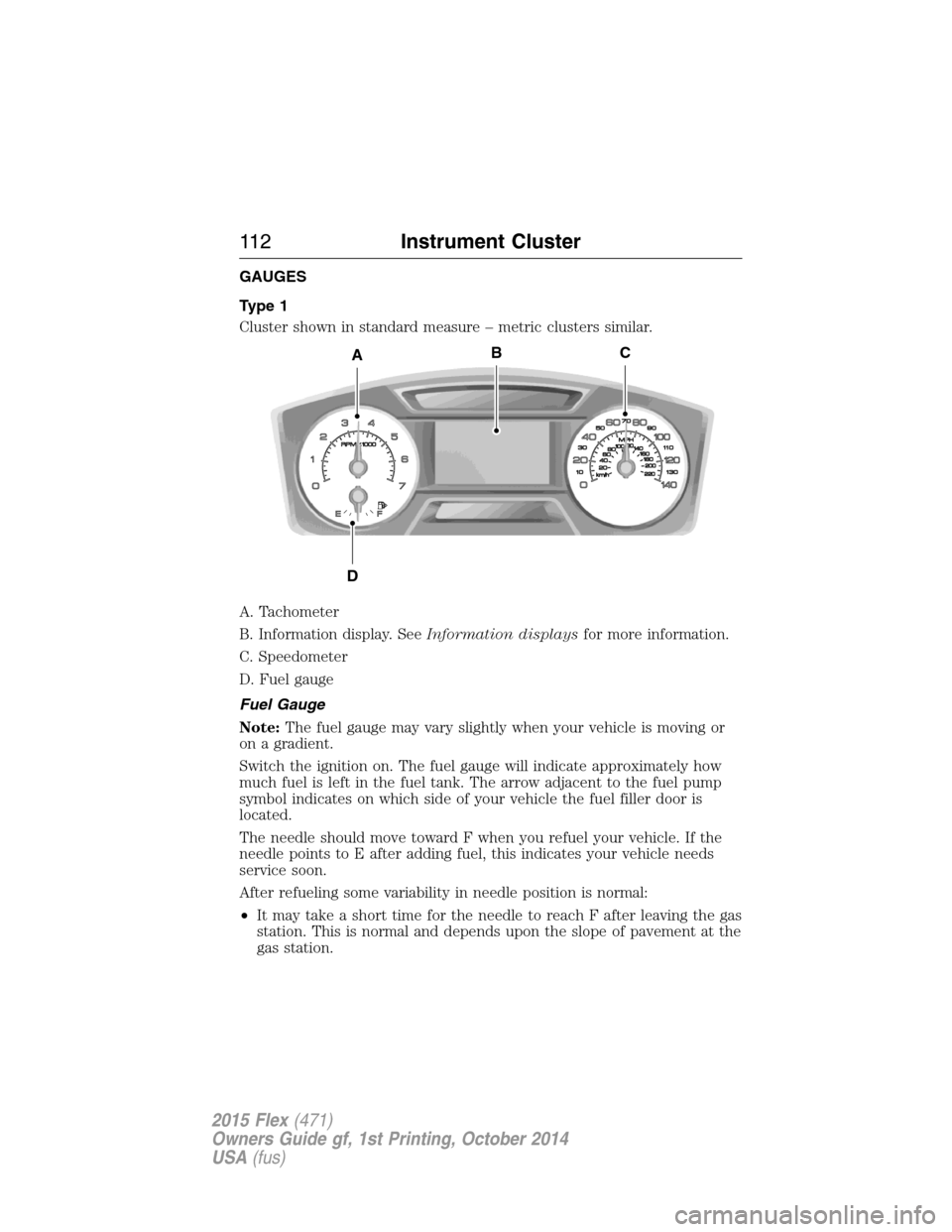
Cluster shown in standard measure – metric clusters similar.
A. Tachometer
B. Information display. SeeInformation displaysfor more information.
C. Speedometer
D. Fuel gauge
Fuel Gauge
Note:The fuel gauge may vary slightly when your vehicle is moving or
on a gradient.
Switch the ignition on. The fuel gauge will indicate approximately how
much fuel is left in the fuel tank. The arrow adjacent to the fuel pump
symbol indicates on which side of your vehicle the fuel filler door is
located.
The needle should move toward F when you refuel your vehicle. If the
needle points to E after adding fuel, this indicates your vehicle needs
service soon.
After refueling some variability in needle position is normal:
•It may take a short time for the needle to reach F after leaving the gas
station. This is normal and depends upon the slope of pavement at the
gas station.
A
D
CB
11 2Instrument Cluster
2015 Flex(471)
Owners Guide gf, 1st Printing, October 2014
USA(fus)
Page 115 of 571

WARNING LAMPS AND INDICATORS
There indicators can alert you to a vehicle condition that may become
serious enough to cause expensive repairs. Many lights will illuminate
when you start your vehicle to make sure they work. If any light remains
on after starting the vehicle, refer to the respective system warning light
for additional information.
Note:Some warning indicators are reconfigurable telltales (RTT). These
indicators appear in the information display and function the same as a
warning light, but do not display on startup.
Adaptive cruise control (if equipped) (RTT)
The speed control system indicator light changes color to indicate what
mode the system is in:
•On (white light): Illuminates when the adaptive cruise control system
is turned on. Turns off when the speed control system is turned off.
•Engaged (green light): Illuminates when the adaptive cruise control
system is engaged. Turns off when the speed control system is
disengaged.
Stability Control System
Displays when the AdvanceTrac®/Traction control is active. If
the light remains on, have the system serviced immediately.
Stability Control System Off
Illuminates when AdvanceTrac®/Traction control has been
disabled by the driver.
Airbag readiness
If this light fails to illuminate when the ignition is turned on,
continues to flash or remains on, contact your authorized dealer
as soon as possible. A chime will sound when there is a
malfunction in the indicator light.
11 4Instrument Cluster
2015 Flex(471)
Owners Guide gf, 1st Printing, October 2014
USA(fus)
Page 116 of 571

Anti-lock brake system
If the ABS light stays illuminated or continues to flash, a
malfunction has been detected. Contact your authorized dealer
as soon as possible. Normal braking is still functional unless the
brake warning light also is illuminated.
Brake system warning light
To confirm the brake system warning light is functional, it will
momentarily illuminate when the ignition is turned to the on
position when the engine is not running, or in a position
between on and start, or by applying the parking brake when the ignition
is turned to the on position.
If it illuminates when you are driving, check that the parking brake is not
engaged. If the parking brake is not engaged, this indicates low brake
fluid level or a brake system malfunction. Have the system checked
immediately by your authorized dealer.
WARNING:Driving a vehicle with the brake system warning
light on is dangerous. A significant decrease in braking
performance may occur. It will take you longer to stop the vehicle.
Have the vehicle checked by your authorized dealer as soon as possible.
Driving extended distances with the parking brake engaged can cause
brake failure and the risk of personal injury.
Charging system (RTT)
Illuminates when the battery is not charging properly. If it stays
on while the engine is running, there may be a malfunction with
the charging system. Contact your authorized dealer as soon as
possible. This indicates a problem with the electrical system or a related
component.
Door ajar (RTT)
Displays when the ignition is on and any door is not completely
closed.
Instrument Cluster11 5
2015 Flex(471)
Owners Guide gf, 1st Printing, October 2014
USA(fus)
Page 117 of 571

Engine oil pressure (RTT)
Illuminates when the oil pressure falls below the normal range.
Engine coolant temperature (RTT)
Illuminates when the engine coolant temperature is high. Stop
the vehicle as soon as possible, switch off the engine and let
cool.
Fog lamps (if equipped)
Illuminates when the fog lamps are turned on.
Grade assist and overdrive cancel (if equipped) (RTT)
Illuminates when grade assist is turned on.
Heads up display (if equipped)
A red beam of lights will illuminate on the windshield in certain
instances when using adaptive cruise control and/or the
collision warning system. It will also illuminate momentarily
when you start your vehicle to make sure the display works.
High beams
Illuminates when the high-beam headlamps are on.
Low fuel (RTT)
Illuminates when the fuel level in the fuel tank is at or near
empty.
Liftgate ajar (RTT)
Illuminates when the ignition is on and liftgate is not
completely closed.
11 6Instrument Cluster
2015 Flex(471)
Owners Guide gf, 1st Printing, October 2014
USA(fus)
Page 118 of 571
Low tire pressure warning
Illuminates when your tire pressure is low. If the light remains
on at start up or while driving, the tire pressure should be
checked. When the ignition is first turned to on, the light will
illuminate for 3 seconds to ensure the warning light is functional. If the
light does not turn on or begins to flash, contact an authorized dealer as
soon as possible.
Low washer fluid (RTT)
Illuminates when the windshield washer fluid is low.
Park lamps
Illuminates when the park lamps are on.
Powertrain malfunction/reduced power (RTT)
Illuminates when a powertrain or an AWD fault has been
detected. Contact your authorized dealer as soon as possible.
Safety belt
Reminds you to fasten your safety belt. A Belt-Minder® chime
will also sound to remind you to fasten your safety belt.
Instrument Cluster11 7
2015 Flex(471)
Owners Guide gf, 1st Printing, October 2014
USA(fus)