2015 FORD F250 instrument cluster
[x] Cancel search: instrument clusterPage 175 of 485
PRINCIPLE OF OPERATION
WARNINGS
Hill descent control cannot control
descent in all surface conditions and
circumstances, such as ice or
extremely steep grades. Hill descent
control is a driver assist system and cannot
substitute for good judgment by the driver.
Failure to do so may result in loss of vehicle
control, crash or serious injury. Hill descent control does not provide
hill hold at zero miles per hour (0
kilometers per hour). When stopped,
the parking brake must be applied or the
vehicle must be placed in P (Park) or it
may roll away. Hill descent control allows the driver to set
and maintain vehicle speed while
descending steep grades in various surface
conditions.
Hill descent control can maintain vehicle
speeds on downhill grades between 2 mph
(3 km/h) and 12 mph (20 km/h). Above 20
mph (32 km/h), the system remains
armed, but descent speed cannot be set
or maintained.
Hill descent control requires a cooling
down interval after a period of sustained
use. The amount of time that the feature
can remain active before cooling varies
with conditions. The system will provide a
warning in the message center and a chime
will sound when the system is about to
disengage for cooling. At this time,
manually apply the brakes as needed to
maintain descent speed. USING HILL DESCENT
CONTROL Press and release the hill
descent button located on the
instrument panel. A light in the
cluster will illuminate and a
chime will sound when this feature is
activated.
To increase descent speed, press the
accelerator pedal until the desired speed
is reached. To decrease descent speed,
press the brake pedal until the desired
speed is reached.
Whether accelerating or decelerating, once
the desired descent speed is reached,
remove your feet from the pedals and the
chosen vehicle speed will be maintained.
Note: Noise from the ABS pump motor may
be observed during hill descent control
operation. This is a normal characteristic of
the ABS and should be no reason for
concern.
Hill descent modes
• At speeds below 20 mph (32 km/h):
When the Hill Descent Control switch
is pressed and Hill Descent Control is
active, the Hill Descent Control telltale
will flash.
• At speeds below 20 mph (32 km/h):
When the Hill Descent Control switch
is pressed and conditions are not
correct for hill descent activation, the
Hill Descent Control system will be
enabled, the Hill Descent Control
telltale will be solid and a message will
display in the information display.
172
Super Duty (), enUSA Terrain Response
(If Equipped)E163957
Page 181 of 485
PRINCIPLE OF OPERATION
Cruise control lets you maintain a set
speed without keeping your foot on the
accelerator pedal. You can use cruise
control when your vehicle speed is greater
than 20 mph (30 km/h).
USING CRUISE CONTROL WARNINGS
Do not use cruise control in heavy
traffic, on winding roads or when the
road surface is slippery. This could
result in loss of vehicle control, serious
injury or death. When you are going downhill, your
vehicle speed may increase above
the set speed. The system will not
apply the brakes. Change down a gear to
assist the system in maintaining the set
speed. Failure to do so could result in loss
of vehicle control, serious injury or death. Note:
Cruise control will disengage if the
vehicle speed decreases more than 10 mph
(16 km/h) below your set speed while
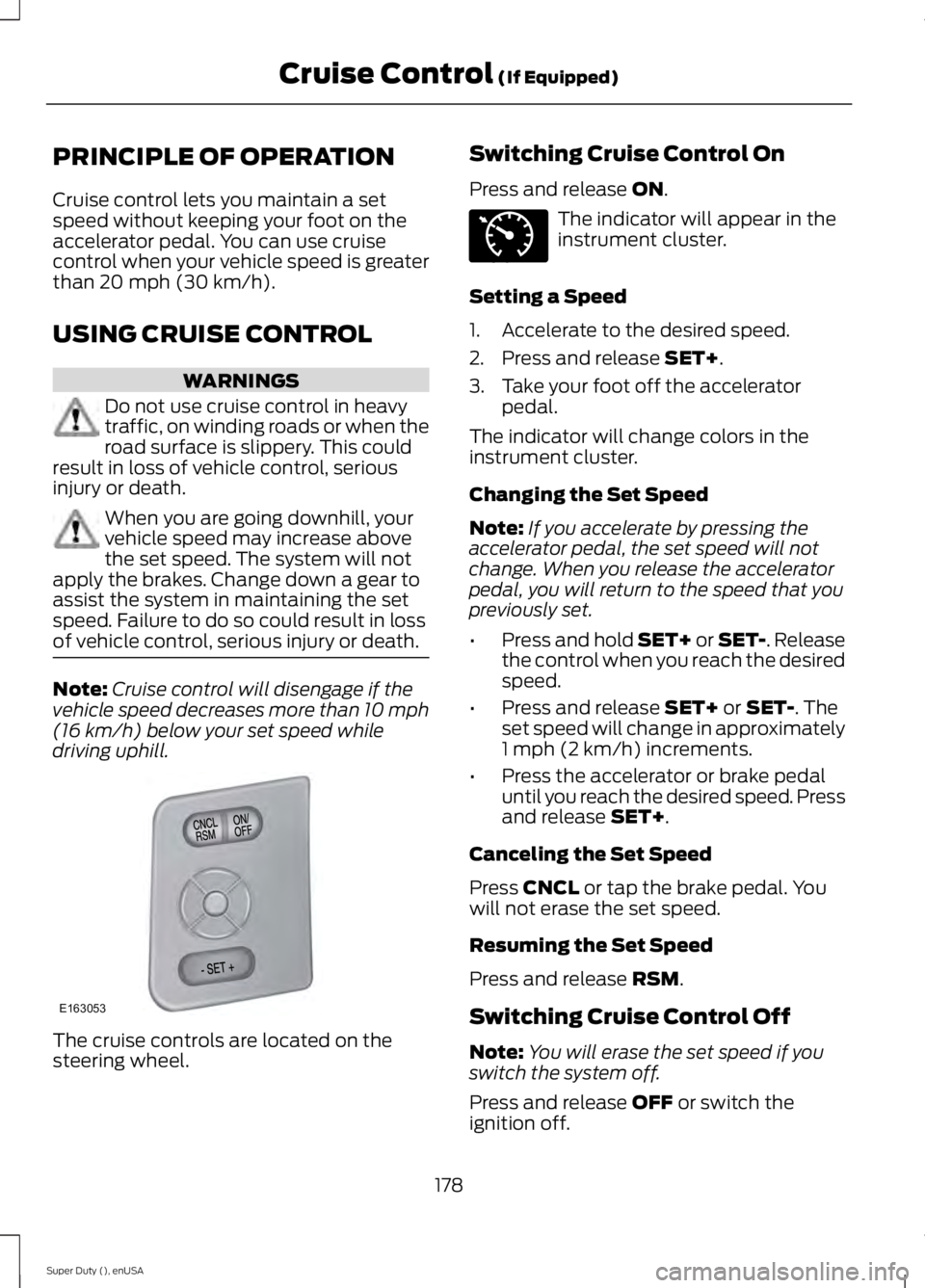
driving uphill. The cruise controls are located on the
steering wheel. Switching Cruise Control On
Press and release
ON. The indicator will appear in the
instrument cluster.
Setting a Speed
1. Accelerate to the desired speed.
2. Press and release
SET+.
3. Take your foot off the accelerator pedal.
The indicator will change colors in the
instrument cluster.
Changing the Set Speed
Note: If you accelerate by pressing the
accelerator pedal, the set speed will not
change. When you release the accelerator
pedal, you will return to the speed that you
previously set.
• Press and hold SET+ or SET-. Release
the control when you reach the desired
speed.
• Press and release
SET+ or SET-. The
set speed will change in approximately
1 mph (2 km/h) increments.
• Press the accelerator or brake pedal
until you reach the desired speed. Press
and release
SET+.
Canceling the Set Speed
Press
CNCL or tap the brake pedal. You
will not erase the set speed.
Resuming the Set Speed
Press and release
RSM.
Switching Cruise Control Off
Note: You will erase the set speed if you
switch the system off.
Press and release
OFF or switch the
ignition off.
178
Super Duty (), enUSA Cruise Control
(If Equipped)E163053 E71340
Page 232 of 485

Protected components
Fuse amp rating
Fuse or relay number
Power mirror switch
10A
8
Auxiliary switch relay #3
10A
9
Customer access feed
10A
10
Run/accessory relay
Instrument cluster
10A
11
Interior lighting
15A
12
Lighted running board lamps
Right turn signals and brake lamps
15A
13
Left turn signals and brake lamps
15A
14
Backup lamps, Trailer tow backup relay
15A
15
High-mounted stop lamps
Reverse signal interior mirror
Right low beam headlamp
10A
16
Left low beam headlamp
10A
17
Brake shift interlock
10A
18
Keypad illumination
Passive anti-theft transceiver
Powertrain control module
Amplifier
20A
19
Subwoofer
Power door locks
20A
20
Brake on/off switch
10A
21
Horn
20A
22
Not used (spare)
15A
23
Diagnostic connector
15A
24
Electronic finish panel
Power fold mirror relay
Remote keyless entry
Steering wheel control module
Not used (spare)
15A
25
Steering wheel control module
5A
26
Not used (spare)
20A
27
229
Super Duty (), enUSA Fuses
Page 243 of 485
5. If the coolant is low, add coolant,
restart the engine and take your vehicle
to an authorized dealer. See Adding
engine coolant in this chapter for more
information. Refer to fail-safe cooling
for additional information.
AUTOMATIC TRANSMISSION
FLUID CHECK
Have an authorized dealer check and
change the transmission fluid and filter at
the correct service interval. See
Scheduled Maintenance (page 457).
Do not use supplemental transmission
fluid additives, treatments or cleaning
agents. The use of these materials may
affect transmission operation and result
in damage to internal transmission
components.
Checking Automatic Transmission
Fluid
For scheduled intervals of the fluid checks
and changes, See
Scheduled
Maintenance (page 457). Your
transmission does not consume fluid.
However, the fluid level should be checked
if the transmission is not working properly,
i.e., if the transmission slips or shifts slowly
or if you notice some sign of fluid leakage.
Automatic transmission fluid expands
when warmed. To obtain an accurate fluid
check, drive the vehicle until it is at normal
operating temperature (approximately
19 mi (30 km)
). Verify that the
transmission fluid temperature gauge,
located on the instrument cluster, is within
normal range.
1. Drive the vehicle
19 (30 km)until it
reaches normal operating temperature.
2. Park the vehicle on a level surface and
engage the parking brake. 3.
With the engine running, parking brake
engaged and your foot on the brake
pedal, move the gearshift lever through
all of the gear ranges. Allow sufficient
time for each gear to engage.
4. Latch the gearshift lever in P and leave
the engine running.
5. Remove the dipstick, wiping it clean with a clean, dry lint free rag. If
necessary, refer to the Under Hood
Overview in this chapter for the
location of the dipstick.
6. Install the dipstick making sure it is fully
seated in the filler tube.
7. Remove the dipstick and inspect the fluid level. The fluid should be in the
designated area for normal operating
temperature or ambient temperature.
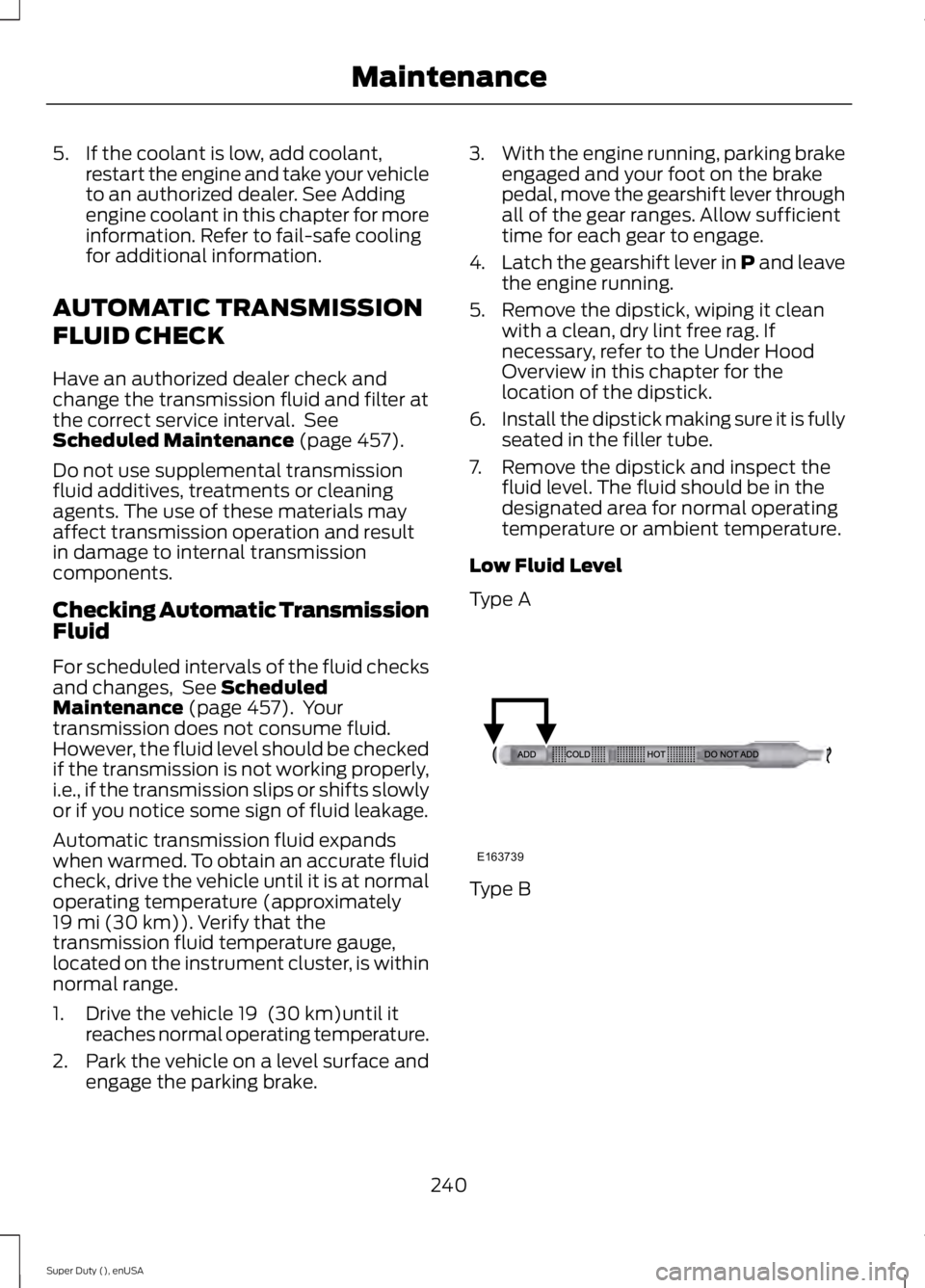
Low Fluid Level
Type A Type B
240
Super Duty (), enUSA MaintenanceE163739
Page 260 of 485
•
Never wash or rinse any ignition coil,
spark plug wire or spark plug well, or
the area in and around these locations.
• Cover the battery, power distribution
box, and air filter assembly to prevent
water damage when cleaning the
engine.
CLEANING THE WINDOWS AND
WIPER BLADES
Car wash chemicals and environmental
fallout can result in windshield and wiper
blade contamination. Dirty windshield and
wipers will result in poor windshield wiper
operation. Keep the windshield and wiper
blades clean to maintain windshield wiper
performance.
To clean the windshield and wiper blades:
• Clean the windshield with a
non-abrasive glass cleaner.
• For windshields contaminated with
tree sap, chemicals, wax or bugs, clean
the entire windshield using steel wool
(no greater than 0000 grade) in a
circular motion and rinse with water.
• Clean the wiper blades with isopropyl
rubbing alcohol or windshield washer
concentrate.
Note: Do not use razor blades or other
sharp objects to clean or remove decals
from the inside of the heated rear window.
The vehicle warranty does not cover
damage caused to the heated rear window
grid lines.
CLEANING THE INTERIOR WARNINGS
Do not use cleaning solvents, bleach
or dye on the vehicle
’s safety belts,
as these actions may weaken the
belt webbing. WARNINGS
On vehicles equipped with
seat-mounted airbags, do not use
chemical solvents or strong
detergents. Such products could
contaminate the side airbag system and
affect performance of the side airbag in a
collision. For fabric, carpets, cloth seats, safety belts
and seats equipped with side airbags:
•
Remove dust and loose dirt with a
vacuum cleaner.
• Remove light stains and soil with
Motorcraft Professional Strength
Carpet & Upholstery Cleaner.
• If grease or tar is present on the
material, spot-clean the area first with
Motorcraft Spot and Stain Remover. In
Canada, use Motorcraft Multi-Purpose
Cleaner.
• If a ring forms on the fabric after spot
cleaning, clean the entire area
immediately (but do not oversaturate)
or the ring will set.
• Do not use household cleaning
products or glass cleaners, which can
stain and discolor the fabric and affect
the flame retardant abilities of the seat
materials.
CLEANING THE INSTRUMENT
PANEL AND INSTRUMENT
CLUSTER LENS WARNING
Do not use chemical solvents or
strong detergents when cleaning the
steering wheel or instrument panel
to avoid contamination of the airbag
system. 257
Super Duty (), enUSA Vehicle Care
Page 261 of 485
Note:
Follow the same procedure as
cleaning leather seats for cleaning leather
instrument panels and leather interior trim
surfaces. See Cleaning Leather Seats
(page 258).
Clean the instrument panel and cluster
lens with a clean, damp and soft cloth,
then use a clean, dry and soft cloth to dry
these areas.
• Avoid cleaners or polishes that increase
the gloss of the upper portion of the
instrument panel. The dull finish in this
area helps protect you from
undesirable windshield reflection.
• Do not use any household cleaning
products or glass cleaners as these
may damage the finish of the
instrument panel, interior trim and
cluster lens.
• Wash or wipe your hands clean if you
have been in contact with certain
products such as insect repellent and
suntan lotion to avoid possible damage
to the interior painted surfaces.
• Do not allow air fresheners and hand
sanitizers to spill onto interior surfaces.
If a spill occurs, wipe off immediately.
Your warranty may not cover these
damages.
If a staining liquid like coffee or juice has
been spilled on the instrument panel or on
interior trim surfaces:
1. Wipe up spilled liquid using a clean, soft cloth as quickly as possible.
2. Use Motorcraft Premium Leather and Vinyl Cleaner or a commercially
available leather cleaning product for
automotive interiors. Test any cleaner
or stain remover on an inconspicuous
area.
3. Alternatively, wipe the surface with a clean, soft cloth and a mild soap and
water solution. Dry the area with a
clean, soft cloth. 4. If necessary, apply more soap and
water solution or cleaning product to
a clean, soft cloth and press it onto the
soiled area. Allow this to set at room
temperature for 30 minutes.
5. Remove the soaked cloth, then with a clean, damp cloth, use a rubbing
motion for 60 seconds on the soiled
area.
6. Dry the area with a clean, soft cloth.
CLEANING LEATHER SEATS
(If
Equipped)
Without King Ranch Edition
Note: Follow the same procedure as
cleaning leather seats for cleaning leather
instrument panels and leather interior trim
surfaces.
For routine cleaning, wipe the surface with
a soft, damp cloth and a mild soap and
water solution. Dry the area with a clean,
soft cloth.
For cleaning and removing spots and stains
such as dye transfer, use Motorcraft
Premium Leather and Vinyl Cleaner or a
commercially available leather cleaning
product for automotive interiors.
Note: Test any cleaner or stain remover on
an inconspicuous area.
You should:
• Remove dust and loose dirt with a
vacuum cleaner.
• Clean and treat spills and stains as
soon as possible.
Do not use the following products as these
may damage the leather:
• Oil and petroleum or silicone-based
leather conditioners.
• Household cleaners.
258
Super Duty (), enUSA Vehicle Care
Page 477 of 485

Center Console..............................................134
Removable Front Cupholders........................ 134
Changing a Bulb...........................................249 Lamp Assembly Condensation.................... 249
Replacing Brake/Tail/Turn/Reverse Lamp Bulbs................................................................. 250
Replacing Cargo Lamp and High-mount Brake Lamp Bulbs........................................ 250
Replacing Fog Lamp Bulbs (If Equipped......................................................... 250
Replacing Front Clearance and Identification Lamp Bulbs (If
Equipped)........................................................ 249
Replacing the License Plate Lamp Bulb..................................................................... 251
Changing a Fuse
............................................231
Fuses........................................................................\
231
Changing a Road Wheel
...........................288
Dissimilar Spare Wheel and Tire Assembly
Information..................................................... 288
Location of the Spare Tire and Tools.........289
Removing the Spare Tire (With Spare Tire Carrier Only)................................................... 290
Tire Change Procedure..................................... 291
Changing the 12V Battery.........................244 Battery Management System (If
Equipped)........................................................ 245
Changing the Engine Air Filter.................253
Changing the Wiper Blades.....................246
Checking MyKey System Status...............53
Checking the Wiper Blades.....................246
Child Restraint and Safety Belt Maintenance.................................................35
Child Safety
.......................................................15
General Information............................................. 15
Child Safety Locks..........................................27
Child Seat Positioning..................................26
Cleaning Leather Seats
.............................258
With King Ranch Edition................................. 259
Without King Ranch Edition.......................... 258
Cleaning Products
.......................................255
Cleaning the Alloy Wheels.......................260
Cleaning the Engine
....................................256
Cleaning the Exterior..................................255 Exterior Chrome Parts...................................... 255
Exterior Plastic Parts........................................ 256
Stripes or Graphics............................................ 256
Underbody........................................................... 256Cleaning the Instrument Panel and
Instrument Cluster Lens.........................257
Cleaning the Interior....................................257
Cleaning the Windows and Wiper Blades............................................................257
Clearing All MyKeys.......................................53
Climate..............................................................411 Climate Control Voice Commands..............413
Climate Control
............................................106
Climate Controlled Seats...........................121 Cooled Seats......................................................... 121
Heated Seats......................................................... 121
Coolant Check See: Engine Coolant Check............................ 236
Crash Sensors and Airbag Indicator
........45
Creating a MyKey.............................................51 Programming/Changing Configurable
Settings............................................................... 52
Cruise Control
..................................................63
Principle of Operation....................................... 178
Cruise control See: Using Cruise Control................................ 178
Customer Assistance
...................................217
D
Data Recording
..................................................9
Event Data Recording.......................................... 10
Service Data Recording........................................ 9
Daytime Running Lamps
............................68
Digital Radio...................................................316 HD Radio Reception and Station
Troubleshooting.............................................. 317
Direction Indicators.......................................69 Lane Change.......................................................... 69
Driver and Passenger Airbags....................37 Children and Airbags........................................... 42
Driver and Front Passenger Seating Adjustment........................................................ 37
Passenger Airbag On and Off Switch ..........37
Driving Aids
......................................................179
Driving Hints...................................................207
Driving Through Water..............................208
DRL See: Daytime Running Lamps........................ 68
474
Super Duty (), enUSA Index
Page 480 of 485

Information....................................................402
911 Assist.............................................................. 408
Alerts..................................................................... 408
Calendar............................................................... 408
Sirius Travel Link................................................ 405
SYNC Services (If Equipped, United States Only)................................................................. 403
Vehicle Health Report (If Equipped, United States Only).................................................... 410
Information Messages.................................95
4WD........................................................................\
104
AdvanceTrac ™...................................................... 95
Alarm........................................................................\
95
Diesel Messages................................................... 96
Doors and Locks................................................... 99
Drivetrain................................................................. 99
Engine..................................................................... 100
Fuel........................................................................\
.. 100
Key........................................................................\
..... 101
Maintenance......................................................... 101
MyKey®................................................................... 101
Off Road................................................................ 103
Park Aid.................................................................. 102
Park Brake............................................................. 102
Power Steering.................................................... 102
Tire Pressure Monitoring System.................103
Trailer...................................................................... 104
Installing Child Seats.....................................16 Child Seats............................................................... 16
Tether Strap Attachment.................................. 22
Tether Strap Attachment (Rear SuperCab Only)..................................................................... 23
Using Cinch Tongue Lap and Shoulder Belts (All Front Center, Super Cab and Crew
Cab Rear Center Positions).......................... 19
Using Lap and Shoulder Belts.......................... 17
Using Lower Anchors and Tethers for CHildren (LATCH)............................................. 21
Using Tether Straps.............................................. 21
Instrument Cluster
.........................................77
Instrument Lighting Dimmer.....................68
Interior Lamps
.................................................69
Front Map Lamps (If equipped).................... 69
Rear Dome and Map Lamps............................ 70
Interior Mirror
....................................................74
Auto-Dimming Mirror.......................................... 74
Introduction.........................................................7 J
Jump Starting the Vehicle.........................214
Connecting the Jumper Cables..................... 214
Jump Starting....................................................... 215
Preparing Your Vehicle...................................... 214
Removing the Jumper Cables........................ 215
K
Keyless Entry....................................................57 SECURICODE™ KEYLESS ENTRY
KEYPAD
............................................................... 57
Keys and Remote Controls.........................47
L
Lighting Control...............................................67 Headlamp Flasher................................................ 67
High Beams............................................................ 67
Lighting...............................................................67
Limited Slip Differential.............................162
Load Carrying
................................................180
Load Limit.......................................................180
Special Loading Instructions for Owners of
Pick-up Trucks and Utility-type
Vehicles.............................................................. 187
Vehicle Loading - with and without a Trailer................................................................. 180
Locking and Unlocking
.................................56
Autolock and Autounlock................................. 56
Battery Saver.......................................................... 57
Illuminated Entry................................................... 57
Power Door Locks................................................ 56
Remote Control.................................................... 56
Smart Unlocks...................................................... 56
Locks
...................................................................56
Lug Nuts See: Changing a Road Wheel....................... 288
M
Maintenance..................................................232 General Information.......................................... 232
Manual Climate Control
............................106
477
Super Duty (), enUSA Index