Page 116 of 549
Settings
65, 70, 75, 80 MPH (105, 115, 120, 130 km/
h) or Off
MAX Speed
45, 55 or 65 MPH (75, 90, 100 km/h) or
Off
Speed Minder
Volume Limiter - check enabled or uncheck disabled
Hold OK to Clear MyKeys
Clear MyKey
Miles & Gallons, L/100km or km/L
Distance
Display
Setup
°Fahrenheit or °Celsius
Temperature
psi, kPa or bar
Tire Pressure
Choose your applicable setting
Language
Information Display Controls
(Type 3) (If Equipped) •
Press the up and down arrow buttons
to scroll through and highlight the
options within a menu.
• Press the right arrow button to enter a
sub-menu.
• Press the left arrow button to exit a
menu.
• Press the
OK button to choose and
confirm a setting or messages.
Main menu
You can access the menus using the
information display control. My View
Trip/Fuel
Truck Info
Towing
Off Road
113
F-150 (), enUSA, First Printing Information DisplaysE176093 E176094 E176095 E163181 E176096 E176097
Page 117 of 549
Settings
My View Use the arrow buttons to choose
between the following My View
options.
My View
Trip 1
Trip/Fuel
Add/Remove
Screens
Configure My View
Trip 2
Fuel Economy
Fuel History
Navigation/Compass
Auto StartStop
Tire Pressure Monitor
Truck Info
Digital Speedometer
Engine Information
MyKey Status
Trailer Status
Towing
Trailer Information
Trailer Light Check
Off Road Status
Off Road
Power Distribution
Up/Down moves selec-
tion in the list
Screen Selection 1
- 7
Reorder Screens
Press OK to select
Trip/Fuel Use the arrow buttons to choose
between the following trip and
fuel options.
114
F-150 (), enUSA, First Printing Information DisplaysE176098 E176094 E176095
Page 119 of 549

Truck Info
Engine Information - Oil Life, Engine Hours, Engine Idle Hours - Hold OK to Reset
MyKey Status - Admin Keys, MyKeys and MyKey Mileage
• Gauge View - Shows the turbo boost or transmission temp value.
• Tire Pressure - Shows the tire pressure psi.
• Digital Speedometer - Shows a digital display of your vehicle speed.
• Engine Information - Shows engine information.
• MyKey Status - Shows the status of your MyKeys.
Tire Pressure Displays your current vehicle tire pressures.
Towing Use the arrow buttons to choose
between the following towing
options.
Note: Trailer options are not available if your vehicle speed is greater than 3mph (5km/h). Towing
Pitch Angle, sterring angle, gain and output display
Towing
Status
Trailer Name, Accumulated Miles - Press OK for Trailer Options
Towing
Informa-
tion
Running, Brake/Turn Signal Light Status or No Trailer Detected
Trailer
Light
Check
Trailer Sway Control - check enabled or uncheck disabled
Trailer
Setup -
Press OK
for Trailer
Options
116
F-150 (), enUSA, First Printing Information DisplaysE184771 E176096
Page 120 of 549
Towing
no active trailer
Change Trailer Selected
Programmed trailers
Default TrailerList of named
trailers, No Stored
Trailers - Press OK
to rename
Rename Trailer
Change Trailer Settings
List of named or
default trailers -
Press OK to select
Reset Trailer
Mileage
Default (Electric,
Surge, None) or
Electric over
Hydraulic
Change Trailer
Brake
List of named
trailers, No stored
trailers - Press OK
to select
Delete Trailer
Conventional, Fifth
Wheel or Goose-
neck
Change Trailer
Setup
New Trailer - Press OK to select
Add Trailer
Default (Electric,
Surge, None) or
Electric over
Hydraulic
Trailer Brake Mode
Conventional, Fifth Wheel or Gooseneck - Press OK to Select
Connec-
tion Check-
list
Off Road Use the arrow buttons to choose
between the following off road
options.
117
F-150 (), enUSA, First Printing Information DisplaysE176097
Page 121 of 549

Off Road
Pitch, steering angle, roll, Elocker and 4X4
Power Distribution
Settings Use the arrow buttons to
configure different driver setting
choices.
Note:
Some items are optional and may
not appear. Settings
Auto High Beam - check enabled or uncheck disabled
Blindspot - check enabled or uncheck disabled
Cross Traffic Alert - check enabled or uncheck disabled
Driver Alert - check enabled or uncheck disabled
Rear Park Aid - check enabled or uncheck disabled High, Normal or Low
Sensitivity
Collision
Warn
On or Off
Warn
Adaptive or Normal
Cruise
Control
Alert only, Aid only or both
Mode
Lane keeping
Sys
High, Normal or Low
Intensity
Normal or Towing
DTE Calcula-
tion
Auto Engine Off - check enabled or uncheck disabled
Vehicle
Easy Entry/Exit - check enabled or uncheck disabled Off or XXX
seconds
Autolamp Delay
Lighting
Daytime Lights - check enabled or
uncheck disabled
Autounlock - check enabled or uncheck
disabled
Locks
118
F-150 (), enUSA, First Printing Information DisplaysE176098
Page 128 of 549

Action
Message
An electronic locking differential (ELD) system fault ispresent. See Using Four-Wheel Drive (page 182).
Check Locking Differen-
tial
The transfer case is in the neutral position. This message
indicates that your vehicle is safe to be towed with all four wheels on the ground.
Neutral Tow Enabled
Leave Transmission in Neutral
The transfer case is NOT in the neutral position. This messageindicates that your vehicle is NOT safe to be towed with all four wheels on the ground.
Neutral Tow Disabled
Engine Action
Message
The engine has reduced power to help reduce highengine temperature.
Power Reduced to Lower Engine
Temp
Fuel Action
Message
An early reminder of a low fuel condition.
Fuel Level Low
The fuel fill inlet may not be properly closed.
Check Fuel Fill Inlet
Keys and Intelligent Access Action
Message
A reminder to press the brake while starting the vehicle.
Press Brake to START
The system does not detect a key in your vehicle. See KeylessStarting
(page 160).
No Key Detected
You pressed the StartStop button to switch off the engine
and your vehicle does not detect your intelligent access key inside your vehicle.
Restart Now or Key is
Needed
Your vehicle is in the run ignition state.
Run Power Active
There is a problem with your vehicle ’s starting system. See
an authorized dealer for service.
Starting System Fault
125
F-150 (), enUSA, First Printing Information Displays
Page 134 of 549
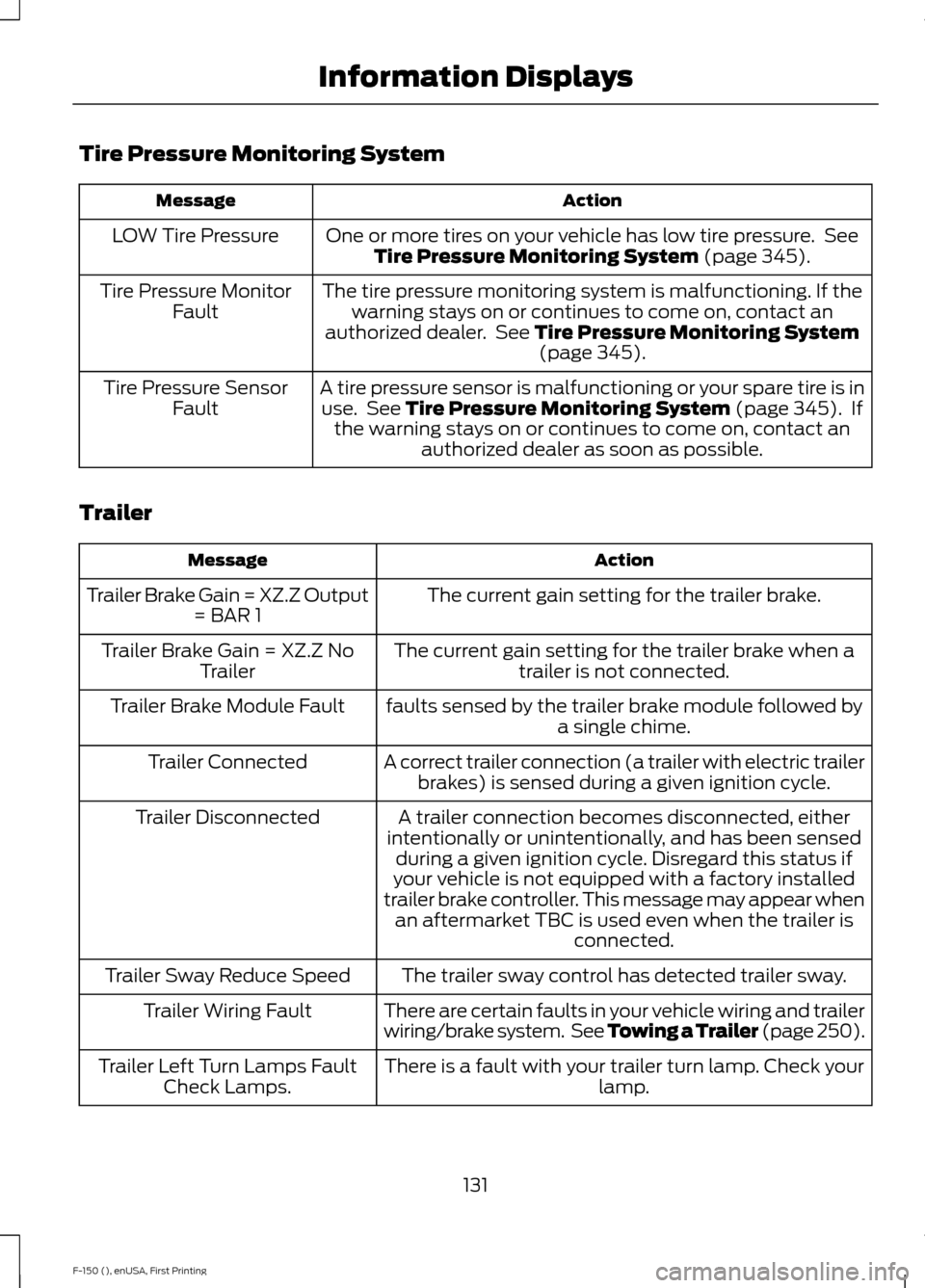
Tire Pressure Monitoring System
Action
Message
One or more tires on your vehicle has low tire pressure. SeeTire Pressure Monitoring System (page 345).
LOW Tire Pressure
The tire pressure monitoring system is malfunctioning. If thewarning stays on or continues to come on, contact an
authorized dealer. See
Tire Pressure Monitoring System (page 345).
Tire Pressure Monitor
Fault
A tire pressure sensor is malfunctioning or your spare tire is inuse. See
Tire Pressure Monitoring System (page 345). If
the warning stays on or continues to come on, contact an authorized dealer as soon as possible.
Tire Pressure Sensor
Fault
Trailer Action
Message
The current gain setting for the trailer brake.
Trailer Brake Gain = XZ.Z Output
= BAR 1
The current gain setting for the trailer brake when atrailer is not connected.
Trailer Brake Gain = XZ.Z No
Trailer
faults sensed by the trailer brake module followed bya single chime.
Trailer Brake Module Fault
A correct trailer connection (a trailer with electric trailerbrakes) is sensed during a given ignition cycle.
Trailer Connected
A trailer connection becomes disconnected, either
intentionally or unintentionally, and has been sensed during a given ignition cycle. Disregard this status if
your vehicle is not equipped with a factory installed
trailer brake controller. This message may appear when an aftermarket TBC is used even when the trailer is connected.
Trailer Disconnected
The trailer sway control has detected trailer sway.
Trailer Sway Reduce Speed
There are certain faults in your vehicle wiring and trailer
wiring/brake system. See Towing a Trailer (page 250).
Trailer Wiring Fault
There is a fault with your trailer turn lamp. Check yourlamp.
Trailer Left Turn Lamps Fault
Check Lamps.
131
F-150 (), enUSA, First Printing Information Displays
Page 135 of 549

Action
Message
There is a fault with your trailer turn lamp. Check your lamp.
Trailer Right Turn Lamps Fault
Check Lamps
There is a fault with your trailer battery. See Towing
a Trailer (page 250).
Trailer Battery Not Charging See
Manual
There is a fault with your vehicle trailer lighting module.See
Towing a Trailer (page 250).
Trailer Lighting Module Fault
See Manual
4WD Action
Message
A 4X4 system fault is present. See Using Four-WheelDrive
(page 182).
Check 4x4
The 4X4 system is making a shift.
4x4 Shift in Progress
When your vehicle is at a stop and you need to shiftinto Neutral before you select 4X4 LOW.
For 4x4 Low Shift to N
When your vehicle is moving and you need to reduceyour speed to select 4X4 LOW.
For 4x4 Low Slow to 3 MPH
You select 2WD while your vehicle is at a stop in 4X4LOW and you need to shift into Neutral.
To Exit 4x4 LOW Shift to N
You select 2WD while your vehicle is operating in 4X4LOW and you need to reduce your speed.
To Exit 4x4 LOW Slow to 3 MPH
May display when there is a Transfer case gear tooth
blockage while shifting to or from 4L or to the neutral state.
Shift Delayed Pull Forward
A 4X4 system fault is present and the system is
temporarily disabled. See
Using Four-Wheel Drive
(page 182).
4x4 Temporarily Disabled
The 4X4 system has been restored.
4x4 Auto Restored
A 4X4 system fault is present and the system is
temporarily locked. See
Using Four-Wheel Drive
(page 182).
4x4 Temporarily Locked
132
F-150 (), enUSA, First Printing Information Displays


