Page 77 of 549

Full Guard (If Equipped)
To monitor the following:
• Doors.
• Hood.
• Tailgate.
• Movement inside your vehicle.
• Change in vehicle inclination, for
example, unwanted towing.
Lock your vehicle using the remote control
or the power door lock control with the
accompanying door open and then close
all doors.
Note: Do not choose full monitor mode if
movement within the vehicle is likely to
occur or when the vehicle is in transport.
Note: For correct operation of the interior
motion detection system, make sure all
windows are closed prior to arming the
system. This helps prevent accidental alarm
activation due to external influences and
make sure of correct interior motion
detection. Additionally, the interior motion
sensing system will not arm if any door is
ajar.
Arming the Alarm
The alarm is ready to arm when there is
not a key in the ignition. Lock your vehicle
to arm the alarm.
The direction indicators flash once after
you lock your vehicle. This indicates the
alarm is in the pre-armed mode. It fully
arms after 20 seconds.
Disarming the Alarm
Disarm the alarm by any of the following
actions:
• Press the power door unlock button
within the 20-second pre-armed mode.
• Unlock the doors with the remote
control or keyless entry keypad. •
Switch the ignition on or start your
vehicle.
• Use a key in the driver door lock
cylinder to unlock your vehicle, then
switch the ignition on within 12
seconds.
Note: Pressing the panic button on the
remote control stops the horn and direction
indicators, but will not disarm the system.
74
F-150 (), enUSA, First Printing Security
Page 91 of 549

To switch on the lamps, press
the button located in the lighting
control panel, or the button
located in the cargo box near the lamp. When switched on, these lamps light the
cargo area of your vehicle and the trailer
hitch.
Note:
The cargo and trailer hookup lamps
turn off automatically when you reach a
speed of 3 mph (5 km/h). They also turn off
automatically after 10 minutes, fading
gradually to off.
INTERIOR LAMPS
The following lamps switch on when:
• You open any door.
• You press a remote control button.
• You touch switch A on the front interior
lamp. Front Interior Lamps
Note:
The front interior lamp switches are
on the overhead console. The exact location
of each switch on the overhead console
depends upon which roof, sunroof, and
window shade features are equipped on the
vehicle.
Note: Touch switch C to switch the door
function off when you open any door. When
the door function is off and you open a door,
the courtesy and door lamps will stay off.
Touch switch C again to switch the door
function back on. When the door function
is on and you open a door, the courtesy and
door lamps will switch on. Left-hand side map lamp switch.
A.
All lamps on switch.
B.
Door function switch.
C.
Right-hand side map lamp
switch.
D.
88
F-150 (), enUSA, First Printing LightingE189587 E190880 E176210
Page 111 of 549
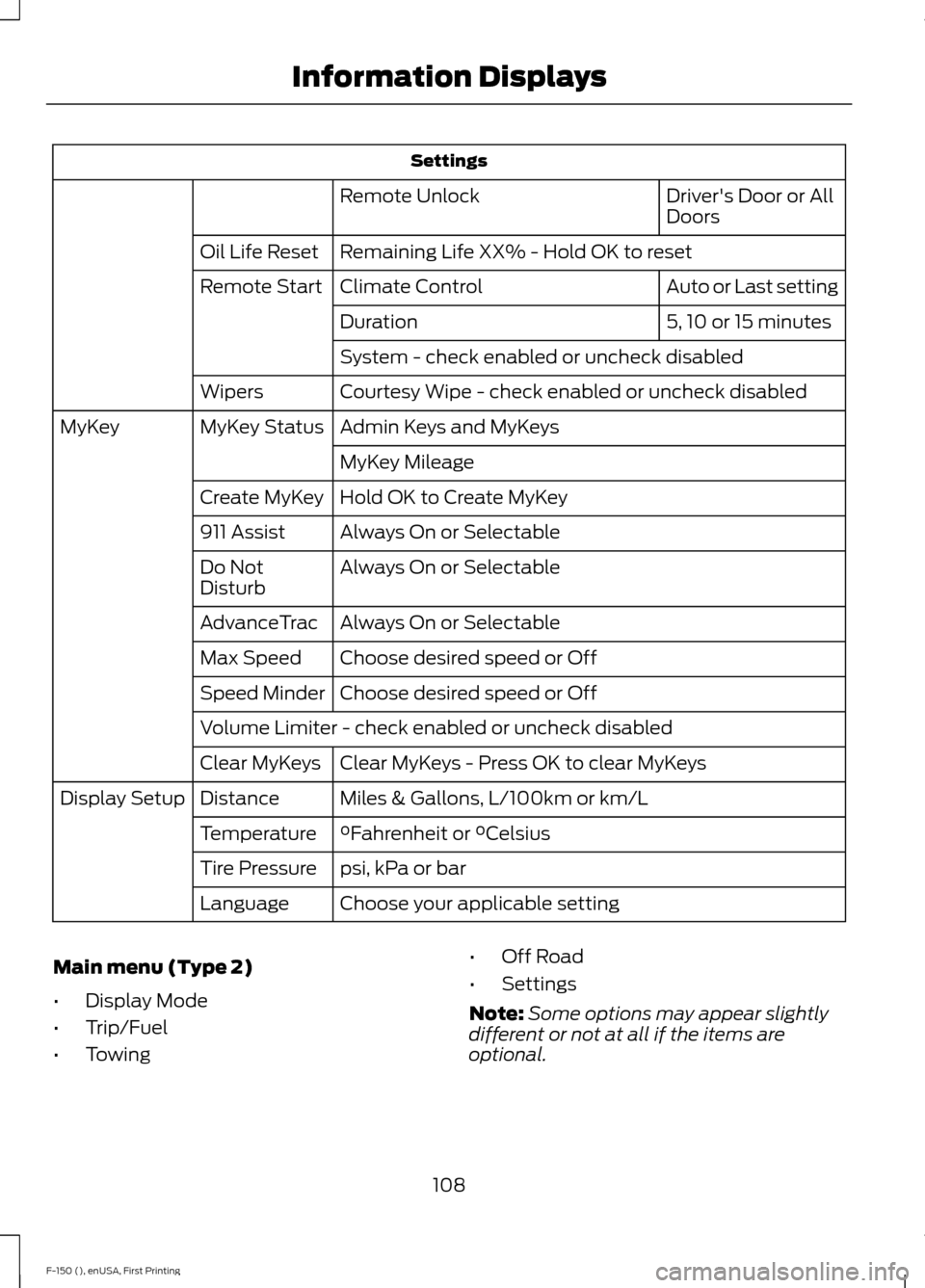
Settings
Driver's Door or All
Doors
Remote Unlock
Remaining Life XX% - Hold OK to reset
Oil Life Reset
Auto or Last setting
Climate Control
Remote Start
5, 10 or 15 minutes
Duration
System - check enabled or uncheck disabled
Courtesy Wipe - check enabled or uncheck disabled
Wipers
Admin Keys and MyKeys
MyKey Status
MyKey
MyKey Mileage
Hold OK to Create MyKey
Create MyKey
Always On or Selectable
911 Assist
Always On or Selectable
Do Not
Disturb
Always On or Selectable
AdvanceTrac
Choose desired speed or Off
Max Speed
Choose desired speed or Off
Speed Minder
Volume Limiter - check enabled or uncheck disabled
Clear MyKeys - Press OK to clear MyKeys
Clear MyKeys
Miles & Gallons, L/100km or km/L
Distance
Display Setup
°Fahrenheit or °Celsius
Temperature
psi, kPa or bar
Tire Pressure
Choose your applicable setting
Language
Main menu (Type 2)
• Display Mode
• Trip/Fuel
• Towing •
Off Road
• Settings
Note: Some options may appear slightly
different or not at all if the items are
optional.
108
F-150 (), enUSA, First Printing Information Displays
Page 115 of 549
Settings
Settings
Blindspot - check enabled or uncheck disabled
Cross Traffic Alert - check enabled or uncheck disabled
Park Aid - check enabled or uncheck disabled Normal
DTE Calcula-
tion
Towing
Easy Entry/Exit - check enabled or uncheck disabled Off or XXX seconds
Autolamp
Delay
Lighting
Daytime Lights - check enabled or uncheck
disabled
Autolock - check enabled or uncheck
disabled
Locks
Autounlock - check enabled or uncheck
disabledDrivers Door or All Doors
Remote
Unlock
Vehicle
Auto or Last setting
Climate
Control
Remote Start
Auto or Off
Seats
5, 10 or 15 minutes
Duration
System - check enabled or uncheck
disabled
Courtesy Wipe or Rain Sensing - check
enabled or uncheck disabled
Wipers
Advanced
Settings
Hold OK to Create MyKey
Create MyKey
MyKey
Always On or User Selectable
911 Assist
Always On or User Selectable
Do Not
Disturb
Always On or User Selectable
AdvanceTrac
112
F-150 (), enUSA, First Printing Information Displays
Page 122 of 549
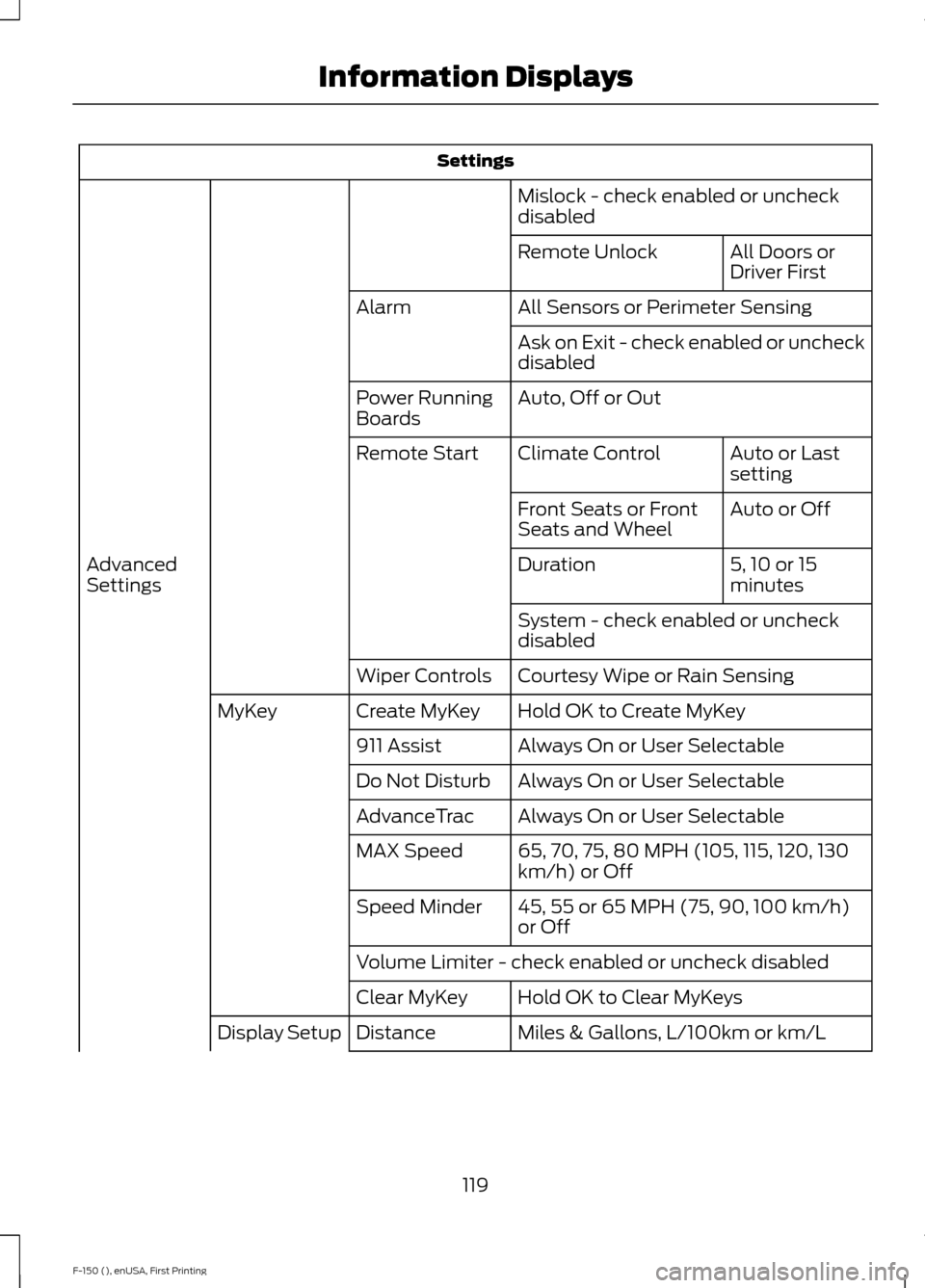
Settings
Mislock - check enabled or uncheck
disabled All Doors or
Driver First
Remote Unlock
All Sensors or Perimeter Sensing
Alarm
Ask on Exit - check enabled or uncheck
disabled
Auto, Off or Out
Power Running
Boards
Auto or Last
setting
Climate Control
Remote Start
Auto or Off
Front Seats or Front
Seats and Wheel
5, 10 or 15
minutes
Duration
Advanced
Settings
System - check enabled or uncheck
disabled
Courtesy Wipe or Rain Sensing
Wiper Controls
Hold OK to Create MyKey
Create MyKey
MyKey
Always On or User Selectable
911 Assist
Always On or User Selectable
Do Not Disturb
Always On or User Selectable
AdvanceTrac
65, 70, 75, 80 MPH (105, 115, 120, 130
km/h) or Off
MAX Speed
45, 55 or 65 MPH (75, 90, 100 km/h)
or Off
Speed Minder
Volume Limiter - check enabled or uncheck disabled
Hold OK to Clear MyKeys
Clear MyKey
Miles & Gallons, L/100km or km/L
Distance
Display Setup
119
F-150 (), enUSA, First Printing Information Displays
Page 142 of 549

Side Window Defogging in Cold Weather
Vehicle with automatic climate control
Vehicle with manual climate control
Press the defrost button.
Select the windshield air vents using the
air distribution buttons.
1
Adjust the temperature control to the
desired setting. Use 72°F (22°C) as a
starting point, then adjust the setting as
necessary.
Press the A/C button.
2
Adjust the temperature control to the
desired setting.
3
Adjust the fan speed to the highest
setting.
4
HEATED WINDOWS AND
MIRRORS
Heated Rear Window
(If Equipped)
Note: The engine must be running to use
this feature.
Note: If your vehicle is equipped with a
sliding rear window, the feature does not
operate when you open the window.
Press the button to clear the rear window
of thin ice and fog. Press the button again
within 10 minutes to switch it off. It
switches off automatically after 10
minutes, or when you switch the ignition
off.
Do not use razor blades or other sharp
objects to clean the inside of the rear
window or to remove decals from the
inside of the rear window. This may
cause damage to the heated grid lines.
Your warranty does not cover this
damage. Heated Exterior Mirror
(If Equipped)
Note: Do not remove ice from the mirrors
with a scraper or attempt to readjust the
mirror glass that has frozen in place. These
actions could cause damage to the glass
and mirrors.
Note: Do not clean the housing or glass of
any mirror with harsh abrasives, fuel or other
petroleum-based cleaning products.
The heated mirrors remove ice, mist and
fog when you switch on the heated rear
window.
REMOTE START
(If Equipped)
The remote start feature allows you to
pre-condition the interior of your vehicle.
The climate control system works to
achieve comfort according to your previous
settings.
Note: You cannot adjust the system during
remote start operation.
139
F-150 (), enUSA, First Printing Climate Control
Page 143 of 549

Turn the ignition on to return the system
to its previous settings. You can now make
adjustments normally, but you need to turn
certain vehicle-dependent features back
on, such as:
•
Heated seats.
• Cooled seats.
• Heated steering wheel.
• Heated mirrors.
• Heated rear window.
You can adjust the default remote start
settings using the information display
controls. See Information Displays
(page 105).
Automatic Settings
In hot weather, the system is set to 72°F
(22°C). The cooled seats are set to high
(if available, and selected to AUTO in the
information display).
In moderate weather, the system either
heats or cools (based on previous
settings). The rear defroster, heated
mirrors and heated seats do not
automatically turn on.
In cold weather, the system is set to 72°F
(22°C). The heated seats are set to high
(if available, and selected to AUTO in the
information display). The rear defroster
and heated mirrors automatically turn on.
140
F-150 (), enUSA, First Printing Climate Control
Page 149 of 549

To access and make adjustments to the
massage setting:
1.
Press the Menu Settings icon > Vehicle
>Multi-contour Seat.
2. Choose the desired seat to adjust.
3. Press Off, Lo or Hi.
MEMORY FUNCTION (If Equipped) WARNINGS
Before activating the seat memory,
make sure that the area immediately
surrounding the seat is clear of
obstructions and that all occupants are
clear of moving parts. Do not use the memory function
when your vehicle is moving.
This function automatically recalls the
position of these features:
•
Driver seat.
• Power mirrors.
• Adjustable pedals.
• Steering column.
The memory control is located on the door
panel. Saving a PreSet Position
1. Switch the ignition on. 2. Move the memory features to your
desired positions.
3. Press and hold button 1 for about two seconds until you hear a single tone.
To program position 2, repeat the previous
procedure using button 2.
Note: You can save a memory preset at any
time.
Recalling a PreSet Position:
Press and release the preset memory
button desired. The memory features move
to the position stored for that preset.
You can recall a programmed memory
position:
• When the ignition is off.
• Only if the transmission is in park (P)
or neutral (N) if the ignition is on.
You can program a remote entry
transmitter to recall a memory setting.
See
Keys and Remote Controls (page
55).
You can also program a personal keyless
entry code to recall a memory setting. See
Locks
(page 66).
Easy Entry and Exit Feature
(If
Equipped)
If you enable the easy entry and exit
feature, it automatically moves the driver
seat rearward 2 inches (5 centimeters)
when you switch the ignition off.
If the seat is located less than 2 inches (5
centimeters) from the rear of the seat
track, the seat travels less than 2 inches
(5 centimeters) rearward.
The driver seat returns to the previous
position when you switch the ignition on.
You can enable or disable this feature in
the information display. See Information
Displays
(page 105).
146
F-150 (), enUSA, First Printing SeatsE142554