2015 FORD ESCAPE parking brake
[x] Cancel search: parking brakePage 262 of 449

1.
T-type mini-spare: This spare tire
begins with the letter T for tire size and
may have Temporary Use Only molded in
the sidewall.
2. Full-size dissimilar spare with label
on wheel:
This spare tire has a label on
the wheel that states: THIS WHEEL AND
TIRE ASSEMBLY FOR TEMPORARY USE
ONLY.
When driving with one of the dissimilar
spare tires listed above, do not:
• Exceed
50 mph (80 km/h).
• Load the vehicle beyond maximum
vehicle load rating listed on the Safety
Compliance Label.
• Tow a trailer.
• Use snow chains on the end of the
vehicle with the dissimilar spare tire.
• Use more than one dissimilar spare tire
at a time.
• Use commercial car washing
equipment.
• Try to repair the dissimilar spare tire.
Use of one of the dissimilar spare tires
listed above at any one wheel location can
lead to impairment of the following:
• Handling, stability and braking
performance.
• Comfort and noise.
• Ground clearance and parking at curbs.
• Winter weather driving capability.
• Wet weather driving capability.
• All-wheel driving capability
3. Full-size dissimilar spare without
label on wheel
When driving with the full-size dissimilar
spare wheel and tire assembly, do not:
• Exceed
70 mph (113 km/h).
• Use more than one dissimilar spare
wheel and tire assembly at a time. •
Use commercial car washing
equipment.
• Use snow chains on the end of the
vehicle with the dissimilar spare wheel
and tire assembly.
The usage of a full-size dissimilar spare
wheel and tire assembly can lead to
impairment of the following:
• Handling, stability and braking
performance.
• Comfort and noise.
• Ground clearance and parking at curbs.
• Winter weather driving capability.
• Wet weather driving capability.
• All-wheel driving capability
When driving with the full-size dissimilar
spare wheel and tire assembly additional
caution should be given to:
• Towing a trailer.
• Driving vehicles equipped with a
camper body.
• Driving vehicles with a load on the
cargo rack.
Drive cautiously when using a full-size
dissimilar spare wheel and tire assembly
and seek service as soon as possible.
Tire Change Procedure WARNINGS
When one of the front wheels is off
the ground, the transmission alone
will not prevent your vehicle from
moving or slipping off the jack, even if the
transmission is in park (P) or neutral (N). To help prevent your vehicle from
moving when you change a tire, be
sure to place the transmission in park
(P) or neutral (N), set the parking brake,
and block (in both directions) the wheel
that is diagonally opposite (other side and
end of your vehicle) to the tire being
changed.
259
Escape (TM2), enUSA, First Printing Wheels and Tires
Page 263 of 449

WARNINGS
Never get underneath a vehicle that
is supported only by a jack. If the
vehicle slips off the jack, you or
someone else could be seriously injured. Do not attempt to change a tire on
the side of the vehicle close to
moving traffic. Pull far enough off the
road to avoid the danger of being hit when
operating the jack or changing the wheel. Always use the jack provided as
original equipment with your vehicle.
If using a jack other than the one
provided as original equipment with your
vehicle, make sure the jack capacity is
adequate for the vehicle weight, including
any vehicle cargo or modifications. Note:
Passengers should not remain in your
vehicle when the vehicle is being jacked.
1. Park on a level surface, set the parking
brake and activate the hazard flashers.
2. Place the transmission in park (P) and
turn the engine off.
3. Remove the carpeted wheel cover.
4. Remove the wing nut that secures the spare tire by turning it
counterclockwise. 5.
Remove the jack from the foam holder.
The lug wrench is located in the left
side storage foam next to the spare
tire. Remove the flat tire retainer strap
from the jack base. 6. Block the diagonally opposite wheel.
7. Loosen each wheel lug nut one-half
turn counterclockwise, but do not
remove them until the wheel is raised
off the ground.
Note: Jack at the specified locations to
avoid damage to the vehicle.
8. The vehicle jacking points are shown here, and are depicted on the warning
label on the jack. 9.
Small arrow-shaped marks on the sills
show the location of the jacking points.
260
Escape (TM2), enUSA, First Printing Wheels and TiresE160855 E142551 E145908
Page 292 of 449
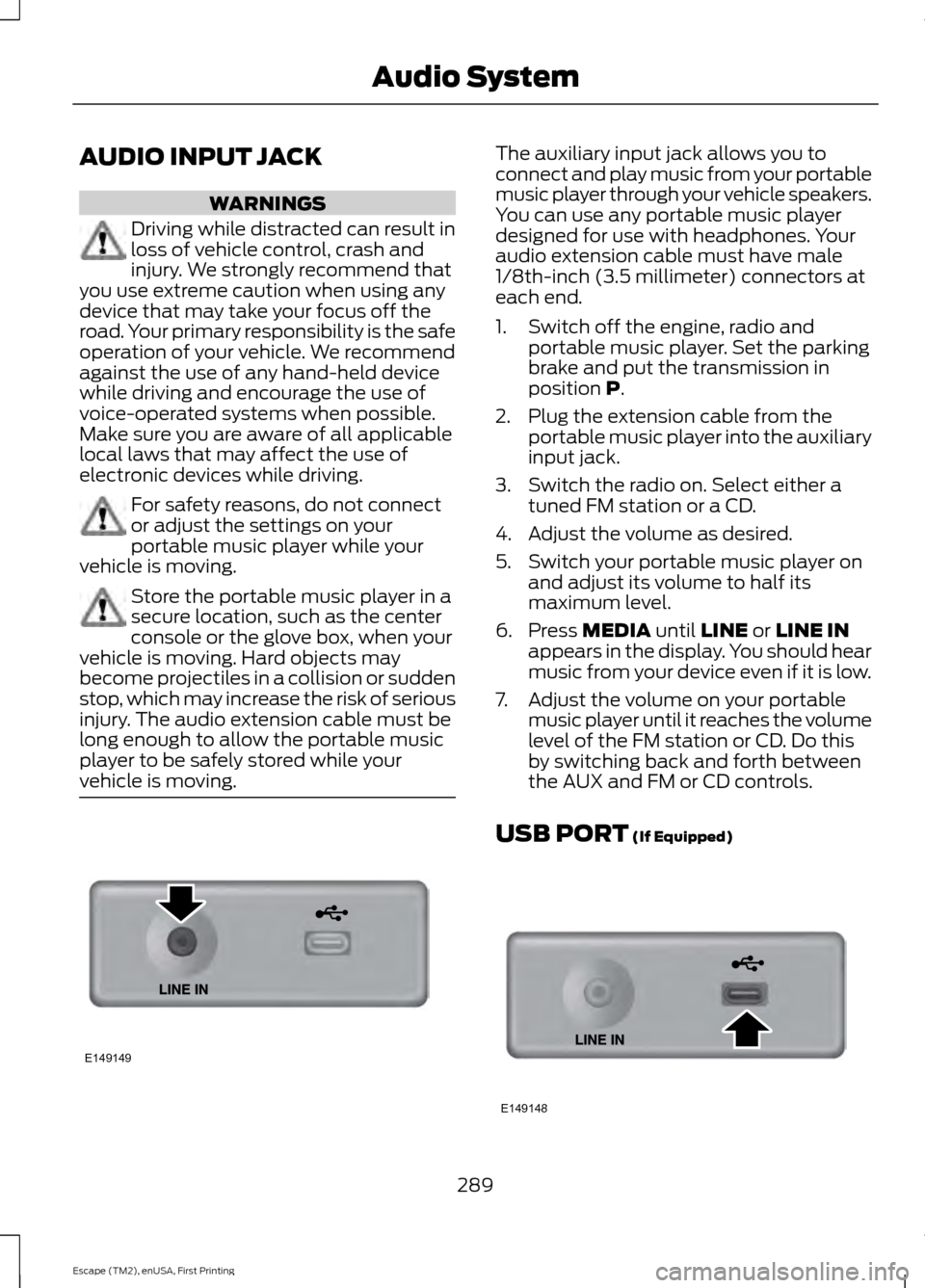
AUDIO INPUT JACK
WARNINGS
Driving while distracted can result in
loss of vehicle control, crash and
injury. We strongly recommend that
you use extreme caution when using any
device that may take your focus off the
road. Your primary responsibility is the safe
operation of your vehicle. We recommend
against the use of any hand-held device
while driving and encourage the use of
voice-operated systems when possible.
Make sure you are aware of all applicable
local laws that may affect the use of
electronic devices while driving. For safety reasons, do not connect
or adjust the settings on your
portable music player while your
vehicle is moving. Store the portable music player in a
secure location, such as the center
console or the glove box, when your
vehicle is moving. Hard objects may
become projectiles in a collision or sudden
stop, which may increase the risk of serious
injury. The audio extension cable must be
long enough to allow the portable music
player to be safely stored while your
vehicle is moving. The auxiliary input jack allows you to
connect and play music from your portable
music player through your vehicle speakers.
You can use any portable music player
designed for use with headphones. Your
audio extension cable must have male
1/8th-inch (3.5 millimeter) connectors at
each end.
1. Switch off the engine, radio and
portable music player. Set the parking
brake and put the transmission in
position P.
2. Plug the extension cable from the portable music player into the auxiliary
input jack.
3. Switch the radio on. Select either a tuned FM station or a CD.
4. Adjust the volume as desired.
5. Switch your portable music player on and adjust its volume to half its
maximum level.
6. Press
MEDIA until LINE or LINE IN
appears in the display. You should hear
music from your device even if it is low.
7. Adjust the volume on your portable music player until it reaches the volume
level of the FM station or CD. Do this
by switching back and forth between
the AUX and FM or CD controls.
USB PORT
(If Equipped) 289
Escape (TM2), enUSA, First Printing Audio SystemE149149 E149148
Page 366 of 449

To access, press the lower left
corner on the touchscreen, then
select the BT Stereo tab.
Bluetooth Audio Voice Commands If you are listening to a Bluetooth
audio device, press the voice
button on the steering wheel
control. When prompted, say "Next song",
"Pause", "Play" or "Previous song".
If you are not listening to a Bluetooth audio
device, press the voice button and, after
the tone, say "Next song", "Pause", "Play"
or "Previous song".
A/V Inputs WARNINGS
Driving while distracted can result in
loss of vehicle control, crash and
injury. We strongly recommend that
you use extreme caution when using any
device that may take your focus off the
road. Your primary responsibility is the safe
operation of your vehicle. We recommend
against the use of any handheld device
while driving and encourage the use of
voice-operated systems when possible.
Make sure you are aware of all applicable
local laws that may affect the use of
electronic devices while driving. For safety reasons, do not connect
or adjust the settings on your
portable music player while your
vehicle is moving. Store the portable music player in a
secure location, such as the center
console or the glove box, when your
vehicle is moving. Hard objects may
become projectiles in a crash or sudden
stop, which may increase the risk of serious
injury. The audio extension cable must be
long enough to allow the portable music
player to be safely stored while your
vehicle is moving. Your A/V inputs allow you to connect an
auxiliary audio/video source (such as a
gaming systems or a personal camcorder)
by connecting RCA cords (not included)
to these input jacks. The jacks are yellow,
red and white and are located either
behind a small access door on the
instrument panel or in your center console.
You can also use the A/V inputs as an
auxiliary input jack to play music from your
portable music player over your vehicle's
speakers. Plug in your 1/8 inch (3.5
millimeter) RCA adapter into the two left
A/V input jacks (red and white).
Press the lower left corner of the
touchscreen, and then select
A/V In.
To use the auxiliary input jack feature,
make sure that your portable music player
is designed for use with headphones and
that it is fully charged. You also need an
audio extension cable with stereo male
1/8-inch (3.5 millimeter) connectors at one
end and a RCA jack at the other.
1. Switch off the engine, radio and portable music player. Set the parking
brake and put the transmission in
position
P.
2. Attach one end of the audio extension
cable to the headphone output of your
player and the other end into the
adapter in one of the two left A/V input
jacks (white or red) inside the center
console.
363
Escape (TM2), enUSA, First Printing MyFord Touch
™
(If Equipped)E142611 E142599 E142622
Page 425 of 449

Check every month
Engine oil level.
Function of all interior and exterior lights.
Tires (including spare) for wear and proper pressure. Windshield washer fluid level. Check every six months
Battery connections. Clean if necessary.
Body and door drain holes for obstructions. Clean if necessary. Cooling system fluid level and coolant strength.
Door weatherstrips for wear. Lubricate if necessary.
Hinges, latches and outside locks for proper operation. Lubricate if necessary. Parking brake for proper operation.
Safety belts and seat latches for wear and function.
Safety warning lamps (brake, ABS, airbag and safety belt) for operation.
Washer spray and wiper operation. Clean or replace blades as necessary.
Multi-Point Inspection
In order to keep your vehicle running right,
it is important to have the systems on your
vehicle checked regularly. This can help
identify potential issues and prevent major
problems. We recommend having the
following multi-point inspection performed
at every scheduled maintenance interval
to help make sure your vehicle keeps
running great.
422
Escape (TM2), enUSA, First Printing Scheduled Maintenance
Page 427 of 449

When to expect the OIL CHANGE REQUIRED message
Vehicle use and example
Interval
Normal
7500-10000 miles
(12000-16000 km) Normal commuting with highway driving
No, or moderate, load or towing
Flat to moderately hilly roads
No extended idling
Severe
5000-7499 miles
(8000-11999 km) Moderate to heavy load or towing
Mountainous or off-road conditions
Extended idling
Extended hot or cold operation
Extreme
3000-4999 miles
(4800-7999 km) Maximum load or towing
Extreme hot or cold operation
Normal Maintenance Intervals At every oil change interval as indicated by the information display
*
Change engine oil and filter. **
Rotate the tires.
Perform a multi-point inspection (recommended).
Inspect the automatic transmission fluid level. Consult your dealer for requirements.
Inspect the brake pads, shoes, rotors, drums, brake linings, hoses and parking brake.
Inspect the engine cooling system strength and hoses.
Inspect the exhaust system and heat shields.
Inspect the rear axle and U-joints. Lubricate any areas with grease fittings (Four-wheel
drive vehicles).
Inspect the half-shaft boots.
Inspect the steering linkage, ball joints, suspension, tire-rod ends, driveshaft and U-
joints. Lubricate any areas with grease fittings (Four-wheel drive vehicles).
424
Escape (TM2), enUSA, First Printing Scheduled Maintenance
Page 440 of 449

4
4WD
See: Four-Wheel Drive...................................... 142
A
A/C See: Climate Control......................................... 103
About This Manual...........................................7
ABS See: Brakes............................................................ 147
ABS driving hints See: Hints on Driving With Anti-Lock
Brakes................................................................. 147
Accessories....................................................396 Exterior Style....................................................... 396
Interior Style........................................................ 396
Lifestyle................................................................. 396
Peace of Mind..................................................... 396
Accessories See: Replacement Parts
Recommendation............................................. 11
Active Park Assist
.........................................154
Automatic Steering into Parking
Space................................................................. 155
Deactivating the Park Assist Feature..........156
Troubleshooting the System.......................... 157
Using Active Park Assist................................... 154
Adjusting the Headlamps
.........................222
Horizontal Aim Adjustment........................... 224
Vertical Aim Adjustment................................. 222
Adjusting the Steering Wheel...................69
Airbag Disposal...............................................47
Air Conditioning See: Climate Control......................................... 103
Alarm See: Anti-Theft Alarm........................................ 68
Ambient Lighting.............................................77
Anti-Theft Alarm
...........................................68
Arming the Alarm................................................ 68
Disarming the Alarm........................................... 68
Appendices....................................................398
At a Glance........................................................14 Front Exterior Overview...................................... 14
Instrument Panel Overview.............................. 16
Rear Exterior Overview........................................ 17
Vehicle Interior Overview.................................... 15Audible Warnings and Indicators.............88
Automatic Transmission Warning
Chime.................................................................. 89
Engine On Warning Chime............................... 88
Headlamps On Warning Chime..................... 89
Key in Ignition Warning Chime........................ 88
Keyless Warning Alert ....................................... 88
Parking Brake On Warning Chime.................89
Audio Control
..................................................69
Audio Input Jack..........................................289
Audio System.................................................272
General Information.......................................... 272
Audio Unit - Vehicles With: AM/FM/CD/ SYNC/Satellite Radio..............................277
Audio Unit - Vehicles With: AM/FM/CD/ SYNC..............................................................275
Audio Unit - Vehicles With: AM/FM/ CD....................................................................273
Audio Unit - Vehicles With: Premium AM/FM/CD
..................................................279
Audio Unit - Vehicles With: Sony AM/ FM/CD............................................................281
Menu Structure................................................... 282
Autolamps.........................................................74 Windshield Wiper Activated
Headlamps......................................................... 75
Automatic Climate Control......................104 Temperature Control........................................ 105
Automatic Transmission
............................139
Brake-Shift Interlock......................................... 140
If Your Vehicle Gets Stuck In Mud or Snow.................................................................... 141
SelectShift Automatic® Transmission................................................... 139
Understanding the Positions of Your Automatic Transmission............................. 139
Automatic Transmission Fluid Check.............................................................219
Autowipers.........................................................71
Auxiliary Power Points
................................122
110 Volt AC Power Point.................................... 122
12 Volt DC Power Point...................................... 122
Locations................................................................ 122
437
Escape (TM2), enUSA, First Printing Index
Page 443 of 449

Fog Lamps - Front
See: Front Fog Lamps......................................... 77
Ford Credit..........................................................11
(U.S. Only)................................................................. 11
Four-Wheel Drive
..........................................142
Principle of Operation....................................... 142
Front Fog Lamps.............................................77
Front Passenger Sensing System.............41
Fuel and Refueling
........................................131
Fuel Consumption........................................135
Calculating Fuel Economy.............................. 136
Filling the Tank..................................................... 135
Fuel Filter
.........................................................219
Fuel Quality.....................................................132
Choosing the Right Fuel................................... 132
Octane Recommendations............................ 132
Fuel Shutoff
...................................................190
Fuses................................................................200
Fuse Specification Chart..........................200 Luggage Compartment Fuse Panel...........206
Passenger Compartment Fuse
Panel................................................................. 203
Power Distribution Box................................... 200
Pre-Fuse Box...................................................... 200
G
Garage Door Opener See: Universal Garage Door Opener............118
Gauges...............................................................84 Engine Coolant Temperature Gauge............85
Fuel Gauge.............................................................. 85
Information Display............................................. 84
General Information on Radio Frequencies...................................................48
Intelligent Access................................................. 48
General Maintenance Information.......420 Multi-Point Inspection..................................... 422
Owner Checks and Services........................... 421
Protecting Your Investment.......................... 420
Why Maintain Your Vehicle?......................... 420
Why Maintain Your Vehicle at Your Dealership?..................................................... 420
Getting Assistance Outside the U.S. and Canada..........................................................197
Getting the Services You Need...............194 Away From Home.............................................. 194Global Opening
..............................................80
Opening the Windows....................................... 80
H
Handbrake See: Parking Brake............................................. 148
Hazard Warning Flashers..........................190
Headlamp Exit Delay....................................76
Head Restraints
...............................................111
Adjusting the Head Restraint.......................... 112
Heated Seats
...................................................117
Heated Windows and Mirrors..................109 Heated Exterior Mirror...................................... 109
Heated Rear Window....................................... 109
Heating See: Climate Control......................................... 103
Hill Start Assist..............................................148 Using Hill Start Assist....................................... 148
Hints on Controlling the Interior Climate
..........................................................106
Cooling the Interior Quickly............................. 107
General Hints....................................................... 106
Heating the Interior Quickly............................ 106
Maximum Cooling Performance in Instrument Panel or Instrument Panel
and Footwell Positions............................... 109
Recommended Settings for Cooling ..........107
Recommended Settings for Heating..........107
Side Window Defogging in Cold Weather............................................................ 108
Vehicle Stationary for Extended Periods during Extreme High Ambient
Temperatures................................................. 108
Hints on Driving With Anti-Lock Brakes.............................................................147
Hood Lock See: Opening and Closing the Hood...........210
I
Ignition Switch
...............................................125
In California (U.S. Only).............................195
Information Display Control.......................70
Information Displays
....................................90
General Information........................................... 90
440
Escape (TM2), enUSA, First Printing Index