Page 94 of 508
The mirror will dim automatically to reduce
glare when bright lights are detected from
behind your vehicle. It will automatically
return to normal reflection when you select
reverse gear to make sure you have a clear
view when backing up.
SUN VISORS
Rotate the sun visor toward the side
window and extend it rearward for extra
shade.
Illuminated Vanity Mirror
Lift the cover to switch the lamp on. MOONROOF (If Equipped) WARNINGS
Do not let children play with the
moonroof or leave them unattended
in the vehicle. They may seriously
hurt themselves. When closing the moonroof, you
should verify that it is free of
obstructions and make sure that
children and pets are not in the proximity
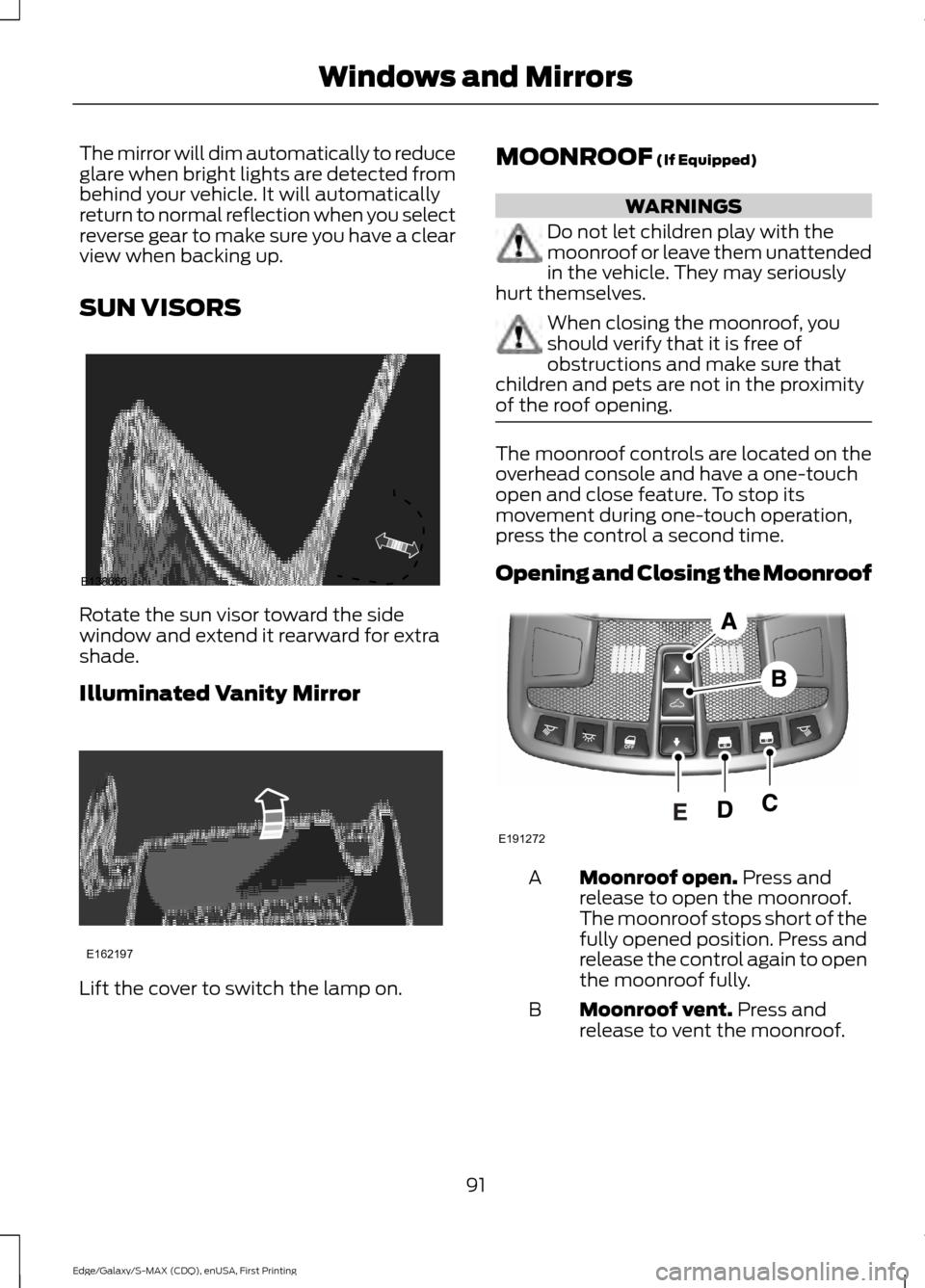
of the roof opening. The moonroof controls are located on the
overhead console and have a one-touch
open and close feature. To stop its
movement during one-touch operation,
press the control a second time.
Opening and Closing the Moonroof
Moonroof open.
Press and
release to open the moonroof.
The moonroof stops short of the
fully opened position. Press and
release the control again to open
the moonroof fully.
A
Moonroof vent.
Press and
release to vent the moonroof.
B
91
Edge/Galaxy/S-MAX (CDQ), enUSA, First Printing Windows and MirrorsE138666 E162197 E191272
Page 95 of 508
Sunshade open. Press and
release to open the sunshade.
The sunshade opens
automatically with the
moonroof. You can also open
the sunshade with the moonroof
C
closed. Note:
The sunshade
stops short of its fully opened
position for the comfort of rear
passengers. To open the
sunshade fully, press the control
again.
Sunshade close.
Press and
release to close the sunshade.
D
Moonroof close.
Press and
release to close the moonroof
from either the open or vent
positions.
E
Note: The moonroof stops
8 in (200 mm)
from the closed position. To close the
moonroof, press and hold the
moonroof
close control until the moonroof is in the
fully closed position.
92
Edge/Galaxy/S-MAX (CDQ), enUSA, First Printing Windows and Mirrors
Page 107 of 508
Settings
5, 10 or 15 minutes
Duration
System - check enabled or uncheck disabled
Remote Open or Remote Close
Windows
Courtesy Wipe or Rain Sensing
Wipers
Hold OK to Create MyKey
Create
MyKey
MyKey
Always On or User Selectable
911
Assist
On or Off
Do Not
Disturb
Always On or User Selectable
Traction
Control
Choose desired speed or Off
MAX
Speed
Choose desired speed or Off
Speed
Minder
Volume Limiter - check enabled or uncheck disabled
Hold OK to Clear All MyKeys
Clear
MyKeys
Miles & Gallons, L/100km or km/L
Distance
Display
Setup
Fahrenheit (°F) or Celsius (°C)
Temper-
ature
psi, kPa or bar
Tire Pres-
sure
Choose your applicable setting
Language
104
Edge/Galaxy/S-MAX (CDQ), enUSA, First Printing Information Displays
Page 112 of 508
Settings
Remote Open or Remote Close
Windows
Courtesy Wipe or Rain Sensing
Wipers
Hold OK to Create MyKey
Create
MyKey
MyKey
Always On or User Selectable
911
Assist
On or Off
Do Not
Disturb
Always On or User Selectable
Traction
Control
Choose desired speed or Off
MAX
Speed
Choose desired speed or Off
Speed
Minder
Volume Limiter - check enabled or uncheck disabled
Hold OK to Clear All MyKeys
Clear
MyKeys
Miles & Gallons, l/100km or km/l
Distance
Display
Setup
Fuel Gauge or Fuel + Tach
Gauge
Display
°Fahrenheit or °Celsius
Temper-
ature
psi, kPa or bar
Tire Pres-
sure
Choose your applicable setting
Language
INFORMATION MESSAGES
Note: Depending on your vehicle options
and instrument cluster type, not all of the
messages will display or be available. The
information display may abbreviate or
shorten certain messages.
109
Edge/Galaxy/S-MAX (CDQ), enUSA, First Printing Information Displays
Page 127 of 508

MANUAL CLIMATE CONTROL - VEHICLES WITH: ELECTRONIC
MANUAL TEMPERATURE CONTROL (EMTC)
Fan speed control: Adjusts the volume of air circulated in the vehicle.
A
Air distribution control: Adjust the control to turn airflow from the windshield,
instrument panel, or footwell vents on or off. You can distribute air through any
combination of these vents.
B
Note:
At least one of these buttons illuminates on when the system is on.
Temperature control:
Controls the temperature of the air circulated in your
vehicle.
C
MAX Defrost:
Adjust the control to turn on defrost. Outside air flows through
the windshield vents, air conditioning automatically turns on, and fan
automatically adjusts to the highest speed. You can also use this setting to
defrost and clear the windshield of a thin covering of ice. The heated rear window
also automatically turns on when you select maximum defrost.
D
Note:
To prevent window fogging, you cannot select recirculated air when
maximum defrost is on.
124
Edge/Galaxy/S-MAX (CDQ), enUSA, First Printing Climate ControlE188680
Page 128 of 508

MAX A/C: Adjust the control for maximum cooling. Recirculated air flows
through the instrument panel vents, air conditioning automatically turns on,
and the fan automatically adjusts to the highest speed.
E
Recirculated air:
Press the button to switch between outside air and
recirculated air. The air currently in the passenger compartment recirculates.
This can reduce the time needed to cool the interior and reduce unwanted odors
from entering your vehicle.
F
Note:
Recirculated air may also turn on and off automatically in instrument
panel or instrument panel and floor airflow modes during hot weather to improve
cooling efficiency.
Heated seats (if equipped):
Press the button to switch the heated seats on
and off. See Heated Seats (page 140).
G
Heated rear window:
Press the button to switch the heated rear window on
and off. See Heated Windows and Mirrors (page 131).
H
Power:
Press the button to switch the system on and off. When the system is
off, it prevents outside air from entering the vehicle.
I
A/C:
Press the button to switch the air conditioning on or off. Air conditioning
cools your vehicle using outside air. To improve the time to reach a comfortable
temperature in hot weather, drive with the windows open until you feel cold air
through the air vents.
J
Note: In certain conditions (for example, maximum defrost), the air conditioning
compressor may continue to operate even though the air conditioning is
switched off.
125
Edge/Galaxy/S-MAX (CDQ), enUSA, First Printing Climate Control
Page 130 of 508

A/C: Press the button to switch the air conditioning on or off. Air conditioning
cools your vehicle using outside air. To improve the time to reach a comfortable
temperature in hot weather, drive with the windows open until you feel cold air
through the air vents.
G
Note: In certain conditions (for example, maximum defrost), the air conditioning
compressor may continue to operate even though the air conditioning is
switched off.
Power:
Press the button to switch the system on and off. When the system is
off, it prevents outside air from entering the vehicle.
H
AUTO:
Press the button to switch on automatic operation. Adjust to select the
desired temperature. Fan speed, air distribution, air conditioning operation, and
outside or recirculated air are automatically adjusted to heat or cool the vehicle
to maintain the desired temperature. You can also turn off dual zone mode by
pressing and holding the button for greater than two seconds.
I
Heated rear window:
Press the button to switch the heated rear window on
and off. See Heated Windows and Mirrors (page 131).
J
MAX Defrost: Press the button to switch on defrost. Outside air flows through
the windshield vents, air conditioning automatically turns on, and fan
automatically adjusts to the highest speed. You can also use this setting to
defrost and clear the windshield of a thin covering of ice. The heated rear window
also automatically turns on when you select maximum defrost.
K
Note:
To prevent window fogging, you cannot select recirculated air when
maximum defrost is on.
Defrost: Select to distribute air through the windshield air vents. Air distribution
to the instrument panel and footwell vents turns off. You can also use this
setting to defrost and clear the windshield of a thin covering of ice.
L
AUTOMATIC CLIMATE
CONTROL - VEHICLES WITH:
DUAL AUTOMATIC
TEMPERATURE CONTROL
(DATC)/SONY AUDIO SYSTEM
Note: You can switch temperature units
between Fahrenheit and Celsius. See
Information Displays
(page 100).
127
Edge/Galaxy/S-MAX (CDQ), enUSA, First Printing Climate Control
Page 132 of 508

Heated seats (if equipped): Press the button to switch the heated seats on
and off. See Heated Seats (page 140).
E
Climate controlled seats (if equipped):
Press the button to switch the
climate controlled seats on and off. See Climate Controlled Seats (page
141).
F
Passenger temperature control:
Adjusts the temperature on the passenger
side.
G
Fan speed control:
Adjusts the volume of air circulated in the vehicle.
H
Driver temperature control: Adjusts the temperature setting using the control
on the driver side.
I
MAX Defrost: Press the button to switch on defrost. Outside air flows through
the windshield vents, air conditioning automatically turns on, and fan
automatically adjusts to the highest speed. You can also use this setting to
defrost and clear the windshield of a thin covering of ice. The heated rear window
also automatically turns on when you select maximum defrost.
J
Note:
To prevent window fogging, you cannot select recirculated air when
maximum defrost is on.
Heated rear window:
Press the button to switch the heated rear window on
and off. See Heated Windows and Mirrors (page 131).
K
Defrost: Select to distribute air through the windshield air vents. Air distribution
to the instrument panel and footwell vents turns off. You can also use this
setting to defrost and clear the windshield of a thin covering of ice.
L
AUTO:
Press the button to turn on automatic operation. Select the desired
temperature using the temperature control. The system adjusts fan speed, air
distribution, air conditioning operation, and selects outside air or recirculated
air to heat or cool the vehicle in order to maintain the desired temperature. You
can also use the
AUTO button to turn off dual zone operation by pressing and
holding the button for more than two seconds.
M
HINTS ON CONTROLLING THE
INTERIOR CLIMATE
General Hints
Note: Prolonged use of recirculated air may
cause the windows to fog up.
Note: You may feel a small amount of air
from the footwell air vents regardless of the
air distribution setting. Note:
To reduce humidity build-up inside
your vehicle, do not drive with the system
switched off or with recirculated air always
switched on.
Note: Do not place objects under the front
seats as this may interfere with the airflow
to the rear seats.
Note: Remove any snow, ice or leaves from
the air intake area at the base of the
windshield.
129
Edge/Galaxy/S-MAX (CDQ), enUSA, First Printing Climate Control


