Page 141 of 367

Failure Indications
A malfunction of the Rear Park Assist sensors or system is
indicated, during REVERSE gear engagement, by the in-
strument panel warning icon and message displayed on
the Electronic Vehicle Information Center (EVIC) display.
The warning icon is illuminated and a message
is displayed on the EVIC display (if equipped).
Refer to#Electronic Vehicle Information Center
(EVIC)#in “Understanding Your Instrument
Panel” for further information.
The sensors and wiring are tested continuously when the
ignition is in the ON/RUN position. Failures are indi-
cated immediately if they occur when the system is ON.
Even if the system is able to identify that a specific sensor
is in failure condition, the EVIC shall indicate that the
Rear Park Assist system is unavailable, without reference
to the sensor in failure condition. If even a single sensor
fails, the entire system must be disabled. The system is
turned off automatically.
Cleaning The Rear Park Assist System
Clean the Rear Park Assist sensors with water, car wash
soap and a soft cloth. Do not use rough or hard cloths. In
washing stations, clean sensors quickly keeping the va-
por jet/high pressure washing nozzles at least 4 in
(10 cm) from the sensors. Do not scratch or poke the
sensors. Otherwise, you could damage the sensors.
Park Assist System Usage Precautions
NOTE:
•Ensure that the outer surface and the underside of the
rear bumper is clean and clear of snow, ice, mud, dirt
or other obstruction to keep the Rear Park Assist
system operating properly.
•Jackhammers, large trucks, and other vibrations could
affect the performance of Rear Park Assist.
3
UNDERSTANDING THE FEATURES OF YOUR VEHICLE 139
Page 151 of 367
STORAGE
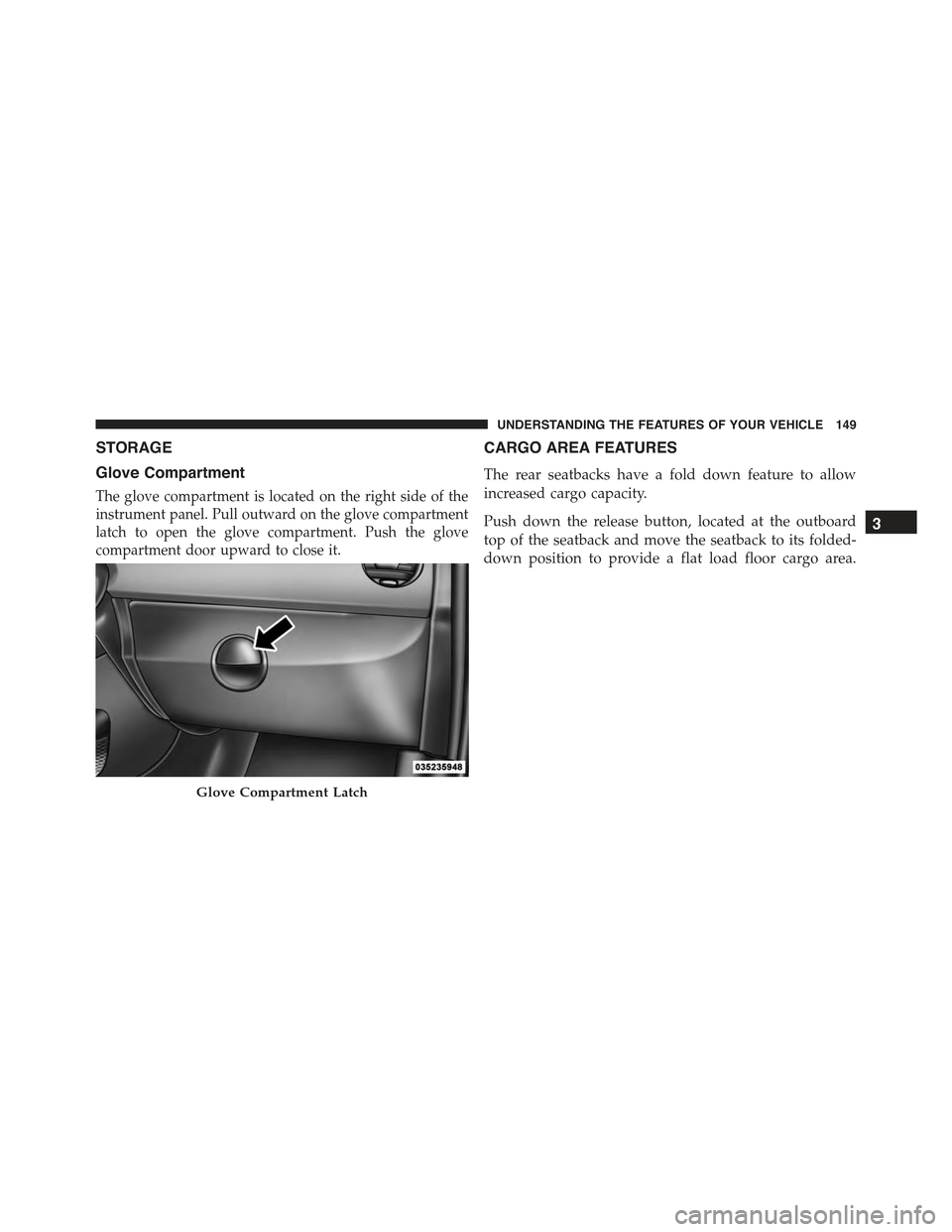
Glove Compartment
The glove compartment is located on the right side of the
instrument panel. Pull outward on the glove compartment
latch to open the glove compartment. Push the glove
compartment door upward to close it.
CARGO AREA FEATURES
The rear seatbacks have a fold down feature to allow
increased cargo capacity.
Push down the release button, located at the outboard
top of the seatback and move the seatback to its folded-
down position to provide a flat load floor cargo area.
Glove Compartment Latch
3
UNDERSTANDING THE FEATURES OF YOUR VEHICLE 149
Page 153 of 367
REAR WINDOW FEATURES
Rear Window Defroster
The rear window defroster button is located in the
center of the instrument panel, below the radio.
Push this button to turn on the rear window defroster. An
indicator in the instrument panel cluster will illuminate
when the rear window defroster is on. The rear window
defroster automatically turns off after approximately 20
minutes. To manually shut the defroster off, push the
button a second time.
CAUTION!
Failure to follow these cautions can cause damage to
the heating elements:
•Use care when washing the inside of the rear
window. Do not use abrasive window cleaners on
the interior surface of the window. Use a soft cloth
and a mild washing solution, wiping parallel to the
heating elements. Labels can be peeled off after
soaking with warm water.
•Do not use scrapers, sharp instruments, or abrasive
window cleaners on the interior surface of the
window.
•Keep all objects a safe distance from the window.
3
UNDERSTANDING THE FEATURES OF YOUR VEHICLE 151
Page 155 of 367
UNDERSTANDING YOUR INSTRUMENT PANEL
CONTENTS
!INSTRUMENT PANEL FEATURES..........155
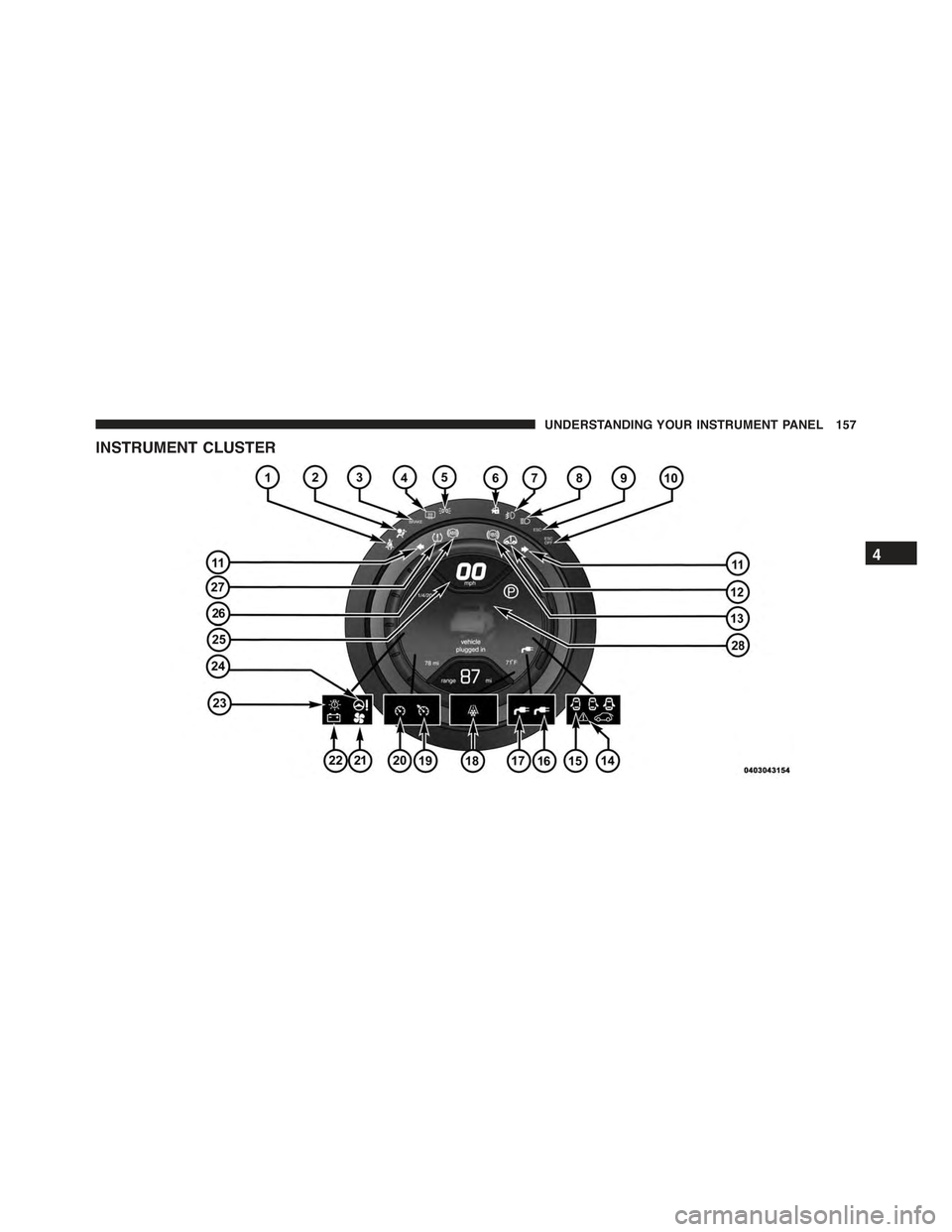
!INSTRUMENT CLUSTER.................157
!INSTRUMENT CLUSTER DESCRIPTIONS.....158
!ELECTRONIC VEHICLE INFORMATION
CENTER (EVIC).......................166
▫EVIC Control Buttons..................167
▫Electronic Vehicle Information Center (EVIC)
Setup Menu.........................169
▫Trip Computer.......................170
!SALES CODE (RAB) RADIO..............173
▫Introduction.........................173
▫Suggestions..........................173
▫Technical Specifications.................176
▫Quick Guide.........................177
▫General Information....................180
▫Functions And Adjustments..............181
▫Radio..............................188
▫SiriusXM Satellite Radio — If Equipped......190
▫CD Player...........................193
▫CD MP3 Player.......................195
4
Page 156 of 367
▫Troubleshooting.......................198
!iPod®/USB/MEDIA PLAYER CONTROL — IF
EQUIPPED...........................199
!STEERING WHEEL AUDIO CONTROLS......200
▫Radio Operation......................201
▫CD Player Operation...................201
▫Operating Instructions — Hands-Free Phone
(If Equipped).........................201
!CD/DVD DISC MAINTENANCE...........201
!RADIO OPERATION AND MOBILE PHONES . .202
!CLIMATE CONTROLS...................202
▫Automatic Temperature Control (ATC)......202
▫Operating Tips.......................208
154 UNDERSTANDING YOUR INSTRUMENT PANEL
Page 157 of 367
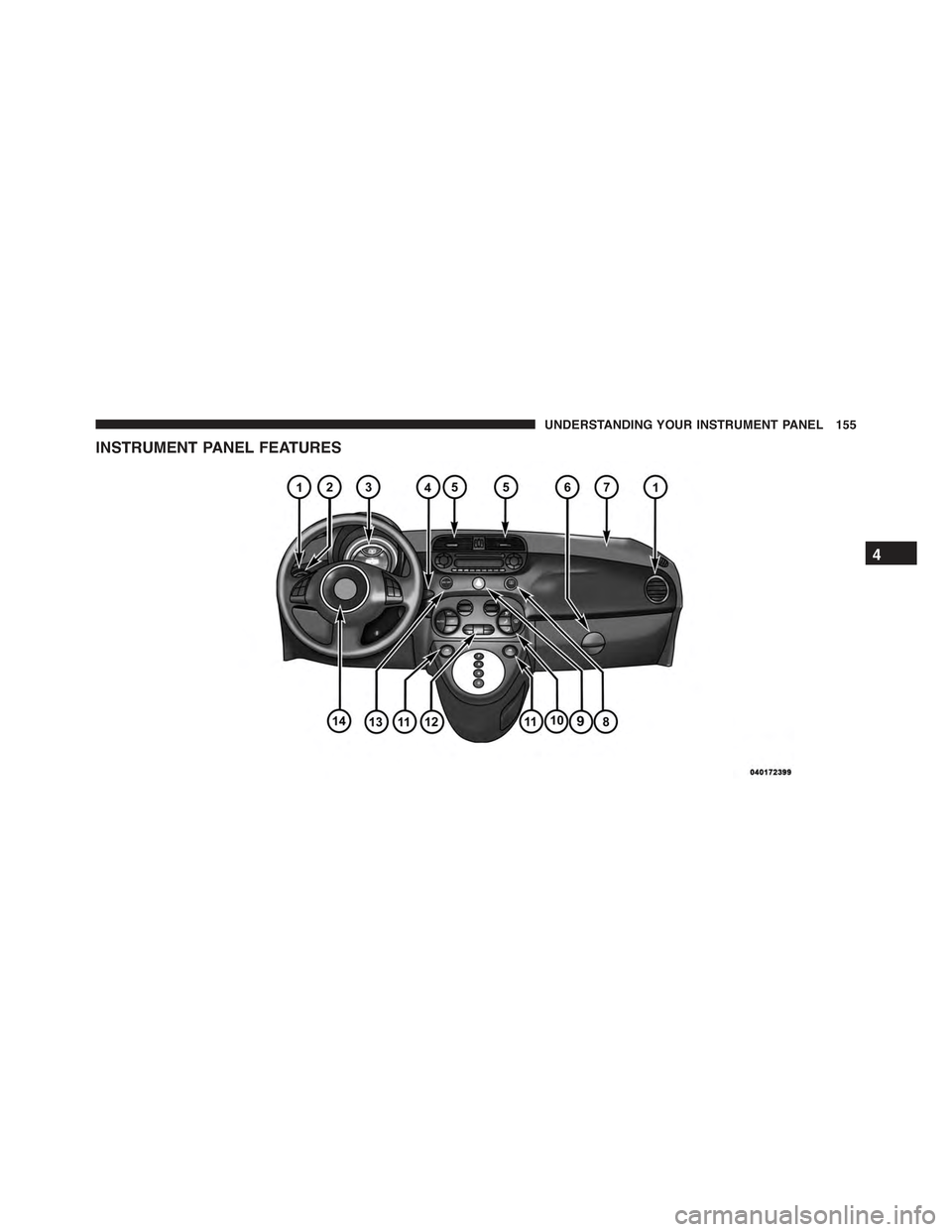
INSTRUMENT PANEL FEATURES
4
UNDERSTANDING YOUR INSTRUMENT PANEL 155
Page 158 of 367
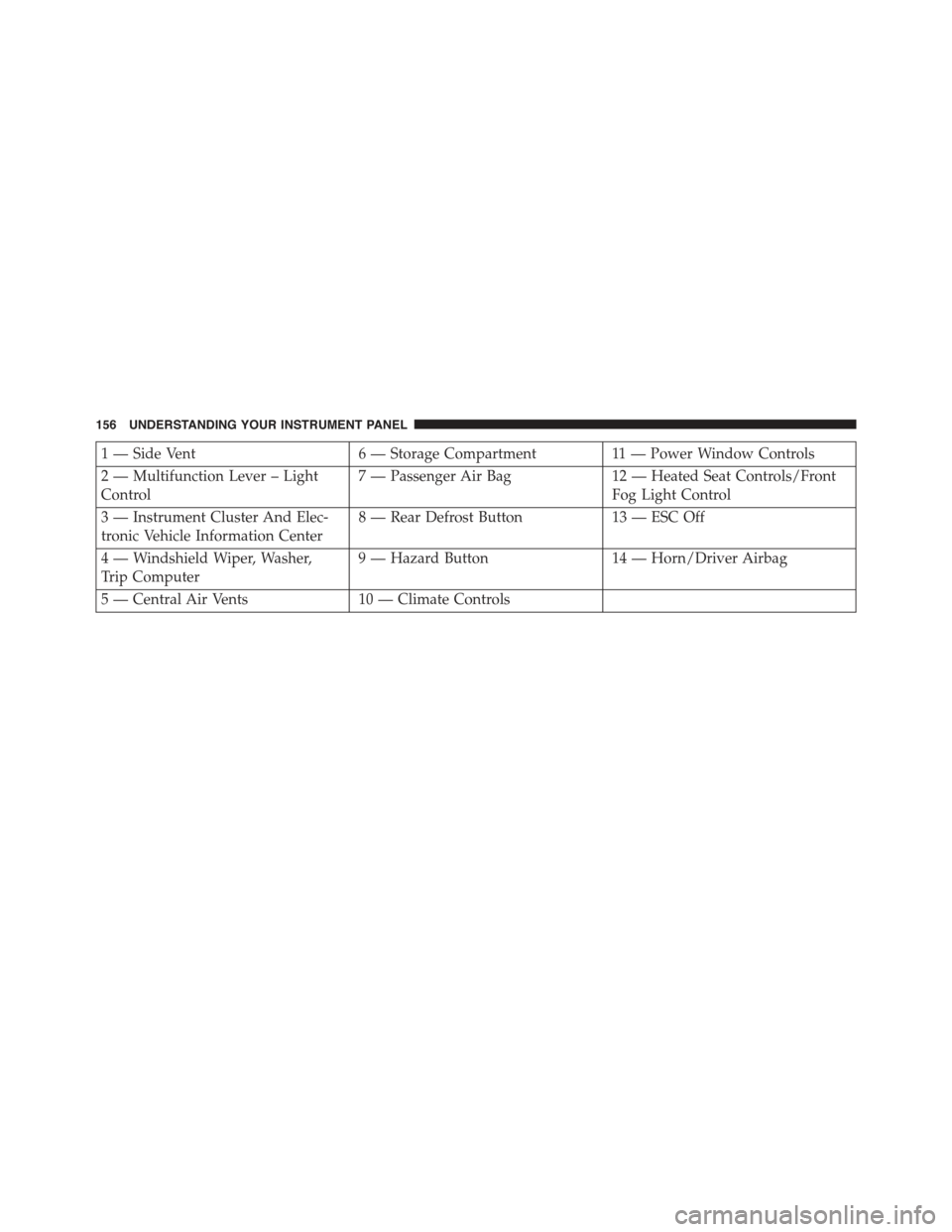
1 — Side Vent6 — Storage Compartment11 — Power Window Controls
2 — Multifunction Lever – Light
Control
7 — Passenger Air Bag12 — Heated Seat Controls/Front
Fog Light Control
3 — Instrument Cluster And Elec-
tronic Vehicle Information Center
8 — Rear Defrost Button13 — ESC Off
4 — Windshield Wiper, Washer,
Trip Computer
9 — Hazard Button14 — Horn/Driver Airbag
5 — Central Air Vents10 — Climate Controls
156 UNDERSTANDING YOUR INSTRUMENT PANEL
Page 159 of 367
INSTRUMENT CLUSTER
4
UNDERSTANDING YOUR INSTRUMENT PANEL 157