Page 193 of 367

SiriusXM Satellite Radio Program Types
Program Types can be selected by pushing theor
buttons. The Program Type will change to the next
category and the radio will then tune to first station in
that program type. Pushingorbuttons will tune
to only the stations in that program type.
Pushing theorbuttons until#All#is displayed
will allow normal tuning to all stations.
The Program Types available are: All, Pop, Rock,
Electronic/Dance, Hip-Hop/R&B, Country, Christian,
Jazz/Standards, Classical, Latin/World, Sports, Enter-
tainment, Talk, News, NPR, Comedy, Family & Health,
Religion, Traffic/Weather.
You can find the SiriusXM current terms and conditions
at www.siriusxm.com.
Re-Subscribe To SiriusXM Satellite Radio
New vehicle purchasers or lessees will receive a free
limited time subscription to SiriusXM Satellite Radio
with their radio. Following expiration of the free services,
it will be necessary to access the information on the
Subscription Information screen in order to re-subscribe.
Press the UP/DOWN button to scroll through the Menu
Functions, and the Left/Right button to change the
selected Set-up Menu function.
Write down the Electronic Serial Number (ESN) for your
receiver. To retrieve the Electronic Serial Number of Siri-
usXM Satellite Receiver Module tune to Channel 0. Make
sure that when the order is placed, the ESN are correct. If
any of the ESN numbers are not entered correctly, then the
SiriusXM subscription will not be able to be transferred to
the new radio and will not be active when installed in the
customer ’s vehicle. To reactivate your service, either call
the number listed on the display or visit the provider
online.
4
UNDERSTANDING YOUR INSTRUMENT PANEL 191
Page 205 of 367
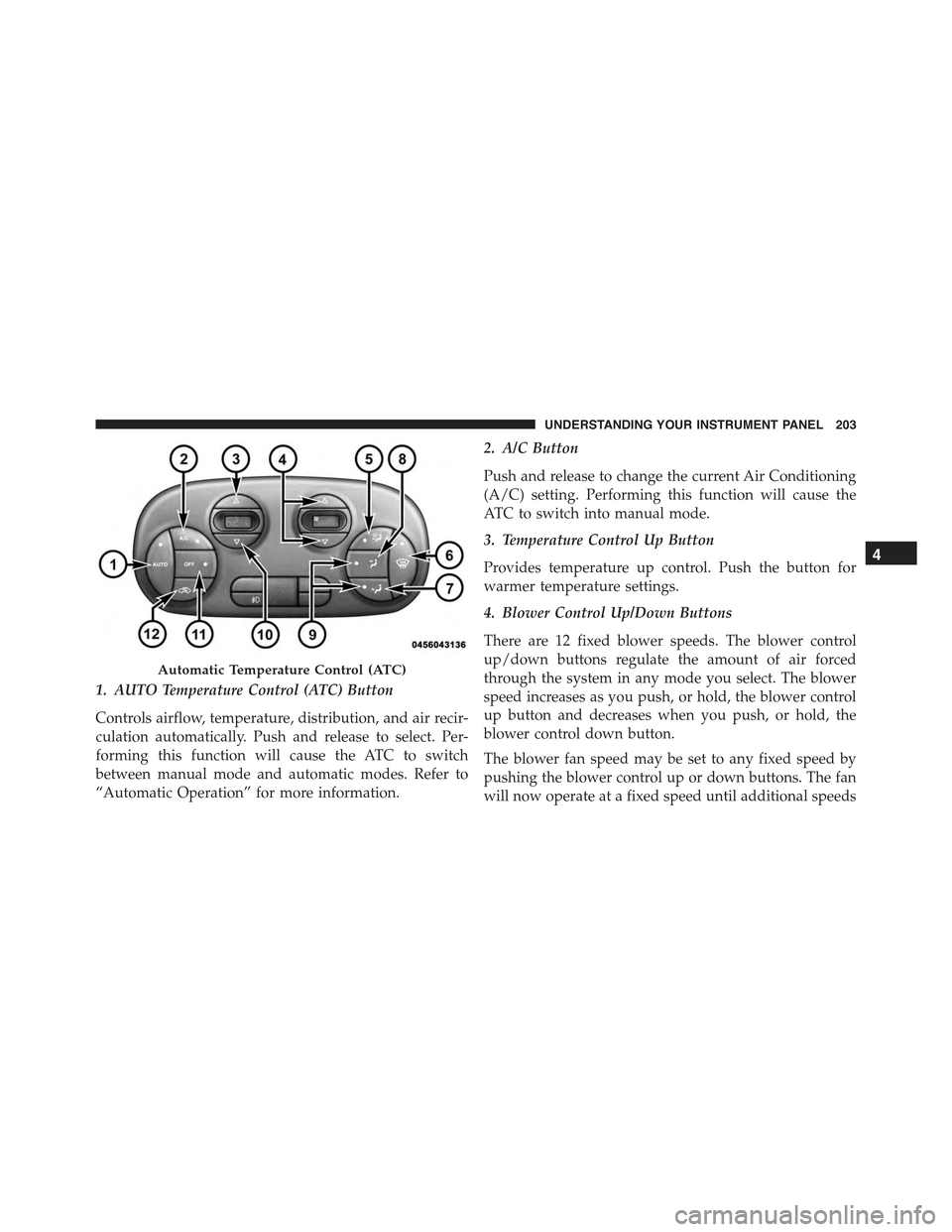
1. AUTO Temperature Control (ATC) Button
Controls airflow, temperature, distribution, and air recir-
culation automatically. Push and release to select. Per-
forming this function will cause the ATC to switch
between manual mode and automatic modes. Refer to
“Automatic Operation” for more information.
2. A/C Button
Push and release to change the current Air Conditioning
(A/C) setting. Performing this function will cause the
ATC to switch into manual mode.
3. Temperature Control Up Button
Provides temperature up control. Push the button for
warmer temperature settings.
4. Blower Control Up/Down Buttons
There are 12 fixed blower speeds. The blower control
up/down buttons regulate the amount of air forced
through the system in any mode you select. The blower
speed increases as you push, or hold, the blower control
up button and decreases when you push, or hold, the
blower control down button.
The blower fan speed may be set to any fixed speed by
pushing the blower control up or down buttons. The fan
will now operate at a fixed speed until additional speeds
Automatic Temperature Control (ATC)
4
UNDERSTANDING YOUR INSTRUMENT PANEL 203
Page 208 of 367

NOTE:
•If the system is in Mix or Defrost Mode, the A/C can
be turned off, but the A/C system shall remain active
to prevent fogging of the windows.
•If fog or mist appears on the windshield or side glass,
select Defrost mode and adjust blower speed if
needed.
Recirculation Control
When outside air contains smoke, odors, or high
humidity, or if rapid cooling is desired, you may
wish to recirculate interior air by pushing the RECIRCU-
LATION control button. Recirculation mode should only
be used temporarily. The recirculation LED will illumi-
nate when this button is selected. Push the button a
second time to turn off the Recirculation mode LED and
allow outside air into the vehicle.
NOTE:In cold weather, use of Recirculation mode may lead
to excessive window fogging. The recirculation feature may
be unavailable (indicator light shall blink) if conditions exist
that could create fogging on the inside of the windshield. On
systems with Manual Climate Controls, the Recirculation
mode is not allowed in Defrost mode to improve window
clearing operation. Recirculation will be disabled automati-
cally if this mode is selected. Attempting to use Recirculation
while in this mode will cause the LED in the control button
to blink and then turn off.
Automatic Operation
1. Push the AUTO button on the Automatic Temperature
Control (ATC) Panel, the indicator will illuminate
when on.
2.Next, adjust the temperature you would like the system
to maintain by adjusting the temperature control buttons.
Once the desired temperature is displayed, the system
will achieve and automatically maintain that comfort
level.
206 UNDERSTANDING YOUR INSTRUMENT PANEL
Page 217 of 367
NOTE:
•If the key is held in the START position for more than
10 seconds “READY” mode will not be achieved.
Return the key to OFF position, and then back to the
START position and hold for less than 10 seconds to
achieve “READY”.
•If the “READY” indicator fails to illuminate after you
have followed the normal starting procedure contact
your authorized dealer.
SINGLE–SPEED TRANSMISSION
Your 500e uses a Single-Speed Transmission to direct the
output from the electric motor. The single-speed trans-
mission is operated using push-buttons instead of a
traditional shift lever.
“READY” Indicator
5
STARTING AND OPERATING 215
Page 218 of 367
The push-buttons are located on the lower instrument
panel.CAUTION!
Damage to the transmission may occur if the follow-
ing precautions are not observed:
•Place the transmission into PARK only after the
vehicle has come to a complete stop.
•Place the transmission into or out of REVERSE
only after the vehicle has come to a complete stop.
•Before placing the transmission into any range
make sure your foot is firmly pressing the brake
pedal.
NOTE:
•You must press and hold the brake pedal while
shifting out of PARK.
•If all push-button LEDs are on when the key is ON, see
your authorized dealer.
Single-Speed Transmission Push-Buttons
216 STARTING AND OPERATING
Page 219 of 367

WARNING!
•Only place the transmission into gear when your
foot is firmly pressing the brake pedal.
•Unintended movement of a vehicle could injure
those in or near the vehicle. As with all vehicles,
you should never exit a vehicle while the vehicle is
in “READY” mode. Before exiting a vehicle, always
apply the parking brake, shift the transmission
into PARK, and remove the ignition key. Once the
key is removed, the transmission is locked in
PARK, securing the vehicle against unwanted
movement.
•When leaving the vehicle, always remove the igni-
tion key and lock your vehicle.
(Continued)
WARNING!(Continued)
•Never leave children alone in a vehicle, or with
access to an unlocked vehicle. Allowing children to
be in a vehicle unattended is dangerous for a
number of reasons. A child or others could be
seriously or fatally injured. Children should be
warned not to touch the parking brake, brake pedal
or the transmission range buttons.
•Do not leave the ignition key in or near the vehicle
(or in a location accessible to children). A child
could operate power windows, other controls, or
move the vehicle.
5
STARTING AND OPERATING 217
Page 222 of 367

WARNING!(Continued)
•Never leave children alone in a vehicle, or with
access to an unlocked vehicle. Allowing children to
be in a vehicle unattended is dangerous for a
number of reasons. A child or others could be
seriously or fatally injured. Children should be
warned not to touch the parking brake, brake pedal
or the transmission range buttons.
•Do not leave the ignition key in or near the vehicle
(or in a location accessible to children). A child
could operate power windows, other controls, or
move the vehicle.
REVERSE (R)
This gear is for moving the vehicle backward. Shift into
REVERSE only after the vehicle has come to a complete
stop.
NEUTRAL (N)
The vehicle may be started in this gear. Apply the
parking brake and place the transmission into PARK if
you must leave the vehicle.
WARNING!
Do not coast in NEUTRAL and never turn off the
ignition to coast down a hill. These are unsafe
practices that limit your response to changing traffic
or road conditions. You might lose control of the
vehicle and have a collision.
220 STARTING AND OPERATING
Page 229 of 367

When the parking brake is applied with the ignition
switch in the MAR (ACC/ON/RUN) position, the Brake
Warning Light in the instrument cluster will illuminate.
When parking on a hill, it is important to turn the front
wheels toward the curb on a downhill grade and away
from the curb on an uphill grade. The parking brake
should always be applied whenever the driver is not in
the vehicle.
WARNING!
•Never leave children alone in a vehicle, or with
access to an unlocked vehicle.
•Allowing children to be in a vehicle unattended is
dangerous for a number of reasons. A child or others
could be seriously or fatally injured. Children
should be warned not to touch the parking brake,
brake pedal or the transmission push buttons.
(Continued)
WARNING!(Continued)
•Do not leave the key fob in or near the vehicle (or
in a location accessible to children). A child could
operate power windows, other controls, or move
the vehicle.
•Be sure the parking brake is fully disengaged
before driving; failure to do so can lead to brake
failure and a collision.
•Always fully apply the parking brake when leav-
ing your vehicle, or it may roll and cause damage or
injury.
CAUTION!
If the Brake Warning Light remains on with the
parking brake released, a brake system malfunction
is indicated. Have the brake system serviced by an
authorized dealer immediately.
5
STARTING AND OPERATING 227

