Page 162 of 367

CAUTION!(Continued)
•Do not use scrapers, sharp instruments, or abrasive
window cleaners on the interior surface of the
window.
•Keep all objects a safe distance from the window.
5. Park/Headlight ON Indicator / Follow Me Home
(Headlight Delay) Indicator
This indicator will illuminate when the park
lights or headlights are turned on. If the Follow
Me Home feature is activated this indicator
will illuminate and the EVIC will show how
long the function remains active. For further information,
refer to “Follow Me Home” in “Understanding The
Features of Your Vehicle.”
6. Vehicle Break-in/Indicator
This indicator will illuminate when the Vehicle
Theft Alarm system has detected an attempt
was made to break into the vehicle.
7. Front Fog Light Indicator — If Equipped
This indicator will illuminate when the front fog
lights are on.
8. High Beam Indicator
This light indicates that the headlights are on high
beam. Pull the turn signal lever toward the steer-
ing wheel to switch the headlights to low beam.
160 UNDERSTANDING YOUR INSTRUMENT PANEL
Page 164 of 367
13. Regenerative Brake System Light
If the light turns on and remains on while
driving, it suggests that there is a potential
problem with the Regenerative Brake System
(RBS) and the need for system service. See your
authorized dealer as soon as possible.
14. Door Ajar Lights
These lights will turn on to indicate when the drivers,
passengers or both doors may be ajar.
15. Liftgate Ajar Light
This light will turn on to indicate when the liftgate may
be ajar.
16. Service Propulsion System Warning Light
The Service Propulsion System Warning Light
will illuminate if there is a malfunction de-
tected with the Propulsion System. If the light
comes on or remains on while driving see your
authorized dealer.
17. Plugged In Indicator
This green indicator will illuminate when the
vehicle is plugged in.
18. Plugged In Indicator
This red indicator will illuminate if there is a
malfunction or interruption during the vehicle
charging process.
162 UNDERSTANDING YOUR INSTRUMENT PANEL
Page 171 of 367
Electronic Vehicle Information Center (EVIC)
Setup Menu
The menu comprises a series of functions arranged in a
cycle. Push and release the + and – buttons to access the
different options and settings (setup).
The setup menu can be activated by pushing the MENU
ESC button. Single pushes on the + or – buttons will
scroll through the setup menu options. The menu in-
cludes the following functions:
•Charging Schedule
•Set Date
•Set Time
•Units
•Language
•Battery % Display
•Auto Door Locks
•Remote Unlock
•Daytime Running Lights
•Button Volume
•Hill Start Assist
•Stored Warnings
•Tutorial
•Connectivity ID
•Restore Factory Settings
•Exit Menu
4
UNDERSTANDING YOUR INSTRUMENT PANEL 169
Page 187 of 367

Preset/User/Classic/Rock/Jazz Functions — If Equipped
The built-in equalizer can be activated/deactivated.
When the equalizer function is off, the audio settings can
only be changed by adjusting the “Bass” and “Treble”
settings, whereas when the function is on, the acoustic
curves can be adjusted. To deactivate the equalizer, select
the “EQ Preset” function in the audio menu.
To activate the equalizer, use the AUDIO button to select
one of the adjustments:
•“EQ User” (adjustment of 7 equalizer bands that can
be changed by the user)
•“Classic” (equalizer preset for optimal classic music
sound)
•“Rock” (equalizer preset for optimal rock and pop
music sound)
•“Jazz” (equalizer preset for optimal jazz music sound)
When one of the equalizer adjustments is activated the
wording “EQ” lights up.
User EQ Settings Function — If Equipped
To set a personalized equalizer adjustment:
1. Push the AUDIO button.
2. Use theorbuttons to set EQ function.
3. Useorbuttons to select#EQ User.#
4. Push the MENU button to start adjusting equalizer.
5. On the display a seven bar graph will appear, in which
each bar represents a frequency. Select the bar to be
adjusted by using theorbuttons. The selected
bar will start to flash and it can be adjusted using
orbuttons.
6. To store the setting, push the MENU or AUDIO
buttons.
4
UNDERSTANDING YOUR INSTRUMENT PANEL 185
Page 320 of 367
Interior Care
Use MOPAR® Total Clean to clean fabric upholstery and
carpeting.
Use MOPAR® Total Clean to clean vinyl upholstery.
MOPAR® Total Clean is specifically recommended for
leather upholstery.
Your leather upholstery can be best preserved by regular
cleaning with a damp soft cloth. Small particles of dirt
can act as an abrasive and damage the leather upholstery
and should be removed promptly with a damp cloth.
Stubborn soils can be removed easily with a soft cloth
and MOPAR® Total Clean. Care should be taken to avoid
soaking your leather upholstery with any liquid. Please
do not use polishes, oils, cleaning fluids, solvents, deter-
gents, or ammonia-based cleaners to clean your leather
upholstery. Application of a leather conditioner is not
required to maintain the original condition.
WARNING!
Do not use volatile solvents for cleaning purposes.
Many are potentially flammable, and if used in
closed areas they may cause respiratory harm.
CAUTION!
Do not use Alcohol and Alcohol-based and/or Keton
based cleaning products to clean leather seats, as
damage to the seat may result.
Cleaning Headlights
Your vehicle has plastic headlights that are lighter and
less susceptible to stone breakage than glass headlights.
Plastic is not as scratch resistant as glass and therefore
different lens cleaning procedures must be followed.
318 MAINTAINING YOUR VEHICLE
Page 324 of 367
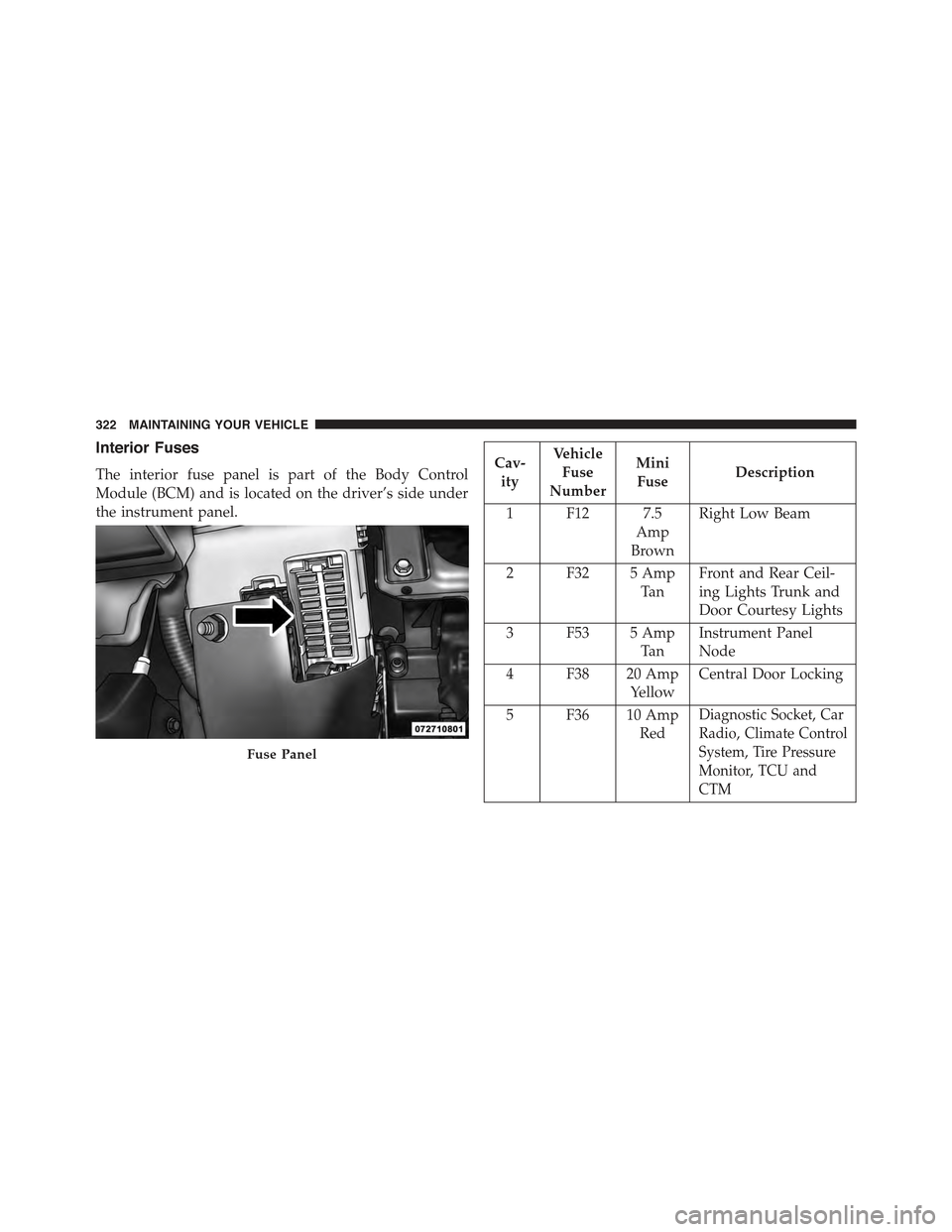
Interior Fuses
The interior fuse panel is part of the Body Control
Module (BCM) and is located on the driver’s side under
the instrument panel.
Cav-
ity
Vehicle
Fuse
Number
Mini
FuseDescription
1 F12 7.5
Amp
Brown
Right Low Beam
2 F32 5 Amp
Ta n
Front and Rear Ceil-
ing Lights Trunk and
Door Courtesy Lights
3 F53 5 Amp
Ta n
Instrument Panel
Node
4 F38 20 Amp
Yellow
Central Door Locking
5 F36 10 Amp
Red
Diagnostic Socket, Car
Radio, Climate Control
System, Tire Pressure
Monitor, TCU and
CTM
Fuse Panel
322 MAINTAINING YOUR VEHICLE
Page 333 of 367
Front Turn Signal, Parking And Daytime Running
Lamps
1. Turn the steering wheel completely to the left or right.
2. Open the wheel housing access door.
3. Remove the plastic cap from the back of the lamp
housing.
4. Rotate bulb/socket counter-clockwise.
5. Remove the bulb and replace as needed.
6. Install the bulb into socket, and rotate bulb/socket
clockwise into lamp locking it in place.
7. Reinstall the plastic cap.
Front Fog Lamps
To replace the front fog lights, see your authorized dealer.
Wheel Housing Access Door
7
MAINTAINING YOUR VEHICLE 331
Page 340 of 367
MAINTENANCE SCHEDULE
Once A Month Or Before A Trip:
•Check windshield washer fluid level
•Check the tire inflation pressures and look for unusual
wear or damage
•Check the fluid levels of the coolant reservoirs and
brake master cylinder
•Check function of all interior and exterior lights
Required Maintenance Intervals
Refer to the maintenance schedules on the following
page for the required maintenance intervals.
At Every Service Interval:
•Rotate the tires.Rotate at the first sign of irregu-
lar wear.
•Inspect brake pads, shoes, rotors, drums, and
hoses.
•Inspect battery cooling system protection and
hoses.
•Check and adjust hand brake.
338 MAINTENANCE SCHEDULES