Page 158 of 367
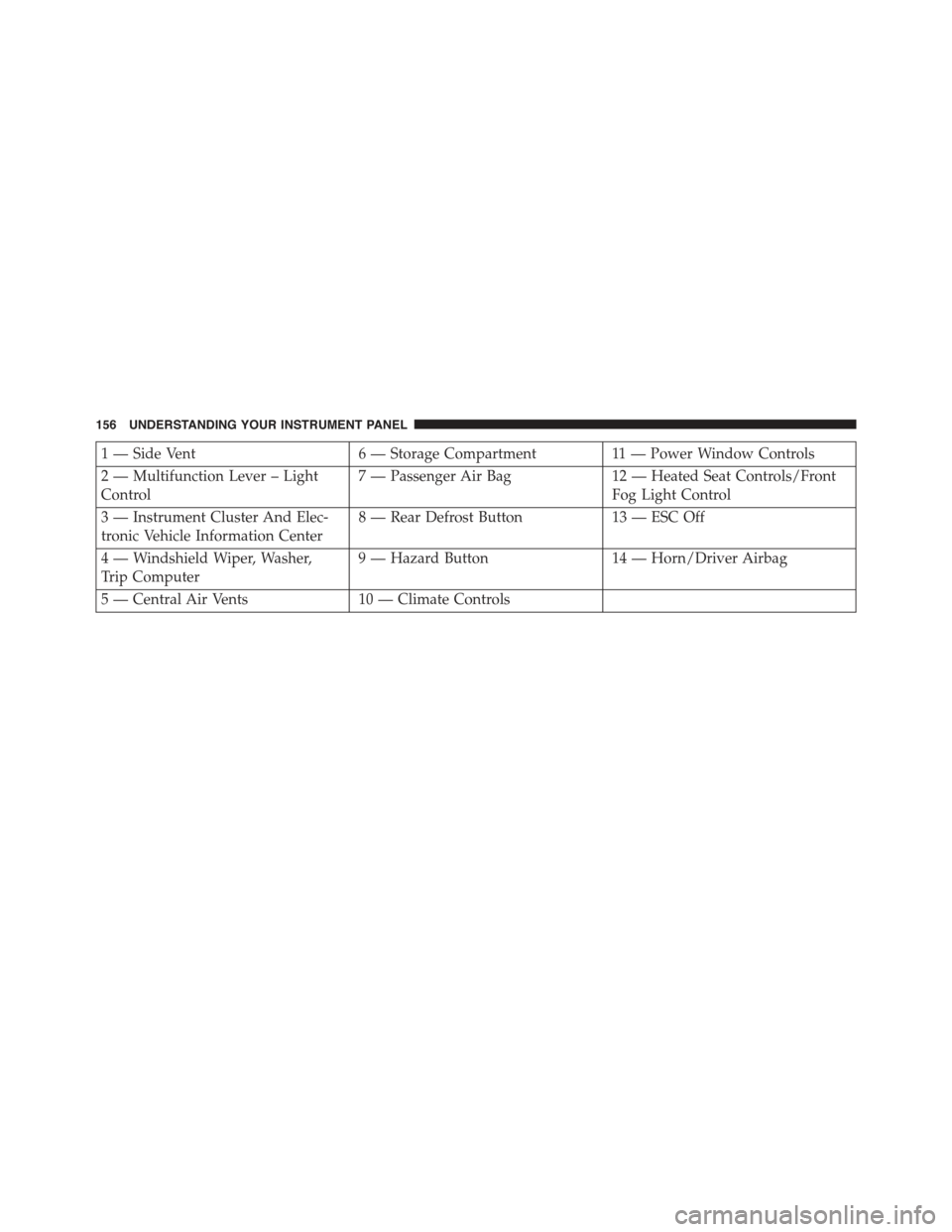
1 — Side Vent6 — Storage Compartment11 — Power Window Controls
2 — Multifunction Lever – Light
Control
7 — Passenger Air Bag12 — Heated Seat Controls/Front
Fog Light Control
3 — Instrument Cluster And Elec-
tronic Vehicle Information Center
8 — Rear Defrost Button13 — ESC Off
4 — Windshield Wiper, Washer,
Trip Computer
9 — Hazard Button14 — Horn/Driver Airbag
5 — Central Air Vents10 — Climate Controls
156 UNDERSTANDING YOUR INSTRUMENT PANEL
Page 159 of 367
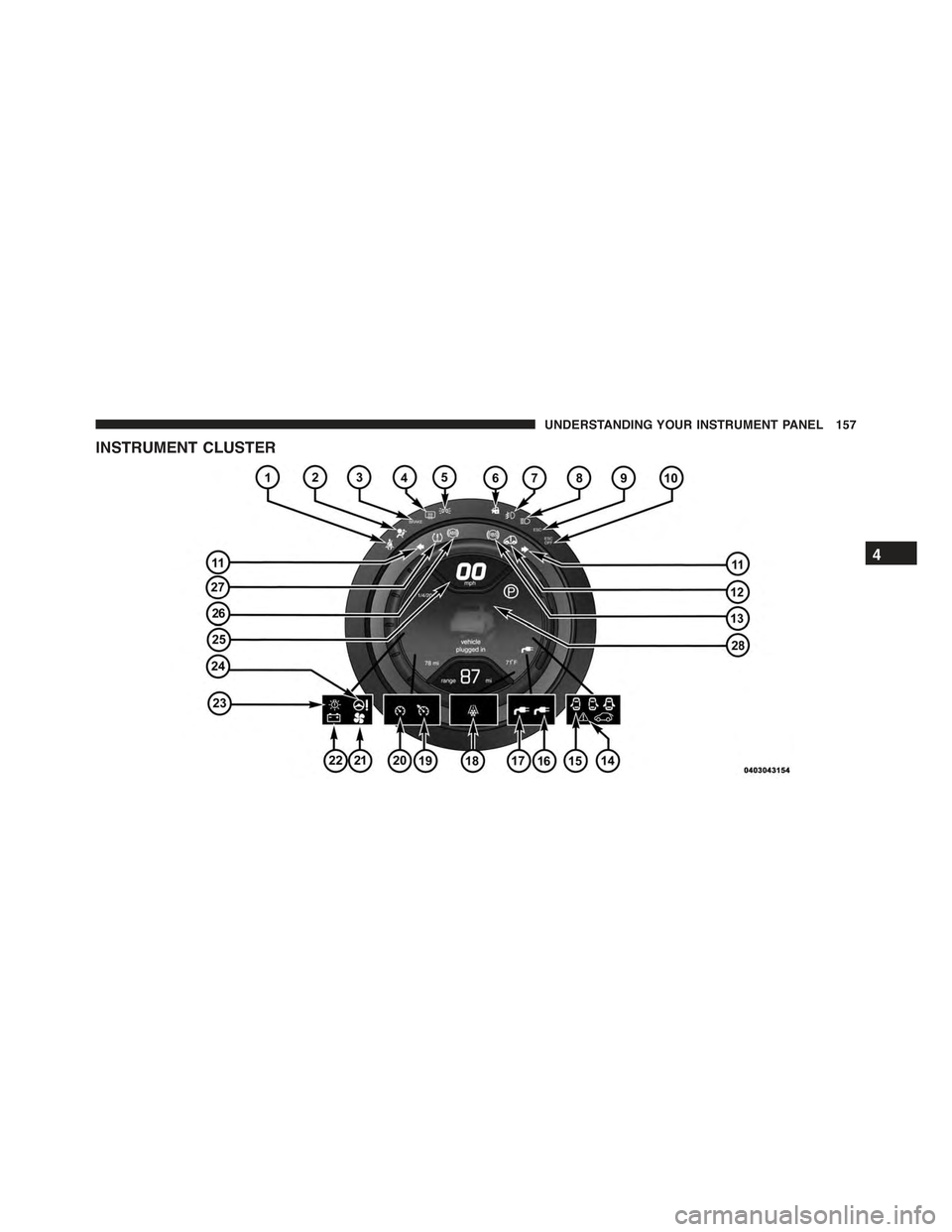
INSTRUMENT CLUSTER
4
UNDERSTANDING YOUR INSTRUMENT PANEL 157
Page 160 of 367
INSTRUMENT CLUSTER DESCRIPTIONS
1. Seat Belt Reminder Light
When the ignition switch is first turned to ON/
RUN, this light will turn on if the driver’s seat belt
is unbuckled, a chime will sound. When driving,
if the driver’s seat belt remains unbuckled, the Seat Belt
Reminder Light will illuminate and the chime will sound.
Refer to “Occupant Restraints” in “Things To Know
Before Starting Your Vehicle” for further information.
2. Air Bag Warning Light
If this light turns on while driving, have the
system inspected at an authorized dealer as soon
as possible. Refer to “Occupant Restraints” in
“Things To Know Before Starting Your Vehicle”
for further information.
3. Brake Warning Light
This light monitors various brake functions,
including brake fluid level and parking brake
application. If the Brake Warning Light turns
on it may indicate that the parking brake is
applied, that the brake fluid level is low, or that there is
a problem with the brake system reservoir.
The light will remain on until the cause is corrected.
If brake failure is indicated, immediate repair is neces-
sary.
WARNING!
Driving a vehicle with the red brake light on is
dangerous. You could have a collision. Have the
vehicle checked immediately.
158 UNDERSTANDING YOUR INSTRUMENT PANEL
Page 163 of 367
9. Electronic Stability Control (ESC) Activation /
Malfunction Indicator Light
The ESC Activation/Malfunction Indicator
Light in the instrument cluster will come on for
four seconds when the ignition switch is
turned to the ON/RUN position. If the ESC
Activation/Malfunction Indicator Light comes on con-
tinuously a malfunction has been detected in the ESC
system. If this light remains on, see your authorized
dealer as soon as possible to have the problem diagnosed
and corrected.
NOTE:
•The ESC Off Indicator Light and the ESC Activation/
Malfunction Indicator Light come on momentarily
each time the ignition switch is turned to ON/RUN.
•Each time the ignition is turned to ON/RUN, the
ESC system will be on, even if it was turned off
previously.
10. Electronic Stability Control OFF (ESC OFF)
Indicator Light
This light indicates the Electronic Stability Con-
trol system (ESC) has been turned off by the
driver.
11. Turn Signal Indicators
The arrows will flash in unison with the exte-
rior turn signal, when using the turn signal
lever.
12. EV System Malfunction Indicator Light
This indicator will illuminate when there is a
malfunction in the Electric Vehicle (EV) Sys-
tem. If the EV System Malfunction Indicator
light comes on while driving or charging see
your authorized dealer as soon as possible.
4
UNDERSTANDING YOUR INSTRUMENT PANEL 161
Page 165 of 367

19. Icy Road Indicator
This light will illuminate during an icy road
condition.
20. Electronic Speed Control SET
This light will turn on when the electronic
speed control is SET. For further information,
refer to “Electronic Speed Control” in “Under-
standing The Features Of Your Vehicle.”
21. Electronic Speed Control ON
This telltale will illuminate amber when the
electronic speed control is ON. For further
information, refer to “Electronic Speed Con-
trol” in “Understanding The Features Of Your
Vehicle.”
22. Charging System Light
This light shows the status of the electrical charg-
ing system. If the light stays on or comes on while
driving, turn off some of the vehicle’s non-essential
electrical devices. If the charging system light remains on,
it means that the vehicle is experiencing a problem with
the charging system. Obtain SERVICE IMMEDIATELY.
See an authorized dealer.
If jump starting is required, refer to “Jump Starting
Procedures” in “What To Do In Emergencies.”
For vehicles equipped with a premium cluster this indi-
cator will display in the Electronic Vehicle Information
Center (EVIC). Refer to ”Electronic Vehicle Information
Center (EVIC) — If Equipped” for further information.
23. Exterior Bulb Failure Indicator
This light will illuminate when there is a malfunction in
one of the exterior bulbs.
4
UNDERSTANDING YOUR INSTRUMENT PANEL 163
Page 168 of 367

CAUTION!
The TPMS has been optimized for the original
equipment tires and wheels. TPMS pressures and
warning have been established for the tire size
equipped on your vehicle. Undesirable system opera-
tion or sensor damage may result when using re-
placement equipment that is not of the same size,
type, and/or style. Aftermarket wheels can cause
sensor damage. Using aftermarket tire sealants may
cause the Tire Pressure Monitoring System (TPMS)
sensor to become inoperable. After using an after-
market tire sealant it is recommended that you take
your vehicle to an authorized dealership to have your
sensor function checked.
28. Electronic Vehicle Information Center (EVIC)
The EVIC features a driver-interactive display that is
located in the instrument cluster. For further information,
refer to “Electronic Vehicle Information Center (EVIC)” in
“Understanding Your Instrument Panel.”
ELECTRONIC VEHICLE INFORMATION
CENTER (EVIC)
The Electronic Vehicle Information Center (EVIC) fea-
tures a driver-interactive display that is located in the
instrument cluster.
166 UNDERSTANDING YOUR INSTRUMENT PANEL
Page 169 of 367
The EVIC consists of the following:
•System Status
•Vehicle Information Warning Message Displays
•Outside Temperature Display
•Trip Computer Functions
•Tire Pressure Monitoring Display
•Range
EVIC Control Buttons
The EVIC control buttons are located on the right side of
the Instrument Cluster. There are three control buttons
that are used to navigate through the EVIC functions:
•+ button
•– button
•MENU ESC button
Electronic Vehicle Information Center (EVIC) Display
4
UNDERSTANDING YOUR INSTRUMENT PANEL 167
Page 172 of 367

Selecting An Option Of The Main Menu Without
Submenu:
1. Briefly push and release the MENU ESC button to
select the main menu option to set.
2. Push and release the + or – button (by single pushes)
to select the new setting.
3. Briefly push and release the MENU ESC button to
store the new setting and go back to the main menu
option previously selected.
Selecting An Option Of The Main Menu With Sub-
menu:
1. Briefly push and release the MENU ESC button to
display the first submenu option.
2. Push and release the + or – button (by single pushes)
to scroll through all the submenu options.
3. Briefly push and release the MENU ESC button to
select the displayed submenu option and to open the
relevant setup menu.
4. Push and release the + or – button (by single pushes)
to select the new setting for this submenu option.
5. Briefly push and release the MENU ESC button to
store the new setting and go back to the previously
selected submenu option.
6. Push and hold the MENU ESC button to return to the
main menu (short hold) or the main screen (longer
hold).
Trip Computer
The Trip Computer is located in the instrument cluster.
The Trip Computer displays trip information such as:
average speed, distance traveled, average energy, time
traveled, motor power, and tire pressure.
170 UNDERSTANDING YOUR INSTRUMENT PANEL