Page 27 of 367

The EVSE LED’s will be used to indicate the vehicle’s
connection status if no faults are found during the self test.
AC LED
Fault In-
dicator
LED
Charge Level Indicator
LED’s
••••••
After the EVSE is connected to the vehicle’s charge inlet
the EVSE will continue to illuminate all LED’s green.
Once the vehicle begins charging the EVSE Charge level
LED’s will illuminate in order from left to right, then shut
off. This pattern will repeat as long as the EVSE remains
connected to AC power and the vehicle is actively
charging. Completion of charge will result in illuminat-
ing all LED’s green. If the vehicle stops charging, the LED
pattern will stop.
The LED’s are illuminated and turn off at the rate of one
change per second and the battery is charging.
AC
LED
Fault
Indica-
tor LED
Charge Level Indicator
LED’sTime
•••ooo1.0
sec
••••o o 2.0
sec
•••••o 3.0
sec
••••••4.0
sec
Refer to the Level 1 User Manual for any additional
information on its use or operation.
2
THINGS TO KNOW BEFORE STARTING YOUR VEHICLE 25
Page 28 of 367
Charging The High Voltage Battery
1. Put the vehicle in PARK.
2. Turn the ignition to the OFF position.
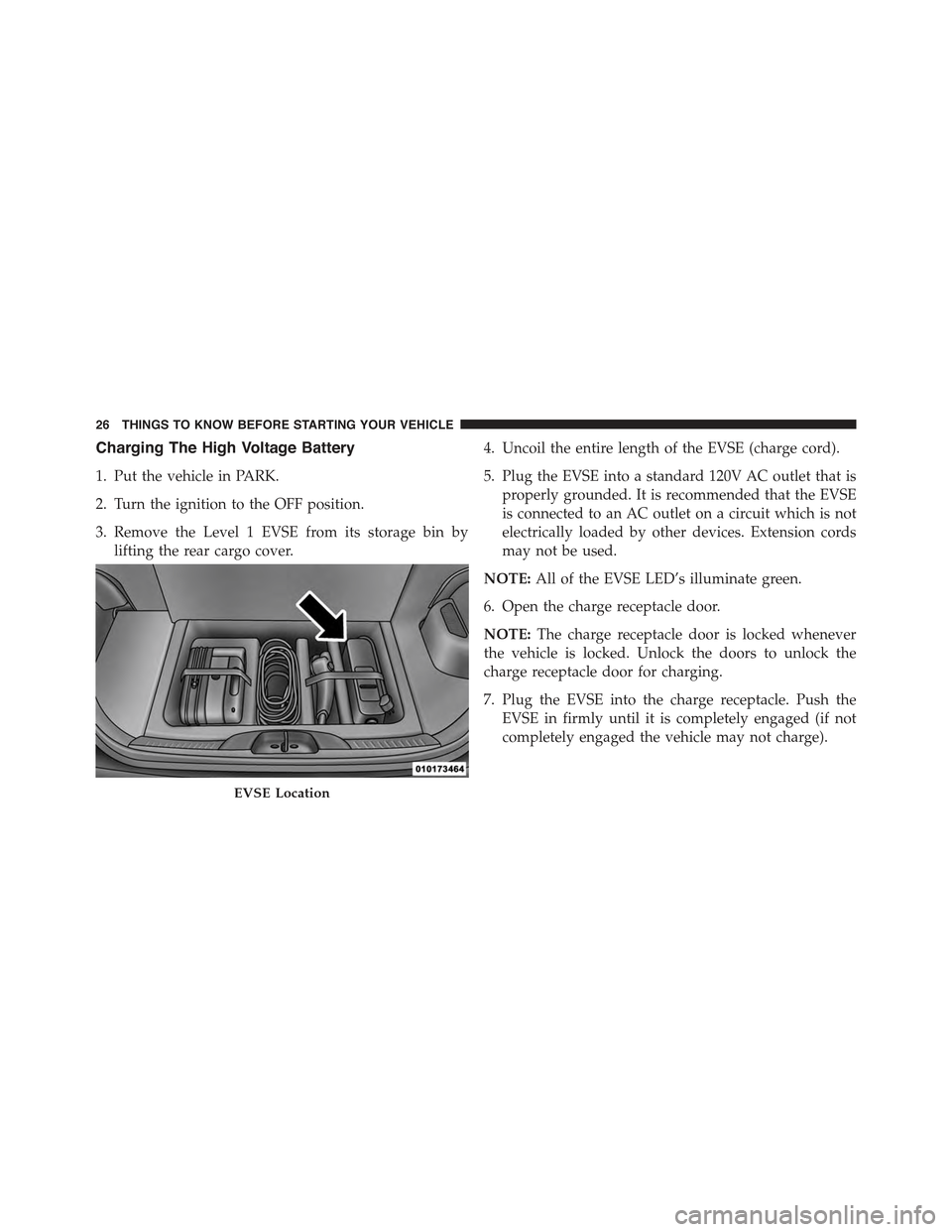
3. Remove the Level 1 EVSE from its storage bin by
lifting the rear cargo cover.
4. Uncoil the entire length of the EVSE (charge cord).
5. Plug the EVSE into a standard 120V AC outlet that is
properly grounded. It is recommended that the EVSE
is connected to an AC outlet on a circuit which is not
electrically loaded by other devices. Extension cords
may not be used.
NOTE:All of the EVSE LED’s illuminate green.
6. Open the charge receptacle door.
NOTE:The charge receptacle door is locked whenever
the vehicle is locked. Unlock the doors to unlock the
charge receptacle door for charging.
7. Plug the EVSE into the charge receptacle. Push the
EVSE in firmly until it is completely engaged (if not
completely engaged the vehicle may not charge).
EVSE Location
26 THINGS TO KNOW BEFORE STARTING YOUR VEHICLE
Page 29 of 367
NOTE:
•The vehicle will initiate the charging cycle automati-
cally when all the conditions are satisfied.
•The vehicle charge indicator will show the pattern
for charging.
8. When charging is complete, or the vehicle needs to be
unplugged, remove the EVSE by pushing the button
on the charge connector and pull firmly to remove it
from the charge receptacle.
9. Close the charge receptacle door.
EVSE Charge CouplerCharge Indicator
2
THINGS TO KNOW BEFORE STARTING YOUR VEHICLE 27
Page 30 of 367
NOTE:
•In the event of an error in the charging process, the AC
power to the vehicle will stop and a red indicator will
illuminate on the EVSE.
•Keep the door for the charge receptacle closed when
not in use.
Vehicle Charge Indicators
Instrument Cluster High Voltage Battery Gauge
There is a battery gauge indicator located on the instrument
cluster. The battery gauge will display, with progressive
color indication, the current state of charge for the high
voltage battery; with the percentage value located at the
bottom of the gauge.
Charge Receptacle Door
High Voltage Battery Gauge
28 THINGS TO KNOW BEFORE STARTING YOUR VEHICLE
Page 33 of 367
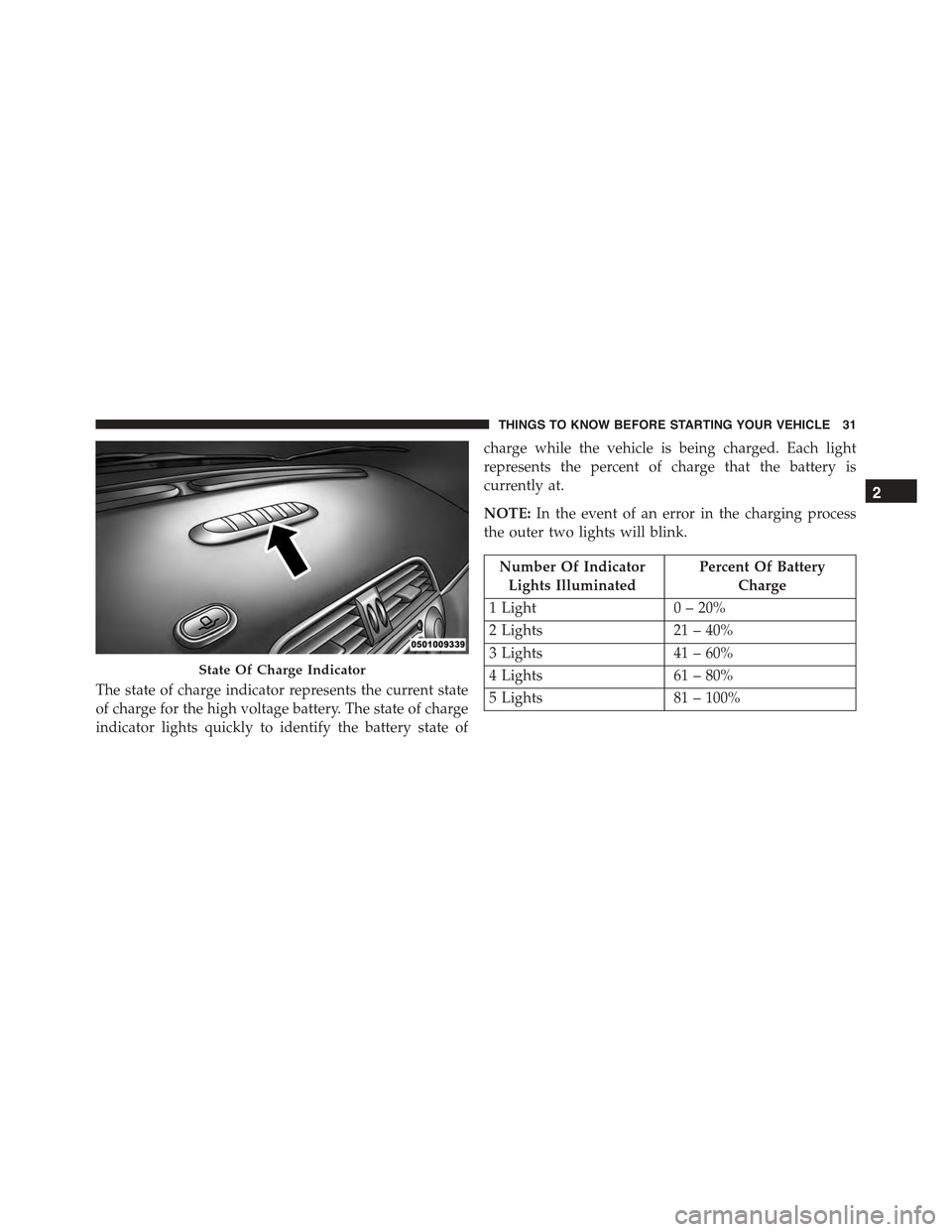
The state of charge indicator represents the current state
of charge for the high voltage battery. The state of charge
indicator lights quickly to identify the battery state of
charge while the vehicle is being charged. Each light
represents the percent of charge that the battery is
currently at.
NOTE:In the event of an error in the charging process
the outer two lights will blink.
Number Of Indicator
Lights Illuminated
Percent Of Battery
Charge
1 Light0 – 20%
2 Lights21 – 40%
3 Lights41 – 60%
4 Lights61 – 80%
5 Lights81 – 100%
State Of Charge Indicator
2
THINGS TO KNOW BEFORE STARTING YOUR VEHICLE 31
Page 113 of 367

Message reader functions are managed by the control
buttons on the steering wheel or by the BLUE&ME™
voice commands.
The BLUE&ME™ message reader enables the following
operations:
•To display an indicator on the instrument panel that
indicates you have received a new SMS text. It will
display the sender’s number/name and will ask you
whether to read the text of the message to you.
•To manage the list of SMS texts received on your
BLUE&ME™ paired mobile phone.
•To read the messages received and stored. Messages
can be read multiple times.
•To call the SMS text sender using the buttons on the
steering wheel or voice commands.
•To delete individual messages or the entire inbox using
the buttons on the steering wheel or voice commands.
The BLUE&ME™ system can also recognize and read
abbreviations, if any (e.g. “ILUVU” will be read like “I
love you”) and interpret the most usual emoticons (e.g. :-)
will be read like “Smile”), that are currently used to write
SMS texts.
Media Player
With the BLUE&ME™ media player you can play the
digital audio files stored on a USB device by simply
connecting it to the USB port located in the center console
of the car. A second USB port, used for charging only, is
located in the glovebox.
In this way, while you are driving you can play your
favorite music collections.
•iPod® Player— See dedicated paragraph under Me-
dia Player Functions.
3
UNDERSTANDING THE FEATURES OF YOUR VEHICLE 111
Page 163 of 367
9. Electronic Stability Control (ESC) Activation /
Malfunction Indicator Light
The ESC Activation/Malfunction Indicator
Light in the instrument cluster will come on for
four seconds when the ignition switch is
turned to the ON/RUN position. If the ESC
Activation/Malfunction Indicator Light comes on con-
tinuously a malfunction has been detected in the ESC
system. If this light remains on, see your authorized
dealer as soon as possible to have the problem diagnosed
and corrected.
NOTE:
•The ESC Off Indicator Light and the ESC Activation/
Malfunction Indicator Light come on momentarily
each time the ignition switch is turned to ON/RUN.
•Each time the ignition is turned to ON/RUN, the
ESC system will be on, even if it was turned off
previously.
10. Electronic Stability Control OFF (ESC OFF)
Indicator Light
This light indicates the Electronic Stability Con-
trol system (ESC) has been turned off by the
driver.
11. Turn Signal Indicators
The arrows will flash in unison with the exte-
rior turn signal, when using the turn signal
lever.
12. EV System Malfunction Indicator Light
This indicator will illuminate when there is a
malfunction in the Electric Vehicle (EV) Sys-
tem. If the EV System Malfunction Indicator
light comes on while driving or charging see
your authorized dealer as soon as possible.
4
UNDERSTANDING YOUR INSTRUMENT PANEL 161
Page 164 of 367
13. Regenerative Brake System Light
If the light turns on and remains on while
driving, it suggests that there is a potential
problem with the Regenerative Brake System
(RBS) and the need for system service. See your
authorized dealer as soon as possible.
14. Door Ajar Lights
These lights will turn on to indicate when the drivers,
passengers or both doors may be ajar.
15. Liftgate Ajar Light
This light will turn on to indicate when the liftgate may
be ajar.
16. Service Propulsion System Warning Light
The Service Propulsion System Warning Light
will illuminate if there is a malfunction de-
tected with the Propulsion System. If the light
comes on or remains on while driving see your
authorized dealer.
17. Plugged In Indicator
This green indicator will illuminate when the
vehicle is plugged in.
18. Plugged In Indicator
This red indicator will illuminate if there is a
malfunction or interruption during the vehicle
charging process.
162 UNDERSTANDING YOUR INSTRUMENT PANEL