Page 238 of 426
Only shift from DRIVE to PARK or REVERSE when the
accelerator pedal is released and the vehicle is stopped.
Be sure to keep your foot on the brake pedal when
shifting between these gears.
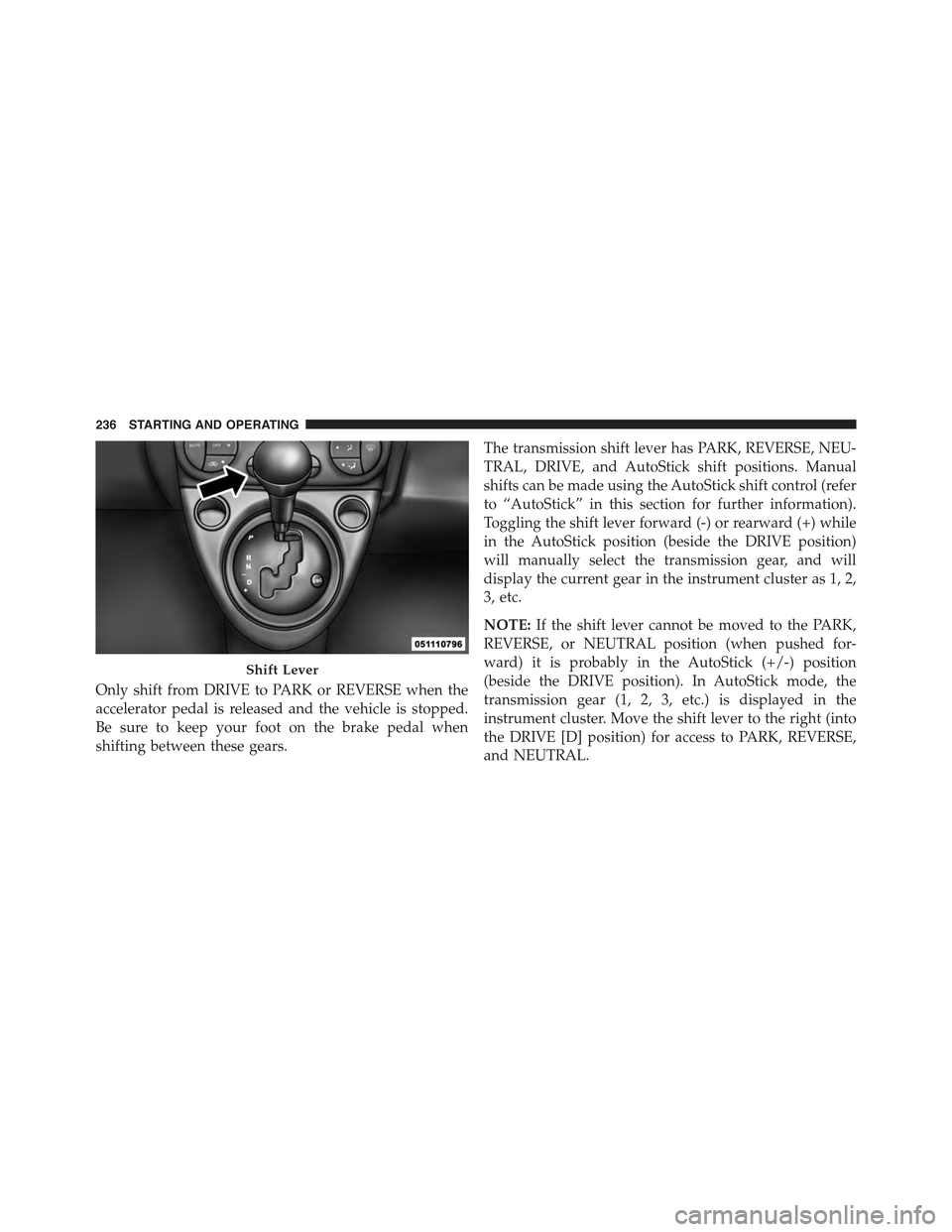
The transmission shift lever has PARK, REVERSE, NEU-
TRAL, DRIVE, and AutoStick shift positions. Manual
shifts can be made using the AutoStick shift control (refer
to “AutoStick” in this section for further information).
Toggling the shift lever forward (-) or rearward (+) while
in the AutoStick position (beside the DRIVE position)
will manually select the transmission gear, and will
display the current gear in the instrument cluster as 1, 2,
3, etc.
NOTE:If the shift lever cannot be moved to the PARK,
REVERSE, or NEUTRAL position (when pushed for-
ward) it is probably in the AutoStick (+/-) position
(beside the DRIVE position). In AutoStick mode, the
transmission gear (1, 2, 3, etc.) is displayed in the
instrument cluster. Move the shift lever to the right (into
the DRIVE [D] position) for access to PARK, REVERSE,
and NEUTRAL.
Shift Lever
236 STARTING AND OPERATING
Page 241 of 426
CAUTION!
•Before moving the shift lever out of PARK, you
must turn the ignition switch from the LOCK/OFF
position to the ON/RUN position, and also press
the brake pedal. Otherwise, damage to the shift
lever could result.
•DO NOT race the engine when shifting from
PARK or NEUTRAL into another gear range, as this
can damage the drivetrain.
The following indicators should be used to ensure that
you have engaged the transmission into the PARK posi-
tion:
•When shifting into PARK, press the lock button on the
shift lever and firmly move the lever all the way
forward and to the left until it stops and is fully seated.
•Look at the transmission gear position display and
verify that it indicates the PARK position.
•With brake pedal released, verify that the shift lever
will not move out of PARK.
REVERSE (R)
This range is for moving the vehicle backward. Shift into
REVERSE only after the vehicle has come to a complete
stop.
NEUTRAL (N)
Use this range when the vehicle is standing for prolonged
periods with the engine running. The engine may be
started in this range. Apply the parking brake and shift
the transmission into PARK if you must leave the vehicle.
5
STARTING AND OPERATING 239
Page 244 of 426
NOTE:Even if the transmission can be reset, we recom-
mend that you visit your authorized dealer at your
earliest possible convenience. Your authorized dealer has
diagnostic equipment to determine if the problem could
recur.
If the transmission cannot be reset, authorized dealer
service is required.
AUTOSTICK
AutoStick is a driver-interactive transmission feature
providing manual shift control, giving you more control
of the vehicle. AutoStick allows you to maximize engine
braking, eliminate undesirable upshifts and downshifts,
and improve overall vehicle performance. This system
can also provide you with more control during passing,
city driving, cold slippery conditions, mountain driving,
and many other situations.
Operation
When the shift lever is in the AutoStick position (beside the
Drive position), it can be moved forward and rearward.
This allows the driver to manually select the transmission
gear being used. Moving the shift lever forward (-) triggers
a downshift, and rearward (+) an upshift. The current gear
is displayed in the instrument cluster.
NOTE:In AutoStick mode, the transmission will only
shift up or down when the driver moves the shift lever
rearward (+) or forward (-), except as described below.
•The transmission will automatically upshift when nec-
essary to prevent engine over-speed.
•The transmission will automatically downshift as the
vehicle slows (to prevent engine lugging) and will
display the current gear.
242 STARTING AND OPERATING
Page 249 of 426
POWER STEERING
The electric power steering system will give you good
vehicle response and increased ease of maneuverability
in tight spaces. The system will vary its assist to provide
light efforts while parking and good feel while driving.
If the electric steering system experiences a fault that
prevents it from providing assist, you will still have the
ability to steer the vehicle manually.
WARNING!
Continued operation with reduced or no power steer-
ing assist could pose a safety risk to yourself and
others. Service should be obtained as soon as pos-
sible.
If the Steering icon is flashing, it indicates that the vehicle
needs to be taken to an authorized dealer for service. It is
likely the vehicle has lost power steering assistance.
If the Steering icon is displayed and the “POWER STEER-
ING SYSTEM OVER TEMP” message is displayed on the
EVIC screen, they indicate that extreme steering maneu-
vers may have occurred which caused an over tempera-
ture condition in the power steering system. Once driv-
ing conditions are safe, pull over and let the vehicle idle
for a few moments until the icon and message turn off.
Refer to “Electronic Vehicle Information (EVIC)” in “Un-
derstanding Your Instrument Panel” for further informa-
tion.
If the Steering icon is displayed and the “SERVICE
POWER STEERING – ASSIST OFF” message is displayed
on the EVIC screen, they indicate the vehicle needs to be
taken to an authorized dealer for service. Refer to “Elec-
tronic Vehicle Information (EVIC)” in “Understanding
Your Instrument Panel” for further information.
5
STARTING AND OPERATING 247
Page 252 of 426
SPORT MODE
Manual Transmission — If Equipped
In Sport mode, the engine is more responsive to the
throttle pedal, and provides more maximum torque by
increasing turbo boost pressure. Steering feedback is
improved, and steering effort is slightly higher. This
driving mode is useful for spirited driving.
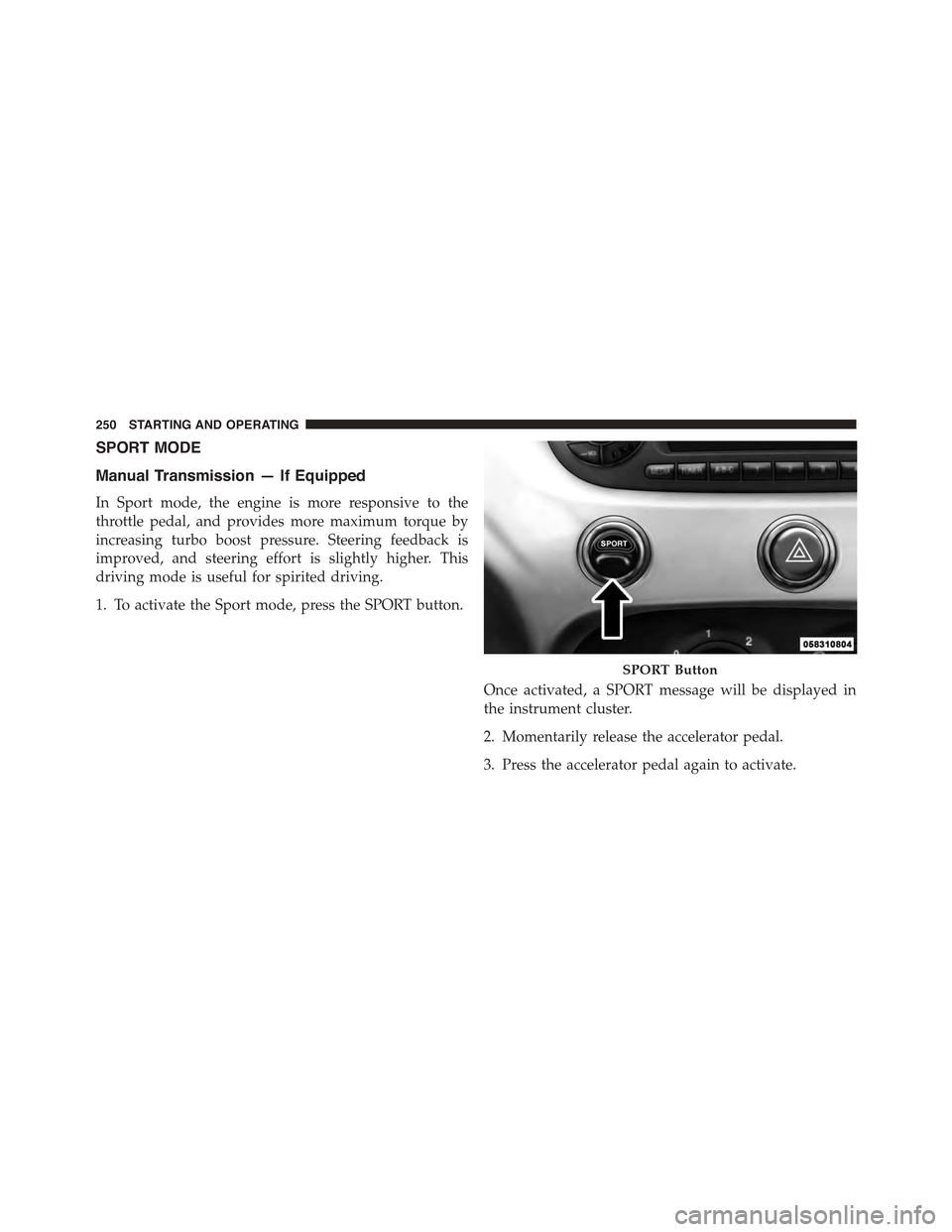
1. To activate the Sport mode, press the SPORT button.
Once activated, a SPORT message will be displayed in
the instrument cluster.
2. Momentarily release the accelerator pedal.
3. Press the accelerator pedal again to activate.
SPORT Button
250 STARTING AND OPERATING
Page 253 of 426
Automatic Transmission — If Equipped
The Sport mode increases steering feedback to the driver
with slight increase in effort and changes the transmis-
sion shift schedules for more aggressive shifting. This
driving mode is useful while driving on twisty roads
where more steering precision is desired in spirited
cornering.
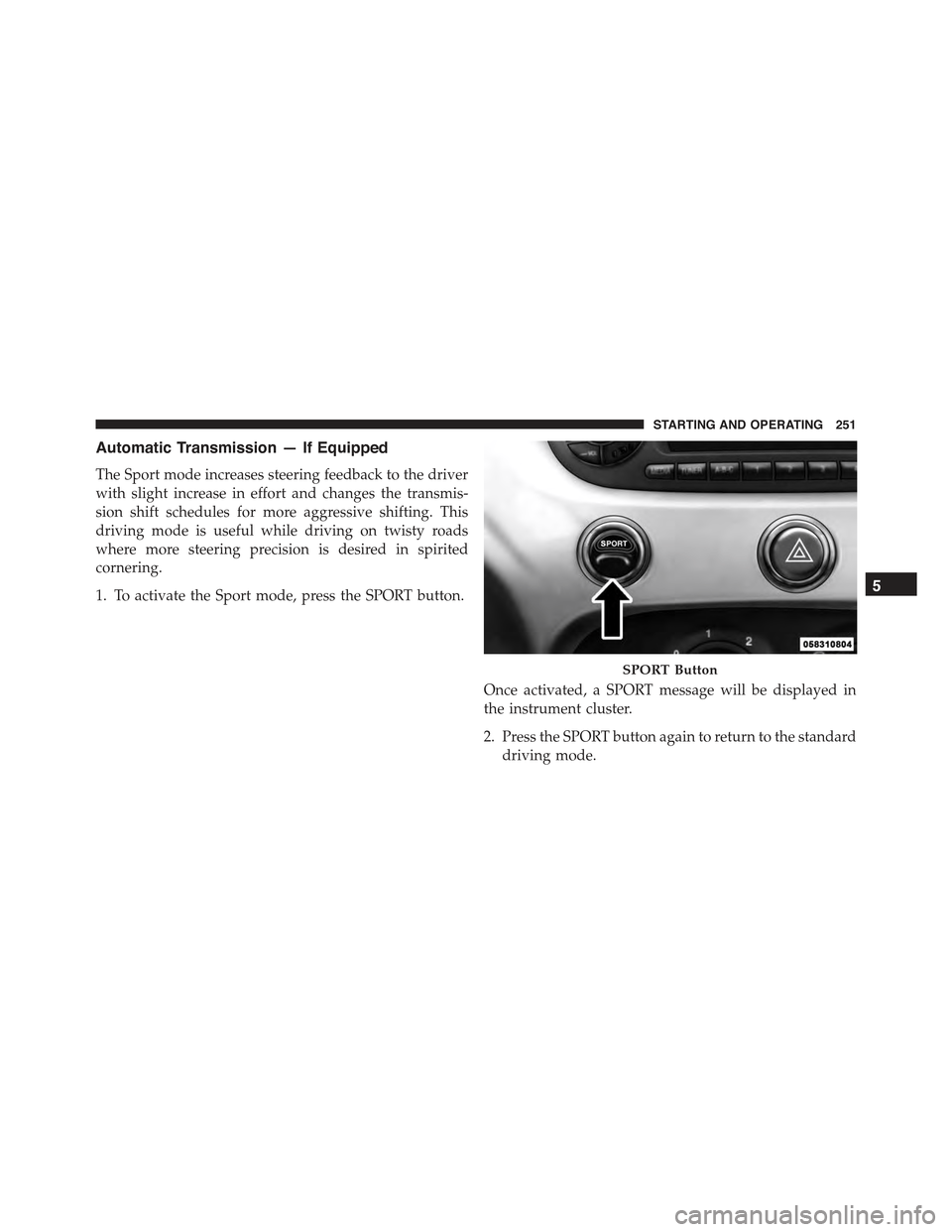
1. To activate the Sport mode, press the SPORT button.
Once activated, a SPORT message will be displayed in
the instrument cluster.
2. Press the SPORT button again to return to the standard
driving mode.
SPORT Button
5
STARTING AND OPERATING 251
Page 261 of 426
To turn ESC on again, momentarily press the switch
again. This will restore the normal ESC On mode of
operation.
WARNING!
When in “Partial Off” mode, the TCS functionality of
ESC (except for the limited slip feature described in
the TCS section) has been disabled and the “ESC Off
Indicator Light” will be illuminated. When in “Par-
tial Off” mode, the engine power reduction of TCS is
disabled, and the enhanced vehicle stability offered
by the ESC system is reduced.
Full Off
This mode is intended for off-highway or off-road use
only and should not be used on public roadways. In this
mode, all TCS and ESC stability features are turned OFF,
except for the limited slip feature described in the TCS
section. To enter the “Full Off” mode, depress and hold
the ESC OFF switch for five seconds. After five seconds,
the ESC OFF Indicator Light will illuminate, and the
“ESC OFF” message will display in the EVIC. To turn
ESC ON again, momentarily press the ESC OFF switch.
WARNING!
In the ESC “Full Off” mode, the engine torque
reduction and stability features are cancelled. There-
fore, the enhanced vehicle stability offered by ESC is
unavailable. The “Full Off” ESC mode is intended
for off-highway or offroad use only.
5
STARTING AND OPERATING 259
Page 291 of 426

The TPMS consists of the following components:
•Receiver Module.
•Four Tire Pressure Monitoring Sensors.
•Tire Pressure Monitoring Telltale Light.
Tire Pressure Monitoring Low Pressure Warnings
The Tire Pressure Monitoring Telltale Light will illumi-
nate in the instrument cluster, an audible chime will be
activated, and the “Check left or right front/rear tire
xxx.x psi” text message will display when one or more of
the four active road tire pressures are low. Should this
occur, you should stop as soon as possible, check the
inflation pressure of each tire on your vehicle, and inflate
each tire to the vehicle’s recommended cold placard
pressure value. The system will automatically update
and the Tire Pressure Monitoring Light will extinguish
once the updated tire pressures have been received. The
vehicle may need to be driven for up to 20 minutes above
15 mph (24 km/h) to receive this information.
Check TPMS Warnings
The Tire Pressure Monitoring Telltale Light will flash on
and off for 75 seconds and remain on solid when a system
fault is detected, and the “Service Tire Pressure Monitoring
System” text message will display. If the ignition key is
cycled, this sequence will repeat providing the system fault
still exists. The Tire Pressure Monitoring Telltale Light will
turn off when the fault condition no longer exists. A system
fault can occur with any of the following scenarios:
1. Jamming due to electronic devices or driving next to
facilities emitting the same radio frequencies as the
TPM sensors.
2. Installing some form of aftermarket window tinting
that affects radio wave signals.
3. Snow or ice around the wheels or wheel housings.
4. Using tire chains on the vehicle.
5. Using wheels/tires not equipped with TPM sensors.
5
STARTING AND OPERATING 289