Page 131 of 426
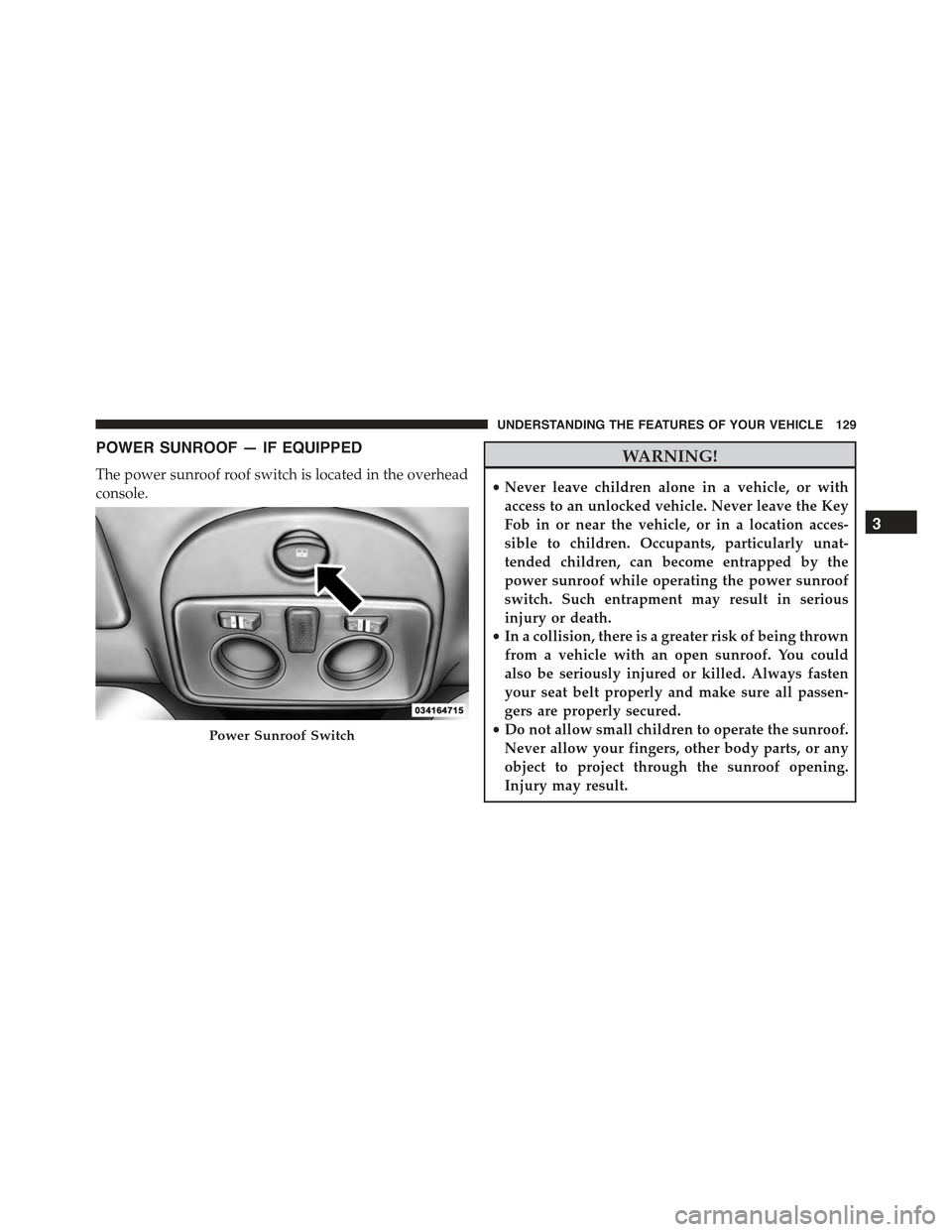
POWER SUNROOF — IF EQUIPPED
The power sunroof roof switch is located in the overhead
console.
WARNING!
•Never leave children alone in a vehicle, or with
access to an unlocked vehicle. Never leave the Key
Fob in or near the vehicle, or in a location acces-
sible to children. Occupants, particularly unat-
tended children, can become entrapped by the
power sunroof while operating the power sunroof
switch. Such entrapment may result in serious
injury or death.
•In a collision, there is a greater risk of being thrown
from a vehicle with an open sunroof. You could
also be seriously injured or killed. Always fasten
your seat belt properly and make sure all passen-
gers are properly secured.
•Do not allow small children to operate the sunroof.
Never allow your fingers, other body parts, or any
object to project through the sunroof opening.
Injury may result.
Power Sunroof Switch
3
UNDERSTANDING THE FEATURES OF YOUR VEHICLE 129
Page 161 of 426

23. Generic Warning Light
The Generic Warning Light will illuminate if
any of the following conditions occur: Oil
Change Request, Engine Oil Pressure Sensor
Failure, External Light Failure, Fuel Cut-Off
Intervention, Fuel Cut-Off Not Available, Parking Sensor
Failure.
24. Cruise On Indicator — If Equipped
This light will turn on when the electronic
speed control is ON. For further information,
refer to “Electronic Speed Control” in “Under-
standing Your Instrument Panel.”
25. Charging System Light
This light shows the status of the electrical charg-
ing system. The light should come on when the
ignition switch is first turned to ON/RUN and remain on
briefly as a bulb check. If the light stays on or comes on
while driving, turn off some of the vehicle’s non-essential
electrical devices or increase engine speed (if at idle). If
the charging system light remains on, it means that the
vehicle is experiencing a problem with the charging
system. Obtain SERVICE IMMEDIATELY. See an autho-
rized dealer.
If jump starting is required, refer to “Jump Starting
Procedures” in “What To Do In Emergencies.”
26. Electronic Throttle Control (ETC) Light
This light informs you of a problem with the
Electronic Throttle Control (ETC) system. If a
problem is detected, the light will come on
while the engine is running. Cycle the ignition
key when the vehicle has completely stopped and the
shift lever is placed in the NEUTRAL position. The light
should turn off. If the light remains lit with the engine
running, your vehicle will usually be drivable. However,
see an authorized dealer for service as soon as possible. If
4
UNDERSTANDING YOUR INSTRUMENT PANEL 159
Page 183 of 426
Lock
WhenUnlock Driver Dooris selected, only the driver’s
door will unlock on the first push of the Remote Keyless
Entry (RKE) transmitter UNLOCK button. When Unlock
Drivers Door is selected, you must push the RKE trans-
mitter UNLOCK button twice to unlock the passenger
door. WhenAll Doorsis selected, both of the doors will
unlock on the first push of the RKE transmitter UNLOCK
button. To make your selection, push and release the
SELECT button until “Unlock Driver Door” or “All
Doors” appears.
Exit Menu
This function closes the initial menu screen.
Briefly push and release theMENUbutton to go back to
the main screen.
Push and release thebutton to return to the first
menu option (Speed Beep).
Push and release thebutton to return to the last
menu option (Daylights).
4
UNDERSTANDING YOUR INSTRUMENT PANEL 181
Page 198 of 426
On Volume Limit
This function makes it possible to activate/deactivate the
maximum volume limit when turning the radio on.
The display shows the function status:
•“On volume limit: on” – when the radio is turned on
the volume level will be:
– If the volume level is equal to or higher than the
maximum value, the radio will come on at the
maximum volume.
– If the volume level is between the minimum and
maximum values, the radio will come on at the
same volume as before it was switched off.
– If the volume level is equal to or lower than the
minimum value, the radio will come on at the
minimum volume.
•“On volume limit: off” – The radio will come on at the
same volume as before it was switched off. The
volume level can be between 0 and 40.
Use the buttonsorto change the setting.
NOTE:
•Using the Menu it is only possible to adjust the
activation/deactivation of the function and not the
minimum or maximum volume value.
•If the battery charge is too low, the volume cannot be
adjusted between the minimum and the maximum
level.
Radio Off Function
This function makes it possible to set the radio switching
off mode by choosing between two methods.
The chosen mode appears on the display:
•“Radio off: 00 min” — The radio turns off in connec-
tion with the ignition key; the radio is turned auto-
matically off as soon as the key is turned to the STOP
position.
196 UNDERSTANDING YOUR INSTRUMENT PANEL
Page 199 of 426
•“Radio off: 20 min” — The radio turns off indepen-
dently from the ignition key; the radio remains on for
a maximum period of 20 minutes after the key has
been turned to the STOP position.
System Reset Function
This function is used to restore all settings to the factory
values. The options are:
•NO — No restore intervention.
•YES — The default parameters will be restored. Dur-
ing such operation, the wording “Resetting” appears
on the display. At the end of the operation, the source
does not change and the previous situation will be
displayed.
Radio
(Tuner) Introduction
When the car radio is turned on, the last function that
was selected before turning it off (Radio, CD, CD MP3,
AUX) is activated.
To select the Radio function when another audio source is
being listened to, briefly push the TUNER button.
Once the Radio mode has been activated, the display will
show the name (RBDS stations only) or the frequency of
the selected radio station, the frequency band selected
(e.g. FMA) and the preset button number (e.g. P1).
Frequency Band Selection
With the Radio mode active, press the FM or AM tuner
button briefly and repeatedly to select the desired recep-
tion band.
4
UNDERSTANDING YOUR INSTRUMENT PANEL 197
Page 204 of 426
CD Player
Introduction
This chapter describes the operation of the CD player
only. To operate the radio, refer to the description in the
“Functions and Adjustments” chapter.
CD Player Selection
To activate the CD player built into the equipment,
proceed as follows:
•Load a CD with the equipment switched on. The first
track will start to play.
Or
•If a CD has already been loaded, turn on the radio and
then briefly push the MEDIA button to select the “CD”
function mode. The last track listened to will start to
play.
It is advisable to use original CDs to ensure optimal
playing. If CD-R/RWs are used, we recommend using
good quality media that are burned at the slowest speed
possible.
CD Loading/Ejecting
To load the CD, insert it gently into the slot to activate the
motorized loading system, which will position it cor-
rectly.
The CD can be loaded with the radio off and the ignition
key turned to ON/RUN. In this case, the radio will
remain off. When the radio is turned on, the last source
listened to before being switched off, will be activated.
When a CD is inserted, the display will show the symbol
“CD” and the wording “CD Reading.” They will remain
displayed for the whole time required for the radio to
read the CD. When this time has elapsed the radio
automatically starts playing the first track.
202 UNDERSTANDING YOUR INSTRUMENT PANEL
Page 225 of 426
STARTING AND OPERATING
CONTENTS
!STARTING PROCEDURES................227
▫Manual Transmission — If Equipped.......227
▫Automatic Transmission — If Equipped.....227
▫Normal Starting.......................227
▫Cold Weather Operation................228
▫Extended Park Starting..................228
▫If Engine Fails To Start.................229
▫After Starting........................230
▫Turbocharger “Cool Down”..............230
!MANUAL TRANSMISSION — IF EQUIPPED . . .230
▫Five-Speed Manual Transmission...........230
▫Recommended Shift Speeds..............232
▫Downshifting........................232
!AUTOMATIC TRANSMISSION —
IF EQUIPPED.........................233
▫Key Ignition Park Interlock...............235
▫Brake/Transmission Shift Interlock System . . .235
▫Six-Speed Automatic Transmission.........235
▫Gear Ranges.........................237
5
Page 229 of 426

STARTING PROCEDURES
Before starting your vehicle, adjust your seat, adjust both
inside and outside mirrors, and fasten your seat belts.
WARNING!
•Never leave children alone in a vehicle, or with
access to an unlocked vehicle.
•Allowing children to be in a vehicle unattended is
dangerous for a number of reasons. A child or
others could be seriously or fatally injured. Chil-
dren should be warned not to touch the parking
brake, brake pedal or the shift lever.
•Do not leave the Key Fob in or near the vehicle (or
in a location accessible to children). A child could
operate power windows, other controls, or move
the vehicle.
Manual Transmission — If Equipped
Apply the parking brake, place the shift lever in NEU-
TRAL, and press the clutch pedal before starting the
vehicle. This vehicle is equipped with a clutch interlock-
ing ignition system. It will not start unless the clutch
pedal is pressed to the floor.
Automatic Transmission — If Equipped
The shift lever must be in the PARK or NEUTRAL
position before you can start the engine. Depress the
brake pedal before shifting to any driving gear.
NOTE:You must press the brake pedal before shifting
out of PARK.
Normal Starting
NOTE:Normal starting of either a cold or a warm engine
is obtained without pumping or pressing the accelerator
pedal.
5
STARTING AND OPERATING 227