Page 161 of 400

The DID display is located in the center portion of the
instrument cluster and consists of the following sections:
1. Main Screen — The inner ring of the display will
illuminate in grey under normal conditions, yellow for
non critical warnings, red for critical warnings, and
white for on demand information.
2. Audio / Phone Information and Sub-menu Informa-
tion — Whenever there are sub-menus available, the
position within the sub-menus is shown here.
3. Reconfigurable Telltales/Information
4. Telltales/Indicators
5. Selectable Information (Tach, Mph/Kmh, Vehicle Info,
Fuel Economy, Trip A, Trip B, Audio, Stored Messages,
Screen Setup, Performance, Diagnostics, Hibernation)
6. Suspension Status — The suspension status icon will
illuminate in this area. Refer to “Starting And Operat-
ing” for further information.
7. ESC Status — The ESC status icon will illuminate in
this area. Refer to “Starting And Operating” for fur-
ther information.
8. Launch Control status when launch control mode is
entered. Refer to “Starting And Operating” for further
information.
4
UNDERSTANDING YOUR INSTRUMENT PANEL 159
Page 183 of 400

Safety & Driving Assistance — If Equipped
After pressing the Safety & Driving Assistance button on
the touchscreen the following settings will be available:
•ParkView® Backup Camera Delay
When the vehicle is shifted out of REVERSE (with camera
delay turned OFF), the rear camera mode is exited and
the previous screen appears again. When the vehicle is
shifted out of REVERSE (with camera delay turned ON),
the rear view image with dynamic grid lines will be
displayed for up to 10 seconds after shifting out of
“REVERSE” unless the forward vehicle speed exceeds
8 mph (12 km/h), the transmission is shifted into
“PARK” or the ignition is switched to the OFF position.
To set the ParkView® Backup Camera Delay press the
“settings” button, then the “Safety & Driving Assistance”
button on the touchscreen. Press the “Parkview Backup
camera Delay” button on the touchscreen to turn the
ParkView® Delay ON or OFF.
•Hill Start Assist — If Equipped
When this feature is selected, the Hill Start Assist (HSA)
system is active. To make your selection, press the “Hill
Start Assist” button on the touchscreen until a check-
mark appears next to setting, indicating that the setting
has been selected. Press the back arrow/Done button on
the touchscreen to return to the previous menu.
Lights
After pressing the Lights button on the touchscreen the
following settings will be available.
•Headlight Off Delay
When this feature is selected, the driver can choose to
have the headlights remain on for 0, 30, 60, or 90 seconds
when exiting the vehicle. To change the Headlight Off
Delay status, press the “+” or “-” button on the touch-
screen to select your desired time interval. Press the back
4
UNDERSTANDING YOUR INSTRUMENT PANEL 181
Page 204 of 400

feature. Refer to the “Customer Programmable Fea-
tures — Uconnect® System Settings” in this section of
the manual.
To provide you with maximum comfort in the Automatic
mode during cold start-ups, the blower fan will remain
on low until the engine warms up. The blower will
increase in speed and transition into Auto mode.
Recirculation Control
When outside air contains smoke, odors, or high humid-
ity, or if rapid cooling is desired, you may wish to
recirculate interior air by pressing the RECIRCULATION
control button. Recirculation mode should only be used
temporarily. The recirculation LED will illuminate on the
blower control knob when this button is selected. Push
the button a second time to turn off the Recirculation
mode LED and allow outside air into the vehicle.
NOTE:In cold weather, use of Recirculation mode may
lead to excessive window fogging. The Recirculation
mode is not allowed in Defrost mode to improve window
clearing operation. Recirculation will be disabled auto-
matically if these modes are selected.
Summer Operation
The engine cooling system must be protected with a
high-quality antifreeze coolant to provide proper corro-
sion protection and to protect against engine overheating.
OAT coolant (conforming to MS.90032) is recommended.
Refer to “Maintenance Procedures” in “Maintaining Your
Vehicle” for proper coolant selection.
Winter Operation
To ensure the best possible heater and defroster perfor-
mance, make sure the engine cooling system is function-
ing properly and the proper amount, type, and concen-
tration of coolant is used. Refer to “Maintenance
Procedures” in “Maintaining Your Vehicle” for proper
202 UNDERSTANDING YOUR INSTRUMENT PANEL
Page 205 of 400

coolant selection. Use of the air Recirculation mode
during Winter months is not recommended because it
may cause window fogging.
Vacation/Storage
Any time you store your vehicle or keep it out of service
(i.e., vacation) for two weeks or more, run the air
conditioning system at idle for about five minutes in
fresh air with the blower setting in high. This will ensure
adequate system lubrication to minimize the possibility
of compressor damage when the system is started again.
Window Fogging and Frosting
Vehicle windows tend to fog on the inside of the glass in
mild, rainy and/or humid weather. Windows may frost
on the inside of the glass in very cold weather. To clear
the windows, select Defrost or Mix mode and increase
the front blower speed. Do not use the Recirculation
mode without A/C for long periods, as fogging may
occur.
NOTE:Automatic Temperature Controls (ATC) will au-
tomatically adjust the climate control settings to reduce
or eliminate window fogging on the front windshield.
When this occurs, recirculation will be unavailable.
Outside Air Intake
Make sure the air intake, located directly in front of the
windshield, is free of obstructions such as leaves. Leaves
collected in the air intake may reduce airflow, can cause
odor, and if they enter the plenum they could plug the
water drains. In winter months, ensure the air intake is
clear of ice, slush and snow.
4
UNDERSTANDING YOUR INSTRUMENT PANEL 203
Page 221 of 400
STARTING AND OPERATING
CONTENTS
!STARTING PROCEDURES................222
▫Normal Starting.......................222
▫If Engine Fails To Start.................224
▫After Starting........................225
!MANUAL TRANSMISSION...............225
▫Shifting.............................226
▫Recommended Shift Speeds..............227
▫Skip Shift Indicator Light...............228
!STREET/RACE MODE — IF EQUIPPED......229
!LAUNCH MODE.......................230
!DRIVING ON SLIPPERY SURFACES.........232
▫Acceleration.........................232
▫Traction............................232
!DRIVING THROUGH WATER.............233
▫Flowing/Rising Water..................233
▫Shallow Standing Water.................234
!POWER STEERING.....................235
▫Power Steering Fluid Check..............236
!PARKING BRAKE......................237
!BRAKE SYSTEM.......................239
5
Page 233 of 400
5. Rapidly press the accelerator pedal to the floor within
one second.
NOTE:If the cluster launch DID message indicates all
conditions are correct for launch and the throttle is
pressed to the floor quickly (within approximately 1/2
second) the system will hold the engine speed to a preset
speed (below the engine rev limiter speed).
6. Release the clutch aggressively. Do not ride the clutch.
Release the accelerator pedal to deactivate launch con-
trol. Pressing the launch control button or actuating the
brakes will also deactivate launch control.
NOTE:
•Launch Mode brings the engine to optimum launch
RPM and waits for the driver to release the clutch.
Launch Mode then uses engine throttle only to achieve
controlled wheelslip for maximum acceleration
through first gear.
•Launch Mode can be used in any of the Electronic
Stability Control (ESC) Modes.
LAUNCH Button
5
STARTING AND OPERATING 231
Page 234 of 400

•Launch mode should not be used within the first 500
miles of engine break-in.
WARNING!
Launch Mode is intended for off-highway or off-road
use only and should not be used on any public
roadways. It is recommended that this feature be
used in a controlled environment, and within the
limits of the law. The capabilities of the vehicle as
measured by the performance pages must never be
exploited in a reckless or dangerous manner, which
can jeopardize the user ’s safety or the safety of
others. Only a safe, attentive, and skillful driver can
prevent accidents.
DRIVING ON SLIPPERY SURFACES
Acceleration
WARNING!
Rapid acceleration on slippery surfaces is dangerous.
You could lose control of the vehicle and possibly
have a collision. Accelerate slowly and carefully
whenever there is likely to be poor traction (ice,
snow, wet, mud, loose sand, etc.).
Traction
When driving on wet or slushy roads, it is possible for a
wedge of water to build up between the tire and road
surface. This is hydroplaning and may cause partial or
complete loss of vehicle control and stopping ability. To
reduce this possibility, the following precautions should
be observed:
232 STARTING AND OPERATING
Page 247 of 400
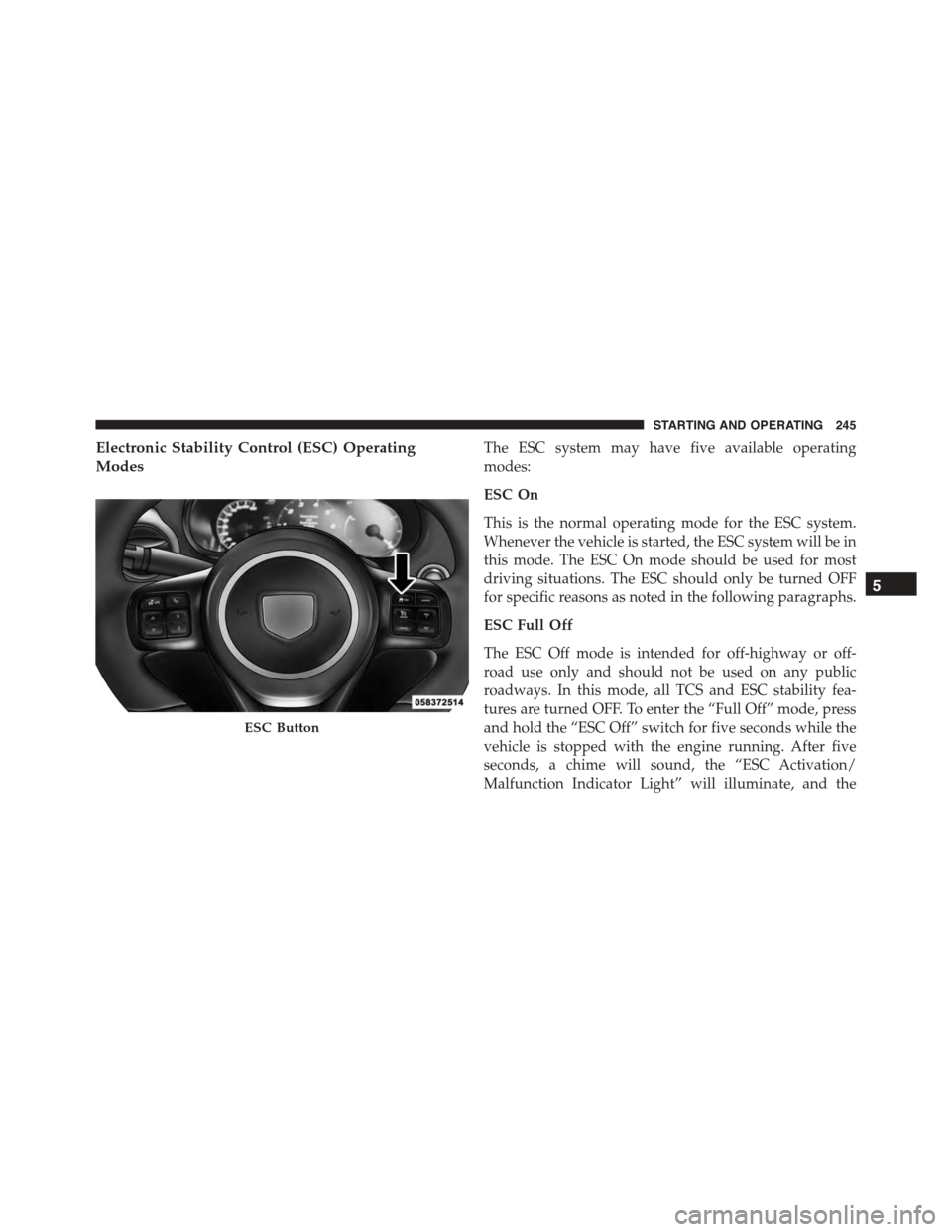
Electronic Stability Control (ESC) Operating
Modes
The ESC system may have five available operating
modes:
ESC On
This is the normal operating mode for the ESC system.
Whenever the vehicle is started, the ESC system will be in
this mode. The ESC On mode should be used for most
driving situations. The ESC should only be turned OFF
for specific reasons as noted in the following paragraphs.
ESC Full Off
The ESC Off mode is intended for off-highway or off-
road use only and should not be used on any public
roadways. In this mode, all TCS and ESC stability fea-
tures are turned OFF. To enter the “Full Off” mode, press
and hold the “ESC Off” switch for five seconds while the
vehicle is stopped with the engine running. After five
seconds, a chime will sound, the “ESC Activation/
Malfunction Indicator Light” will illuminate, and the
ESC Button
5
STARTING AND OPERATING 245