Page 218 of 400
TIP:Once you perform a search, you can reorganize the
results by selecting either the Best Match, Rating or
Distance tab on the top of the touchscreen display.
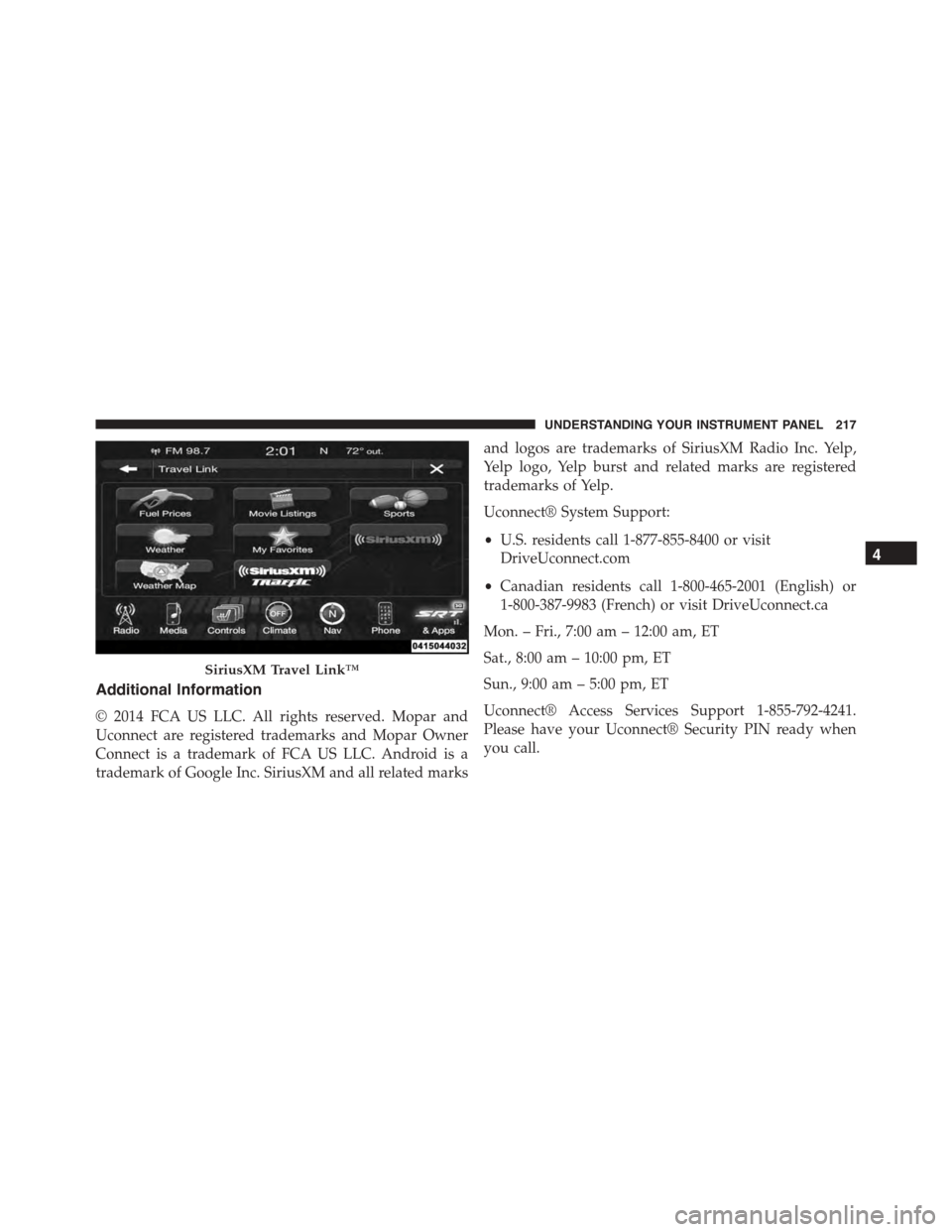
SiriusXM Travel Link™ (8.4AN)
Need to find a gas station, view local movie listings,
check a sports score or the 5 - day weather forecast?
SiriusXM Travel Link™ is a suite of services that brings a
wealth of information right to your Uconnect® 8.4AN
system.
Push the VR button. After the beep, say one of the
following commands:
•Show fuel prices
•Show 5 - day weather forecast
•Show extended weather
TIP:Traffic alerts are not accessible with Voice Com-
mand.
Yelp®
216 UNDERSTANDING YOUR INSTRUMENT PANEL
Page 219 of 400
Additional Information
© 2014 FCA US LLC. All rights reserved. Mopar and
Uconnect are registered trademarks and Mopar Owner
Connect is a trademark of FCA US LLC. Android is a
trademark of Google Inc. SiriusXM and all related marks
and logos are trademarks of SiriusXM Radio Inc. Yelp,
Yelp logo, Yelp burst and related marks are registered
trademarks of Yelp.
Uconnect® System Support:
•U.S. residents call 1-877-855-8400 or visit
DriveUconnect.com
•Canadian residents call 1-800-465-2001 (English) or
1-800-387-9983 (French) or visit DriveUconnect.ca
Mon. – Fri., 7:00 am – 12:00 am, ET
Sat., 8:00 am – 10:00 pm, ET
Sun., 9:00 am – 5:00 pm, ET
Uconnect® Access Services Support 1-855-792-4241.
Please have your Uconnect® Security PIN ready when
you call.
SiriusXM Travel Link™
4
UNDERSTANDING YOUR INSTRUMENT PANEL 217
Page 225 of 400
NOTE:
•You must disarm the security system in order to start
the engine. Refer to “Security Alarm System” in
“Things To Know Before Starting Your Vehicle” for
further information.
•Normal starting of either a cold or a warm engine does
not require pumping or pressing the accelerator pedal.
However, if the engine has not started within three
seconds, slightly press the accelerator pedal while
continuing to crank. If the engine fails to start within
15 seconds, wait five seconds, then repeat the “Normal
Starting” procedure.
To Start The Engine:
1. Fully apply the parking brake.
2. Press the clutch pedal to the floor.
NOTE:The engine will not start unless the clutch pedal
is pressed to the floor.
3. Place the shift lever in NEUTRAL.
4. Press the red ENGINE START/STOP button located
on the instrument panel. Release the button when the
engine starts.
Engine START/STOP Button
5
STARTING AND OPERATING 223
Page 231 of 400

CAUTION!
If you skip more than one gear while downshifting
or downshift at too high a vehicle speed, you could
damage the engine, transmission, or clutch.
WARNING!
Skipping more than one gear while downshifting,
could cause you to lose control of your vehicle. You
could have a collision.
STREET/RACE MODE — IF EQUIPPED
This vehicle is equipped with a two mode electronic
controlled damping system. This system allows for a
compliant street suspension damping setting or a firmer
race suspension damping setting. When in street mode
the system will automatically shift the suspension damp-
ers to the firmer Race damping setting during some hard
acceleration and braking situations. There are two modes
of operation:
•Street Mode — This mode will give a sporty, but
comfortable ride. This mode is driver selectable when
the vehicle is placed in STREET mode (press the
“STREET” button on the Instrument Panel). This mode
is intended for a smoother ride on the various types of
pavement and road conditions while still providing
damping levels appropriate extreme capabilities.
•Race Mode — This mode is driver selectable when the
vehicle is placed in RACE mode (press the “RACE”
button on the Instrument Panel). This mode is for track
use only and will supply maximum grip to the tires.
5
STARTING AND OPERATING 229
Page 248 of 400

#ESC OFF#message will display in the vehicle cluster (left
of the odometer). The “ESC OFF” message may appear in
the Driver Information Display (DID). Refer to “Driver
Information Display (DID)” in “Understanding Your
Instrument Panel” for further information. To turn ESC
ON again, momentarily press the “ESC Off” switch.
WARNING!
With the ESC switched OFF, the enhanced vehicle
stability offered by ESC is unavailable. In an emer-
gency evasive maneuver, the ESC system will not
engage to assist in maintaining stability. The “Full
Off” ESC mode is intended for off-highway or off-
road only.
Sport Mode — If Equipped
Sport mode has reduced traction control and reduced
stability control. To enter the “Sport Mode” mode, press
the “ESC” switch once (located on the steering wheel).
The “ESC Sport Light” will illuminate, and the#ESC
SPORT#message will display in the vehicle cluster (left of
the odometer). Refer to “Driver Information Display
(DID)” in “Understanding Your Instrument Panel” for
further information.
Track Mode — If Equipped
Track Mode has no traction control and has reduced
stability control. To enter the “Track Mode” mode, press
the “ESC” switch twice. The “ESC Track Light” will
illuminate, and the#ESC TRACK#message will display in
the vehicle cluster (left of the odometer). Refer to “Driver
Information Display (DID)” in “Understanding Your
Instrument Panel” for further information.
Rain Mode
Rain mode offers increased traction control and stability
control for low traction conditions such as wet roads, dry
246 STARTING AND OPERATING
Page 249 of 400
roads during cold temperatures, or when the driver
wants enhanced stability due to lack of familiarity or
experience with the vehicle’s response. To enter the “Rain
Mode” mode, press the “ESC” switch three times. The
“ESC Rain Light” will illuminate, and the#ESC RAIN#
message will display in the vehicle cluster (left of the
odometer). Refer to “Driver Information Display (DID)”
in “Understanding Your Instrument Panel” for further
information.
NOTE:Some models may not offer “Sport” or “Track”
Mode.
TIRE SAFETY INFORMATION
Tire Markings
1—U.S.DOTSafetyStandardsCode (TIN)4—MaximumLoad
2 — Size Designation 5 — Maximum Pressure3 — Service Description 6 — Treadwear, Traction andTemperature Grades
5
STARTING AND OPERATING 247
Page 292 of 400

HAZARD WARNING FLASHER
The Hazard Warning flasher switch is located in the
center of the instrument panel above the climate controls.
Push the switch to turn on the Hazard Warning
flasher. When the switch is activated, all direc-
tional turn signals will flash on and off to warn oncoming
traffic of an emergency. Push the switch a second time to
turn off the Hazard Warning flasher.
This is an emergency warning system and it should not
be used when the vehicle is in motion. Use it when your
vehicle is disabled and it is creating a safety hazard for
other motorists.
When you must leave the vehicle to seek assistance, the
Hazard Warning flasher will continue to operate even
though the ignition is placed in the OFF position.
NOTE:With extended use the Hazard Warning flasher
may wear down your battery.
IF YOUR ENGINE OVERHEATS
In any of the following situations, you can reduce the
potential for overheating by taking the appropriate ac-
tion.
•On the highways —Slow down and use the highest
gear possible.
•In city traffic —While stopped, put the transmission
in NEUTRAL, but do not increase engine idle speed.
•In city traffic —While moving, shift into the highest
gear possible to reduce engine RPM.
NOTE:There are steps that you can take to slow down
an impending overheat condition:
290 WHAT TO DO IN EMERGENCIES
Page 304 of 400
If the tire pressure is 19 psi (1.3 Bar) or higher:
1. Push the Power Button (4) to turn on Tire Service Kit
and inflate the tire to the pressure indicated on the tire
and loading information label on the driver-side door
opening.
NOTE:If the tire becomes over-inflated, push the Defla-
tion Button to reduce the tire pressure to the recom-
mended inflation pressure before continuing.
2. Disconnect the Tire Service Kit from the valve stem,
reinstall the cap on the valve stem and unplug from 12
Volt outlet.
3. Place the Tire Service Kit in its proper storage area in
the vehicle.
4. Have the tire inspected and repaired or replaced at the
earliest opportunity at an authorized dealer or tire
service center.
5. Remove the Speed Limit sticker from the instrument
panel after the tire has been repaired.
6. Replace the Sealant Bottle (1) and Sealant Hose (6)
assembly at your authorized dealer as soon as pos-
sible. Refer to (F) “Sealant Bottle and Hose Replace-
ment”.
NOTE:When having the tire serviced, advise the autho-
rized dealer or service center that the tire has been sealed
using the Tire Service Kit.
(F) Sealant Bottle And Hose Replacement:
1. Uncoil the Sealant Hose (6) (clear in color).
2. Locate the round Sealant Bottle release button in the
recessed area under the sealant bottle.
3. Push the Sealant Bottle release button. The Sealant
Bottle (1) will pop up. Remove the bottle and dispose
of it accordingly.
302 WHAT TO DO IN EMERGENCIES