Page 268 of 648

Sunshade Operation
The sunshade can be opened manually. However, the
sunshade will open automatically as the sunroof opens.
NOTE:The sunshade cannot be closed if the sunroof is
open.
Wind Buffeting
Wind buffeting can be described as the perception of
pressure on the ears or a helicopter-type sound in the
ears. Your vehicle may exhibit wind buffeting with the
windows down, or the sunroof (if equipped) in certain
open or partially open positions. This is a normal occur-
rence and can be minimized. If the buffeting occurs with
the rear windows open, open the front and rear windows
together to minimize the buffeting. If the buffeting occurs
with the sunroof open, adjust the sunroof opening to
minimize the buffeting or open any window.
Sunroof Maintenance
Use only a nonabrasive cleaner and a soft cloth to clean
the glass panel.
Ignition Off Operation
The power sunroof switch will remain active for up to
approximately ten minutes after the ignition switch is
turned to the LOCK position. Opening either front door
will cancel this feature.
NOTE:Ignition Off time is programmable through the
Uconnect® System. Refer to “Uconnect® Settings/
Customer Programmable Features” in “Understanding
Your Instrument Panel” for further information.
ELECTRICAL POWER OUTLETS
A 12 Volt (13 Amp) power outlet is located in the center
console below the radio. The power outlet has power
available when the ignition in the ON/RUN or ACC
position.
266 UNDERSTANDING THE FEATURES OF YOUR VEHICLE
Page 269 of 648
This power outlet will also operate a conventional cigar
lighter unit.To preserve the heating element, do not
hold the lighter in the heating position.
A second 12 Volt (13 Amp) power outlet is located inside
the center console storage area. Power is available with
the ignition is in the ON/RUN, ACC or LOCK position.
Front 12 Volt Power Outlet
Center Console 12 Volt Power Outlet
3
UNDERSTANDING THE FEATURES OF YOUR VEHICLE 267
Page 270 of 648
A third fused 12 Volt power outlet is located on the back
of the center console. This power outlet has power
available when the ignition is in the LOCK, ON or ACC
position.
A fourth fused 12 Volt power outlet is located on the left
quarter trim panel in the cargo area. This power outlet
has power available when the ignition is in the ON or
ACC position.
Rear Seat 12 Volt Power OutletRear Cargo Area Power Outlet
268 UNDERSTANDING THE FEATURES OF YOUR VEHICLE
Page 281 of 648
WARNING!
Be certain that the seat cushion is locked securely
into position before using the seat. Otherwise, the
seat will not provide the proper stability for passen-
gers. An improperly latched seat cushion could cause
serious injury.
Second-Row Passenger Seat Temporary Storage
Bin
This is a temporary storage bin designed for use when
the seatback/armrest is down. Be sure to remove all
items from this bin before raising the seatback/armrest.
Second-Row Map Pocket And Grocery Retainers
— If Equipped
A map storage pocket and grocery retainers are located
on the back of the drivers seatback.
In-Floor Storage Bin With Removable Liner
NOTE:Position the front seat to at least a mid-track
position to provide easier access to the storage bin.
An in-floor storage bin is located behind each front seat.
Each 1.6 gal (5.9L) bin can hold up to 12, 12 oz (0.35L)
Seat Storage And Grocery Retainers
3
UNDERSTANDING THE FEATURES OF YOUR VEHICLE 279
Page 289 of 648
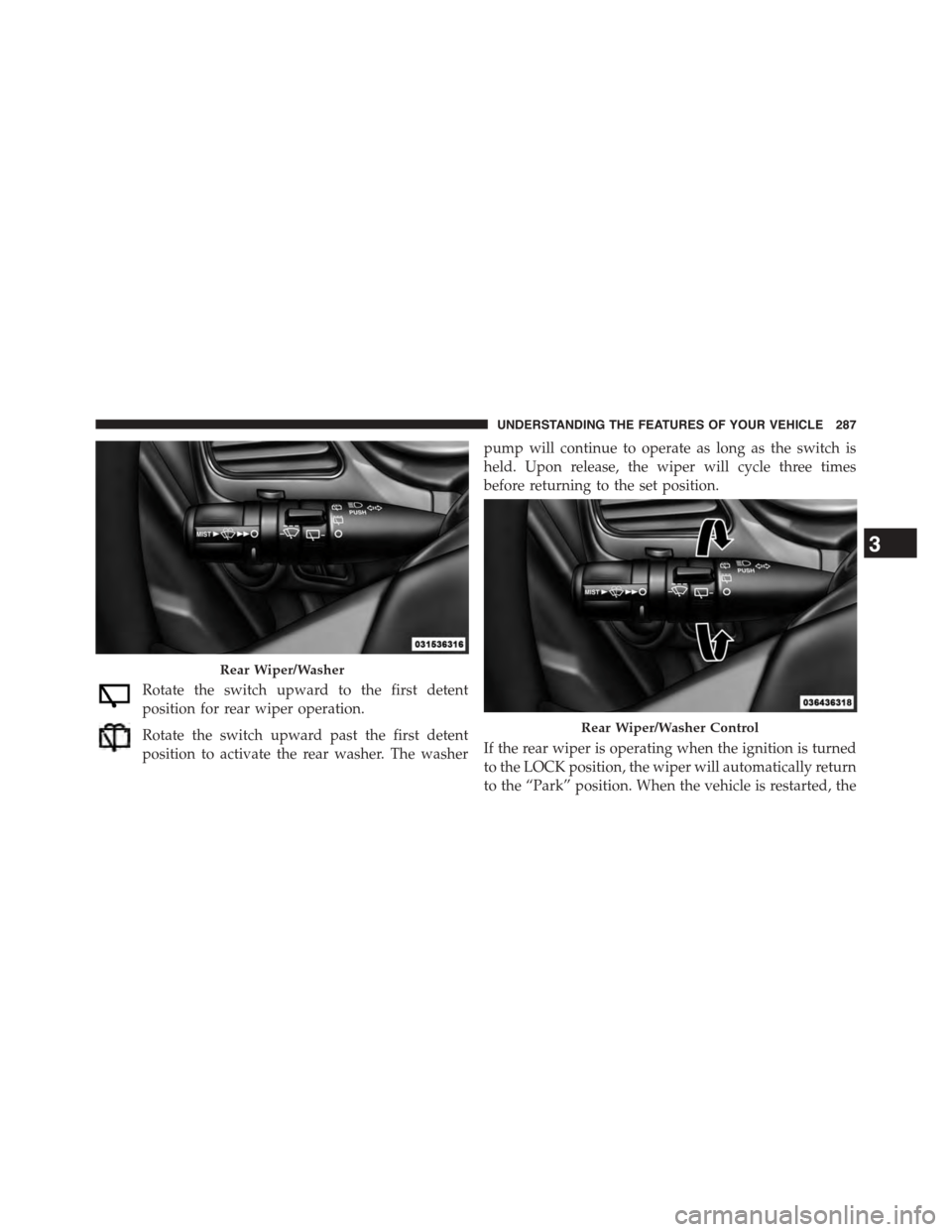
Rotate the switch upward to the first detent
position for rear wiper operation.
Rotate the switch upward past the first detent
position to activate the rear washer. The washer
pump will continue to operate as long as the switch is
held. Upon release, the wiper will cycle three times
before returning to the set position.
If the rear wiper is operating when the ignition is turned
to the LOCK position, the wiper will automatically return
to the “Park” position. When the vehicle is restarted, the
Rear Wiper/Washer
Rear Wiper/Washer Control
3
UNDERSTANDING THE FEATURES OF YOUR VEHICLE 287
Page 292 of 648

To Move The Crossbars
1. Loosen the knobs on top of each crossbar approxi-
mately six turns to disengage the clamp tooth from the
side rail.
2. Relocate the crossbars, aligning the crossbar stan-
chions (end pieces) with one of the vertical marks on
the outboard surface of the side rail for proper posi-
tioning. There are four frontward marks for the front
crossbar and four rearward marks for the rear cross-
bar. Make sure the crossbars remain equally spaced or
parallel at any position for proper function.
3. Tighten the knobs on each crossbar to lock it in
position. As you tighten the knob, make sure the
clamp tooth engages completely into the side rail slot.
4. Attempt to move the crossbar to ensure that it is
locked in position.
NOTE:
•To help control wind noise when installing the cross-
bars, make sure the arrows marked on the underside
of the crossbars face the front of the vehicle.
•To help reduce the amount of wind noise when the
crossbars are not in use, fasten the front crossbar in the
fourth position from the front and the rear crossbar in
Crossbar Knobs
290 UNDERSTANDING THE FEATURES OF YOUR VEHICLE
Page 296 of 648

▫Buttons On The Touchscreen..............320
▫Customer Programmable Features —
Uconnect® 4.3 Settings..................321
▫Customer Programmable Features —
Uconnect® System 8.4 Settings............333
!Uconnect® MULTIMEDIA — VIDEO
ENTERTAINMENT SYSTEM (VES™) — IF
EQUIPPED...........................347
▫Getting Started.......................348
▫Single Video Screen....................348
▫Play Video Games.....................349
▫Listen To An Audio Source On Channel 2 While A
Video Is Playing On Channel 1............350
▫Important Notes For Single Video Screen
System.............................351
▫Play A DVD Using The Touchscreen Radio . . .352
▫VES™ Remote Control — If Equipped.......353
▫Remote Control Storage.................356
▫Locking The Remote Control.............357
▫Replacing The Remote Control Batteries......357
▫Headphones Operation.................357
▫Replacing The Headphone Batteries.........358
▫Controls............................358
▫Unwired® Stereo Headphone Lifetime Limited
Warranty...........................359
▫System Information....................361
294 UNDERSTANDING YOUR INSTRUMENT PANEL
Page 305 of 648

if the driver’s seat belt remains unbuckled, the Seat Belt
Reminder Light will illuminate and the chime will sound.
Refer to “Occupant Restraints” in “Things To Know
Before Starting Your Vehicle” for further information.
12. Brake Warning Light
This light monitors various brake functions,
including brake fluid level and parking brake
application. If the brake light turns on it may
indicate that the parking brake is applied, that
the brake fluid level is low, or that there is a problem with
the anti-lock brake system reservoir.
If the light remains on when the parking brake has been
disengaged, and the fluid level is at the full mark on the
master cylinder reservoir, it indicates a possible brake
hydraulic system malfunction or that a problem with the
Brake Booster has been detected by the Anti-Lock Brake
System (ABS) / Electronic Stability Control (ESC) system.
In this case, the light will remain on until the condition
has been corrected. If the problem is related to the brake
booster, the ABS pump will run when applying the brake
and a brake pedal pulsation may be felt during each stop.
The dual brake system provides a reserve braking capac-
ity in the event of a failure to a portion of the hydraulic
system. A leak in either half of the dual brake system is
indicated by the Brake Warning Light, which will turn on
when the brake fluid level in the master cylinder has
dropped below a specified level.
The light will remain on until the cause is corrected.
NOTE:The light may flash momentarily during sharp
cornering maneuvers, which change fluid level condi-
tions. The vehicle should have service performed, and
the brake fluid level checked.
If brake failure is indicated, immediate repair is neces-
sary.
4
UNDERSTANDING YOUR INSTRUMENT PANEL 303