Page 381 of 648

12. Climate Control OFF Button
Press and release this button to turn the Climate Control
ON/OFF.
13. Driver Temperature Control Down Button
(Uconnect® 8.4 Only)
Provides the driver with independent temperature con-
trol. Push the button for cooler temperature settings.
NOTE:In Sync mode, this button will also automatically
adjust the passenger temperature setting at the same
time.
14. Driver Temperature Control Up Button (Uconnect®
8.4 Only)
Provides the driver with independent temperature con-
trol. Push the button for warmer temperature settings.
NOTE:In Sync mode, this button will also automatically
adjust the passenger temperature setting at the same time.
15. Temperature Control (Uconnect® 4.3 Only)
Press the driver or passenger temperature button on the
touchscreen to regulate the temperature of the air inside
the passenger compartment. Moving the temperature bar
into the red area, indicates warmer temperatures. Mov-
ing the temperature bar into the blue area indicates cooler
temperatures. Driver and passenger have independent
temperature control if Sync mode is not illuminated.
Climate Control Functions
A/C (Air Conditioning)
The Air Conditioning (A/C) button allows the operator
to manually activate or deactivate the air conditioning
system. When the air conditioning system is turned on,
cool dehumidified air will flow through the outlets into
the cabin. For improved fuel economy, press the A/C
button to turn off the air conditioning and manually
4
UNDERSTANDING YOUR INSTRUMENT PANEL 379
Page 394 of 648

•Floor Mode
Air comes from the floor outlets. A slight
amount of air is directed through the defrost
and side window demister outlets.
•Mix Mode
Air comes from the floor, defrost and side
window demist outlets. This mode works best
in cold or snowy conditions.
13. Climate Control OFF Button
Press and release this button to turn the Climate Control
ON/OFF.
14. Driver Temperature Control Down Button
(Uconnect® 8.4)
Provides the driver with independent temperature con-
trol. Push the button for cooler temperature settings.
NOTE:In Sync mode, this button will also automatically
adjust the passenger temperature setting at the same
time.
15.Driver Temperature Control Up Button (Uconnect® 8.4)
Provides the driver with independent temperature con-
trol. Push the button for warmer temperature settings.
NOTE:In Sync mode, this button will also automatically
adjust the passenger temperature setting at the same
time.
16. Temperature Control (Uconnect® 4.3)
Press the driver or passenger temperature button on the
touchscreen to regulate the temperature of the air inside
the passenger compartment. Moving the temperature bar
into the red area, indicates warmer temperatures. Mov-
ing the temperature bar into the blue area indicates cooler
temperatures. Driver and passenger have independent
temperature control if Sync mode is not illuminated.
392 UNDERSTANDING YOUR INSTRUMENT PANEL
Page 585 of 648
Cavity
Car-
tridge
Fuse
Mini-
FuseDescription
F107 – 10 Amp
Red
Rear Camera – If
Equipped
F108 – 15 Amp
Blue
Instrument Panel
F109 – 10 Amp
Red
Climate Control/
HVAC
F110 – 10 Amp
Red
Occupant Restraint
Controller
F112 – 10 Amp
Red
Spare
F114 – 20 Amp
Yellow
Rear HVAC
Blower/Motor
F115 – 20 Amp
Yellow
Rear Wiper Motor
Cavity
Car-
tridge
Fuse
Mini-
FuseDescription
F116 30 Amp
Pink
– Rear Defroster
(EBL)
F117 – 10 Amp
Red
Heated Mirrors
F118 – 10 Amp
Red
Occupant Restraint
Controller
F119 – 10 Amp
Red
Steering Column
Control Module
F120 – 10 Amp
Red
All Wheel Drive –
If Equipped
F121 – 15 Amp
Blue
Wireless Ignition
Node
F122 – 25 Amp
Clear
Driver Door Mod-
ule
7
MAINTAINING YOUR VEHICLE 583
Page 586 of 648
Cavity
Car-
tridge
Fuse
Mini-
FuseDescription
F123 – 25 Amp
Clear
Passenger Door
Module
F124 – 10 Amp
Red
Mirrors
F125 – 10 Amp
Red
Steering Column
Control Module
F126 – 25 Amp
Clear
Audio Amplifier
F127 – 20 Amp
Yellow
Trailer Tow – If
Equipped
F128 – 15 Amp
Blue
Radio
F129 – 15 Amp
Blue
Video/DVD – If
Equipped
Cavity
Car-
tridge
Fuse
Mini-
FuseDescription
F130 – 15 Amp
Blue
Climate Control/
Instrument Panel
F131 – 10 Amp
Red
Passenger
Assistance/Hands
Free System – If
Equipped
F132 – 10 Amp
Red
Tire Pressure Mod-
ule
F133 – 10 Amp
Red
Spare
584 MAINTAINING YOUR VEHICLE
Page 589 of 648
Cavity
Car-
tridge
Fuse
Mini-
FuseDescription
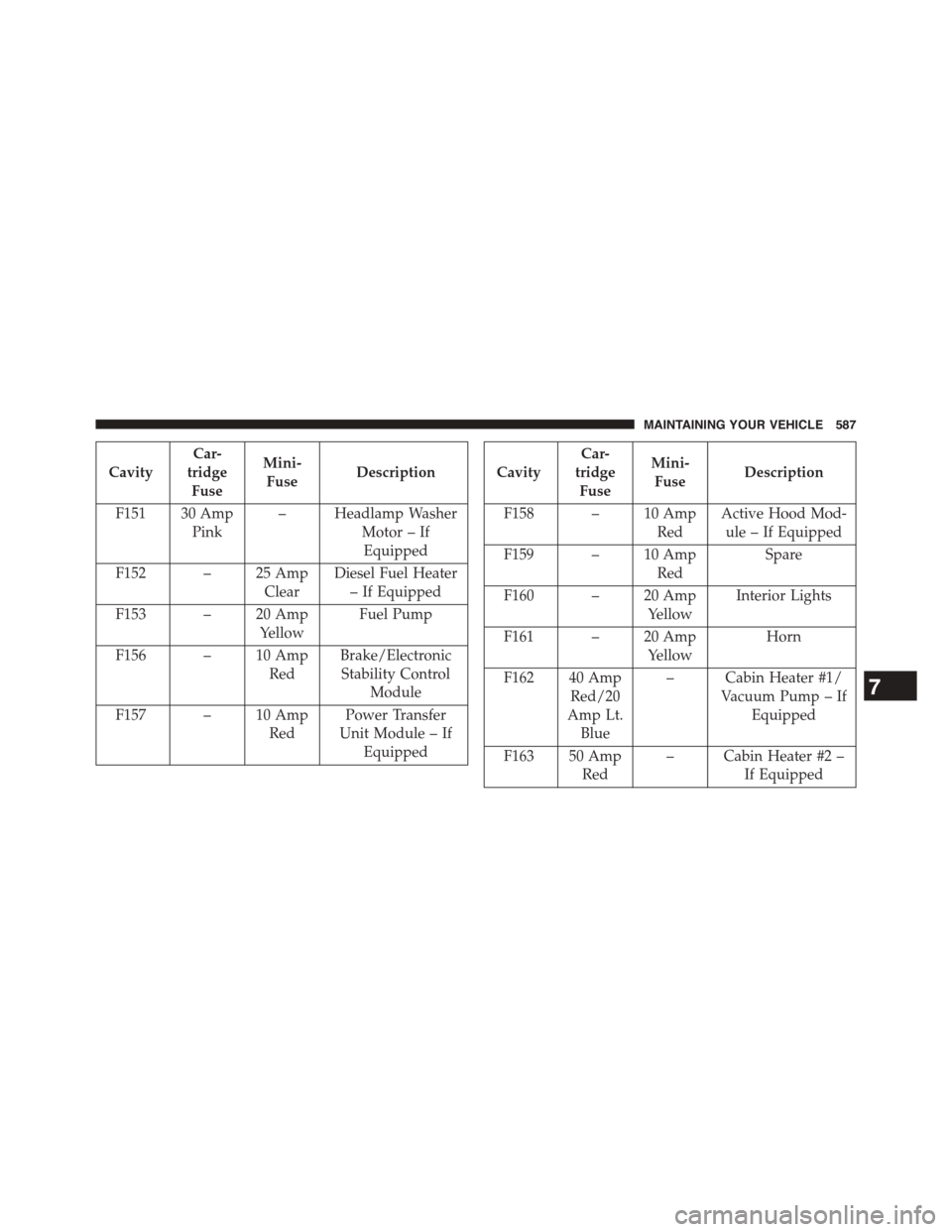
F151 30 Amp
Pink
– Headlamp Washer
Motor – If
Equipped
F152 – 25 Amp
Clear
Diesel Fuel Heater
– If Equipped
F153 – 20 Amp
Yellow
Fuel Pump
F156 – 10 Amp
Red
Brake/Electronic
Stability Control
Module
F157 – 10 Amp
Red
Power Transfer
Unit Module – If
Equipped
Cavity
Car-
tridge
Fuse
Mini-
FuseDescription
F158 – 10 Amp
Red
Active Hood Mod-
ule – If Equipped
F159 – 10 Amp
Red
Spare
F160 – 20 Amp
Yellow
Interior Lights
F161 – 20 Amp
Yellow
Horn
F162 40 Amp
Red/20
Amp Lt.
Blue
– Cabin Heater #1/
Vacuum Pump – If
Equipped
F163 50 Amp
Red
– Cabin Heater #2 –
If Equipped
7
MAINTAINING YOUR VEHICLE 587
Page 590 of 648
Cavity
Car-
tridge
Fuse
Mini-
FuseDescription
F164 – 25 Amp
Clear
Powertrain Auto
Shutdown
F165 – 20 Amp
Yellow
Powertrain Shut-
down
F166 – 20 Amp
Yellow
Spare
F167 – 30 Amp
Green
Powertrain Shut-
down
F168 – 10 Amp
Red
Air Conditioner
Clutch
F169 40 Amp
Green
– Emissions – Partial
Zero Emissions Ve-
hicle Motor
Cavity
Car-
tridge
Fuse
Mini-
FuseDescription
F170 – 15 Amp
Blue
Emissions – Partial
Zero Emissions Ve-
hicle Actuators
F172 – 20 Amp
Yellow
Spare
F173 – 25 Amp
Clear
Anti Lock Brake
Valves
F174 – 20 Amp
Yellow
Siren – If Equipped
F175 – 30 Amp
Green
Spare
F176 – 10 Amp
Red
Powertrain Control
Modules
588 MAINTAINING YOUR VEHICLE
Page 591 of 648
Cavity
Car-
tridge
Fuse
Mini-
FuseDescription
F177 – 20 Amp
Yellow
All Wheel Drive
Module – If
Equipped
F178 – 25 Amp
Clear
Sunroof – If
Equipped
F179 – 10 Amp
Red
Battery Sensor
F181 100
Amp
Blue
– Electrohydraulic
Steering (EHPS) – If
Equipped
F182 50 Amp
Red
– Cabin Heater #3 –
If Equipped
F184 30 Amp
Pink
– Front Wiper Motor
REPLACEMENT BULBS
Interior Bulbs
Bulb Number
Courtesy/Reading
Lamps (Incandescent)
578
Courtesy/Reading
Lamps (Optional LED)
LED (Serviced at Autho-
rized Dealer)
Glove Box Lamp 194
Cargo Lamp 579
Optional Door Map
Pocket/Cupholder
LED (Serviced at Autho-
rized Dealer)
For lighted switches, see your authorized dealer for
replacement instructions.
7
MAINTAINING YOUR VEHICLE 589
Page 625 of 648

Disposal..............................565
Anti-Lock Brake System (ABS)................434
Anti-Lock Warning Light....................304
Appearance Care.........................575
Arming System (Security Alarm)...............17
Assist, Hill Start..........................443
Auto Down Power Windows..................40
Automatic Dimming Mirror..................116
Automatic Door Locks......................31
Automatic Headlights......................223
Automatic Oil Change Indicator...............315
Automatic Transmission....................413
Adding Fluid..........................571
Fluid and Filter Changes..................573
Fluid Level Check.......................571
Fluid Type............................601
Gear Ranges...........................417
Special Additives.......................570
Autostick...............................424
Auto Unlock, Doors........................31
Auxiliary Electrical Outlet (Power Outlet)........266
Auxiliary Power Outlet.....................266
Back-Up Lights...........................593
Battery.................................551
Keyless Transmitter Replacement (RKE)........23
Location..............................551
Belts, Seat...............................105
Bluetooth®
Connecting To A Particular Mobile Phone Or Audio
Device After Pairing.....................155
Connect Or Disconnect Link Between the Uconnect®
Phone And Mobile Phone.................140
Pair (Link) Uconnect® Phone To A Mobile
Phone...............................125
Body Mechanism Lubrication.................555
B-Pillar Location..........................452
Brake Assist System.......................43710
INDEX 623