Page 238 of 648
WARNING!
•Persons who are unable to feel pain to the skin
because of advanced age, chronic illness, diabetes,
spinal cord injury, medication, alcohol use, exhaus-
tion, or other physical conditions must exercise
care when using the steering wheel heater. It may
cause burns even at low temperatures, especially if
used for long periods.
•Do not place anything on the steering wheel that
insulates against heat, such as a blanket or steering
wheel covers of any type and material. This may
cause the steering wheel heater to overheat.
ELECTRONIC SPEED CONTROL — IF EQUIPPED
When engaged, the Electronic Speed Control takes over
accelerator operations at speeds greater than 25 mph
(40 km/h).
The Electronic Speed Control buttons are located on the
right side of the steering wheel.
Electronic Speed Control Buttons
1—ON/OFF3—SET-2—RES+4—CANCEL
236 UNDERSTANDING THE FEATURES OF YOUR VEHICLE
Page 297 of 648
!iPod®/USB/MP3 CONTROL..............370
!STEERING WHEEL AUDIO CONTROLS......370
▫Right-Hand Switch Functions.............371
▫Left-Hand Switch Functions For Radio
Operation...........................371
▫Left-Hand Switch Functions For Media (i.e., CD)
Operation..........................371
!CD/DVD DISC MAINTENANCE...........372
!RADIO OPERATION AND MOBILE PHONES . .372
!CLIMATE CONTROLS...................373
▫Manual Climate Controls With Touchscreen — If
Equipped...........................373
▫Rear Manual Temperature Control (MTC) — If
Equipped...........................381
▫Automatic Temperature Control (ATC) With
Touchscreen — If Equipped..............386
▫Rear Automatic Temperature Control (ATC) — If
Equipped...........................395
4
UNDERSTANDING YOUR INSTRUMENT PANEL 295
Page 304 of 648

Your vehicle has also been equipped with a TPMS
malfunction indicator to indicate when the system is not
operating properly. The TPMS malfunction indicator is
combined with the low tire pressure telltale. When the
system detects a malfunction, the telltale will flash for
approximately one minute and then remain continuously
illuminated. This sequence will continue upon subse-
quent vehicle start-ups as long as the malfunction exists.
When the malfunction indicator is illuminated, the sys-
tem may not be able to detect or signal low tire pressure
as intended. TPMS malfunctions may occur for a variety
of reasons, including the installation of replacement or
alternate tires or wheels on the vehicle that prevent the
TPMS from functioning properly. Always check the
TPMS malfunction telltale after replacing one or more
tires or wheels on your vehicle, to ensure that the
replacement or alternate tires and wheels allow the TPMS
to continue to function properly.
CAUTION!
The TPMS has been optimized for the original
equipment tires and wheels. TPMS pressures and
warning have been established for the tire size
equipped on your vehicle. Undesirable system opera-
tion or sensor damage may result when using re-
placement equipment that is not of the same size,
type, and/or style. Aftermarket wheels can cause
sensor damage. Do not use tire sealant from a can or
balance beads if your vehicle is equipped with a
TPMS, as damage to the sensors may result.
11. Seat Belt Reminder Light
When the ignition switch is first turned to ON/
RUN, this light will turn on for four to eight
seconds as a bulb check. During the bulb check, if
the driver or front passenger’s seat belt is unbuckled, a
chime will sound. After the bulb check or when driving,
302 UNDERSTANDING YOUR INSTRUMENT PANEL
Page 309 of 648
ELECTRONIC VEHICLE INFORMATION CENTER
(EVIC)
The Electronic Vehicle Information Center (EVIC) fea-
tures a driver-interactive display that is located in the
instrument cluster.
This system allows the driver to select a variety of useful
information by pushing the switches mounted on the
steering wheel. The EVIC consists of the following:
•Radio Info
•Fuel Economy
•Vehicle Speed
•Trip Info
•Tire Pressure
•Vehicle Information
•Warning Message Displays
•Turn Menu OFF
Electronic Vehicle Information Center (EVIC)
4
UNDERSTANDING YOUR INSTRUMENT PANEL 307
Page 310 of 648
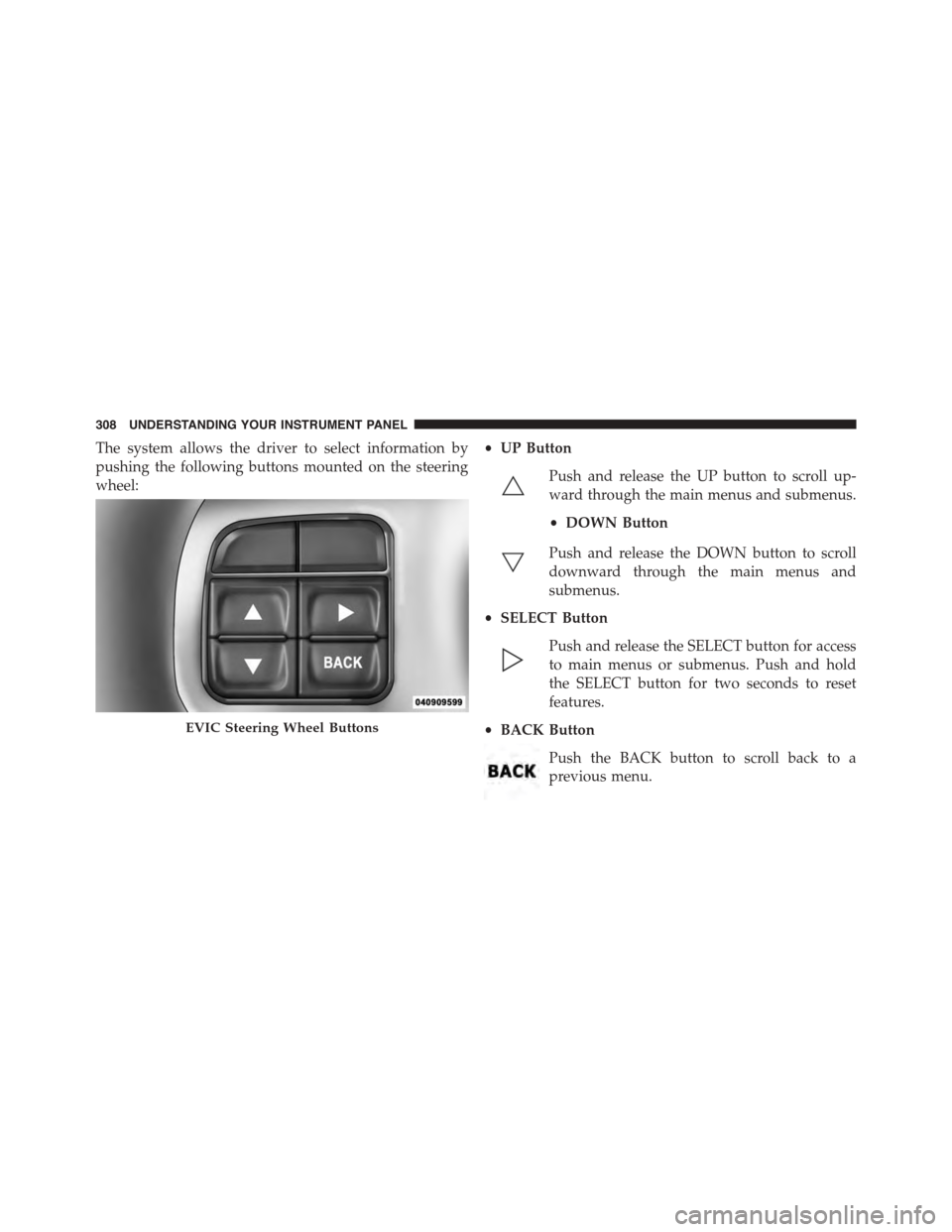
The system allows the driver to select information by
pushing the following buttons mounted on the steering
wheel:
•UP Button
Push and release the UP button to scroll up-
ward through the main menus and submenus.
•DOWN Button
Push and release the DOWN button to scroll
downward through the main menus and
submenus.
•SELECT Button
Push and release the SELECT button for access
to main menus or submenus. Push and hold
the SELECT button for two seconds to reset
features.
•BACK Button
Push the BACK button to scroll back to a
previous menu.
EVIC Steering Wheel Buttons
308 UNDERSTANDING YOUR INSTRUMENT PANEL
Page 322 of 648

Messages
Push and release the UP or DOWN button until “Mes-
sages: XX” displays highlighted in the EVIC. If there is
more than one message, pushing the SELECT button will
display a stored warning message. Push and release the
UP and DOWN buttons if there is more than one message
to step through the remaining stored messages. If there
are no message, pushing the SELECT button will do
nothing.
Turn Menu OFF
Select from Main Menu using the DOWN button. Push-
ing the SELECT button blanks the menu display. Pushing
any one of the four steering wheel buttons brings the
menu back.
Uconnect® SETTINGS
The Uconnect® system uses a combination of buttons on
the touchscreen and buttons on the faceplate located on
the center of the instrument panel that allows you to
access and change the customer programmable features.
Buttons On The Faceplate
Buttons on the faceplate are located on the left and right
side of the Uconnect® 4.3 screen. In addition, there is a
Scroll/Enter control knob located on the right side of the
Climate Controls in the center of the instrument panel.
Turn the control knob to scroll through menus and
change settings (i.e., 30, 60, 90), push the center of the
control knob one or more times to select or change a
setting (i.e., ON, OFF).
Buttons On The Touchscreen
Buttons on the touchscreen are accessible on the
Uconnect® Touchscreen.
320 UNDERSTANDING YOUR INSTRUMENT PANEL
Page 328 of 648
touchscreen. Refer to “Lights/SmartBeam™ — If
Equipped” in “Understanding The Features Of Your
Vehicle” for further information.
•Daytime Running Lights — If Available
Press the “Daytime Running Lights” button on the touch-
screen to change this display. When this feature is se-
lected, the headlights will turn on whenever the engine is
running. To make your selection, press the “Daytime
Running Lights” button on the touchscreen and select
“ON” or “OFF.” Then press the back arrow button on the
touchscreen.
•Steering Directed Lights — If Equipped
Press the “Steering Directed Lights” button on the touch-
screen to change this display. When this feature is se-
lected, the headlights turn relative to a change in direc-
tion of the steering wheel. To make your selection, press
the “Steering Directed Lights” button on the touchscreen
and select “ON” or ‘OFF.” Then press the back arrow
button on the touchscreen.
•Flash Lamps With Lock
Press the “Flash Lamps With Lock” button on the touch-
screen to change this display. When this feature is se-
lected, the exterior lights will flash when the doors are
locked with the Remote Keyless Entry (RKE) transmitter.
This feature may be selected with or without the sound
horn on lock feature selected. To make your selection,
press the “Flash Lamps With Lock” button on the touch-
screen and select “ON” or “OFF.” Then press the back
arrow button on the touchscreen.
326 UNDERSTANDING YOUR INSTRUMENT PANEL
Page 342 of 648

make your selection, press the “Auto High Beams”
button on the touchscreen, until a check-mark appears
next to setting, showing that setting has been selected.
Press the back arrow button on the touchscreen to return
to the previous menu. Refer to “Lights/SmartBeam™ —
If Equipped” in “Understanding The Features Of Your
Vehicle” for further information.
•Daytime Running Lights — If Equipped
When this feature is selected, the headlights will turn on
whenever the engine is running. To make your selection,
press the “Daytime Running Lights” button on the touch-
screen, until a check-mark appears next to setting, show-
ing that setting has been selected. Press the back arrow
button on the touchscreen to return to the previous
menu.
•Steering Directed Headlights — If Equipped
When this feature is selected, the headlights turn relative
to a change in direction of the steering wheel. To make
your selection, press the “Steering Directed Lights” but-
ton on the touchscreen, until a check-mark appears next
to setting, showing that setting has been selected. Press
the back arrow button on the touchscreen to return to the
previous menu.
•Flash Lamps With Lock
When this feature is selected, the exterior lights will flash
when the doors are locked with the Remote Keyless
Entry (RKE) transmitter. This feature may be selected
with or without the sound horn on lock feature selected.
To make your selection, press the “Flash Lamps with
Lock” button on the touchscreen, until a check-mark
appears next to setting, showing that setting has been
selected. Press the back arrow button on the touchscreen
to return to the previous menu.
340 UNDERSTANDING YOUR INSTRUMENT PANEL