Page 281 of 703
STORAGE
Glove Compartments
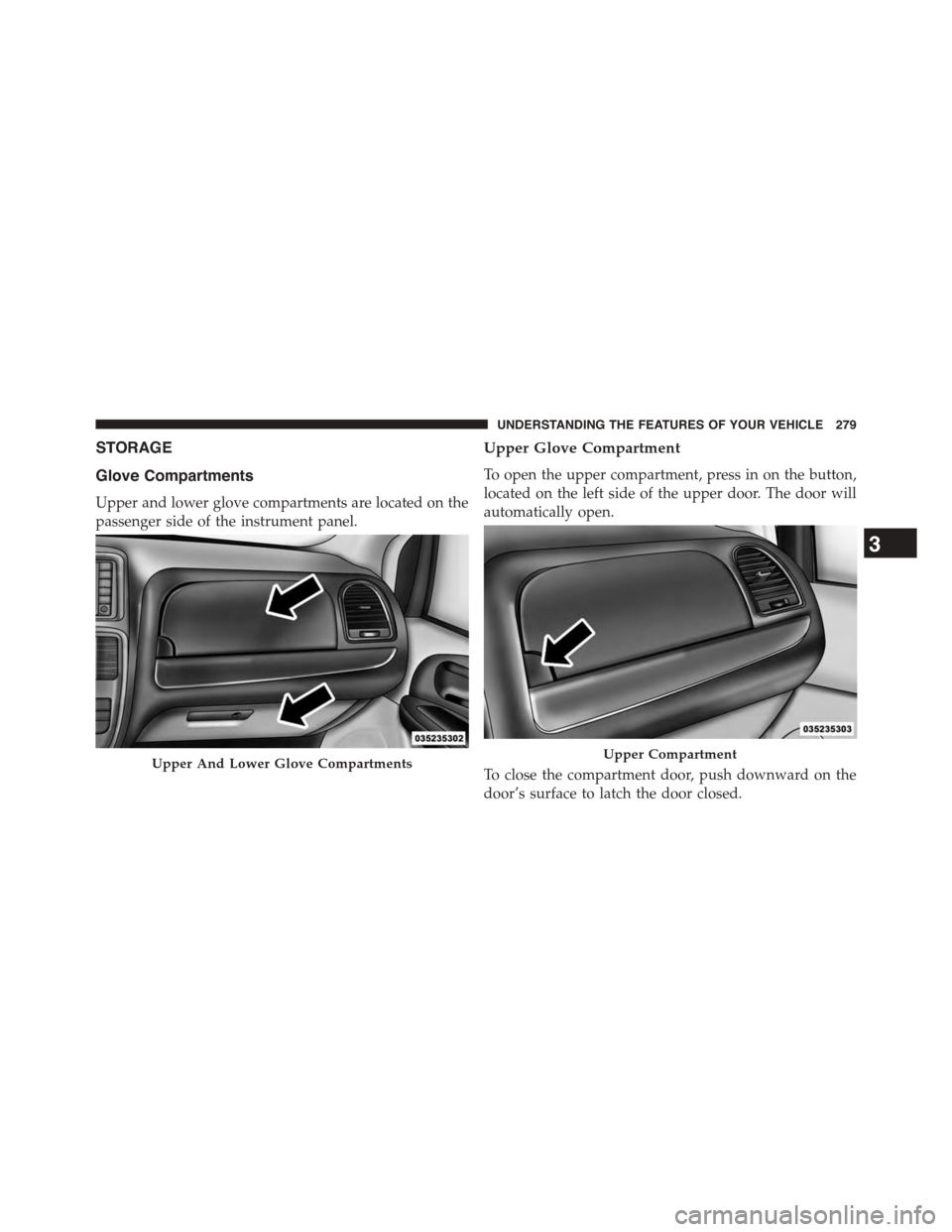
Upper and lower glove compartments are located on the
passenger side of the instrument panel.
Upper Glove Compartment
To open the upper compartment, press in on the button,
located on the left side of the upper door. The door will
automatically open.
To close the compartment door, push downward on the
door’s surface to latch the door closed.
Upper And Lower Glove CompartmentsUpper Compartment
3
UNDERSTANDING THE FEATURES OF YOUR VEHICLE 279
Page 294 of 703
NOTE:The front cupholder light ring and pass through
lighting is controlled by a dimming switch located on the
instrument panel, refer to “Lights” in “Understanding
The Features Of Your Vehicle” for further information.
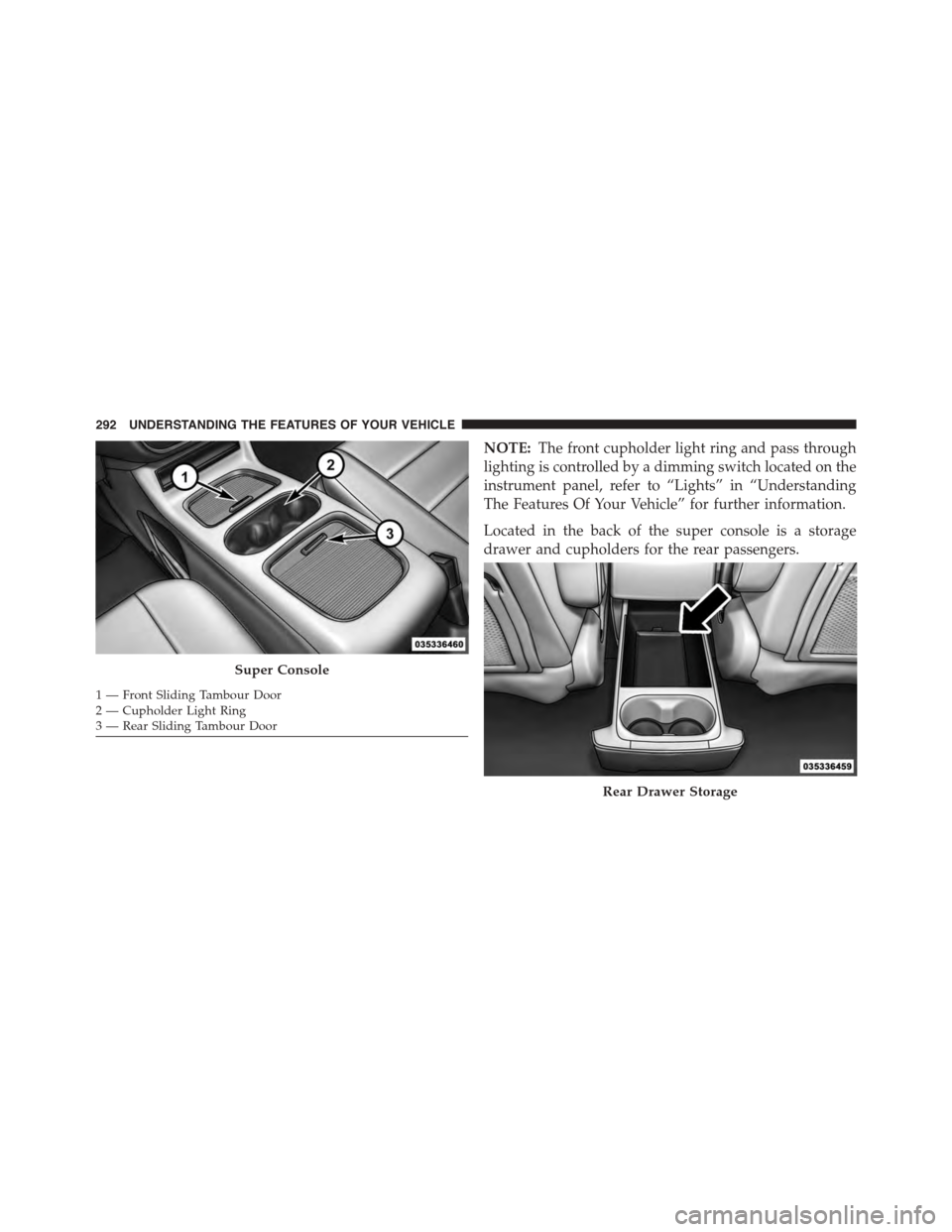
Located in the back of the super console is a storage
drawer and cupholders for the rear passengers.
Super Console
1—FrontSlidingTambourDoor2—CupholderLightRing3—RearSlidingTambourDoor
Rear Drawer Storage
292 UNDERSTANDING THE FEATURES OF YOUR VEHICLE
Page 305 of 703
UNDERSTANDING YOUR INSTRUMENT PANEL
CONTENTS
!INSTRUMENT PANEL FEATURES..........308
!INSTRUMENT CLUSTER — BASE..........309
!INSTRUMENT CLUSTER — PREMIUM.......310
!INSTRUMENT CLUSTER DESCRIPTIONS.....311
!ELECTRONIC VEHICLE INFORMATION CENTER
(EVIC) — IF EQUIPPED..................325
▫Electronic Vehicle Information Center (EVIC)
Displays............................327
▫EVIC White Telltale Lights...............331
▫EVIC Amber Telltale Lights..............331
▫EVIC Red Telltale Lights................332
▫Oil Change Required...................334
▫Fuel Economy........................336
▫Vehicle Speed........................337
▫Trip Info...........................337
▫Tr i p A . . . . . . . . . . . . . . . . . . . . . . . . . . . ..337
▫Tr i p B . . . . . . . . . . . . . . . . . . . . . . . . . . . . ..338
▫Elapsed Time........................338
▫To Reset A Trip Function................338
▫Ti re P S I . . . . . . . . . . . . . . . . . . . . . . . . . . . ..338
4
Page 306 of 703

▫Units..............................338
▫Vehicle Info (Customer Information Features) . .338
▫Messages #..........................339
▫Keyless Enter-N-Go™ Display — If Equipped . .339
▫Compass / Temperature Display..........340
▫Compass Variance.....................342
▫Turn Menu Off.......................342
▫Customer-Programmable Features
(System Setup).......................342
!Uconnect® 430/430N CD/DVD/HDD/NAV — IF
EQUIPPED...........................350
▫Operating Instructions (Voice Command System)
— If Equipped.......................350
▫Operating Instructions (Uconnect® Phone) — If
Equipped...........................350
!Uconnect® 130........................350
▫Operating Instructions — Radio Mode......350
▫Operation Instructions — CD MODE For CD And
MP3 Audio Play......................354
▫Notes On Playing MP3 Files.............356
▫Operation Instructions — Auxiliary Mode . . . .359
!Uconnect® 130 WITH SATELLITE RADIO.....360
▫Operating Instructions — Radio Mode.......360
▫Operation Instructions — CD MODE For CD And
MP3 Audio Play......................366
▫Notes On Playing MP3 Files.............368
▫LIST Button — CD Mode For MP3 Play......371
304 UNDERSTANDING YOUR INSTRUMENT PANEL
Page 307 of 703

▫INFO Button — CD Mode For MP3 Play.....371
▫Uconnect® (Satellite Radio) — If Equipped . . .372
▫Operating Instructions (Uconnect® Phone) — If
Equipped...........................377
!iPod®/USB/MP3 CONTROL — IF EQUIPPED . . .377
▫Connecting The iPod® Or External USB
Device.............................378
▫Using This Feature.....................379
▫Controlling The iPod® Or External USB Device
Using Radio Buttons...................379
▫Play Mode..........................379
▫List Or Browse Mode...................381
▫Bluetooth® Streaming Audio (BTSA).......383
!Uconnect® MULTIMEDIA — VIDEO
ENTERTAINMENT SYSTEM (VES™) — IF
EQUIPPED...........................384
▫Getting Started.......................384
▫Blu-ray™ Disc Player...................385
▫Play Video Games.....................386
▫Listen To An Audio Source On Channel 2 While A
Video Is Playing On Channel 1............389
▫Dual Video Screen.....................390
▫Play A DVD Using The Touchscreen Radio . . .390
▫Play A DVD Using The VES™ Player — If
Equipped...........................393
▫Play A Blu-ray™ Disc Using The Blu-ray™ Player
— If Equipped.......................396
4
UNDERSTANDING YOUR INSTRUMENT PANEL 305
Page 308 of 703

▫Listen To An Audio Source While A Video Is
Playing.............................397
▫Important Notes For Dual Video Screen
System.............................400
▫VES™ Remote Control — If Equipped.......401
▫Blu-ray™ Player Remote Control — If
Equipped...........................403
▫Remote Control Storage.................405
▫Locking The Remote Control.............406
▫Replacing The Remote Control Batteries......406
▫Headphones Operation.................407
▫Blu-ray™ Headphones Operation..........408
▫Controls............................409
▫Replacing The Headphone Batteries.........410
▫Unwired® Stereo Headphone Lifetime Limited
Warranty...........................410
▫System Information....................411
!STEERING WHEEL AUDIO CONTROLS — IF
EQUIPPED...........................430
▫Radio Operation......................430
▫CD Player...........................431
!CD/DVD/Blu-ray™ Disc MAINTENANCE . . . .431
!RADIO OPERATION AND MOBILE PHONES . .432
▫General Information...................432
!CLIMATE CONTROLS...................432
▫Manual Heating And Air Conditioning System —
If Equipped.........................433
▫Rear Manual Climate Control — If Equipped . .438
306 UNDERSTANDING YOUR INSTRUMENT PANEL
Page 309 of 703
▫Automatic Temperature Control (ATC) — If
Equipped...........................440
▫Operating Tips.......................451
4
UNDERSTANDING YOUR INSTRUMENT PANEL 307
Page 310 of 703
INSTRUMENT PANEL FEATURES
1 — Air Vents5 — Upper Glove Compartment 9 — Storage Bin13 — Hood Release2—InstrumentCluster6—LowerGloveCompart-ment10 — Cup Holders14 — Dimmer Switch
3 — Shift Lever7 — Climate Controls11 — Switch Bank15 — Headlight Switch4—Radio8—DVD–IfEquipped 12—IgnitionSwitch
308 UNDERSTANDING YOUR INSTRUMENT PANEL