2015 DODGE GRAND CARAVAN window
[x] Cancel search: windowPage 355 of 703
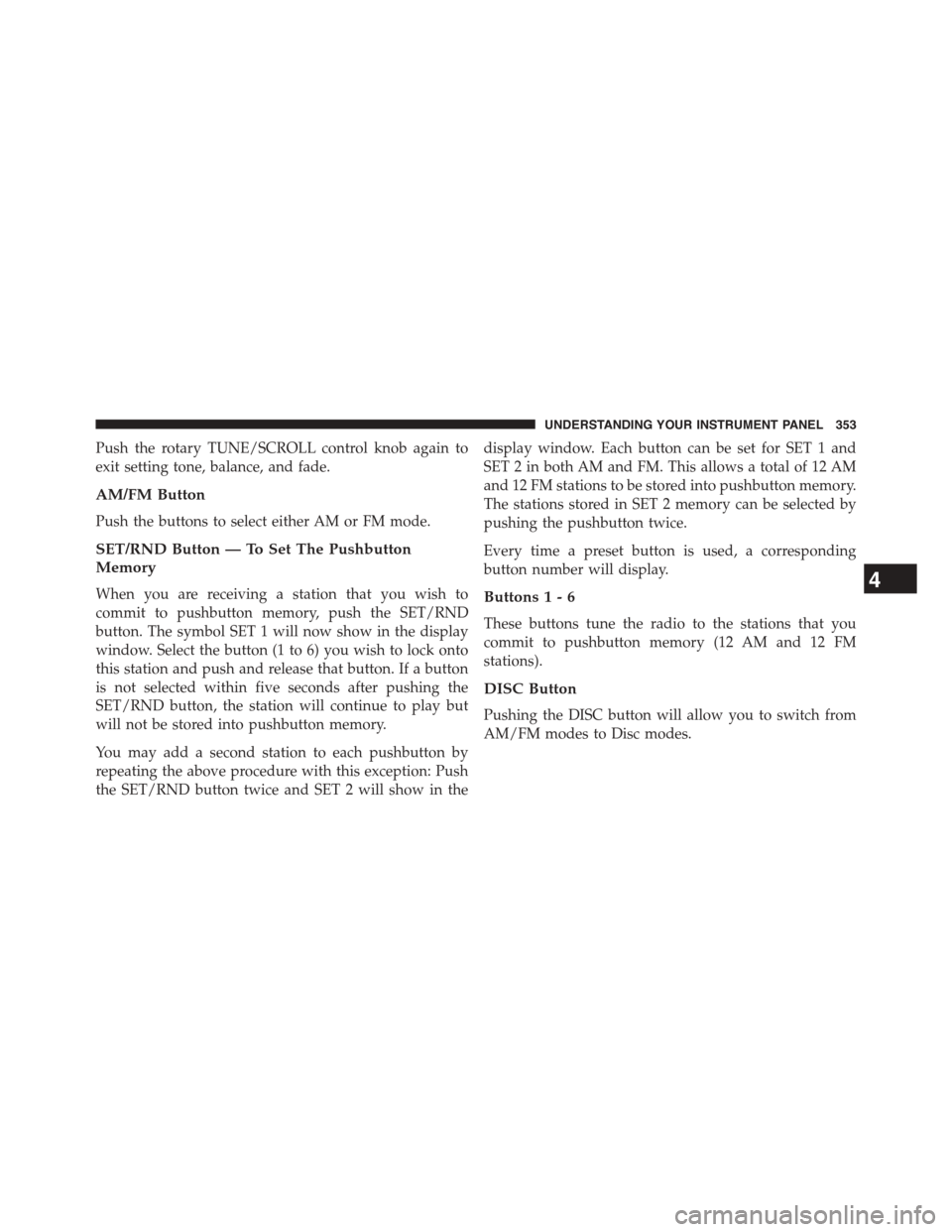
Push the rotary TUNE/SCROLL control knob again to
exit setting tone, balance, and fade.
AM/FM Button
Push the buttons to select either AM or FM mode.
SET/RND Button — To Set The Pushbutton
Memory
When you are receiving a station that you wish to
commit to pushbutton memory, push the SET/RND
button. The symbol SET 1 will now show in the display
window. Select the button (1 to 6) you wish to lock onto
this station and push and release that button. If a button
is not selected within five seconds after pushing the
SET/RND button, the station will continue to play but
will not be stored into pushbutton memory.
You may add a second station to each pushbutton by
repeating the above procedure with this exception: Push
the SET/RND button twice and SET 2 will show in the
display window. Each button can be set for SET 1 and
SET 2 in both AM and FM. This allows a total of 12 AM
and 12 FM stations to be stored into pushbutton memory.
The stations stored in SET 2 memory can be selected by
pushing the pushbutton twice.
Every time a preset button is used, a corresponding
button number will display.
Buttons1-6
These buttons tune the radio to the stations that you
commit to pushbutton memory (12 AM and 12 FM
stations).
DISC Button
Pushing the DISC button will allow you to switch from
AM/FM modes to Disc modes.
4
UNDERSTANDING YOUR INSTRUMENT PANEL 353
Page 367 of 703

By pushing the SEEK button when the Music Type icon is
displayed, the radio will be tuned to the next frequency
station with the same selected Music Type name. The
Music Type function only operates when in the FM
mode.
If a preset button is activated while in the Music Type
(Program Type) mode, the Music Type mode will be
exited and the radio will tune to the preset station.
SETUP Button
Pushing the SETUP button allows you to select between
the following items:
•Set Clock— Pushing the SELECT button will allow
you to set the clock. Adjust the hours by turning the
TUNE/SCROLL control knob. After adjusting the
hours, push the TUNE/SCROLL control knob to set
the minutes. The minutes will begin to blink. Adjust
the minutes using the right side TUNE/SCROLL con-
trol knob. Push the TUNE/SCROLL control knob to
save time change.
AM/FM Button
Push the button to select either AM or FM mode.
SET/RND Button — To Set The Pushbutton
Memory
When you are receiving a station that you wish to
commit to pushbutton memory, push the SET/RND
button. The symbol SET 1 will now show in the display
window. Select the button (1–6) you wish to lock onto this
station and push and release that button. If a button is not
selected within five seconds after pushing the SET/RND
button, the station will continue to play but will not be
stored into pushbutton memory.
You may add a second station to each pushbutton by
repeating the above procedure with this exception: Push
4
UNDERSTANDING YOUR INSTRUMENT PANEL 365
Page 368 of 703
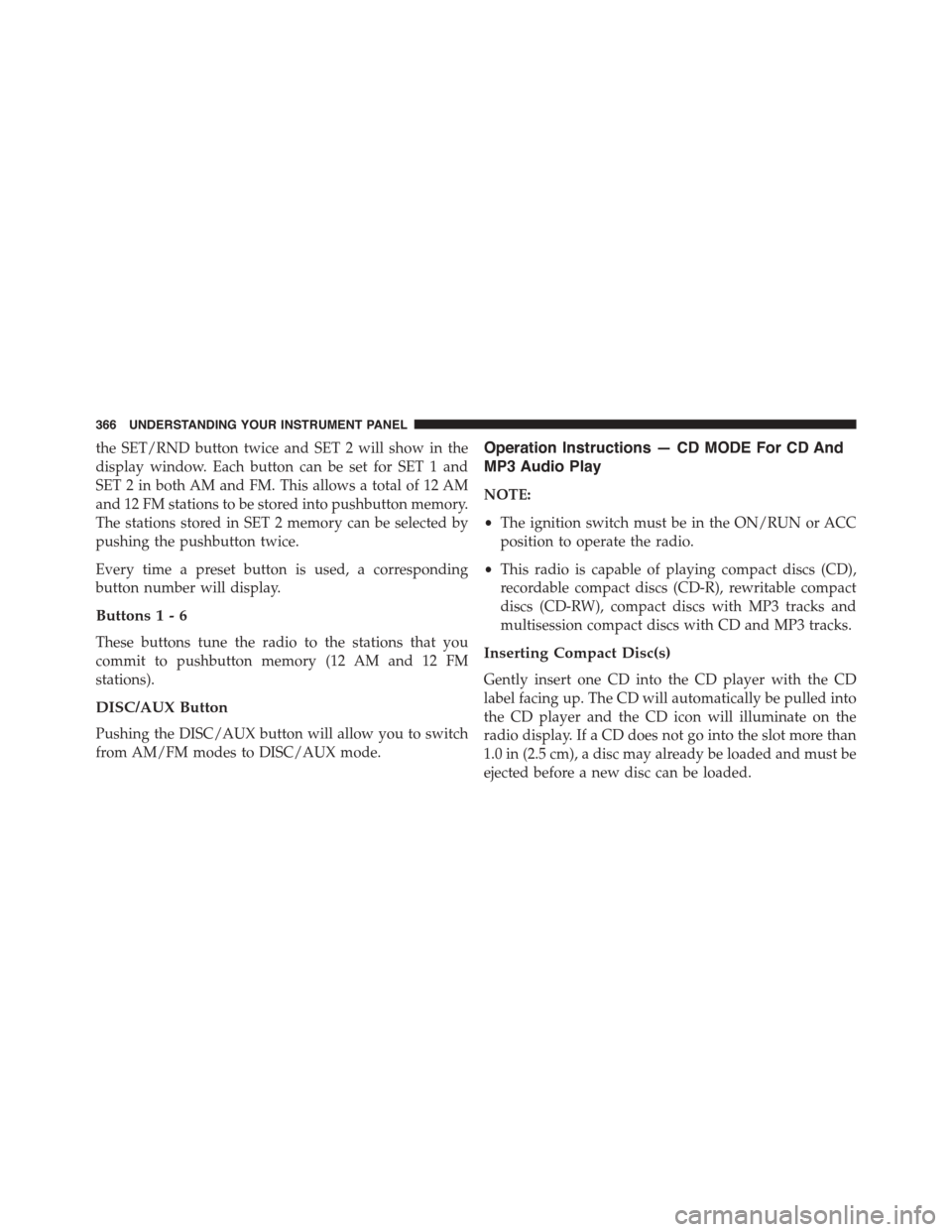
the SET/RND button twice and SET 2 will show in the
display window. Each button can be set for SET 1 and
SET 2 in both AM and FM. This allows a total of 12 AM
and 12 FM stations to be stored into pushbutton memory.
The stations stored in SET 2 memory can be selected by
pushing the pushbutton twice.
Every time a preset button is used, a corresponding
button number will display.
Buttons1-6
These buttons tune the radio to the stations that you
commit to pushbutton memory (12 AM and 12 FM
stations).
DISC/AUX Button
Pushing the DISC/AUX button will allow you to switch
from AM/FM modes to DISC/AUX mode.
Operation Instructions — CD MODE For CD And
MP3 Audio Play
NOTE:
•The ignition switch must be in the ON/RUN or ACC
position to operate the radio.
•This radio is capable of playing compact discs (CD),
recordable compact discs (CD-R), rewritable compact
discs (CD-RW), compact discs with MP3 tracks and
multisession compact discs with CD and MP3 tracks.
Inserting Compact Disc(s)
Gently insert one CD into the CD player with the CD
label facing up. The CD will automatically be pulled into
the CD player and the CD icon will illuminate on the
radio display. If a CD does not go into the slot more than
1.0 in (2.5 cm), a disc may already be loaded and must be
ejected before a new disc can be loaded.
366 UNDERSTANDING YOUR INSTRUMENT PANEL
Page 378 of 703
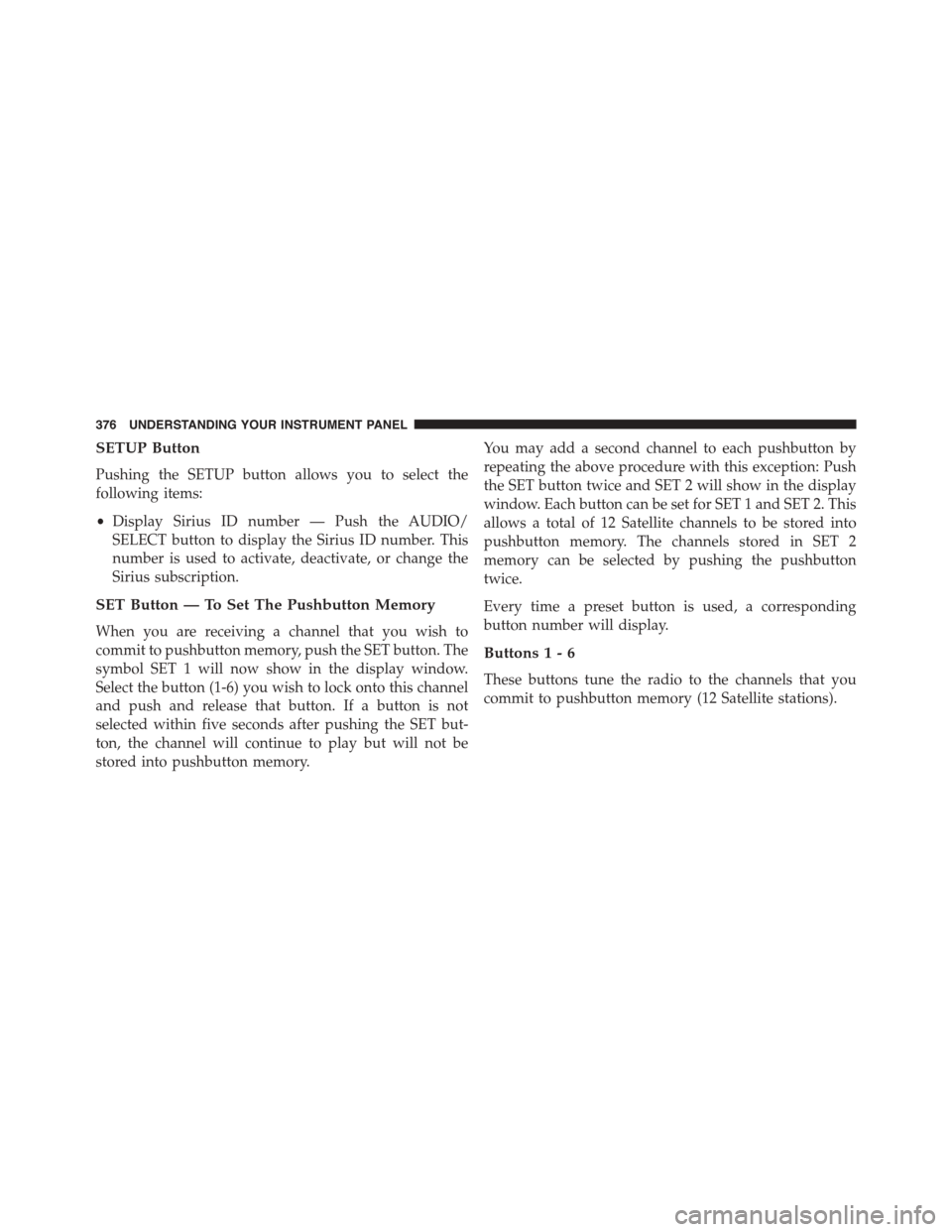
SETUP Button
Pushing the SETUP button allows you to select the
following items:
•Display Sirius ID number — Push the AUDIO/
SELECT button to display the Sirius ID number. This
number is used to activate, deactivate, or change the
Sirius subscription.
SET Button — To Set The Pushbutton Memory
When you are receiving a channel that you wish to
commit to pushbutton memory, push the SET button. The
symbol SET 1 will now show in the display window.
Select the button (1-6) you wish to lock onto this channel
and push and release that button. If a button is not
selected within five seconds after pushing the SET but-
ton, the channel will continue to play but will not be
stored into pushbutton memory.
You may add a second channel to each pushbutton by
repeating the above procedure with this exception: Push
the SET button twice and SET 2 will show in the display
window. Each button can be set for SET 1 and SET 2. This
allows a total of 12 Satellite channels to be stored into
pushbutton memory. The channels stored in SET 2
memory can be selected by pushing the pushbutton
twice.
Every time a preset button is used, a corresponding
button number will display.
Buttons1-6
These buttons tune the radio to the channels that you
commit to pushbutton memory (12 Satellite stations).
376 UNDERSTANDING YOUR INSTRUMENT PANEL
Page 436 of 703
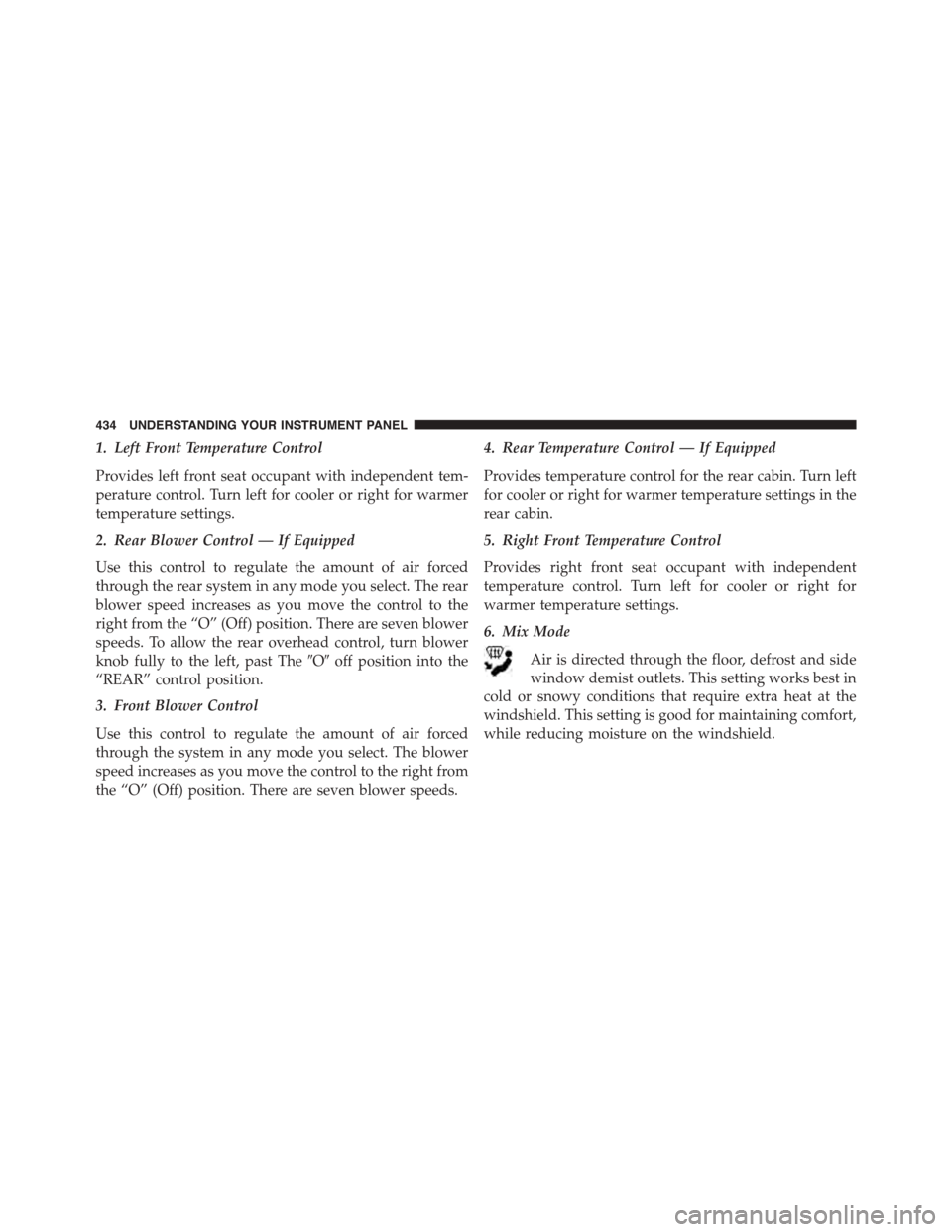
1. Left Front Temperature Control
Provides left front seat occupant with independent tem-
perature control. Turn left for cooler or right for warmer
temperature settings.
2. Rear Blower Control — If Equipped
Use this control to regulate the amount of air forced
through the rear system in any mode you select. The rear
blower speed increases as you move the control to the
right from the “O” (Off) position. There are seven blower
speeds. To allow the rear overhead control, turn blower
knob fully to the left, past The#O#off position into the
“REAR” control position.
3. Front Blower Control
Use this control to regulate the amount of air forced
through the system in any mode you select. The blower
speed increases as you move the control to the right from
the “O” (Off) position. There are seven blower speeds.
4. Rear Temperature Control — If Equipped
Provides temperature control for the rear cabin. Turn left
for cooler or right for warmer temperature settings in the
rear cabin.
5. Right Front Temperature Control
Provides right front seat occupant with independent
temperature control. Turn left for cooler or right for
warmer temperature settings.
6. Mix Mode
Air is directed through the floor, defrost and side
window demist outlets. This setting works best in
cold or snowy conditions that require extra heat at the
windshield. This setting is good for maintaining comfort,
while reducing moisture on the windshield.
434 UNDERSTANDING YOUR INSTRUMENT PANEL
Page 437 of 703
7. Front Defrost Mode
Air is directed through the windshield and side
window demist outlets. Use Defrost mode with
maximum blower and temperature settings for best
windshield and side window defrosting.
NOTE:The air conditioning compressor may operate in
Mix and Defrost, even if the A/C button is not pressed.
This dehumidifies the air to help dry the windshield. To
improve fuel economy, use these modes only when
necessary.
8. Electronic Rear Window Defrost
Press this button to turn on the rear window
defroster and the heated outside mirrors (if
equipped). An indicator in the button will illuminate
when the rear window defroster is on. The rear window
defroster automatically turns off after approximately 10
minutes.
NOTE:
•You can turn off the heated mirror feature at anytime
by pressing the rear window defroster switch a
second time.
•To prevent excessive battery drain, use the rear
window defroster only when the engine is operating.
CAUTION!
Failure to follow these cautions can cause damage to
the heating elements:
•Use care when washing the inside of the rear
window. Do not use abrasive window cleaners on
the interior surface of the window. Use a soft cloth
and a mild washing solution, wiping parallel to the
heating elements. Labels can be peeled off after
soaking with warm water.
(Continued)
4
UNDERSTANDING YOUR INSTRUMENT PANEL 435
Page 438 of 703
CAUTION!(Continued)
•Do not use scrapers, sharp instruments, or abrasive
window cleaners on the interior surface of the
window.
•Keep all objects a safe distance from the window.
9. Recirculation Control Button
Press this button to choose between outside air
intake or recirculation of the air inside the
vehicle. An indicator light will illuminate when
you are in Recirculation mode. Only use the
Recirculation mode to temporarily block out any outside
odors, smoke, or dust, and to cool the interior rapidly
upon initial start-up in very hot or humid weather.
NOTE:
•If the Recirculation button is pressed when the
system is in Defrost mode the Recirculation LED
indicator will flash three times to indicate Recircula-
tion mode is not allowed.
•Continuous use of the Recirculation mode may make
the inside air stuffy and window fogging may occur.
Extended use of this mode is not recommended.
•In cold or damp weather, the use of the Recirculation
mode will cause windows to fog on the inside
because of moisture buildup inside the vehicle. For
maximum defogging, select the outside air position.
•In order to prevent fogging, when the Recirculation
button is pressed and the mode control is set to
Panel, the A/C will engage automatically.
•The A/C can be deselected manually without dis-
turbing the mode control selection.
436 UNDERSTANDING YOUR INSTRUMENT PANEL
Page 445 of 703

12. Rear Window Defrost
Press this button to turn on the rear window defroster
and the heated outside mirrors (if equipped). An indica-
tor in the button will illuminate when the rear window
defroster is on. The rear window defroster automatically
turns off after approximately 10 minutes.
13. Rear Lock
Press and release the Rear Lock button on the front ATC
panel to lock and unlock the rear climate controls.
14. Auto Temperature Control Button
Controls airflow temperature, distribution, volume, and
the amount of air recirculation automatically. Press and
release to select. Refer to “Automatic Operation” for
more information. Performing this function will cause
the ATC to switch between manual mode and automatic
modes.
15. Climate Control OFF Button
Press and release to turn the Climate Control OFF. If the
control is OFF, press any button to turn the control ON.
16. Blower Control
There are seven blower speeds, the blower speed in-
creases as you move the control to the right from the
lowest blower setting. Performing this function will
cause the ATC to switch into manual mode.
17. Mode Control Button
Press and release to select between Modes (Panel, Bi-
Level, Floor, Mix). Performing this function will cause the
ATC to switch into manual mode.
18. Recirculation Control Button
Press and release to change the current setting, the
indicator illuminates when ON.
4
UNDERSTANDING YOUR INSTRUMENT PANEL 443